Qwen3-Coder: Run an 80B-Parameter LLM on Your Desktop
Qwen3-Coder runs 80B parameters on a desktop with only 3B active per token — and plugs into Claude Code. Why the cloud-only era of AI coding is ending.
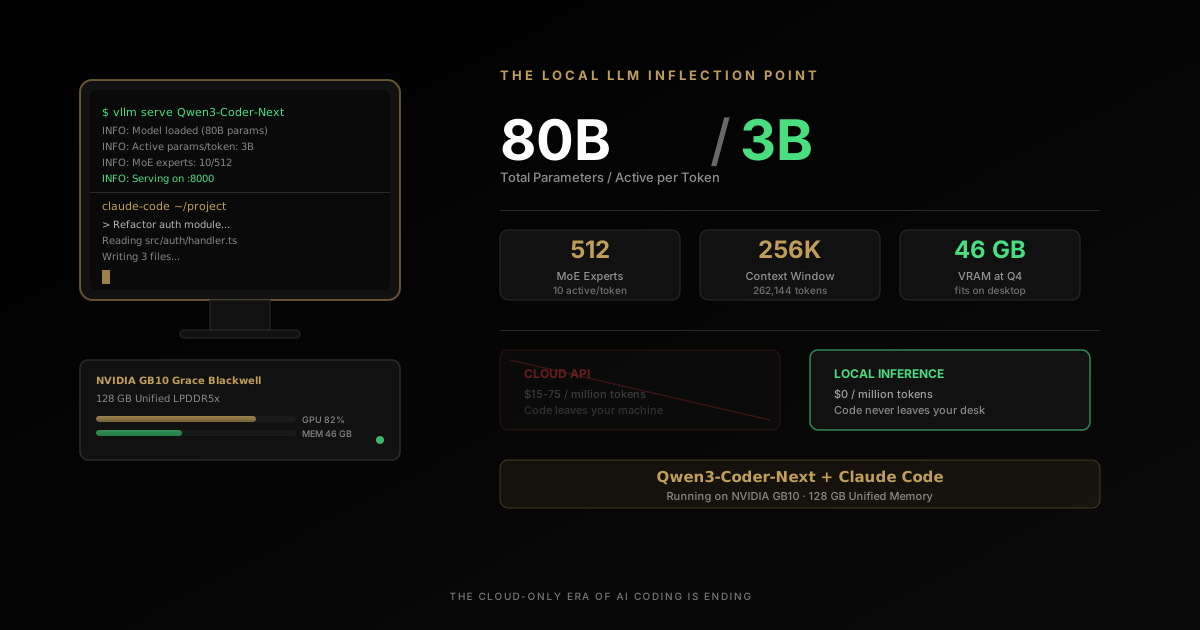
Somewhere in a home office, a tech journalist is staring at his terminal. He has tried this before — a dozen times, maybe more. Download a model. Configure the inference server. Run it. Watch it struggle with anything beyond autocomplete. Close the terminal. Go back to the cloud API. This time, with Qwen3-Coder, the story ends differently.
This time is different.
The model on his desktop has 80 billion parameters. It is activating only 3 billion of them per token. It is writing real code — not toy snippets, not half-broken suggestions — through the same Claude Code interface he uses every day. And it is doing it without sending a single byte to anyone’s cloud.
Adam Conway, lead technical editor at XDA Developers, just published the kind of article that does not come along often. Not a benchmark review. Not a product launch. A confession: “I finally found a local LLM I actually want to use for coding.”
That sentence is a signal flare. And if you are a developer paying cloud AI bills every month, you need to understand what just changed.
TL;DR
- Qwen3-Coder-Next is an 80B-parameter model that activates only 3B parameters per token, so it runs at small-model speed on desktop-class hardware.
- A 128 GB unified-memory workstation (NVIDIA GB10 Grace Blackwell) runs it at Q8 quantization with room left over for a 170,000-token context window.
- It plugs straight into Claude Code — no plugin, no fork. Point
ANTHROPIC_BASE_URLat a local vLLM server and the agent just works. - Heavy solo users can break even on hardware cost in under a year; a four-developer team can break even in under five months.
- Cloud still wins on frontier reasoning, huge context windows, and team consistency — the smart move is local-first, cloud when it earns its keep.
What Is Qwen3-Coder-Next?
Qwen3-Coder-Next is an 80-billion-parameter open-weight coding model from Alibaba’s Qwen team that activates only 3 billion parameters per token, using an ultra-sparse Mixture-of-Experts architecture. That trick lets it deliver frontier-scale code generation at a runtime cost closer to a 3B model than an 80B one — small enough to run entirely on a desktop, with no cloud API in the loop.
WHY THIS MOMENT IS DIFFERENT
Local coding models have existed for a while. What changed here is the combination of architecture, hardware, and integration quality arriving at the same time.
MODEL
80B total parameters, 3B active per token
The MoE architecture makes a frontier-scale coding model behave like a much smaller inference workload.
- 512 experts total
- 10 + 1 active experts
- Large-model knowledge with smaller-model runtime behavior
HARDWARE
128 GB unified memory changes the ceiling
A single desktop-class machine can now host model sizes that previously required awkward multi-device compromises.
- No PCIe shuffle between RAM and VRAM
- Q8 and large context windows become practical
- Serious local agent workflows finally fit
WORKFLOW
It plugs into Claude Code instead of replacing it
The developer experience matters as much as the benchmark. Reusing an existing agent shell removes adoption friction.
- Anthropic-compatible API endpoint
- Same tool-calling flow
- No custom toy interface required
ECONOMICS
Heavy users can justify local on cost alone
Once you cross a certain monthly usage threshold, a workstation starts looking like infrastructure, not a luxury.
- Cloud spend compounds linearly
- Hardware cost flattens after purchase
- Privacy and control arrive as side benefits
Why “I Actually Want to Use It” Is the Only Benchmark That Matters
The local LLM space is drowning in benchmarks. HumanEval scores. SWE-Bench pass rates. Tokens per second at various quantization levels. Every week, a new model claims state-of-the-art performance on some leaderboard.
And every week, developers try these models and go back to Claude or GPT.
Because benchmarks measure capability in isolation. They do not measure the thing that actually determines adoption: whether a developer reaches for the local tool instead of the cloud one when they have real work to do.
Let us be honest about what local LLMs for coding have been until now. The 7B models were fast but useless — generating code that looked reasonable until you tried to run it. The 13B-30B models were better but still could not hold a candle to cloud APIs. They would get you 70% of the way there, then fail on the nuanced reasoning that separates “code that runs” from “code that works.” The 70B+ models required enterprise hardware — multiple A100s or H100s just to run at reasonable speed.
Conway has been running local LLMs on serious hardware for years. His previous setup — Ollama and Open WebUI on an AMD Radeon RX 7900 XTX — was, in his words, “functional, but never quite good enough.” The models were “typically too dumb to handle anything beyond basic autocomplete.”
That is the honest experience of most developers who have tried local AI coding. The models work. They generate code. But there is an unmistakable quality gap that makes you reach for the cloud API the moment a task gets real.
What changed is not just a better model. It is a convergence of three things arriving at the same time: the right architecture, the right hardware, and the right integration layer.
The Model: Qwen3-Coder-Next and the 80B/3B Trick
The model at the center of this story is Qwen3-Coder-Next from Alibaba’s Qwen team. On paper, it is an 80-billion-parameter model. In practice, it behaves like something much smaller — and much faster.
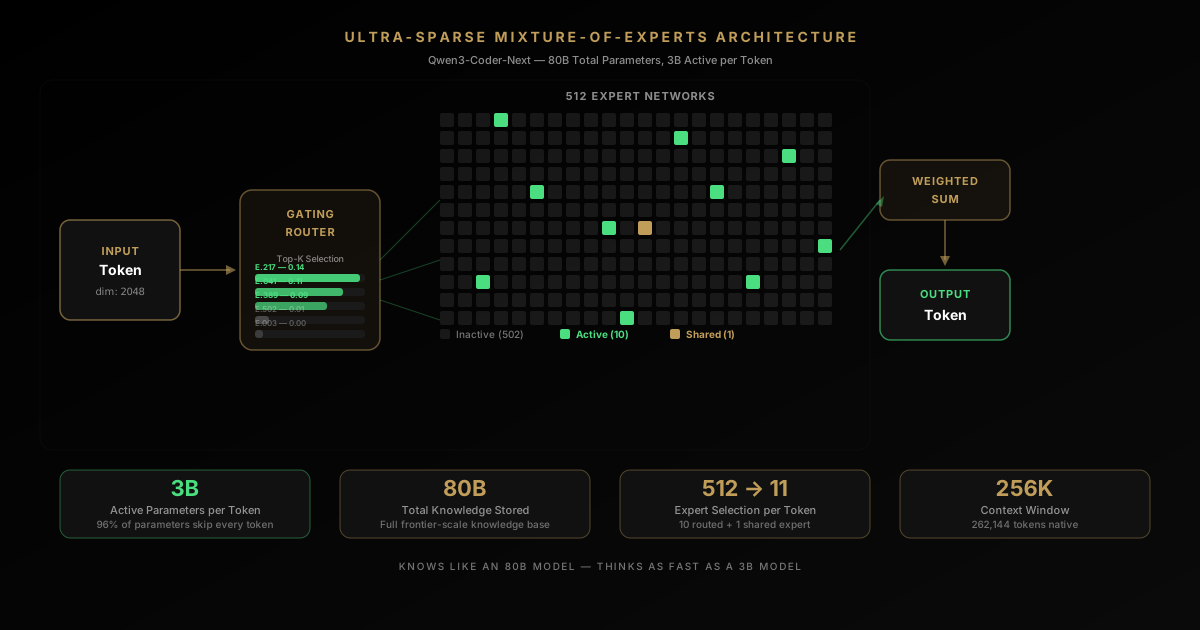
The architecture is ultra-sparse Mixture-of-Experts (MoE). Here is how it works:
The model contains 512 expert networks. For every single token it processes, it activates only 10 experts plus 1 shared expert. Each expert is small — 512-dimensional intermediate layers. The result: only 3 billion parameters are active per token, despite the model containing 80 billion total.
This is not a gimmick. This is the architectural pattern that makes local LLM coding viable.
| Specification | Detail |
|---|---|
| Total Parameters | 80B |
| Active Parameters per Token | 3B |
| Total Experts | 512 |
| Active Experts per Token | 10 + 1 shared |
| Context Window | 262,144 tokens (256K) |
| Architecture | Hybrid: Gated DeltaNet (linear attention) + Gated Attention + MoE |
| Layers | 48 (12 repeating blocks) |
The hybrid attention design is where it gets technically interesting. Each block cycles through three DeltaNet linear attention layers followed by one full gated attention layer. Traditional transformer attention is quadratic — double your context length, quadruple your memory usage. Linear attention layers do not have this problem. The KV cache does not grow with sequence length.
The practical effect: 75% of the model’s layers use cheap linear attention for speed, while 25% use full attention for quality on long-range dependencies. You get 80 billion parameters of knowledge compressed into a model that runs like a 3-billion-parameter model at inference time. The model knows as much as a large model. It thinks as fast as a small one.
And this is not just a paper result. On Hugging Face, the model already has 434,000+ downloads and 950 likes for the base model, with the FP8 quantized version pulling another 212,000 downloads. The GGUF variant — optimized for running on consumer hardware — has 58,500 downloads in under three weeks. That adoption curve is steep.
The Hardware: 128 GB of Unified Memory Changes Everything
The model is half of the equation. The other half is something that did not exist on desktops until recently.
Conway’s setup runs on a Lenovo ThinkStation PGX featuring NVIDIA’s GB10 Grace Blackwell Superchip. The specification that matters most: 128 GB of unified LPDDR5x memory shared between CPU and GPU.
This is not 128 GB split across system RAM and a discrete GPU’s VRAM. It is a single, unified memory pool. The CPU and GPU see the same memory at the same bandwidth. No PCIe bottleneck. No copying tensors between system memory and GPU memory.
Why this matters for local LLMs: the single biggest bottleneck for running large models locally has always been VRAM. A typical high-end consumer GPU has 24 GB of VRAM. An 80-billion-parameter model at Q4 quantization needs roughly 46 GB. You literally cannot fit it on one GPU.
The traditional solution — splitting the model across GPU and CPU memory — introduces massive latency as data shuttles back and forth across the PCIe bus. It is like printing every street address in your neighborhood using full GPS coordinates — technically correct, brutally inefficient.
The GB10’s unified memory eliminates this entirely:
- Q4_K_M quantization: ~46 GB VRAM, leaving ~80 GB of headroom
- Q8_0 quantization: ~85 GB VRAM, still fitting comfortably with a 170,000-token context window
At Q8 quantization — which is near-lossless quality — you have an 80-billion-parameter coding model running on a desktop with a context window large enough to hold an entire medium-sized codebase. And you still have 40+ GB of memory left over for the operating system, your IDE, and everything else.
This is the hardware inflection point that local AI has been waiting for.
The Agentic Difference: Why This Is Not Just Another Chat Model
Here is what separates Qwen3-Coder-Next from every local coding model that came before: it was trained specifically for agentic coding workflows.
Most local LLMs are trained for chat. You ask a question, they answer. Ask another question, they answer again. Each interaction is somewhat isolated. That is fine for asking “How do I sort an array in Python?” It is useless for real development work.
Agentic workflows are fundamentally different:
- Multi-step planning — “To fix this bug, I need to check 3 files, understand the data flow, identify the root cause, and propose a targeted fix.”
- Tool usage — Actually reading files, executing code, running tests, and analyzing output.
- Recovery from failure — When something does not work, understanding why and trying a different approach instead of repeating the same mistake.
- Context maintenance — Remembering what has already been tried, what the current state is, and what the original goal was across dozens of interactions.
This is what Claude Code, Cursor, and Aider do — they are agentic coding systems, not simple chat interfaces. And the Qwen3-Coder-Next model card explicitly lists compatibility with Claude Code, Qwen Code, and Cline — with advanced tool-calling and failure recovery as core design targets.
The model was not just trained to write code. It was trained to be a coding agent.
The Integration: Claude Code Does Not Care Where Its Brain Lives
Conway is not running Qwen3-Coder-Next through some experimental UI or a custom chat interface. He is running it through Claude Code — Anthropic’s CLI-based coding agent that has become a staple for professional developers.
The setup is deceptively simple. A Docker container runs vLLM as the inference server:
docker run --rm -it --gpus all --ipc=host --network host
  --ulimit memlock=-1 --ulimit stack=67108864
  -v ~/.cache/huggingface:/root/.cache/huggingface
  nvcr.io/nvidia/vllm:26.01-py3
  vllm serve "Qwen/Qwen3-Coder-Next-FP8"
  --served-model-name qwen3-coder-next
  --port 8000
  --max-model-len 170000
  --gpu-memory-utilization 0.90
  --enable-auto-tool-choice
  --tool-call-parser qwen3_coder
  --attention-backend flashinfer
  --enable-prefix-caching
  --kv-cache-dtype fp8
  --max-num-seqs 1
Then five environment variables redirect Claude Code to the local endpoint:
export ANTHROPIC_BASE_URL=http://192.168.1.179:8000
export ANTHROPIC_MODEL=qwen3-coder-next
export ANTHROPIC_SMALL_FAST_MODEL=qwen3-coder-next
export API_TIMEOUT_MS=600000
export CLAUDE_CODE_DISABLE_NONESSENTIAL_TRAFFIC=1
That is it.
As Conway puts it: “Claude Code doesn’t care where its backend lives as long as the endpoint speaks the Anthropic Messages API, which vLLM does.”
This is an underappreciated design decision. Claude Code — and recent versions of vLLM and Ollama — support the Anthropic Messages API format natively. There is no translation layer. No API shim. No compatibility hack. The local inference server speaks the same protocol as Anthropic’s cloud, and Claude Code consumes it without modification.
The developer experience is identical. Same tool-calling interface. Same file operations. Same agentic coding workflow. The only difference is that the model running the show lives on the machine under your desk instead of a data center in Virginia.
The Economics: A Real Cost Breakdown
Let us talk about money, because this is where the argument for local LLMs has historically fallen apart. And this is where the math has finally flipped.
The Cloud Bill
A typical agentic coding session:
- Initial context loading: ~20K tokens
- 15 query iterations at ~5K tokens each: ~75K tokens
- 15 model responses at ~3K tokens each: ~45K tokens
- Total per session: ~140K tokens
At 20 sessions per month — a moderate pace for a developer using AI daily — that is 2.8 million tokens per month.
- Claude Sonnet 4.5: ~$42/month ($504/year)
- Claude Opus 4: ~$150/month ($1,800/year)
- Heavy agentic usage (500K-1M tokens/day): $200-$1,000/month ($2,400-$12,000/year)
These numbers are real. Developers on Twitter regularly share cloud AI bills in the hundreds per month. Teams are seeing five-figure annual costs.
The Local Bill
Lenovo ThinkStation PGX: estimated $3,000-$5,000 for the developer tier.
Electricity: ~300W under load, 8 hours/day, 260 working days/year = 624 kWh/year. At $0.15/kWh, that is $94/year.
After purchase, every token is free. No per-request charges. No rate limits. No usage caps.
The Breakeven
For a solo developer spending $500/month on cloud APIs:
- Month 0: Pay $5,000 for hardware. Behind $5,000.
- Month 10: Savings equal hardware cost. Break even.
- Year 2: $7,000 ahead ($12,000 saved minus $5,000 hardware).
- Year 3-5: Pure savings plus a machine that handles other compute workloads.
For a team of four developers each spending $300/month:
- Combined cloud cost: $14,400/year.
- Shared inference server: $5,000 one-time.
- Breakeven: Under 5 months.
- 3-year savings: $38,000+.
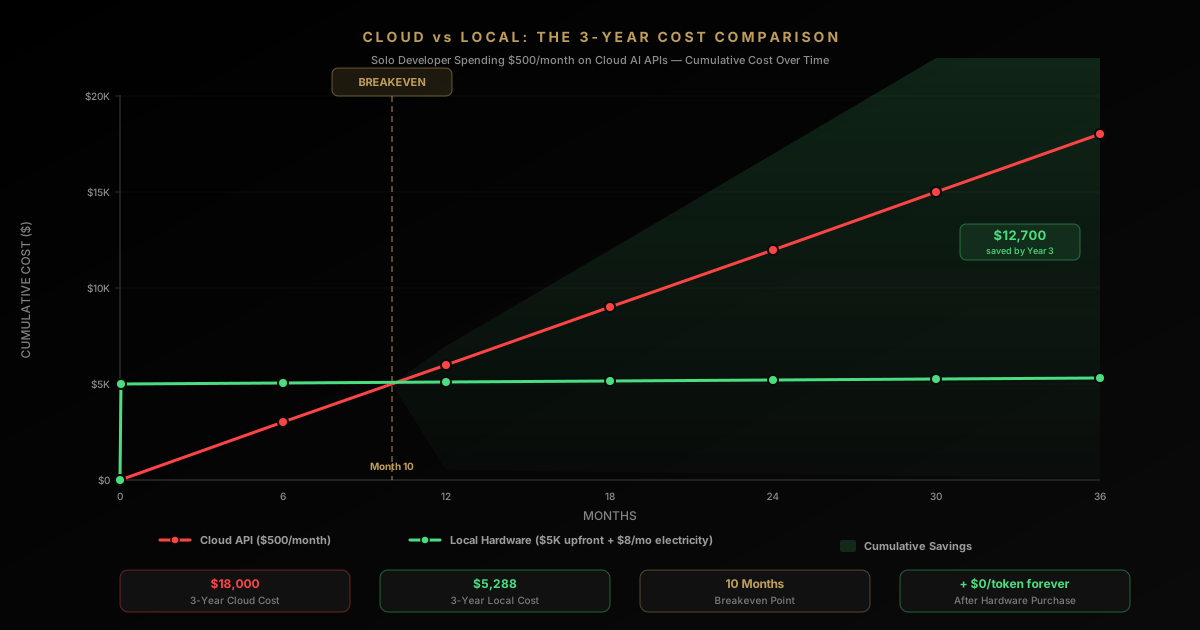
The math is no longer close. For heavy users, local is dramatically cheaper. But cost is only half the argument. The other half is something most developers are not thinking about hard enough.
The Privacy Argument Nobody Is Making Loudly Enough
“Privacy” sounds abstract until you are the one facing consequences.
The Security Researcher
Your job is analyzing firmware. Reverse engineering binaries. Decompiled code that looks like FUN_00401a3c operating on undefined4 *param_1. You need an LLM to help identify data structures, name functions, and understand algorithms across hundreds of decompiled routines.
With cloud APIs: you cannot send proprietary binaries to a third-party server. NDAs prohibit it. Security policies block it. Some cloud models refuse to help with reverse engineering entirely. And even if allowed, API latency of 2-5 seconds per request across 20-30 iterations per function kills your flow state. Hit a rate limit after 50 requests, wait 60 seconds, lose your train of thought.
With a local model: the binary never leaves your machine. No compliance issues. No rate limits. Response time measured in milliseconds, not seconds. Iteration speed goes up 10x. Hundreds of functions that used to take hours of boilerplate analysis now take minutes of rapid refinement.
The Startup CTO
Your job is building proprietary algorithms — your company’s competitive advantage. Every line of code you send to a cloud API is transmitted over the internet, processed by third-party systems, potentially logged for “quality improvement,” and subject to the provider’s policies — which change.
With a local model: your IP stays internal. Zero risk of leakage. Competitive advantage stays protected.
The Enterprise Developer
You work in healthcare, finance, defense, or any regulated industry. Compliance teams have opinions about where code goes. Audit trails matter. Data residency is not optional.
For these developers, local AI is not a cost optimization. It is a compliance requirement. And until recently, meeting that requirement meant accepting dramatically worse AI assistance. That trade-off is gone.
The Quantization Trade-Off: What If You Do Not Have 128 GB?
Not everyone has a ThinkStation PGX. But the local LLM revolution is not exclusive to workstation-class hardware. The key is quantization — compressing models to fit smaller GPUs.
Normal models use 16-bit floating point weights. Each parameter costs 2 bytes. An 80B model at FP16 would need 160 GB — unrunnable on any single consumer device.
Quantization reduces that precision:
| Quantization | Bytes/Parameter | 80B Model Size | Quality Impact |
|---|---|---|---|
| FP16 (full) | 2.0 | ~160 GB | Baseline |
| Q8 (8-bit) | 1.0 | ~85 GB | Under 1% loss — virtually indistinguishable |
| Q4 (4-bit) | 0.5 | ~46 GB | 2-5% loss — noticeable on hard reasoning |
| Q2 (2-bit) | 0.25 | ~23 GB | 10-20% loss — starts hallucinating |
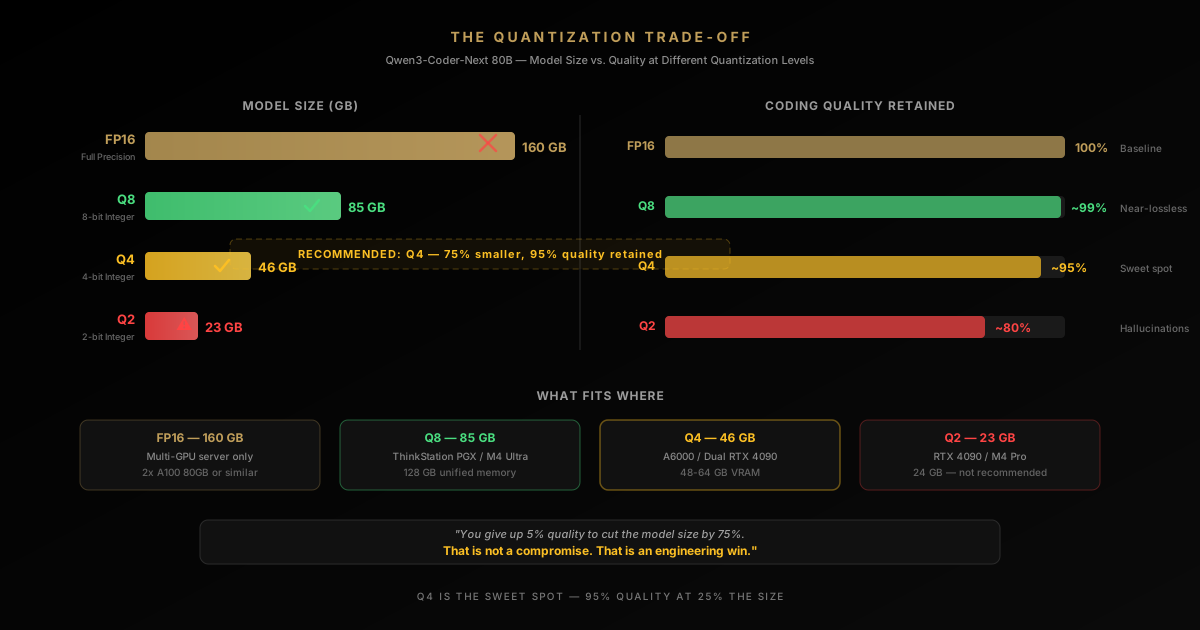
Q8 is the recommendation for anyone who can fit it. The quality loss is negligible. Conway’s setup uses FP8 (effectively 8-bit) and runs the full agentic workflow without degradation.
Q4 is the sweet spot for consumer GPUs. You give up 5-10% on the hardest reasoning tasks. For writing functions, debugging, generating tests, and refactoring — you will not notice the difference. This is where a 24-48 GB GPU becomes viable for the 80B model.
Here is how to think about your hardware:
| Your Hardware | Best Model Choice | Why |
|---|---|---|
| 128 GB unified (ThinkStation PGX, M4 Ultra) | Qwen3-Coder-Next 80B at Q8 | Maximum capability, full agentic workflows |
| 48-80 GB VRAM (A6000, dual GPU) | Qwen3-Coder-Next 80B at Q4 | Near-full quality, fits with headroom |
| 24 GB VRAM (RTX 4090, A5000) | Qwen2.5-Coder 32B at Q4 | Best quality that fits on one consumer GPU |
| 16 GB VRAM (RTX 4070 Ti) | Codestral 22B at Q4 | Solid for autocomplete and simpler tasks |
| Under 16 GB VRAM | Consider cloud APIs | Hardware cost not justified for the quality gap |
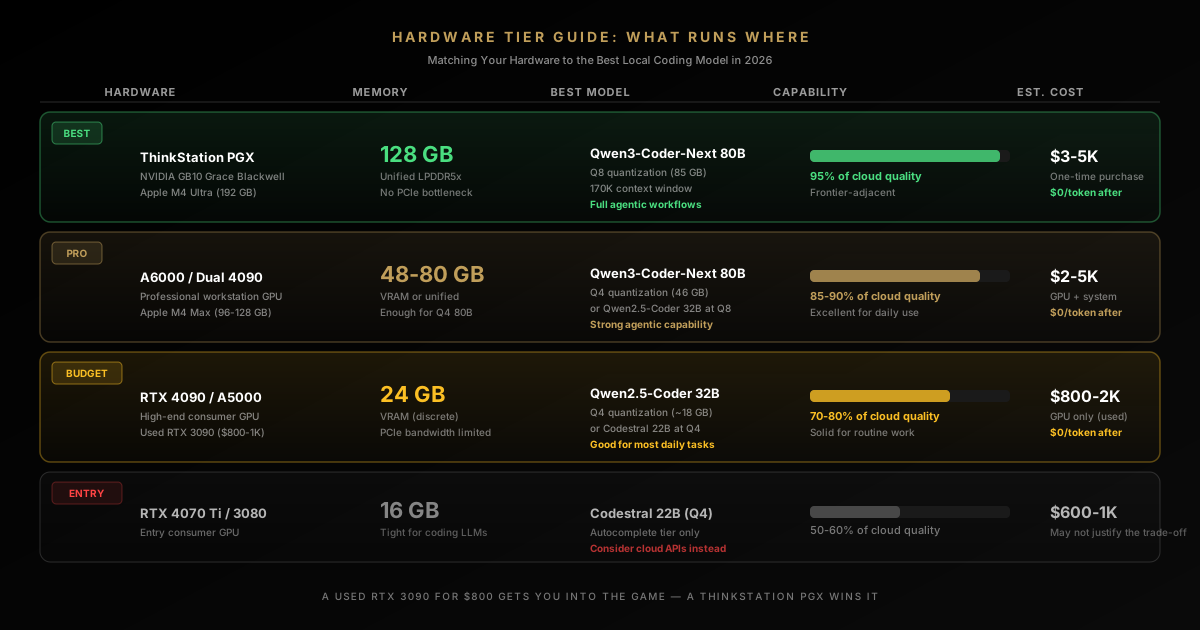
The practical message: you do not need a $5,000 workstation to benefit from local AI coding. A used RTX 3090 ($800-$1,000 on the secondary market) running a 32B model at Q4 quantization is a genuine alternative to cloud APIs for most daily coding tasks.
When Cloud Still Wins — And It Does
This article would be dishonest if it did not state clearly where cloud models remain superior. The smart strategy is not “local vs. cloud.” It is “local AND cloud.”
LOCAL FIRST, CLOUD WHEN IT EARNS ITS KEEP
The right decision is usually hybrid. Local and cloud excel under different constraints.
LOCAL WINS
Use local when privacy, iteration speed, and cost dominate
- You are a heavy daily coding-agent user
- Sensitive code or regulated environments limit cloud usage
- You want zero per-token cost after setup
- Your hardware can run a model that clears the quality bar
CLOUD WINS
Use cloud when frontier quality still matters more
- You need the strongest reasoning available regardless of cost
- Your local hardware cannot support the model quality you need
- You are a lighter user who will not reach breakeven soon
- Operational simplicity matters more than data locality
Absolute frontier reasoning. Claude Opus 4, GPT-5, and Gemini Ultra still outperform local models on the hardest problems: novel algorithm design, complex mathematical proofs, cross-domain reasoning requiring vast knowledge. If you are pushing the boundary of what AI can do with code, cloud models have more parameters, more training data, and more compute behind them.
Extreme scale context. While 170K tokens is large, some tasks genuinely require 500K+ token context windows — analyzing entire monorepos, processing massive documentation sets. Cloud infrastructure handles this more gracefully than a single desktop.
Collaboration and consistency. Teams benefit from everyone hitting the same model version. No hardware heterogeneity. No “works on my machine” problems with different quantization levels producing different outputs.
Multimodal capabilities. Cloud models are ahead on vision, audio, and cross-modal reasoning. If your workflow involves analyzing UI screenshots, diagrams, or non-text inputs, cloud remains the better choice.
Zero upfront cost. For a developer who uses AI coding tools a few times a week — not daily — cloud pay-as-you-go is simply cheaper than buying hardware.
The honest recommendation: use local for the 80% of work that is sensitive, repetitive, or high-volume. Use cloud for the 20% that genuinely requires frontier reasoning. Your monthly bill drops by 80%. Your privacy improves dramatically. And for most tasks, you will not notice a quality difference.
The Bigger Picture: Why 2026 Is the Year Local AI Coding Gets Real
Conway’s article is not an isolated event. It is a data point in a rapidly accelerating trend.
The models are crossing the threshold. Qwen3-Coder-Next’s ultra-sparse MoE architecture — 80B total, 3B active — is the pattern that makes local coding LLMs viable. You get frontier-adjacent quality at a fraction of the compute cost. Expect every major model lab to ship variants optimized for this exact use case.
The hardware is arriving. NVIDIA’s GB10 Grace Blackwell brings 128 GB of unified memory to desktop workstations. Apple’s M-series chips already offer up to 192 GB of unified memory. AMD is pushing similar architectures. The memory wall that blocked large local models is crumbling.
The tooling is mature. vLLM, Ollama, SGLang, and llama.cpp have all converged on supporting standard API formats. Claude Code, Cline, Continue, and other coding agents can swap backends with environment variables. The integration layer is no longer the bottleneck.
The economic incentive is enormous. Every cloud AI API call has a margin baked in. Running inference locally eliminates that margin entirely. As models get more efficient and hardware gets cheaper, the crossover point where local is cheaper than cloud moves earlier and earlier. For heavy users, we are already past it.
And looking ahead: NVIDIA’s next-generation GB200 will push unified memory to 192 GB. Apple’s M-series continues scaling. AMD’s MI300 series offers 192 GB of HBM3 at increasingly competitive prices. By 2027, running frontier-quality coding models locally will be default, not exotic.
What This Means for You — Right Now
If you are a developer currently paying for cloud AI coding tools, here is the practical takeaway:
If you have the hardware — a machine with 24+ GB of GPU memory — you can run capable local coding models today. Qwen2.5-Coder 32B at Q4 quantization fits in under 20 GB. The toolchain is production-ready. Start with Ollama, pull a model, and point your preferred coding agent at it. Total setup time: 15 minutes. Total ongoing cost: electricity.
If you are evaluating workstation purchases, the GB10-based systems and Apple Silicon Macs with 96-192 GB of unified memory should be on your radar. The ability to run 80B+ parameter models locally is a capability that pays dividends for years.
If you are a team lead or engineering manager, this changes the economics of AI-assisted development. Instead of per-seat cloud API subscriptions, a shared on-premises inference server can serve an entire team. The privacy benefits alone may justify the investment for regulated industries.
If you are building developer tools, the Anthropic Messages API is becoming the de facto standard that local inference servers implement. Designing your tool to work with swappable backends is no longer optional — it is a competitive necessity.
The Signal in the Noise
Every few months, someone publishes a breathless article about a new local LLM that will “replace” cloud AI. Most of those articles age poorly.
What makes Conway’s piece different is not enthusiasm. It is resignation. This is not a local-AI evangelist trying to convert you. It is a skeptic who tried, failed, tried again, failed again — and then, one day, stopped going back to the cloud.
“I finally found a local LLM I actually want to use for coding.”
That “finally” carries years of disappointment. That “actually want to use” is the inflection point.
The cloud is not going away. Frontier models will continue to push the boundary of what is possible. But the gap between what you can run on your desk and what you can rent from a data center just narrowed dramatically.
For a lot of coding work — maybe most coding work — that gap no longer matters.
The local LLM revolution did not arrive with a bang. It arrived with a tech journalist quietly closing his cloud API tab and not opening it again.
Related: If you develop in Rust and want to run your tooling locally, see how Rust Glancer achieves LSP on 8GB RAM — same philosophy of trading latency for memory savings.
FAQ
Questions readers usually have
Sources
- Adam Conway, XDA Developers, “I finally found a local LLM I actually want to use for coding” — the original account this article is built on
- Qwen Team, Qwen3-Coder-Next model card — official architecture specs, download counts, and supported tool-calling clients
- vLLM Project, vLLM documentation — the inference server used to serve Qwen3-Coder-Next behind an Anthropic-compatible API
Explore more: LLM Engineering — RAG, Fine-Tuning & Production LLMs · Claude Code
Google Search · Preferred sources
Prefer this site on Google
If you already read this writing, add umesh-malik.com as a Preferred Source. Google can then highlight it with a preferred badge in Top Stories, AI Overviews, and AI Mode — for you, not as a site-wide ranking boost.
Related Articles
AI Coding Agents & DX
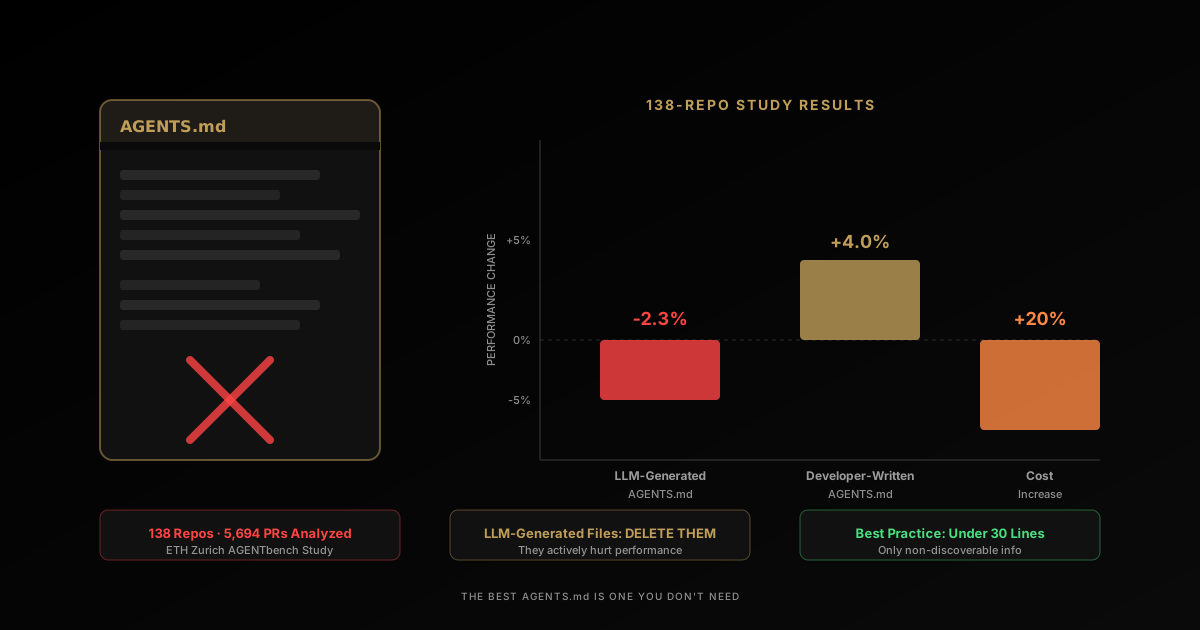
AGENTS.md Files Don't Work the Way You Think — A 138-Repo Study
A 138-repo study: AGENTS.md files hurt performance by 2-3% and raised costs 20%+. What the research found — and what actually works instead.
AI Coding Agents & DX
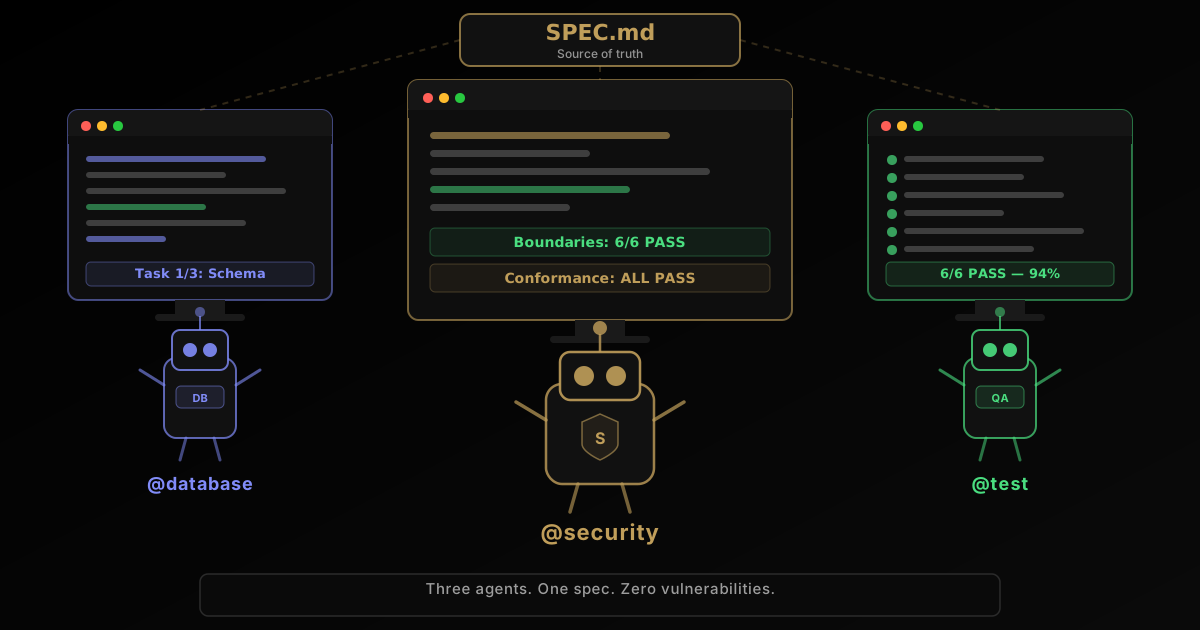
Spec-Driven Development for AI Agents (Addy Osmani)
Why AI coding agent prompts fail — and how spec-driven development fixes it, per Addy Osmani's 5-principle framework backed by GitHub's 2,500-config analysis.

AI Coding Agents & DX
How to Switch Between Multiple Claude Code Accounts Without Re-Logging In (claude-swap Guide)
claude-swap is an open-source CLI that switches Claude Code accounts in seconds — no browser re-login. How it works, how to use it, and what it misses.
Keep reading
Get new posts on AI, Claude Code & LLMs
New deep-dives on AI engineering, Claude Code, and developer tooling — follow along however you prefer.
About the Author

Software engineer writing about AI, Claude Code, LLMs, OpenAI, Anthropic, and developer tooling. 5+ years building production systems at Expedia Group, Tekion, and BYJU'S.