How to Check If You Installed Compromised LiteLLM 1.107.0
How to check if you installed compromised LiteLLM 1.107.0 from PyPI or Docker: a 60-second detection script, the cook.pth startup trick, and what to rotate.

TL;DR Here is how to check if you installed compromised LiteLLM: look for cook.pth, cook.py and sitecustomize.py in site-packages and for /tmp/.pc_once_72129118c59f5636c0bb. Version 1.107.0 was live on PyPI for under two hours on 2026-10-21 and stole cloud, CI and LLM provider credentials in every Python process, not just ones importing LiteLLM. If any indicator hits, rebuild the environment and rotate credentials before you do anything else.
What Is the LiteLLM 1.107.0 PyPI Compromise?
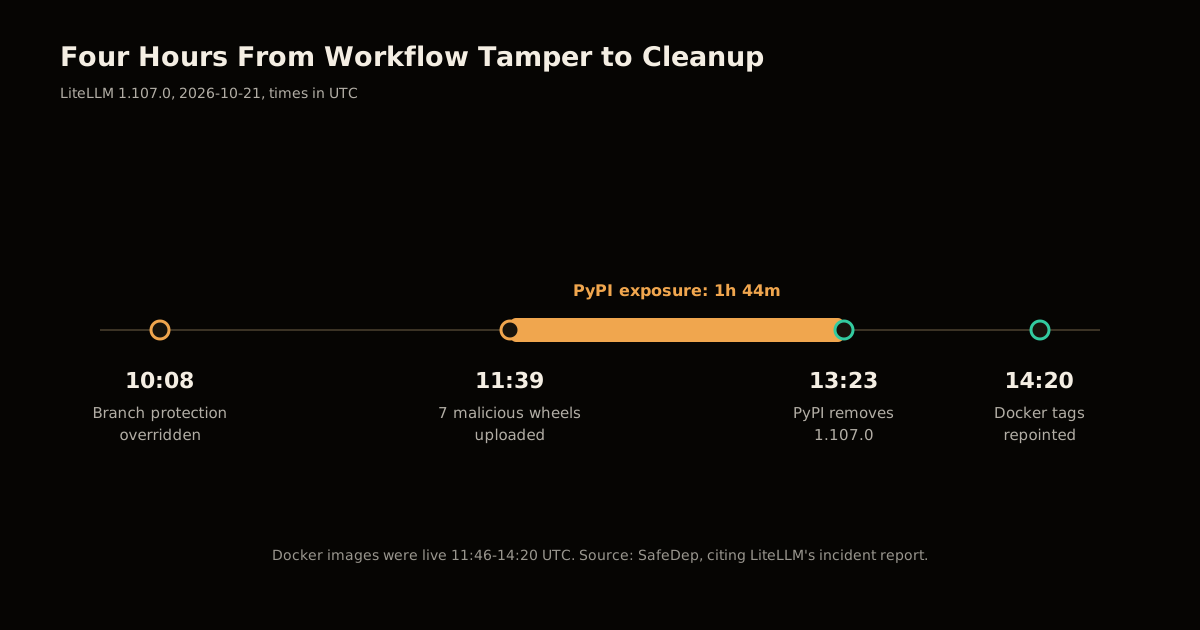
It is a supply-chain attack where a malicious litellm==1.107.0 was built and published through LiteLLM’s own release pipeline, so it carried a legitimate-looking release. SafeDep’s analysis shows the build line data = "cook" was added under [tool.maturin] in the sdist’s pyproject.toml. No public commit in BerriAI/litellm contains it. The wheel therefore ships a cook/ folder that lands three files in site-packages.
| Artifact | Affected | Not affected (per SafeDep) |
|---|---|---|
| PyPI | litellm==1.107.0 (all seven wheels, plus the sdist) | 1.106.2, 1.107.0rc1, 1.107.0rc2 |
| Docker | v1.107.0, latest, main-latest, main-stable (11:46-14:20 UTC) | Tags after the 14:20 UTC cleanup |
| Companions | None | litellm-proxy-extras 0.4.110, litellm-enterprise 0.1.78 |
How Does the Malware Run Without an Import?
Python’s site module executes any line in a .pth file that starts with import, and imports sitecustomize at startup (Python docs). The attacker used both:
cook.pthcontainsimport cook, socook.py(about 61 KB, base64 and zlib wrapped) runs in every interpreter launch.cook.pycollects SSH keys, shell history, AWS/Azure/GCP/Kubernetes/Docker credentials, CI/CD secrets, AI tool tokens, browser data, environment variables and GPG/TLS keys. On a proxy host it also readsLiteLLM_CredentialsTableandLiteLLM_ProxyModelTable, which hold provider API keys.- Results are AES-256-CBC encrypted, the key is RSA-OAEP wrapped, and the archive is POSTed to
www.litellm[.]dev/healthcheck. sitecustomize.pyforks a detached daemon, reads a domain from a GitHub dead-drop, and every hour downloads andexec()s a second stage from/codepy.
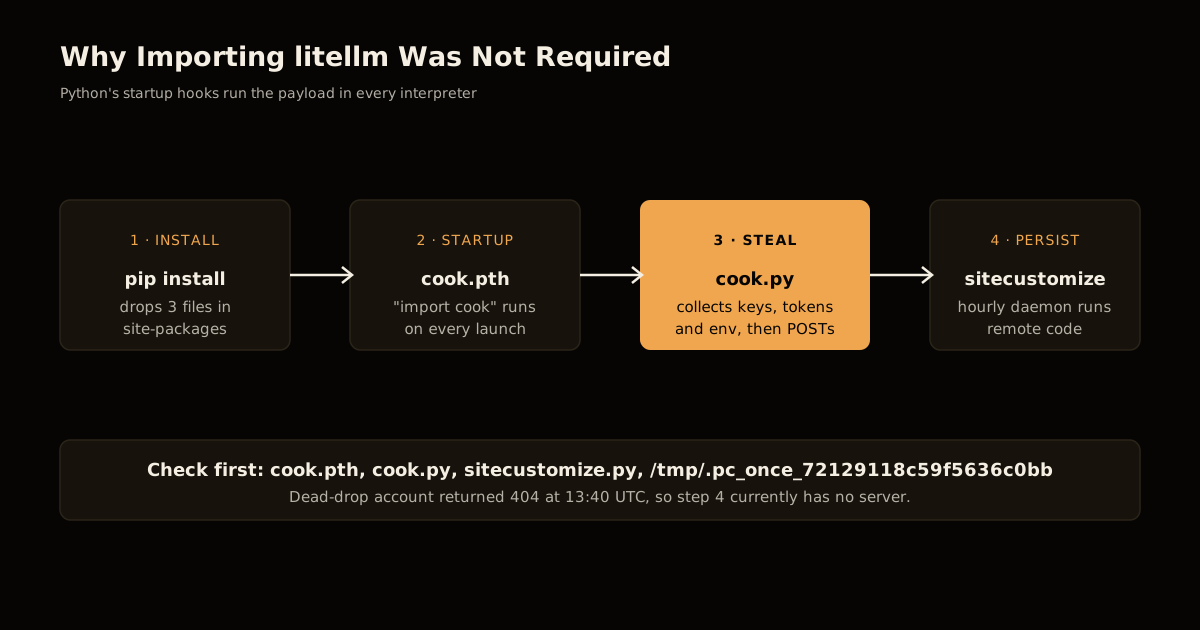
SafeDep observed the dead-drop GitHub account returning 404 at 13:40 UTC, so the backdoor currently finds no server. Hosts that ran it earlier may already have executed second-stage code, which SafeDep could not recover.
How to Check If You Installed Compromised LiteLLM
Run this on every laptop, CI runner and container that could have resolved litellm between 11:39 UTC on 2026-10-21 and the removal at 13:23 UTC, or pulled the Docker tags before 14:20 UTC.
- Find the injected files in every Python environment:
for sp in $(python3 -c "import site,sys;print('\n'.join(site.getsitepackages()+[site.getusersitepackages()]))"); do
  ls -l "$sp"/cook.pth "$sp"/cook.py "$sp"/sitecustomize.py 2>/dev/null
done
find / -name cook.pth -not -path "*/proc/*" 2>/dev/null- Compare hashes. On Linux/macOS,
cook.pthis7f191632e732…2bdb,cook.pyis9dd0a3926f96…be25andsitecustomize.pyis34bef04fe88a…05fa(full SHA-256 values are in the SafeDep post). Asitecustomize.pyyou did not write is suspicious even if the hash differs. - Check host markers:
ls /tmp/.pc_once_72129118c59f5636c0bb /tmp/remote_code_loader.lock. The first means the stealer uploaded; the second means the backdoor daemon ran. - Look for a detached Python process:
ps -eo pid,ppid,sid,cmd | awk '$2==1 && /python/'. - Search egress and DNS logs for
www.litellm.dev, and for Python processes calling169.254.169.254. - Check lockfiles and image history:
grep -rn "litellm==1.107.0\|litellm-1.107.0" .anddocker historyon anything built from the affected tags.
| Indicator | Meaning |
|---|---|
cook.pth present | Stealer ran at every Python start |
.pc_once_* marker in /tmp | Credentials were uploaded |
remote_code_loader.lock in /tmp | Backdoor daemon started |
Traffic to www.litellm.dev | Exfiltration attempted |
What Should You Rotate After a Compromised LiteLLM Install?
SafeDep’s article does not prescribe remediation; this order is my inference from its list of targeted data. Work by blast radius, and rotate from a clean machine.
- Cloud and CI/CD: AWS/Azure/GCP keys, Kubernetes configs, Terraform, Vault and runner tokens. Revoke sessions, not just keys.
- LLM provider keys: anything in the LiteLLM proxy database, plus keys in
.envfiles and environment variables. - Source control: GitHub CLI tokens, SSH keys, GPG keys.
- AI tooling: Claude, Cursor, Copilot and Codex tokens.
- Rebuild: delete the virtualenv or image; do not patch in place. Pin to
1.106.2or a newer, verified release.
How to Stop the Next One
The pattern repeats: axios on npm and mathmain’s encrypted loader used different tricks, same gap. Install-time code runs with your full privileges. Three changes cut most of the risk:
- Pin with hashes (
pip install --require-hashes) and add a cooldown of a few days before adopting new releases. - Run agents, CI and proxies in a sandbox with no default internet access; a stealer with nowhere to POST fails quietly. See also stopping agent sandbox escapes.
- Keep provider keys out of long-lived environment variables. A gateway that holds every key is the richest target in your LLM stack.
If you run agent tooling, the same blast-radius thinking applies to MCP servers and the Claude Code leak fallout.
FAQ
Which LiteLLM versions are compromised? Only 1.107.0 on PyPI and the Docker tags v1.107.0, latest, main-latest and main-stable during 11:46-14:20 UTC on 2026-10-21.
Am I safe if I never imported litellm? No. cook.pth runs at interpreter startup, so every Python process in that environment executed the stealer.
Does pip uninstall litellm clean it up? Not reliably. Rebuild the environment and treat the host as compromised if any indicator is present.
Sources
Frequently asked questions
Google Search · Preferred sources
Prefer this site on Google
If you already read this writing, add umesh-malik.com as a Preferred Source. Google can then highlight it with a preferred badge in Top Stories, AI Overviews, and AI Mode — for you, not as a site-wide ranking boost.
Related Articles

AI Security
Plugin Registry Security: Signed Packages Beat a Trusted Gatekeeper
Plugin registry security doesn't need one trusted gatekeeper: EmDash signs every release with AT Protocol and sandboxes plugins by capability, not by review.

AI Security
How to Detect npm Encrypted Loader Malware: 3.1M Downloads
Detect npm encrypted loader malware before it runs: the trigger matrix, AES-256-GCM payload, and IOCs behind mathmain's 3.1M weekly downloads.

AI Security
Package registry RCE: close the auto-build path 2,000 gems used
Package registry RCE starts the moment an upload triggers a build. Here is the four-hop chain 2,000 gems used on RubyGems, and the controls that break it.
Keep reading
Get new posts on AI, Claude Code & LLMs
New deep-dives on AI engineering, Claude Code, and developer tooling — follow along however you prefer.
About the Author

Software engineer writing about AI, Claude Code, LLMs, OpenAI, Anthropic, and developer tooling. 5+ years building production systems at Expedia Group, Tekion, and BYJU'S.