MS Paint Invisible Watermark: How to Find the GUID in AI Images
The MS Paint invisible watermark embeds a server GUID into every AI image — even when inference runs locally. Here's how to detect it.

TL;DR The MS Paint invisible watermark embeds a server-issued GUID into every AI-generated image — even when inference runs locally on your NPU. The prompt goes to Microsoft for moderation, Microsoft returns a GUID, and that GUID is embedded into the raw pixels before you ever see the result. “Local generation” does not mean “offline generation.”
What is the MS Paint invisible watermark?
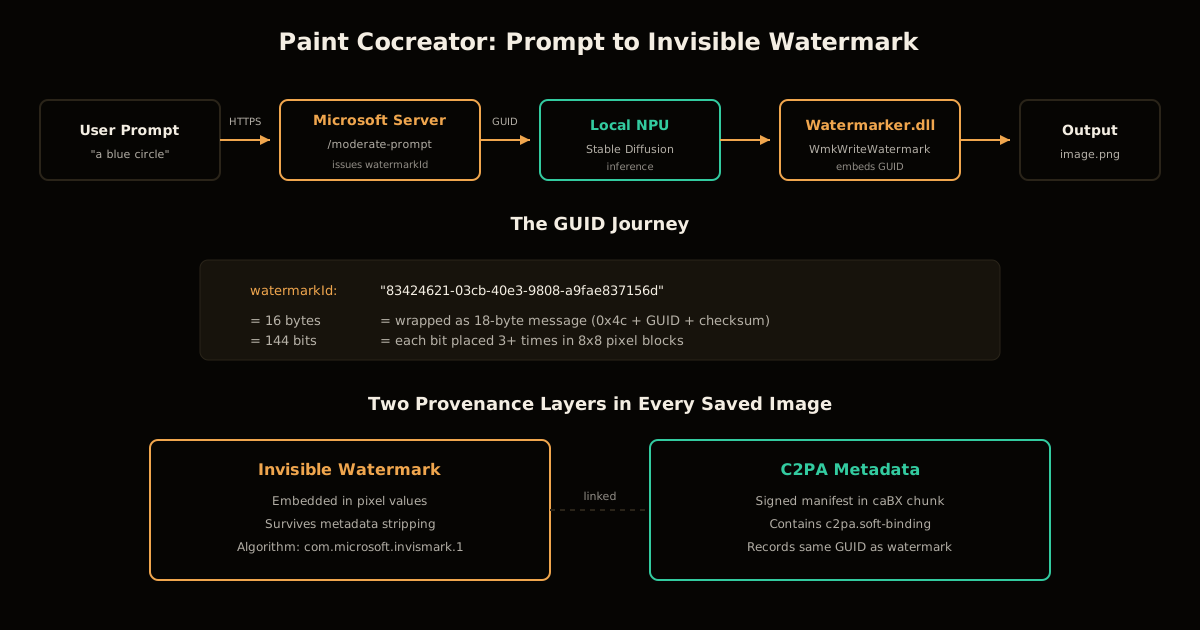
When you use Paint’s Cocreator feature to generate an image, Microsoft does not simply run the local Stable Diffusion model and hand you the output. Before inference starts, Paint sends your prompt to a remote moderation endpoint. That endpoint returns a watermarkId — a GUID — alongside the moderated prompt. Paint then runs local inference, and Watermarker.dll embeds that GUID directly into the image pixels using a frequency-domain algorithm. The result is an invisible marker that ties every generated image to a specific prompt moderation request in Microsoft’s logs.
This is not the visible Copilot logo. Paint has a separate setting for that, and users can disable it. The invisible watermark is not controlled by any setting. If the embedding fails — because the image is too small, or the encoder cannot place each bit at least three times — Paint refuses to return the image at all. The watermark is mandatory.
Security researcher Xusheng Li reverse-engineered this behavior using Binary Ninja and Claude Code, documenting the full call chain from prompt submission through pixel modification. The discovery applies to both the Paint Cocreator (local NPU generation on Copilot+ PCs) and the cloud Image Creator paths.
How does Paint embed the watermark?
The watermarking happens in Watermarker.dll, which exports a function called WmkWriteWatermark. The payload is exactly 16 bytes — one GUID — and the encoder wraps it in an 18-byte message:
| Byte position | Content |
|---|---|
| 0 | Magic byte 0x4c |
| 1-16 | The 16-byte GUID |
| 17 | Checksum (sum of bytes 1-16 mod 256) |
The 18 bytes expand to 144 bits. The encoder then scans the image for suitable 8×8 pixel blocks and quantizes matrix values to encode each bit. The algorithm requires every bit to be placed at least three times for redundancy. If the image is smaller than 192×192 pixels, the encoder fails and Paint refuses to return the image.
The embedding uses what Li describes as “a content-adaptive block-domain, SVD-style watermark” — the same general class of algorithm used in academic robust watermarking literature. It modifies roughly 75% of pixels (193,376 of 262,144 in Li’s 512×512 test image), but the changes are small enough to be imperceptible.
| Constraint | Value |
|---|---|
| Minimum image size | 192×192 px |
| Payload length | Exactly 16 bytes |
| Bits embedded | 144 (18 bytes × 8) |
| Redundancy | ≥3 placements per bit |
| Typical pixels modified | ~75% |
The visible Copilot logo watermark is added by a completely separate function, AddPerceptibleWatermark, which composites an SVG overlay. The two watermarks are independent code paths.
Why does “local” inference still phone home?
Microsoft markets Cocreator on Copilot+ PCs as running “locally on your device.” The inference does run on the NPU — the Stable Diffusion ONNX models are shipped with Paint and execute without uploading your image to the cloud. But the prompt leaves your device before inference begins.
Paint sends every prompt to:
https://apsaiservices-a0fqcjc6bzbhgdcd.b02.azurefd.net/
v1/paint-cocreator/moderate-prompt
The request includes the prompt text, the style, and the lastPromptGenerationId from the previous request (allowing Microsoft to link successive generations). The server returns:
{
  "revisedPrompt": "...",
  "promptGenerationId": "74d9e06b-adea-43ce-85fe-186a26e2e34a",
  "watermarkId": "83424621-03cb-40e3-9808-a9fae837156d",
  "containsHumanReference": false
}
The watermarkId is what gets embedded into the pixels. The containsHumanReference flag indicates whether the server’s classifier detected a reference to a person — Microsoft stores this alongside the IDs, though Li found no evidence it affects the watermarking step itself.
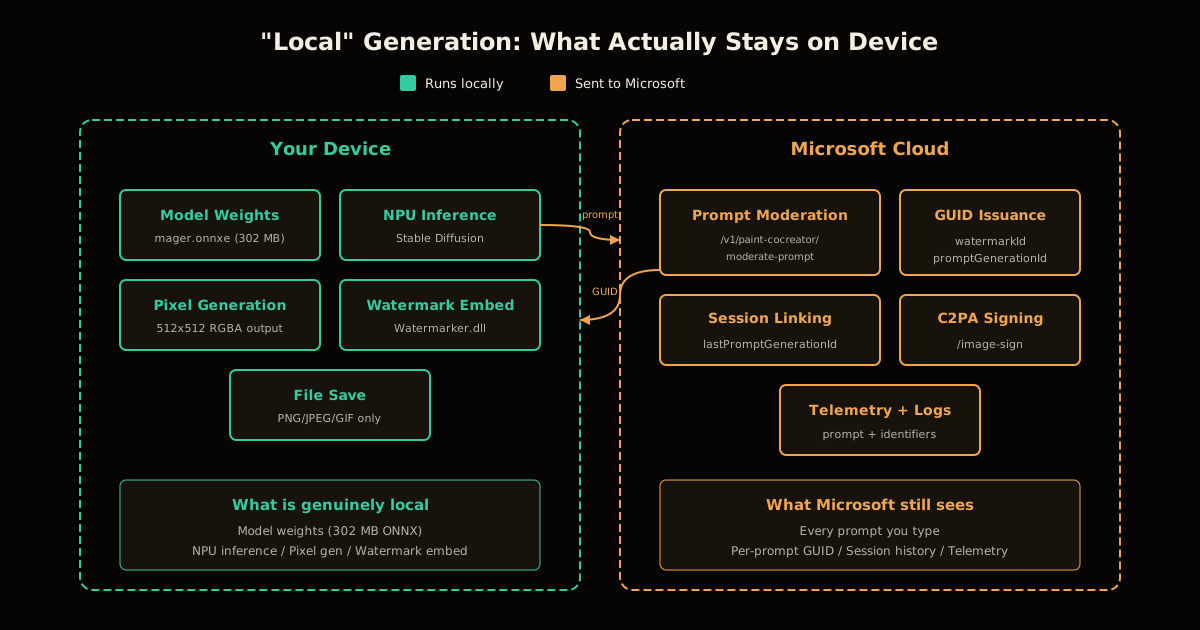
The “local” claim is technically accurate for inference but misleading for the overall feature. Microsoft receives your prompt, classifies it, issues a tracking identifier, and can correlate that identifier with the finished image when you later use the C2PA Content Credentials signing endpoint. “Generated on your device” does not mean “Microsoft doesn’t know what you generated.”
How does this relate to C2PA metadata?
The invisible watermark is one half of a two-layer provenance system. The other half is C2PA Content Credentials — signed metadata that Paint attaches to saved images.
After local generation, Paint calls another Microsoft endpoint (/v1/paint-cocreator/image-sign) to get a signed C2PA manifest. That manifest contains:
{
  "c2pa.soft-binding": {
    "alg": "com.microsoft.invismark.1",
    "blocks": [{
      "scope": "the entire image",
      "value": "83424621-03cb-40e3-9808-a9fae837156d"
    }]
  },
  "c2pa.actions.v2": {
    "actions": [{
      "action": "c2pa.watermarked",
      "description": "Content watermarked by Microsoft Responsible AI"
    }]
  }
}
The soft-binding assertion names the algorithm (com.microsoft.invismark.1) and records the exact GUID embedded in the pixels. This is what “soft binding” means in C2PA terminology: a value derived from or embedded into the content itself, so the provenance record can be matched to the content even after the file-level manifest is stripped.
If someone removes the C2PA metadata, Microsoft can still identify the image by extracting the watermark from the pixels and looking up the GUID in their moderation logs. The two layers reinforce each other.
This also explains why Paint restricts save formats. After AI generation, you can only save as PNG, JPEG, GIF, or .paint — all formats that support C2PA manifests. BMP is conspicuously absent, even though it’s Paint’s classic format. The C2PA spec explicitly notes that BMP cannot embed manifests without an external sidecar. Microsoft chose provenance preservation over format compatibility.
What does this mean for privacy?
The immediate implication is that “local AI” on Windows is not as private as the marketing suggests. Microsoft receives every prompt you generate, can correlate prompts over time via lastPromptGenerationId, and embeds a persistent identifier into every output image.
| Claim | Reality |
|---|---|
| “Generates locally on your NPU” | True — inference runs on device |
| “Works offline” | False — prompt moderation requires internet |
| “Private to your device” | False — prompt text goes to Microsoft |
| “No tracking of what you generate” | False — server-issued GUID in every image |
Microsoft’s support page discloses that Image Creator “uses Azure online services” and collects “user and device identifiers together with prompts for abuse prevention and monitoring.” It also mentions C2PA metadata. What it does not explain is that the C2PA manifest contains a pointer to an invisible pixel watermark, or that this identifier is issued by the prompt moderation step before any local generation happens.
The EU AI Act Article 50 transparency requirements, which took effect August 2, 2026, require AI-generated content to carry a detectable machine-readable mark. Microsoft’s watermark satisfies that requirement. Whether Article 50 requires disclosing that the mark contains a prompt-linked tracking identifier is a question nobody has answered yet.
How can I detect or verify the watermark?
Li did not publish a standalone extractor, but the algorithm is documented well enough that one could be built. The key observations:
- The embedding uses 8×8 blocks and matrix decomposition
- Constants include
24.0,0.25,0.5, and0.2 - Each of 144 bits is placed at least 3 times
- The 18-byte message starts with
0x4cand ends with a checksum
For simpler detection, check the C2PA metadata. Any image saved directly from Paint’s AI features will have a caBX PNG chunk (or APP11 JPEG marker) containing the signed manifest. Tools like c2patool can extract and verify it:
c2patool image.pngIf the manifest contains "alg": "com.microsoft.invismark.1", the invisible watermark is present.
The Photos app follows the same pattern, with one behavioral difference: if WmkWriteWatermark fails in Photos, the app logs the error and continues returning the unwatermarked image. Paint treats the failure as fatal. Both apps use the same GUID format and the same embedding algorithm — the difference is in error handling, not in what gets embedded.
What’s different from other AI watermarks?
Microsoft’s approach differs from other deployed AI watermarking systems:
| System | Scope | Binding |
|---|---|---|
| Microsoft InvisMark | Windows Paint/Photos only | Server-issued GUID per prompt |
| Google SynthID | Imagen, some Gemini outputs | Model-level signal, no per-prompt ID |
| Meta Stable Signature | Some internal image models | Model fingerprint, not prompt-linked |
| OpenAI metadata | DALL-E API outputs | EXIF/C2PA, no pixel watermark |
The distinctive feature of Microsoft’s system is that the watermark is a per-prompt identifier, not just an “AI-generated” flag. SynthID tells you an image came from Google; InvisMark tells Microsoft exactly which prompt moderation request produced it.
Whether that’s a feature or a bug depends on your threat model. For abuse detection and provenance tracking, per-prompt binding is more useful. For privacy, it’s more invasive. Microsoft has chosen abuse detection.
The larger pattern
This is part of a broader shift toward on-device AI with remote verification. WhatsApp’s Scam Alert, which I covered recently, follows a similar architecture: local inference for privacy, but remote coordination for model integrity and metrics. The common thread is that “local” no longer means “isolated” — it means “the sensitive part runs on your hardware, but the system as a whole still talks to the cloud.”
The honest version of this pattern includes disclosure. Microsoft discloses C2PA metadata and remote moderation. WhatsApp publishes model hashes to a third-party ledger. The dishonest version — which is inevitable as this pattern spreads — will embed tracking identifiers without documentation and call it “privacy-preserving local AI.”
For now, the takeaway is simple: if an app offers AI features and requires an internet connection, assume it is reporting something. The question is what, and whether the vendor is willing to document it.
FAQ
Does Windows Paint watermark AI-generated images? Yes. Paint embeds a 16-byte GUID into every image generated by the Cocreator feature, including those generated locally on Copilot+ PCs. The GUID is issued by Microsoft’s remote moderation server before inference begins, then embedded into the raw pixels by Watermarker.dll.
Can I disable the invisible watermark in Paint? No. The visible Copilot logo can be disabled. The invisible watermark cannot. If the embedding fails, Paint refuses to return the image rather than returning an unwatermarked copy.
What is the difference between the visible and invisible watermarks? The visible watermark is a small logo in the corner, controlled by a user setting. The invisible watermark is a server-issued GUID embedded into pixel values using a frequency-domain algorithm, controlled by nothing.
Does the watermark survive re-encoding? Light edits preserve it. Heavy JPEG compression, significant scaling, or re-rendering from scratch will destroy it. The algorithm places each bit at least three times for robustness to casual edits.
Is this related to C2PA Content Credentials? Yes. The C2PA manifest contains a c2pa.soft-binding assertion that records the invisible watermark’s GUID. The two layers — pixel-level watermark and file-level manifest — are designed to reinforce each other.
Does the Photos app do the same thing? Yes. Photos uses the same Watermarker.dll and embeds the same GUID format. The only difference is error handling: Photos continues if the watermark fails, while Paint aborts the generation.
Sources
- Xusheng Li — Microsoft Paint and Photos Embed Server-Issued GUIDs as Invisible Watermarks in Locally-Generated Images — the reverse engineering that documented this behavior
- Microsoft — Use Cocreator in Paint — official documentation, including the C2PA and Azure services disclosures
- C2PA — Content Provenance and Authenticity Technical Specification — the standard Paint’s metadata follows
- EU AI Act — Article 50: Transparency obligations — the regulation requiring machine-readable AI content marks
Written for umesh-malik.com — no-fluff technical writing on AI, Web Dev, and Engineering.
Frequently asked questions
Google Search · Preferred sources
Prefer this site on Google
If you already read this writing, add umesh-malik.com as a Preferred Source. Google can then highlight it with a preferred badge in Top Stories, AI Overviews, and AI Mode — for you, not as a site-wide ranking boost.
Related Articles

AI Security
Turn off AI features permanently: configure 1 policy, not 25 toggles
Turn off AI features permanently with policy, not toggles: one Chrome default covers 25 gen-AI features, and Microsoft has deprecated the Copilot policy.

AI Security
Build on-device AI without breaking E2EE: the metrics leak first
Local inference is the easy half of on-device AI without breaking E2EE. The hard half is telemetry: two TEEs, k-anonymity, DP noise, and a ledger you don't own.

AI Security
Plugin Registry Security: Signed Packages Beat a Trusted Gatekeeper
Plugin registry security doesn't need one trusted gatekeeper: EmDash signs every release with AT Protocol and sandboxes plugins by capability, not by review.
Keep reading
Get new posts on AI, Claude Code & LLMs
New deep-dives on AI engineering, Claude Code, and developer tooling — follow along however you prefer.
About the Author

Software engineer writing about AI, Claude Code, LLMs, OpenAI, Anthropic, and developer tooling. 5+ years building production systems at Expedia Group, Tekion, and BYJU'S.