How to Scope AI Agent Access to Cloudflare Workers, Not Admin
Cloudflare's new roles let you scope AI agent access to Cloudflare Workers per resource, not per account. Four roles, ten legacy ones replaced, 5 steps.

TL;DR Cloudflare shipped worker-level granular authorization on September 15, 2026, and it finally gives you a real way to scope AI agent access to Cloudflare Workers instead of handing out account-wide roles: four roles — Metadata Read-Only, Content Read-Only, Editor, and Admin — that apply to one Worker, one product, or the whole Developer Platform. A deploy token or an AI agent can now hold Editor on exactly one Worker instead of admin on your whole Cloudflare account. It is generally available today, Workers-only for now, with D1, R2, and KV on the roadmap.
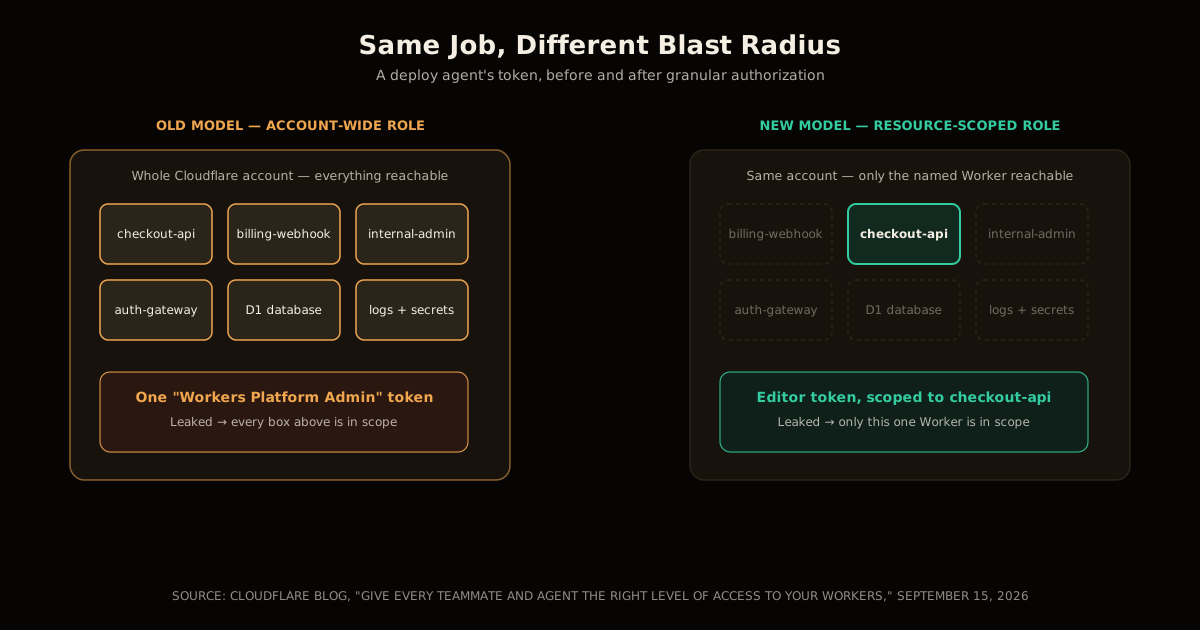
Most Cloudflare accounts hand out access the same way most AWS accounts did in 2014: one login, one blast radius. Give a teammate — or an agent — enough access to deploy one Worker, and until today they could also read every other Worker’s code, tail every log, and delete resources that have nothing to do with their job. Cloudflare’s own framing of why this shipped now is blunt: “The last thing you want is for an agent to make a change in production, just because it was granted more access than it needs.”
What is Cloudflare’s granular Workers authorization?
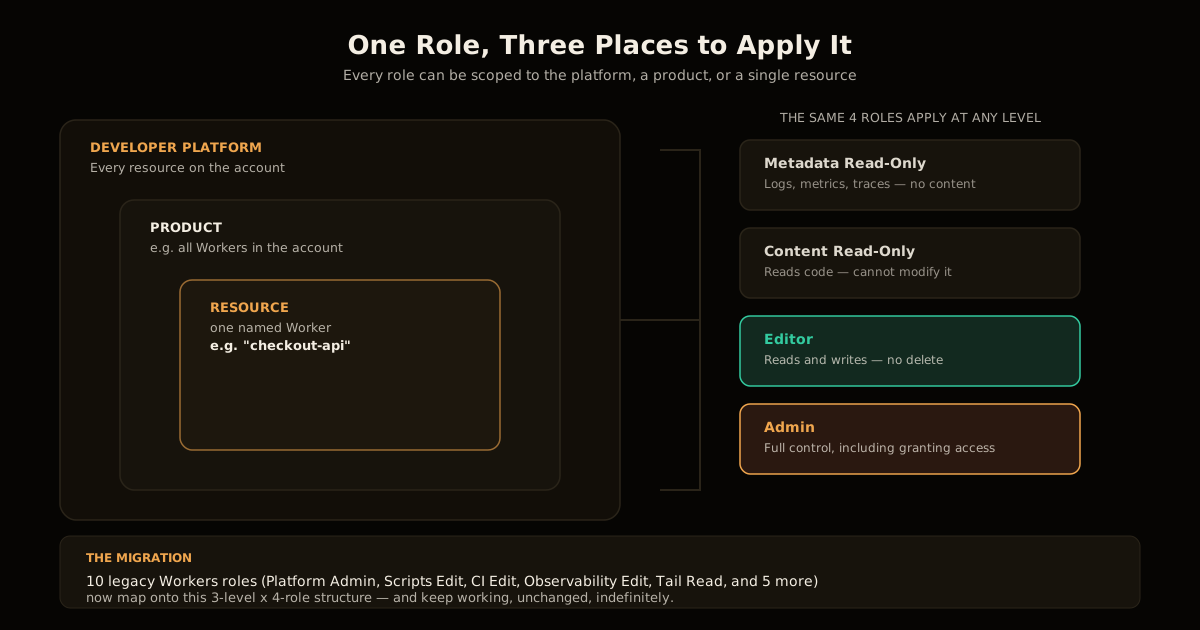
Granular Workers authorization is resource-scoped access control, replacing Cloudflare’s old model where a role applied to your entire account. It works across three levels — the whole Developer Platform, a product such as Workers, or one named resource such as a single Worker — and at every level you pick from the same four roles. Assign Editor to one Worker and the grant stops at that Worker’s boundary; nothing else in the account is reachable through that policy.
This is not a Workers-specific quirk bolted onto the existing role list. It is a redesign of what a “role” means on the platform, and it is live for every customer today — no beta flag, no waitlist.
The four roles, from read-only to admin
Four roles cover every access pattern Cloudflare identified, and each one has a plain-language boundary you can check a policy against before you grant it:
| Role | Can it see content? | Can it write? | Can it create or delete? | Typical grantee |
|---|---|---|---|---|
| Metadata Read-Only | No — settings, metrics, logs, traces only | No | No | An on-call agent debugging a latency spike |
| Content Read-Only | Yes — Worker code, D1 content | No | No | A code-review bot inspecting a deploy |
| Editor | Yes | Yes — content and settings | No | A CI/CD pipeline or deploy agent |
| Admin | Yes | Yes | Yes — plus granting access to others | A human platform owner |
Read that table as a checklist, not a ladder. An agent that only needs to explain why a Worker is slow should never hold more than Metadata Read-Only — it has no legitimate reason to read the Worker’s source, let alone change it. An agent that deploys builds needs Editor, and stops exactly there: it cannot delete the Worker, cannot create a new one, and cannot hand its own access to another identity.
Why AI agents and CI/CD needed this
The problem this closes is specific, and Cloudflare names it directly: agents and automated pipelines were, until now, forced into the same account-wide roles a human administrator uses. A GitHub Actions job that only deploys checkout-api had no way to hold a token that couldn’t also touch billing-webhook or internal-admin-panel, because the token’s role lived at the account level, not the resource level.
That gap matters more with every agent you add, not less. Cloudflare’s second point on this is the operational one: “If the workflow is misconfigured or its token is exposed, the impact remains contained.” A leaked account-admin token is a full-account incident — rotate everything, audit every resource, assume compromise everywhere. A leaked Editor token scoped to one Worker is a one-resource incident: roll that Worker back, rotate that one credential, move on. The failure mode didn’t change; what changed is how far it spreads when it happens, which is the entire point of least privilege.
This is the same shape of problem as securing MCP write tools with risk tiers and giving an agent CMS write access without melting the cache — in both cases, the fix was refusing to let a tool’s blast radius exceed its job. Cloudflare just applied the same idea one layer down, at the account’s own access-control system instead of at an application built on top of it.
How to scope AI agent access to Cloudflare Workers in 5 steps
Work through this whenever you’re about to grant a new agent, pipeline, or teammate access to a Worker:
Name the job, not the person. Write down the single task the identity performs — “deploys
checkout-apion merge to main,” not “helps with the checkout project.” Vague jobs produce over-broad grants.Pick the role from the table above, not the next one up. If the job is read-only debugging, that’s Metadata Read-Only, full stop — resist the urge to grant Content Read-Only “just in case it needs to see the code later.”
Scope it to the resource, not the product. In Manage Account → Members, select the member or service account, and create a policy naming the specific Worker rather than “all Workers,” unless the job genuinely spans every Worker you own.
Generate a scoped API token for anything unattended. A CI/CD pipeline or an autonomous agent should never hold a human’s dashboard session — issue a token carrying only the role and scope from steps 2 and 3.
Check the Routes exception before you ship it. If the job ever changes a route or a custom domain, Editor on the Worker is not enough — see the next section before you assume the deploy will work.
What breaks if you forget the Workers Routes permission?
Editor access on a Worker is not sufficient to change that Worker’s routes. Routing decides which zone’s traffic reaches a Worker, and a zone is a resource the Worker’s own scope doesn’t cover — so Cloudflare requires Editor on the Worker and a separate Workers Routes permission granted on the zone. Skip the second half and your deploy agent’s route update will fail with a 403, even though the same token can happily push new code.
This is a deliberate seam, not a bug to route around with a broader grant. It exists so that owning a Worker never implicitly grants the power to redirect a domain’s traffic to it — the same reasoning behind treating MCP tool annotations as untrusted unless the server is trusted: a capability that looks adjacent to what you granted is not the same capability, and the platform shouldn’t pretend otherwise. If your pipeline touches routes or custom domains, budget for granting both permissions up front instead of debugging a cryptic 403 during a deploy window.
What happens to your old Workers roles
Nothing breaks today. Cloudflare is keeping ten legacy role types alive and mapped onto the new model rather than force-migrating every account on launch day:
- Workers Platform (Read-Only) and Workers Platform Admin
- Workers Scripts Read and Workers Scripts Edit
- Workers CI Read and Workers CI Edit
- Workers Observability Read, Workers Observability Edit, and Workers Observability Telemetry Edit
- Workers Tail Read
Cloudflare’s stated policy is to support these “indefinitely,” with advance notice before any deprecation. Practically, that means you can leave existing service tokens alone and start using the four-role model only for new grants — there’s no forced cutover to plan around, and no reason to rush a migration that risks breaking a working pipeline.
Where this still falls short
The scope is Workers only, for now. If your agent’s job touches a D1 database, an R2 bucket, or a KV namespace bound to that Worker, those products don’t yet have resource-level roles of their own — you’re still granting whatever access model each product currently exposes, separately from the Worker’s role. Cloudflare has named D1, R2, and KV as the next products in line, but until that ships, a fully least-privilege agent pipeline touching multiple product types will have an inconsistent access model stitched across them.
The other limit is organizational, not technical: User Groups let you assign a policy once and add members for automatic inheritance, which is convenient, but it also means a misconfigured group policy now affects every member added to it later. Treat group-level grants with the same scrutiny you’d give an individual Admin grant — the blast radius is different, not smaller.
Common mistakes when scoping agent access
Granting the product-wide scope “to save time.” Scoping to “all Workers” instead of the one Worker an agent actually deploys defeats the entire point of the September 2026 change — you’ve recreated the old account-wide blast radius one level down.
Reusing a human’s Editor grant for a pipeline token. A service identity should get its own scoped token, generated for step 4 above, not a copy of a person’s dashboard permissions. Tokens and people rotate on different schedules and get revoked for different reasons.
Assuming Editor covers routing. As covered above, it doesn’t — plan for the separate Workers Routes permission wherever your pipeline touches a domain, not after the first failed deploy.
Treating the legacy roles as deprecated today. They aren’t. There’s no urgency to rip out working service tokens; the urgency is only in not creating new account-wide grants going forward.
The takeaway
Cloudflare closed a real gap: agents and CI/CD pipelines no longer have to borrow account-admin-shaped access just to deploy one Worker. Four roles, three scope levels, and a token that can’t reach anything outside its named resource is the least-privilege baseline every automated identity on the platform should have had from day one. It isn’t complete — D1, R2, and KV are still catching up — but it’s the right shape, and it costs nothing to start using on your next new grant.
Cloudflare shipped a related agent pattern the same season: Turnstile Spin proposes a scoped, reviewable fix instead of an unattended one — worth reading if you’re deciding how much autonomy to give an agent touching security-relevant config anywhere else on the platform. Once an agent’s Worker access is scoped this tightly, the next place to look is what it costs to run: reducing S3 storage costs covers the same Cloudflare R2 that a scoped Worker identity would read from or write to.
FAQ
What is Cloudflare’s granular Workers authorization? A permission system, GA since September 15, 2026, that scopes access to one Worker, one product, or the whole Developer Platform instead of only the whole account, using four roles in place of ten legacy Workers role types.
What are the four new Workers roles? Metadata Read-Only, Content Read-Only, Editor, and Admin — each one strictly containing the read/write/create-delete capabilities of the role below it.
How do I give an AI agent access to only one Worker? Create a policy in Manage Account → Members scoped to that Worker with the Editor role, or generate an API token carrying the same scoped permission for unattended use.
What happens to my old Workers roles? They keep working. Ten legacy roles are mapped onto the new model and supported indefinitely, with advance notice before any deprecation.
Does this cover D1, R2, and KV yet? No — Workers only today. Cloudflare has named those three products as next in line for the same model.
Why do I need both Editor access and the Workers Routes permission to change a route? Because a route affects a zone, which the Worker’s own scope doesn’t cover; Cloudflare requires both grants so owning a Worker never implies the power to redirect a domain’s traffic.
Related reading: scoping access is half the job; the other half is making an agent’s claims verifiable, which grounding AI agent findings in evidence covers.
Sources
- Give every teammate and agent the right level of access to your Workers — Cloudflare Blog, September 15, 2026. The announcement: role definitions, scope levels, legacy role list, and the routes-permission requirement.
- Cloudflare account roles documentation — Cloudflare Developers docs. Reference for how account-level roles and permission grants work on the platform.
- Model Context Protocol specification, 2026-07-28 — the tool-annotation trust boundary this post draws the routes-permission comparison from.
Frequently asked questions
Google Search · Preferred sources
Prefer this site on Google
If you already read this writing, add umesh-malik.com as a Preferred Source. Google can then highlight it with a preferred badge in Top Stories, AI Overviews, and AI Mode — for you, not as a site-wide ranking boost.
Related Articles

AI Security
How to Secure MCP Write Tools: Cloudflare's WriteGuard Lesson
How to secure MCP write tools: the spec puts confirmation on the client — the one layer you don't control. Cloudflare's WriteGuard moves the gate server-side.

AI Security
Configure Cloudflare Access for Workers: auth before your code runs
Cloudflare Access for Workers checks requests before your code runs — no JWT validation. The three scopes, the local-dev config, and what it still misses.

AI Security
MCP Write Controls: Lessons from Cloudflare WriteGuard
MCP write controls decide what your agents can break. Cloudflare's WriteGuard shows the pattern: per-tool risk tiers, agent attribution, central audit.
Keep reading
Get new posts on AI, Claude Code & LLMs
New deep-dives on AI engineering, Claude Code, and developer tooling — follow along however you prefer.
About the Author

Software engineer writing about AI, Claude Code, LLMs, OpenAI, Anthropic, and developer tooling. 5+ years building production systems at Expedia Group, Tekion, and BYJU'S.