Configure Cloudflare Access for Workers: auth before your code runs
Cloudflare Access for Workers checks requests before your code runs — no JWT validation. The three scopes, the local-dev config, and what it still misses.

TL;DR
Cloudflare Access for Workers attaches an identity policy to a Worker — or to every Worker in your account at once — and enforces it at the edge before your code executes, covering custom domains, routes, workers.dev subdomains and preview URLs automatically. Inside the Worker, ctx.access.getIdentity() hands you the authenticated email, name and groups with no JWT validation. It closes the “someone deployed an internal tool to the public internet” hole in one policy, but it authenticates rather than authorizes — your permission logic still has to exist.
What is Cloudflare Access for Workers?
Cloudflare Access for Workers is an authentication policy bound to the Worker itself rather than to a hostname, evaluated at Cloudflare’s edge before the request is routed to your code. It shipped to everyone on 14 August 2026.
The problem it targets is stated plainly in Cloudflare’s own framing: any employee can build an application, deploy it to the public internet, and accidentally expose internal work or company data. That has always been possible. What changed is the rate — when a working internal dashboard is forty minutes of prompting rather than a two-week project, far more of them exist, and the median one was never threat-modelled by anybody. This is the same gap between a thing that runs and a thing that is live that shows up everywhere AI compresses build time.
The honest version of the old advice — “put auth in front of it” — was never free. It meant an auth middleware in every Worker, a per-hostname Access application for each one, and a CF_Authorization cookie you validated yourself against Cloudflare’s public keys. Three places to get it wrong, per app, forever.
Why this could not exist before
The interesting part is architectural. Access previously matched on hostname, which is exactly the wrong key for Workers: one Worker answers on a custom domain, a route, a workers.dev subdomain, and a fresh preview URL per deploy. Protecting “the app” meant enumerating hostnames you did not know in advance.
Cloudflare’s FL2 rework separated Workers routing from Workers execution. Once those are distinct steps, Access can resolve which Worker a request is destined for before the routing decision commits — so the policy can be keyed to the Worker rather than to a name that happens to point at it.
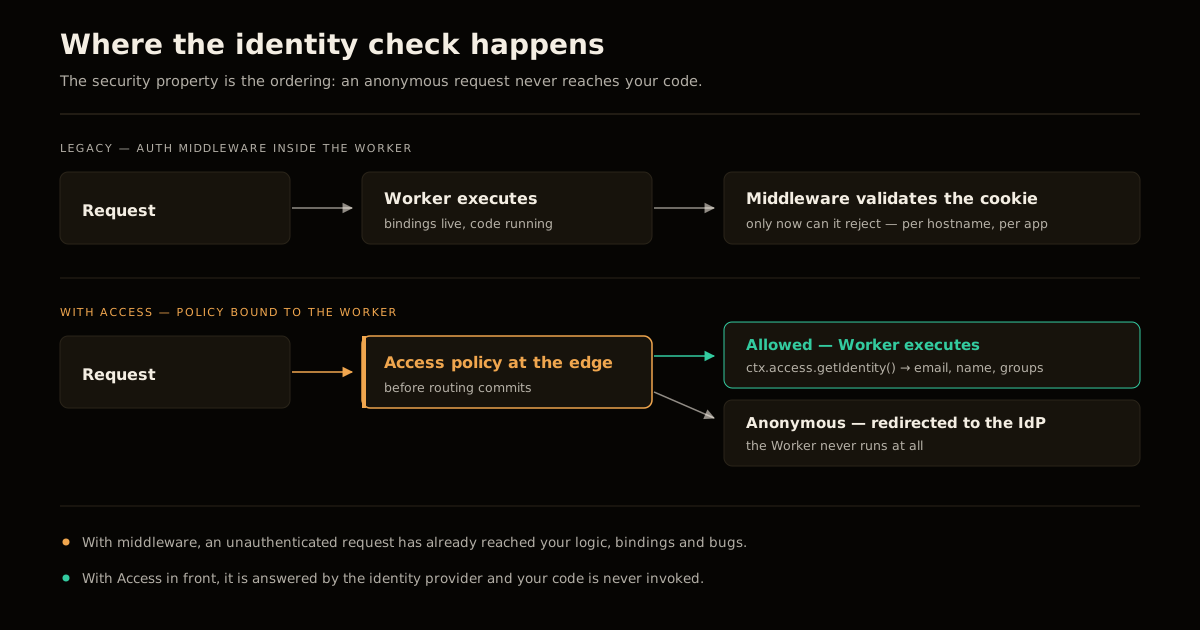
That ordering is the security property worth naming. With middleware, your code runs, parses a cookie, and decides to reject — an unauthenticated request has already reached your logic, your bindings, and your bugs. With Access in front, an anonymous request is answered by the identity provider redirect and your Worker never executes at all.
Every entry point, not the one you remembered
Because the policy binds to the Worker, all four of its entry points are covered at once:
| Entry point | Why it gets missed |
|---|---|
| Custom domain | The one people do remember |
| Route on a zone | Easy to add later and forget to re-protect |
workers.dev subdomain | Public by default, often left enabled after testing |
| Preview URL | Generated on every deploy — unlisted, not private |
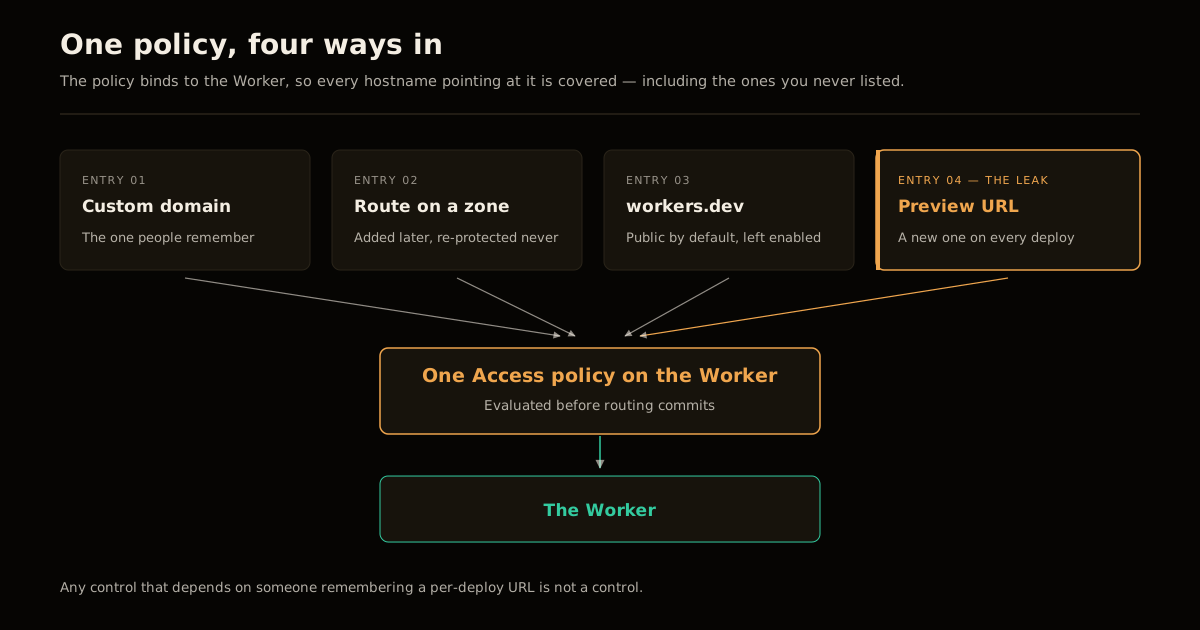
Preview URLs are the one that matters. They are unlisted rather than private, a new one appears on every deploy, and they are the artifact most likely to end up pasted into a chat thread with an external contractor in it. Any control that requires someone to remember a per-deploy URL is not a control.
The three scopes, and which one you actually want
Policies apply at three levels, and the blast radius differs sharply:
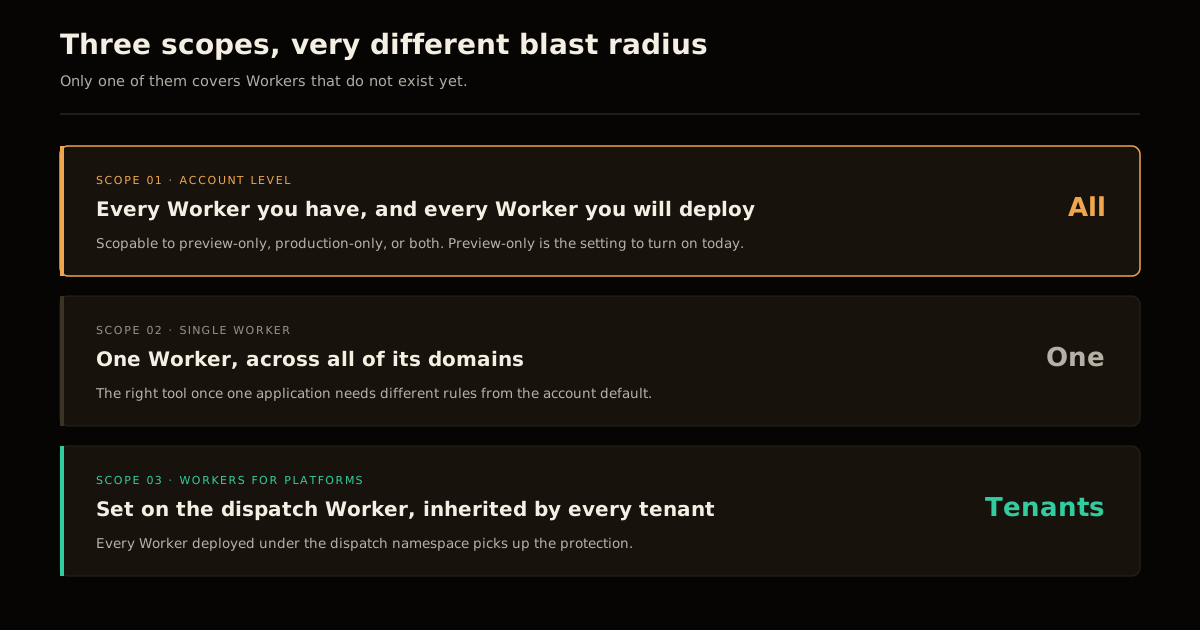
- Account-level — every Worker you have and every Worker you will ever deploy. Scopable to preview-only, production-only, or both.
- Single Worker — one Worker, across all of its domains.
- Workers for Platforms — set it on the dispatch Worker and every tenant Worker deployed under it inherits the protection.
The account-level policy scoped to preview deployments only is the setting most teams should turn on today. It is the closest thing here to a free win: it cannot break production routing, it applies to Workers nobody has written yet, and it shuts the exposure path that actually leaks. Production policies deserve per-application thought; preview URLs do not — none of them should ever have been public.
That “current and future” property is what makes it a control rather than a cleanup. A one-time audit of exposed Workers is stale the moment someone deploys again, which is the same reason offboarding checklists fail without enforced revocation.
Reading identity in the Worker
Inside a protected Worker, identity arrives on the context object:
export default {
  async fetch(request, env, ctx) {
    const identity = await ctx.access.getIdentity();
    // identity.email, identity.name, identity.groups
    return new Response(`Signed in as ${identity.email}`);
  }
};
No JWT validation, no public-key fetch, no cookie parsing. The audience tag is on ctx.access.aud if you need to distinguish which application policy matched.
This is a real reduction in code you own. Cookie-validation logic is exactly the kind of security code that is written once, copied between projects, and never revisited — and a subtly wrong verification is worse than none, because it looks like a control while admitting anyone who can forge the shape of a token.
Local development without a fake login
Add a dev block to wrangler.jsonc and wrangler dev will feed a simulated identity to ctx.access:
{
  "access": {
    "dev": {
      "aud": "my-app",
      "identity": {
        "email": "admin@example.com"
      }
    }
  }
}
Delete the block to exercise the unauthenticated path. Be precise about what this proves: you are testing your code’s handling of an identity, not Cloudflare’s enforcement of the policy. The enforcement only exists in front of a deployed Worker. A green local run says your happy path reads identity.email correctly — it says nothing about whether the production policy is actually attached, and those are the failures that matter.
What it does not solve
Access authenticates. It does not authorize.
Everyone who passes the policy arrives at your code as a legitimate user, and from there the questions are entirely yours: is this person allowed to see this tenant’s rows, trigger this job, delete this record. A policy that admits “anyone with a company email” in front of an internal admin tool is a meaningful improvement over the public internet and still not an access-control model. The same distinction applies to anything you expose to automation, which is why write-capable tools need their own controls beyond who is calling them.
Two more limits worth stating. Cloudflare’s announcement says this is available to everyone but discloses no pricing, plan, or seat details — check your own account before assuming an account-wide rollout is free. And this is browser-shaped, identity-provider-backed authentication; programmatic callers and machine traffic are a separate design problem, not something the one-click policy answers for you.
The mistakes I would expect
Assuming an account policy is retroactive protection. It covers requests from the moment it applies. Anything already scraped from an exposed preview URL is already gone, and turning on a policy is not an incident response.
Protecting production and leaving previews open. This is backwards, and it is the default instinct. Production usually has some auth already; the preview URL from three deploys ago has none and is still live.
Treating getIdentity() as an authorization check. It returns who, not what-they-may-do. Reading identity.email and proceeding is authentication theatre.
Shipping the dev identity block. An access.dev block with a hardcoded email is a local convenience. Verify what your deploy pipeline actually publishes, the same way you would with any credential that only belongs in development.
Leaving workers.dev enabled on a custom-domain app. The account policy covers it now, which is precisely why people stop noticing it is on. Disable the subdomain for apps that do not need it — defence in depth costs nothing here.
The one-click framing is accurate for the part it covers, and the part it covers is the one that leaks. Turn on the account-level preview policy, then go do the authorization work it was never going to do for you.
Frequently asked questions
What is Cloudflare Access for Workers?
It is an identity policy you attach directly to a Worker — or to every Worker in an account — so Cloudflare checks who the requester is before the request reaches your application code. It replaces the pattern of writing your own auth middleware inside the Worker, and it covers custom domains, routes, workers.dev subdomains and preview URLs automatically rather than one hostname at a time.
Do I still need to validate the Access JWT myself?
No. Inside a protected Worker you call ctx.access.getIdentity() and get the authenticated user’s email, name and groups back directly, with no JWT validation required. The audience tag is available as ctx.access.aud. This is the main developer-facing change — the older pattern of fetching Cloudflare’s public keys and verifying the CF_Authorization cookie yourself is no longer necessary for this case.
Does it protect Worker preview URLs?
Yes, and that is the most valuable part. Preview URLs, workers.dev subdomains, custom domains and routes are all covered automatically by the policy. Preview URLs are the classic accidental exposure — they are unlisted rather than private, they are generated on every deploy, and nobody remembers to lock them down individually.
Which policy scope should I use?
Start with the account-level policy scoped to preview deployments only. It applies to every current and future Worker, so nothing new can ship unprotected, and it leaves production routing untouched while you work out per-application policies. Per-Worker policies are the right tool once a specific app needs different rules from the account default.
How do I develop locally against an Access-protected Worker?
Add an access.dev block to wrangler.jsonc with an aud value and a simulated identity object, and wrangler dev will feed that identity to ctx.access as if you had logged in. Removing the block simulates an unauthenticated request, which is how you test the denied path. You are testing your code’s handling of an identity, not Cloudflare’s enforcement of the policy.
Does Access replace authorization inside my application?
No. Access answers “is this a person we know” — it does not answer “is this person allowed to do this”. Anyone who passes the policy reaches your code as a valid user, so role checks, tenant scoping and destructive-action guards still belong in the Worker. Treat Access as the outer gate, not the whole access-control model.
Access secures who reaches a Worker; it doesn’t touch the TLS handshake that gets a request there in the first place. If you terminate TLS anywhere outside Cloudflare’s edge, the post-quantum TLS migration checklist covers the other transport-layer upgrade worth checking on those endpoints.
Sources
- Cloudflare, Secure all your internal vibe-coded applications — in one click — the announcement, the FL2 routing/execution split, the three policy scopes and the
ctx.accessAPI. - Cloudflare Docs, You can now enable Access on a Worker or all Workers at once — the 14 August 2026 changelog entry and the
wrangler.jsoncdev configuration. - Cloudflare One Docs, Validate JWTs — the manual
CF_Authorizationverification flow this replaces.
Frequently asked questions
Google Search · Preferred sources
Prefer this site on Google
If you already read this writing, add umesh-malik.com as a Preferred Source. Google can then highlight it with a preferred badge in Top Stories, AI Overviews, and AI Mode — for you, not as a site-wide ranking boost.
Related Articles

AI Security
How to Scope AI Agent Access to Cloudflare Workers, Not Admin
Cloudflare's new roles let you scope AI agent access to Cloudflare Workers per resource, not per account. Four roles, ten legacy ones replaced, 5 steps.

AI Security
Plugin Registry Security: Signed Packages Beat a Trusted Gatekeeper
Plugin registry security doesn't need one trusted gatekeeper: EmDash signs every release with AT Protocol and sandboxes plugins by capability, not by review.

AI Security
How to Block AI Training Without Losing Search Visibility
Block AI training without losing search by setting one toggle. Bot Preference Sync writes robots.txt from your dashboard — no static file to maintain.
Keep reading
Get new posts on AI, Claude Code & LLMs
New deep-dives on AI engineering, Claude Code, and developer tooling — follow along however you prefer.
About the Author

Software engineer writing about AI, Claude Code, LLMs, OpenAI, Anthropic, and developer tooling. 5+ years building production systems at Expedia Group, Tekion, and BYJU'S.