Agentic Browsing in PageSpeed Insights: How to Make Your Website AI-Ready (2026)
Agentic browsing in PageSpeed Insights grades your site for AI agents, not just humans. What the category checks, why Google added it, how to pass it.

Agentic browsing in PageSpeed Insights is the newest signal that your website’s audience is no longer just humans and search crawlers — it’s AI agents acting on a person’s behalf. Google now scores how usable your site is for that third audience, in the same tool you already use for Core Web Vitals.
TL;DR
- PageSpeed Insights now grades your site for AI agents, not just humans. Lighthouse 13.3 (May 7, 2026) added an Agentic Browsing category to the default config; PageSpeed Insights inherited it within two weeks. It sits next to Performance, Accessibility, Best Practices and SEO — and reports a ratio like
3/3, not a score out of 100. - It checks three things by default: a clean accessibility tree, a stable layout (low CLS), and a valid
llms.txtat your domain root. The wider Lighthouse category also audits WebMCP — annotated forms and registered agent tools. - Google added it because agents are now real traffic. Operator, Computer Use, Project Mariner, Perplexity and ChatGPT’s browse mode visit sites on a person’s behalf. A growing share of requests hitting your server are software, not people.
- You don’t fail for lacking AI features — the category is informational. But “AI-ready” is now a measurable, public number, and it’s about to become a competitive one.
- Proof it’s achievable: a real Lighthouse 13.4 run on my own site,
umesh-malik.com, scores Agentic Browsing 3/3 and 100 on Accessibility, Best Practices and SEO — and it passes 7/7 on the isitagentready.com protocol-discovery checklist — using nothing but static files and one Cloudflare Worker. Here’s exactly how, so you can copy it.
Your Website Is Now Being Graded for Robots
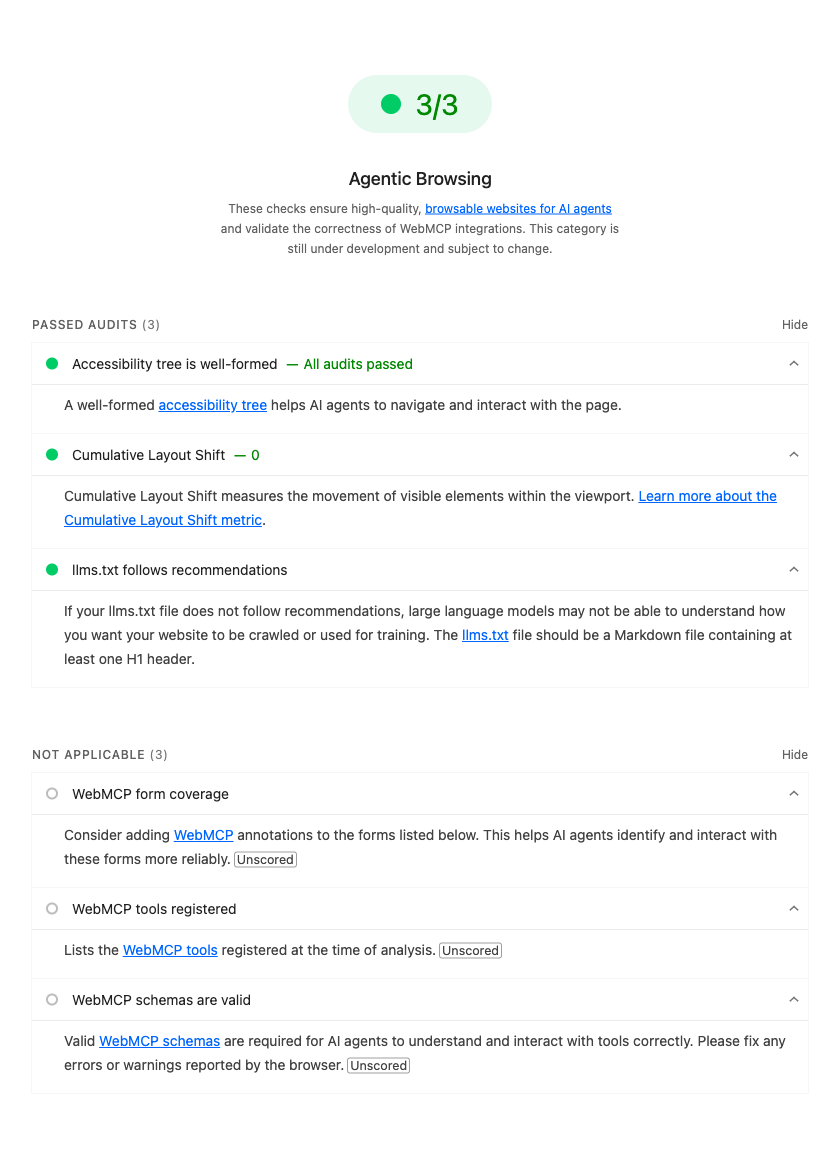
Open pagespeed.web.dev, run a report, and you’ll see something that wasn’t there a month ago: a category called Agentic Browsing, sitting right alongside Performance and SEO. It doesn’t show a number out of 100. It shows a ratio — 2/3, 3/3 — and a short list of checks with names like “accessibility tree” and “llms.txt”.
That ratio is not measuring how fast your page loads or whether your headings are in order. It’s measuring how well an AI agent can read your page, understand it, and act on it — with no human in the loop.
This is the quiet half of a shift that’s been building all year. We spent two decades optimizing for two audiences: humans who read, and crawlers that index. There’s now a third, and it behaves like neither. An agent doesn’t skim your hero copy or admire your animations. It wants structure it can parse, facts it can extract, and tools it can call. Google just turned “are you ready for that audience?” into a number anyone can pull up.
💡 Key insight: SEO made your site findable. GEO made it quotable. Agentic Browsing makes it usable by software. These are three different jobs, and the third one is now scored in the same tool you already use for Core Web Vitals.
What Is Agentic Browsing in PageSpeed Insights?
Agentic Browsing is a Lighthouse category that scores how ready a page is for an AI agent to read it, understand it, and act on it without a human driving. It was introduced in Lighthouse 13.3 on May 7, 2026, moved straight into the default config, and PageSpeed Insights picked it up within a couple of weeks. As of mid-June 2026 it’s live for everyone.
A few things make it behave differently from every other Lighthouse category:
- It reports a ratio, not a score out of 100. You’ll see
3/3, not92. It’s a count of passed checks, not a weighted index. - It’s marked “under development.” The exact audits and the way they’re scored will change. Don’t carve a
3/3into your OKRs yet. - It won’t fail you for having no AI features.
example.com— a page with almost nothing on it — earns a perfect ratio. This is a checklist of opportunities, not a penalty box.
In PageSpeed Insights, the default result is built from three checks. The broader Lighthouse category runs four audits:
| Audit | What it measures | Why an agent cares |
|---|---|---|
| Accessibility tree | Is the page's a11y tree well-formed? | The a11y tree is a compact, semantic map of the page — far cheaper to parse than raw HTML or a screenshot |
| Layout stability (CLS) | Cumulative Layout Shift | Agents that screenshot a page get confused when the layout keeps jumping under them |
| llms.txt | Is there a valid llms.txt at the domain root? | A hand-authored map of your site: what it is, what matters, where to read more |
| WebMCP | Declarative form annotations + registered agent tools | Lets an agent call your site instead of guessing at your forms |
Notice what’s not there: nothing about keywords, backlinks, or meta descriptions. This audit is about machine comprehension and machine action, full stop.
Why Google Added It — Agents Are Real Traffic Now
The cynical read is “Google wants another number to chase.” The accurate read is simpler: a meaningful and growing share of the requests hitting public web servers are agents, not humans — and the tooling finally caught up to that reality.
Look at who’s browsing on a user’s behalf in 2026: OpenAI’s Operator, Anthropic’s Computer Use, Google’s own Project Mariner, Perplexity, and ChatGPT’s browse mode. These don’t issue a query and read ten blue links. They get a task — “compare these three products and book the cheapest one that ships by Friday” — and they execute it across multiple sites. To do that, they have to read your page, model what’s on it, and act.
When an agent hits a page built only for human eyes, three things go wrong:
- Comprehension is expensive. Feeding raw HTML or a screenshot into a model burns tokens and invites mistakes. A clean accessibility tree is an order of magnitude cheaper to reason over.
- Action is fragile. If your “Add to cart” is a
<div>with anonclick, an agent has to guess. Annotated forms and registered tools remove the guessing. - Discovery is a coin flip. Without an
llms.txtor a tool manifest, the agent has to reverse-engineer your site’s structure every single visit.
How It Helps Developers (and Agents)
For agents, the payoff is obvious: cheaper comprehension, reliable action, less hallucination about what your site does.
For developers, the wins are quieter but real:
WHAT YOU ACTUALLY GET
This isn't charity for robots. An agent-ready site is a better-engineered site, and the audit gives you a public scorecard for work that used to be invisible.
CITATIONS & TRAFFIC
Get surfaced in AI answers
A clean structure and a maintained llms.txt make your content easier for assistants to quote — and quoting is the new ranking.
- Higher chance of citation in ChatGPT, Perplexity, AI Overviews
- Your facts, attributed, instead of a competitor's paraphrase
A FREE A11Y AUDIT
The a11y tree check pays double
A well-formed accessibility tree helps screen readers AND agents. One fix, two audiences. There is no version of this that isn't worth doing.
- WCAG wins for free
- Semantic HTML you should have shipped anyway
A NEW SCORECARD
Invisible work becomes measurable
Shipping structured data and discovery files used to be a leap of faith. Now there is a public number that says you did it.
- Concrete target for stakeholders
- A diff you can point at in review
AGENT-NATIVE FEATURES
WebMCP turns pages into tools
Annotate your forms and register tools, and an agent can transact with your site reliably instead of scraping and guessing.
- Bookings, search, filters become callable
- Fewer broken agent flows on your domain
How to Make Any Website AI-Ready
Here’s where it gets practical. The PageSpeed category is the headline, but the fuller checklist lives at isitagentready.com — a free scanner that groups agent-readiness into five categories. I’ve used its taxonomy to structure the work below, because it maps cleanly onto what agents actually look for.
| Category | What to ship | Effort |
|---|---|---|
| Discoverability | robots.txt, sitemap, Link response headers, DNS-AID | Low — mostly config |
| Content accessibility | Markdown content negotiation (serve .md to agents) | Medium |
| Bot access control | AI-bot rules in robots.txt, Content-Signal, Web Bot Auth | Low to medium |
| Protocol discovery | MCP server card, Agent Skills, WebMCP, API catalog, OAuth discovery, auth.md | Medium — the deep end |
| Commerce | x402, MPP, UCP, ACP | Only if you sell |
You don’t need all five. A blog needs the first four and can ignore commerce entirely. A store needs all five. Work top-down — discoverability is the cheapest and highest-leverage.
THE AGENT-READY ROLLOUT, IN ORDER
Each step is independently shippable. Stop whenever the cost stops being worth it for your site — but the first three are nearly free.
STEP 1 — DISCOVERABILITY
Let agents find your stuff
Publish a robots.txt that explicitly names AI crawlers, a real sitemap, and Link headers on your HTML that point to your discovery files. This is config, not code.
- Allow ClaudeBot, GPTBot, OAI-SearchBot, PerplexityBot, Applebot, Google-Extended
- Emit RFC 8288 Link headers to your api-catalog, llms.txt and feeds
Why this step existsAgents stop reverse-engineering your structure on every visit.
STEP 2 — llms.txt + CLEAN STRUCTURE
Hand the agent a map
Add a valid llms.txt at your domain root: an H1, a real description, and links to your best content. Then make sure your pages render as a clean accessibility tree — semantic HTML, real headings, DOM components instead of images-of-text.
- H1 + description + links (the three things the audit checks)
- Replace screenshot-style diagrams with real DOM/tables
- Keep Cumulative Layout Shift low so screenshotting agents aren't confused
Why this step existsYou pass all three default PageSpeed Agentic Browsing checks.
STEP 3 — BOT ACCESS CONTROL
Say yes (or no) on purpose
Use Content-Signal directives in robots.txt to declare how your content may be used — training, search, AI input. This is your policy, stated in machine-readable terms instead of left ambiguous.
- Content-Signal: ai-train, search, ai-input
- Explicit per-bot allow/deny rules
- Optional: Web Bot Auth for cryptographically verified agents
Why this step existsYour usage policy is explicit and enforceable, not implied.
STEP 4 — PROTOCOL DISCOVERY
Become callable, not just readable
This is the deep end. Stand up an MCP server so agents can call typed tools instead of scraping HTML, publish a server card and an api-catalog so they can find it, and register WebMCP tools for in-page actions.
- MCP server + /.well-known/mcp server card
- /.well-known/api-catalog (RFC 9727 linkset)
- WebMCP via navigator.modelContext for browser-side agents
- auth.md + OAuth discovery — even just to honestly declare "anonymous, no auth"
Why this step existsAgents transact with your site reliably instead of guessing.
💡 Key insight: The single highest-leverage change most sites can make is also the most boring — stop rendering text and diagrams as images. An image of a table is invisible to the accessibility tree. A real
<table>(or a component that renders one) is readable by screen readers, crawlers, and agents in one shot. I’ll come back to this, because it’s exactly how I scored my own site.
If you want to go deeper on the callable layer, I wrote a full walkthrough of building a production MCP server and deploying it on Cloudflare Workers — that’s the same server backing the numbers below.
Proof: How AI-Ready Is umesh-malik.com?
Talk is cheap, so here’s the receipt. I ran my own site — umesh-malik.com — through Lighthouse 13.4 (the engine behind PageSpeed Insights) and the isitagentready.com checklist. This site is a SvelteKit SSG — fully static, one Cloudflare Worker, no special infrastructure. Everything below ships from files in a public repo.
The Agentic Browsing category comes back 3/3 — every weighted check passing:
umesh-malik.com — REAL LIGHTHOUSE 13.4 SCORECARD (JUNE 2026)
3/3
Agentic Browsing
a11y tree ✓ · CLS 0 ✓ · llms.txt ✓
100
Best Practices
no third-party cookies, clean console
100
Accessibility
WCAG AA, semantic DOM
100
SEO
structured data + canonical meta
Here’s the honest, category-by-category breakdown — including what the site doesn’t have:
| Checklist item | umesh-malik.com | How |
|---|---|---|
| robots.txt + AI-bot rules | Yes | 30+ AI crawlers named; Content-Signal: ai-train=yes, search=yes, ai-input=yes |
| Sitemap + Link headers | Yes | Worker appends RFC 8288 Link headers to every HTML response |
| Markdown content negotiation | Yes | Accept: text/markdown serves /blog/<slug>.md and /llms.txt |
| llms.txt + llms-full.txt | Yes | Valid H1, description, ~3,500 words, every post linked |
| MCP server card | Yes | /.well-known/mcp/server-card.json — 4 tools, Streamable HTTP |
| Agent Skills + API catalog + WebMCP | Yes | agent-skills/index.json, RFC 9727 linkset, navigator.modelContext |
| OAuth discovery + auth.md | Yes | Honestly declares the site as public/anonymous — no fake auth server |
| DNS-AID + Web Bot Auth | Not yet | On the roadmap — newer, lower-leverage for a content site |
| Commerce (x402, MPP, UCP, ACP) | N/A | It's a portfolio + blog. Nothing to sell, nothing to fake. |
The result: the site passes every category that applies to it and scores 7/7 on protocol discovery. The 3/3 above is a real Lighthouse run, not a mockup — and I’m not pretending DNS-AID and Web Bot Auth are done, because they aren’t. (Note the three WebMCP audits show as Not Applicable in the screenshot: the site registers WebMCP tools in code, but Lighthouse’s WebMCP audits are still informational and didn’t score them on this page — an honest nuance of a category that’s openly “under development.“) That candor is the point. Agent-readiness is a real engineering state, not a vanity badge.
How I Actually Got Here (and How You Can Copy It)
None of this required a backend rewrite. The whole agent-discovery layer is one Cloudflare Worker plus a handful of static files:
THE EXACT MOVES — REPLICABLE ON ANY STATIC SITE
Track progress as you work through the list
0%
0/7 done
The most important line in that list is the one about diagrams as DOM components. This very post is the proof: every chart, table and step list you’ve scrolled past is a real Svelte component rendering semantic HTML — not a PNG. That’s why an agent (or a screen reader) can read all of it, and it’s a large part of why the accessibility-tree check passes. One decision, paid back across three audiences.
Common Mistakes to Avoid
- Chasing the ratio instead of the readiness.
example.comscores a perfect ratio with nothing real behind it. A green3/3on a site full of image-of-text content is a lie you’re telling yourself. Optimize the underlying state, not the badge. - Faking an auth server. If your site is public, say so in auth.md and OAuth discovery. Advertising endpoints that don’t exist breaks the agents that trust them. Honest “anonymous, no auth” beats a fictional token endpoint.
- Treating llms.txt as a keyword dump. It’s a map, not a meta-keywords tag. Give it a clear H1, a real description, and links to your genuinely best content. Stuffing it is the 2007 SEO mistake in a new file.
- Shipping images of text. The single most common thing that quietly fails the accessibility-tree check. If a human needs to read words in it, it should be real text, not a screenshot.
- Ignoring CLS because “it’s just SEO.” Layout that jumps confuses screenshot-based agents the same way it annoys users. Your Core Web Vitals work now pays an agentic dividend too.
The Bottom Line
Agentic Browsing in PageSpeed Insights is small today — a ratio, marked “under development,” consumed by tools that are themselves a year young. It would be easy to dismiss. Don’t.
The trajectory is unmistakable: agents are becoming a first-class audience for the web, Google just made their needs measurable, and the work to satisfy them is cheap, mostly static, and overlaps almost entirely with accessibility and good engineering you should be doing anyway. The sites that ship a clean accessibility tree, a real llms.txt, and a callable MCP endpoint now will be the ones agents reach for when the rest of the web is still serving them screenshots.
I made my own site agent-ready with a Worker and some static files, and I documented every move so you can do the same. Start with robots.txt and llms.txt this week. Then decide how deep into protocol discovery your site deserves to go.
Agentic Browsing & AI-Readiness — FAQ
Sources
- PageSpeed Insights — run the Agentic Browsing category on any URL
- Lighthouse release notes — 13.3 introduced the category on May 7, 2026
- llms.txt specification — the file the default audit validates
- isitagentready.com — the protocol-discovery checklist referenced in the proof section
Written for umesh-malik.com — no-fluff technical writing on AI, Web Dev, and Engineering. Curious how the callable layer works? Read How to Build a Production MCP Server next.
Google Search · Preferred sources
Prefer this site on Google
If you already read this writing, add umesh-malik.com as a Preferred Source. Google can then highlight it with a preferred badge in Top Stories, AI Overviews, and AI Mode — for you, not as a site-wide ranking boost.
Related Articles

AI Engineering
Ads for AI Agents: TIME Serves Crawlers a Different Site
Ads for AI agents are live. TIME serves crawlers a 42 KB markdown site with sponsored blocks; humans and Googlebot get 1.2 MB of HTML. I measured all of it.

AI Engineering
Agent context compaction: keep what the 150K cutoff drops
Agent context compaction drops every block before the summary at 150K tokens. What survives, what instructions silently replaces, and the usage field that lies.

AI Engineering
Agent Harness Design: Why an ARC-AGI-3 Score Tripled
Agent harness design decided a benchmark: OpenAI's ARC-AGI-3 score went 13.3% → 38.3% with zero model changes. What that means for your agent loop.
Keep reading
Get new posts on AI, Claude Code & LLMs
New deep-dives on AI engineering, Claude Code, and developer tooling — follow along however you prefer.
About the Author

Software engineer writing about AI, Claude Code, LLMs, OpenAI, Anthropic, and developer tooling. 5+ years building production systems at Expedia Group, Tekion, and BYJU'S.