How to Build Enterprise-Grade AI Agents for Free (MaxKB, 2026)
How to build enterprise-grade AI agents for free in 2026: a hands-on MaxKB + local LLM guide to RAG precision, security, and $0 API cost.

TL;DR
- How to build enterprise-grade AI agents for free: self-host MaxKB — an open-source (GPLv3, ~22k GitHub stars) agent platform — and point it at a local model like DeepSeek or Llama via Ollama, so you pay zero API tokens and no data ever leaves your server.
- “Enterprise-grade” isn’t a checkbox — it’s five things: answer precision, cost control, data-sovereign security, access control, and observability. Free tools can nail four of them out of the box.
- The one honest catch: MaxKB’s Community edition is free forever but capped (2 users, 5 apps, 50 knowledge bases). SSO, LDAP, and RBAC live in the paid Pro tier ($1,920/yr) — you can replace them yourself for $0 with more effort.
- Precision comes from your RAG pipeline, not the model. Chunking, hybrid search, a reranker, and a “cite or refuse” prompt matter more than which LLM you pick.
- MaxKB vs Dify vs n8n: pick MaxKB for a knowledge-grounded Q&A agent, Dify for a broad LLM app builder, n8n when the agent is one step in a bigger automation.
Most “Free AI Agent” Guides Are Lying to You
Here’s how to build enterprise-grade AI agents for free in 2026: self-host the open-source platform MaxKB, point it at a local model, and you get a document-grounded, tool-using agent with $0 API cost and zero data leaving your network.
Most other “free AI agent” tutorials are either toys or bait. The toy version wires ChatGPT to a prompt and calls it an “agent.” The bait version is free until step 7, when you hit a paywall, a per-token API meter, or a “contact sales” wall right as it gets useful. Neither gives you something you’d actually put in front of customers or run your internal knowledge base on.
This guide is the version I wish existed. We’re going to stand up a real, enterprise-grade AI agent — one that answers from your documents with citations, takes actions through tools, runs entirely on infrastructure you control, and costs $0 in API fees — and I’ll be honest about exactly where “free” stops and money starts. No hand-waving.
The vehicle is MaxKB, and by the end you’ll have a working agent plus a clear-eyed view of the five things that separate a demo from something you can trust in production.
What Is an Enterprise-Grade AI Agent?
An enterprise-grade AI agent is an AI system that answers or acts on your organization’s own data with measurable accuracy, keeps that data under your control, enforces who can do what, stays observable, and does all of it at a cost you can predict. “Enterprise-grade” is about trust and control — not about how big the model is.
People throw the phrase around like it means “expensive.” It doesn’t. A $30/month SaaS chatbot can be less enterprise-grade than a well-configured open-source stack running on a $40 VPS. What makes an agent enterprise-grade is whether it holds up on five pillars:
The five pillars of an enterprise-grade agent
Pillar 1
Effectiveness & precision
It answers from your real data and is right often enough to trust. Hallucinations are the enemy.
Pillar 2
Cost control
Predictable, ideally flat. No surprise token bills that scale with success.
Pillar 3
Security & data sovereignty
Sensitive documents never leave your network. You own the data and the model runtime.
Pillar 4
Access control
Who can see which knowledge base, edit which agent, call which tool — SSO, roles, audit.
Pillar 5
Observability
You can see what the agent retrieved, what it answered, and why — and improve it.
Keep these five in mind. Everything below maps back to them. The good news: a free, self-hosted stack wins pillars 1, 2, 3, and 5 outright. Pillar 4 is the one place “free” gets an asterisk, and we’ll deal with it head-on.
The $0 Stack: MaxKB + a Local Model
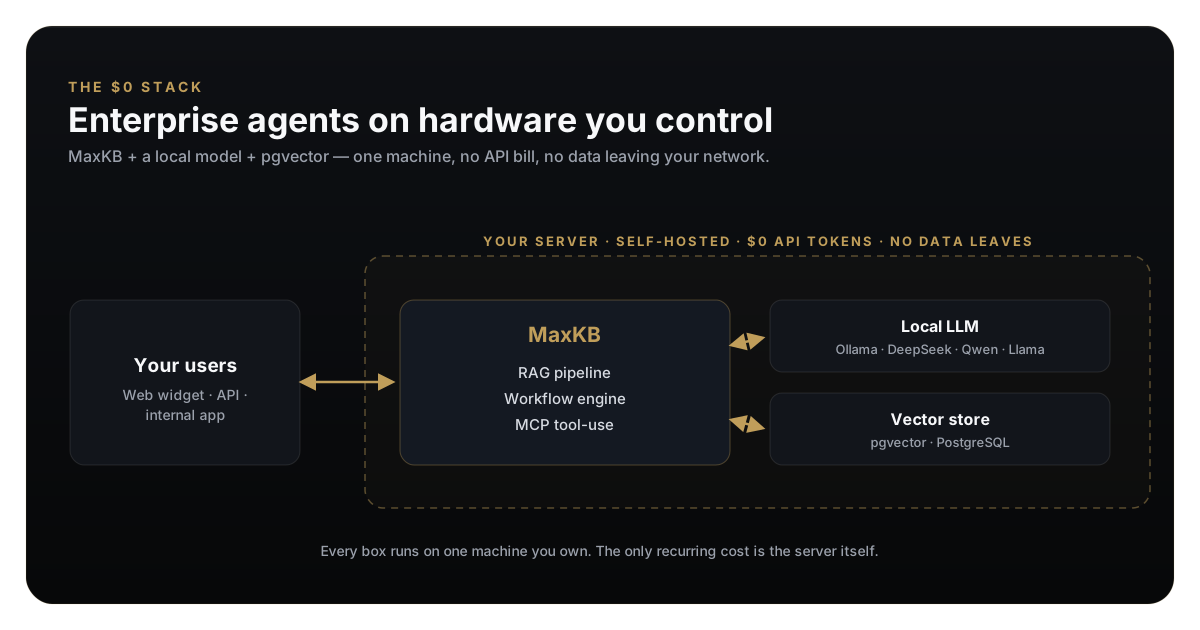
The cheapest enterprise-grade agent in 2026 is MaxKB running against a local LLM, both self-hosted on one machine. That’s the whole trick. MaxKB gives you the agent platform; a local model kills the API bill; self-hosting solves data sovereignty.
MaxKB (short for Max Knowledge Brain, built by the 1Panel team) is an open-source platform for building enterprise-grade agents. Its stack is boringly solid — Vue frontend, Django backend, LangChain under the hood, and PostgreSQL + pgvector as the vector store — which means no exotic dependencies and one-command deployment.
Out of the box it gives you a full RAG pipeline (upload docs or crawl a site → automatic chunking → vectorization), a visual workflow engine, and MCP tool-use so the agent can call external tools. Crucially, it’s model-agnostic — it’ll talk to OpenAI, Claude, and Gemini or to local models like DeepSeek, Qwen, and Llama.
That last part is the money-saver. Point MaxKB at a local model served by Ollama and your per-token cost drops to exactly zero.
Why this stack is the default for a free enterprise agent
$0
API token cost
local model via Ollama
~22k★
MaxKB on GitHub
GPLv3, active
100%
Data stays on-box
no third-party cloud
1 cmd
To deploy
single Docker container
How to Build Enterprise-Grade AI Agents for Free, Step by Step
Here’s the honest, end-to-end walkthrough. You need a machine with Docker installed — a laptop works for testing; for a local model you’ll want at least 16GB of RAM (more if you run larger models). Every step below is free.
The build
Six steps from an empty server to an agent answering from your documents — with no API key anywhere.
Step 1
Run MaxKB
One Docker command brings up MaxKB with its bundled PostgreSQL + pgvector.
Step 2
Serve a local model
Ollama pulls and serves a model locally. This is what makes token cost $0.
Step 3
Connect the model in MaxKB
Add Ollama as a model provider in the MaxKB UI — no API key, just a local URL.
Step 4
Build a knowledge base
Upload your PDFs/docs or crawl a site. MaxKB chunks, embeds, and indexes automatically.
Step 5
Create the agent + wire an MCP tool
Attach the knowledge base, set a grounding prompt, and give the agent a tool to act.
Step 6
Embed it
Drop the generated widget snippet on any site, or call the agent via its API.
Step 1 — Run MaxKB
One command. This maps a data volume so your knowledge bases survive restarts:
docker run -d --name=maxkb --restart=always
  -p 8080:8080
  -v ~/.maxkb:/var/lib/postgresql/data
  -v ~/.python-packages:/opt/maxkb/app/sandbox/python-packages
  1panel/maxkb
Open http://localhost:8080 and log in with the default credentials shown in the MaxKB docs. Change the password immediately — that’s the first line of your security checklist.
Step 2 — Serve a local model for $0
Install Ollama, then pull a model. DeepSeek and Qwen punch far above their weight for RAG in 2026:
# install ollama, then:
ollama pull deepseek-r1:7b        # reasoning model, runs on modest hardware
ollama pull nomic-embed-text      # embeddings for the RAG pipeline
Ollama now serves an OpenAI-compatible endpoint at http://localhost:11434. This is the whole reason your token bill is zero — inference happens on your hardware, not someone’s metered API.
Step 3 — Connect the model in MaxKB
In the MaxKB UI go to Model Settings → Add Model, choose the Ollama provider, and point it at your Ollama host. If MaxKB runs in Docker and Ollama runs on the host machine, use http://host.docker.internal:11434 as the base URL. Add both the chat model (deepseek-r1:7b) and the embedding model (nomic-embed-text). No API key required.
Step 4 — Build the knowledge base
Create a knowledge base, then either upload documents or paste a URL to crawl. MaxKB handles splitting, vectorizing, and indexing into pgvector automatically. Two settings decide your precision:
- Chunk size — too big and retrieval pulls in noise; too small and it loses context. Start around 500-800 tokens with overlap, then tune against real questions.
- Segment cleanup — strip navigation boilerplate and repeated headers before indexing. Garbage in the index is the number-one cause of confidently wrong answers.
Step 5 — Create the agent and give it a tool
Create an application, attach your knowledge base, and set a system prompt that enforces grounding — the “cite or refuse” rule:
Answer only from the provided knowledge base.
Cite the source document for every claim.
If the answer isn't in the knowledge base, say
"I don't have that information" — never guess.
Then wire an MCP tool so the agent can act, not just answer — look up an order, create a ticket, query a database. MaxKB’s function library and MCP support let you register tools the workflow can call. If you’re new to MCP, start with how to build an MCP server and deploying one on Cloudflare Workers.
Step 6 — Embed it
MaxKB generates an embeddable chat widget and a REST API. Paste the widget script into any page, or call the API from your backend. Zero front-end code required — this is the “zero-coding integration” MaxKB is built around.
The Five Pillars, Judged Honestly
A running agent isn’t the same as an enterprise-grade one. Let’s grade the free stack against the five pillars — including where it falls short.
Pillar 1 — Effectiveness & precision
Precision comes from the retrieval layer, not the model. This is the most important sentence in this article. Teams burn weeks swapping models when their real problem is a bad chunking strategy or no reranking. RAG works by retrieving relevant chunks and forcing the model to answer from those chunks, which is what crushes hallucinations.
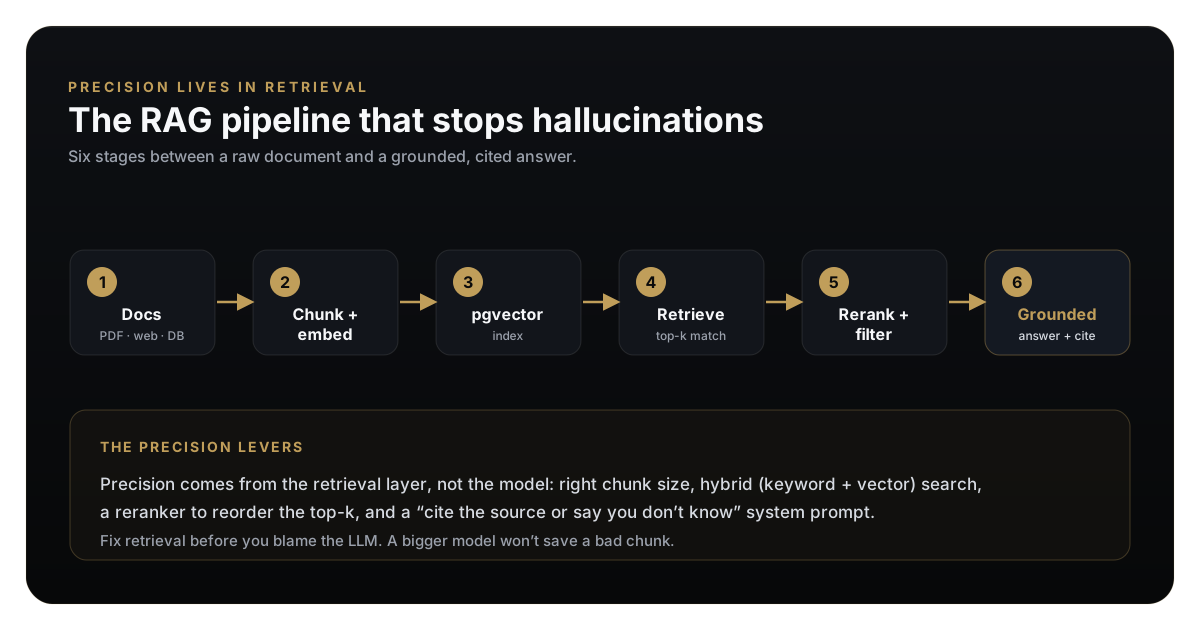
The precision levers, in order of impact:
- Chunking — right size + overlap, boilerplate stripped.
- Hybrid search — combine keyword and vector search so exact terms (part numbers, names) aren’t lost to fuzzy semantics.
- Reranking — reorder the top-k so the best chunk lands in the model’s context, not just a relevant one.
- A grounding prompt — “cite or refuse,” as above.
Nail those four and a 7B local model will out-answer a frontier model with a sloppy pipeline. If you want the full theory, read building a RAG pipeline from scratch.
Pillar 2 — Cost control
This is where self-hosting quietly wins. A metered API bills you more as you succeed; a per-seat SaaS bills you more as your team grows. A self-hosted local model turns both into one flat server bill that barely moves.
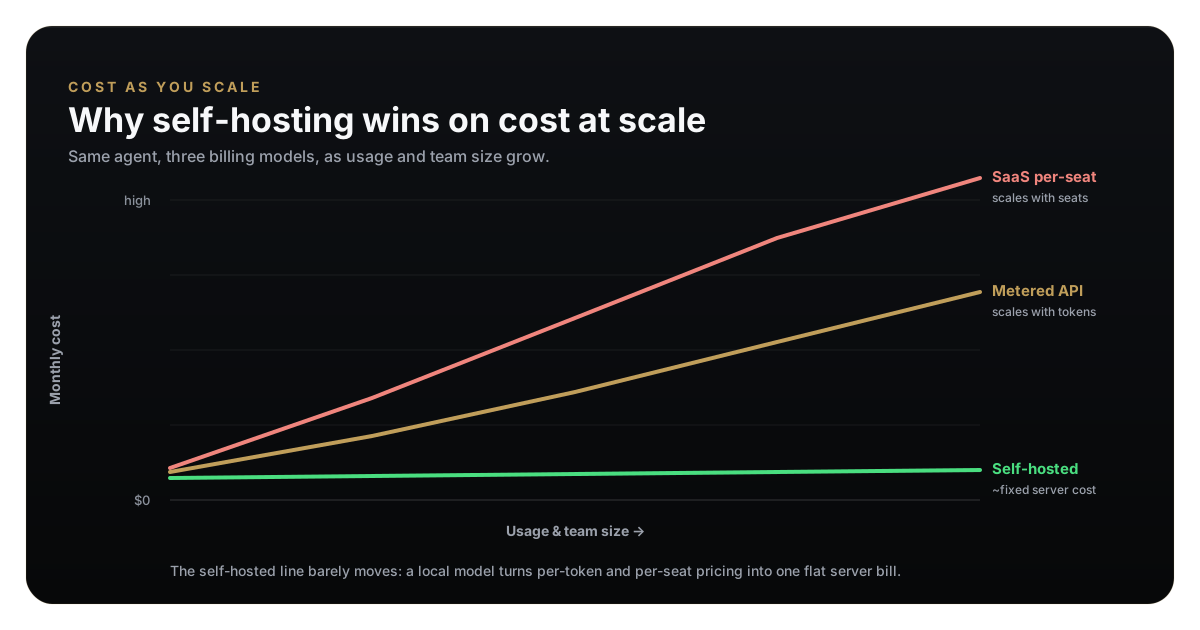
The tradeoff is real and worth stating: self-hosting trades a variable money cost for a fixed operational cost — you run the server, you patch it, you own uptime. For a small internal agent that’s a rounding error. At scale it’s a massive saving.
Pillar 3 — Security & data sovereignty
The strongest argument for this stack. When the model runs locally and MaxKB runs on your server, no document ever touches a third-party cloud. For anyone handling PII, health, financial, or regulated data, that alone can be the difference between “allowed” and “not allowed.” You’re not sending your knowledge base to an API you don’t control.
That’s the architecture being secure. You still have to harden the deployment:
Free self-hosting security checklist
Track progress as you work through the list
0%
0/7 done
For the broader threat model of agents that take actions, see the agentic AI enterprise security model.
Pillar 4 — Access control (the honest asterisk)
Here’s where free ends. MaxKB’s Community edition caps you at 2 users, and SSO, LDAP, and RBAC are Pro-tier features. If you need “marketing can only see the marketing knowledge base, support leads can edit agents, everyone logs in with Okta” — that’s the paid tier, or DIY work you take on yourself (an auth proxy in front, separate instances per team). I’d rather tell you that now than let you discover it at rollout.
Pillar 5 — Observability
MaxKB logs conversations and lets you inspect what was retrieved for a given answer, which is enough to debug precision and iterate on chunking. It’s not a full LLM-observability suite — if you need deep tracing and eval dashboards you’ll add tooling — but for “why did the agent say that?” you have what you need for free.
Where Does “Free” Actually End?
No dodging it. Here’s the exact line between $0 and paid, so you can plan.
MaxKB: free vs paid, honestly
Community (free)
$0The deal
2 users · 5 apps · 50 knowledge bases · full RAG, workflow & MCP · self-hosted
What you get
Perfect for a solo builder, an internal team agent, a POC, or a single customer-facing bot.
Professional
$1,920/yrThe deal
Unlimited users/apps/KBs · SSO · LDAP · RBAC · email support
What you get
When you need real multi-team access control and can't or won't DIY it.
DIY scale-free path
$0 + effortThe deal
Run multiple Community instances, add your own auth proxy, script your own backups
What you get
Stay at $0 by trading money for engineering time. Viable for small orgs, painful past a point.
My take: start on Community. It is genuinely free and genuinely capable. Only pay when access control across multiple teams becomes a real, present need — not a hypothetical one. Most people building their first agent are nowhere near the 2-user wall.
MaxKB vs Dify vs n8n: Which Free AI Agent Platform Should You Use?
“Free AI agent platform” returns a dozen tools that do overlapping-but-different things. Here’s how the honest contenders compare — and none of these are the same product.
| Tool | Best for | Free & self-host | RAG built in | The catch |
|---|---|---|---|---|
| MaxKB | Knowledge-grounded Q&A / support agents | Yes, GPLv3 | Yes — full pipeline | Free tier caps users; SSO/RBAC are paid |
| Dify | General LLM app / agent builder | Yes, open source | Yes | Broader but heavier to run and learn |
| n8n | AI as one step in a bigger automation | Yes, self-host | No — you assemble it | Not an AI-first product; you build the RAG |
| Ollama | Serving the local model itself | Yes, fully free | No — it's the runtime | A model server, not an agent platform |
The key insight: Ollama isn’t a competitor to MaxKB — it’s a component of the stack. MaxKB and Dify compete; n8n plays a different game (orchestration). Here’s how I’d choose:
Which one should you actually pick?
- Q&A / support
If your goal is… 01
An agent that answers from your docs with citations
Pick
MaxKB
Because
Purpose-built RAG + fastest path to a grounded, embeddable agent.
- app builder
If your goal is… 02
A flexible platform to build many different LLM apps
Pick
Dify
Because
Broader app-building surface if you'll build beyond knowledge Q&A.
- automation
If your goal is… 03
AI embedded inside a multi-tool business workflow
Pick
n8n (+ Ollama)
Because
It's an automation engine first; AI is one node among hundreds of connectors.
- the $0 lever
If your goal is… 04
Zero API cost on any of the above
Pick
Ollama
Because
Local model runtime that plugs into all of them and drops token cost to $0.
Common Mistakes That Kill Free Agents
Do this, not that
The difference between a free agent that embarrasses you and one you'd stake your name on.
What the good ones do
- Invest in the retrieval pipeline — chunking, hybrid search, reranking
- Use a dedicated embedding model, separate from the chat model
- Enforce a 'cite the source or refuse' grounding prompt
- Scope the knowledge base tightly — one domain per KB
- Harden the deployment before exposing it (HTTPS, no default password)
- Test against real user questions, not cherry-picked demos
What kills the bad ones
- Blaming the model when the real problem is bad chunks
- Dumping every document into one giant knowledge base
- Letting the agent answer from general knowledge, ungrounded
- Exposing the raw container port straight to the internet
- Ignoring the 2-user cap until rollout day
- Skipping backups of the pgvector volume
A free agent fails on operations and retrieval, almost never on the model. Get those right and $0 is genuinely enterprise-grade.
FAQ
How to build enterprise-grade AI agents for free — FAQ
Bottom Line
Free and enterprise-grade are not opposites in 2026 — that’s the myth this guide exists to kill. Self-host MaxKB, point it at a local model, invest in your retrieval pipeline, harden the box, and you have an agent that answers from your data with citations, keeps that data on your own hardware, and costs nothing per token. The only honest asterisk is multi-team access control, and you now know exactly when that bill arrives.
Start on the Community edition today. Build the narrow, useful agent — the one that answers your support questions or your internal docs — get the retrieval right, and let the results decide whether you ever need to pay.
If this was useful, read building a RAG pipeline from scratch next to push your agent’s precision further, or why 77% of AI agents never reach production to make sure yours is in the 23% that do.
Sources
- MaxKB — 1Panel-dev/MaxKB on GitHub (open-source, GPLv3)
- MaxKB official documentation
- MaxKB project site
- Ollama — run local models
Written for umesh-malik.com — no-fluff technical writing on AI, Web Dev, and Engineering.
Google Search · Preferred sources
Prefer this site on Google
If you already read this writing, add umesh-malik.com as a Preferred Source. Google can then highlight it with a preferred badge in Top Stories, AI Overviews, and AI Mode — for you, not as a site-wide ranking boost.
Related Articles

AI Engineering
Ads for AI Agents: TIME Serves Crawlers a Different Site
Ads for AI agents are live. TIME serves crawlers a 42 KB markdown site with sponsored blocks; humans and Googlebot get 1.2 MB of HTML. I measured all of it.

AI Engineering
Why 77% of Autonomous AI Agents Never Reach Production (2026)
Only 23% of autonomous AI agents reach production in 2026. The demo-to-production gap, why agents fail, and the playbook the winners actually use.
AI Engineering
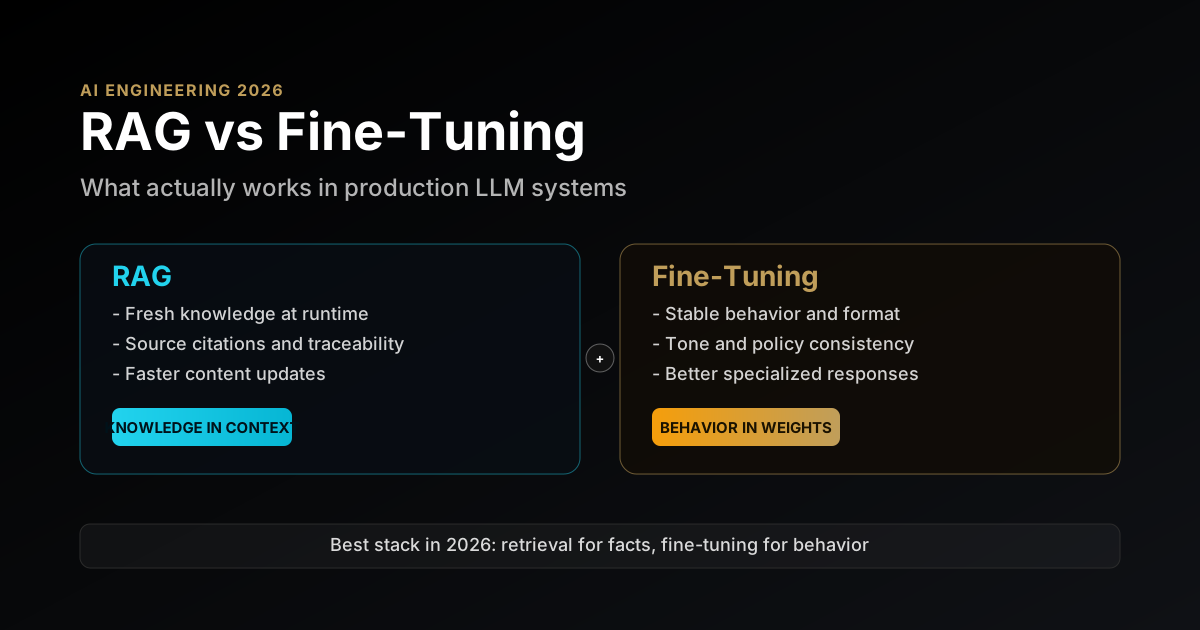
RAG vs Fine-Tuning for LLMs in 2026: A Production Decision Framework With Real Tradeoffs
RAG vs fine-tuning for LLMs in 2026: a practical decision framework covering architecture tradeoffs, cost, latency, and when to use each in production.
Keep reading
Get new posts on AI, Claude Code & LLMs
New deep-dives on AI engineering, Claude Code, and developer tooling — follow along however you prefer.
About the Author

Software engineer writing about AI, Claude Code, LLMs, OpenAI, Anthropic, and developer tooling. 5+ years building production systems at Expedia Group, Tekion, and BYJU'S.