ChatGPT Apps SDK and the Super App Reform: How Apps in ChatGPT Work (2026)
The ChatGPT Apps SDK explained: how apps in ChatGPT work, why it's built on MCP, who the launch partners are, and how developers build and submit apps.

OpenAI just turned ChatGPT into a platform — and the ChatGPT Apps SDK is how developers ship to it. The company stopped treating ChatGPT as a chatbot and started treating it as an operating system.
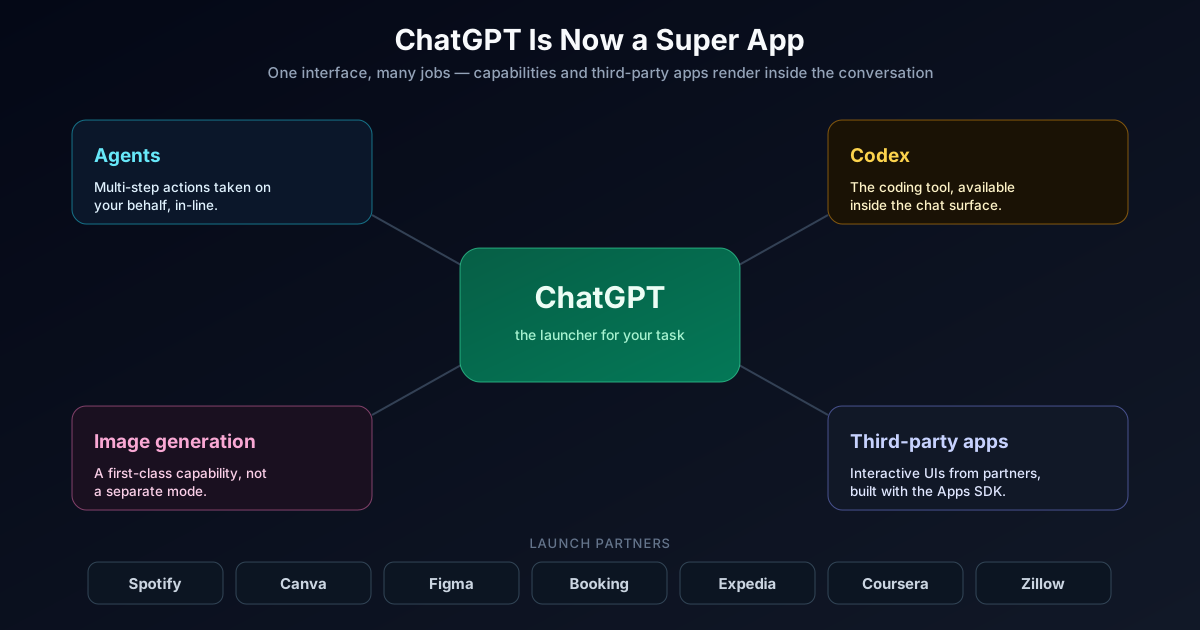
The 2026 reform — a “super app” redesign reportedly codenamed Aria — folds AI agents, the Codex coding tool, image generation, and a growing catalog of third-party apps directly into the main ChatGPT interface. For its ~900 million weekly users, the chat box is becoming a launcher: you ask for a playlist and Spotify renders inside the conversation, you ask for a place to stay and Booking.com shows up as an interactive card, you sketch an idea and Canva opens inline.
The thing that makes this real for developers is the Apps SDK — and the most important detail is that it is built on the Model Context Protocol (MCP). OpenAI did not invent a proprietary plugin format this time. It standardized on the same open protocol the rest of the industry is converging on, and added a UI layer on top.
The short answer: ChatGPT is now a distribution platform, and the Apps SDK is how you ship to it. If you build software, “being inside ChatGPT” is about to be a channel you have to think about — the way “being in the App Store” became one in 2008.
THE REFORM AT A GLANCE
900M
Weekly users
the new distribution surface
MCP
Built on
open standard, not a plugin silo
7+
Launch partners
Spotify, Canva, Figma, Booking…
Inline
App UIs
rendered in the conversation
WHO SHOULD READ WHAT
This covers three audiences: people who just want to understand the shift, developers who want to build, and teams deciding whether to invest.
Use this to skip to what matters
EVERYONE
You want to understand the change
Read what the super app is and why MCP matters.
Focus on
OutcomeYou will understand why this is bigger than "ChatGPT got plugins again."
DEVELOPERS
You want to build an app
Jump to how apps work and the build walkthrough.
Focus on
OutcomeYou will know exactly what an Apps SDK app is made of and how to ship one.
PRODUCT + STRATEGY
You are deciding whether to invest
Focus on the opportunity, the risks, and the checklist.
Focus on
OutcomeYou will leave with a clear-eyed view of the upside and the platform-dependency risk.
TL;DR
- OpenAI reworked ChatGPT into a super app: agents, Codex, image generation, and third-party apps live inside the main interface, reaching ~900M weekly users.
- The Apps SDK is how developers build those apps, and it is built on MCP (Model Context Protocol) — an open standard, not a closed plugin format.
- An app is an MCP server that lists tools, executes tool calls, and returns widgets — web UI components ChatGPT renders inline in the conversation via a sandboxed iframe.
- The UI talks to ChatGPT over a JSON-RPC bridge (postMessage) and can request inline, picture-in-picture, or fullscreen display via
window.openai.requestDisplayMode. - Launch partners included Booking.com, Canva, Coursera, Figma, Expedia, Spotify, and Zillow.
- Apps are available to logged-in users outside the EEA, Switzerland, and the UK on Free, Go, Plus, and Pro.
- Developers submit apps through a submission portal; approved ones land in the App Directory to be discovered and shared.
- Because it is MCP-based, the same app can run in other MCP Apps-compatible hosts — you build the UI once.
What the “Super App” Reform Actually Is
For years, ChatGPT was a text box with a model behind it. The reform changes the shape of the product: the conversation becomes a surface where different capabilities and apps render directly.
Concretely, the redesigned ChatGPT pulls several things into one place:
- Agents that can take multi-step actions on your behalf
- Codex, the coding tool, available in-line for engineering work
- Image generation as a first-class capability, not a mode you switch to
- Third-party apps — Spotify, Canva, Figma, Booking.com and more — that render interactive UI inside the chat
Codex and Figma sitting side by side in that same launch lineup is not a coincidence — see how to turn Figma designs into production React with Codex for that workflow in practice.
The strategic move is obvious once you name it: OpenAI wants ChatGPT to be the place you start a task, not the place you go to get text you then paste elsewhere. That is the definition of a super app — one interface that handles many jobs — and it is the same playbook WeChat ran in China a decade ago.
Why Building on MCP Is the Real Story
The single most important technical decision in this release is that the Apps SDK builds on the Model Context Protocol.
MCP is the open standard for connecting models to external tools and data. If you have already built an MCP server — for Claude, for an internal agent, for anything — you are most of the way to a ChatGPT app. And because ChatGPT implements the same iframe-and-bridge model that the broader MCP Apps effort defines, a UI you build for ChatGPT can run in other MCP Apps-compatible hosts too.
That is a genuinely different bet than a proprietary plugin store. It means:
- You build once. The tool contract and UI bridge are standardized.
- You are not fully locked in. MCP is an open protocol with multiple hosts.
- The ecosystem compounds. Every MCP investment across the industry now points at ChatGPT distribution too.
If you are new to MCP, start with my guide to building an MCP server and the walkthrough on deploying an MCP server on Cloudflare Workers — the same server you build there is the foundation for a ChatGPT app.
How the ChatGPT Apps SDK Works
An app in ChatGPT has two halves: an MCP server (the logic) and an optional UI component (the interface). This is the core of the ChatGPT Apps SDK — here is the anatomy.
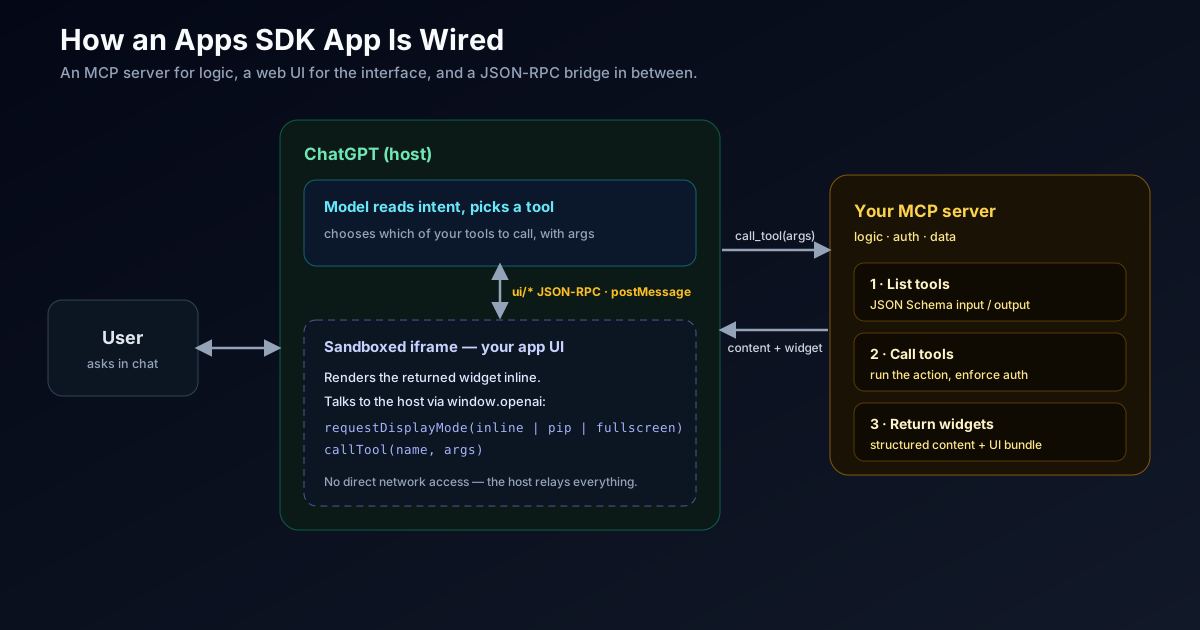
At minimum, your MCP server implements three capabilities:
THE THREE MCP CAPABILITIES
A minimal Apps SDK integration is just these three things. Everything else is polish.
CAPABILITY 1
List tools
Your server advertises the tools it supports, each with a JSON Schema input/output contract and optional annotations.
- This is how the model knows what your app can do
- Clear names and schemas make the model call tools correctly
- Annotations hint at behavior (read-only, destructive, etc.)
CAPABILITY 2
Call tools
When the model selects a tool, it issues a call with arguments that match the user’s intent. Your server executes the action and returns structured content.
- You enforce auth and validate inputs here
- Return structured content the model can parse
- This is where your real business logic runs
CAPABILITY 3
Return widgets
Alongside structured content, return embedded resources in the response metadata so the Apps SDK can render your interface inline in ChatGPT.
- The widget is a web UI bundle pointed to by the tool
- ChatGPT renders it in a sandboxed iframe
- The UI and model stay in sync through the bridge
The UI half runs inside a sandboxed iframe and communicates with ChatGPT over a standard bridge — ui/* JSON-RPC messages over postMessage. Your component can read state, call your tools, and negotiate how it is displayed:
// Inside your app's UI bundle, running in the ChatGPT iframe.

// Ask ChatGPT to present the widget larger for an interactive task.
await window.openai.requestDisplayMode({ mode: 'fullscreen' }); // or 'inline' | 'pip'

// Call one of your MCP server's tools from the UI and render the result.
const result = await window.openai.callTool('search_listings', {
  location: 'Lisbon',
  checkIn: '2026-08-01'
});
renderListings(result.structuredContent);
The display modes
window.openai.requestDisplayMode lets a widget negotiate how it appears:
| Mode | What it is | Good for |
|---|---|---|
| inline | Rendered directly in the conversation flow | Cards, results, quick previews |
| pip | Picture-in-picture, floating over the chat | Media, live status, persistent widgets |
| fullscreen | Takes over the surface for a focused task | Editors, maps, multi-step flows |
Building an App: The Shape of the Work
You do not need to learn a new framework. If you can write an MCP server and a small web UI, you can build a ChatGPT app.
FROM ZERO TO SUBMITTED
The end-to-end path for shipping an app into ChatGPT.
STEP 1
Build the MCP server
Define your tools with JSON Schema, implement the call handlers, and enforce auth. This is standard MCP work.
- Start from an existing MCP server if you have one
- Keep tool schemas tight so the model calls them correctly
STEP 2
Build the UI bundle
Write a web component that renders your tool results and talks to ChatGPT over the window.openai bridge.
- Use requestDisplayMode to pick inline / pip / fullscreen
- Handle the sandboxed iframe constraints (no assumptions about the host)
STEP 3
Point tools at widgets
Return your UI bundle as an embedded resource in tool response metadata so ChatGPT knows what to render.
- Each tool can map to its own widget
- Return structured content the model can also reason over
STEP 4
Submit and get listed
Submit through the app submission portal. Apps that meet quality and safety standards land in the App Directory.
- Discovery and sharing happen through the Directory
- Meet the review bar before you count on distribution
The Opportunity — and the Risk
This is a real distribution channel, but building on someone else’s platform always cuts both ways.
SHOULD YOU BUILD FOR CHATGPT?
The upside is enormous reach. The downside is the oldest one in platform history: dependency.
The pros
- Access to ~900M weekly users without acquiring them yourself
- Built on open MCP — reuse existing servers and run in other hosts
- Rich inline UI, not a flat text plugin — real product experiences
- A real App Directory for discovery, unlike the 2023 plugin era
- Distribution where users already start their tasks
The cons
- Platform dependency: OpenAI controls discovery, ranking, and the rules
- Regional gaps at launch (no EEA, Switzerland, or UK)
- A review/quality bar you must clear and keep clearing
- Your UX lives inside someone else’s surface and constraints
- Monetization and data terms are the platform’s to change
Build for it as a channel, not as your foundation. Reusing MCP work keeps the cost low and the lock-in lower.
For brands, the mental shift is the same one search and app stores forced: users increasingly start inside an aggregator. If people begin their travel, design, or media tasks in ChatGPT, being absent from the App Directory is a discovery problem — the same way being absent from Google once was.
Readiness Checklist
Before you ship a ChatGPT app
Track progress as you work through the list
0%
0/6 done
The Bigger Picture: This Pairs With GPT-5.6
The super app reform did not ship in a vacuum. It arrived in the same window as the GPT-5.6 model family, and the two reinforce each other. A more capable, more efficient model makes agentic, multi-app workflows economically viable; a super app surface gives that model somewhere to do things. Cheaper tokens plus a distribution platform is how “AI agent that gets real work done” stops being a demo.
If you are building agents that call many tools, the same discipline I wrote about in the agentic AI enterprise security model applies: capability without governance is a liability, and apps inside ChatGPT are no exception.
FAQ
Questions readers usually have
The questions developers and product teams ask first about apps in ChatGPT.
Final Take
The ChatGPT super app reform is OpenAI’s clearest bet yet that the interface, not just the model, is the product.
By building the Apps SDK on MCP, OpenAI turned “being inside ChatGPT” into a channel you can reach with mostly standard, reusable work — and turned ChatGPT into a distribution platform sitting in front of ~900 million weekly users. That is a genuine opportunity and a genuine dependency at the same time.
The right posture is pragmatic: reuse your MCP investment, ship an app as a channel, design for portability, and keep your product’s center of gravity your own. Do that, and the super app is upside without the classic platform trap.
Next, read the GPT-5.6 complete guide that shipped alongside it, and — if you are building the backend — my MCP server guide.
Sources
- OpenAI: Introducing apps in ChatGPT and the new Apps SDK
- OpenAI Developers: Apps SDK
- OpenAI Developers: Build your ChatGPT UI
- OpenAI: Developers can now submit apps to ChatGPT
- Model Context Protocol Blog: MCP Apps — bringing UI capabilities to MCP clients
Explore more: AI Coding Agents & Developer Experience
Google Search · Preferred sources
Prefer this site on Google
If you already read this writing, add umesh-malik.com as a Preferred Source. Google can then highlight it with a preferred badge in Top Stories, AI Overviews, and AI Mode — for you, not as a site-wide ranking boost.
Related Articles

AI Engineering
Agent Harness Design: Why an ARC-AGI-3 Score Tripled
Agent harness design decided a benchmark: OpenAI's ARC-AGI-3 score went 13.3% → 38.3% with zero model changes. What that means for your agent loop.

AI Engineering
Agent-to-Human Delegation: Why Your AI Shouldn't DM Coworkers
Agent-to-human delegation is the pattern nobody designed for: your AI messaging a coworker. Why it lands badly, and the handoff rules that fix it.

AI Engineering
How to Build an MCP Server: A Step-by-Step Guide (2026)
How to build an MCP server, step by step: JSON-RPC 2.0, the Streamable HTTP transport, typed tools, and agent discovery — from a real one I shipped.
Keep reading
Get new posts on AI, Claude Code & LLMs
New deep-dives on AI engineering, Claude Code, and developer tooling — follow along however you prefer.
About the Author

Software engineer writing about AI, Claude Code, LLMs, OpenAI, Anthropic, and developer tooling. 5+ years building production systems at Expedia Group, Tekion, and BYJU'S.