Automate SaaS Security Remediation: Fixed in Under 5 Minutes
Automate SaaS security remediation and cut fixes from hours to under 5 minutes: the queue-policy-workflow pattern, plus when it still needs a human in the loop.

TL;DR Automate SaaS security remediation with a queue-then-policy pipeline instead of an alert-only dashboard: detected findings land in a durable queue, a policy engine matches them against declared rules, and matched findings either auto-fix through the SaaS vendor’s own API or get routed to a human channel — all inside a five-minute target instead of the hours or days manual triage takes. The catch is scope: auto-remediation earns its keep on reversible, narrowly-defined actions and should escalate anything ambiguous or destructive to a person.
Auto-remediation is a policy-driven pipeline that closes a security finding — or routes it to a human — without anyone manually triaging the alert first. Most Security Posture Management tools stop short of that: they tell you a file is shared publicly, a login policy is misconfigured, or an OAuth grant looks unusual, and then a human has to open a ticket, confirm the finding is real, and click the fix. That gap between detection and action is where the real cost sits, and it’s fixable with the same event-driven patterns most teams already use for application backends.
The problem: alert-only SSPM tools don’t fix anything
Alert-only SSPM (SaaS Security Posture Management) is the default shape of most cloud security tooling: it scans connected SaaS apps, surfaces misconfigurations, and stops there. A single misconfigured file-sharing policy across a Google Workspace or Microsoft 365 tenant can generate thousands of individual findings in seconds — one per exposed file — and every one of those findings sits in a backlog until someone works through it by hand.
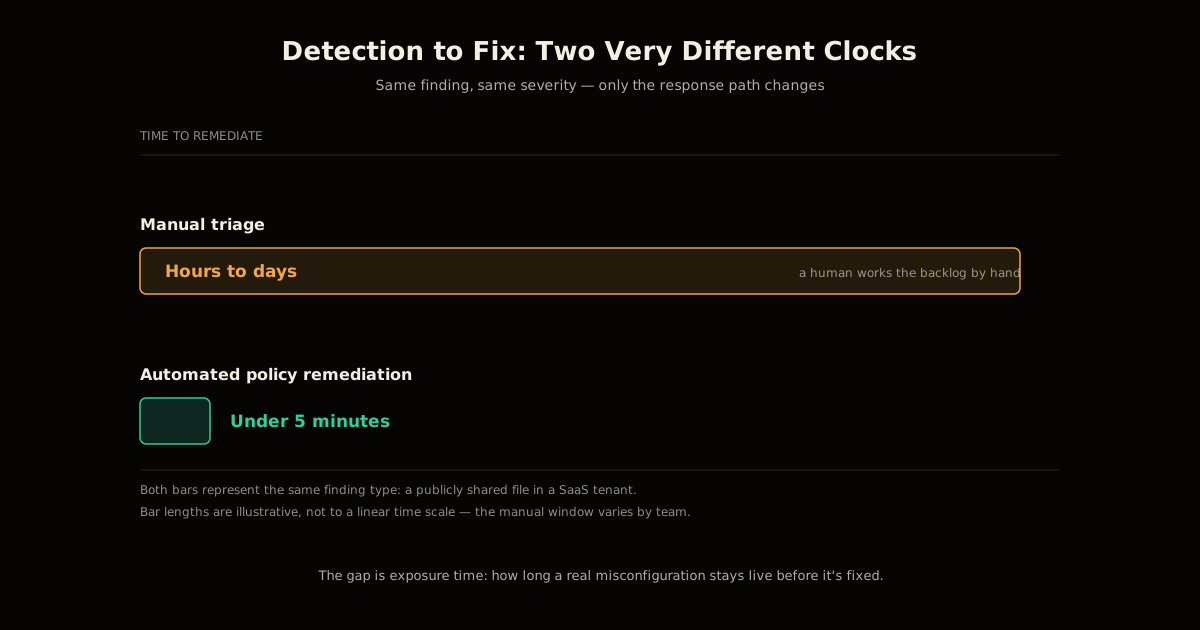
The gap this creates isn’t small. Detection-to-remediation windows for manually triaged findings are commonly measured in hours or days, and that’s more than enough time for a sensitive file to be downloaded, indexed by a search crawler, or forwarded outside the organization. The finding was correct the moment it fired; the fix just hadn’t happened yet.
How to automate SaaS security remediation in under 5 minutes
The fix is not a smarter dashboard — it’s closing the loop the dashboard leaves open. The pattern has five steps, and each one exists to solve a specific failure mode of doing this by hand:
Ingest every finding into a durable queue the moment the SSPM/CASB scanner detects it, instead of writing directly to a database a human polls later. The queue absorbs bursts — a single bad policy producing thousands of findings at once doesn’t overwhelm anything downstream.
Match each finding against declared policies, not ad-hoc scripts. A policy specifies a target vendor, a finding type, and an action — remediate, notify, or both — so the logic that decides what happens is auditable text, not buried conditionals.
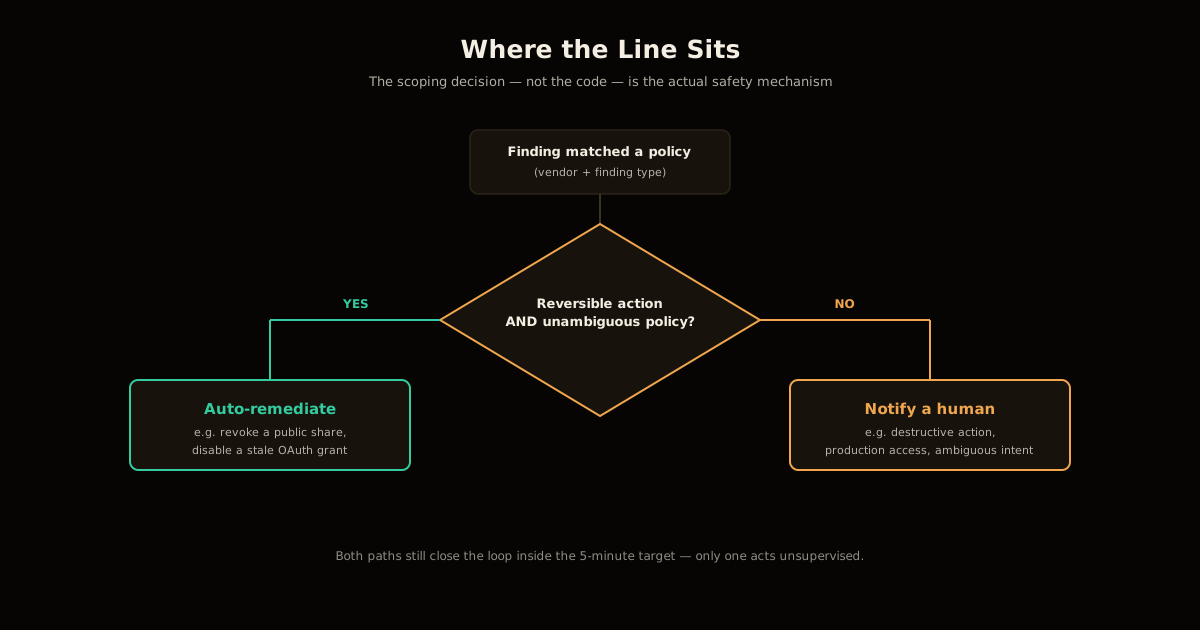
Branch on reversibility. Narrowly-scoped, reversible actions (revoke a public share, disable a stale OAuth grant) go to automatic remediation. Anything destructive or ambiguous goes to a notification channel instead — see the next section for where that line sits.
Execute with idempotent retries and backoff. SaaS vendor APIs rate-limit aggressively under bursty load, so the execution layer needs durable retry semantics, not a fire-and-forget HTTP call that silently drops on a 429.
Log every action, success or failure, with enough detail — timestamp, policy that fired, vendor API response — to answer “why did this get changed” months later without guessing.
Do this well and the target is genuinely reachable: five minutes or less from a finding firing to the fix landing, down from a backlog measured in hours or days.
Inside the architecture: queues, policy workers, and durable workflows
One concrete way to build this — the shape Cloudflare’s CASB remediation policies use — chains together three pieces of infrastructure that map directly onto the five steps above:
- A queue receives an orchestration message the instant a scanner produces a finding. This is step 1: it exists purely to decouple arrival rate from processing rate.
- A worker process picks messages off the queue and checks them against configured policies — vendor, finding type, action — to decide whether this specific finding matches a rule at all. This is steps 2 and 3.
- A durable workflow engine actually executes the matched action: calling the SaaS vendor’s API to remediate directly, or dispatching a webhook to Slack, Microsoft Teams, Jira, ServiceNow, or a custom HTTP endpoint. This layer owns retries, exponential backoff against vendor rate limits, and step-by-step execution state, which is step 4.
A concrete example makes the shape click: a marketing team routinely shares files publicly as part of normal work, which trips the same “publicly shared file” finding every time and floods the backlog with noise a human has already decided is fine to auto-fix. Wire that specific finding type to a remediation policy once, and every future occurrence gets the public share revoked within minutes — no ticket, no repeated manual review of something already decided.
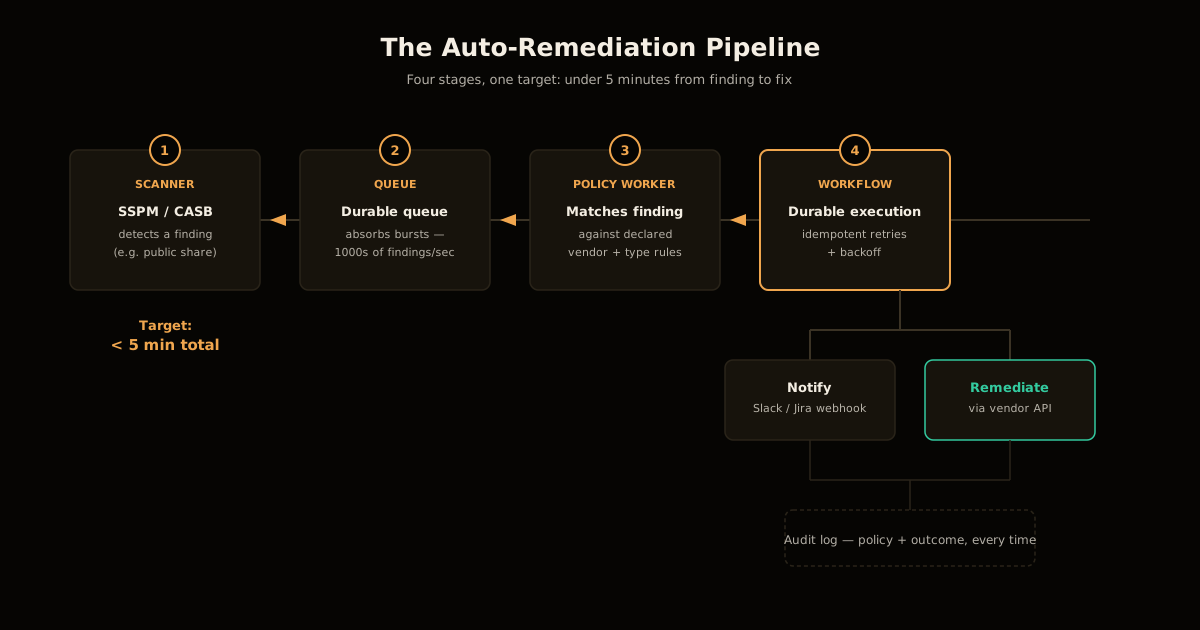
Two log streams make this auditable rather than opaque: one tracks policy administration — who created, edited, or disabled a policy, and when — and the other tracks runtime outcomes, including vendor API error responses when a remediation call fails. Without both, an automated fix is a black box the moment something goes wrong.
When auto-remediation is safe — and when it isn’t
The architecture above will happily execute a bad policy exactly as fast as a good one, which makes the scoping decision the actual safety mechanism, not the code. Use two questions to draw the line:
Is the action reversible? Revoking a public share link, disabling a stale API key, or removing an unused OAuth grant can all be undone in seconds if the policy turns out to be wrong. Deleting a mailbox, disabling a user account, or rotating a production credential cannot be undone as cleanly, and a false positive there costs far more than the minutes an alert-only tool would have cost you.
Is the policy unambiguous? A rule like “if a file is shared with ‘anyone with the link’ AND it’s outside an approved sharing domain list, revoke the share” is a deterministic yes/no test. A rule like “if this login looks unusual, do something” requires judgment a policy engine can’t safely encode, and forcing it into one just moves the false-positive cost from a human’s queue into an automated action a human didn’t review.
When either answer is no, route to a webhook instead of a remediation call. The pipeline still does its job — it still closes the loop in minutes by putting the finding in front of the right person through Slack or Jira instead of a shared dashboard nobody checks — it just stops short of acting unsupervised.
What breaks if you skip idempotent retries
The failure that actually bites teams building this isn’t a wrong policy — it’s a retry that isn’t safe to repeat. SaaS vendor APIs throttle aggressively during bursts, which means the execution layer will see failed calls and will retry them. If a remediation action isn’t written to be idempotent, a retried “revoke this share” can attempt to revoke a share that a previous, slower-to-report attempt already revoked, and the vendor API’s response to that second call — an error, a no-op, a different error code depending on the vendor — becomes noise the audit log has to explain away instead of a clean success.
The same problem hits notifications: a retried webhook dispatch without deduplication sends the same Slack alert twice, which trains the humans who are supposed to trust that channel to start ignoring it. A durable workflow engine solves this by tracking execution state per attempt rather than treating each retry as a fresh, stateless call — the difference between “retry safely” and “retry and hope.”
Auto-remediation vs. manual triage vs. full SOAR
| Manual triage | Automated policy remediation (this pattern) | Full SOAR platform | |
|---|---|---|---|
| Typical time to fix | Hours to days | Under 5 minutes | Minutes, with more setup |
| Setup cost | Low (just a dashboard) | Moderate (queue + policy engine + workflows) | High (dedicated platform, playbook authoring) |
| Blast radius of a bad rule | None — a human reviews every action | Limited to the policy’s declared scope | Can span many integrated systems at once |
| Best for | Low finding volume, high-judgment calls | High-volume, narrowly-scoped, reversible findings | Cross-system incident response beyond SaaS config |
The honest reading of this table: automated policy remediation is the right first step for the bulk of routine, reversible findings clogging an SSPM backlog, not a replacement for either end of the spectrum. It doesn’t need the investment a full SOAR deployment requires, and it removes exactly the class of finding — high-volume, low-judgment — that manual triage handles worst.
FAQ
What is auto-remediation for SaaS security findings?
It’s a policy-driven pipeline that reacts to a detected misconfiguration — like a publicly shared file — by either fixing it automatically through the SaaS vendor’s own API or routing it to a human channel, without anyone manually triaging the alert first. The point isn’t replacing judgment; it’s removing the queue of findings that never needed a human decision in the first place.
When should a finding auto-remediate versus escalate to a human?
Auto-remediate when the action is reversible, narrowly scoped, and the policy is unambiguous — revoking a public share link is a good example. Escalate when the action is destructive, touches production access, or the policy would have to guess at intent, because a wrong automated call at that scope costs more than the hours you saved.
Why put a queue between detection and remediation instead of fixing findings inline?
A queue decouples the rate findings arrive from the rate they can safely be processed. A single misconfigured tenant-wide policy can produce thousands of findings in seconds, and firing that many remediation calls inline would either throttle against the SaaS vendor’s API rate limits or duplicate work if the same finding gets reported twice before the first fix lands.
Does automated remediation replace an SSPM or CASB tool?
No — it sits downstream of one. The SSPM/CASB layer still does the scanning and finding classification; the remediation layer only consumes those findings and closes the loop. Without a detection source feeding it real findings, an automated remediation pipeline has nothing to act on.
What happens if a remediation action fails partway through?
A well-built pipeline treats every remediation step as idempotent and re-runnable, so a durable-execution layer can retry with backoff against vendor rate limits without risking a duplicate action or a corrupted half-applied fix. Without that guarantee, a retried failure can silently double-send a notification or attempt to revoke a permission that a previous retry already revoked, which surfaces as confusing audit-log noise rather than a clean failure.
Can this pattern work without a specific vendor’s serverless platform?
Yes — the shape is generic: an event source, a durable queue, a policy-matching step, and an execution layer that retries safely. It’s commonly built on a queue plus a workflow orchestrator (Cloudflare Queues/Workflows, AWS SQS plus Step Functions, or a self-hosted equivalent like Temporal), not on any one vendor’s specific product.
This pattern generalizes well beyond SaaS security findings — the same reversibility-and-ambiguity test decides what’s safe to let an AI agent with CMS write access do unsupervised, and the same idempotent-retry discipline matters wherever you’re sandboxing an agent’s internet access against a flaky upstream. If you’re building the human-escalation side of this pipeline, the trust boundaries in Cloudflare Access for Workers are a reasonable model for who gets to see a flagged finding at all. And the underlying judgment call — automate the reversible, escalate the ambiguous — is the same one covered from the people side in offboarding controls for insider threats and from the process side in why AI incident response skills decay without regular practice.
Sources
- Cloudflare, Introducing automatic remediation policies with Cloudflare CASB — the queue/worker/workflow architecture, the five-minute remediation target, the marketing-file example, and the two audit-log categories described in this post.
- Cloudflare Developers, Workflows — the durable-execution primitive (retries, backoff, per-step state) referenced for the idempotent-retry discussion.
Frequently asked questions
Google Search · Preferred sources
Prefer this site on Google
If you already read this writing, add umesh-malik.com as a Preferred Source. Google can then highlight it with a preferred badge in Top Stories, AI Overviews, and AI Mode — for you, not as a site-wide ranking boost.
Related Articles

AI Security
Plugin Registry Security: Signed Packages Beat a Trusted Gatekeeper
Plugin registry security doesn't need one trusted gatekeeper: EmDash signs every release with AT Protocol and sandboxes plugins by capability, not by review.

AI Security
How to Scope AI Agent Access to Cloudflare Workers, Not Admin
Cloudflare's new roles let you scope AI agent access to Cloudflare Workers per resource, not per account. Four roles, ten legacy ones replaced, 5 steps.

AI Security
Configure Cloudflare Access for Workers: auth before your code runs
Cloudflare Access for Workers checks requests before your code runs — no JWT validation. The three scopes, the local-dev config, and what it still misses.
Keep reading
Get new posts on AI, Claude Code & LLMs
New deep-dives on AI engineering, Claude Code, and developer tooling — follow along however you prefer.
About the Author

Software engineer writing about AI, Claude Code, LLMs, OpenAI, Anthropic, and developer tooling. 5+ years building production systems at Expedia Group, Tekion, and BYJU'S.