How to Stop a Yo-Yo DDoS Attack: the Read the Docs Playbook
How to stop a yo-yo DDoS attack: Read the Docs held 5.5M requests/minute for 10 days using JA4 fingerprinting and edge caching, not IP bans.

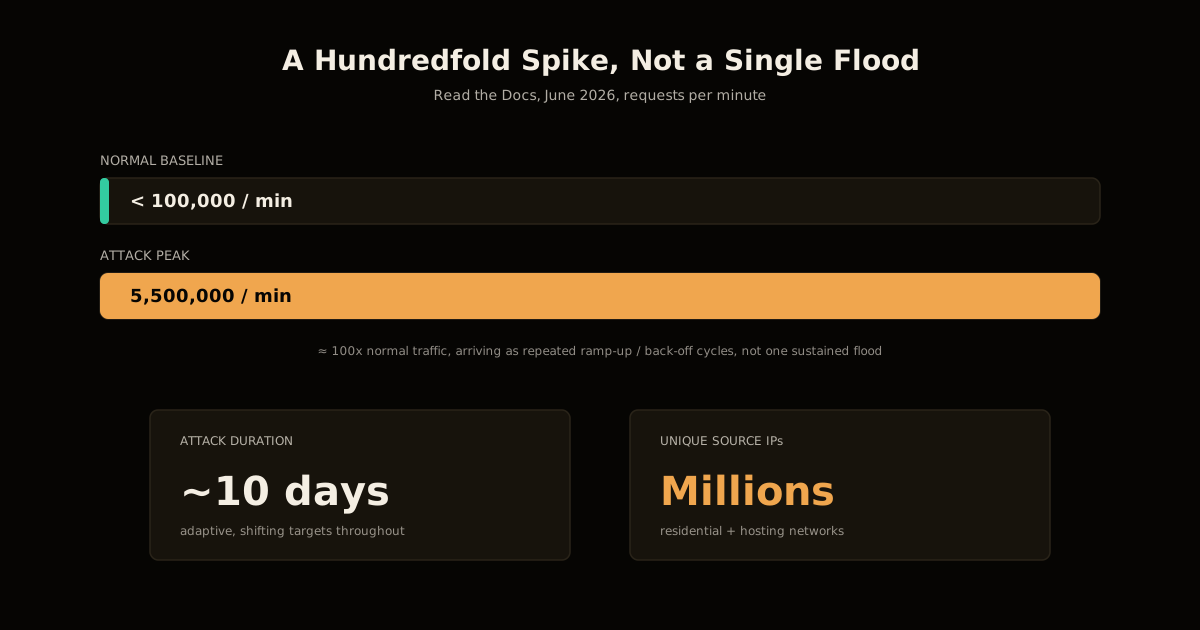
TL;DR Here’s how to stop a yo-yo DDoS attack — a pattern that ramps traffic up to find your rate-limit threshold, then backs off before it trips. In June 2026 one hit Read the Docs at 5.5 million requests per minute, roughly 100x its normal baseline, for nearly ten days straight. IP and ASN blocking didn’t stop it, because the traffic came from millions of residential and hosting IPs that each fired a handful of requests and vanished; what actually held was moving uncached redirects to the edge, JA4 TLS fingerprinting to catch a tool’s signature no matter how often its IP changed, and caching almost everything, including 404s. None of it depended on Read the Docs’ scale — any site serving dynamic redirects or search behind a CDN carries the same exposure.
If your monitoring has ever shown a traffic graph that spikes, drops back to almost-normal, spikes again, and repeats for days without ever fully going away, this is the pattern, and Read the Docs published the full incident in unusual detail. It’s worth reading end to end, because most public DDoS postmortems stop at “we turned on the CDN’s DDoS mode and it went away.” This one didn’t — the attackers adapted around that in under an hour, and the fight that followed is a clean map of what actually works against a patient, well-funded attacker versus what only stops the lazy ones.
What is a yo-yo DDoS attack?
A yo-yo DDoS attack is a volumetric attack that deliberately probes for your rate-limit and autoscaling thresholds instead of just trying to exceed them once. The attacker ramps traffic up until defenses start engaging, backs off just enough to let any time-windowed limit reset, then ramps again — often with a slightly different set of source IPs or a subtly different request shape each cycle. The name describes the shape it leaves on a traffic graph: not one flood, but a saw-tooth of spikes and pull-backs.
That adaptive quality is what makes it expensive to fight rather than just loud. Read the Docs’ attack peaked at 5.5 million requests per minute against a baseline under 100,000 — a roughly hundredfold jump — sustained on and off for close to ten days, sourced from millions of unique IPs spanning hundreds of networks, both residential and hosting. A flood you can block once; a yo-yo attack forces you to keep re-deriving what “normal” looks like while it’s actively trying to look like normal traffic in between spikes.
How Read the Docs actually stopped it
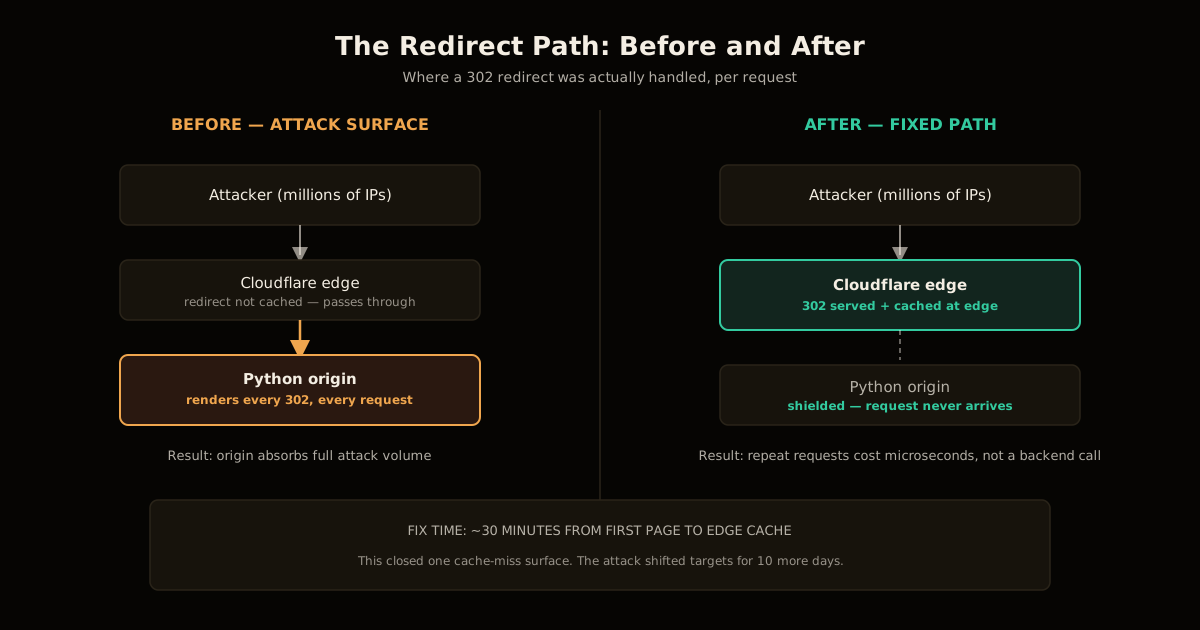
The team’s own timeline is the useful part, because it shows a defense that had to change shape twice, not a single fix that ended the incident. Operations were paged within minutes of the first outage-causing spike. Within roughly thirty minutes, the team traced the actual damage to a specific, boring cause: uncached HTTP 302 redirects served by the Python application backend rather than by edge infrastructure. Every one of those redirects was a full round trip into application code, and the attackers had found the one class of request Cloudflare’s cache wasn’t already absorbing.
The first fix — moving those redirects to be served at Cloudflare’s edge — closed that hole within the hour. It did not end the attack. The attackers kept going for another week and a half, shifting which hosts and services they targeted as each cache-miss surface got closed off, which is the yo-yo pattern playing out at the infrastructure level, not just the traffic-volume level: probe for the next uncached, expensive path, hit it until it’s fixed, move to the next one.
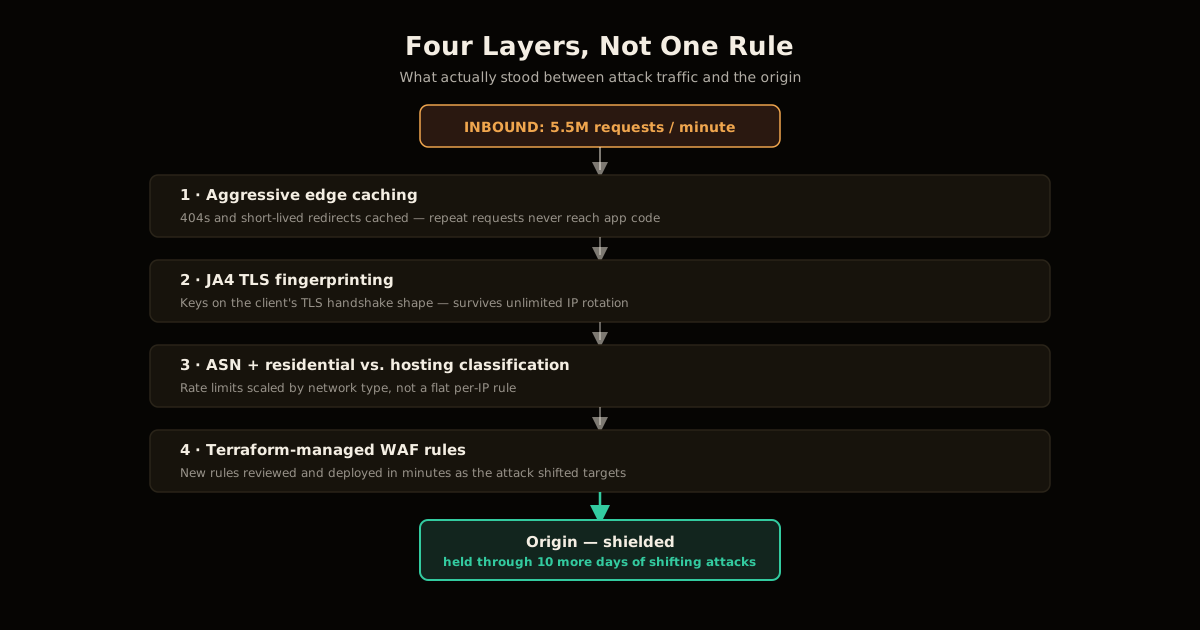
What eventually stabilized the incident was layering four distinct techniques rather than leaning on any single one:
- Aggressive edge caching, including error responses. 404s and short-lived redirects got cached for minutes at a time — a window too short to serve stale content to real users, but long enough to remove nearly all repeat-request cost from the origin.
- JA4 TLS fingerprinting. Instead of keying on IP address, the team fingerprinted the TLS handshake itself — cipher suites, extensions, and signature algorithms, sorted rather than order-dependent — which stays stable even when an attacker rotates through millions of source IPs.
- Combined bot-probability scoring with per-IP and per-ASN rate limits, deliberately avoiding a blanket JavaScript challenge that would have broken API integrations and legitimate automated tooling using the docs.
- Terraform-managed edge and WAF rules, so a new fingerprint or rate-limit rule could be written, reviewed, and deployed in minutes instead of being hand-edited under pressure in a vendor dashboard.
How to stop a yo-yo DDoS attack on your own site
You don’t need Read the Docs’ traffic volume to be exposed to this exact pattern — you need a dynamically-rendered path that isn’t cached, which describes almost every site with redirects, search, or a logged-in dashboard. The order Read the Docs converged on, worth copying directly:
Find and cache every cache-miss surface first. Redirects, 404s, and search endpoints are the classic examples — anything dynamic that a CDN doesn’t cache by default is where an attacker’s cost-per-request advantage over you is largest.
Cache aggressively, even at short TTLs. A one-minute cache window on a 404 page removes the request from your origin’s workload almost entirely while staying invisible to real users, who rarely reload the same broken link within sixty seconds.
Fingerprint clients, not just IPs. JA4 (or an equivalent TLS/HTTP fingerprint) keeps working when an attacker cycles through more source IPs than you could ever individually block, because the fingerprint travels with the tool, not the network path.
Classify traffic by network type before rate-limiting it. A request from a known hosting ASN can absorb a tighter limit than one from a residential ISP, where you risk rate-limiting real customers on shared connections.
Reach for a full challenge (CAPTCHA, JS challenge) last, not first. It’s the technique most likely to break legitimate API clients and frustrate real visitors, so use it only on paths where nothing softer is holding.
Manage your edge and WAF rules as code. Whatever you write during the first thirty minutes of an incident is a rule you’ll need to iterate on for days — doing that safely under pressure needs version control and review, not a dashboard someone might misconfigure at 2 a.m.
What breaks when you rely on IP blocking alone
The instinctive first response to a traffic spike is still to start blocking IP addresses, and it’s worth being explicit about why that instinct fails here. An IP ban only pays off against an attacker who reuses the same address enough times for the ban to matter before they move on. Read the Docs’ attacker didn’t: individual source IPs made a handful of requests each and were never seen again, drawn from a pool of millions across residential and hosting networks. By the time a ban propagated, the address behind it had already stopped sending traffic.
ASN-level blocking is a step up but has its own failure mode — legitimate ISPs and cloud providers share address ranges with abusive proxy traffic, so blocking by network risks collateral damage against real users and real automated tooling using your service normally. This is exactly why the fix that held wasn’t a better IP list, it was fingerprinting the request itself: JA4 doesn’t care how many IP addresses an attacker rotates through, because the TLS handshake characteristics of the tool sending the request don’t change just because its source address does.
DDoS mitigation techniques compared
| Technique | Cost to bypass it | Cost to real users | How it held up here |
|---|---|---|---|
| IP address blocking | Trivial — millions of IPs, each used once | None | Failed — bans landed after the IP had already gone quiet |
| ASN-level blocking | Low-to-medium — shift to a different network | Risk of blocking legitimate ISPs/clouds | Partial — caught some, collateral risk on the rest |
| Blanket JS challenge / CAPTCHA | Medium — solvable, but adds attacker cost | High — breaks API clients, frustrates humans | Deliberately avoided for this reason |
| Aggressive edge caching of dynamic paths | Structural — removes the target entirely | None, at short TTLs | Held — closed the specific hole attackers found first |
| JA4 TLS fingerprinting + rate limits | High — requires a new tool signature entirely | Low, if tuned against real traffic first | Held — the technique that survived IP rotation |
The pattern across that table matches what’s held up against every scraper and bot campaign covered on this site before: anything keyed on IP address alone degrades the moment an attacker has more addresses than you have patience to ban. Everything that held here was keyed on something more expensive to fake — where the request physically originates in aggregate, or what the client actually is underneath its address.
Frequently asked questions
What is a yo-yo DDoS attack?
It’s a distributed denial-of-service pattern where the attacker deliberately ramps traffic up until it finds your rate-limit threshold, then backs off before that limit trips and blocks them outright. The next ramp starts a little differently — a new set of source IPs, a slightly adjusted request shape — so a defense tuned to the last spike keeps missing the current one. The name comes from the traffic graph: a saw-tooth of spikes and pull-backs instead of one sustained flood.
Why didn’t IP or ASN blocking stop the Read the Docs attack?
Because the traffic came from millions of unique source IPs spread across hundreds of networks, including residential blocks, so banning an address bought nothing — it had usually already stopped sending requests by the time the ban took effect. ASN-level blocking caught a bit more, but legitimate residential ISPs and hosting providers share ranges with abusive proxy traffic, so blocking by network risked taking out real users and legitimate automation alongside the attack.
What is JA4 fingerprinting and why does it work when IP blocking doesn’t?
JA4 is a TLS client fingerprint that hashes the cipher suites, extensions, and signature algorithms a client’s TLS handshake offers, sorted rather than kept in their original order, specifically to resist attackers randomizing that order to evade detection. Two requests from completely different IP addresses running the same scraping tool or the same botnet client library produce the same JA4 hash, which is what makes it useful against an attacker who rotates source IPs faster than you can block them — you’re keying on what’s sending the request, not where it’s sending it from.
Why did caching 404s and redirects matter as much as any rate limit?
Because the actual damage in this attack wasn’t the request volume hitting Cloudflare’s edge — it was requests reaching Read the Docs’ Python backend for temporary redirects that nothing was caching. Every one of those was a round trip through application code instead of a response served from the edge in microseconds, and that’s the resource an attacker running a yo-yo pattern is actually trying to exhaust. Caching those responses, even for a window of minutes, turned an expensive per-request cost into a near-free one and removed most of the attack’s leverage before any rate limit had to fire.
Is a yo-yo DDoS attack only a risk for high-profile projects like Read the Docs?
No — the postmortem’s own conclusion is that proxy networks and AI-adjacent scraping tools have made this kind of attack cheap enough to point at anyone. Any site that serves authenticated dashboards, dynamic redirects, or search behind a CDN has the same shape of exposure; a smaller site just has a lower ceiling before the same traffic pattern causes real degradation, not immunity from the pattern itself.
What’s the fastest defense to deploy if I don’t have Terraform-managed WAF rules yet?
Start with edge caching on your cheapest-to-cache, most attack-prone routes — redirects, 404s, and static assets — since that alone removes origin load without touching a single rate-limit rule. Layer a generic bot-probability score with a per-IP or per-ASN rate limit on top of that, and only reach for a full JavaScript challenge or CAPTCHA as a last resort, because those break legitimate API clients and frustrate real users in a way a cache layer never does.
Sources
- Read the Docs — Understanding the recent DDoS attack against Read the Docs, the incident postmortem this post is based on.
- FoxIO — JA4+ network fingerprinting suite, the specification behind the TLS fingerprinting technique described above.
The same asymmetry shows up everywhere on this beat: an attacker’s marginal cost stays near zero while yours scales with every address they’re willing to burn, so the fix is never a better blocklist, it’s removing what makes the expensive path expensive at all. If you’re fighting a steadier scraper problem rather than a spike, proof-of-work bought git.kernel.org months at a time against bots that never stopped, and verifying crawler IPs against published ranges instead of trusting the User-Agent is the same “key on something expensive to fake” idea one layer up the stack.
Once you have blocking rules in place, keeping robots.txt in sync with your actual bot-enforcement config stops the two from drifting apart, and Cloudflare’s own baseline method for telling a real traffic drop from an outage is the detection-side counterpart to everything above — you can’t fingerprint your way out of an attack you haven’t first told apart from a normal Tuesday. If your edge rules aren’t already managed as code, Cloudflare Access’s identity checks in front of a Worker are a good template for treating perimeter config as something reviewed and versioned, not hand-edited under pressure.
Frequently asked questions
Google Search · Preferred sources
Prefer this site on Google
If you already read this writing, add umesh-malik.com as a Preferred Source. Google can then highlight it with a preferred badge in Top Stories, AI Overviews, and AI Mode — for you, not as a site-wide ranking boost.
Related Articles

AI Security
How to Stop AI Scrapers Overloading Your Server: the 20% CPU Toll
How to stop AI scrapers overloading your server: git.kernel.org now loses 14-16 of its 90 CPU cores to bots, and proof-of-work only bought a few months.

AI Security
How to Check If You Installed Compromised LiteLLM 1.107.0
How to check if you installed compromised LiteLLM 1.107.0 from PyPI or Docker: a 60-second detection script, the cook.pth startup trick, and what to rotate.

AI Security
Plugin Registry Security: Signed Packages Beat a Trusted Gatekeeper
Plugin registry security doesn't need one trusted gatekeeper: EmDash signs every release with AT Protocol and sandboxes plugins by capability, not by review.
Keep reading
Get new posts on AI, Claude Code & LLMs
New deep-dives on AI engineering, Claude Code, and developer tooling — follow along however you prefer.
About the Author

Software engineer writing about AI, Claude Code, LLMs, OpenAI, Anthropic, and developer tooling. 5+ years building production systems at Expedia Group, Tekion, and BYJU'S.