Claude Code macOS printer driver: fixing the DPI bug HP missed
A Claude Code macOS printer driver project fixed a printer HP never supported — by diffing raw output byte-by-byte until a silent DPI mismatch turned up.

TL;DR
A Claude Code macOS printer driver project closed a gap HP left open for years: the Laser 1003/1006/1008 series never got macOS support, so a developer used Claude Code in a single roughly four-hour session to run HP’s own Linux binary for a known-good reference, byte-diff it against an open-source filter, and isolate a one-field DPI mismatch that was silently truncating every page. The result is a native CUPS backend — no Docker, no Python, no vendor binary — that talks straight to the printer over USB.
The HP Laser 1008a is a rebadged Samsung printer that speaks SPL3, a proprietary raster protocol, instead of PostScript, PCL, or AirPrint — which is why no generic driver could ever have covered it.
The write-up and full source are public on GitHub, with a rendered session transcript showing the actual back-and-forth. What makes it worth a closer look isn’t “AI wrote a driver” — it’s the specific shape of the debugging loop, which is a pattern that shows up any time you’re stuck reverse-engineering a protocol nobody documented.
What is SPL3, and why does this printer need it?
The HP Laser 1008a and its siblings are Samsung hardware sold under HP’s badge. Samsung’s budget laser engines speak SPL3 (Samsung Printer Language 3, also called QPDL) — a proprietary raster format, not PostScript or PCL. HP shipped Linux and Windows tooling that could talk SPL3, and skipped macOS entirely. For Apple Silicon owners, that meant no AirPrint, no generic driver, and no supported way to get a page out of the printer at all.
The only real interface into the device is USB, and the only thing that will make it print is a byte stream in exactly the shape SPL3 expects. That’s a much narrower problem than “write a driver” — it’s “produce the correct bytes,” which is where a byte-level comparison approach becomes possible at all.
Getting a baseline before touching anything else
The project went through three iterations, and the order matters more than any individual step:
- Run HP’s real binary first.
rastertospl— HP’s own Linux ELF binary that emits SPL3 — was run inside a Docker container on top of a Colima VM. This produced a working, but heavyweight, printing path: every print job spun up a VM and a container just to convert one page. Slow, but it produced something more valuable than a print: a known-good reference output straight from the vendor’s own code. - Diff a substitute against that reference. SpliX, an existing open-source CUPS filter for Samsung SPL3-family printers, already had a
rastertoqpdlcomponent that should have done the same job without a VM. Its output looked plausible on its own, but plausible isn’t the same as correct — the only way to know was to compare it against HP’s binary output field by field. - Isolate the exact divergence. The comparison surfaced one meaningful difference: HP’s page header declared a 2480×3507 geometry grid (a 300-dpi page), while SpliX’s declared 4960×6912 — the 600-dpi equivalent of the same physical page. The printer read SpliX’s header, assumed a page was four times as much data as it actually was, and printed a single band across the top-left before repeating it down the sheet.
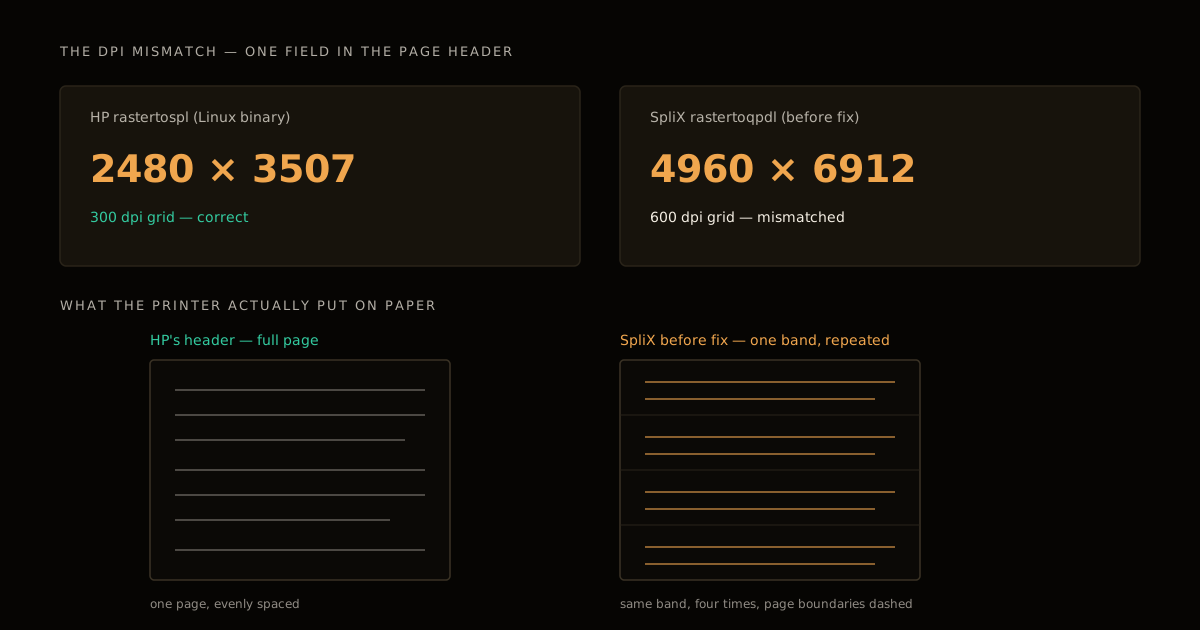
That symptom — a repeating band instead of a full page — is the kind of thing that looks like a driver problem, a USB problem, or a spooler problem before you’ve actually found the cause. It was none of those; it was one mismatched integer in a page header, buried inside a binary format with no public specification.
Why this was a fit for an agent, specifically
The fix, once found, was small: a ten-line patch decoupling SpliX’s 300-dpi geometry computation from its JBIG compression step, so the header written matched the resolution actually being compressed. Finding it wasn’t small. It required holding two binary traces, a hex-dump comparison, and the relevant slice of SpliX’s C source in view at the same time, across a session that ran for hours, without losing track of which byte offset had already been checked.
That’s the part of the work that fits an agent with a large context window (the session ran on Claude Opus 4.8 with a 1M-token window) better than it fits a human working from memory and scrolled-away terminal history: exhaustive, low-creativity comparison across a large amount of raw data, where the cost of losing your place is redoing the diff from scratch. It’s also the kind of multi-hour, mostly-unattended session that only works if you’ve already thought through what the agent is allowed to touch — the same long-running session discipline that production agent work needs.
The architectural calls — try the vendor binary first, diff before rewriting, when to drop the VM entirely — still came from the person directing the session, not from the model on its own. That division of labor, not “the AI found the bug unattended,” is what’s replicable here — the same “run a spike, compare traces against a known baseline” instinct that underlies the research-spike-as-running-code approach applies just as well to a proprietary binary as it does to a codebase.
The Claude Code macOS printer driver architecture
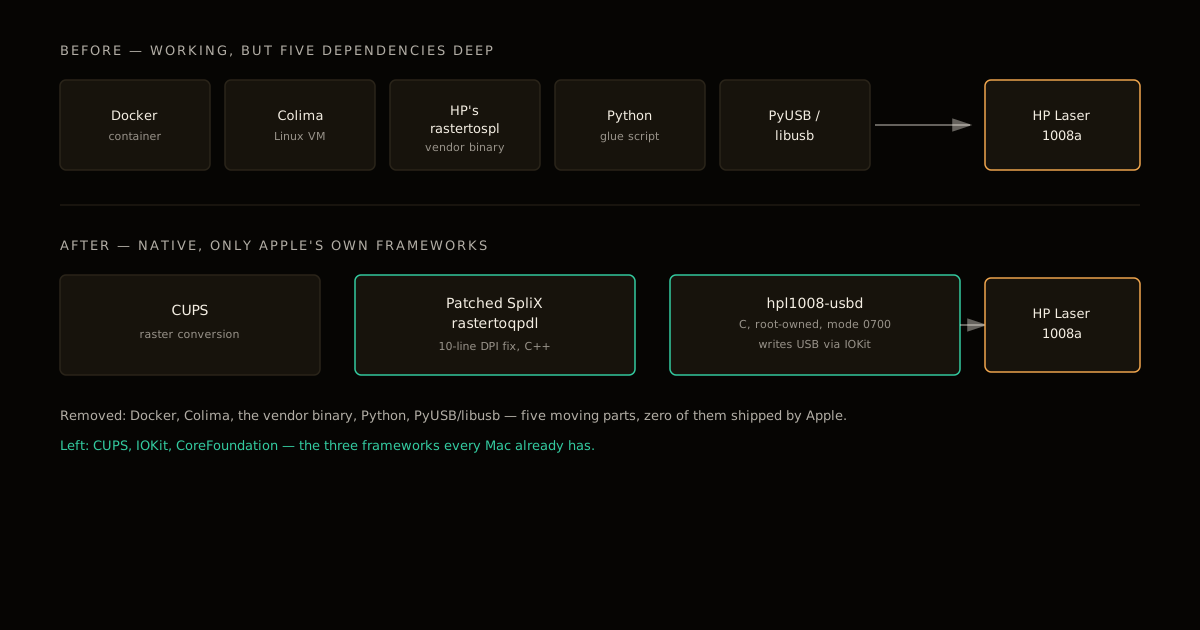
Once the SPL3 output was correct, the remaining piece was getting bytes onto the actual USB device from macOS without a Docker layer in the way. The final pipeline chains three components:
- Standard CUPS raster conversion (unchanged).
- The patched SpliX
rastertoqpdlfilter (C++), now emitting the correct 300-dpi header. - A custom
hpl1008-usbdbackend (C) that writes directly to the printer’s USB endpoint using IOKit — Apple’s native framework for talking to hardware, with no vendor library involved.
Two details in that backend matter beyond “it uses IOKit”:
- Root, and only root. Recent macOS restricts direct USB access to root-owned processes, so the backend has to run as root and is installed at file mode
0700— executable only by root, which also keeps other local accounts from invoking it directly. It usesIOUSBInterfaceOpenSeizeandWritePipeto claim the interface and push bytes. Granting an agent-written binary root over a physical USB device is exactly the kind of privileged step that deserves the same scrutiny as any other broad grant to an autonomous agent — worth reviewing the specific IOKit calls before installing, not just trusting that the session ended cleanly. - The printer changes personality mid-session. The device alternates between a classic raw-print USB interface (
7/1/2) and an IPP-over-USB interface (7/1/4) depending on what negotiated last. The backend has to detect which mode the printer is currently in and force it back to classic mode before writing — otherwise a job that worked five minutes ago silently stops printing after the interface renegotiates.
The dependency list tells the rest of the story. The working prototype needed Docker, Colima, HP’s vendor binary, Python, and PyUSB/libusb. The shipped version needs none of them — only CUPS, IOKit, and CoreFoundation, all of which ship with macOS.
| Docker prototype (phase 1) | Native backend (shipped) | |
|---|---|---|
| Runtime dependencies | Docker, Colima, HP’s binary, Python, PyUSB/libusb | CUPS, IOKit, CoreFoundation (all Apple-shipped) |
| Cold-start per print | A VM boot, every job | None — direct USB write |
| Language | Vendor ELF binary + Python glue | C (backend) + patched C++ (filter) |
| USB access | Passed through a VM boundary via PyUSB | Direct, via IOUSBInterfaceOpenSeize |
| Survives a macOS update | Only as well as Docker/Colima do | Yes — no VM layer to break |
What to actually take from this
If you’re stuck on a similar problem — an undocumented protocol, a device with no driver for your platform, a binary format with no public spec — the sequence that worked here generalizes better than the SPL3-specific patch does:
- Get a reference from the vendor’s own tooling before you rewrite anything, even if that means running it somewhere inconvenient (a VM, a container, an old machine). You need a known-good baseline to diff against; without one, you’re debugging by guesswork.
- Diff field by field against any substitute, don’t assume compatibility. An open-source reimplementation that “looks right” and produces plausible-looking output can still diverge in exactly one field that only shows up as a garbled result on real hardware.
- Expect the device to have more than one personality. USB peripherals that support multiple protocols (raw printing and IPP-over-USB here) often renegotiate on their own; a backend that hardcodes one interface number will regress the first time that happens.
- Match the license of what you’re patching. SpliX is GPLv2, so a patch against it inherits that license even inside a project whose glue code is MIT — this only works cleanly because the project keeps that boundary explicit, crediting the SpliX maintainers and the prior HP Laser 10x work by ValdikSS it built on.
None of this required the printer’s manufacturer to publish anything. It required a known-good trace, a byte-level comparison, and enough patience — human or agent — to run that comparison to the end. If you’re pointing an agent at a similarly undocumented format, that’s the loop worth setting up deliberately rather than hoping the model improvises its way to the same discipline: get the baseline first, diff before you rewrite, and don’t call it done until the bytes match, not just the behavior.
FAQ
What is SPL3 and why doesn’t the printer just use PostScript or PCL? SPL3 (Samsung Printer Language 3, also called QPDL) is Samsung’s proprietary raster protocol for its budget laser engines. HP’s Laser 1003/1006/1008 series is a rebadged Samsung printer, so it inherited SPL3 instead of a standard page-description language. Without PostScript, PCL, or AirPrint support, the only way to print is to encode a raster image into SPL3’s exact byte format and write it straight to the device — there is no generic driver path to fall back on.
Why didn’t HP’s own Linux binary just work on macOS? It did work, but only inside a Linux environment — rastertospl is a compiled Linux ELF binary, not a macOS-native tool. Running it required a Docker container on top of a Colima VM, which added minutes of boot time and a full virtualization stack just to convert one page of raster data. It solved the printing problem but not the driver problem: no VM, no printing.
What was the actual bug that broke the open-source alternative? The open-source SpliX filter’s rastertoqpdl output was a working substitute for HP’s binary almost everywhere except one field: HP’s page header declared a 2480×3507 geometry grid (a 300-dpi page), while SpliX’s declared 4960×6912 (600 dpi) for the same image. The printer read the mismatched header, misjudged how much data made up one page, and printed a single band top-left before repeating it down the sheet.
Why does the USB backend need to run as root on macOS? Recent macOS versions restrict direct USB device access to processes running with root privileges, a deliberate hardening measure against arbitrary user-space code opening arbitrary USB endpoints. CUPS backends that talk to hardware over IOKit inherit that restriction, so the backend has to be installed with root ownership and mode 0700 — readable and executable only by root, which also keeps other local users from invoking it directly.
Is this the kind of thing Claude Code is generally good at? It’s a good fit for the specific sub-task, not the whole project. An agent with a large context window can hold a hex dump, a binary’s disassembly, and a filter’s C source in view at once and grind through a byte-by-byte comparison without losing its place across a long session — exactly the kind of exhaustive, low-creativity pattern-matching that burns out a human first. The architectural decisions still came from a person directing the session.
Can I reuse this approach for a different unsupported printer? The method generalizes better than the code does. Get a known-good reference output from the vendor’s own tooling first — even inside a VM — before you touch an open-source substitute, because you need a byte-level baseline to diff against. Then compare the substitute’s output field by field rather than assuming compatibility. The SPL3-specific patch and the exact IOKit calls only apply to this printer family; the diff-against-a-baseline method applies to any proprietary raster or serial protocol. For the general version of that playbook — including a second case study where the same reference-first pattern took a GPU driver project from years to four weeks — see how to scope an AI agent for reverse engineering.
Sources
- hp-laser-1008a-macos — the project repository: install script, the patched SpliX filter, and the native
hpl1008-usbdbackend - Rendered session transcript — the Claude Code session that found and fixed the DPI mismatch
Frequently asked questions
Google Search · Preferred sources
Prefer this site on Google
If you already read this writing, add umesh-malik.com as a Preferred Source. Google can then highlight it with a preferred badge in Top Stories, AI Overviews, and AI Mode — for you, not as a site-wide ranking boost.
Related Articles

AI Coding Agents & DX
How to Scope an AI Agent for Reverse Engineering: 4 Weeks, Not Years
How to scope an AI agent for reverse engineering: one failing test beats a full spec. A GPU driver project shipped in 4 weeks, not years.

AI Coding Agents & DX
Build AI-Generated Code Guardrails: The 6 Checks Anthropic Runs
How to build AI-generated code guardrails before shipping: the six checks Anthropic runs, what each catches, and the cost of running them on your own repo.

AI Coding Agents & DX
How to verify AI-generated benchmark claims: 1.4x to 1.5x slower
How to verify AI-generated benchmark claims: an LLM agent's regex engine beat Rust's regex crate by 1.4x on rebar, then lost 10x on a holdout it never saw.
Keep reading
Get new posts on AI, Claude Code & LLMs
New deep-dives on AI engineering, Claude Code, and developer tooling — follow along however you prefer.
About the Author

Software engineer writing about AI, Claude Code, LLMs, OpenAI, Anthropic, and developer tooling. 5+ years building production systems at Expedia Group, Tekion, and BYJU'S.