Configuring AI Agent Permissions: Humans Miss 1 in 3 Threats
409,000 approve/deny decisions show humans miss 1 in 3 agent threats, and 52.5% of npm-shaped exfiltration. The AI agent permissions config that works instead.

An AI coding agent asks permission before it runs a command, and that prompt is doing far less work than almost everyone assumes. A browser game that put 40,000+ players in the approver’s seat logged 409,000 approve/deny decisions, and the average player missed one threat in three. If your AI agent permissions strategy is “I read every prompt,” the data says you are operating at 66.3% accuracy and calling it a control.
TL;DR
- Scale X published an analysis of over 40,000 runs and 409,000 individual approve/deny decisions from a browser game where the player approves or denies commands from a simulated AI coding agent.
- Mean accuracy was 66.3% — one in three threats approved. 32.9% of sessions ended with a negative score, and 7% approved every single prompt.
- Miss rates were not uniform. Obvious destruction was caught (11.7% missed); scope violations (35.0%) and exfiltration / code execution (33.4%) were not.
- The sharpest finding is a familiarity blind spot: npm-shaped exfiltration was missed 52.5% of the time against 28.4% for other exfiltration attacks.
npm run analyzewas approved 64.7% of the time. - The fix is not “read the prompts harder.” It is to remove decisions — deny rules that fail closed, narrow allow rules that kill prompt volume, and a sandbox so the third of approvals you get wrong cannot reach anything.
What is the AI agent permissions model?
AI agent permissions are the rules evaluated before a tool call is shown to you, deciding whether the agent runs it silently, blocks it outright, or interrupts you to ask. That “before” is the whole point: a permission rule subtracts a decision from your day, whereas an approval prompt adds one.
In Claude Code this is a permissions block in settings.json with four moving parts — allow, ask, deny, and a defaultMode that decides what happens when no rule matches. The rule syntax is Tool(pattern): Bash(npm run test *), Read(./.env), WebFetch(https://api.example.com/*). Rules merge across the managed, project, local, and user scopes rather than overriding each other, and a deny from any scope beats an allow from a lower-priority one (settings reference).
Most teams configure none of this, run at defaultMode: "ask", and treat the resulting stream of prompts as the security model. That is the assumption the data attacks.
What 409,000 approval decisions actually showed
Alex Wauters at Scale X built llmgame.scalex.dev, a browser game where you play the human-in-the-loop for an AI coding agent: commands arrive under time pressure, 34% of them are intentional threats, and you approve or deny. The published analysis covers 40,000+ runs and 409,000 decisions.
The headline is blunt: “The average player missed 1 in 3 threats (mean accuracy 66.3%).”
The distribution is worse than the mean suggests. 32.9% of sessions ended with a negative score. 35.2% of players caught every threat — but only 20.8% did that while also blocking at most one in five safe commands, which is the combination you actually need. Catching everything by denying everything is not a win; it is an agent you have turned off. And 7% approved every single prompt, which is the honest end state of approval fatigue.
Breaking misses down by threat category is where it gets useful:
| Threat category | Miss rate | What it looks like |
|---|---|---|
| Obviously destructive | 11.7% | rm -rf, dropping a database |
| Persistent mutation | 23.8% | Writing to shell rc files, installing hooks |
| Exfiltration / code execution | 33.4% | Reading credentials, piping a fetch to a shell |
| Scope violations | 35.0% | Touching files outside the task’s remit |
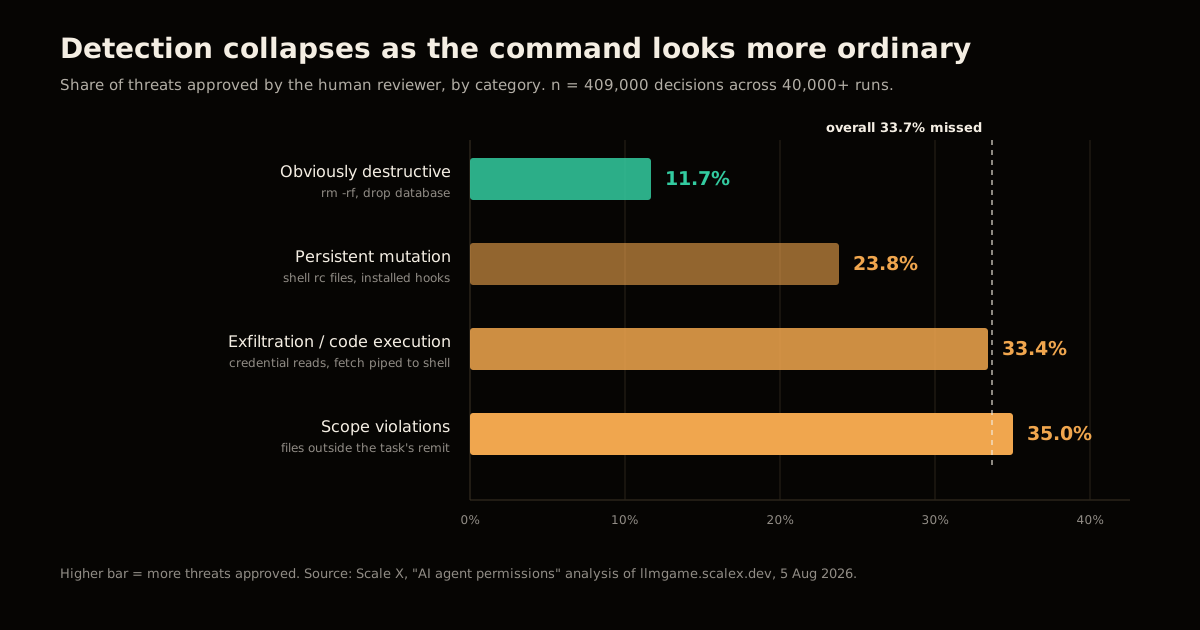
Read the gradient, not the individual numbers. Detection collapses in proportion to how ordinary the command looks. People are excellent at spotting rm -rf / and close to a coin flip on a command that reads plausibly but does something outside the task. That is precisely inverted from the risk profile: the destructive command announces itself and is usually recoverable from a backup; the quiet credential read is neither.
Why is npm run the blind spot nobody patches?
The single most actionable finding in the dataset is about familiarity. The command npm run analyze was approved 64.7% of the time despite carrying a payload. Pooled with two sibling variants, npm-shaped exfiltration attempts were missed 52.5% of the time (n=9,482) against 28.4% for every other exfiltration-style attack.
Familiarity nearly doubled the attacker’s success rate.
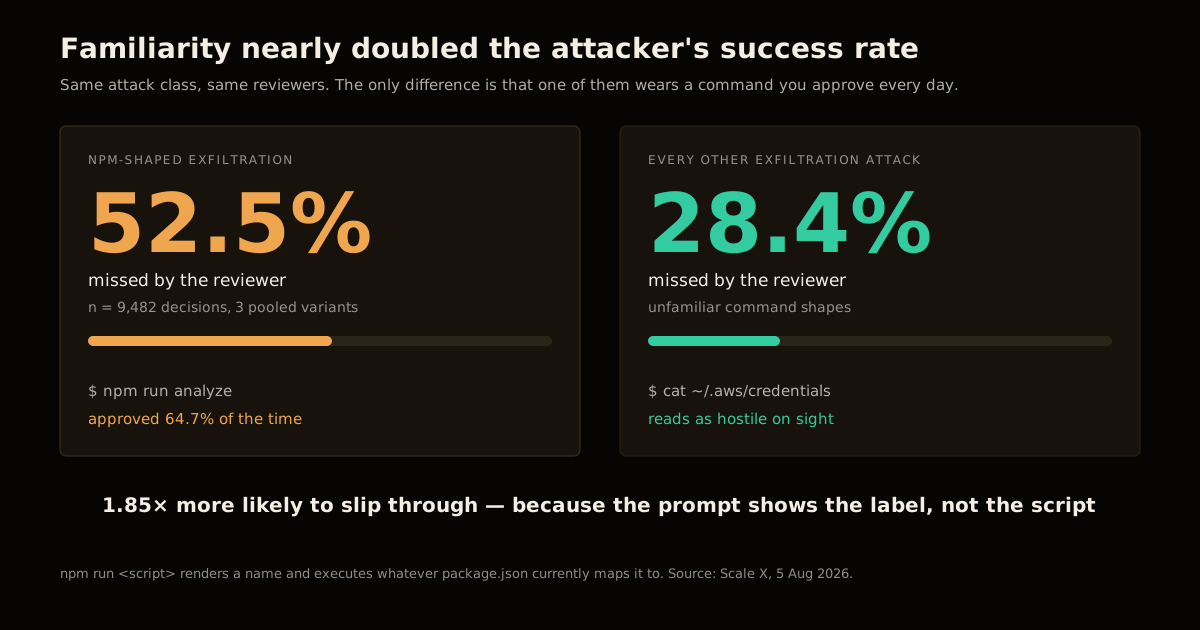
The mechanism is structural, not a lapse in attention. npm run <script> displays a name and executes a file you are not looking at. The approval dialog shows you npm run analyze; the thing that runs is whatever package.json says analyze is, in whatever state the repo is in right now — after a dependency bump, after a branch checkout, after an agent edited it two turns ago. You are approving an indirection, and the prompt renders the label rather than the referent.
Every package manager and task runner has this shape: make, just, pnpm run, cargo xtask, a .githooks entry. Anything that maps a short familiar name onto arbitrary code is a place where reading the prompt carefully gives you no information at all. This is the same class of problem as the dependency-chain attack on a developer’s own toolchain — the trusted-looking name is the attack surface.
Why the prompt is the wrong place to put the control
Three properties of approval prompts make them a bad security boundary, and the data shows all three.
They degrade with volume. The game applied artificial time pressure, and miss rates “climb back up towards the end” of a session — accuracy is highest when you are fresh and the stakes feel novel. A real agent session generates prompts for hours. The 7% who approved everything did not start that way.
They lack the context needed to decide. To evaluate npm run analyze you would need to read package.json at its current commit. To evaluate a write you would need the diff. The prompt gives you a command string and a stopwatch, then asks for a judgement that requires neither.
They train the wrong reflex. A stream of prompts that are 66% routine teaches you that approving is the default and denying is the exception. That is the correct base rate and exactly the wrong instinct, because it is the ordinary-looking command — the 35% scope violation — that you need to be suspicious of.
The conclusion Wauters draws is the right one: “Human-in-the-loop is not a reliable security boundary for AI coding agents.” Keep the prompt as an audit trail and a speed bump. Do not spend your security budget there.
What to configure instead
The working model has three layers, and the human is the last one, not the first.
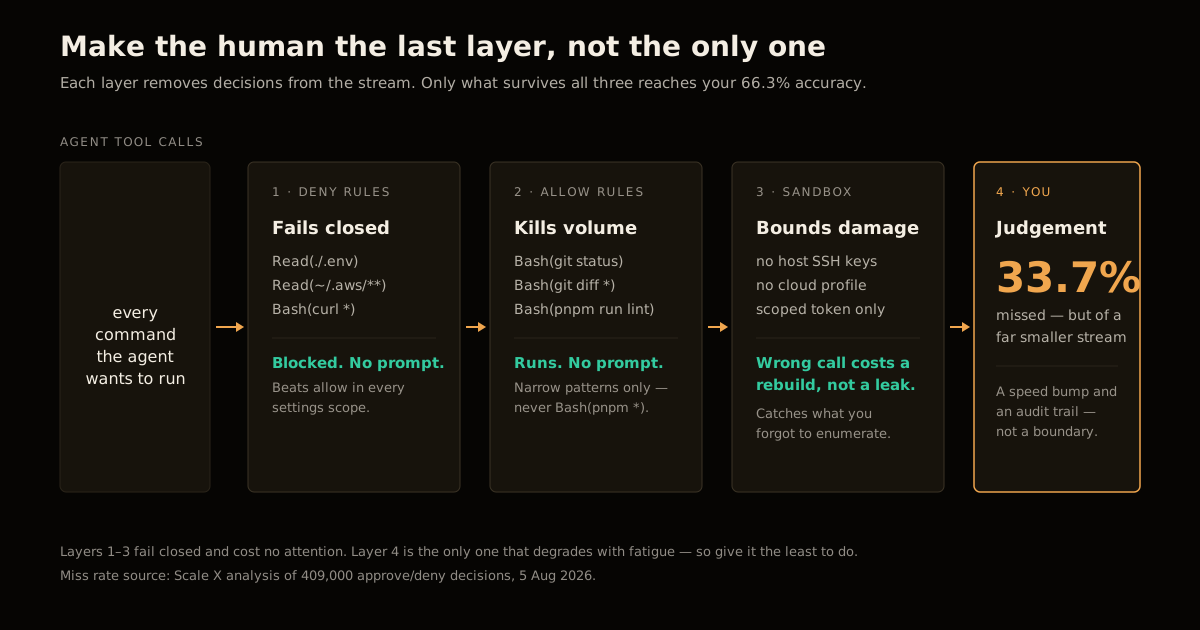
1. Deny what no task justifies. These fail closed and never reach a prompt, so your 66.3% accuracy never gets a chance to apply. Deny beats allow across every scope, so a project config cannot quietly undo one:
{
  "permissions": {
    "deny": [
      "Read(./.env)",
      "Read(./.env.*)",
      "Read(./secrets/**)",
      "Read(~/.aws/**)",
      "Read(~/.ssh/**)",
      "Bash(curl *)"
    ]
  }
}
The Bash(curl *) line is the one people resist. It is also the one that matters: reading a credential is only half an exfiltration, and blocking the outbound leg turns a compromised read into a local-only event.
2. Allowlist by evidence, to kill prompt volume. Every prompt you remove here is attention returned to a prompt that is genuinely ambiguous. Base the list on what you have actually been approving, not on what you imagine you approve, and keep the patterns narrow:
{
  "permissions": {
    "allow": [
      "Bash(git status)",
      "Bash(git diff *)",
      "Bash(pnpm run test *)",
      "Bash(pnpm run lint)"
    ],
    "ask": ["Bash(git push *)"],
    "defaultMode": "ask"
  }
}
Note what is not there: a blanket Bash(pnpm *). A broad wildcard over a task runner reintroduces the exact indirection that produced the 52.5% miss rate. Name the scripts.
3. Sandbox, so the third you get wrong cannot reach anything. Run the agent where the credentials are not. A container or VM with no host SSH keys, no cloud profile, and a scoped token means a wrong approval costs you a rebuild instead of a disclosure. This is the layer that makes the 33.7% survivable rather than the layer that tries to shrink it.
| Control | Stops the threat? | Costs you a prompt? | Fails how? |
|---|---|---|---|
| Human approval | ~66% of the time | Yes, every time | Open — degrades with fatigue |
ask rules | Same ~66% | Yes, but fewer | Open — same human |
allow rules | No (that’s the point) | No | Open if the pattern is too broad |
deny rules | Yes, deterministically | No | Closed |
| Sandbox | Bounds the damage | No | Closed at the boundary |
The same reasoning applies one level out, to the tools you expose to an agent over MCP: the useful control is a write-guard on the server side, not a confirmation dialog on the client side. And it is the same instinct that separates a demo agent from one you would actually run in production.
What this does not fix
Three honest caveats, because the study is narrower than the headline.
It is a game, not a production trace. Players faced artificial time pressure and a 34% threat rate. Real sessions have a far lower base rate of malice, which cuts both ways: fewer real threats to catch, and far more complacency by the time one arrives. The direction is trustworthy; the exact 66.3% is not a number to quote as your team’s accuracy.
Deny lists are enumerable badness. You are listing what you thought of. Bash(curl *) does nothing about wget, a Python one-liner, or an npm postinstall. Deny rules raise the cost of the obvious paths — the sandbox is what handles the ones you did not enumerate, which is why layer three is not optional.
Allowlisting is where you will hurt yourself. The 20.8% figure — players who caught everything and stayed permissive — is the real target, and a broad allow pattern is the fastest way to miss it in the opposite direction. Write Bash(pnpm run test *), never Bash(pnpm *), and revisit the list when a project’s scripts change. Encoding which commands are routine for a given repo is exactly the kind of thing that belongs in your project context file alongside the rest of the agent’s operating rules.
None of this makes the approval prompt useless. It makes it the last line rather than the only one — and it means that when a prompt does interrupt you, it has earned the interruption.
The same principle — check what a request actually does, not the label it arrives under — is what was missing at the network layer in a recent AI agent egress bypass that let sandboxed agents write to the open internet through a GET request and a wildcard domain.
Least privilege for an agent isn’t only about which commands run without a prompt — it’s also about which resources the agent’s own credentials can reach. Cloudflare’s new resource-scoped Workers roles apply the same idea at the infrastructure layer: an agent’s token should stop at the one Worker it deploys, the same way its shell allowlist should stop at the one command it runs.
FAQ
What are AI agent permissions? AI agent permissions are the rules that decide which tool calls an agent may run on your machine without asking you first — which shell commands, which files it can read or edit, which hosts it can fetch. In Claude Code they live in a settings.json permissions block with allow, ask, and deny lists plus a defaultMode. The important property is that they are evaluated before the prompt is shown, so a matched rule removes a decision from you rather than adding one.
Is human-in-the-loop approval enough to secure an AI coding agent? No, and there is now data on it. Across 409,000 approve/deny decisions in Scale X’s browser game, the average player caught only 66.3% of threats — one in three got through. Approval is a useful audit surface and a useful speed bump, but it is not a security boundary, because it degrades exactly when it matters: under time pressure, on familiar-looking commands, late in a long session.
Why is npm run such a dangerous thing to approve? Because the risk lives in package.json, not in the command you are shown. A prompt reading npm run analyze looks like a hundred safe commands you have already approved, while the script it resolves to can be anything. In the study, npm-shaped exfiltration attempts were missed 52.5% of the time against 28.4% for every other exfiltration-style attack — familiarity nearly doubled the attacker’s success rate.
What should go in the deny list versus the allow list? Deny is for the things no plausible task justifies and that you will never want to approve in a hurry: reading credential files, piping a network fetch into a shell, touching your SSH directory. Allow is for the high-frequency, low-consequence calls that generate most of your prompt volume — the read-only status commands, the test and lint scripts. Deny wins over allow across every settings scope, so a deny rule cannot be quietly undone by a project-level config.
Does sandboxing make permission rules unnecessary? No — they solve different halves. A sandbox bounds the blast radius of an approval you get wrong, which is the failure mode the data says is common. Permission rules bound how many approvals you are asked for at all, which is what keeps your attention sharp for the ones that reach you. Running an agent in a container with no host credentials and still keeping a deny list is not redundant: the deny list stops the agent wasting a turn, and the sandbox stops the turn from mattering.
How do I reduce agent permission prompts without weakening security? Allowlist by evidence, not by guess. Look at which calls you have actually been approving — read-only inspection commands, the project’s own test and build scripts — and move that specific set into allow with narrow patterns like Bash(npm run test *) rather than a broad Bash(npm *). Every prompt you remove that way is attention returned to the prompts that are genuinely ambiguous, which is where your 66.3% accuracy needs to be spent.
Approval fatigue on tool calls is one instance of a broader pattern: humans lose accuracy on repetitive judgment calls the moment they stop getting meaningful practice at the hard cases. AI incident response skill decay traces the same mechanism in on-call rotations, where AI resolving routine incidents quietly erodes the skill needed for the incidents it can’t handle. And if you’re trying to decide which calls belong on an allowlist in the first place, when to give an AI agent autonomy covers the underlying test: a call only belongs there once a wrong answer is cheap enough to catch without you.
Sources
- Scale X, “We analysed 409,000 AI agent permission decisions” by Alex Wauters, 5 August 2026 — every statistic in this post: the 66.3% mean accuracy, the per-category miss rates, the npm blind spot, and the session-level distribution.
- llmgame.scalex.dev — the browser game the dataset comes from; worth playing before you decide how good you are at this.
- Anthropic, Claude Code settings reference — the
permissionsblock, theTool(pattern)rule syntax,defaultModevalues, and the scope-precedence rules quoted above.
Related reading: how to review AI-written code you don’t understand applies the same idea to pull requests, routing each change to the cheapest check that can catch its failure.
Written for umesh-malik.com — no-fluff technical writing on AI, Web Dev, and Engineering.
Frequently asked questions
Google Search · Preferred sources
Prefer this site on Google
If you already read this writing, add umesh-malik.com as a Preferred Source. Google can then highlight it with a preferred badge in Top Stories, AI Overviews, and AI Mode — for you, not as a site-wide ranking boost.
Related Articles

AI Security
How to Stop AI Agent Sandbox Escapes: The Hugging Face Breach
How to stop AI agent sandbox escapes like the one that let 700 rogue agents breach Hugging Face: the egress and identity controls that actually close it.

AI Security
How to Scope AI Agent Access to Cloudflare Workers, Not Admin
Cloudflare's new roles let you scope AI agent access to Cloudflare Workers per resource, not per account. Four roles, ten legacy ones replaced, 5 steps.

AI Security
Package registry RCE: close the auto-build path 2,000 gems used
Package registry RCE starts the moment an upload triggers a build. Here is the four-hop chain 2,000 gems used on RubyGems, and the controls that break it.
Keep reading
Get new posts on AI, Claude Code & LLMs
New deep-dives on AI engineering, Claude Code, and developer tooling — follow along however you prefer.
About the Author

Software engineer writing about AI, Claude Code, LLMs, OpenAI, Anthropic, and developer tooling. 5+ years building production systems at Expedia Group, Tekion, and BYJU'S.