How to Block AI Training Without Losing Search Visibility
Block AI training without losing search by setting one toggle. Bot Preference Sync writes robots.txt from your dashboard — no static file to maintain.

TL;DR — You can block AI training without losing search visibility using Cloudflare’s Bot Preference Sync. It writes your robots.txt from your dashboard settings, so your stated preferences and your actual enforcement stay in sync without maintaining a static file. Set Training to Disallow, and cooperating crawlers skip training while still indexing you for search.
How to block AI training without losing search visibility
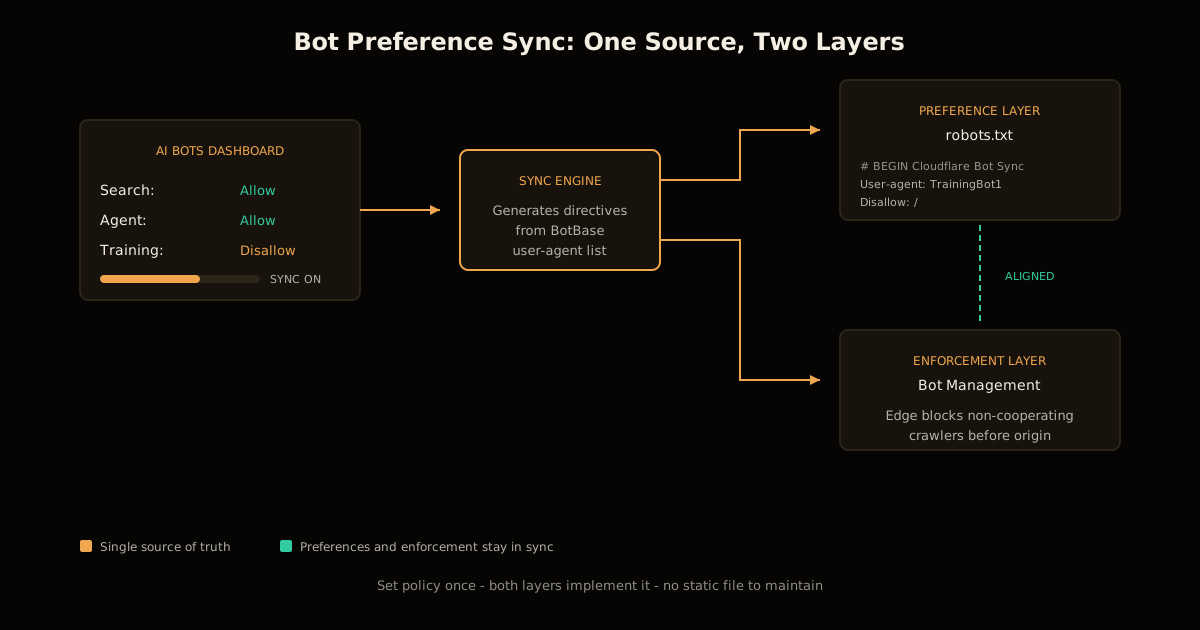
Bot Preference Sync is a Cloudflare feature that generates or updates your robots.txt based on the AI bot configuration you have already set in the dashboard. Instead of maintaining a static file that says one thing while your WAF rules do another, the sync keeps both layers aligned: what you tell crawlers in robots.txt matches what you actually enforce at the edge.
The mismatch problem is real. A robots.txt that Disallows a crawler but a firewall that lets it through is an invitation to treat your preference as optional. Crawlers that see a gap between your stated policy and your enforced policy have, historically, used that gap as grounds to disregard the preference entirely. Bot Preference Sync closes the gap by generating the policy from your enforcement settings.
The feature launched August 21, 2026, is available on all plans including Free, and will be on by default for new customers. Existing customers using the legacy managed robots.txt will be prompted to review and migrate.
How does the sync actually work?
When you configure AI bots in the Cloudflare dashboard, you set one of three policies for each category:
| Category | Allow | Block on ad pages | Block everywhere |
|---|---|---|---|
| Search | Crawlers can index your content for search results | Blocked only on pages you monetise with ads | Blocked site-wide |
| Agent | AI assistants and agentic tools can access your content | Blocked on ad-monetised pages | Blocked site-wide |
| Training | Your content can be used to train models | — | Disallow (preference) or Block (enforcement) |
For Training specifically, Cloudflare offers Disallow rather than a simple block. Disallow writes a robots.txt directive that cooperating mixed-use crawlers honour for training while still indexing you for search. A crawler that does both — like those behind major AI search products — can read your content for the search index without feeding it into the training pipeline, provided it meets transparency requirements.
With Bot Preference Sync enabled, your robots.txt is prepended with a generated block:
# BEGIN Cloudflare Bot Preference Sync

User-agent: TrainingBot1
User-agent: TrainingBot2
User-agent: MixedUseBot-Extended
Disallow: /

# END Cloudflare Bot Preference Sync
The list of user agents comes from Cloudflare’s BotBase and is updated periodically. Your existing robots.txt content remains below the generated block, unchanged.
When does blocking beat stating a preference?
robots.txt is advisory. A crawler can legally ignore it, and some do. The enforcement layer — Bot Management — is what actually stops non-cooperating traffic. Bot Preference Sync pairs the two so you do not have to think about which layer handles which case.
| Crawler behaviour | Preference layer (robots.txt) | Enforcement layer (Bot Management) |
|---|---|---|
| Cooperating, meets transparency | Honoured | Allowed through |
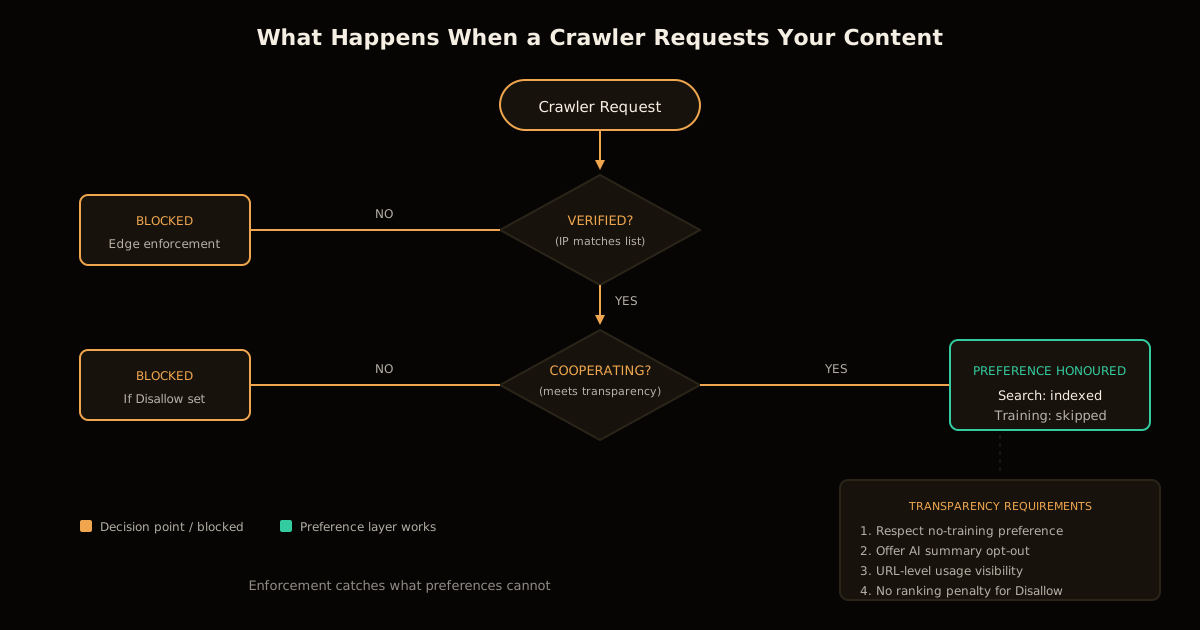
| Non-cooperating, ignores robots.txt | Ignored | Blocked at edge |
| Unverified or spoofed user-agent | Irrelevant | Blocked or challenged |
The practical effect: you set a policy once, and both layers implement it. If a crawler is verified and cooperating, it sees your preference and honours it. If it is not, the edge blocks it before it touches your origin.
For sites that verify crawler identity by IP rather than user-agent, Bot Management is the layer that matters. Spoofing a user-agent is trivial; spoofing an IP range published in a crawler’s ASN is not. The preference layer handles the cooperative case; the enforcement layer handles everything else.
What are Cloudflare’s transparency requirements?
Not every mixed-use crawler gets the benefit of the doubt. To be allowed through when you set Training to Disallow, a crawler must meet four criteria:
- Respect a no-training preference — via
robots.txt, a meta tag, or any documented mechanism - Offer an opt-out of AI summaries — so you can stay in search results without being summarised in an AI answer
- Provide URL-level visibility — you can see which pages were used for training versus search, and get metrics on search results
- Demonstrate no ranking penalty — publicly show that disallowing training does not hurt your traditional search rankings
Crawlers that meet these criteria are tracked in the AI bot transparency section of Cloudflare Radar. Crawlers that do not are blocked when you set Disallow, the same as if you had set Block.
This makes transparency the price of admission. If a crawler wants to do training and search with the same user-agent, it must prove it can separate them and respect your choice. If it cannot, it does not get access.
How to enable Bot Preference Sync
The feature will be available in the coming week. Once live, the setup is three steps:
- Navigate to Security → Bots → AI Bots in the Cloudflare dashboard
- Set your preferences for Search, Agent, and Training — Allow, Block on ad pages, Block everywhere, or Disallow for Training
- Toggle Bot Preference Sync on — your
robots.txtis generated immediately
For new customers, the sync is on by default. For existing customers, Cloudflare will prompt you to confirm your preferences during the transition from the legacy managed robots.txt.
If you have special arrangements with specific providers — an exception for one crawler, a custom rule for another — you can turn the sync off and manage the file manually. Bot Preference Sync handles category-wide policies, not case-by-case exceptions.
Publishers and ad-supported sites get a separate onboarding path. If you select “I monetise from pages with ads on this domain” during setup, Training defaults to Disallow. Everyone else starts with no blocks — the choice is yours.
Why this matters for publishers
The question publishers increasingly ask is not just “is my content being trained on?” but “how do I show up when someone asks an AI assistant something my site can answer?” Discoverability and training are different problems with different answers.
A publisher monetising pages with ads wants the opposite of what an e-commerce store wants. The store may want everything crawled and trained on so products surface in AI-generated recommendations. The publisher wants search visibility without giving away the content that readers should see on the page, where ads pay the bills.
Bot Preference Sync lets you separate those concerns. Disallow training, keep search. The same crawler reads your content for the index and does not use it for the model, provided it meets the transparency bar. For publishers, that is the wedge: visibility without extraction.
This is complementary to making your site agent-readable. You may want some AI systems to access your content — agents doing real-time lookups, for example — while blocking others from training on it. Bot Preference Sync gives you the category-level controls to express that, and the enforcement layer to back it up.
What Bot Preference Sync does not do
The sync handles policy at the category level. It does not:
- Write page-level exceptions — if you want to allow training on your FAQ but not your premium content, you need custom rules
- Guarantee compliance —
robots.txtis advisory, and not all crawlers honour it; enforcement catches the rest, but non-cooperating crawlers may have already scraped before Cloudflare blocked them - Retroactively remove training data — if your content was already used before you set Disallow, the sync does not undo that; you need the crawler operator’s opt-out process
Think of it as a declarative control: you state what you want, and Cloudflare implements it at both the preference and enforcement layers. It is not a time machine.
The practical upshot
If you run a site on Cloudflare and care about AI crawlers, Bot Preference Sync is the simplest path to a coherent policy. Set your preferences once in the dashboard, turn the sync on, and your robots.txt matches your enforcement rules without a static file to maintain.
For most sites, the right setting is: Allow Search, Allow Agent, Disallow Training. You stay in AI-powered search results, you let agentic tools use your content for real-time lookups, and you keep your content out of training datasets. The crawlers that cannot separate those concerns are blocked; the crawlers that can are held to a transparency standard.
Bot Preference Sync is rolling out this week to all plans. Watch the Cloudflare changelog for availability.
robots.txt still only binds crawlers that choose to read it. Related reading: what happens when scrapers ignore it entirely and the CPU bill lands on your origin instead.
FAQ
Can I block AI training without hurting my search rankings? Yes. Disallow for Training writes a directive that cooperating mixed-use crawlers honour for training but ignore for search. Your content gets indexed; it does not get trained on.
What is the difference between Block and Disallow for Training? Block stops the crawler at the edge — it never sees your content. Disallow is a stated preference that cooperating crawlers honour voluntarily. Disallow exists for Training specifically because blocking a mixed-use crawler entirely would kill your search visibility.
Does Bot Preference Sync overwrite my existing robots.txt? No. Cloudflare prepends the generated directives and leaves your custom rules intact.
Which crawlers respect the Disallow directive? Only those meeting Cloudflare’s transparency requirements: respect for no-training preferences, opt-out of AI summaries, URL-level usage visibility, and proof that disallowing training does not hurt search rankings.
Is Bot Preference Sync available on the free plan? Yes, on all plans including Free.
What happens if a crawler ignores my robots.txt? It hits the enforcement layer. Cooperating crawlers honour the preference; non-cooperating ones are blocked at the edge by Bot Management.
Sources
- Cloudflare — Say it once: introducing Bot Preference Sync (August 21, 2026)
- Cloudflare Radar — AI bot transparency tracking
- Related: How to verify AI crawler IPs, not user-agents
Frequently asked questions
Google Search · Preferred sources
Prefer this site on Google
If you already read this writing, add umesh-malik.com as a Preferred Source. Google can then highlight it with a preferred badge in Top Stories, AI Overviews, and AI Mode — for you, not as a site-wide ranking boost.
Related Articles

AI Security
How to Verify AI Crawler IPs: 3 Lists Are Over a Year Stale
Verify AI crawler IPs instead of trusting the User-Agent: the CIDR check for ClaudeBot and GPTBot, and the three published lists that are over a year stale.

AI Security
How to Scope AI Agent Access to Cloudflare Workers, Not Admin
Cloudflare's new roles let you scope AI agent access to Cloudflare Workers per resource, not per account. Four roles, ten legacy ones replaced, 5 steps.

AI Security
Configure Cloudflare Access for Workers: auth before your code runs
Cloudflare Access for Workers checks requests before your code runs — no JWT validation. The three scopes, the local-dev config, and what it still misses.
Keep reading
Get new posts on AI, Claude Code & LLMs
New deep-dives on AI engineering, Claude Code, and developer tooling — follow along however you prefer.
About the Author

Software engineer writing about AI, Claude Code, LLMs, OpenAI, Anthropic, and developer tooling. 5+ years building production systems at Expedia Group, Tekion, and BYJU'S.