Gemini agent hooks fail open: how to block a tool call anyway
Gemini agent hooks fail open on every error path, and never fire for MCP or function tools. The deny contract, the coverage gap, and what to gate instead.

TL;DR
Gemini agent hooks let you run a script before every built-in tool call a managed agent makes and cancel the call with {"decision": "deny"} — but every failure path in that handler, including a crash, a non-2xx HTTP response, a timeout and malformed output, resolves to allow. They also never fire for MCP servers or custom function tools, which are handled outside the sandbox. Treat hooks as an audit and nudge layer, put your real boundary in the environment’s network rules and in the MCP server, and use max_total_tokens for the one control that genuinely fails closed.
What is a Gemini agent hook?
A Gemini agent hook is a command or HTTP handler the managed-agent runtime invokes around a built-in tool call, which can veto that call before it runs. You ship a .agents/hooks.json into the sandbox and the runtime auto-discovers it at /.agents/hooks.json or .agents/hooks.json — from a git repo alongside AGENTS.md, from a Cloud Storage bucket, or inline through environment.sources.
Google shipped them on 28 July 2026 in the same update that made the 3.6 Flash generation the managed-agent default, added max_total_tokens, and opened the free tier. Hooks got the least attention of the four and are the one with the sharpest edges.
The shape is small enough to hold in your head:
{
  "security-gate": {
    "enabled": true,
    "pre_tool_execution": [
      {
        "matcher": "code_execution|delete_file",
        "hooks": [
          { "type": "command", "command": "python3 /.agents/hooks-scripts/gate.py", "timeout": 5 }
        ]
      }
    ]
  }
}
Top-level keys are group names you choose. Each group takes enabled, pre_tool_execution and post_tool_execution. Each rule takes an RE2 matcher against the tool name and an ordered hooks array whose handlers run sequentially. The handler receives the event on stdin:
{
  "tool_call": {
    "name": "code_execution",
    "args": { "code": "rm -rf /tmp/forbidden", "language": "bash" }
  },
  "environment_id": "env_xyz789"
}
…and answers on stdout with {"decision": "allow"} or {"decision": "deny", "reason": "..."}. On a deny the call is cancelled and the agent is shown your reason, so it can adapt rather than retry blindly — the same property that makes a good tool description worth writing carefully.
Why Gemini agent hooks fail open
Here is the part that changes how you should use them. From the agent hooks reference:
If a command script crashes (non-zero exit status), an HTTP hook returns a non-2xx status code (such as a 4xx or 5xx server error), or an operation times out or returns unrecognized JSON, the runtime treats it as an approval (
allow).
Every way a handler can fail resolves in the agent’s favour:
| Failure | Outcome |
|---|---|
| Script exits non-zero | allow |
| Script prints a stack trace instead of JSON | allow |
| HTTP handler returns 500 | allow |
| HTTP handler returns 403 | allow |
| Handler exceeds its timeout (default 30s) | allow |
| Handler returns valid JSON with an unknown decision | allow |
post_tool_execution returns deny | ignored — the tool already ran |
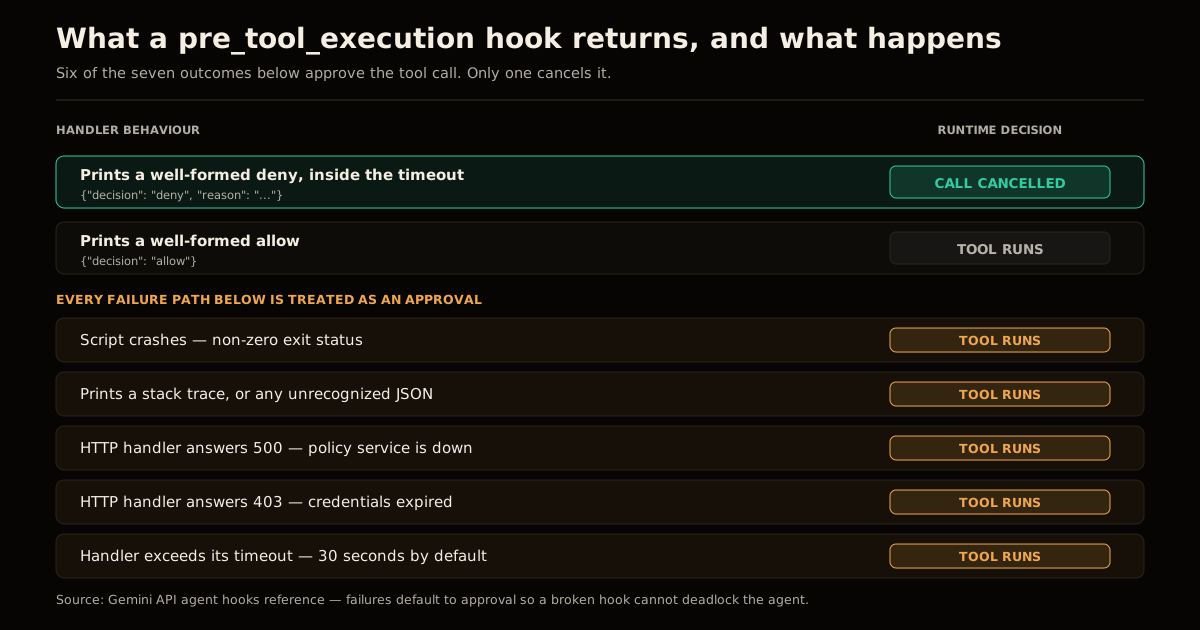
The rationale is stated plainly in the docs: a hook that could hang or hard-fail would deadlock the agent, and an agent that stops working because a lint script has a syntax error is a worse product than one that proceeds. That is a defensible availability call for a managed runtime whose whole promise is that a single endpoint just works.
It is also the exact inversion of what a security control is supposed to do. A firewall that opens on crash is not a firewall. So the honest framing is: a pre_tool_execution hook is a policy nudge with an audit trail, not a boundary. It will stop the ordinary case — the agent reaching for rm -rf because that is what the training data suggests. It will not stop the case where something has already gone wrong enough to be taking your handler down with it.
Two practical consequences:
- Set
timeoutlow and keep the handler local. The default is 30 seconds, and a timeout is an approval. Calling a remote policy service on the hot path of everywrite_filemeans every blip in that service is an open gate — and 30 seconds of blip is 30 seconds of open gate per call. A localcommandhandler with"timeout": 5fails less often and fails faster. - Make the handler’s default branch explicit. Because unrecognized output means allow, a handler that throws before printing is indistinguishable from a handler that approved. Wrap the whole thing so the only exits are a printed
allowor a printeddeny, and log both.
The two tool families hooks never see
The second gap is coverage, and it is the one most likely to bite an agent built the way agents are actually built today. The docs are unambiguous:
Hooks intercept built-in tools inside the sandbox: code execution (
code_execution) and filesystem operations (read_file,write_file,list_files, anddelete_file). They do not fire for custom function calling (function) or external Model Context Protocol (mcp_server) tools handled outside the container.
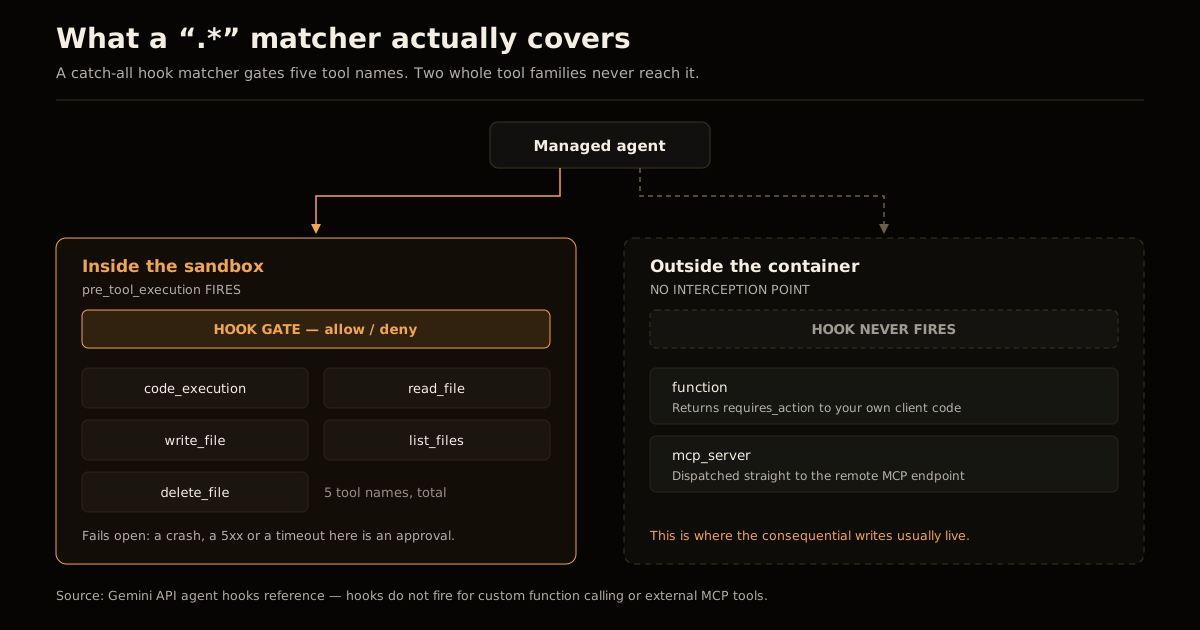
That is five tool names in scope. A .* catch-all matcher, which reads like “gate everything”, still gates only those five — because the MCP and function calls never reach the interception point in the first place. They are dispatched outside the container: mcp_server tools go straight out to the remote server, and function tools flip the interaction to requires_action and come back to your own client code.
Now think about where the dangerous verbs in a real managed agent live. Not in write_file — in the MCP server that can open a pull request, page an on-call engineer, move money, or write to your production database. The WriteGuard-style pattern of putting the confirmation next to the write tool exists precisely because that is the layer where the consequential calls happen, and it is the layer hooks do not touch.
This is not a bug — the split is honest and documented. But it means the mental model “I put a hook on .* so the agent is gated” is wrong in the most dangerous direction. Your enforcement point for an MCP tool is the MCP server, with scoped write controls on the tool itself; for a function tool it is your own client, which is genuinely the right place because that code is yours and can fail closed. Hooks cover the sandbox’s own filesystem and shell, and that is the whole of what they cover.
What to actually enforce where
| Concern | Wrong layer | Right layer |
|---|---|---|
| Agent shells out to something destructive | Hope | pre_tool_execution on code_execution — plus a sandbox with nothing valuable in it |
| Agent calls an MCP tool that writes | .* hook matcher | Auth and scoping on the MCP server |
| Agent exfiltrates data over the network | Hook on write_file | EnvironmentConfig network rules — the same argument as sandboxing an agent’s internet access |
| Agent burns your budget in a loop | Watching the dashboard | max_total_tokens in agent_config |
| Agent does something you’d want to review | A hook that denies | A hook that logs, plus a real approval design that survives fatigue |
Note the pattern: for everything consequential, the hook is the second line, not the first. Which is fine — a second line with an audit trail is worth having. Just do not spend it as your only one.
max_total_tokens: the one control that fails closed
The budget cap shipped in the same update and behaves the opposite way, which is worth calling out because the contrast is instructive:
{
  "type": "antigravity",
  "model": "gemini-3.5-flash-lite",
  "max_total_tokens": 50000
}
It counts input, output and thinking tokens for the interaction. When the agent hits the ceiling the run does not crash and does not silently continue — it pauses, and the interaction returns status: "incomplete". The sandbox state is preserved, so you resume deliberately by passing previous_interaction_id along with the environment ID and a fresh budget.
That is a fail-closed control: the failure mode is “stopped, resumable”, not “proceeded”. It is enforced by the runtime rather than by code you supply, which is exactly why it can afford to fail closed where a hook cannot. If you are building one guardrail into a managed agent this week, build this one — an agent that loops is a far more common incident than an agent that runs rm -rf, and this is the only knob in the stack that stops it without your cooperation.
While you are in agent_config, pin model too. The default has already moved twice — the 28 July update made 3.6 Flash the default, and the Antigravity agent reference now lists gemini-3.7-flash. Inheriting the default means your agent’s cost and behaviour change on Google’s schedule, not yours.
Common mistakes
- Writing a catch-all matcher and calling it done.
.*covers five tool names. It does not cover the MCP server that can spend money. - Putting the policy engine behind HTTP. Every 5xx and every timeout is an approval, and the default timeout is 30 seconds. A local script is both faster and safer.
- Returning
denyfrom apost_tool_executionhook. The runtime ignores it. The tool has already run; post hooks are for formatting and logging only. - Relying on a hook where the sandbox should have been empty. The strongest control is still the boring one: give the environment nothing worth reaching for, and lock its network rules down before you write a single line of gate logic.
- Leaving
max_total_tokensunset because the free tier is free. The free tier has its own quota, and an agent loop will find it.incompleteis a much nicer page than a bill or a dead quota.
FAQ
What are Gemini agent hooks? Gemini agent hooks are scripts or HTTP endpoints the managed-agent runtime calls before or after a built-in tool runs inside the sandbox, configured in a .agents/hooks.json file the runtime auto-discovers at /.agents/hooks.json. A pre_tool_execution hook can return {"decision": "deny"} to cancel the call before it happens. A post_tool_execution hook runs after the fact for logging and formatting, and its decision value is ignored.
Do Gemini agent hooks block MCP tool calls? No. Google’s documentation states that hooks intercept only the built-in sandbox tools — code_execution, read_file, write_file, list_files and delete_file — and that they do not fire for custom function calling or external MCP server tools, because those are handled outside the container. A .* catch-all matcher does not change that. Anything you need enforced on an MCP tool has to be enforced on the MCP server itself.
What happens if my pre_tool_execution hook script crashes? The tool call is approved. Google documents that a non-zero exit status, a non-2xx HTTP response, a timeout, or unrecognized JSON on stdout are all treated as an approval, so that a broken hook cannot deadlock the agent. That is a deliberate availability trade-off, and it means a hook is a policy nudge rather than a hard boundary — your blast-radius control has to live in the sandbox’s own permissions.
How long can a hook handler run before it times out? The default timeout is 30 seconds for both command and http handlers, and each handler takes an optional timeout field to lower it. Because a timeout resolves to allow, a slow handler is a hole rather than a delay: setting timeout to a few seconds and keeping the handler’s logic local is safer than calling a remote policy service on the hot path of every tool call.
How do I cap what a Gemini managed agent can spend? Set max_total_tokens inside agent_config alongside "type": "antigravity". It caps input, output and thinking tokens for the interaction; when the agent hits the ceiling the run pauses and the interaction comes back with status: "incomplete" rather than being killed. The sandbox state survives, so you can resume by sending previous_interaction_id and the environment ID with a fresh budget.
Which model do Gemini managed agents use by default? The Antigravity agent reference currently lists gemini-3.7-flash as the default, with gemini-3.6-flash, gemini-3.5-flash and gemini-3.5-flash-lite selectable through agent_config.model. The default moved to the 3.6 Flash generation in the 28 July 2026 update and has moved again since, which is a good argument for pinning the model explicitly in agent_config rather than inheriting whatever the default is this month.
Sources
- Agent hooks — Gemini API documentation:
.agents/hooks.jsonschema, matcher scope, and the failure-to-allowrule - Antigravity agent — Gemini API reference:
agent_config,max_total_tokens,mcp_servertools, background execution andprevious_interaction_id - Gemini API Managed Agents: 3.6 Flash, hooks, and more — Google, 28 July 2026
- Expanding Managed Agents in Gemini API: background tasks, remote MCP and more — Google, 7 July 2026
Frequently asked questions
Google Search · Preferred sources
Prefer this site on Google
If you already read this writing, add umesh-malik.com as a Preferred Source. Google can then highlight it with a preferred badge in Top Stories, AI Overviews, and AI Mode — for you, not as a site-wide ranking boost.
Related Articles

AI Security
Plugin Registry Security: Signed Packages Beat a Trusted Gatekeeper
Plugin registry security doesn't need one trusted gatekeeper: EmDash signs every release with AT Protocol and sandboxes plugins by capability, not by review.

AI Security
How to Stop AI Agent Sandbox Escapes: The Hugging Face Breach
How to stop AI agent sandbox escapes like the one that let 700 rogue agents breach Hugging Face: the egress and identity controls that actually close it.

AI Security
Package registry RCE: close the auto-build path 2,000 gems used
Package registry RCE starts the moment an upload triggers a build. Here is the four-hop chain 2,000 gems used on RubyGems, and the controls that break it.
Keep reading
Get new posts on AI, Claude Code & LLMs
New deep-dives on AI engineering, Claude Code, and developer tooling — follow along however you prefer.
About the Author

Software engineer writing about AI, Claude Code, LLMs, OpenAI, Anthropic, and developer tooling. 5+ years building production systems at Expedia Group, Tekion, and BYJU'S.