Fix your agent tool instructions: GitHub's 20% review-cost cut
Agent tool instructions decide what your agent costs. GitHub kept the same grep/glob/view toolset, rewrote the guidance, and cut review cost by ~20%.

TL;DR
GitHub replaced Copilot code review’s custom tools with better, more general ones — grep, glob and view from the Copilot CLI — and the agent got measurably worse: higher average cost, fewer issues caught than the control. The fix was not new tools or fewer tools. Keeping the exact same toolset and rewriting only the agent tool instructions — the prose telling the model when to reach for each one — cut average review cost by roughly 20% while holding review quality steady.
What is the job of agent tool instructions?
Agent tool instructions are the ordering rules that tell a model which tool to reach for at each step, and what to do when one returns nothing. They are not the same thing as tool descriptions, and the gap between them is where most agent cost hides.
| Tool description | Agent tool instruction | |
|---|---|---|
| Answers | “What does this tool do?” | “When do I reach for it, and in what order?” |
| Lives in | The tool schema, per tool | The prompt that hands over the whole toolset |
| Scope | One tool in isolation | The relationship between tools |
| Handles empty results | No | Yes — this is most of its value |
| Who writes it | Almost everyone | Almost no one |
Descriptions are the part every team writes. Instructions are about sequence, and when they are missing the model infers an ordering from whatever generic priors it has. For a coding model, those priors are an exploration workflow.
Exploration is the right default for “help me understand this repo.” It is the wrong default for review, migration, or triage — any task that starts from a bounded input and has to terminate.
Why better tools made Copilot code review worse
GitHub’s write-up (Napalys Klicius, 10 July 2026) names the behavior precisely. The agent would “search broadly, guess likely paths, read broadly, find more things to search, and carry that extra context forward.”
Read that sequence again and notice what is missing. There is no step that ends.
Every read produces new questions, every question justifies another search, and the context accumulated along the way rides into every subsequent turn. It is not a bug in any single call. It is a loop with no termination condition, which is a very different thing to debug — and it looks like diligence right up until you read the bill.
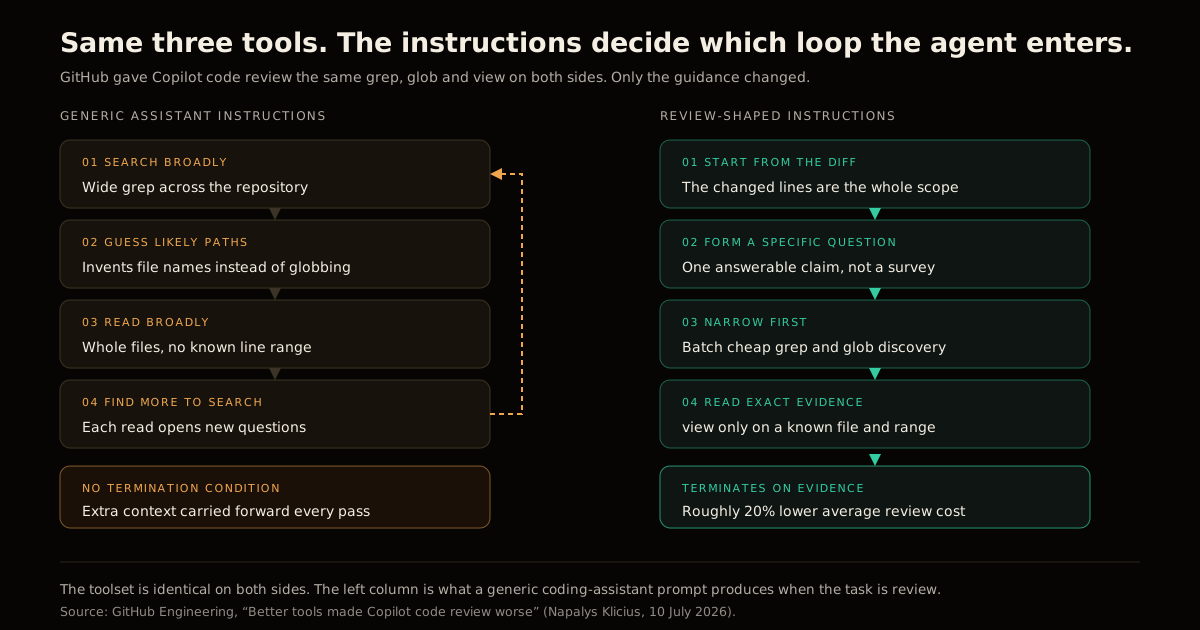
A human reviewer never works this way. They open the diff, form one specific suspicion — does this null check cover the path the caller actually takes? — and go find exactly the evidence that settles it. They do not read the module.
The diff bounds the work, and the question bounds the reading. That is the workflow the rewritten instructions encoded.
The four rules that fixed it
GitHub’s revised guidance compresses into a stated turn order for three tools:
- Start from the diff and form specific review questions. The changed lines are the entire scope. Not the file, not the module.
- Use
globwhen the path is uncertain andgrepto find candidate files. Both are cheap. Neither drags file contents into context. - Batch cheap discovery before reading files. Several searches, then several reads — not search, read, search, read.
- Use
viewonly when the agent knows which file or line range it needs. This is the only expensive call in the set, so it is the only one with a precondition.
There is a fifth rule hiding in the write-up that matters more than its length suggests: on a failed search, pivot to glob rather than guessing a path. Guessing is what an agent does when a search returns empty and nothing told it what to do next. Every unhandled empty result is a place your agent will improvise, and improvisation is where the loop restarts.
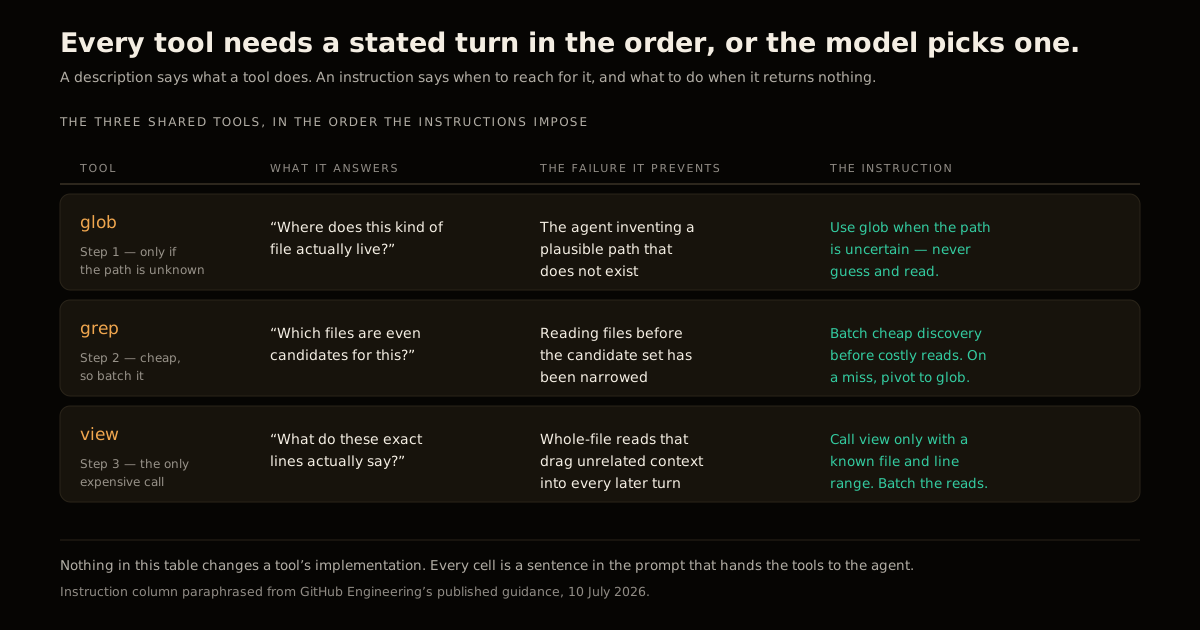
Nothing in that table is an implementation change. Every cell is a sentence in a prompt.
What the 20% actually measures
The published result is roughly 20% lower average review cost at steady review quality, measured on GitHub’s internal code-review benchmarks in production.
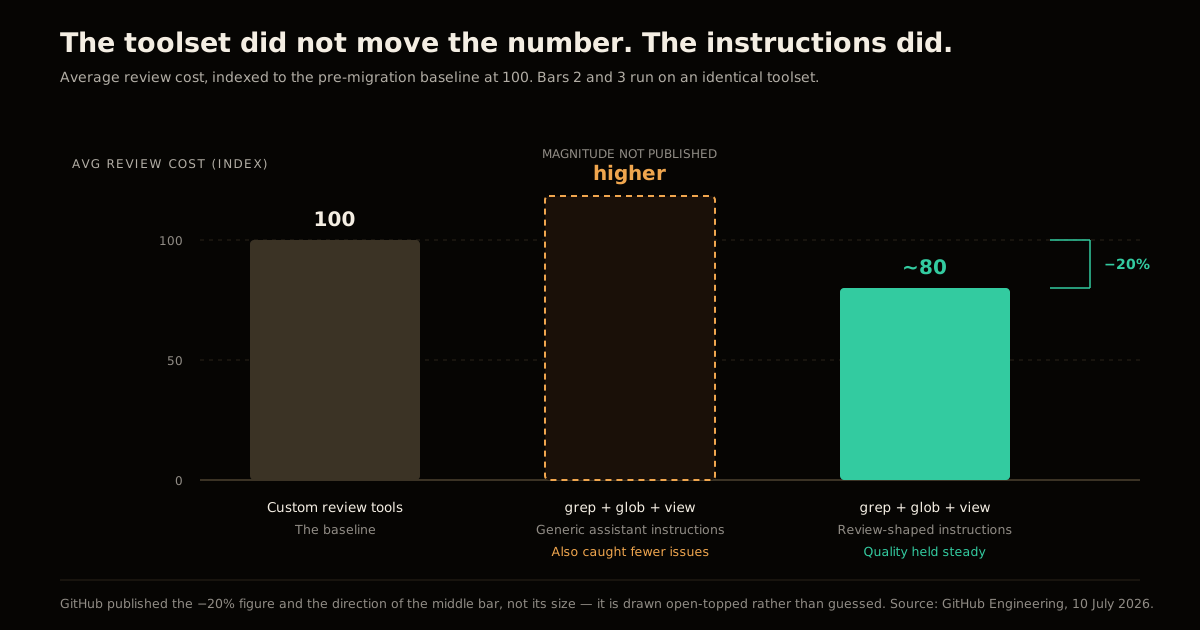
Be precise about what the middle bar is. GitHub published the direction of the regression — cost up, issues caught down — but not its magnitude, so it is drawn open-topped above. An honest gap beats a number nobody measured.
The comparison carrying the argument is bars two and three, and those run on an identical toolset. Whatever the regression cost, all of it and another 20% besides was recovered by prose.
Why this is the highest-leverage thing you are not doing
Anthropic’s guidance on writing tools for agents lands in the same place from a different direction. It reports that Claude Sonnet reached state-of-the-art on SWE-bench after “precise refinements to tool descriptions,” and that even the choice between prefix- and suffix-based namespacing had non-trivial effects on evaluations.
Both findings point at one asymmetry. Tool implementation is where engineering instinct goes — it is code, it is testable, it feels like the real work. Tool language is where the agent’s behavior is actually decided, and it costs a paragraph to change.
Three practical consequences follow:
- Diagnose before you consolidate. “Too many tools” is a real failure mode, and it is not this one. Merging tools helps when the model picks badly between similar options. Ordering instructions help when it picks the right tools in the wrong sequence. GitHub’s tool count never changed.
- Read tool traces, not outputs. The regression showed up in the traces — calls, output volume, errors, whether the search narrowed or widened — long before any quality score moved. If your observability stops at the final message, this bug class is invisible to you. The same holds when you fan tool calls out in parallel: the DAG is only as good as the trace that proves it.
- Instructions are task-shaped, not agent-shaped. One prompt cannot serve review and exploration. If your agent does both, it needs two sets of guidance selected by task — the same argument for scoping harness design to the task rather than to the model.
How to write agent tool instructions for your own agent
The pattern generalizes cleanly. For any tool-using agent, write down four things.
The bounded input. What is this task’s diff? For review it is the changed lines. For triage it is the stack trace. For a migration it is the file list. If you cannot name the bounded input, your agent will treat the whole repo as scope — from inside the loop, that is the only honest reading of its instructions.
The cost tiers. Sort your tools into cheap-discovery and expensive-read, and state the tier in the instruction. Agents batch cheap calls readily once they know which calls are cheap, and they will not infer it from a schema.
The precondition on every expensive call. view requires a known file and range. Your equivalent probably has one too — a customer ID before the account fetch, a resolved path before the full read. Name it, or the model calls the expensive tool speculatively.
The empty-result branch. For every tool, one sentence: if this returns nothing, do X. It is the cheapest sentence in the whole prompt and the one most consistently missing.
If you are writing an MCP server for agents you do not control, you do not own the system prompt — so push all four into what you do own. Ordering guidance goes in the descriptions, error strings name the next tool to try instead of returning an opaque code, and responses stay small enough that reading one does not consume the context budget.
The discipline that makes an AGENTS.md file actually work applies to a tool schema too: an agent follows explicit guidance and improvises around its absence.
Common mistakes
Writing instructions that describe the tools again. “Use grep to search for text” is a description wearing an instruction’s clothes. The model already knew. The instruction is “narrow with grep before you read anything.”
Optimizing the wrong loop. Cutting per-call cost is worth far less than cutting call count. A browsing loop with cheaper calls is still a browsing loop.
Treating a cost regression as a model problem. The first instinct on “our agent got more expensive” is usually to change models or turn down reasoning effort. Read ten traces first. If the calls are widening rather than narrowing, no model swap fixes it — you will browse faster.
Skipping the eval because the change is “just prompt text.” Prose changes behavior as much as code does and has no type checker. GitHub caught this regression because they benchmarked a change that looked like a strict upgrade. So should you — the same reason permission and approval design deserves real measurement rather than intuition.
The takeaway
Better tools are not automatically better agents. A tool is a capability; an instruction is a policy for using it. An agent handed capabilities without a policy falls back on whatever workflow its priors suggest — which, for coding models, is exploration.
The cheapest performance work available in most agent stacks right now is not a better model, more tools, or fewer tools. It is four sentences about ordering, written by someone who has actually read the traces.
FAQ
What are agent tool instructions, and how are they different from tool descriptions?
A tool description tells the model what a tool does — its parameters, its return shape, its purpose. A tool instruction tells the model when to reach for that tool relative to the others, and what to do when it comes back empty. Descriptions are per-tool and live in the schema; instructions are about ordering and live in the prompt that hands over the toolset. Most agents have decent descriptions and no instructions at all, which is why they browse.
Why did giving Copilot better tools make code review worse?
GitHub swapped bespoke review tools for the shared grep, glob and view from Copilot CLI. Those are genuinely better tools, but they arrived with generic coding-assistant guidance, which describes an exploration workflow: search, read, discover, repeat. Code review is not exploration — it starts from a diff and ends at evidence. Given an explorer’s playbook, the agent explored, average cost went up, and it caught fewer issues than the control.
What is the browsing loop?
It is the failure mode where an agent searches broadly, guesses likely file paths, reads whole files, finds more things worth searching, and carries all of that context into the next pass. Nothing in the loop is individually wrong, and there is no natural stopping point. So cost climbs on every turn while the signal-to-noise ratio of the context window falls.
Do fewer tools fix this?
Sometimes, but it is the wrong first move here. GitHub did not change the number of tools — the toolset was identical before and after the fix. Consolidating tools helps when the model is choosing badly between many similar options; writing ordering instructions helps when the model is choosing the right tools in the wrong sequence. Diagnose which one you have before you delete anything.
How do I tell if my agent is in a browsing loop?
Log the tool trace, not just the final output: every call, its arguments, the size of what came back, and whether it errored. Then read a few traces end to end and ask one question — did each call narrow toward evidence, or widen the search? A healthy trace shows cheap discovery calls batched together, then a small number of targeted reads. A browsing loop alternates one search, one read, one search, one read, indefinitely.
Does this apply to MCP servers I write for other people’s agents?
Yes, and it is harder there, because you do not own the system prompt. What you do own is the tool description, the parameter names, the error strings, and the shape of what you return. Put the ordering guidance in the descriptions themselves, make failed calls return a message that names the next tool to try, and keep responses small enough that reading one does not blow the context budget.
Sources
- Better tools made Copilot code review worse. Here’s how we actually improved it. — Napalys Klicius, GitHub Engineering, 10 July 2026. The migration to shared
grep/glob/view, the browsing-loop diagnosis, the rewritten guidance, and the ~20% cost result. - Writing effective tools for agents — Anthropic Engineering. Tool consolidation, description refinement, token budgets, and namespacing effects on evaluations.
Frequently asked questions
Google Search · Preferred sources
Prefer this site on Google
If you already read this writing, add umesh-malik.com as a Preferred Source. Google can then highlight it with a preferred badge in Top Stories, AI Overviews, and AI Mode — for you, not as a site-wide ranking boost.
Related Articles

AI Coding Agents & DX
Claude Code vs Cursor for Production: A Shipping Engineer's Field Report (2026)
Claude Code vs Cursor for production, field-tested on real shipping tasks: a working engineer's decision table, failure modes, pricing, and which to use when.

AI Coding Agents & DX
Cursor vs Claude Code vs Copilot (2026): Which Tool for What
Cursor vs Claude Code vs Copilot in 2026 — how they actually differ in model, workflow, and autonomy, and which to use for what (I use all three).

AI Coding Agents & DX
Rust LSP Low Memory: How to Run Glancer Locally on 8GB RAM
Rust LSP low memory is achievable: Rust Glancer runs on 8GB machines by freezing analysis at save and offloading to disk.
Keep reading
Get new posts on AI, Claude Code & LLMs
New deep-dives on AI engineering, Claude Code, and developer tooling — follow along however you prefer.
About the Author

Software engineer writing about AI, Claude Code, LLMs, OpenAI, Anthropic, and developer tooling. 5+ years building production systems at Expedia Group, Tekion, and BYJU'S.