Hyperdrive MySQL on Workers: 3 Pooler Bugs and How to Test Them
Hyperdrive MySQL on Workers is GA. Three pooler bugs it hit, from lost emoji to a 0.001% empty-result cache fault, and the test that catches each.

TL;DR Hyperdrive MySQL support is now generally available, and Cloudflare’s write-up shows three pooler bugs worth testing in any MySQL stack: utf8 silently dropping emoji, COM_RESET_CONNECTION reverting the character set, and a shared cache returning bytes encoded for the wrong client. The last one hit about 0.001% of queries and returned empty results. Each has a cheap test you can run in under an hour.
Hyperdrive is Cloudflare’s database connection pooler for Workers. It holds warm SQL connections open on Cloudflare’s network, shares them across Worker requests, and can cache common queries in the CDN cache.
I read Cloudflare’s “Inside Hyperdrive: How we solved a rare Hyperdrive MySQL caching bug” (October 14, 2026) for the parts that transfer to your own setup. All facts about Hyperdrive’s internals come from that post. The tests and the checklist are my suggestions, and I did not run them against Hyperdrive.
How do you connect a Cloudflare Worker to MySQL with Hyperdrive?
Create a Hyperdrive, bind it to the Worker, and connect through the binding instead of the database host. Connecting directly costs at least five network round trips per connection, which is impractical for a Worker that starts fresh on every request. Hyperdrive absorbs that cost by keeping connections warm.
Create the Hyperdrive with Wrangler:
npx wrangler hyperdrive create HYPERDRIVE_NAME --connection-string="mysql://user:password@db-host.example.com:3306/dbname"Add the returned ID to your Worker’s Wrangler configuration as a Hyperdrive binding.
In the Worker, open the connection with the binding’s host, port, user and password instead of the origin’s.
Turn on caching only after you have run the tests below, and read results from a staging origin first.
Cloudflare’s Hyperdrive documentation has the current binding syntax and driver notes, so copy that rather than my summary. You can also connect to a new PlanetScale database from the dashboard.
Why does a MySQL pooler lose emoji after a connection reset?
Because two separate MySQL defaults undo the character set you thought you negotiated. Cloudflare hit both during the beta.
The first was utf8. It is a deprecated alias for utf8mb3, which allows 1 to 3 bytes per code point, while real UTF-8 needs up to 4. Hyperdrive negotiated utf8 at handshake, so emoji written to the database were not returned correctly. The fix was to negotiate utf8mb4.
The second came from connection cleanup. A pooler shares connections across requests, so it must clear session state between checkouts. Hyperdrive added COM_RESET_CONNECTION, a lightweight command for exactly that. But the command resets the connection to the server default, not to the character set negotiated at startup. On a server that defaults to latin1, a freshly reset utf8mb4 connection becomes latin1. The fix was to always set utf8mb4 again right after a reset.
| Layer | What you set | What silently happens | Fix |
|---|---|---|---|
| Handshake | utf8 | Treated as utf8mb3, 4-byte emoji break | Negotiate utf8mb4 |
| After reset | Negotiated utf8mb4 | COM_RESET_CONNECTION restores server default (latin1 here) | Re-issue the charset command after every reset |
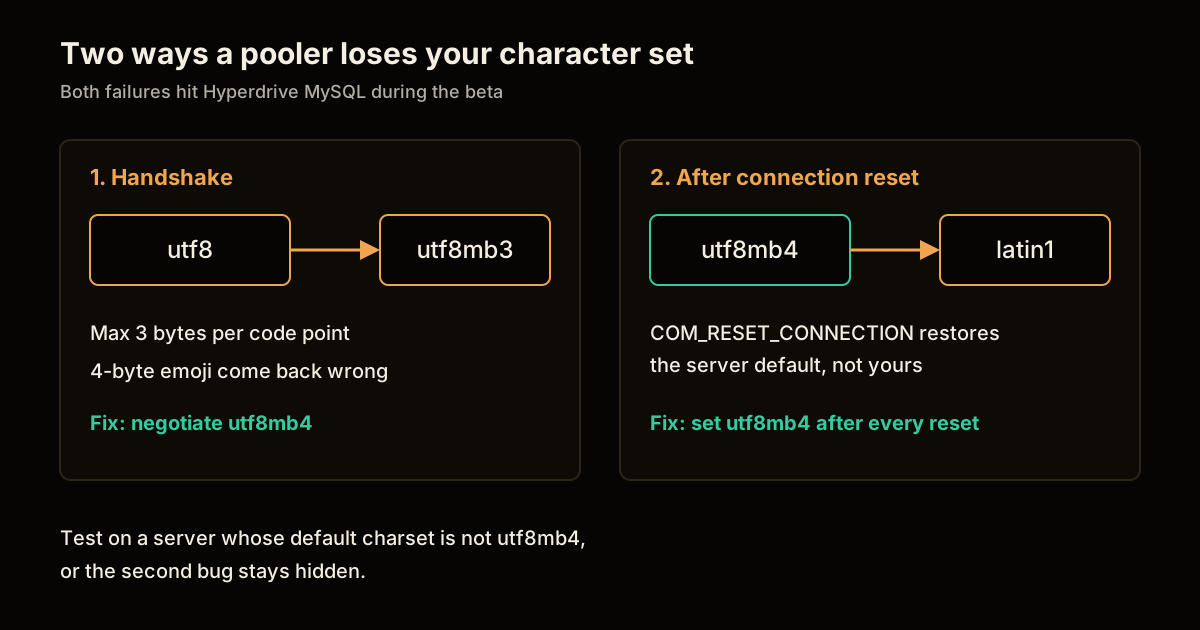
The test: write a row containing an emoji, read it back through the pooler, then force the connection to be reused and read it again. Run it against a server whose default charset is not utf8mb4, since a server that already defaults to utf8mb4 hides the second bug.
How did a shared cache return empty MySQL results?
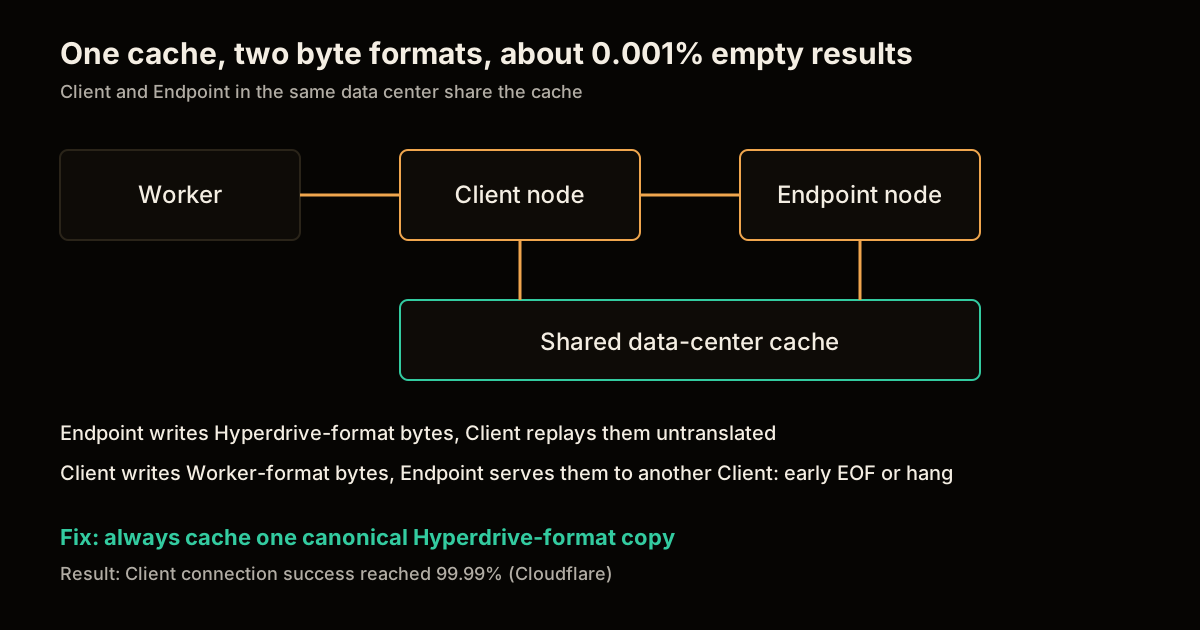
Client and Endpoint nodes shared one data-center cache but wrote different bytes into it. A Hyperdrive has two nodes. The Client node runs beside the Worker and does local caching. The Endpoint node holds the connection pool near the origin database. Each uses the Cloudflare CDN cache of its own data center, so when both run in the same one, they share a cache. Entries are keyed by a hash of the query’s wire messages with some normalization.
The wrinkle is that Hyperdrive talks to the origin with a fixed set of MySQL capability flags, while the Worker’s driver may support a different set. Cloudflare’s example is CLIENT_DEPRECATE_EOF, which the popular mysql2 driver does not support. With it, a result set has no EOF packet after the column definitions and ends in an OK packet. Without it, EOF packets mark both boundaries. Hyperdrive translates between the two.
The old Postgres-era assumption was that the Client could cache exactly the bytes it wrote back to the Worker. Under MySQL those bytes are in the Worker’s format, not the Endpoint’s.
| Scenario | Who writes the cache | Who reads it | Result |
|---|---|---|---|
| Endpoint caches, Client reads | Endpoint, Hyperdrive capabilities | Client | Replies to Worker without translating |
| Client caches, Endpoint reads | Client, Worker capabilities | Endpoint, then a different Client | Early EOF or a hang |
The symptom was about 0.001% empty responses where a non-empty one was always expected, seen only on instances with caching enabled and only when both nodes shared a data center. That is why telemetry and traces found nothing. The fix was to always cache one canonical, Hyperdrive-capability version of the bytes, no matter which node stored it. After that, Cloudflare reports Client connection success reached 99.99%.
How do you test a MySQL pooler before trusting it?
Test the paths a happy-path demo never touches: encoding, reuse, and cached reads. A 0.001% fault will not show up in a smoke test, so the goal is to make each failure mode deterministic. This checklist is my own, derived from the three bugs.
| Check | Failure it catches | How |
|---|---|---|
| Emoji round trip | utf8/utf8mb3 handshake | Insert a 4-byte emoji, read it back |
| Reuse round trip | Charset reverting on reset | Repeat the read after forcing connection reuse, against a non-utf8mb4 server default |
| Cached read parity | Cache bytes in the wrong format | Run the same query repeatedly with caching on and compare every row count to the origin |
| Driver matrix | Capability mismatch | Run the above with each driver you ship, including mysql2 |
| Empty-result alarm | Rare silent faults | Alert when a query that should always return rows returns none |
The last row matters most in production. A 0.001% rate is one in 100,000 queries, so at 10 million queries a day you would see roughly 100 bad responses and no stack trace. If a query can never legitimately return nothing, treat an empty result as an error you log.
What should you take from the Hyperdrive MySQL fixes?
Never assume the bytes you send a client are the bytes you can safely cache for everyone. The cache bug was a Postgres assumption carried into a protocol with negotiable capabilities. Any proxy that translates between two protocol dialects has the same trap: cache the canonical form, translate on the way out.
If you are choosing a pooler, ask three things: what character set it negotiates, what it does after a connection reset, and whether it caches translated or canonical bytes. For related reading, see database per tenant on Cloudflare D1, which uses Hyperdrive on its control plane, Postgres migration safety and table locks and zero-downtime database migration with dual writes for the relational side, use Postgres for everything if you are still choosing a database, and deploy an MCP server on Cloudflare Workers for the platform from the application side.
Sources
- Inside Hyperdrive: How we solved a rare Hyperdrive MySQL caching bug, Cloudflare Blog, October 14, 2026. Every Hyperdrive internal, the 0.001% rate and the 99.99% figure come from this post.
- Cloudflare Hyperdrive documentation, for current binding and driver setup.
- MySQL character set documentation, for
utf8mb3andutf8mb4.
FAQ
Is Hyperdrive MySQL support generally available? Yes. Cloudflare announced general availability of MySQL support for Hyperdrive in a post dated October 14, 2026. The beta ran for about a year, and Cloudflare says the gap between beta and GA was roughly twenty bug fixes.
Why did emoji break when Hyperdrive negotiated utf8? In MySQL, utf8 is a deprecated alias for utf8mb3, which stores at most 3 bytes per code point. Emoji need 4 bytes, so they only survive under utf8mb4. Hyperdrive fixed the handshake to negotiate utf8mb4.
What caused the empty MySQL results in Hyperdrive caching? The Client node cached the exact bytes it wrote to the Worker, but those bytes were translated to the Worker driver’s capabilities. When the Client and Endpoint shared a data-center cache, one node could read bytes encoded for the other, which produced empty rows or hangs about 0.001% of the time.
Does this affect me if I use mysql2 in a Worker? Cloudflare notes mysql2 does not support the CLIENT_DEPRECATE_EOF capability, which is exactly the kind of mismatch Hyperdrive translates. The cache bug is fixed on Cloudflare’s side, so the practical step is to test your own emoji, reset and cached-read paths.
How do I create a Hyperdrive for MySQL? Run npx wrangler hyperdrive create with a name and a mysql:// connection string, or create one in the dashboard. You can also point it at a new PlanetScale database, and then bind it to your Worker.
Frequently asked questions
Google Search · Preferred sources
Prefer this site on Google
If you already read this writing, add umesh-malik.com as a Preferred Source. Google can then highlight it with a preferred badge in Top Stories, AI Overviews, and AI Mode — for you, not as a site-wide ranking boost.
Related Articles

Web Engineering
Self-Host Cloudflare Workers: What workerd Runs and celld Adds
Self-host Cloudflare Workers with workerd today, and add celld when Durable Objects must scale. The working config, the bucket setup, and what stays alpha.

Web Engineering
Deploy FastAPI on Cloudflare Workers: the packages pip won't install
Deploy FastAPI on Cloudflare Workers now that Python is GA: what pip installs cleanly, what needs a Wasm build, and the C-extension wall in between.

Web Engineering
Migrate to a New CMS With Zero Downtime: a 28K RPS DDoS Mid-Rollout
Here is how to migrate to a new CMS with zero downtime: a cookie-routed proxy Worker, staged 1%-100% rollout, and a 28,000 RPS DDoS absorbed mid-migration.
Keep reading
Get new posts on AI, Claude Code & LLMs
New deep-dives on AI engineering, Claude Code, and developer tooling — follow along however you prefer.
About the Author

Software engineer writing about AI, Claude Code, LLMs, OpenAI, Anthropic, and developer tooling. 5+ years building production systems at Expedia Group, Tekion, and BYJU'S.