Self-Host Cloudflare Workers: What workerd Runs and celld Adds
Self-host Cloudflare Workers with workerd today, and add celld when Durable Objects must scale. The working config, the bucket setup, and what stays alpha.

TL;DR You can self-host a Cloudflare Worker today with workerd, Cloudflare’s open-source Workers runtime, using one Cap’n Proto config and workerd serve. What workerd cannot do yet is scale Durable Objects across machines, because its implementation runs as a single instance. celld, the Rust daemon from the Deno team, fills that gap with SQLite cells replicated to one object storage bucket, and the two projects are being merged.
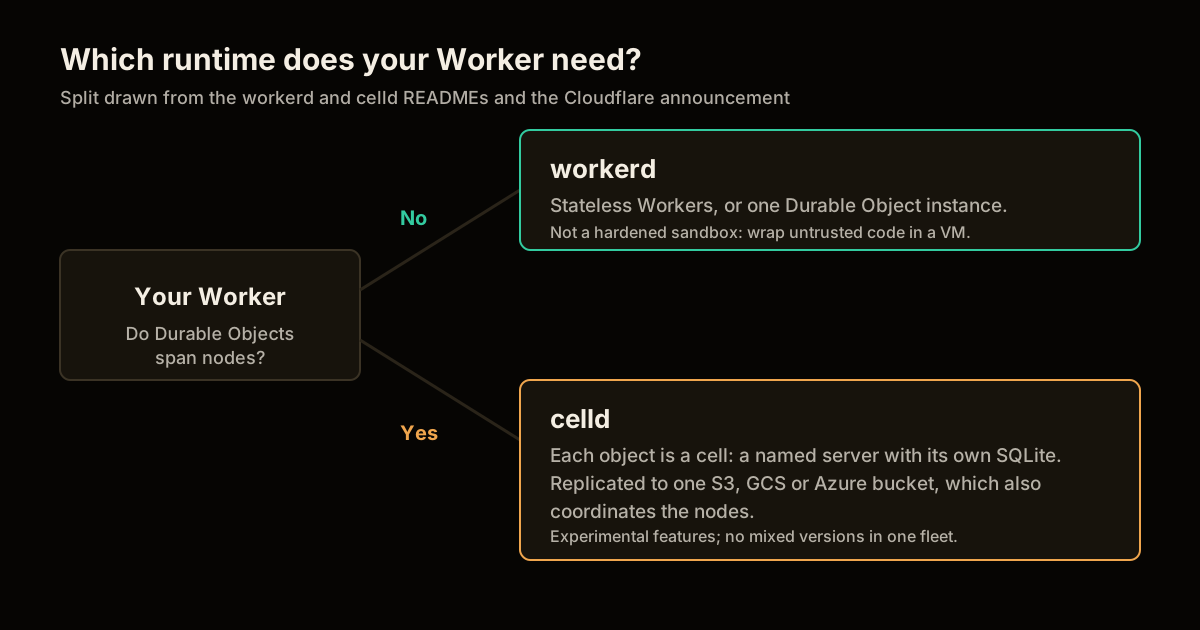
Self-host Cloudflare Workers is a setup where your Worker runs on workerd on your own machine for a single node, and on celld only when Durable Objects must span several nodes.
On October 9, 2026, Cloudflare announced that the Deno team is joining it and that workerd and celld are being merged. The headline is acquisition news. The part you can act on is that both runtimes already exist, both are Apache-2.0, and you can run them this afternoon. This post is the working path: what each one does, a config I ran, the celld bucket setup from its README, and where I would not trust either yet.
What can you self-host with workerd today?
A single-node Workers runtime that is the same code Cloudflare runs in production. The workerd README describes it as a JavaScript and Wasm server runtime for self-hosting Workers applications, local development and testing, and acting as an HTTP proxy. Cloudflare’s announcement calls it “not a parallel implementation, it’s the same code we run in production.”
The catch is Durable Objects. Kenton Varda says in the announcement that workerd’s current implementation runs only as a single instance, fine for local testing and not for scaling. That one limitation is the whole reason celld matters.
| Capability | workerd | celld |
|---|---|---|
| Runs Workers code | Yes | Yes |
| Durable Objects | Single instance only | Distributed, SQLite per object |
| External dependency | None | One object storage bucket |
| Language | C++ | Rust |
| License | Apache-2.0 | Apache-2.0 |
| Maturity | Runs Cloudflare production | v0.1.0 alpha per coverage, experimental features listed |
The celld column comes from its README. It lists support for Workers, Durable Objects, KV, Queues, D1, R2, Workflows, Cron Triggers and static assets. The “alpha” label is from a hands-on write-up, not from the README, so verify the version you install.
How to self-host Cloudflare Workers with workerd in 4 steps
I ran this on Linux with the workerd npm package. The README lists glibc 2.35 or newer on Linux as the requirement, and my box has 2.39.
Install the binary.
npm i workerdpulls the prebuilt binary, or skip the install and callnpx workerddirectly.npx workerd --versionprintedworkerd 2026-10-12for me.Write the Worker. Save this as
hello.js:addEventListener("fetch", event => { event.respondWith(new Response("Hello World")); });Write the config. workerd reads a Cap’n Proto file, not
wrangler.toml. Save this asmy-config.capnp:using Workerd = import "/workerd/workerd.capnp"; const config :Workerd.Config = ( services = [ (name = "main", worker = .mainWorker), ], sockets = [ ( name = "http", address = "127.0.0.1:8080", http = (), service = "main" ), ] ); const mainWorker :Workerd.Worker = ( serviceWorkerScript = embed "hello.js", compatibilityDate = "2023-02-28", );Serve it. Run
npx workerd serve my-config.capnp, thencurl -i localhost:8080. You getHTTP/1.1 200 OKandHello World.
One thing bit me. The README example binds *:8080. In my container that crashed on startup with socket(): Address family not supported by protocol, because the sandbox had no IPv6. Binding 127.0.0.1:8080 fixed it, so if you see that error, change the address before you suspect your Worker.
The full config reference is workerd.capnp in the repository’s src/workerd/server/ directory. Everything else you do with workerd, including bindings and multiple services, is more of that same file.
What does celld add that workerd does not have?
Durable Objects that run across several machines, with one bucket as the only shared dependency. Per the celld README, each Durable Object instance is a cell, a named server with its own SQLite database, and its long-term state lives in your bucket. Every committed write is captured in the LTX replication format.
Coordination is the interesting design choice. Ownership of a cell is granted by a conditional write to the bucket, so exactly one node owns a cell at a time. There is no membership protocol, failure detector or consensus service, and nodes find each other through leases stored in the bucket.
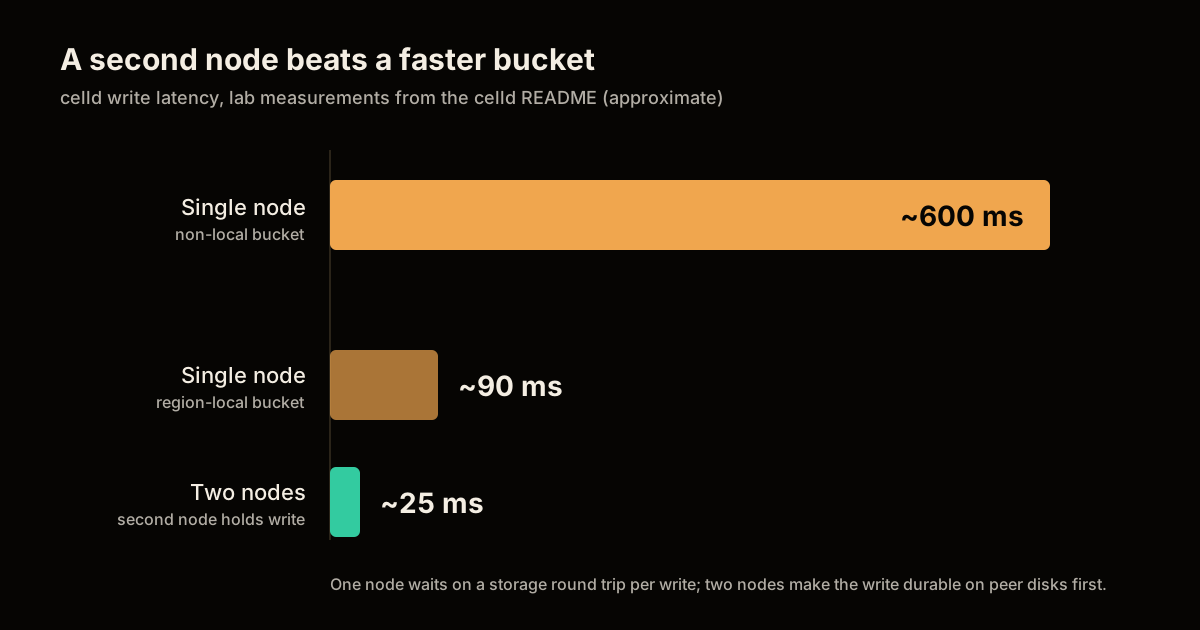
The cost shows up in write latency. The README reports these lab measurements:
| Write path | Latency |
|---|---|
| Single node, bucket in the same region | About 90 ms |
| Single node, non-local bucket | About 600 ms |
| Second node holds the write first | About 25 ms |
With one node, each write waits on a storage round trip before it is durable. With two or more nodes, the owner sends the data to one or two peers and the write is durable once they hold it on disk, with the bucket upload happening afterwards. So the cheapest durability upgrade is a second node, not a faster bucket.
How to try celld without a cloud account
Start with celld dev, which needs no bucket. From the README:
curl -fsSL https://celld.dev/install.sh | sh
celld dev
The Worker listens on http://127.0.0.1:9876 by default, and state persists in .celld/dev. I did not run the installer in this session, so the commands here are the README’s, not my measurements. Read the script before you pipe it into a shell. Deploying a project with celld deploy also needs esbuild on your PATH.
For a real fleet, point every node at the same bucket. Here is the container form from the README, with an R2 endpoint:
docker run --rm --network host
  -e AWS_ACCESS_KEY_ID -e AWS_SECRET_ACCESS_KEY -e AWS_SESSION_TOKEN
  -e CELLD_WATCH=/var/lib/celld/state
  -v celld-state:/var/lib/celld
  ghcr.io/denoland/celld
  --bucket s3://my-cells-bucket
  --endpoint https://ACCOUNT.r2.cloudflarestorage.com
  --region auto
  --listen 0.0.0.0:8080
  --internal-listen 10.0.0.12:8081
  --advertise node-a.internal:8081
Drop --endpoint and --region for AWS S3. Google Cloud Storage uses a gs:// bucket and Azure uses az://. Then deploy once with celld deploy . --bucket s3://my-cells-bucket, and every node loads the latest committed deployment from deploy/current.json. A fleet runs one application.
If you already deploy a Python or MCP Worker, this is the same artifact you would otherwise ship with Wrangler. I covered that path in how to deploy an MCP server on Cloudflare Workers and deploying FastAPI on Workers, and for agent tooling the MCP topic hub lists the rest.
What should you not self-host yet?
Anything that needs a hardened sandbox, the Cloudflare network, or a stable multi-version fleet. Four limits are stated by the projects themselves:
- workerd is not a security boundary. The README says it lacks defense-in-depth against implementation bugs and recommends a virtual machine for possibly malicious code. For production it suggests systemd, passing sockets with
--socket-fd, andNoNewPrivileges=true. If you run untrusted code, compare this with a self-hosted agent sandbox. - celld cannot rolling-upgrade. Mixed versions cannot share a serving fleet, so an upgrade means stopping all old nodes first. That is downtime by design today.
- celld’s internal port is an admin surface. Keep
--internal-listenon a private network, and treat bucket credentials as fleet-administrator access, per the README. - Some products are out of scope. Anything that needs the Cloudflare network, GPUs or browser farms does not move.
I would also hold off on production for governance reasons. The celld repository disables pull requests and accepts patches by emailing git format-patch output under a contributor license agreement, and the announcement promises merge details only “in the coming months.” Plan on evaluating, not committing.
What does the Deno news change for your migration plan?
It sets a clock for Deno Deploy customers and a direction for everyone else. Per Deno’s announcement, Deno Deploy keeps operating for six months before shutting down, and paying customers get migration support to Cloudflare Workers. The Deno runtime gets monthly bug-fix and security releases for a year, after which Deno ends its own development, remains open source, and says it welcomes others who want to continue it. JSR keeps running with its infrastructure moving to Cloudflare.
The announcement does not describe the migration tooling, so I would not plan around a specific conversion path. If you run on Deno Deploy, the safe order is: put your Worker on workerd to prove it runs outside Deploy, move state last, and use celld only to test the Durable Object semantics you depend on.
Cost-wise, self-hosting trades a usage bill for a bucket plus machines you operate, the same trade I measured in Docker Swarm versus Kubernetes at $166 a month. Run workerd where a single node is enough, and treat distributed Durable Objects as the part to wait on.
FAQ
Can you self-host Cloudflare Workers? Yes. workerd is Cloudflare’s open-source Workers runtime under the Apache-2.0 license, and Cloudflare describes it as the same code it runs in production. You can start it with npx workerd serve and a Cap’n Proto config file. What it does not give you today is a distributed Durable Objects setup, because its Durable Objects implementation runs as a single instance.
What is celld? celld is an open-source daemon from the Deno team, written in Rust, that runs a Workers application with Durable Objects on your own machines. Each Durable Object is a named cell with its own SQLite database, replicated to an object storage bucket you control. The bucket is its only external dependency, and nodes coordinate through it with no separate control plane.
Is it safe to run untrusted code in workerd? No, not on its own. The workerd README states that workerd does not contain suitable defense-in-depth against implementation bugs, and recommends running possibly malicious code inside a secure sandbox such as a virtual machine. Treat it as a runtime for code you trust, and wrap it with systemd hardening or a VM for anything else.
What happens to Deno Deploy and the Deno runtime? Per the Deno announcement, Deno Deploy keeps operating for six months before it shuts down, and the Deno runtime gets a year of monthly bug-fix and security releases before the team ends its development. Deno says the runtime will remain open source and that JSR keeps running with its infrastructure moving to Cloudflare. Paying Deploy customers get migration support to Cloudflare Workers.
Should you move production Durable Objects to celld now? Not yet. celld lists experimental features, forbids mixed versions in one fleet, and its repository accepts patches by email only. Use it to evaluate your own workload with celld dev first, and keep production on Cloudflare until the merge with workerd lands and the limits docs match your needs.
Sources
- Deno is joining Cloudflare, Cloudflare blog, October 9, 2026.
- Deno is joining Cloudflare, Deno blog: runtime, Deploy and JSR timelines.
- cloudflare/workerd, README and config example.
- denoland/celld, README: install, bucket setup, storage model, latency and limits.
- celld: self-hosted, distributed Durable Objects, hands-on write-up used for the alpha label.
Frequently asked questions
Google Search · Preferred sources
Prefer this site on Google
If you already read this writing, add umesh-malik.com as a Preferred Source. Google can then highlight it with a preferred badge in Top Stories, AI Overviews, and AI Mode — for you, not as a site-wide ranking boost.
Related Articles

Web Engineering
Build a Cloudflare Streamline Video Pipeline: 4 Steps, 1 Session
Build a Cloudflare Streamline video pipeline: a Worker and Durable Object steer FFmpeg in a Container. See the fixed 4-step order and the limits to know.

Web Engineering
Deploy FastAPI on Cloudflare Workers: the packages pip won't install
Deploy FastAPI on Cloudflare Workers now that Python is GA: what pip installs cleanly, what needs a Wasm build, and the C-extension wall in between.

Web Engineering
Migrate to a New CMS With Zero Downtime: a 28K RPS DDoS Mid-Rollout
Here is how to migrate to a new CMS with zero downtime: a cookie-routed proxy Worker, staged 1%-100% rollout, and a 28,000 RPS DDoS absorbed mid-migration.
Keep reading
Get new posts on AI, Claude Code & LLMs
New deep-dives on AI engineering, Claude Code, and developer tooling — follow along however you prefer.
About the Author

Software engineer writing about AI, Claude Code, LLMs, OpenAI, Anthropic, and developer tooling. 5+ years building production systems at Expedia Group, Tekion, and BYJU'S.