Configure Optional OAuth Scopes for MCP Servers and Agents
Configure optional OAuth scopes so users can narrow agent permissions at consent. The API call, the UX, and handling partial grants.

TL;DR — Cloudflare now supports optional OAuth scopes, letting users deselect permissions on the consent screen. This is exactly what MCP servers and agent apps need to earn trust. Configure optional_scopes on your client, check the token response to see what was actually granted, and build your app to work gracefully with a narrower permission set.
What is an optional OAuth scope?
An optional OAuth scope is a permission an OAuth client can request that users may deselect on the consent screen. The client marks certain scopes as optional during registration; when users see the consent prompt, they can choose to grant only a subset. The access token then contains only the scopes the user actually approved, so applications must check what was granted rather than assuming the full request.
Why agents need optional OAuth scopes
An MCP server that connects agents to Cloudflare resources has a classic permission problem: the agent could use any of a dozen capabilities, but the user only wants to grant what’s needed right now. Before optional scopes, Cloudflare OAuth was all-or-nothing — approve the full request or deny outright. That leaves developers with two bad choices: request minimal permissions and break advanced use cases, or request everything and watch users bounce from the consent screen.
As of August 2026, Cloudflare introduced task-based OAuth consent — developers can mark specific scopes as optional, and users can deselect them during authorization. The consent screen stops being a take-it-or-leave-it wall. The agent gets whatever subset the user is comfortable with, and that is how you build integrations people actually authorize.
How do optional OAuth scopes change the consent experience?
| Before | After |
|---|---|
| User sees a list of permissions the app requested | User sees the same list, but some have checkboxes |
| Only options: Approve All or Deny | User can uncheck optional scopes before approving |
| Token contains every requested scope | Token contains only the scopes the user consented to |
| App assumes full access | App must check the granted scope and handle partial access |
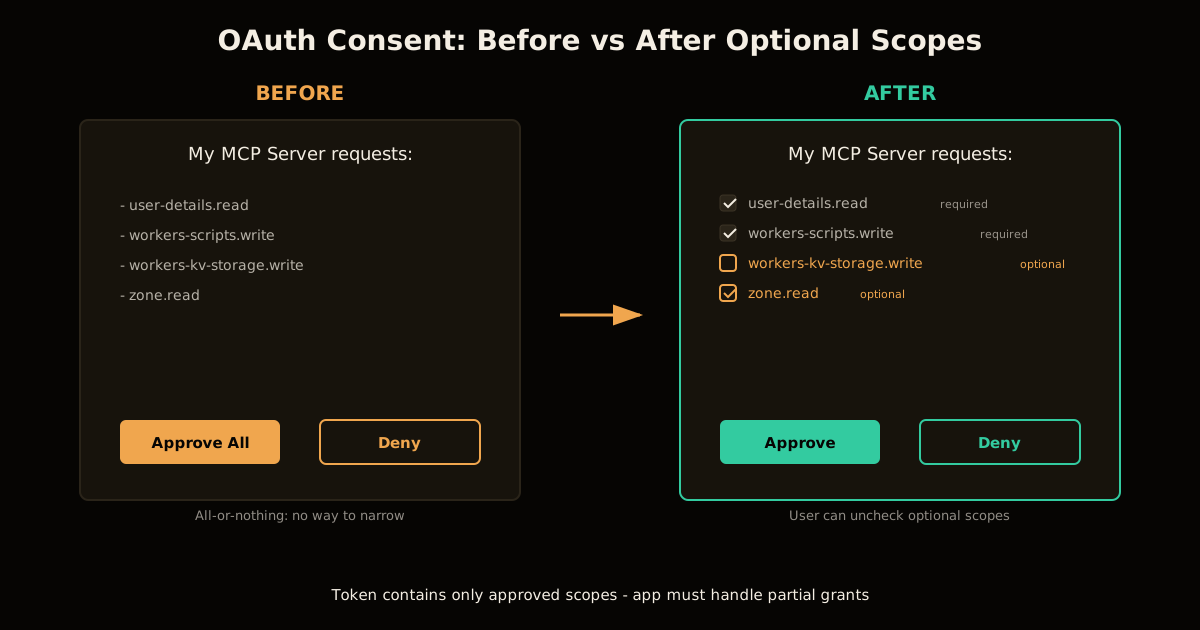
The consent UX shifts from a binary gate to a negotiation. That’s a trust signal for agents — users feel safer authorizing something they can dial back.
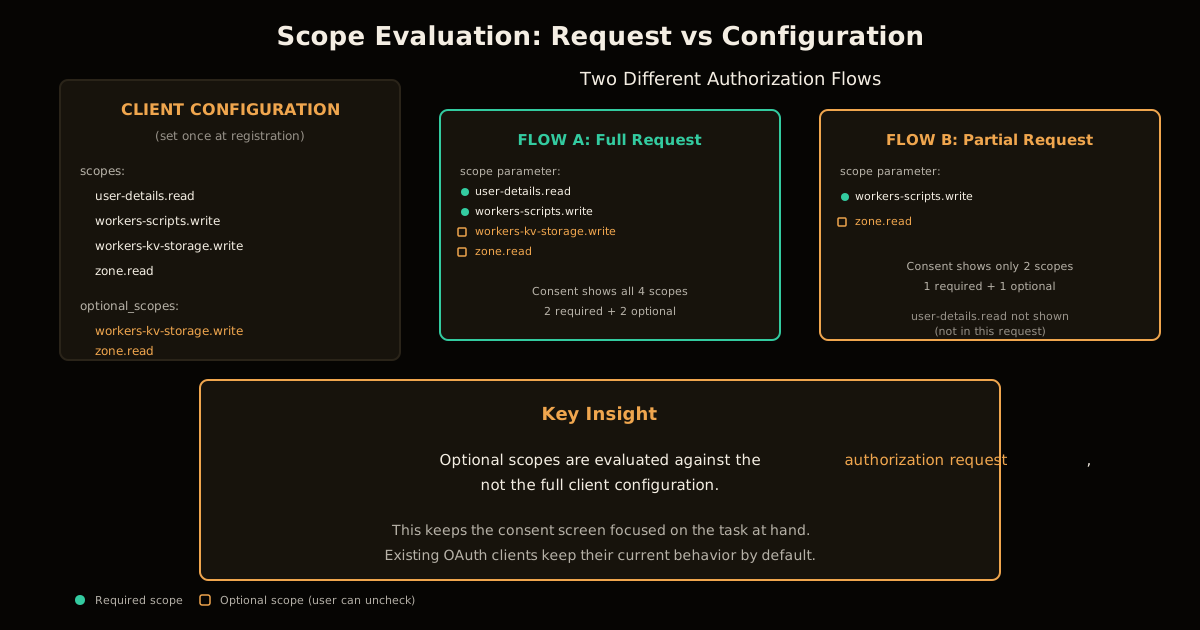
One important detail: optional scopes are evaluated against the authorization request, not the full client configuration. If your client has four scopes configured but only requests two in a given flow, the consent screen only shows those two. This keeps the UI focused on the task at hand rather than every capability the app could eventually use.
How to configure optional scopes on a Cloudflare OAuth client
- Create or update the OAuth client via the Cloudflare API, adding an
optional_scopesarray:
curl "https://api.cloudflare.com/client/v4/accounts/$ACCOUNT_ID/oauth_clients"
  --request POST
  --header "Authorization: Bearer $CLOUDFLARE_API_TOKEN"
  --header "Content-Type: application/json"
  --data '{
    "client_name": "My MCP Server",
    "redirect_uris": ["https://example.com/oauth/callback"],
    "grant_types": ["authorization_code"],
    "response_types": ["code"],
    "token_endpoint_auth_method": "client_secret_basic",
    "scopes": [
      "user-details.read",
      "workers-scripts.write",
      "workers-kv-storage.write",
      "zone.read"
    ],
    "optional_scopes": [
      "workers-kv-storage.write",
      "zone.read"
    ]
  }'
Start the authorization flow requesting whichever scopes you need for this session — they’ll be validated against your configured list.
On the consent screen,
user-details.readandworkers-scripts.writeappear as required (no checkbox), whileworkers-kv-storage.writeandzone.readappear with checkboxes the user can deselect.Exchange the authorization code and inspect the
scopeparameter in the token response to see what was actually granted.Handle partial grants gracefully — if a scope is missing, degrade that feature or surface a clear message rather than crashing.
What breaks when users deselect scopes?
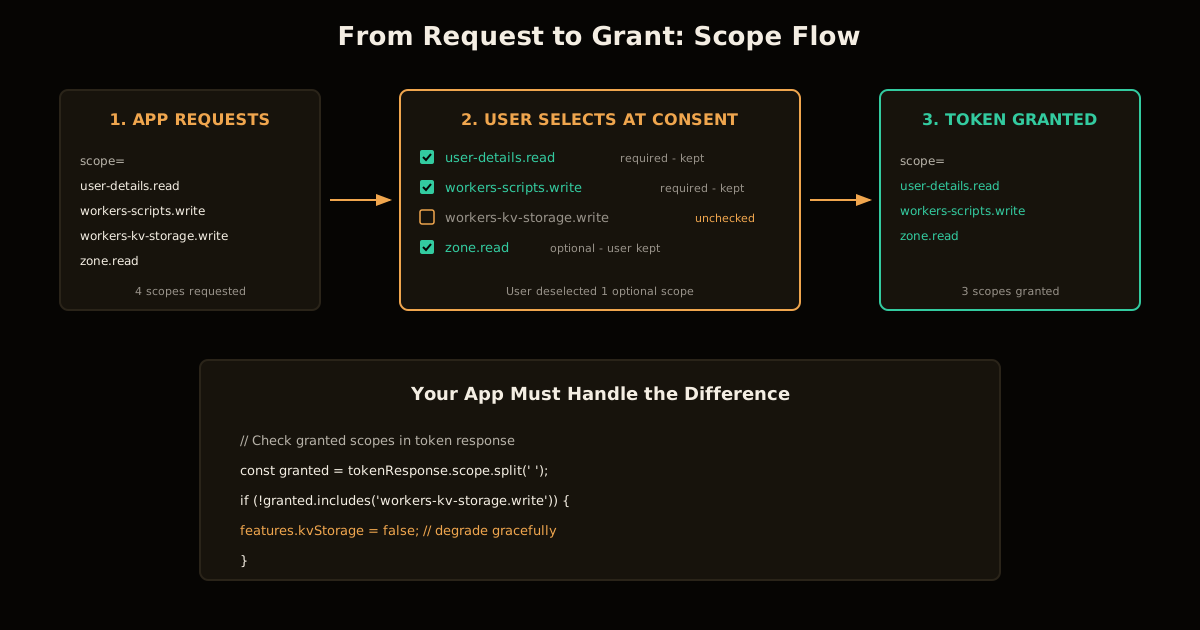
The access token will only contain the scopes the user approved. If your code assumed full access, three things go wrong:
API calls fail with 403. You requested
workers-kv-storage.write, the user unchecked it, and now your KV write returns an authorization error.Features silently break. Worse: you catch the error but don’t surface it, and the user thinks the integration is buggy rather than permission-limited.
Re-authorization flows annoy users. If you redirect back to consent every time a scope is missing, users learn to distrust your app.
The fix is to treat the granted scope set as the source of truth:
// After exchanging the code
const grantedScopes = tokenResponse.scope.split(' ');

if (!grantedScopes.includes('workers-kv-storage.write')) {
  // Disable KV features in the UI, don't just let them 403
  features.kvStorage = false;
  showNotice('KV Storage access was not granted — some features are disabled.');
}
An app that handles narrower grants gracefully is one users feel comfortable authorizing. Requesting only what you need and marking the rest as optional is a signal that your app respects their access decisions.
When should a scope be required vs optional?
| Scope type | Mark as | Why |
|---|---|---|
| Core functionality the app cannot work without | Required | No point authorizing if it can’t do anything |
| Features that enhance but aren’t essential | Optional | Let users decide if they want the extra capability |
| Sensitive operations (delete, write to production) | Optional | Users are more likely to authorize if they can start narrow |
| Read-only scopes for display purposes | Often required | Low risk, high value, users rarely object |
For MCP servers specifically, the pattern is usually: require read access to the resources the agent will query, and make write access optional. An agent that can read your Workers scripts but only write to them if you explicitly allow it is more trustworthy than one that demands full write access upfront.
How does this compare to other OAuth providers?
| Provider | Optional scopes support | Notes |
|---|---|---|
| Cloudflare | Yes (August 2026) | optional_scopes array on client config |
| Partial — incremental auth | User grants one scope at a time, but can’t deselect mid-flow | |
| GitHub | No | User must approve or deny the full request |
| Microsoft Entra | No built-in UI | Developers can build custom consent but it’s work |
Cloudflare’s implementation is notable because it surfaces the flexibility the OAuth spec always allowed in the consent UI itself. RFC 6749 explicitly permits the authorization server to issue a token with a narrower scope, but most providers never exposed that to end users.
What this means for MCP server developers
If you’re building an MCP server on Cloudflare Workers, optional scopes solve the permission problem you’ve been working around. Instead of shipping multiple client configurations (one minimal, one full-featured) or building a custom pre-consent scope picker, you configure one client with optional scopes and let Cloudflare’s consent screen handle the UX.
The agent pattern benefits most: agents request broad capabilities because they might need any of them, but users can narrow to what they’re comfortable with today and expand later. That’s a better trust model than forcing an upfront decision on permissions the user doesn’t understand yet.
For broader context on building agents that respect user consent, the same principle shows up in how to sandbox AI agent internet access — start with the minimum, make expansion explicit, and design for the user who doesn’t fully trust you yet.
FAQ
What are optional OAuth scopes? Optional scopes are permissions an OAuth client can request that users may deselect on the consent screen. The access token contains only the scopes the user approved, so apps must check what was granted.
Why would an MCP server need optional scopes? MCP servers often request broad permissions because an agent could use any of them, but users want to grant less upfront. Optional scopes let users narrow permissions at consent rather than approving everything or denying outright.
Does the OAuth spec allow partial grants? Yes. RFC 6749 explicitly permits the authorization server to issue a token with a narrower scope. Cloudflare’s feature surfaces this in the consent UI.
How does my app know which scopes were granted? Inspect the scope parameter in the token response. If a scope is missing, degrade gracefully rather than assuming full access.
What happens if a user deselects a required scope? Required scopes cannot be deselected — they appear without a checkbox. Only scopes in optional_scopes can be unchecked.
Can I add optional scopes to an existing OAuth client? Yes. Update the client via the API by adding an optional_scopes array. Existing authorizations are unaffected.
Sources
- Cloudflare — From all-or-nothing to task-based OAuth consent (August 2026)
- IETF — RFC 6749: The OAuth 2.0 Authorization Framework — Section 3.3 on scope
- Cloudflare Developer Docs — Third-party OAuth Applications
Frequently asked questions
Google Search · Preferred sources
Prefer this site on Google
If you already read this writing, add umesh-malik.com as a Preferred Source. Google can then highlight it with a preferred badge in Top Stories, AI Overviews, and AI Mode — for you, not as a site-wide ranking boost.
Related Articles

Web Engineering
How to Give an AI Agent CMS Write Access Without Melting the Cache
AI agent CMS write access breaks caches fast. The layered invalidation pattern that let one CMS absorb 5,000 RPS spikes and a 28,000 RPS DDoS without a hiccup.

Web Engineering
How to Make Your Site Agent-Readable: 4 Layers, One Worker
Make your site agent-readable in four layers — readable, discoverable, callable, payable. Three are build-time files; only /mcp needs a Worker.

Web Engineering
Build a Cloudflare Streamline Video Pipeline: 4 Steps, 1 Session
Build a Cloudflare Streamline video pipeline: a Worker and Durable Object steer FFmpeg in a Container. See the fixed 4-step order and the limits to know.
Keep reading
Get new posts on AI, Claude Code & LLMs
New deep-dives on AI engineering, Claude Code, and developer tooling — follow along however you prefer.
About the Author

Software engineer writing about AI, Claude Code, LLMs, OpenAI, Anthropic, and developer tooling. 5+ years building production systems at Expedia Group, Tekion, and BYJU'S.