Build a Cloudflare Streamline Video Pipeline: 4 Steps, 1 Session
Build a Cloudflare Streamline video pipeline: a Worker and Durable Object steer FFmpeg in a Container. See the fixed 4-step order and the limits to know.

TL;DR A Cloudflare Streamline video pipeline lets a Worker and a Durable Object drive an FFmpeg-based media engine running in a Cloudflare Container, so you can burn subtitles, overlays and filters into live or hosted video without running your own media servers. The engine applies four operations in a fixed order and defaults to one session per deployment, which makes it a strong fit for internal tools and prototypes today and a poor fit for a public multi-tenant service.
What is Cloudflare Streamline?
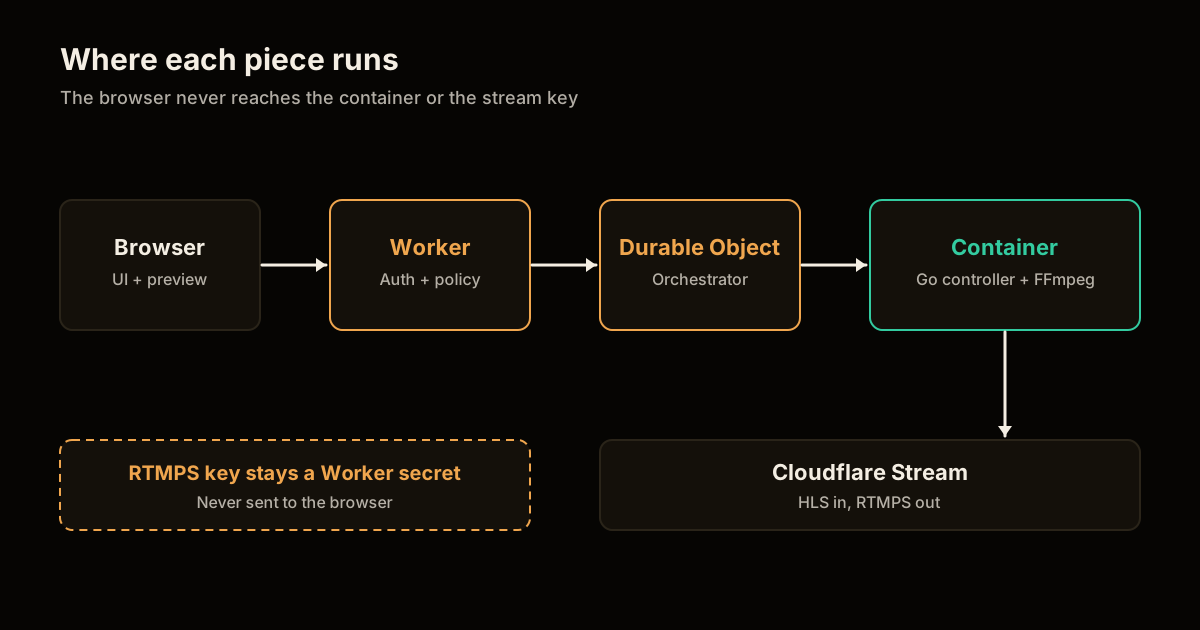
Cloudflare Streamline is an open-source video pipeline kit that splits a media job into two halves: a stateless-looking application on Workers, and a heavy FFmpeg process in a Container. Cloudflare’s announcement frames it around jobs like rendering dynamic annotations on a livestream or producing an alternate version of a hosted video with burned-in subtitles. The code is published under Apache-2.0 in the cloudflare/streamline repository.
The media engine is a Go HTTP controller wrapped around FFmpeg. It accepts webcam, Cloudflare Stream HLS or application-resolved RTMPS input, runs a bounded processing pipeline, and emits either an fMP4 preview over WebSocket or RTMPS output back to Stream Live.
| Piece | Runs on | Job |
|---|---|---|
| Application | Workers | UI, identity and access control, media policy |
| Orchestrator | Durable Object | Session state, routes I/O between Stream and the container |
| Media engine | Container (Go + FFmpeg) | Applies the filter, overlay, subtitle and encode steps |
| Input | Webcam, Stream HLS, RTMPS | Source video |
| Output | fMP4 preview, RTMPS | Preview in the browser or republish to Stream Live |
If you have already shipped Workers behind Access, the shape will feel familiar. My notes on Cloudflare Access for Workers cover the identity half of this setup.
How does a Cloudflare Streamline video pipeline work?
A Cloudflare Streamline video pipeline is one session with an input, a list of operations and an output. The client library exposes a small surface: createStreamline(), sessions.create(), sessions.resume(id), and on a session start(config), ingest(chunk), annotation(png), metrics() and stop(). Your Worker holds that client; the browser never talks to the container directly.
The numbered procedure below is the shortest path from zero to a working burned-in-subtitle stream. The exact config schema lives in the repository, so treat the field-level details there as the source of truth.
- Install the package. Consume a released
@cloudflare/streamlinebuild (Node 22.12+), which has a peer dependency on@cloudflare/containers. - Pin the container image. Reference a versioned engine image from the Cloudflare Registry. It bundles FFmpeg and the Liberation and DejaVu fonts that subtitles need.
- Own the Worker. Add authentication, your UI and your media policy in the Worker. Streamline leaves these to you.
- Resolve secrets server-side. Look up the Stream RTMPS key inside the Worker and pass it to the engine as a secret, never to the client.
- Create and start a session. Call
sessions.create(), thensession.start(config)with your input, operations and output. - Feed and watch it. Use
ingest(chunk)for push input,annotation(png)to swap an overlay, andmetrics()to see what the engine is doing. - Stop it. Call
session.stop(). Sessions can outlive a disconnected Worker through anonActivityExpired()override, and a maximum duration caps runtime.
For local work you can run the container with Docker and bypass the Durable Object for zero-authorization development. That is the right inner loop; do not carry the bypass into a deployed environment.
Why is the operation order fixed?
The engine runs four operations in a single hard-coded order: filter, overlay, subtitle, encode. The announcement lists the options as filters (blur, saturation, brightness, flip), image overlays, subtitle burn-in from auto-detection, and encode parameters (codec, bitrate, resolution, frame rate).
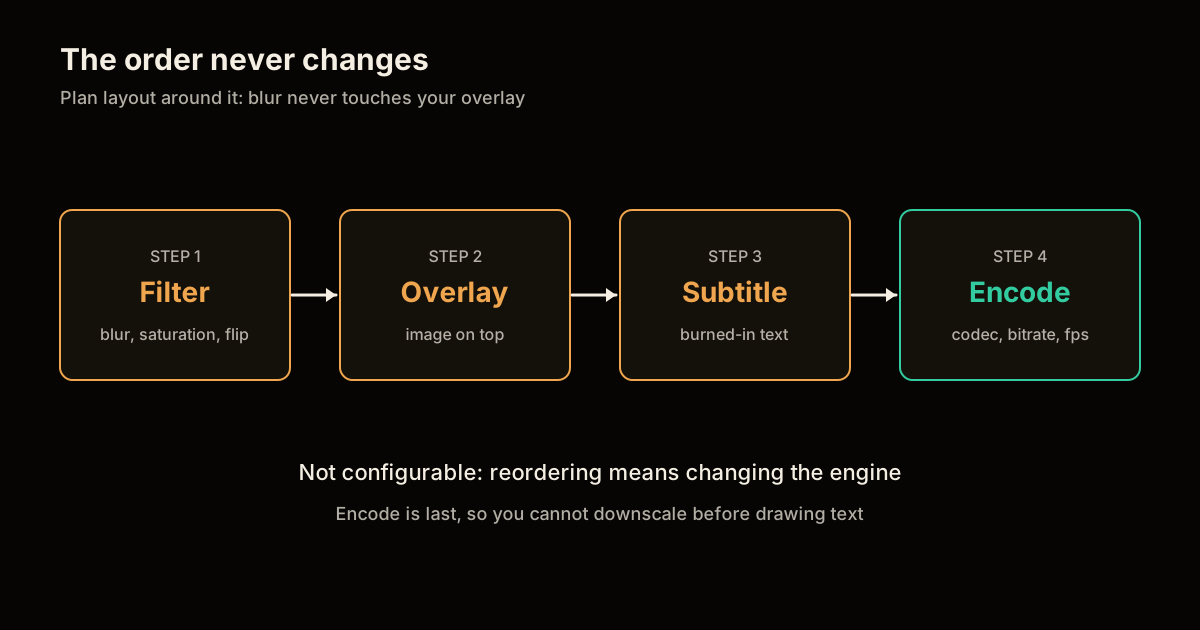
That ordering has real consequences. A blur filter runs before your overlay, so it blurs the source and never your logo. Subtitles are drawn after the overlay, so a tall overlay can sit underneath captions, and encode always comes last, so you cannot downscale before drawing text. Plan your layout around the order instead of fighting it.
| Need | Fits the fixed order? | Workaround |
|---|---|---|
| Blur faces, then add a watermark | Yes | None needed |
| Watermark that should also be blurred | No, overlay comes after filter | Pre-composite the watermark upstream |
| Captions under a lower-third graphic | Partly, text draws above the overlay | Reserve a safe zone in the overlay PNG |
| Downscale then draw crisp text | No, encode is last | Choose encode resolution that suits the text |
What breaks if you expose Streamline to browsers?
Anything the browser can reach, a viewer can abuse. The repository’s security notes are blunt: authenticate callers and resolve sensitive credentials before a request reaches Streamline, and do not expose stream keys, relay capabilities or arbitrary FFmpeg arguments to browsers. The engine itself adds session-ID fencing, bounded request and queue sizes, and capability-protected preview relay connections.
In practice that means three rules for your Worker:
- Never forward raw FFmpeg arguments. Offer a small menu of named presets and map them to engine config server-side.
- Keep the RTMPS key in a secret. The browser should only ever receive a per-session WebSocket capability for the preview.
- Treat the Worker as the policy layer. If a user may not publish to a channel, the Worker refuses before a session exists.
This is the same least-privilege thinking that applies when an AI agent holds credentials; see scoping an AI agent’s Cloudflare Workers access for that pattern, and deploying an MCP server on Workers if you want to expose a pipeline as a tool.
When should you not use Streamline yet?
Skip it for public, multi-user services. Cloudflare’s own notes list the current limits: a CPU bottleneck caps higher quality and frame rates, the operation order is not configurable, and the default singleton model runs one active session per deployment instance.
In production the WebSocket preview also needs MediaSource queuing while a SourceBuffer is updating, or playback stalls.
Cloudflare did not publish pricing or concrete resource limits for this stack in the announcement, so I will not guess at a cost per stream-hour. Measure it with your own clip before you commit: run one session for ten minutes at your target resolution and read metrics().
Use it when you need an internal broadcast tool, a captioning pass on hosted video, or a prototype of live annotations. If your roadmap needs concurrent public sessions, treat Streamline as a reference architecture and budget for scaling the container layer yourself. Long-running, multi-step jobs around it are a natural fit for Cloudflare Workflows.
FAQ
What is Cloudflare Streamline?
Streamline is an open-source (Apache-2.0) toolkit from Cloudflare for building custom video pipelines. A Worker and Durable Object orchestrate a Go media engine that wraps FFmpeg inside a Cloudflare Container. It reads webcam, Stream HLS or RTMPS input and writes an fMP4 preview or RTMPS output.
Can I change the order of Streamline’s video operations?
No. The engine runs filter, overlay, subtitle and encode in that fixed order, and the order is not configurable. If you need a different sequence, you have to change the media engine itself rather than the pipeline config.
Is Streamline ready for a public multi-user video service?
Not as shipped. Cloudflare describes the default deployment as a single-user singleton with one active session per deployment instance. It also notes a CPU bottleneck that limits higher quality and frame rates.
Is it safe to call Streamline straight from the browser?
No. The project’s own security notes say not to expose stream keys, relay capabilities or arbitrary FFmpeg arguments to browsers. Your Worker should authenticate the caller, resolve the RTMPS key server-side and hand the browser only a per-session preview capability.
Sources
- Cloudflare blog: Streamline, custom video pipelines with Cloudflare Stream and Workers
- cloudflare/streamline on GitHub (README, security notes and license)
- Cloudflare Containers documentation
The pipeline order, the singleton limit and the CPU caveat above come directly from those pages. The layout consequences in the order table are my reading of that fixed order.
Frequently asked questions
Google Search · Preferred sources
Prefer this site on Google
If you already read this writing, add umesh-malik.com as a Preferred Source. Google can then highlight it with a preferred badge in Top Stories, AI Overviews, and AI Mode — for you, not as a site-wide ranking boost.
Related Articles

Web Engineering
Post-Quantum TLS Migration: Stop Paying the 150ms Retry Tax
Post-quantum TLS migration checklist: X25519MLKEM768 cut Cloudflare's handshake retries from 52% to 3.7%. How to check, enable, and verify on your own origin.

Web Engineering
How to Give an AI Agent CMS Write Access Without Melting the Cache
AI agent CMS write access breaks caches fast. The layered invalidation pattern that let one CMS absorb 5,000 RPS spikes and a 28,000 RPS DDoS without a hiccup.

Web Engineering
Configure Optional OAuth Scopes for MCP Servers and Agents
Configure optional OAuth scopes so users can narrow agent permissions at consent. The API call, the UX, and handling partial grants.
Keep reading
Get new posts on AI, Claude Code & LLMs
New deep-dives on AI engineering, Claude Code, and developer tooling — follow along however you prefer.
About the Author

Software engineer writing about AI, Claude Code, LLMs, OpenAI, Anthropic, and developer tooling. 5+ years building production systems at Expedia Group, Tekion, and BYJU'S.