Fix Shadow DOM innerHTML not working: use setHTMLUnsafe
Shadow DOM innerHTML not working is a parsing gap, not a bug — it silently skips declarative shadow roots. Use setHTMLUnsafe() instead, plus five more gotchas.

TL;DR “Shadow DOM innerHTML not working” is almost always one specific bug: innerHTML silently ignores shadowrootmode on a <template>, so a declarative shadow root you build with a plain string assignment never attaches — use element.setHTMLUnsafe(html) instead. Five more gotchas follow the same pattern: shadow DOM’s defaults are stricter than they look, and each one (mode, style encapsulation, slots, and event retargeting) has a specific, checkable rule rather than a vibe.
What declarative shadow DOM actually changes
Declarative shadow DOM is shadow-root creation expressed entirely in HTML, with no JavaScript required to make it appear. Before 2023, a shadow root only existed if JavaScript ran element.attachShadow({ mode }) and then populated it. That meant every web component needed a script tag to render, which is exactly the kind of client-side dependency server-rendered frameworks spend effort avoiding. Declarative shadow DOM removes the script requirement: put a <template shadowrootmode="open"> as the first child of a host element, and the browser’s own HTML parser attaches it as a real shadow root while it parses the page — no JavaScript involved.
<user-card>
  <template shadowrootmode="open">
    <style>:host { border: 1px solid var(--border, #2A2419); padding: 1rem; }</style>
    <slot></slot>
  </template>
  <p>Hello from the light DOM</p>
</user-card>
Loaded as the initial HTML of a page, this attaches immediately. The catch is that “the browser’s HTML parser” is doing very specific work here, and most of the DOM APIs developers reach for to insert HTML from a string are not that parser.
Shadow DOM innerHTML not working: the declarative shadow root gets skipped
Take the exact same markup and hand it to innerHTML after the page has already loaded:
// container already exists in the live DOM
container.innerHTML = `
  <user-card>
    <template shadowrootmode="open">
      <style>:host { border: 1px solid #2A2419; }</style>
      <slot></slot>
    </template>
    <p>Hello from the light DOM</p>
  </user-card>
`;

console.log(container.querySelector('user-card').shadowRoot); // null
Nothing errors. Nothing warns. The <template> element sits there in the DOM exactly as written, but it is inert — its contents live in template.content, a detached document fragment, and no shadow root was ever created. innerHTML runs the HTML fragment-parsing algorithm, and that algorithm was never extended to react to shadowrootmode. DOMParser().parseFromString() has the identical restriction, for the identical reason: both are “safe” parsing paths that intentionally ignore attributes that would change the DOM’s shape in ways a sanitizer might not expect.
This is the single most common way declarative shadow DOM breaks in the wild: a component works when the server renders it directly into the document, then silently stops working the moment something client-side — a router, a partial-hydration library, a fetch()-and-insert pattern — re-renders the same markup through innerHTML.
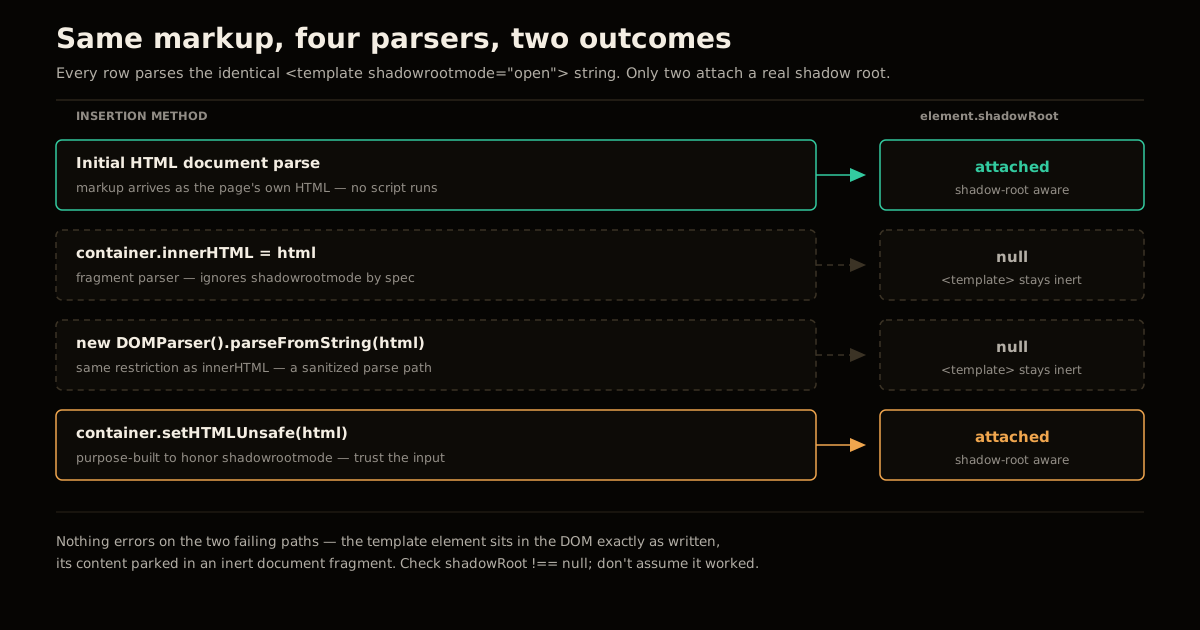
How to render a declarative shadow root safely
Identify whether the markup is server-rendered or client-inserted. If it’s part of the document’s initial HTML response, you’re already done — the streaming parser attaches the shadow root as it reads the page, before any script runs.
If you’re inserting HTML from a string after load, stop using
innerHTMLfor anything that contains a declarative shadow root. Swap it forelement.setHTMLUnsafe(html), which runs a parsing algorithm that is explicitly shadow-root-aware.For a whole fetched document or larger fragment, use the static
document.parseHTMLUnsafe(html)instead of building a throwawayDOMParser— it applies the same shadow-attaching behavior at the document level.Verify, don’t assume. After insertion, check
element.shadowRoot !== nullfor the elements you expect to have one. A silentnullis the bug, every time.Treat
setHTMLUnsafeinput as trusted. The “Unsafe” in the name is not decoration — unlikeinnerHTML, it does not run the same sanitizer, so only call it with markup you control or have already sanitized yourself, never raw user input.
| Method | Attaches a shadowrootmode template as a real shadow root? | Notes |
|---|---|---|
| Initial HTML document parse (SSR / static HTML) | Yes | The streaming parser is shadow-root-aware by default; no script required |
element.innerHTML = html | No | <template> stays inert; content lives in .content, never attaches |
new DOMParser().parseFromString(html, 'text/html') | No | Same restriction as innerHTML — a sanitized parsing path |
element.setHTMLUnsafe(html) | Yes | Purpose-built to honor shadowrootmode; only use with trusted markup |
document.parseHTMLUnsafe(html) | Yes | Document-level equivalent, useful for a whole fetched fragment |
Manual attachShadow() + innerHTML inside the shadow root | Yes, but imperative | Works everywhere; reintroduces the script dependency declarative shadow DOM exists to remove |
Why page CSS can’t style your shadow DOM (and the three escape hatches)
Style encapsulation is the actual point of shadow DOM, and it is stricter than most people expect the first time they hit it. A page-level rule as broad as button { color: red; } will never match a <button> sitting inside a shadow tree, and a shadow-tree rule as broad as * { color: red; } will never leak out to style the rest of the page. There’s no specificity fight to win here — the selectors simply don’t cross the boundary, full stop.
There are exactly three sanctioned ways across it:
- CSS custom properties inherit through the boundary. A page can set
--accent: #F0A64Eon an ancestor, and a shadow tree can readvar(--accent)inside its own stylesheet. This is also whyall: initialinside a shadow tree resets every inherited property except custom properties — they’re explicitly excluded from theallshorthand, which surprises people who expectall: initialto fully reset the component’s environment. ::part()lets a component author mark specific internal elements withpart="name", then any ancestor stylesheet — not just the immediate parent — can style them with::part(name). This is the deliberate, opt-in API for external theming.::slotted()lets the shadow tree’s own stylesheet style the top-level light-DOM nodes projected into one of its<slot>elements — but only those direct nodes, never their descendants, and only from inside the shadow stylesheet, never from the page.
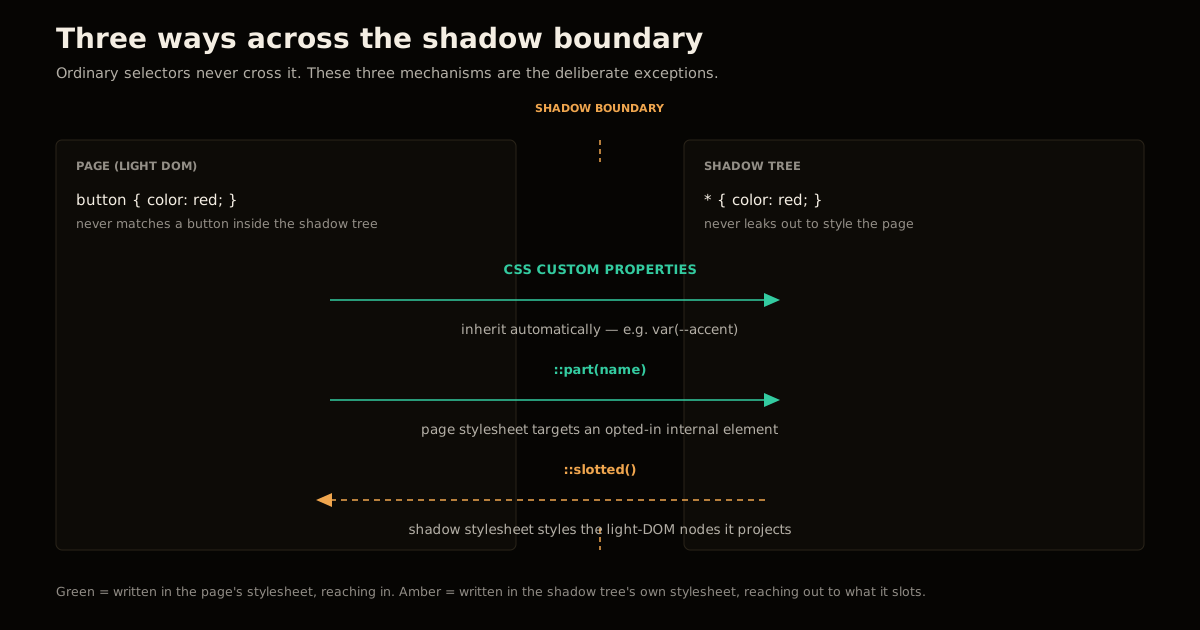
Anyone coming from component libraries built on plain CSS classes (BEM, utility classes) reads this as a limitation. It’s the opposite: it’s the one mechanism that lets a <button> inside your component and a <button> on the host page never fight over the same specificity, no matter how the two codebases evolved. The same discipline that keeps JavaScript proxy-based reactive state predictable — a hard boundary between what can and can’t touch shared state — is what shadow DOM does for style.
What breaks if you delete the slot element?
Nothing you’d expect from the DOM’s perspective — and that’s the part people get wrong. A <slot> is a rendering instruction, not a container. The children assigned to it are light-DOM nodes that live in the page’s own tree the entire time; the slot only tells the shadow tree where to project them visually. Delete the <slot> element and the light-DOM children are still there — still in the DOM, still matched by page CSS, still firing their own events — they simply stop being displayed inside the component, because nothing tells the renderer where to put them anymore.
This matters for testing, too: a document.querySelector() from outside the component will still find slotted content whether or not it’s currently projected, which trips up assertions written against “is this element visible” instead of “is this element assigned.” Test the assignment (slot.assignedNodes()), not just presence in the tree.
When should you use closed mode?
Rarely, and never for security. attachShadow({ mode: 'closed' }) makes element.shadowRoot return null for every caller except the code that ran attachShadow and kept its own private reference — that’s the entire effect. It does not hide the shadow tree from devtools, it does not stop composed events from bubbling out and exposing internal structure through retargeting, and it does not prevent a determined script from walking the DOM some other way. Treat closed mode as an encapsulation signal to other developers on your team (“don’t reach into this from outside”), not as an access-control boundary — you’ll design a more honest system if you don’t ask a JavaScript property to do a security boundary’s job.
Common mistakes with Shadow DOM encapsulation
Rendering declarative shadow DOM through
innerHTMLand assuming a silentnullshadow root is a framework bug. It isn’t — it’s the parser working exactly as specified. Check the table above before filing an issue.Assuming
all: initialfully isolates a component’s styles from the page. Custom properties still flow through, by design, per the CSS spec.Reaching for closed mode to “lock down” a component, then being surprised when a click handler on
documentstill sees the interaction. Composed events (clickamong them) retarget to the host as they bubble out, regardless of mode — the host, not the button the user actually pressed, is whatevent.targetreports outside the shadow tree.Assuming
::slotted()reaches descendants. It only matches the direct nodes assigned to the slot; nesting one level deeper puts an element out of reach of the shadow tree’s own stylesheet.Forgetting event retargeting when writing analytics or delegation code that reads
event.target. If you need the element actually clicked, useevent.composedPath()[0]instead — it returns the full path through every shadow boundary the event crossed, not just the retargeted target.
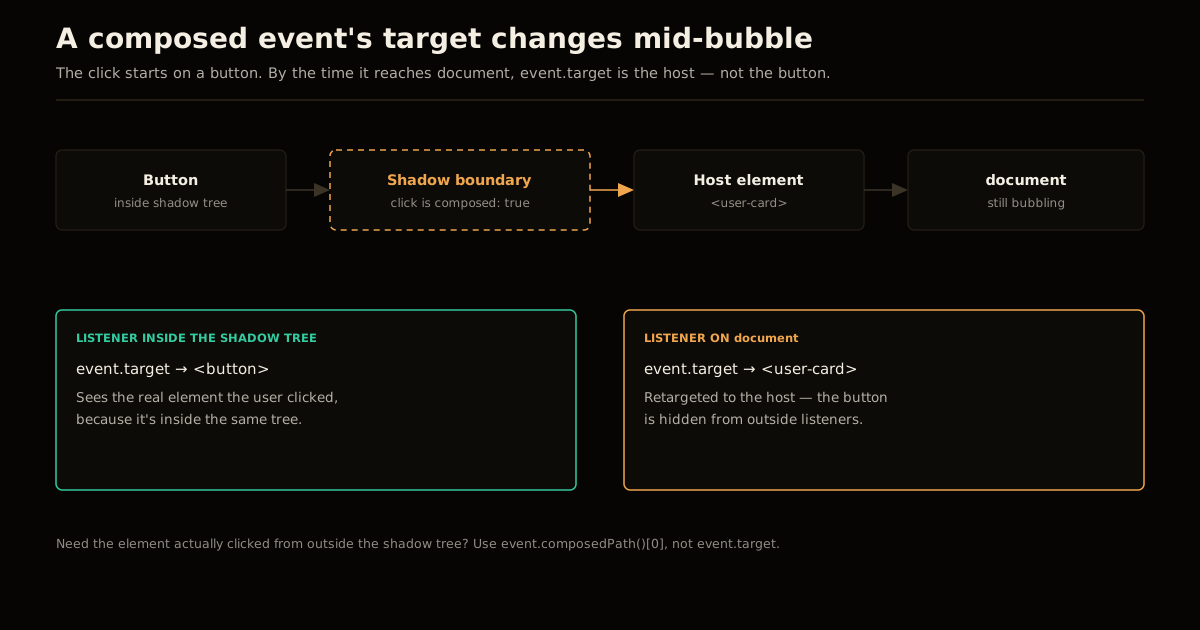
None of this is unique to hand-rolled web components — the same retargeting and encapsulation rules apply whenever a framework compiles down to native custom elements, and they’re one more reason to actually read what the newer JavaScript spec years shipped rather than assuming DOM behavior hasn’t moved. Declarative shadow DOM’s browser-parser dependency is also a Core Web Vitals lever worth knowing about directly: a component that renders on the initial HTML parse needs zero JavaScript to paint correctly, which is the entire reason it exists as a spec feature rather than staying a userland pattern — the same instinct that makes doing heavy work natively in the browser instead of round-tripping to a server worth reaching for when the platform can do it.
FAQ
Why does my declarative shadow DOM not work with innerHTML? Because innerHTML runs the HTML fragment-parsing algorithm, and that algorithm deliberately does not process shadowrootmode attributes on <template> elements — it treats them as ordinary, inert templates. Only the browser’s initial document parse and the newer setHTMLUnsafe()/parseHTMLUnsafe() APIs are shadow-root-aware. Swap the assignment for element.setHTMLUnsafe(html) and the same markup starts attaching a real shadow root.
What is the difference between open and closed shadow root mode? Open mode exposes element.shadowRoot, so any script that holds a reference to the host can reach inside. Closed mode makes element.shadowRoot return null for everyone except the code that called attachShadow and kept its own reference. Closed mode is not a security boundary — it only removes the one convenient property; the DOM inside is still inspectable through devtools and through composed events.
Why doesn’t my page-level CSS style content inside a web component? Shadow DOM’s whole job is style encapsulation: page-level selectors stop at the shadow boundary and never match elements inside a shadow tree, and stylesheets written inside the shadow tree never leak back out. That is true even for a broad selector like * or button — it only ever matches inside its own tree. The escape hatches are CSS custom properties, ::part(), and ::slotted().
What is the difference between ::part() and ::slotted()? ::part() styles elements the component author explicitly opted in with a part="name" attribute, and it can be targeted from any ancestor stylesheet, not just the direct parent. ::slotted() styles the top-level light-DOM nodes projected into a <slot>, but only the nodes passed in directly, never their descendants, and only from inside the shadow tree’s own stylesheet. They solve the same problem — styling across the boundary — from opposite sides of it.
Does removing a slot element delete its assigned content? No. Slotted children are light-DOM nodes that live in the page’s own DOM tree; the <slot> element only controls where they render inside the shadow tree, it does not own them. Delete the <slot> and the children stay in the DOM — normal document flow, still queryable, still fired in devtools — they simply stop being visually projected into the component.
Does event.target still point at the element I actually clicked, inside a shadow tree? Only for listeners attached inside the same shadow tree. Composed events — click, among others — cross the shadow boundary as they bubble, but the DOM retargets target to the shadow host for every listener outside that tree. A document-level click handler on a custom element sees the host, not the button you actually pressed inside it.
Sources
- Simon Willison, “Shadow roots, explained with live examples” (September 23, 2026)
- Interactive Shadow DOM reference used to verify the
attachShadowmode, slot,::part,::slotted, and event-retargeting behavior described above: tools.simonwillison.net/shadow-roots - MDN Web Docs,
Element: setHTMLUnsafe()method
Frequently asked questions
Google Search · Preferred sources
Prefer this site on Google
If you already read this writing, add umesh-malik.com as a Preferred Source. Google can then highlight it with a preferred badge in Top Stories, AI Overviews, and AI Mode — for you, not as a site-wide ranking boost.
Related Articles

Web Engineering
Build JavaScript Proxy Reactive State: 855 Bytes, No Framework
Javascript proxy reactive state in under a kilobyte: an 80-line get/set trap that tracks reads, batches writes, and quietly breaks on one property name.

Web Engineering
ES2024 Features You'll Actually Use in JavaScript
The most impactful ES2024 features: Array grouping, Promise.withResolvers, well-formed Unicode strings, and the RegExp v flag — with practical examples.

Web Engineering
TypeScript Utility Types: Complete Guide to Partial, Required, Pick, Omit, Record, and More (2026)
TypeScript utility types explained: Partial, Pick, Omit, Record, Exclude, ReturnType and more — with real examples, a cheat sheet, and common pitfalls.
Keep reading
Get new posts on AI, Claude Code & LLMs
New deep-dives on AI engineering, Claude Code, and developer tooling — follow along however you prefer.
About the Author

Software engineer writing about AI, Claude Code, LLMs, OpenAI, Anthropic, and developer tooling. 5+ years building production systems at Expedia Group, Tekion, and BYJU'S.