SVG to MP4 in the browser: a two-step workflow, no server
SVG to MP4 in the browser needs no server: paste a URL and 30MB of ffmpeg.wasm renders every frame in your tab. The one catch that trips people up.

TL;DR
Simon Willison’s markdown-svg-renderer turns an animated SVG into a downloadable MP4 entirely inside your browser tab — paste a URL, click the MP4 tab, and 30+MB of ffmpeg.wasm encodes the frames on your machine. No upload, no server, no local ffmpeg install. The catch is the same one every WASM-in-the-browser tool hits: that payload downloads fresh on every page load, and the tool only offers the export when it can actually detect animation in your markup.
What is SVG to MP4 in the browser?
Most “convert my SVG” tools are thin wrappers around a server: you upload a file, a backend process runs ffmpeg or rsvg-convert, and you download the result a few seconds later. markdown-svg-renderer skips the server entirely. It’s a static page that loads your Markdown from a URL, renders any fenced SVG code block, and — if that SVG animates — replays the animation, captures it frame by frame on a <canvas>, and hands those frames to a WebAssembly build of FFmpeg running in the same tab.
That’s the definition worth remembering: it’s not “SVG to video,” it’s “your browser recording its own rendering of your SVG and encoding the result itself.” The tool never sees your file leave the machine.
Why this matters if you ship diagrams
Plenty of technical writing — this blog included — ships hand-authored SVG diagrams because a real diagram beats a stock illustration for explaining an architecture or a benchmark. Static SVGs are fine for a blog post: the browser renders vector markup natively, no extra tooling needed.
The moment you want that same diagram somewhere that doesn’t render inline SVG well — a tweet preview, a Slack unfurl, a conference slide, a README badge — you’re stuck. Most of those surfaces either strip <svg> entirely or flatten it to a static frame, which throws away exactly the part that made an animated diagram worth building. The usual workaround is screen-recording your own browser, trimming the clip, and re-encoding it in a video editor — four separate tools to get one 5-second GIF-replacement out the door.
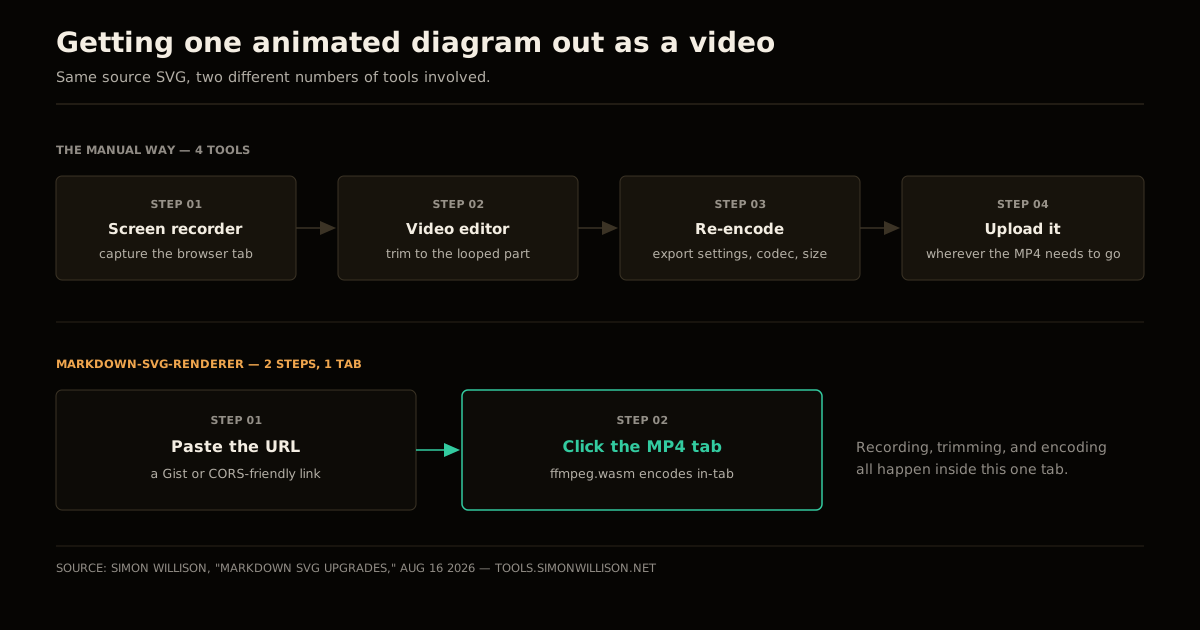
markdown-svg-renderer collapses that into two steps because the recording, the trimming, and the encoding all happen in the same tab that’s already rendering your SVG correctly.
| Manual screen-record path | markdown-svg-renderer | |
|---|---|---|
| Tools needed | Screen recorder, video editor, encoder | One browser tab |
| Steps | 4 | 2 |
| Where it runs | Your OS, then a separate editor | Inside the tab, via ffmpeg.wasm |
| Output formats | Whatever the editor exports | MP4, plus PNG and JPEG for free |
| One-time cost | Learning the editor’s export settings | 30+MB of WASM on first use |
How the pipeline actually works
Here’s the mechanism, traced end to end. Say your Markdown document has a fenced SVG block with a simple rotating tick, the kind of thing SMIL makes trivial:
<svg viewBox="0 0 200 200">
  <circle cx="100" cy="100" r="80" fill="none" stroke="#F0A64E" stroke-width="4"/>
  <line x1="100" y1="100" x2="100" y2="20" stroke="#F4EEE3" stroke-width="4">
    <animateTransform attributeName="transform" type="rotate"
      from="0 100 100" to="360 100 100" dur="4s" repeatCount="indefinite"/>
  </line>
</svg>
Paste a URL to a Markdown document containing that block — or use Simon’s own example, a compass study with a rotating tick ring and an orbiting accent dot — and the renderer runs four steps:
- Fetch and parse. It loads the Markdown from your URL and extracts the SVG code block.
- Detect animation. It inspects the parsed SVG for
<animate*>elements or CSS@keyframes/animationrules. No animation found means only the PNG/JPEG tabs appear. - Replay and capture. If it finds animation, it estimates a loop duration, plays the SVG in a hidden render surface, and grabs a sequence of frames off a
<canvas>at fixed intervals. - Encode with ffmpeg.wasm. Those frames get handed to FFmpeg compiled to WebAssembly, which stitches them into an MP4 using the same H.264 encoder you’d get from a native
ffmpegbinary — just running inside V8 instead of your OS.
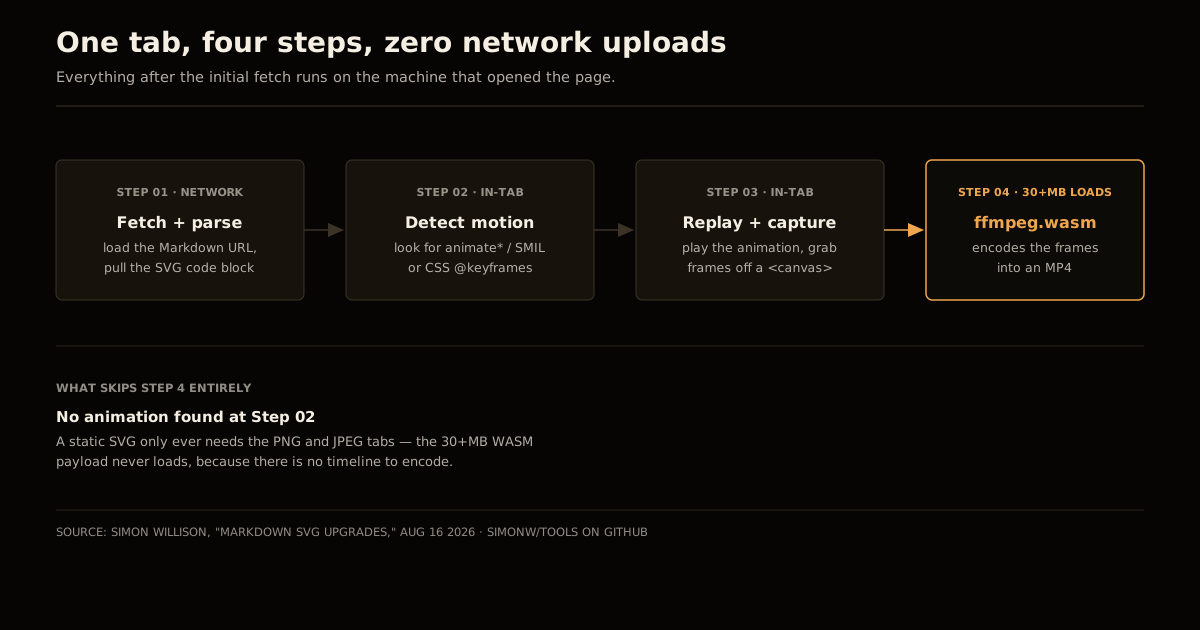
Step 4 is the expensive one, and it’s why the tool doesn’t load ffmpeg.wasm until you actually click the MP4 tab — PNG and JPEG export need none of it, since a raster snapshot of a <canvas> is a couple of built-in browser APIs, not a video codec.
The tradeoff nobody mentions: 30MB, every session
FFmpeg compiled to WebAssembly is not a lightweight dependency. Simon’s own description is direct about it: the tool “loads 30+MB of ffmpeg.wasm so it can compile those frames into an MP4 video using the full power of FFMPEG compiled to WebAssembly.” That’s roughly the size of a modern AAA game’s day-one patch notes page, downloaded to encode a five-second clip of a rotating dot.
For a one-off “let me grab an MP4 of this diagram” task, that’s a fair trade — you get FFmpeg’s real encoder instead of a stripped-down reimplementation, and the download happens once per session, cached by the browser for the next SVG you throw at it in the same sitting. It’s a bad trade if you were hoping to embed this pipeline in a page your visitors load routinely; nobody should ship 30MB of WASM as a dependency of a page view. Treat it as a workbench tool you open when you need an export, not infrastructure you build a product on.
Try it on your own SVG
- Get your SVG into a Markdown document (a fenced code block is enough) and put it somewhere CORS-friendly — a GitHub Gist is the least friction, since Gist raw URLs already ship permissive CORS headers.
- Open markdown-svg-renderer and paste that URL into the loader.
- Check which tabs appear. Rendered and PNG/JPEG always show up; MP4 only shows up if the tool found animation in your markup.
- Click MP4, wait for the 30+MB ffmpeg.wasm payload to load on first use, and download the result once it finishes encoding.
Common mistakes
Expecting an MP4 tab on a static SVG. If nothing in your markup animates, there’s nothing to encode across time — you’ll get PNG and JPEG only, which is correct behavior, not a bug.
Loading from a URL without CORS headers. A plain link to a file on a random server will usually fail to fetch from inside the browser. Gists work because GitHub already serves them with permissive CORS; your own static host may need an explicit
Access-Control-Allow-Originheader.Assuming the 30MB only downloads once, ever. It’s cached per session by the browser, not persisted forever — reload the tab tomorrow and it downloads again. That’s a reasonable cost for an occasional export tool, and a bad one for anything you’d want on every page load.
Treating this as a batch pipeline. It’s a single-file, single-tab tool for grabbing one export at a time — not a substitute for a real server-side render farm if you need to convert hundreds of diagrams.
What I’d actually use this for
Not every SVG needs a video export, and most of the diagrams on a technical blog — including this one — are static and stay that way on purpose: readable, fast, and simple to author by hand. Where this earns its 30MB is the narrow case where a diagram genuinely animates and you need it somewhere that can’t render <svg> inline: a tweet, a Slack thread, a slide deck. That’s a small enough surface that a one-off browser tool beats standing up a render pipeline, in the same way treating a quick investigation as running code beats writing a permanent tool for a question you’ll ask once.
It’s also a small, concrete example of a pattern worth noticing generally: browser payload weight is a budget you spend deliberately, not a number that just happens to you. The same discipline behind auditing what a page actually downloads and refusing to let a script land on every page view without a decision applies here — 30MB of WASM is completely fine for a tool you open on demand, and completely wrong for anything users load by default.
FAQ
How do I convert an animated SVG to MP4 without installing ffmpeg?
Open Simon Willison’s markdown-svg-renderer tool, paste a CORS-friendly URL or a GitHub Gist raw link to a Markdown document containing your SVG in a fenced code block, and let it render. If the SVG contains SMIL or CSS animation, an MP4 tab appears alongside the Rendered, PNG, and JPEG tabs — click it and the browser encodes the video itself, no ffmpeg install or server upload required.
Why does the tool need 30MB of ffmpeg.wasm just to make a video?
Because it is running the actual FFmpeg encoder, compiled to WebAssembly, entirely inside your tab. That 30+MB payload is the price of getting FFmpeg’s real H.264 encoder in the browser instead of a cut-down reimplementation, and it downloads once per session rather than on every export.
Does this work with any SVG, or only animated ones?
Any SVG renders and exports to PNG and JPEG. The MP4 tab specifically only appears when the tool detects animation — SMIL elements like animateTransform, or CSS @keyframes — because a static SVG has nothing to encode across a timeline.
Can I load my SVG from anywhere, or does it have to be a GitHub Gist?
It has to be a URL the browser is allowed to fetch cross-origin, which in practice means CORS-friendly URLs or GitHub Gists — GitHub already serves gist raw content with permissive CORS headers, which is why Gists are the path of least resistance rather than a hard requirement.
Is markdown-svg-renderer open source?
Yes. It lives in Simon Willison’s tools repository on GitHub, alongside his other single-purpose browser utilities, so you can read the exact frame-capture and ffmpeg.wasm invocation code rather than take the behavior on faith.
Sources
- markdown-svg-renderer — the tool itself.
- Simon Willison — “Markdown SVG upgrades” — the announcement this post is based on, including the ffmpeg.wasm size and CORS/Gist details.
- simonw/tools on GitHub — the open-source repository behind the tool.
- Example Gist: compass study SVG — the animated SVG used as the worked example above.
Frequently asked questions
Google Search · Preferred sources
Prefer this site on Google
If you already read this writing, add umesh-malik.com as a Preferred Source. Google can then highlight it with a preferred badge in Top Stories, AI Overviews, and AI Mode — for you, not as a site-wide ranking boost.
Related Articles

Web Engineering
Deploy FastAPI on Cloudflare Workers: the packages pip won't install
Deploy FastAPI on Cloudflare Workers now that Python is GA: what pip installs cleanly, what needs a Wasm build, and the C-extension wall in between.

Web Engineering
Is Your Postgres Migration Safe? Catch the Table Lock First
Is your Postgres migration safe? Not if it takes ACCESS EXCLUSIVE on a hot table. The lock table and 5-step check that catches it before you run it.

Web Engineering
Fix Performance Regressions With a Benchmark Ratchet (3.1x, 0 Breaks)
Fix performance regressions with a benchmark ratchet that fails CI on regression and locks in wins. How Claude shipped 3,000 changes at 3.1x, zero breaks.
Keep reading
Get new posts on AI, Claude Code & LLMs
New deep-dives on AI engineering, Claude Code, and developer tooling — follow along however you prefer.
About the Author

Software engineer writing about AI, Claude Code, LLMs, OpenAI, Anthropic, and developer tooling. 5+ years building production systems at Expedia Group, Tekion, and BYJU'S.