Set up AI Gateway for Workers AI: one argument, every call logged
AI Gateway for Workers AI is now one argument on env.AI.run. What it logs instantly, why caching stays off until you ask, and the 60-second TTL floor.

TL;DR
AI Gateway for Workers AI is now a single argument rather than a separate product: add { gateway: { id: 'default' } } as the third parameter to env.AI.run() and every request is logged with full payloads, token counts and cost attribution, with no dashboard setup first. Caching is the exception — it stays off until you enable it in settings or send a cf-aig-cache-ttl header, and the TTL floor is 60 seconds. The REST surface moved to a unified /ai/ path at the same time, while model-first and smart routing are still pilots, so build for what ships today and not for the roadmap.
What is AI Gateway for Workers AI now?
AI Gateway for Workers AI is a proxy hop you opt into with one argument, which logs every model call’s payload, token count and cost before forwarding it to the same GPU it would have hit anyway. It is no longer a separate product you adopt — it is a parameter on the binding you already use.
Cloudflare merged Workers AI and AI Gateway into one control plane on 7 August 2026. Before this, they were two products that happened to sit next to each other: Workers AI ran models on Cloudflare’s GPUs, and AI Gateway was a proxy you pointed at somebody else’s API to get logging and caching. If you used Workers AI, the gateway’s features were on the other side of a wall.
The wall is gone, and the mechanism is deliberately boring. There is no migration, no new client, no rewrite. The binding you already have grows an optional third argument:
// Before — Workers AI, direct
const response = await env.AI.run('@cf/zai-org/glm-5.2', {
  messages: [{ role: 'user', content: 'Hello!' }],
});// After — the same call, routed through AI Gateway
const response = await env.AI.run(
'@cf/zai-org/glm-5.2',
{ messages: [{ role: 'user', content: 'Hello!' }] },
{ gateway: { id: 'default' } }
);That is the entire change. The model string does not move, the input object does not move, and removing the third argument puts you back exactly where you started. It is one of the rare infrastructure upgrades where the rollback plan is “delete six characters.”
The part worth internalising is what the third argument does to the shape of your system rather than to your code. Adding it inserts a hop that every request now passes through, and that hop is where the observability lives.
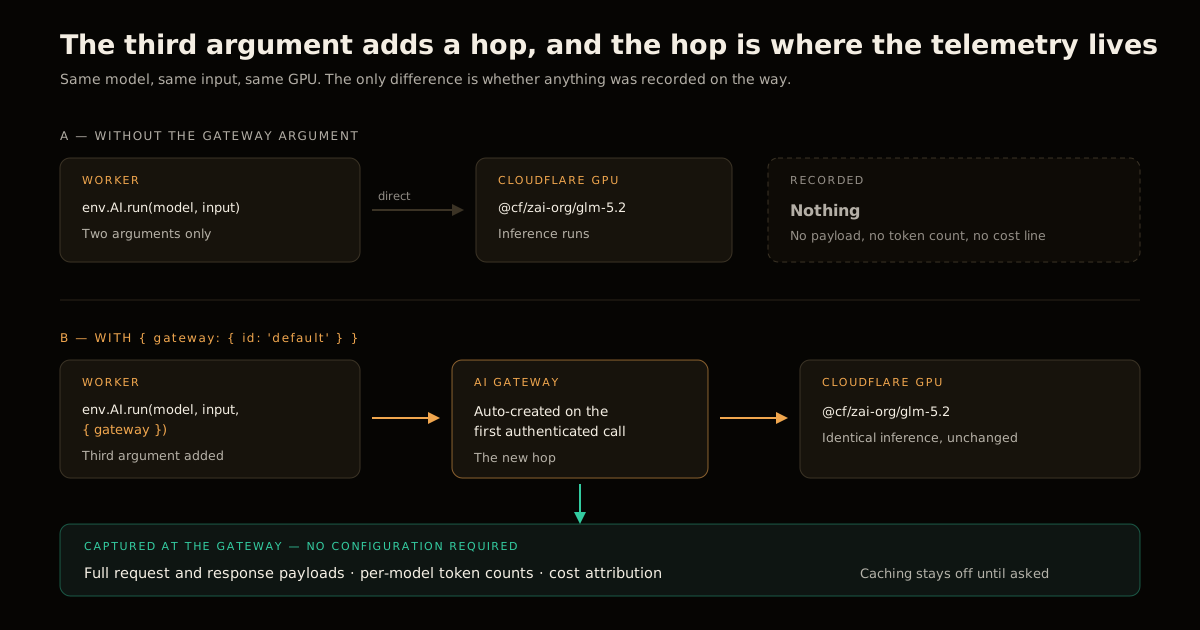
How to route an existing Workers AI call through the gateway
The setup order most people expect — create a gateway, name it, copy the ID, paste it into the Worker — is not required. Cloudflare creates a default gateway on the first authenticated request if you do not have one, so id: 'default' is a working value on a fresh account.
In practice that gives you a three-step rollout:
- Add
{ gateway: { id: 'default' } }to one non-critical call path and deploy it. - Confirm the request shows up in the AI Gateway dashboard with its payload and token count attached.
- Roll the same argument out to the rest of your call sites, using a named gateway per environment once you want staging and production logs kept apart.
Step 2 is not ceremony. It is the only evidence that the argument landed in the right position — because env.AI.run() takes an options object as its second parameter too, and a gateway config accidentally merged into that second object fails silently. You get a normal-looking inference response and an empty dashboard. If you have wired up an MCP server on Workers or any other multi-call agent path, check each call site individually rather than trusting a single smoke test.
What lands in the logs the moment the gateway is in the path
Here is what arrives automatically once the request routes through the gateway, and what still requires a decision from you:
| Capability | Automatic once routed? | What you have to do |
|---|---|---|
| Full request + response payload logging | Yes | Nothing |
| Per-model token counts | Yes | Nothing |
| Cost attribution | Yes | Nothing |
| Gateway existence | Yes — default is auto-created | Nothing |
| Response caching | No | Enable in settings or send cf-aig-cache-ttl |
| Rate limiting | No | Configure per gateway |
| Retries and model fallback | No | Define the fallback chain |
| Pooled credits across providers | No | Opt into unified billing |
The split matters more than the individual rows. Everything in the “yes” column is observation — it changes what you can see without changing what your application does. Everything in the “no” column is control, and control alters behaviour, so Cloudflare quite reasonably makes you ask for it.
That asymmetry is why the honest pitch for this change is not “you get caching for free.” It is: you get a truthful bill and a full audit trail for the price of one argument, and the levers that change behaviour are still yours to pull. For anyone who has tried to reconcile an LLM invoice against application logs that never recorded the prompts, that first half alone is the upgrade. It is the same reason running evaluations against a real framework beats eyeballing outputs — you cannot improve what you never recorded.
Caching is off until you turn it on, and that is the expensive default
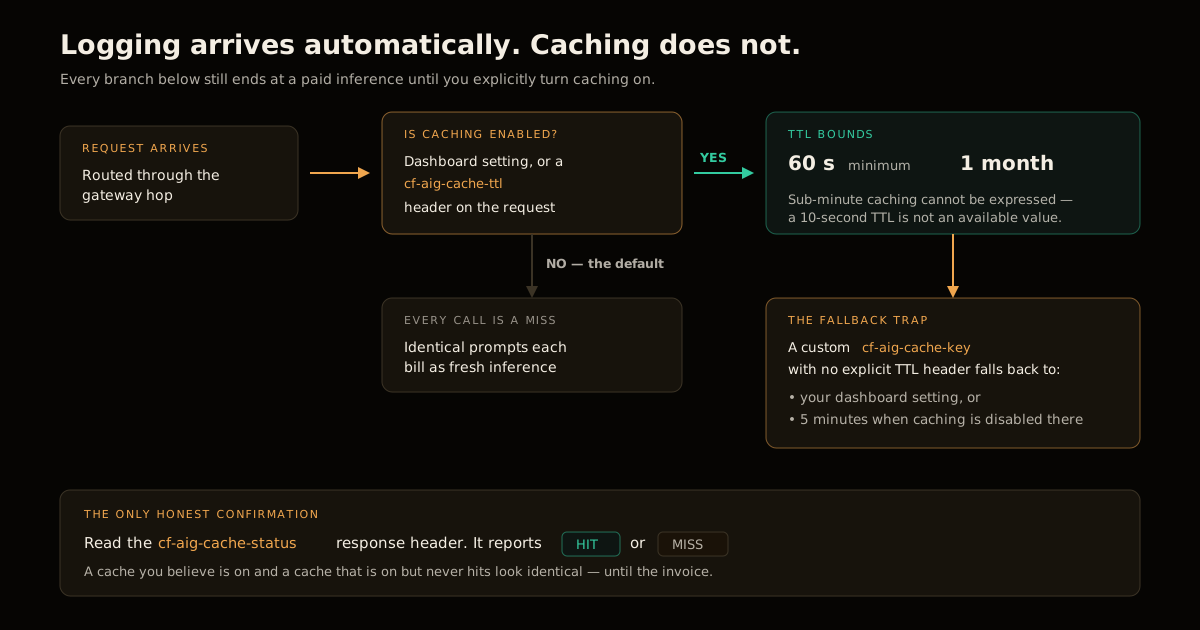
This is the part that costs people money quietly. Because logging appears without configuration, it is easy to assume the rest of the gateway’s feature set did too. It did not. Cloudflare’s caching documentation is explicit that caching is enabled through the AI Gateway settings in the dashboard, or per request with a header.
The header set is small and worth memorising:
| Header | What it does |
|---|---|
cf-aig-cache-ttl | Cache duration in seconds — minimum 60, maximum one month |
cf-aig-skip-cache | Bypass the cache and go to the provider |
cf-aig-cache-key | Override the default cache key |
cf-aig-cache-status | Response header reporting HIT or MISS |
Two details in that table repay attention. First, the 60-second floor means sub-minute caching is not an option — if your workload is a burst of identical requests inside one page render, the cache is designed for you, but a 10-second TTL is not something you can express. Second, cf-aig-cache-status is the only honest confirmation that caching works. A cache you believe is on and is not looks identical to a cache that is on and never hits: same responses, same latency profile under light load, wildly different bill. Read the header before you claim the win.
There is also a trap in the fallback behaviour. If you set a custom cache key but no explicit TTL header, the response falls back to your dashboard settings — or to five minutes when caching is disabled there. So a custom key does not imply a custom lifetime, and the two settings have to be reasoned about together.
The binding-level equivalent of the skip header is a field on the gateway object itself, which the Workers AI binding integration docs show directly:
const response = await env.AI.run(
	"@cf/meta/llama-3.1-8b-instruct-fast",
	{
		prompt: "What is the origin of the phrase Hello, World",
	},
	{
		gateway: {
			id: "default",
			skipCache: true,
		},
	},
);
Use skipCache for anything where a stale answer is a correctness bug rather than a performance win — tool-calling turns that read live state, or an agent step whose output feeds a write.
The REST API moved: /ai/ is the new front door
If you call Workers AI over HTTP instead of through a binding, the endpoint consolidated too. A model invocation is now:
curl "https://api.cloudflare.com/client/v4/accounts/{account_id}/ai/run/@cf/zai-org/glm-5.2"Cloudflare also previewed a model-first route on the same unified path:
https://api.cloudflare.com/client/v4/accounts/{account_id}/ai/v1/chat/completionsThat second one is described as coming soon, not shipped. The /ai/v1/chat/completions shape is an obvious nod to OpenAI-compatible clients, and it is the endpoint that would let you swap providers without touching the SDK — but do not write the migration until it is generally available. Endpoint changes are exactly the kind of thing worth pinning in a CI pipeline that actually exercises the deployed Worker, so a URL that silently changes shape fails a check instead of a customer request.
Model-first and smart routing: what is shipped and what is a pilot
The announcement carries two forward-looking features, and both deserve to be read carefully rather than optimistically:
- Model-first routing — you name the model you want and the gateway handles provider selection and failover across Workers AI and vetted external providers. Described as being in a pilot phase.
- Smart routing — a classifier predicts the task type from your prompt and selects a model without configuration. Described as an internal pilot.
Both are genuinely interesting, and neither is something to build a launch around this quarter. The distinction to hold onto is that the unification shipped is structural — one binding, one REST path, one billing pool, one log stream — while the intelligence layered on top is still being trialled. Structural changes are safe to adopt immediately because they are additive and reversible. Behavioural changes made by a classifier you cannot inspect are not, and the same caution applies to any agent that spends money or moves value at the edge.
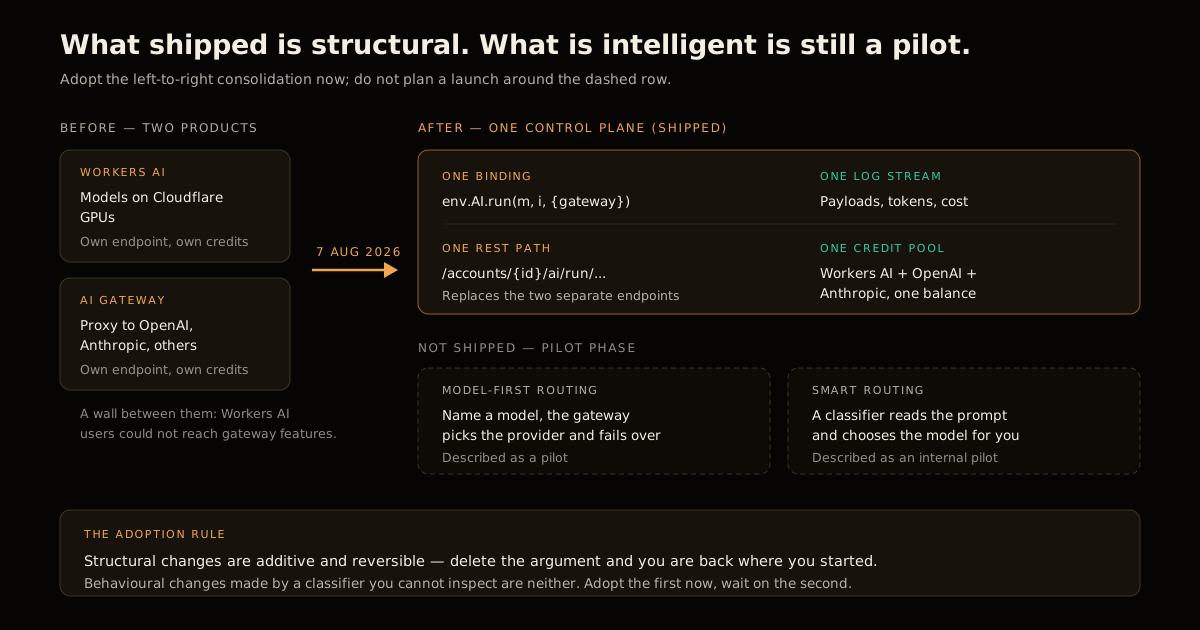
Unified billing is the third shipped piece and the least discussed. Workers AI credits can be pooled with credits for external providers such as OpenAI and Anthropic, so a mixed-provider application draws from one balance. Cloudflare states that this also unlocks elevated rate limits on Workers AI models, but points at the developer documentation for the actual numbers instead of publishing them in the announcement — so treat “higher limits” as directionally true and unquantified until you check your own account.
The three mistakes to avoid
Assuming caching came along for the ride. It did not. Logging is automatic; caching is a decision. Verify with cf-aig-cache-status rather than with your bill three weeks later.
Putting the gateway config in the wrong argument. It is the third parameter to env.AI.run(), not a field inside the second. The wrong position produces a working inference and no telemetry, which is the worst possible failure mode: everything looks fine and nothing is recorded.
Sharing one gateway ID across environments. id: 'default' is a great first request and a poor steady state. Once you are reading the logs to make decisions, staging traffic mixed into production cost attribution makes every number you compute slightly wrong, and slightly-wrong numbers are harder to catch than obviously broken ones.
What I would actually do this week
Add the argument to one route. Confirm the log appears. Then decide — deliberately, with the request volume in front of you — whether caching is worth its correctness risk on that route, and set an explicit cf-aig-cache-ttl rather than inheriting a dashboard default you did not choose.
The unification is a good change precisely because it is small. The value is not in the feature list; it is in the fact that observability stopped being a project and became a parameter.
FAQ
How do I route an existing Workers AI call through AI Gateway?
Add a third argument to env.AI.run() containing a gateway object with an id. The model string and the input object stay exactly as they were, so the change is additive and reversible. If you have never created a gateway, Cloudflare creates a default one on the first authenticated request, which means { gateway: { id: 'default' } } works without any dashboard setup beforehand.
Does AI Gateway for Workers AI cache responses automatically?
No. Caching has to be enabled explicitly — either in the AI Gateway settings in the dashboard or per request with the cf-aig-cache-ttl header. This is the single most common wrong assumption about the unification, because logging and token tracking do arrive automatically while caching does not. Until you turn it on, every identical prompt is a fresh inference you pay for.
What are the limits on cf-aig-cache-ttl?
The TTL is expressed in seconds with a minimum of 60 and a maximum of one month. If you set a custom cache key without an explicit TTL header, the response falls back to your dashboard settings, or to five minutes when caching is disabled there. Check the cf-aig-cache-status response header to confirm whether you actually got a HIT or a MISS rather than assuming the cache is working.
Did the Workers AI REST endpoint change?
Yes. Workers AI and AI Gateway now share a unified /ai/ path, so a model call becomes https://api.cloudflare.com/client/v4/accounts/{account_id}/ai/run/@cf/zai-org/glm-5.2. Cloudflare also previewed an OpenAI-compatible /ai/v1/chat/completions route for model-first routing, but that one is still described as coming soon rather than generally available.
Is model-first routing available today?
Not fully. Cloudflare describes model-first routing as being in a pilot phase and smart routing — where a classifier predicts the task type from the prompt and picks a model for you — as an internal pilot. Design around what ships now: the unified binding, request logging, token and cost tracking, and manual fallbacks. Treat automatic provider selection as a roadmap item you may get later, not as a capacity you can plan a launch on.
What does unified billing actually change?
Workers AI credits can now be pooled with credits for external providers such as OpenAI and Anthropic in the same account, so a mixed-provider application draws from one balance instead of several. Cloudflare also states that unified billing unlocks elevated rate limits on Workers AI models, though the announcement points to the developer docs for the specific numbers rather than publishing them inline.
Sources
- Unifying Workers AI and AI Gateway into a single AI control plane — Cloudflare Blog, 7 August 2026
- AI Gateway caching — Cloudflare Developer Docs
- AI Gateway + Workers AI binding integration — Cloudflare Developer Docs
Frequently asked questions
Google Search · Preferred sources
Prefer this site on Google
If you already read this writing, add umesh-malik.com as a Preferred Source. Google can then highlight it with a preferred badge in Top Stories, AI Overviews, and AI Mode — for you, not as a site-wide ranking boost.
Related Articles

AI Engineering
Production-Grade AI Agents: The Vibe-to-Live Gap
Production-grade AI agents need more than a working demo. 353,000 signed up to learn agents; 6,000 shipped a capstone. Here's exactly what closes the gap.

AI Engineering
How to Ground AI Agent Findings in Evidence: A Cloudflare Pattern
How to ground AI agent findings in evidence: validate every citation in code. Cloudflare's 3-state pattern plus a TypeScript checker you can copy.

AI Engineering
Fix the PCIe Bottleneck in AI Training: How Built-in NICs Work
Fix the PCIe bottleneck in AI training with built-in NICs. Meta's MTIA 300 reclaims 1.2 TB/s by eliminating host CPU mediation.
Keep reading
Get new posts on AI, Claude Code & LLMs
New deep-dives on AI engineering, Claude Code, and developer tooling — follow along however you prefer.
About the Author

Software engineer writing about AI, Claude Code, LLMs, OpenAI, Anthropic, and developer tooling. 5+ years building production systems at Expedia Group, Tekion, and BYJU'S.