Set Up Cloudflare Origin Range Requests: End 128 MiB Fetches
Set up Cloudflare Origin Range Requests with one Cache Rule. Why a 4 MiB seek cost 68 MiB of origin traffic on a 64 MiB range size, and a script to verify 206s.

TL;DR — To set up Cloudflare Origin Range Requests, create a Cache Rule that matches your large-file traffic and set Origin Range Requests to On; there is no range size to tune. The old per-zone setting could turn a 4 MiB video seek into about 68 MiB of origin traffic on a 64 MiB range size, up to 128 MiB when the read crossed a boundary. Verify afterwards that ranged requests still return 206, 416 and a full 200 on a stale If-Range.
Origin Range Requests is a Cloudflare cache feature, announced on October 23, 2026, that satisfies a client’s byte-range request by fetching only chunk-aligned pieces from the origin and caching them in the same fixed-size chunks used for ordinary objects.
What Are Cloudflare Origin Range Requests?
An HTTP range request asks for part of a file. The client sends a normal GET with a Range header, and a server that supports it answers 206 Partial Content with a Content-Range header naming the bytes it returned. Video players use it to seek, download managers use it to resume, and package managers use it to read part of an artifact.
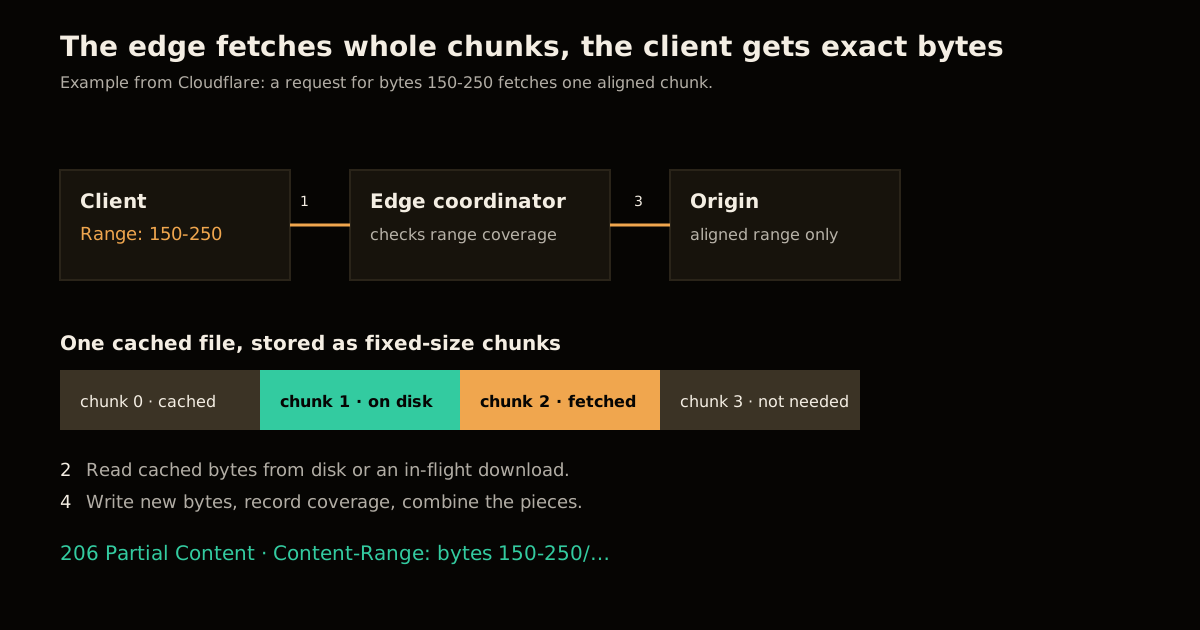
Cloudflare’s announcement describes what changed behind that exchange. The old implementation worked like nginx cache slicing: each client request was mapped onto fixed-size ranges of the file, with the range size and file extensions set per zone. The new one reuses something the Pingora-based cache already did, which is store every cached file on disk in fixed-size chunks. The range size stops being a setting, because it is simply the chunk.
For a missing range the edge fetches origin ranges aligned to chunk boundaries, stores them with the ordinary cache data, and returns only the bytes the client asked for. A request for bytes 150-250 can cause one aligned chunk to be fetched, but the response still contains only 150-250.
Two things do not change, and both matter when you plan the rollout:
- Cache eligibility. Enabling it does not make an otherwise uncacheable response cacheable.
- Origin support. Your origin still needs to support byte ranges, or partial origin fetches buy you nothing.
I have used range caching on media-heavy sites before, and the thing that made it painful was never the header parsing. It was picking one number that suited a 2 MB seek and a 20 GB download at once. If you also run a video pipeline on Cloudflare, my write-up of Cloudflare’s streamline video pipeline covers the other end of the same delivery path.
How Much Did Fixed Range Sizes Waste?
Cloudflare reports that configured range sizes on the old system ran from tens of kilobytes to tens of gigabytes. R2, its largest internal user, used 64 MiB, so a small read that crossed a boundary could cost 128 MiB of transfer between data centers. Too large a size downloads far more than the client wanted. Too small a size turns one request into a long line of tiny origin requests, each holding memory while it waits.
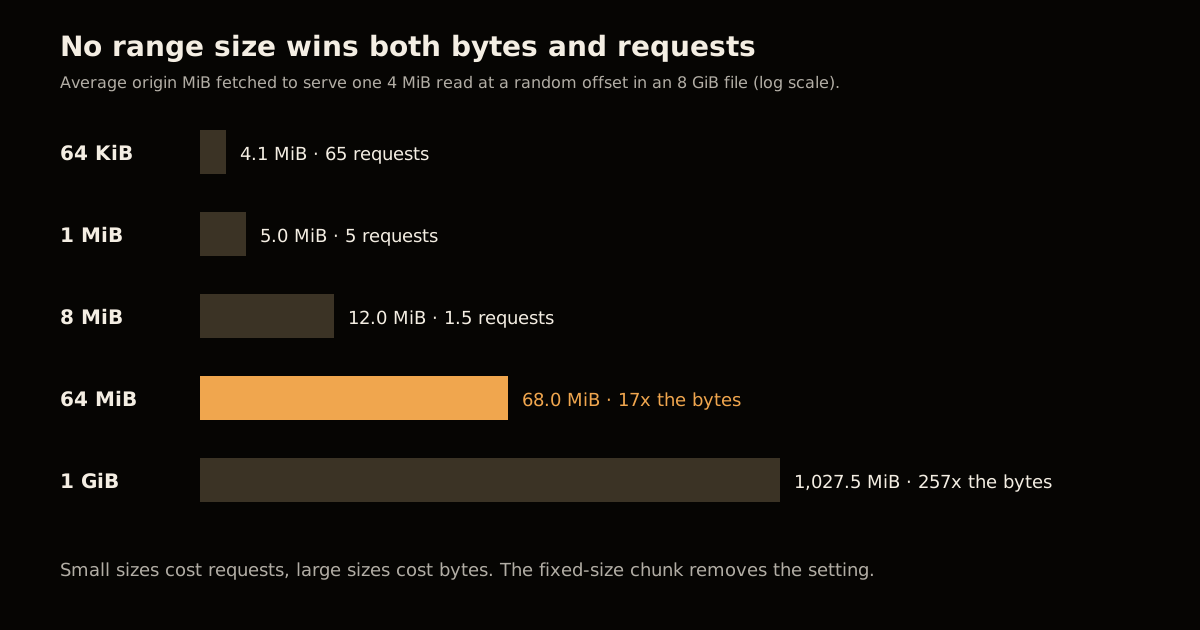
I wanted the shape of that trade-off, so I modelled it. A client reads 4 MiB at a random offset in an 8 GiB file. Under fixed slicing, every range-sized slice the read touches is fetched whole. The closed form is simple: expected origin bytes are the range size plus the read size, and expected origin requests are one plus the read size divided by the range size. I checked it with a 200,000-trial simulation, and the two agreed.
| Range size | Avg origin bytes per 4 MiB read | Avg origin requests | Worst case | Amplification |
|---|---|---|---|---|
| 64 KiB | 4.1 MiB | 65.0 | 4.1 MiB | 1.0x |
| 1 MiB | 5.0 MiB | 5.0 | 5 MiB | 1.3x |
| 8 MiB | 12.0 MiB | 1.5 | 16 MiB | 3.0x |
| 64 MiB | 68.0 MiB | 1.06 | 128 MiB | 17.0x |
| 1 GiB | 1,027.5 MiB | 1.0 | 2,048 MiB | 256.9x |
This is my own model of the failure mode, not a measurement of Cloudflare’s traffic. It ignores caching, which hides the waste on repeat reads, and it assumes a uniform random offset. What it shows is that no value of the setting wins both columns: the size that keeps bytes low (64 KiB) costs 65 origin requests, and the size that keeps requests low (64 MiB) costs 17 times the bytes. That is the dilemma Cloudflare removed, and it is why the rest of the post is about verification rather than tuning.
Cloudflare’s own numbers, after moving R2 to the new implementation, are the part worth quoting. Across R2’s storage regions p99 time to first byte dropped by roughly half on cache hits and misses. A later change that lets the coordinator combine bytes already on disk with bytes fetched from upstream in one response cut tiered cache traffic for R2 and similar workloads by about 6% week over week, which the post describes as petabytes less moving between data centers every day.
How to Set Up Cloudflare Origin Range Requests in 5 Steps
The product configuration is one rule. The five steps are mostly about picking the right traffic and proving it works.
Confirm the origin supports ranges. Request a file with
curl -sI -H "Range: bytes=0-0" https://origin.example.com/big.binand look for206or anAccept-Ranges: bytesheader. If the origin ignoresRange, fix that first.Confirm the objects are cacheable. The feature does not change cache eligibility. If
cf-cache-statusnever showsHITfor the file today, a range rule will not fix it. The same discipline applies to anything else on your edge; I wrote about removing the Cloudflare beacon script for the same reason, because edge behaviour you did not set up is hard to debug.Write a Cache Rule that matches only large-file traffic. In the dashboard go to Caching, then Cache Rules. Match the hosts and extensions where clients read in pieces. An expression like this keeps small assets out of scope:
(http.host eq "cdn.example.com" and http.request.uri.path.extension in {"mp4" "zip" "iso" "gguf"})Set Origin Range Requests to On. In the dashboard this is a setting on the rule. Through the API the announcement gives the value as
origin_range_requests: { "mode": "on" }inside the rule’s action parameters; check the Cache Rules reference for the surrounding payload before scripting it.Run the verification script below against a real file, from a machine that is not your origin, before and after enabling the rule.
Cloudflare says it intends to make this the default way certain file types are served, modifiable by cache rules. Until that lands, the rule is yours to write, so treat step 3 as the step that decides whether you save anything.
How Do You Verify Ranges Still Return the Right Status?
A faster cache that returns the wrong bytes is worse than a slow one, so test the three behaviours Cloudflare says stay standard HTTP: a satisfiable range gets 206 with an accurate Content-Range, an unsatisfiable range gets 416, and anything that cannot safely be ranged comes back as a complete 200. The script below checks all three, and the If-Range case too.
// usage: node check-range.mjs https://cdn.example.com/movie.mp4
const url = process.argv[2];
const get = (headers) => fetch(url, { headers }).then(async (r) => ({ r, body: (await r.arrayBuffer()).byteLength }));

const mid = await get({ Range: "bytes=1048576-2097151" });
const total = Number(mid.r.headers.get("content-range")?.split("/")[1]);
console.log("range      ", mid.r.status, mid.r.headers.get("content-range"), `${mid.body} bytes`);
console.log("cache      ", mid.r.headers.get("cf-cache-status") ?? "n/a");
The second half probes the failure paths:
const past = await get({ Range: `bytes=${total + 10}-${total + 20}` });
console.log("past end   ", past.r.status, "(want 416)");

const stale = await get({ Range: "bytes=0-99", "If-Range": '"not-the-etag"' });
console.log("stale ifrng", stale.r.status, `${stale.body} bytes`, "(want 200 + full body)");

const ok = mid.r.status === 206 && mid.body === 1048576 && past.r.status === 416 && stale.r.status === 200;
console.log(ok ? "PASS" : "FAIL");
process.exit(ok ? 0 : 1);
I ran it against a 5 MiB local server that implements ranges and If-Range, and it printed 206 bytes 1048576-2097151/5242880, 416 and 200 with a full 5,242,880-byte body, then PASS. That proves the script, not Cloudflare. Point it at your CDN hostname, run it twice, and watch cf-cache-status move from MISS to HIT on the second pass.
Why the If-Range probe matters: Cloudflare checks that each origin response matches the requested range, that the total size is stable and that the entity tag stays consistent across subrequests. If the validator does not match, it returns the full representation instead of combining bytes from different versions. Your deploys that overwrite a file in place are exactly where that guard earns its keep. When a ranged request returns an unexpectedly full body, check whether the response is about to be compressed; Cloudflare skips composing ranges for a representation it is about to decompress, since byte offsets in compressed and decompressed forms differ.
What Breaks If Range Requests Don’t Work?
Most failures are quiet. The video still plays, it just seeks slowly, and the bill grows in egress rather than in errors. The table maps each symptom to its likely cause using only behaviours Cloudflare documents.
| Symptom | Likely cause | Check |
|---|---|---|
Always 200, never 206 | Origin ignores Range, or the response is being decompressed | curl -sI -H "Range: bytes=0-0" against the origin |
Never HIT on repeat reads | Response not cache-eligible; the feature does not fix this | cf-cache-status and your Cache Rule scope |
416 on a valid range | Total size changed between subrequests, or the range is past the end | Content-Range total and the ETag |
| Whole new file after a deploy | If-Range validator no longer matches, working as designed | Compare ETags before and after |
| Small files slower or no change | Rule is too broad; the file is always fetched whole | Narrow the extension list in the rule |
The bounded cost is worth stating plainly. Cloudflare notes that a request smaller than a chunk can still require fetching the whole chunk containing it, and non-aligned ranges cost extra work. The difference is that the overhead is bounded and predictable rather than set by a customer-chosen range size. If you serve model weights or large artifacts from the edge, the same sizing logic shows up in VRAM and KV-cache math for local models, where one bad assumption multiplies across every request, and in how an agent prompt cache is split at a shared prefix. For a full-stack view of where the edge fits, see deploying an MCP server on Cloudflare Workers.
FAQ
Do I need to set a range size for Cloudflare Origin Range Requests?
No. Cloudflare’s old range caching needed a per-zone range size. The new feature uses the fixed-size chunks the Pingora-based cache already stores on disk, so there is nothing to tune. You select traffic with a Cache Rule and turn the feature on.
Does Origin Range Requests make an uncacheable file cacheable?
No. Cloudflare states that enabling it does not change normal cache eligibility. If a response was not cacheable before, it still is not. Your origin also has to support byte ranges for partial origin fetches to help.
What status code should a ranged request return?
A satisfiable range returns 206 Partial Content with an accurate Content-Range header. A range past the end of the file returns 416 Range Not Satisfiable. A response that cannot safely be ranged, such as one about to be decompressed, is served as a full 200.
What does If-Range do here?
If-Range asks for a range only when the representation still matches a validator such as an ETag. If the file changed, Cloudflare returns the full new representation instead of stitching together bytes from two versions.
Which files should I enable it for?
Large cacheable objects that clients read in pieces: MP4 video, resumable downloads, package and software artifacts, disk images, archives and model files. Small files that are always fetched whole gain nothing.
Sources
- Origin Range Requests: Serving large files without range-request tuning, Cloudflare Blog, October 23, 2026. Source of the 64 MiB and 128 MiB figures, the roughly 50% p99 TTFB drop, the 6% tiered-cache reduction and the
origin_range_requestsmode. - RFC 9110, section 14: Range Requests, IETF. Semantics of
Range,Content-Range,If-Range, 206 and 416. - Cloudflare Cache Rules documentation, Cloudflare Docs. Where the rule lives and its payload.
- The amplification table and
check-range.mjs: my own simulation (4 MiB read, uniform random offset, 8 GiB file, 200,000 trials) and a script tested against a local range-capable server, not Cloudflare’s production traffic.
Frequently asked questions
Google Search · Preferred sources
Prefer this site on Google
If you already read this writing, add umesh-malik.com as a Preferred Source. Google can then highlight it with a preferred badge in Top Stories, AI Overviews, and AI Mode — for you, not as a site-wide ranking boost.
Related Articles

Web Engineering
How to Give an AI Agent CMS Write Access Without Melting the Cache
AI agent CMS write access breaks caches fast. The layered invalidation pattern that let one CMS absorb 5,000 RPS spikes and a 28,000 RPS DDoS without a hiccup.
Web Engineering
Cloudflare viNext: The $1,100 Next.js-on-Vite Rebuild
Cloudflare viNext rebuilt Next.js on Vite for $1,100 in 7 days: 4.4x faster builds, 57% smaller bundles, already powering CIO.gov in production.

Web Engineering
Hyperdrive MySQL on Workers: 3 Pooler Bugs and How to Test Them
Hyperdrive MySQL on Workers is GA. Three pooler bugs it hit, from lost emoji to a 0.001% empty-result cache fault, and the test that catches each.
Keep reading
Get new posts on AI, Claude Code & LLMs
New deep-dives on AI engineering, Claude Code, and developer tooling — follow along however you prefer.
About the Author

Software engineer writing about AI, Claude Code, LLMs, OpenAI, Anthropic, and developer tooling. 5+ years building production systems at Expedia Group, Tekion, and BYJU'S.