Remove Cloudflare beacon.min.js: you must opt in to opt out
Remove Cloudflare beacon.min.js for good: the disable toggle hides behind adding your site to Web Analytics first, and no-transform is the stronger lever.

TL;DR
To remove Cloudflare beacon.min.js you first have to notice it: if your domain is proxied through Cloudflare, the edge injects a 31,612-byte Real User Measurement script (11,364 bytes gzipped over the wire) into every HTML response you serve, and it appears in no repository, no build output and no code review. The dashboard route out is inverted — you must add your site to Web Analytics before the disable toggle exists at all. The origin route is stronger: Cache-Control: public, no-transform forbids edge rewriting outright, and it stops every other transformation Cloudflare applies by default.
What is beacon.min.js, and why is Cloudflare injecting it?
Cloudflare Web Analytics automatic setup is an edge HTML rewrite that appends a <script> tag pointing at https://static.cloudflareinsights.com/beacon.min.js to pages served through Cloudflare’s proxy, without any change to your origin. The script measures Core Web Vitals and navigation timings in the visitor’s browser and posts them back for the Web Analytics dashboard.
The important word is edge. This does not happen in your framework, your CDN config, or your build. Your origin sends HTML; Cloudflare’s proxy modifies it in flight; the browser receives something your repository has never contained. Cloudflare’s own documentation is direct about the mechanism — automatic setup is “enabled by default” for proxied sites, and it works by injecting the JS snippet at the edge.
Three conditions have to all hold for the injection to land, which is why plenty of engineers on Cloudflare have never seen it:
| Condition | Injection happens | Injection skipped |
|---|---|---|
| DNS record mode | Proxied (orange cloud) | DNS-only (grey cloud) |
| Automatic setup | Enabled (the default) | Set to Disable in Manage Site |
Response Cache-Control | Anything transformable | Contains no-transform |
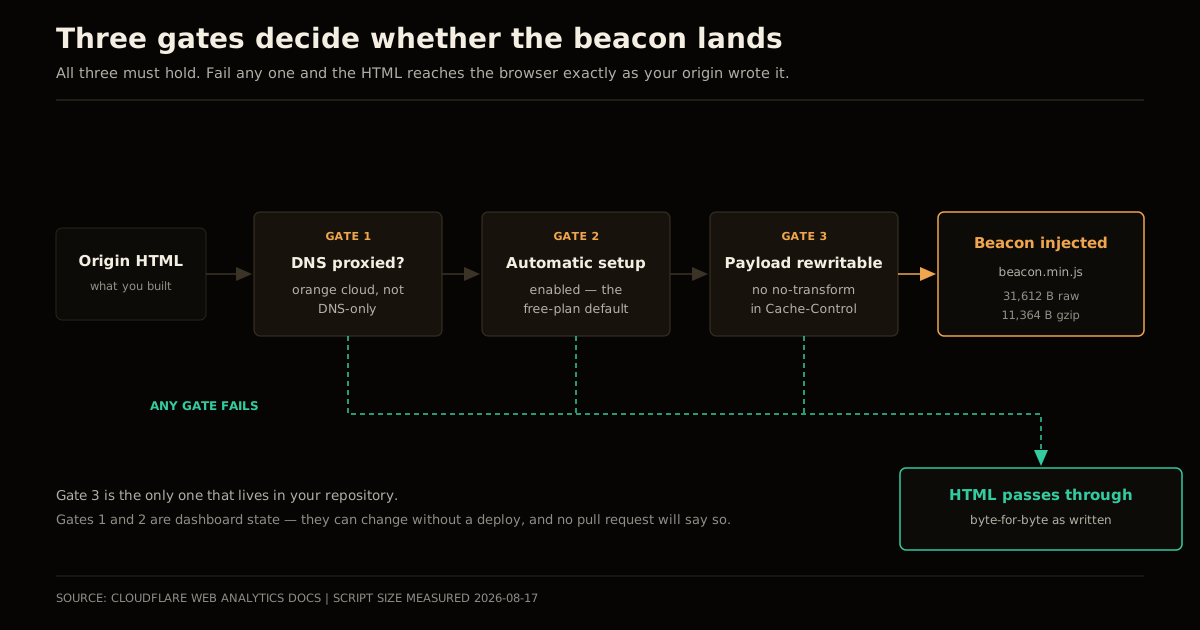
That third row is the one almost nobody knows about, and it turns out to be the most useful lever in this whole story. More on it below.
Check your own site in one command
Before theorising, measure. This is the entire test:
curl -s https://example.com/ | grep -c 'beacon.min.js'1 or more means the edge is injecting it. 0 means it is not. Run it against this site and you get 0 — automatic setup is off here, and the CSP entry that remains is deliberate belt-and-braces rather than evidence of an active beacon.
While you are looking, check for the sibling injection that the Tell HN thread that surfaced this also turned up — Email Address Obfuscation, likewise on by default, rewriting mailto: links and adding its own decoder script:
curl -s https://example.com/ | grep -o '/cdn-cgi/scripts/[a-z0-9/.-]*'The general lesson is worth more than either specific script: on a proxied domain, the HTML your origin emits and the HTML the browser parses are two different documents, and only one of them is in version control. Any audit that reads your build output instead of the wire is auditing the wrong artifact.
How to remove Cloudflare beacon.min.js (you have to opt in first)
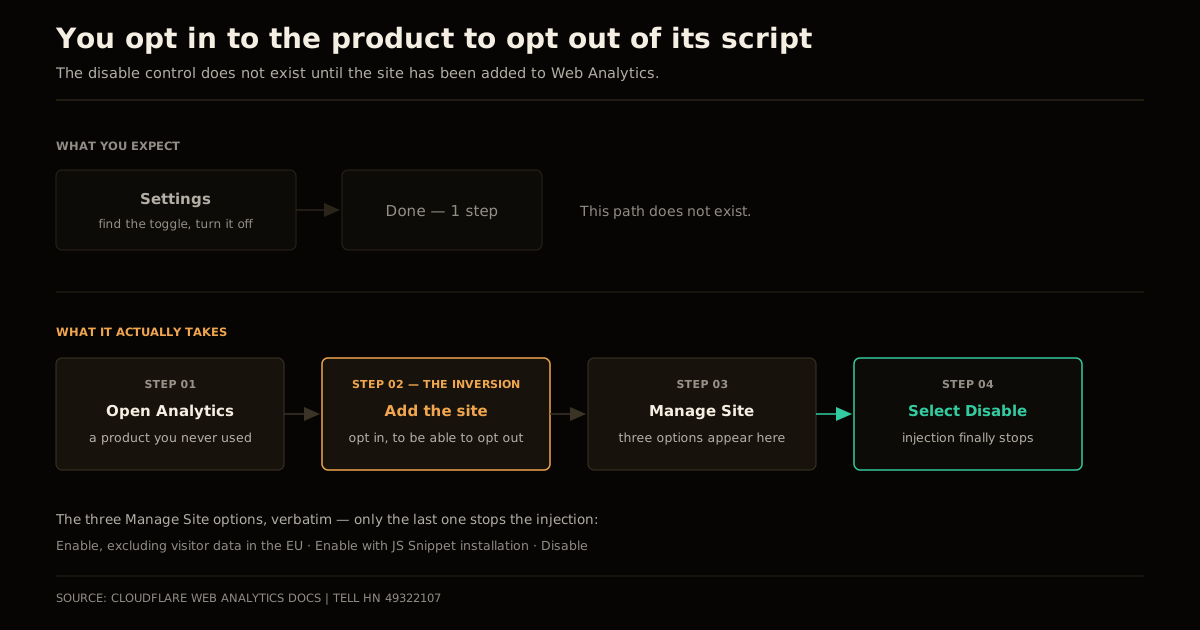
Here is the part that turned a routine default into a front-page complaint. The obvious mental model — “I never enabled Web Analytics, so there is nothing for me to disable” — is exactly wrong. The setting that controls injection lives inside the product you never signed up for.
The original reporter put it plainly: they had to go to the Analytics dashboard, add the site to Web Analytics, and then disable the snippet. You opt in to the product in order to opt out of its script.
Once you are in Manage Site, the automatic-setup control offers three choices, quoted from the docs:
Enable, excluding visitor data in the EUEnable with JS Snippet installationDisable
Only the third stops the injection. The second is the trap for anyone skim-reading — it means “keep RUM on, but I will place the tag myself,” which is more analytics, not less.
A Cloudflare representative in the same thread defended the default on the grounds that RUM gives site owners actionable performance data, and noted that paid plans are opt-in only — the default-on behaviour applies to free sites. That is a coherent position for a free tier funded by aggregate data, and it is still the wrong default. A script that executes in your visitors’ browsers is a decision about your visitors, not about your bandwidth bill, and the party who owes them a disclosure is you.
The lever that skips the dashboard entirely
If you want a guarantee rather than a setting, move the control to your origin:
Cache-Control: public, no-transformCloudflare’s documentation is explicit that with no-transform present, the proxy cannot modify the original payload — it is framed there as a caveat that breaks automatic Web Analytics, which is precisely the outcome you want. The directive is standard HTTP, it lives in your repository, it survives someone else clicking around the dashboard, and it applies per-response so you can scope it to HTML and leave your asset caching alone.
The trade-off is that no-transform is a blanket prohibition, not a targeted one. Everything the edge would otherwise rewrite stops:
| Edge feature | Still applies with no-transform? |
|---|---|
| Web Analytics beacon injection | No |
| Email Address Obfuscation | No |
| Rocket Loader | No |
| HTML minification | No |
| Mirage image optimisation | No |
| Compression, TLS, caching, WAF | Yes — these are not payload transforms |
For a static site that already ships minified, self-hosted assets, giving up edge minification costs nothing and buys byte-for-byte determinism between build output and delivered HTML. If you rely on Rocket Loader or Mirage to paper over a heavy page, use the dashboard toggle instead and fix the page. The same reasoning applies to any third-party script you did not budget for — as covered in the Core Web Vitals guide, the cheapest render-blocking script is the one that was never requested.
The CSP trap: same-origin and cross-origin are different beacons
This is the detail that costs people an afternoon, and it is genuinely non-obvious: the auto-injected beacon and the manually embedded beacon talk to different hosts.
The auto-injected script posts its measurements same-origin, to /cdn-cgi/rum on your own domain — a path Cloudflare’s proxy intercepts before it ever reaches your origin. The manually embedded snippet posts cross-origin to cloudflareinsights.com. So the Content Security Policy each one requires is different:
| Setup | script-src | connect-src |
|---|---|---|
| Automatic (edge-injected) | https://static.cloudflareinsights.com | 'self' |
| Manual (your own tag) | https://static.cloudflareinsights.com | cloudflareinsights.com |
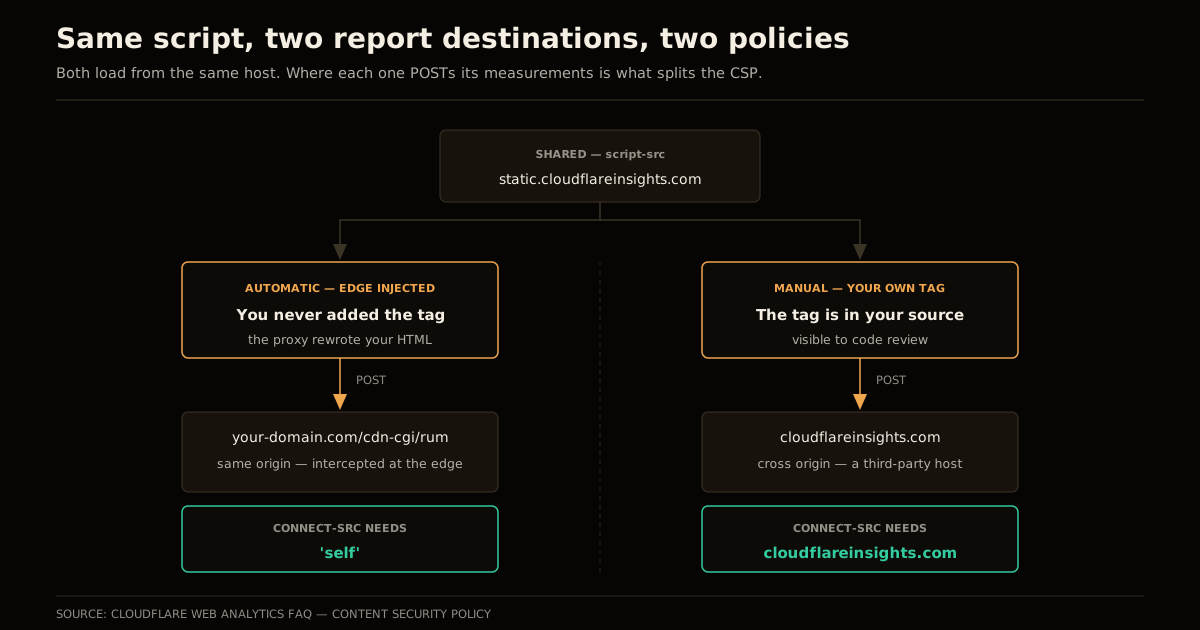
Switch between the two setups without updating connect-src and you get a CSP violation that reports a blocked connection to a host you never configured, on a page whose source code does not mention analytics at all. If you run a strict policy — and on a static site you should, since there is no legitimate reason to allow arbitrary origins — this is the single most likely way you will discover the injection in the first place.
Worth stating plainly: a CSP that blocks the beacon does not remove it. The script still downloads and still executes; only its report fails. Blocking is a symptom-level fix. Disabling the injection is the actual fix.
Common mistakes
Assuming DNS-only means safe forever. It does; the injection needs the proxy. But the whole failure mode here is a default that changes state without a deploy, so make the check part of your release verification rather than a one-time audit.
Treating the CSP allowlist as the decision. Adding
static.cloudflareinsights.comtoscript-srcsilences the console and ships the script. Decide whether you want the beacon first, then write the policy to match.Disabling it in the dashboard and calling it done. The dashboard is account state, not repository state. Nothing in a pull request will ever tell you it changed back.
no-transformis reviewable; a toggle is not.Forgetting your privacy policy. If a third-party script runs in your visitors’ browsers, that belongs in your disclosure, whether or not you chose to add it. “Cloudflare put it there” is an explanation, not a defence.
Reaching for
no-transformon every response. Scope it to HTML. Applying it to static assets buys nothing and forfeits edge optimisations that were never the problem.
What I would actually do
For a static site — this one included — the answer is both levers, in this order. Set Cache-Control: public, no-transform on HTML responses so the guarantee lives in the repo where a reviewer can see it, then set automatic setup to Disable in Manage Site so the edge is not attempting a rewrite it will be refused anyway. Keep the CSP entry only if you have decided you want RUM, and if you have, embed the snippet yourself so the tag is visible in your source alongside every other script you own.
The broader principle is the one I keep landing on with edge platforms, and it is the same one behind running identity checks before your Worker code and behind keeping on-device AI inside the encryption boundary: the platform layer is where behaviour you did not write becomes behaviour you are responsible for. Cloudflare gives you an enormous amount for free at that layer, and more of the stack keeps moving into it. The price of that leverage is that “I didn’t add it” stops being a meaningful sentence. Check the wire, not the build.
FAQ
What is beacon.min.js from static.cloudflareinsights.com?
It is Cloudflare’s Web Analytics RUM (Real User Measurement) script, served from https://static.cloudflareinsights.com/beacon.min.js. It measures Core Web Vitals and page-load timings in the visitor’s browser and posts them back to Cloudflare. On a proxied site it is normally not something you added — Cloudflare’s edge rewrites your HTML and injects the script tag on the way out.
Why is Cloudflare injecting a script I never added?
Automatic setup for Web Analytics is enabled by default on sites proxied through Cloudflare — the orange-cloud DNS records, not DNS-only ones. Because the injection happens in the edge HTML rewriter rather than in your origin response, nothing in your repository or your build output mentions it, which is why it usually surfaces first in DevTools or in a Content Security Policy report rather than in code review.
How do I remove Cloudflare’s beacon.min.js?
There are two ways. In the dashboard, go to Analytics → Web Analytics, add the site, open Manage Site and set automatic setup to Disable. Adding the site first is required — the toggle does not exist until you do. The origin-side alternative is to send Cache-Control: public, no-transform on your HTML responses, which tells Cloudflare it may not modify the payload at all.
Does Cache-Control no-transform disable anything else?
Yes, and that is the trade-off. no-transform blocks every edge transformation on that response, not just analytics injection — Email Address Obfuscation, Rocket Loader, HTML minification and Mirage all stop applying too. Use it when you want a hard guarantee that the bytes your origin sends are the bytes the browser receives; use the dashboard toggle when you only want the analytics injection gone.
What CSP directives does the beacon need?
Both setups need https://static.cloudflareinsights.com in script-src. The connect-src differs: the auto-injected beacon posts same-origin to /cdn-cgi/rum, so 'self' is enough, while a manually embedded snippet posts cross-origin and needs cloudflareinsights.com in connect-src. Getting this backwards is the usual cause of a CSP violation that appears only after you switch between the two setups.
Is email-decode.min.js the same problem?
It is the same mechanism with a different feature behind it. Cloudflare’s Email Address Obfuscation rewrites mailto: links in your HTML and injects /cdn-cgi/scripts/.../email-decode.min.js to decode them at runtime, and it is also on by default. If you are auditing what the edge adds to your pages, check for both — and expect the list to grow as more edge features default to on.
Sources
- Cloudflare Web Analytics — Get started — automatic setup being enabled by default for proxied sites, the three Manage Site options, and the
no-transformcaveat. - Cloudflare Web Analytics — FAQ — the Content Security Policy directives, including the
connect-srcsplit between automatic and manual setups. - Tell HN: Cloudflare silently injects its analytics when you switch nameservers — the report that surfaced the inverted opt-out, the Cloudflare response about free-plan defaults, and the Email Address Obfuscation observation.
- Script sizes measured directly against
https://static.cloudflareinsights.com/beacon.min.json 2026-08-17: 31,612 bytes uncompressed, 11,364 bytes gzipped.
Frequently asked questions
Google Search · Preferred sources
Prefer this site on Google
If you already read this writing, add umesh-malik.com as a Preferred Source. Google can then highlight it with a preferred badge in Top Stories, AI Overviews, and AI Mode — for you, not as a site-wide ranking boost.
Related Articles

Web Engineering
Fix Performance Regressions With a Benchmark Ratchet (3.1x, 0 Breaks)
Fix performance regressions with a benchmark ratchet that fails CI on regression and locks in wins. How Claude shipped 3,000 changes at 3.1x, zero breaks.

Web Engineering
Deploy FastAPI on Cloudflare Workers: the packages pip won't install
Deploy FastAPI on Cloudflare Workers now that Python is GA: what pip installs cleanly, what needs a Wasm build, and the C-extension wall in between.

Web Engineering
Post-Quantum TLS Migration: Stop Paying the 150ms Retry Tax
Post-quantum TLS migration checklist: X25519MLKEM768 cut Cloudflare's handshake retries from 52% to 3.7%. How to check, enable, and verify on your own origin.
Keep reading
Get new posts on AI, Claude Code & LLMs
New deep-dives on AI engineering, Claude Code, and developer tooling — follow along however you prefer.
About the Author

Software engineer writing about AI, Claude Code, LLMs, OpenAI, Anthropic, and developer tooling. 5+ years building production systems at Expedia Group, Tekion, and BYJU'S.