Private PDF Tools: How I Built Paperdost So Files Never Upload
How I built Paperdost, private PDF tools that run in the browser: CSP as a privacy guarantee, WebAssembly codecs, offline workers, and one shared kit.

TL;DR Paperdost is a set of free, private PDF tools and photo tools where every file stays in your browser. I made that a property the browser enforces, using a strict Content Security Policy, instead of a promise in a privacy policy. The rest of the architecture follows from that one constraint: a static site, WebAssembly codecs, per-tool offline workers, one shared kit, and a local MCP server.
What is the point of private PDF tools?
Private PDF tools are tools that process your file on your own device instead of a server. Most online PDF tools work the other way: you upload a file, a server processes it, you download the result. That is fine for a menu, and a poor fit for an Aadhaar card, a bank statement or a signed contract. The usual reassurance is a line saying files are deleted after an hour, which you have to take on trust.
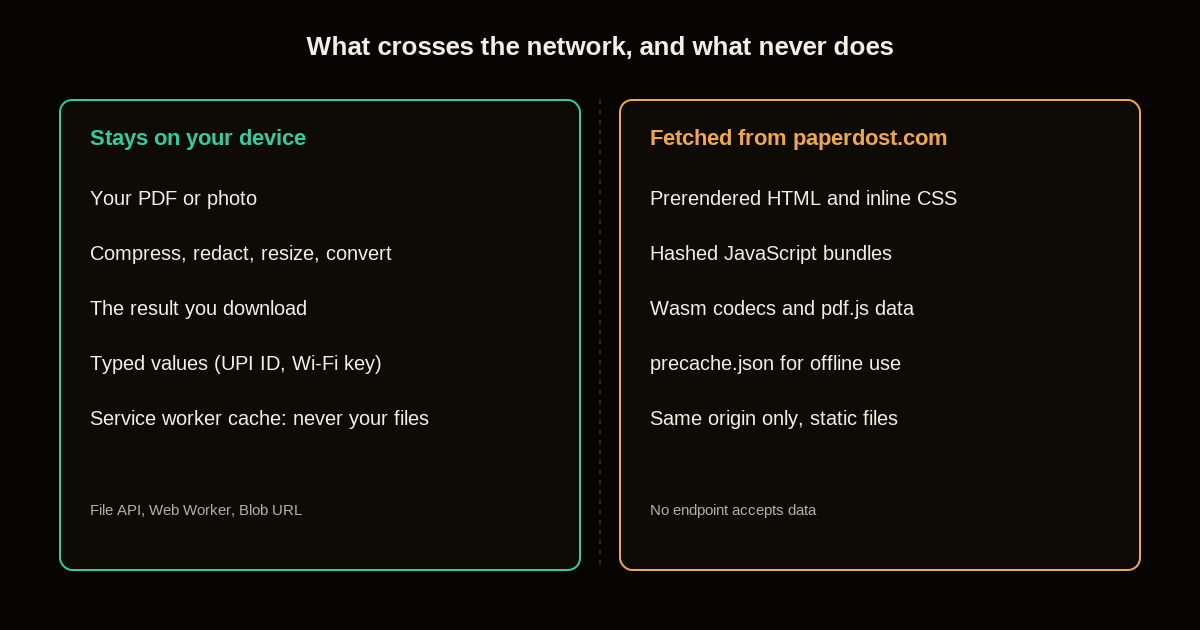
I wanted a design where trust is not required. If the page cannot make a network request that carries your file, it does not matter what anyone intends. That led to the rule everything else in Paperdost has to obey: files never leave the device, and the browser, not me, is the thing that guarantees it.
The tools cover the paperwork jobs people actually search for: compress, merge, split, rotate, unlock, sign and redact PDFs, turn JPG and PNG into PDF, convert HEIC photos, resize photos to the KB limits of exam forms, remove location data from photos, and make QR codes. There is a bit more detail on the exact scope on each tool page, and the project summary lives on the Paperdost project page.
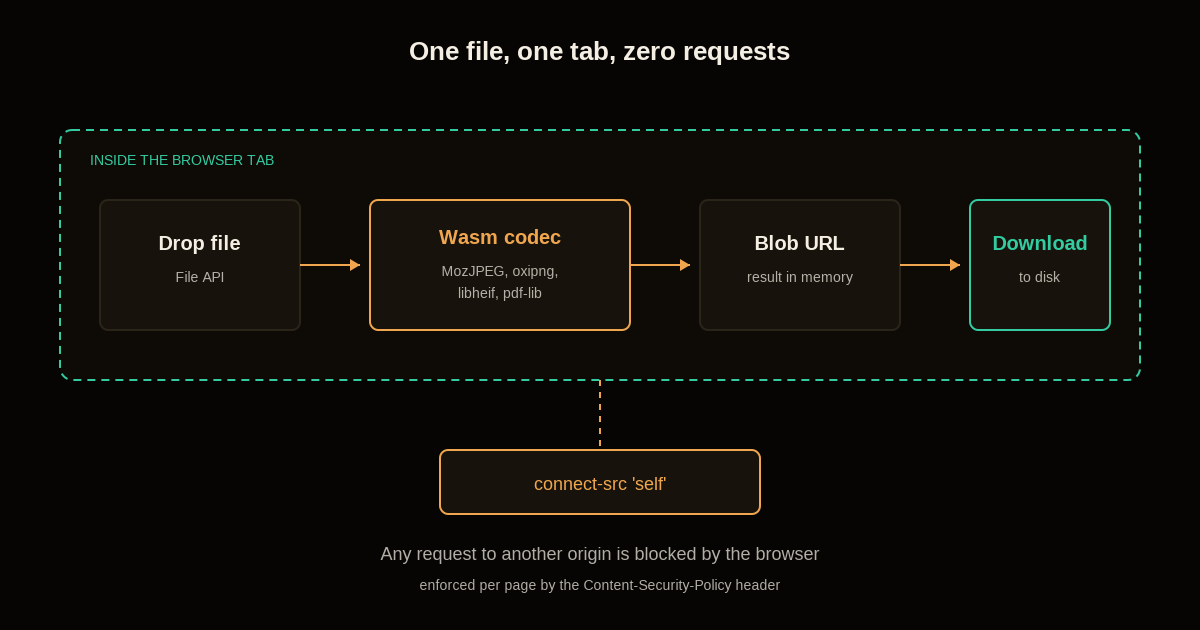
How does a Content Security Policy make a privacy promise enforceable?
A Content Security Policy (CSP) is a response header that tells the browser which origins a page may load from and talk to. Two directives carry the privacy guarantee here:
connect-src 'self'limitsfetch, XHR, WebSocket and similar calls to the site’s own origin. Even if a script were compromised, it could not post a file to a third party.script-src 'self' 'wasm-unsafe-eval'withdefault-src 'none'means no third-party scripts at all. Everything ships in the build, including the WebAssembly modules, which is what thewasm-unsafe-evalallowance is for.
The other headers close the remaining side doors. frame-ancestors 'none' and X-Frame-Options: DENY stop framing, object-src 'none' removes plugins, and the Cross-Origin Opener and Resource Policies isolate the origin. Permissions-Policy denies everything by default, and only the tools that need the camera get it for self.
| Control | What it prevents |
|---|---|
connect-src 'self' | Sending file data to any other origin |
script-src 'self' 'wasm-unsafe-eval' | Third-party or injected scripts |
style-src 'self' plus one hashed inline style | Style injection, without 'unsafe-inline' |
frame-ancestors 'none' | Embedding the tool in another page |
Permissions-Policy denies all | Silent camera, mic or location access |
The part that took the most care is that Cloudflare adds up every matching _headers rule. If a page matches two CSP rules, or none, the guarantee quietly weakens. So the build fails if any page matches zero or two CSPs, and the inline CSS block is hashed at build time and added to style-src rather than allowing 'unsafe-inline'. There is also a /privacy-check/ page on the site that shows the header the browser actually received, so the claim can be checked rather than believed.
A CSP is not magic. It does not stop you from trusting me with the code, and it does not protect a browser extension that reads the page. What it does is make the specific claim “this page cannot send your file elsewhere” something the browser verifies on every load.
Why use WebAssembly codecs instead of the canvas?
The easy way to shrink a JPEG in a browser is to draw it onto a canvas and call canvas.toBlob with a quality value. It works, and it is where I started thinking about it. The problem is that you get whatever encoder the browser ships, no control over colour profiles, and no good way to hit a target like “under 50 KB at exactly 200 by 230 pixels”, which is the kind of limit exam forms enforce.
So the image tools use real codecs compiled to WebAssembly: MozJPEG for JPEG, oxipng for PNG and libheif for reading HEIC. PDF work uses pdf.js for rendering and pdf-lib for editing. The same applies to the pages people search for, such as compress a PDF to 200 KB or convert HEIC photos to JPG: the page sets the target and the tool reports plainly whether it was reached.
The cost is weight. The page itself is roughly 85 to 100 kB gzipped, while pdf.js, pdf-lib and each codec are roughly 130 to 250 kB gzipped. I accept that by loading them lazily with import() inside the handler that needs them, so a visitor who never drops a file never pays for an engine. After the first use they come from cache.
| Approach | Control over output | Download cost | Where I use it |
|---|---|---|---|
canvas.toBlob | Browser’s encoder, little else | None | Nowhere for final output |
| WebAssembly codec (MozJPEG, oxipng) | Quality, size targeting, profiles kept | 130 to 250 kB gzipped, lazy | Image output |
| pdf.js and pdf-lib | Full control of pages and content | Lazy, shared across PDF tools | PDF read, edit, write |
Redaction shows why the extra control matters. A black rectangle drawn over text leaves the text in the file. The redact tool deletes the text from the PDF content stream, and a checker re-reads the output to confirm it is gone. You can see the result on the page for masking an Aadhaar card, which is exactly the kind of document where “covered but still there” is the failure that matters.
How does one kit power twelve tools?
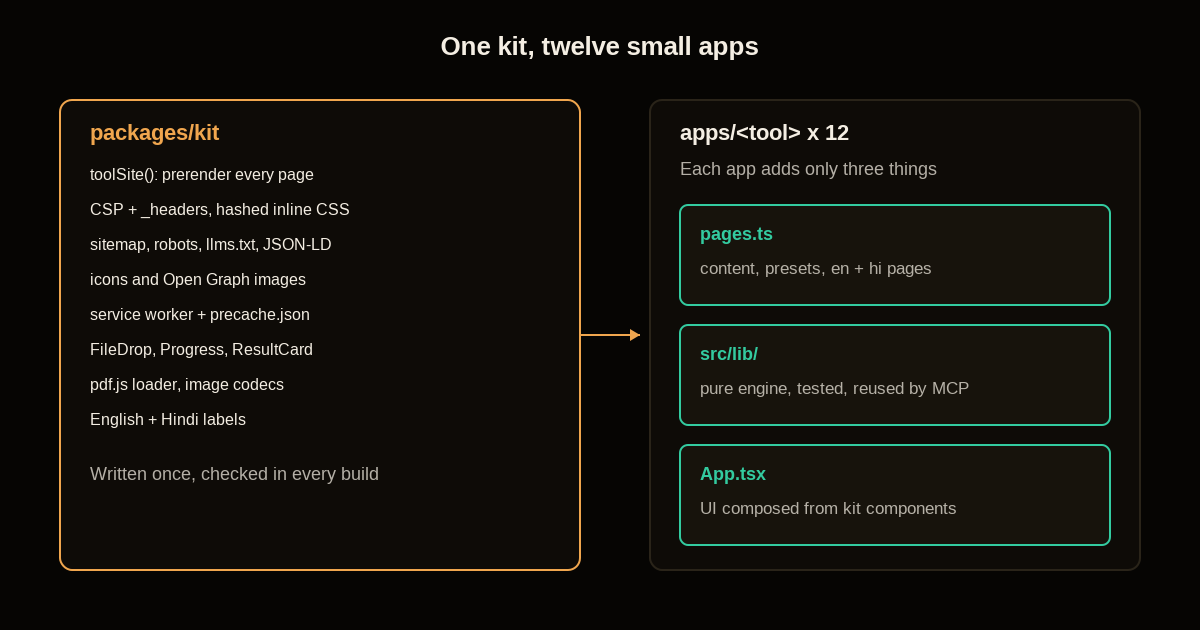
Twelve separate tools could easily become twelve codebases drifting apart. Instead there is one shared package, the kit, and each tool is a small Vite app that composes it. The repo is a Bun monorepo, and every app has the same shape:
pages.tsholds the content: every page’s title, intro, steps, FAQ and presets, in English and Hindi.src/lib/holds the engine as pure TypeScript with no DOM and no UI framework, tested withbun test.App.tsxis the experience, built from kit components such as the file drop, progress bar and result card.vite.config.tsregisters one plugin,toolSite(SITE, PAGES), and nothing else.
That plugin does the unglamorous work. From pages.ts it prerenders every page through Vite’s SSR loader, inlines the CSS and hashes it into the CSP, and emits the sitemap, robots.txt, llms.txt, icons, Open Graph images, JSON-LD and the service worker. A new search-intent page, such as the SSC signature size page, is a data change rather than a new component.
Keeping src/lib/ free of the DOM paid off twice. It makes the engines fast to test with generated inputs, never real documents, and it is what lets the MCP server reuse the exact same code later. The exam size data lives in one file, and each figure in it cites the official notice it came from, so a limit can be corrected in one place.
The build runs its own checks, because I would rather it fail than ship a regression in privacy or parity: one CSP per page, style hashes, precache integrity, brand strings and language twins. A warm full build takes about 17 seconds on an M-series Mac.
How do per-tool service workers make it work offline?
After the first visit, Paperdost keeps working without a connection. That is not only a convenience: someone filling a government form on a weak mobile connection is the typical user, and a tool that needs a round trip is a tool that fails at the worst moment.
Each tool registers its own service worker scoped to /<app>/, so tools update independently and never interfere with each other. The rules are short:
- On install, fetch
precache.json, which lists every file in the build, and cache it under a name that includes the build hash. A new build gets a new cache name and the old one is deleted. - Serve hashed assets cache-first, marked
immutablefor a year. - Serve pages network-first and fall back to the cache when offline.
- Never cache user files. Only build files are ever fetched.
The seven PDF tools need the same 3.5 MB of CMaps, fonts, ICC profiles and decoders. Rather than download that seven times, it is served once at /pdfjs/ and kept in a single shared cache that each tool’s worker tops up with only the files that are missing. The hub at the root has its own worker that deliberately ignores every app folder. This is the part with the most surface area for subtle bugs, which is why the precache integrity check is part of the build.
How do Hindi twin pages and the MCP server fit in?
A large share of the people who search for “pdf 200 kb kaise kare” or a photo size for an exam are searching in Hindi or a mix of Hindi and English. Every English page has a Hindi twin written for those searches, linked with hreflang, and the build fails if a twin is missing. They are written, not machine-translated copies of the interface, because the search phrasing is different from the English page.
The same engines are also available to AI clients. There are two routes, and both keep the privacy model intact:
- WebMCP in the page. Each tool registers tools through
document.modelContext, so a browser agent can set options and run the tool on your file in your own tab. The module loads only if the browser supports WebMCP. - paperdost-mcp on your machine. A stdio MCP server that exposes the tools (compress, merge, unlock, watermark and redact PDFs, images to PDF, HEIC conversion, photo resize, photo location removal, QR make and read). It imports the apps’
src/lib/engines directly and makes no network requests, so the web and the agent produce the same output from the same code. It also never overwrites a file; results are written next to the input.
If you want to build something similar, my notes on building an MCP server cover the protocol side, and the MCP topic hub collects the rest. For another example of heavy work staying in the tab, see SVG to MP4 in the browser. And if photos are your concern, the same instinct of finding what a file quietly carries is behind the Paint invisible watermark write-up, and behind the UPI QR generator that runs without sending your UPI ID anywhere.
What would I do differently?
A few honest trade-offs, because none of this is free:
- Every feature has to work client-side. Anything that needs a server, such as cross-device sync or account features, is simply not available. I treat that as the design, not a gap, but it limits the product.
- Large engines cost a first-use download. Lazy loading and caching soften it, and it still hurts on a slow connection the first time.
- Header composition is fiddly. Because rules add up, mistakes are easy, and I only trust the setup because the build checks it.
- A CSP proves less than people hope. It limits where a page can send data. It does not prove the code is correct, which is why the engines have tests and the source is the thing to audit.
The part I would repeat is making the constraint structural. Once “no uploads” is enforced by the platform, a lot of other decisions get easier: static hosting, no application server to patch, and no data to leak because there is none.
FAQ
Are my files really not uploaded to Paperdost? No file is uploaded. Every tool reads the file with the browser’s File API and processes it on your device. The site also ships a Content Security Policy with connect-src set to ‘self’, so the browser would block a script that tried to send data to another origin, and the site has no endpoint that accepts uploads in the first place. You can check the header yourself on the privacy check page.
Does Paperdost work offline? Yes, after the first visit. Each tool registers its own service worker that precaches the files of that build, and the shared PDF engine data is cached once for all PDF tools. Your own files are never cached, only the site’s build files.
Why WebAssembly codecs instead of the browser’s built-in image encoding? Codecs such as MozJPEG and oxipng usually produce smaller files than canvas.toBlob at similar visual quality, and they let the tool keep colour profiles. The trade-off is a larger download, so the codecs load only when a file is dropped and are cached afterwards.
Can an AI assistant use these tools without uploading files? Yes, in two ways. Each page registers WebMCP tools so a browser agent can drive the tool in your own tab. For desktop clients there is paperdost-mcp, a local MCP server over stdio that runs the same engines on your machine and makes no network requests.
Why are there separate pages for things like SSC signature size or Aadhaar redaction? Each page targets one real task with its own limits, such as a KB range and pixel size for a specific form. They come from data files rather than hand-written markup, and every English page has a Hindi twin so people searching in Hindi land on a page written for them.
Sources
- Paperdost and its machine-readable summary at paperdost.com/llms.txt
- MDN: Content Security Policy connect-src
- MDN: Service Worker API
- MDN: WebAssembly
Frequently asked questions
Google Search · Preferred sources
Prefer this site on Google
If you already read this writing, add umesh-malik.com as a Preferred Source. Google can then highlight it with a preferred badge in Top Stories, AI Overviews, and AI Mode — for you, not as a site-wide ranking boost.
Related Articles

Web Engineering
SVG to MP4 in the browser: a two-step workflow, no server
SVG to MP4 in the browser needs no server: paste a URL and 30MB of ffmpeg.wasm renders every frame in your tab. The one catch that trips people up.

Web Engineering
Deploy FastAPI on Cloudflare Workers: the packages pip won't install
Deploy FastAPI on Cloudflare Workers now that Python is GA: what pip installs cleanly, what needs a Wasm build, and the C-extension wall in between.

Web Engineering
How to Give an AI Agent CMS Write Access Without Melting the Cache
AI agent CMS write access breaks caches fast. The layered invalidation pattern that let one CMS absorb 5,000 RPS spikes and a 28,000 RPS DDoS without a hiccup.
Keep reading
Get new posts on AI, Claude Code & LLMs
New deep-dives on AI engineering, Claude Code, and developer tooling — follow along however you prefer.
About the Author

Software engineer writing about AI, Claude Code, LLMs, OpenAI, Anthropic, and developer tooling. 5+ years building production systems at Expedia Group, Tekion, and BYJU'S.