How to Migrate a Large System Prompt to Ollama Without Breaking It
Migrate a large system prompt to Ollama and it can burn 14% of a 65K context window before the first turn. What breaks, why, and the fix that worked.

TL;DR A self-hosted context budget is the ceiling a large system prompt has to fit inside before a single turn happens, and it’s why teams that migrate a large system prompt to Ollama often watch it fall apart on day one: a 35KB prompt alone can burn roughly 14% of a 65K-token window before anything runs. Every symptom that follows — repeated tool calls, restated objectives, an agent thrashing inside three minutes — traces back to that one number, not the open-weight model’s quality. The fix is structural: split the monolith into single-objective units and set Ollama’s context length explicitly, because its default is far smaller than what a frontier API silently hands you.
What breaks when a large system prompt moves from a frontier model to a self-hosted one?
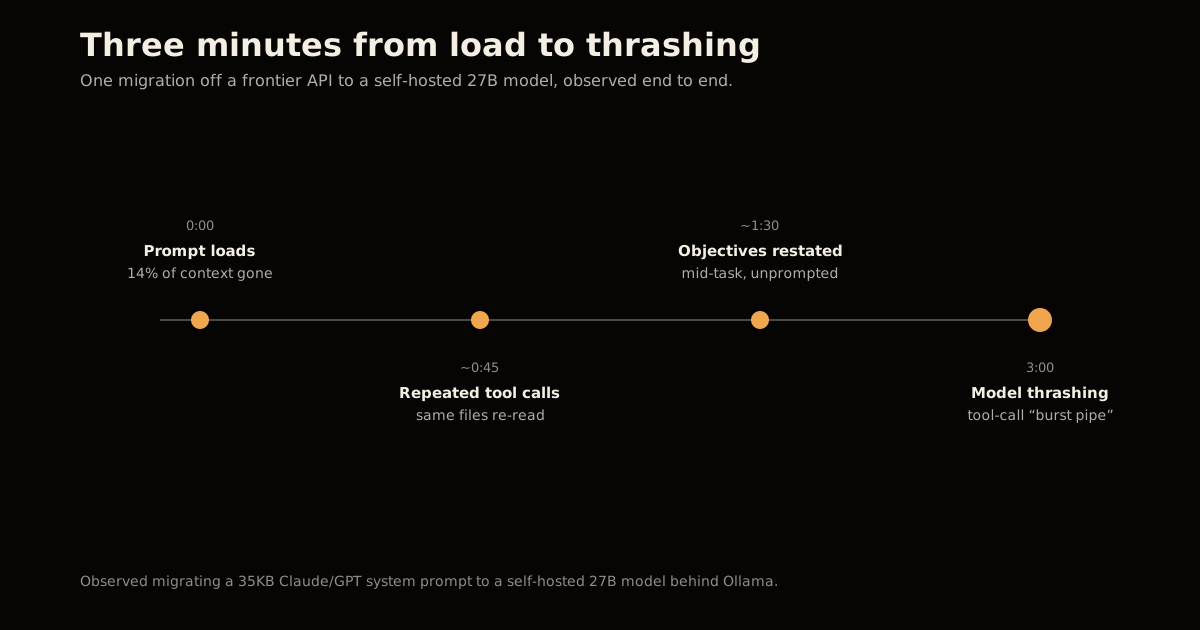
A system prompt built against a frontier API is built against an assumption most engineers never have to name: that the context window is effectively large enough not to think about. One engineer’s account of the migration makes the assumption visible by removing it. Moving a 35KB preprompt from Claude Opus and GPT to a self-hosted 27B model on an AMD Ryzen AI MAX+ 395 — 128GB of RAM, 32GB reserved for the host OS, roughly 96GB left for inference, a 65,536-token context window — the prompt consumed 14% of that window on load, and the degradation started fast.
The specific symptoms are worth naming because they look like a bad model and aren’t: the agent issued the same tool call repeatedly, re-read files it had already processed, restated its own objective mid-task, and hit tool-call parsing failures the author described as a “burst pipe” of overflow data. Model thrashing set in within three minutes. None of it was a reasoning failure — it was a resident-context problem, made worse by a prompt written for a window four to eight times larger than the one it now had to share with everything else.
The author’s framing is the sentence to keep: “One of the biggest assets we get from Frontier Providers isn’t the model — it’s large context windows.” Hosted chain-of-thought hides how much scratch space a prompt actually burns; self-hosting removes that cover and bills you for it immediately.
How much context does a 35KB system prompt actually cost?
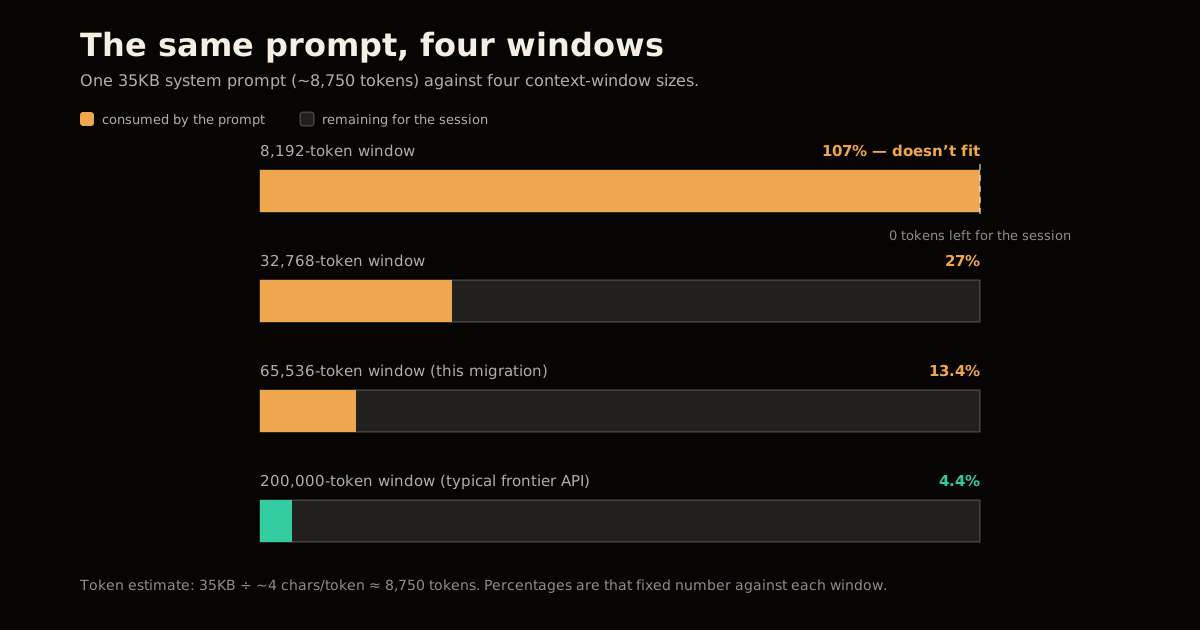
Text runs roughly four characters per token, which puts a 35KB prompt at about 8,750 tokens — a number you can check yourself before you load anything. Against the reported 65,536-token window, that’s 13.4% of the budget, which lines up with the observed 14%. The gap is worth internalizing: it doesn’t move whether the rest of your window is 8K or 200K. It just determines how much room is left over.
| Context window | 35KB prompt (~8,750 tokens) | Remaining for the session | Share consumed |
|---|---|---|---|
| 8,192 (unconfigured small default) | 8,750 | doesn’t fit | over 100% |
| 32,768 | 8,750 | 24,018 | 27% |
| 65,536 (this migration’s setup) | 8,750 | 56,786 | 13.4% |
| 200,000 (typical frontier API) | 8,750 | 191,250 | 4.4% |
Read the top row literally: on a context window at or below the prompt’s own size, the prompt alone doesn’t fit, before a single message from the user or a single tool result arrives. That row is not a hypothetical — it’s close to where some self-hosted deployments sit until someone explicitly raises num_ctx.
Frontier vs. self-hosted: what actually changes
| Dimension | Frontier hosted API | Self-hosted (Ollama, 27B-class) |
|---|---|---|
| Typical context window | 200K+ tokens, provider-managed | Whatever your VRAM/RAM budget sets — 65K in this case |
| Default context length | Effectively already large | Small by default; you must raise num_ctx yourself |
| Reasoning visibility | Chain-of-thought hidden from you | Fully visible — every repeated tool call shows up in the transcript |
| Cost of an inefficient prompt | Absorbed by a window you rarely fill | Paid immediately, in tokens you don’t have |
| Who tunes the context budget | The provider | You, per model, per deployment |
The middle rows are the ones people miss. A frontier provider’s hidden reasoning doesn’t just hide thinking — it hides how wasteful your prompt is, because the window it’s burning through is big enough that the waste never surfaces as a failure. Self-hosting doesn’t make your prompt worse. It just stops absorbing the cost of it for you, the same tradeoff that shows up when context management API compaction decides what survives a long session versus what gets dropped.
How do you migrate a large system prompt to Ollama without breaking it?
Treat the migration as a budgeting exercise, not a copy-paste. The steps below are what actually recovered a working session in the account above, in the order that matters most:
Estimate the prompt’s token cost before you load it. Divide its byte size by roughly 4 to get a token estimate, then check that against your target context window.
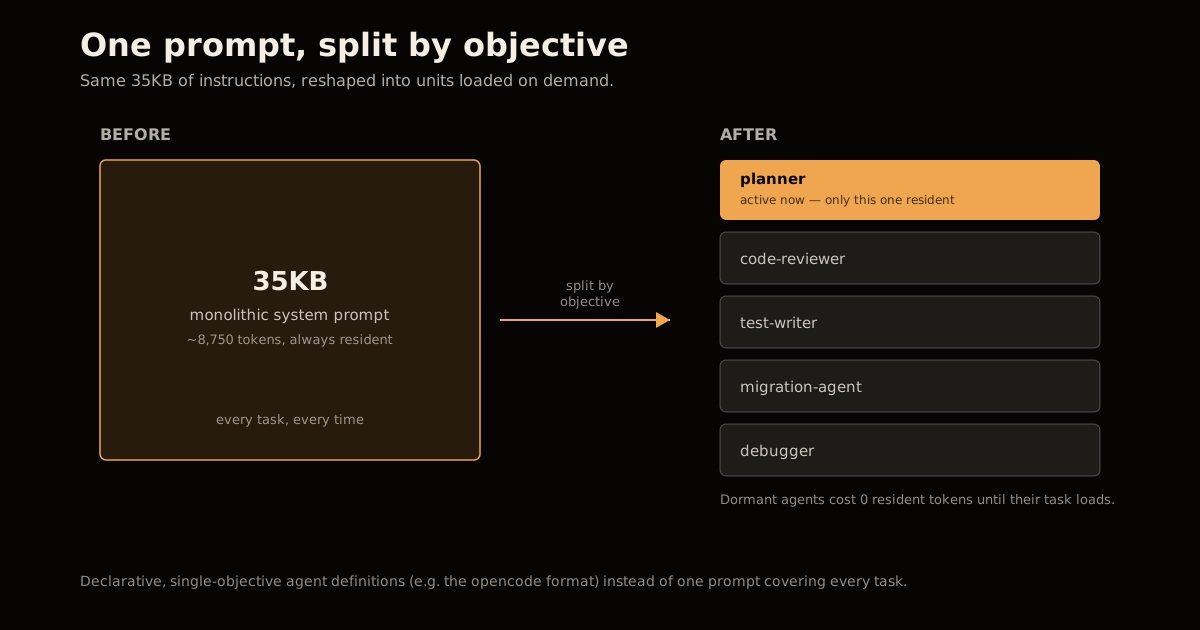
Split the monolithic prompt into single-objective units. One prompt trying to cover every task is the thing consuming 14% of the window for capabilities a given task doesn’t need.
Convert those units into declarative agent definitions. Tools like opencode store one objective, one tool set, and one behavior contract per agent file, loaded only when that task runs — the same instinct behind rewriting an agent’s system prompt to cut tool-call cost instead of adding more tools to a single bloated one.
Set the context length explicitly. Ollama’s default (
num_ctx, orOLLAMA_CONTEXT_LENGTHas an environment variable) is small unless you raise it — check Ollama’s own FAQ on context length before assuming the model is using all the RAM you gave it.Reduce tool calls per agentic step. Every call the agent makes adds to what has to stay resident, so fewer, more decisive calls cost less context than many exploratory ones.
Replace negative constraints with positive directives. “Don’t do X” burns tokens describing a failure mode; “do Y” states the target in fewer words and degrades more gracefully once context gets tight.
Persist session state to disk, not just context. If progress lives only in the conversation window, a context trim erases it — logging state outside the window means a compaction event loses scratch space, not work already done.
Common mistakes migrating a large system prompt to a self-hosted model
Assuming the model is the problem. Repeated tool calls and restated objectives look like a reasoning failure. They’re usually a resident-context failure — the earlier instructions the agent needs have already scrolled out of the window.
Leaving num_ctx at its default. A context window that was never explicitly sized to the hardware is one of the fastest ways to reproduce this failure on the first run, before you’ve even loaded your own prompt.
Porting the prompt verbatim. A prompt tuned for a 200K-token API is tuned for an assumption that no longer holds. Treat the move as a rewrite, not a copy.
Sizing only for the prompt, not the session. The prompt is the floor, not the ceiling. Tool results, file reads, and conversation history all compete for the same budget once the session actually starts.
The one number worth remembering
Divide by four. A prompt’s byte size divided by roughly four gives you its token cost, and that one number tells you whether a self-hosted migration is going to work before you spend a session finding out the hard way. At 35KB and a 65K window, that’s 14% gone on load — enough to explain every downstream symptom in this migration without needing a worse model as the explanation. The same context-budget math that decides how much VRAM a hybrid-attention model needs at long context applies here at the prompt layer: know the number before you commit the hardware, and tune the serving flags — see vLLM’s throughput tuning knobs — around what’s actually left over once the prompt is loaded. More context-budget arithmetic like this lives in the LLM engineering archive.
Frequently asked questions
How much context window does a 35KB system prompt use?
At roughly 4 characters per token, a 35KB prompt is about 8,750 tokens. On a 65,536-token self-hosted window that’s about 13-14% of the entire budget gone before a single turn runs, which matches what engineers migrating off frontier APIs have measured directly. On an 8K-token window — close to where some self-hosted defaults start — the same prompt does not fit at all.
Why does Ollama’s default context length break large system prompts?
Ollama does not automatically size the context window to your hardware or your prompt; it uses a small default (set via num_ctx or the OLLAMA_CONTEXT_LENGTH environment variable) unless you override it. A prompt tuned against a frontier API’s much larger window silently gets truncated or crowds out session history the moment it lands on an unconfigured self-hosted deployment.
What causes an agent to repeat tool calls after migrating off a frontier model?
It’s usually context loss, not a worse model. Once the window fills, earlier instructions and completed steps fall out of view, so the agent re-reads files it already processed and reissues tool calls it already made. The fix is architectural — shrink what has to stay resident — not a bigger or “smarter” checkpoint.
Should I shrink my system prompt or just raise Ollama’s context length?
Both, in that order. Raising num_ctx without shrinking the prompt just delays the same failure to a longer session, and most local hardware can’t extend the window indefinitely anyway. Split the prompt into single-objective units first, then set a context length sized to what’s left over for real session history.
What is a declarative agent definition, and why does it help?
It’s a small, single-purpose configuration file — one objective, one set of tools, one behavior contract — instead of one monolithic prompt trying to cover every task. Tools like opencode store these per-agent under a config directory. Loading only the agent a task needs keeps the resident prompt small and leaves the rest of the context window for actual work.
Does a bigger self-hosted model fix a context-overflow problem?
No. Context overflow is a token-budget problem, not a capability problem — a larger model with the same context window hits the identical ceiling at the identical token count. The lever that actually moves is the size of what you keep resident: prompt, tool definitions, and session history, not parameter count.
Sources
- Notes on gotchas while migrating 35KB preprompts from Opus to self-hosted Ollama — the primary account this post is built from: hardware, prompt size, context window, and every failure mode cited above.
- Ollama FAQ — context length —
num_ctxandOLLAMA_CONTEXT_LENGTHdefaults and how to override them. - opencode — the declarative, per-agent configuration format referenced in the migration steps.
Frequently asked questions
Google Search · Preferred sources
Prefer this site on Google
If you already read this writing, add umesh-malik.com as a Preferred Source. Google can then highlight it with a preferred badge in Top Stories, AI Overviews, and AI Mode — for you, not as a site-wide ranking boost.
Related Articles

LLM Engineering
LLM Eval Framework: Grade Prompts, Models and Harnesses
An LLM eval framework turns vibes into scores. How smevals structures tasks, configs, runners and graders — and how to ship your first eval today.

LLM Engineering
How to Audit an LLM Judge: Right Verdict, Wrong Reason
How to audit an LLM judge in six steps: catch right-verdict, wrong-reason errors and set a mean-minus-2σ drift floor, using Netflix's rubric loop.

LLM Engineering
How to Stop an LLM Saying As a Language Model: It's the Template
How to stop an LLM saying as a language model: it's the chat template, not the weights. Disclaimers drop 17 points without one — the fix, and its limits.
Keep reading
Get new posts on AI, Claude Code & LLMs
New deep-dives on AI engineering, Claude Code, and developer tooling — follow along however you prefer.
About the Author

Software engineer writing about AI, Claude Code, LLMs, OpenAI, Anthropic, and developer tooling. 5+ years building production systems at Expedia Group, Tekion, and BYJU'S.