How to Compare LLM Architectures: 16 Models, One File Each
Compare LLM architectures fast: GQA cuts KV cache 8x on Llama 3 70B, MLA cuts it 93.3% on DeepSeek-V2. One PyTorch repo shows why, file by file.

TL;DR: The fastest way to compare LLM architectures is to read two model.py files side by side, not two papers. Grouped Query Attention (GQA) and Multi-Head Latent Attention (MLA) both exist to shrink the KV cache, but by very different amounts — GQA cuts it roughly 8x on a Llama 3 70B-style config, while DeepSeek’s own paper reports MLA cutting it 93.3% with a 5.76x throughput gain. A single-file reference repo like OpenArch is where you see which real models made which tradeoff.
Comparing LLM architectures is tracing the same three decisions — attention variant, positional encoding, and feed-forward shape — across two implementations until you can say exactly what differs and why it was worth the tradeoff. Benchmark leaderboards tell you a model is good. They don’t tell you it uses Multi-Head Latent Attention instead of Grouped Query Attention, or that its feed-forward block routes tokens through 8 of a much larger expert pool instead of running one dense MLP.
Reading two LLM papers back to back to catch those decisions is a bad use of an afternoon. The papers use different notation, different benchmarks, and bury the one comparison you actually want — what changed in the code — under forty pages of ablations. There’s a faster path: read the model.py files side by side.
How to Compare LLM Architectures: What Actually Differs
Those three decisions — attention variant, positional encoding, feed-forward shape — are the ones that actually determine memory footprint, serving cost, and where a model will fall over. This is exactly the gap OpenArch fills.
It’s a 206-star, Apache-2.0 PyTorch codebase that implements 16 modern architectures — GPT-2, Llama 2 through 4, OLMo 2, DeepSeek R1, Gemma 3, Mistral 3, Qwen 3, Kimi K2, GLM 4.5, GPT-OSS, Grok-2.5, and more — as one readable model.py per model, explicitly optimized for reading rather than production training. No sharding, no kernel fusion, no distributed launch script standing between you and the tensor shapes. It builds on Sebastian Raschka’s Big LLM Architecture Comparison, which catalogs the same design space in prose; OpenArch is the version you can diff.
How Attention Variants Actually Differ: MHA, GQA, MLA, and Sliding Window
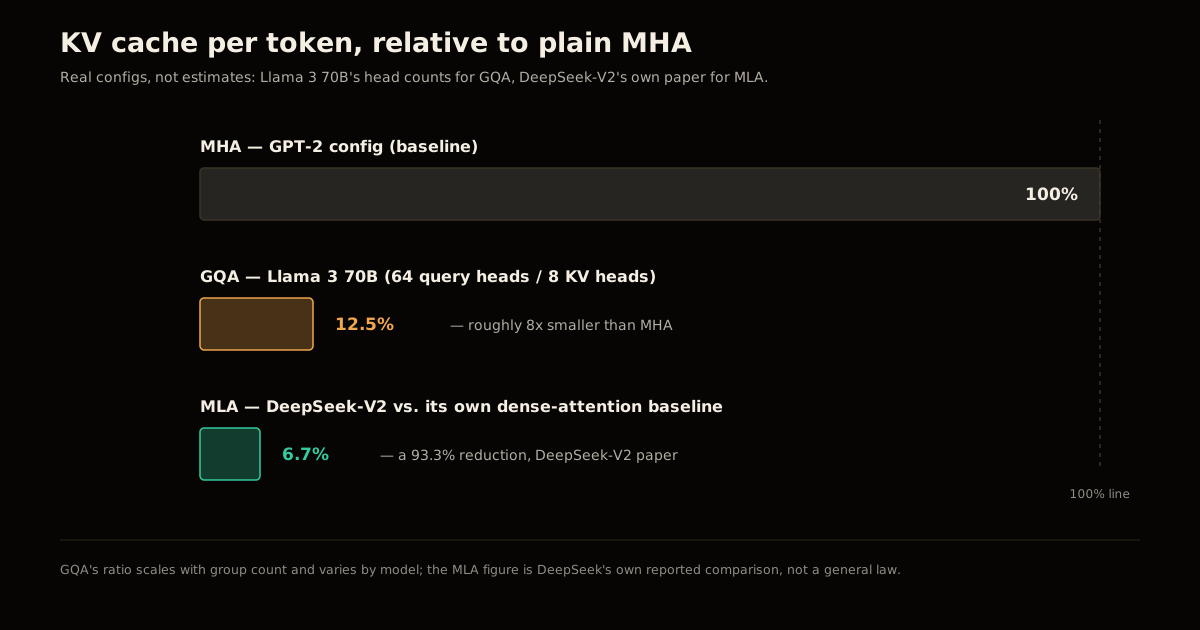
Every attention variant after plain Multi-Head Attention (MHA) exists to answer one question: how much of the key/value cache can you throw away without hurting quality? The three real numbers below come from published model configs and papers, not estimates.
| Variant | Mechanism | Real example | KV cache vs. MHA baseline |
|---|---|---|---|
| MHA | Every query head gets its own key/value heads | GPT-2 (OpenArch baseline) | 1x — the reference point |
| GQA | Groups of query heads share one key/value head | Llama 3 70B (64 query heads, 8 KV heads) | ~8x smaller (1 KV head per 8 query heads) |
| MLA | Keys and values compressed into a shared low-rank latent vector | DeepSeek-V2 vs. its own dense-attention baseline | 93.3% smaller, 5.76x higher throughput (DeepSeek-V2 paper) |
| Sliding window | Each token attends only to a fixed-size local window | Gemma 3, Mistral 3, GPT-OSS | Bounded by window size, independent of sequence length |
Sliding-window attention isn’t really a KV-cache trick — it’s a different bet entirely: cap the context each layer can see so cache size stops scaling with sequence length at all. Gemma 3 and GPT-OSS interleave sliding-window layers with a few full-attention layers so the model still gets occasional long-range access, which is why “sliding window vs. GQA” isn’t really an either/or in the repo’s actual model files — several models use both.
MLA’s 93.3% figure is the standout, and it’s earned honestly: instead of just reducing how many KV heads exist (GQA’s move), MLA compresses the full key/value representation into a small latent vector and reconstructs it at read time. That’s why it costs more to implement correctly — OpenArch’s deepseek folder is visibly denser than its llama folder — and why most labs still ship the simpler GQA instead of chasing MLA’s extra few percentage points.
How Do You Read an Unfamiliar model.py in Under 10 Minutes?
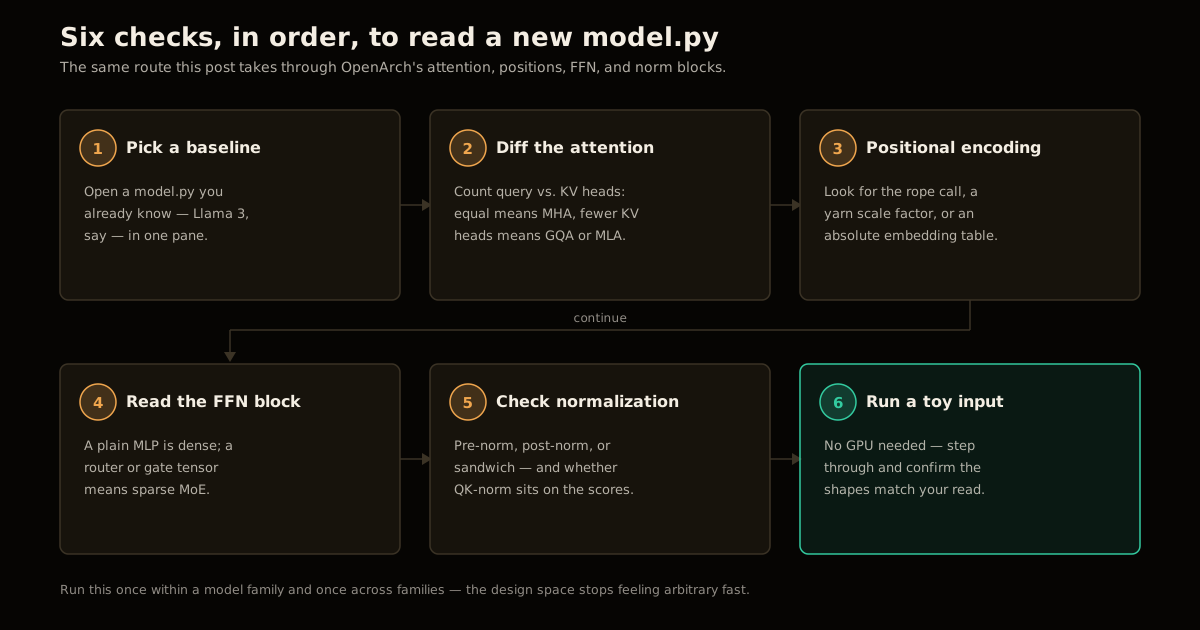
You don’t need to understand every line of a new architecture file to know what makes it different from one you already know. Six checks, in this order, cover the decisions that matter:
Pick a baseline you already know. Open
text/llama-3/model.py(or whichever architecture you’re already fluent in) in one pane.Diff the attention block first. Count query heads versus key/value heads. Equal counts mean MHA; fewer KV heads than query heads means GQA; a compression/decompression pair around the KV projection means MLA.
Check the positional encoding call. Look for
rope, ayarnscaling factor, or an absolute embedding table — this single line tells you the model’s stance on long-context extrapolation.Read the feed-forward block for a router. A plain two-layer MLP is dense. A
routerorgatetensor selecting a subset of expert weights is sparse MoE — note whether there’s also an always-on “shared expert” alongside the routed ones.Check normalization placement. Pre-norm (before the sublayer), post-norm (after), or “sandwich” (both) changes training stability, not just style — and QK-norm on the attention scores specifically signals the authors hit stability issues at scale.
Run the file on a toy input. No GPU needed — OpenArch is built for exactly this. Step through with a debugger and confirm the shapes match what you just inferred; this catches the cases where reading the code alone leads you astray.
Do this once for two models in the same family (say, Llama 3 vs. Llama 4) and once across families (Llama vs. DeepSeek), and you’ll have internalized the actual design space faster than skimming either paper’s related-work section.
Where Mixture-of-Experts Fits In
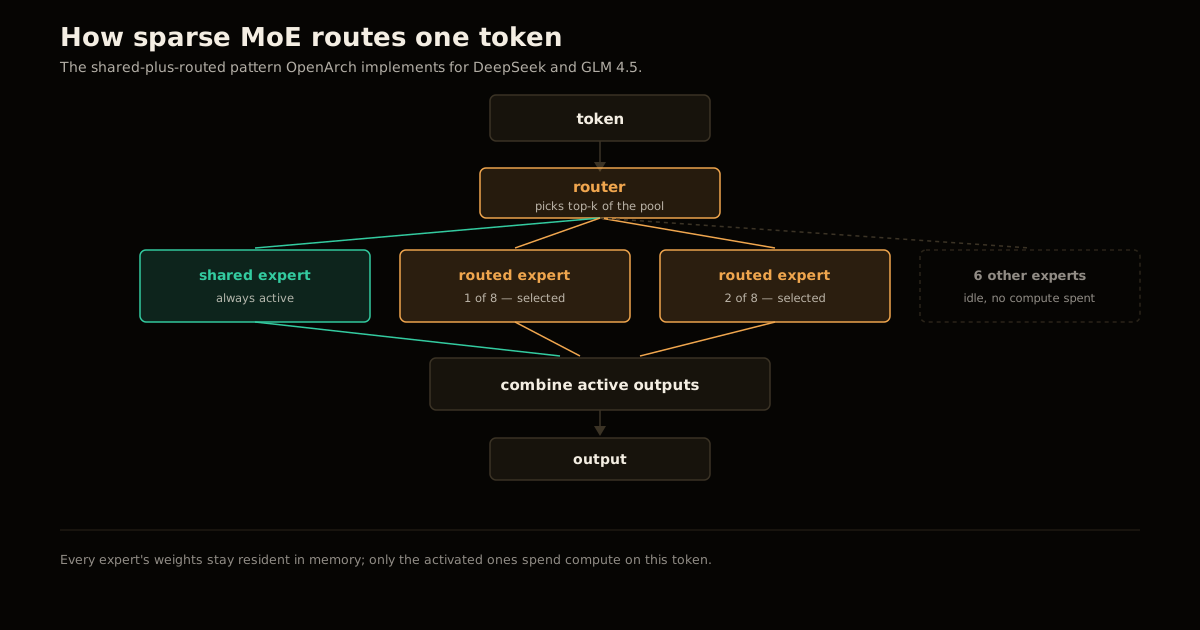
Attention determines cache size; the feed-forward block determines compute cost per token, and that’s where dense-vs-MoE is the real fork. A dense FFN runs every parameter for every token. Sparse MoE, which OpenArch implements for DeepSeek, GLM 4.5, GPT-OSS, and others, splits the FFN into many smaller experts and routes each token through only a handful of them — plus, in DeepSeek’s and GLM’s case, one or more shared experts that process every token regardless of routing, as a stability fallback the way a residual connection is a fallback for a deep stack of layers.
The tradeoff is memory versus compute: you still have to hold every expert’s weights, so total parameter count (and VRAM to store them) balloons, but the FLOPs per forward pass only scale with however many experts the router actually activates. That’s the same shape of tradeoff GQA and MLA make for attention — spend more of one resource to save the other — which is the pattern worth internalizing more than any single model’s specific numbers.
What Breaks If You Judge Architectures by Benchmark Score Alone?
A leaderboard score is the output of an architecture, a training run, and a dataset all at once — you can’t attribute it back to the attention variant or the MoE routing scheme in isolation, because two models with identical benchmark scores can have wildly different serving costs. A team that picks an architecture purely off a leaderboard, without checking whether it’s GQA or MLA under the hood, can end up locked into a KV-cache profile that’s 8x more expensive to serve than a competitor scoring within a point of it. The fix isn’t more benchmarks — it’s reading the model.py, because the cost structure lives in code the benchmark never reports.
The same trap applies to picking sliding-window attention for “efficiency” without checking that the model interleaves in enough full-attention layers to preserve long-range recall — a detail that shows up in a long-context eval, not a standard leaderboard, and that you can only catch by reading the layer-construction loop rather than the final number.
FAQ
What’s the fastest way to compare two LLM architectures without reading two papers?
Open both models’ attention and feed-forward blocks side by side in a single-file reference implementation like OpenArch. Count query heads versus KV heads for the attention variant, then check whether the FFN block has a router for MoE. That tells you the two decisions that matter most in under ten minutes, versus hours parsing two separate papers’ notation.
Is Grouped Query Attention (GQA) always better than Multi-Head Attention (MHA)?
Not always — GQA trades a small amount of modeling capacity for a large cut in KV cache memory, which only pays off when you’re serving long contexts or large batches. For short-context, latency-sensitive workloads with plenty of memory headroom, plain MHA’s full head diversity can still win on quality per parameter.
Why does DeepSeek use Multi-Head Latent Attention (MLA) instead of GQA?
DeepSeek-V2’s paper reports MLA cuts KV cache by 93.3% versus a dense-attention baseline while improving throughput 5.76x, because MLA compresses keys and values into a shared low-rank latent vector instead of just reducing the head count like GQA does. That extra compression cost more engineering complexity, which is why most other labs still ship GQA.
What’s the difference between a shared expert and a routed expert in MoE?
A shared expert processes every token, the same way a dense FFN would, so the model always has a stable fallback. Routed experts are a larger pool where a router selects only a handful per token, which is where the sparse compute savings come from — you pay for the whole pool in memory but only a slice of it in compute.
Do I need a GPU to run the OpenArch reference implementations?
No — the repo is explicitly optimized for reading, not training or serving, so the point is to open model.py and trace tensor shapes, not to run a forward pass at scale. A CPU is enough to step through a toy input and confirm you understand where the architecture branches.
Is a bigger KV cache reduction always worth the added complexity?
No. GQA is a few lines of head-grouping logic on top of standard attention, while MLA requires a compression and reconstruction path that’s materially harder to implement and debug correctly. Reach for MLA-level complexity only when context length or serving batch size actually makes KV cache your bottleneck.
Sources
- OpenArch — single-file PyTorch reference implementations of 16 modern LLM architectures
- Sebastian Raschka — The Big LLM Architecture Comparison
- DeepSeek-V2: A Strong, Economical, and Efficient Mixture-of-Experts Language Model (arXiv:2405.04434)
Once you can read an attention block on sight, the next bottleneck is usually the KV cache itself — see the VRAM and KV-cache math behind running Qwen3 locally for the arithmetic these variants are all trying to shrink, and DeepSeek V4 Flash’s real benchmarks for what MLA plus sparse MoE looks like in a shipped model. If you’re tuning an inference server around whichever variant you land on, vLLM’s throughput flags are the next lever, and the broader compute-vs-parameters tradeoff shows up again in looped transformers’ parameter-compute tradeoff. For running a Kimi K2-family MoE model yourself, Kimi K3 locally on a MacBook walks through the practical side.
Explore more: LLM Engineering
Frequently asked questions
Google Search · Preferred sources
Prefer this site on Google
If you already read this writing, add umesh-malik.com as a Preferred Source. Google can then highlight it with a preferred badge in Top Stories, AI Overviews, and AI Mode — for you, not as a site-wide ranking boost.
Related Articles

LLM Engineering
How to Decide: Loop Transformer Blocks or Add More Layers
Loop transformer blocks or add more layers? Reusing weights cuts training compute 6.8-18% at equal loss, but forward passes and KV cache never shrink.

LLM Engineering
How to Audit an LLM Judge: Right Verdict, Wrong Reason
How to audit an LLM judge in six steps: catch right-verdict, wrong-reason errors and set a mean-minus-2σ drift floor, using Netflix's rubric loop.

LLM Engineering
How to Stop an LLM Saying As a Language Model: It's the Template
How to stop an LLM saying as a language model: it's the chat template, not the weights. Disclaimers drop 17 points without one — the fix, and its limits.
Keep reading
Get new posts on AI, Claude Code & LLMs
New deep-dives on AI engineering, Claude Code, and developer tooling — follow along however you prefer.
About the Author

Software engineer writing about AI, Claude Code, LLMs, OpenAI, Anthropic, and developer tooling. 5+ years building production systems at Expedia Group, Tekion, and BYJU'S.