OpenAI Python HTTPX2 Migration: Fix the TLS Trap First
The OpenAI Python HTTPX2 migration breaks certifi TLS in containers and proxies. The full checklist, OS trust store fix, and legacy escape hatch.

TL;DR The OpenAI Python HTTPX2 migration is here. The SDK now uses HTTPX2 instead of httpx, and while most code works unchanged, the TLS trust store shift from certifi to OS breaks containers and corporate proxy environments. Fix it with SSL_CERT_FILE, or use the legacy httpx escape hatch while you migrate infrastructure.
The OpenAI Python HTTPX2 migration is a breaking change hiding in plain sight. It’s the kind of upgrade that works perfectly on your laptop and fails silently in production — the TLS verification change doesn’t show up in tests run on developer machines with full OS trust stores. The SDK now uses HTTPX2 for its HTTP layer, httpx is no longer a transitive dependency, and certifi is gone.
This guide is your complete OpenAI Python HTTPX2 migration checklist: what changed, what breaks, and how to fix it — whether you’re on the happy path or stuck with constraints that require the legacy escape hatch.
What is the OpenAI Python HTTPX2 migration?
The OpenAI Python HTTPX2 migration is the replacement of the SDK’s underlying HTTP client from httpx to httpx2, with a critical side effect: TLS certificate verification now uses the operating-system trust store instead of the bundled certifi CA certificates.
HTTPX2 is installed automatically when you pip install openai — no extra dependencies required. The previous httpx package is no longer a transitive dependency.
What changed: HTTPX2 and the TLS trust store shift
For applications using the SDK’s default client, the API surface is unchanged:
from openai import OpenAI

client = OpenAI(timeout=30.0)
response = client.responses.create(model="gpt-5.5", input="Hello")
Parsed response models, streaming APIs, authentication, retries, and numeric timeouts all continue to work exactly as before.
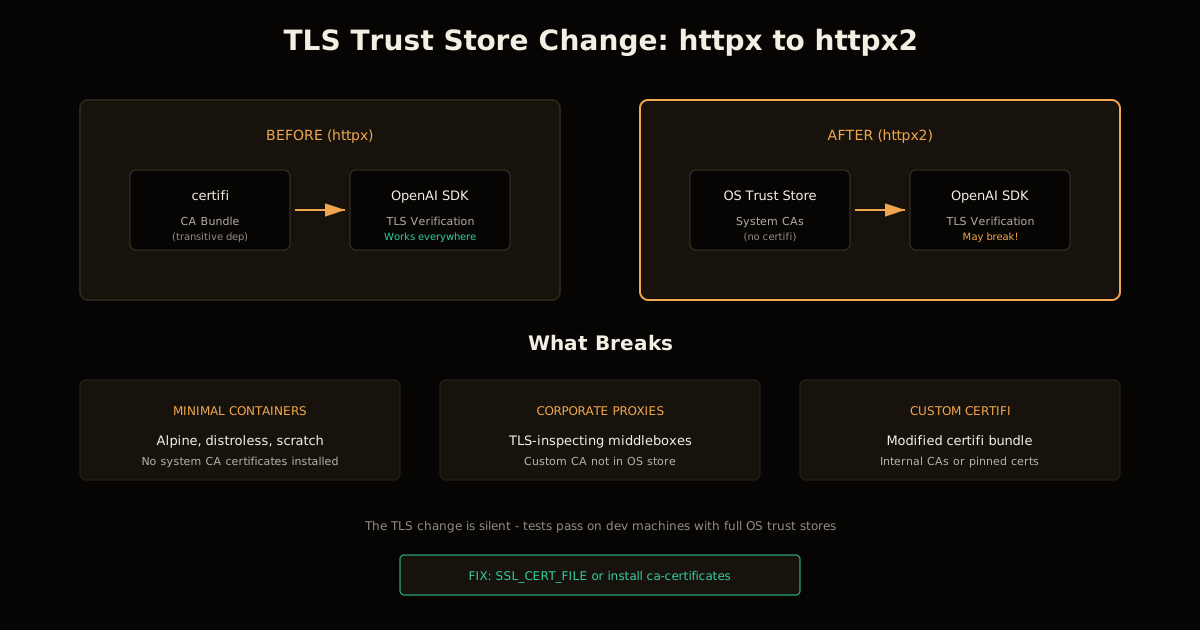
Here’s the catch: HTTPX2 uses the operating-system trust store for TLS verification instead of certifi. This is a security improvement for most environments — it respects your system’s certificate management. But it’s a breaking change for:
- Minimal container images (Alpine, distroless, scratch) without system CA certificates
- Corporate proxy environments using TLS-inspecting middleboxes
- Custom certifi bundles used for internal CAs or pinned certificates
| Component | Before (httpx) | After (httpx2) |
|---|---|---|
| TLS trust store | certifi bundle | OS trust store |
| certifi installed | Yes (transitive) | No |
| httpx installed | Yes | No |
| Configuration objects | httpx.Timeout, httpx.Client | httpx2.Timeout, httpx2.Client |
How to fix the TLS break in containers
The symptom is a certificate verification error that only shows up in production — your laptop has a full trust store, but your container doesn’t.
Option 1: Install system CA certificates
For Debian/Ubuntu-based images:
RUN apt-get update && apt-get install -y ca-certificates && rm -rf /var/lib/apt/lists/*For Alpine:
RUN apk add --no-cache ca-certificatesThis is the cleanest fix. Your container gets a proper trust store, which is the right security posture anyway.
Option 2: Point to an explicit CA bundle
If you can’t modify the container image or need a custom bundle:
export SSL_CERT_FILE=/path/to/ca-bundle.pemOr for a directory of certificates:
export SSL_CERT_DIR=/path/to/ca-directoryThese environment variables are honored when trust_env=True, which is the SDK default.
Option 3: Pass an explicit SSLContext
For fine-grained control, configure the HTTP client directly:
import ssl
from openai import OpenAI, DefaultHttpx2Client

ssl_context = ssl.create_default_context(cafile="/path/to/ca-bundle.pem")
client = OpenAI(http_client=DefaultHttpx2Client(verify=ssl_context))
For async:
from openai import AsyncOpenAI, DefaultAsyncHttpx2Client

client = AsyncOpenAI(http_client=DefaultAsyncHttpx2Client(verify=ssl_context))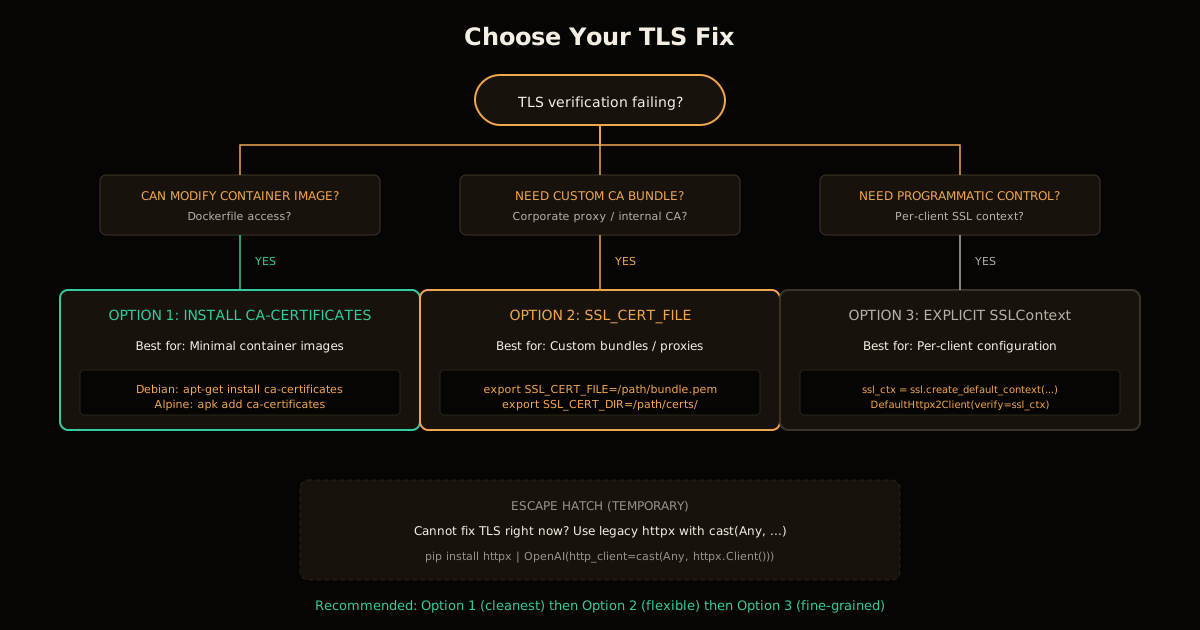
How to migrate custom HTTP clients
If you’re passing a custom http_client to the SDK, update to HTTPX2 configuration objects. The SDK provides helpers that preserve its recommended defaults:
import httpx2
from openai import OpenAI, DefaultHttpx2Client

# Proxy configuration
proxy_client = OpenAI(
    http_client=DefaultHttpx2Client(proxy="http://proxy.example.com:8080")
)

# Custom transport with granular timeouts
transport_client = OpenAI(
    http_client=DefaultHttpx2Client(
        transport=httpx2.HTTPTransport(local_address="0.0.0.0"),
        timeout=httpx2.Timeout(30.0, connect=5.0),
    )
)
The mapping is straightforward:
| httpx object | httpx2 equivalent |
|---|---|
httpx.Client | httpx2.Client |
httpx.AsyncClient | httpx2.AsyncClient |
httpx.Timeout | httpx2.Timeout |
httpx.URL | httpx2.URL |
httpx.Limits | httpx2.Limits |
httpx.HTTPTransport | httpx2.HTTPTransport |
httpx.MockTransport | httpx2.MockTransport |
Key insight: Numeric timeout values don’t change. If you had
timeout=30.0, it still works. Only the configuration object imports need updating.
How to update authentication and event hooks
If you have custom auth handlers or request/response hooks, update the type annotations:
import httpx2
from openai import OpenAI, DefaultHttpx2Client

def log_request(request: httpx2.Request) -> None:
    print(request.method, request.url)

client = OpenAI(
    http_client=DefaultHttpx2Client(event_hooks={"request": [log_request]})
)
The hook signatures are the same — they just receive httpx2.Request and httpx2.Response objects instead of the legacy types.
How to update tests and mocks
This is where most teams will feel the migration cost. Mocks must intercept HTTPX2 requests and return HTTPX2 responses.
import httpx2
from openai import OpenAI

def handler(request: httpx2.Request) -> httpx2.Response:
    return httpx2.Response(
        200,
        request=request,
        json={"object": "list", "data": []},
    )

client = OpenAI(
    http_client=httpx2.Client(transport=httpx2.MockTransport(handler))
)
assert client.models.list().data == []
If you use RESPX for mocking, you need an HTTPX2-compatible version. A RESPX build that only patches legacy httpx won’t intercept the SDK’s requests.
When to use the legacy HTTPX escape hatch
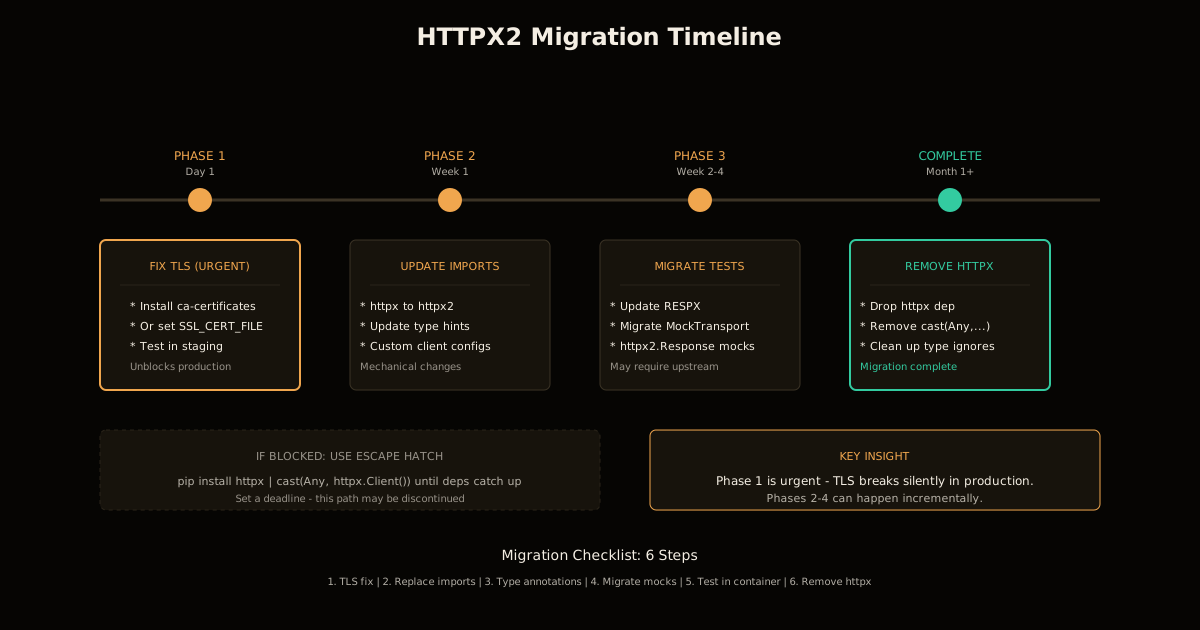
Sometimes you can’t migrate everything at once. The SDK supports injecting a legacy httpx client as a temporary escape hatch:
from typing import Any, cast
import httpx
from openai import OpenAI

# Type checker workaround required
client = OpenAI(http_client=cast(Any, httpx.Client()))
The cast(Any, ...) is necessary because the SDK’s type annotations expect HTTPX2 clients. This is deliberately friction — it’s a migration aid, not a permanent solution.
Install httpx explicitly:
pip install openai httpxFor async:
from typing import Any, cast
import httpx
from openai import AsyncOpenAI

client = AsyncOpenAI(http_client=cast(Any, httpx.AsyncClient()))Warning: Legacy HTTPX support is documented as a temporary escape hatch that may be discontinued. Use it to unblock deployments while you migrate infrastructure, not as a permanent architecture choice.
Common mistakes when migrating
Mistake 1: Assuming tests prove TLS works. Your CI probably runs on a full OS with a proper trust store. The break shows up in minimal containers.
Mistake 2: Mixing httpx and httpx2 imports. If you’re migrating incrementally, keep the boundaries clean. A codebase with both import httpx and import httpx2 is asking for confusion.
Mistake 3: Forgetting to update raw response handling. If you use with_raw_response, the returned objects are now httpx2.Response:
response = client.models.with_raw_response.list()
assert isinstance(response.http_response, httpx2.Response)
Mistake 4: Using the escape hatch without a migration plan. The legacy client support exists to unblock you, not to let you ignore the migration indefinitely. Set a deadline.
Checklist: migrating to HTTPX2
- Update your container images to include system CA certificates, or set
SSL_CERT_FILE - Replace httpx imports with httpx2 in custom client configurations
- Update type annotations in hooks and auth handlers
- Migrate mocks to httpx2.MockTransport and httpx2.Response
- Test in a minimal container that matches production
- Remove explicit httpx dependency once migration is complete
The migration isn’t complex — it’s just thorough. The TLS change is the only true gotcha, and once you’ve addressed that, the rest is mechanical find-and-replace on import statements.
For applications that rely on ecosystem tools like RESPX, the migration timeline depends on upstream support. Use the escape hatch if needed, but track the blocker and resolve it. The SDK’s HTTPX2 default is here to stay.
If you’re building production AI features with the OpenAI SDK, this migration is table stakes — but it’s not the hard part. The hard part is getting from prototype to production, evaluating your LLM integration properly, and building the production layer around your SDK calls. Get the TLS fix done today, then focus on what actually determines whether your agent ships.
For more on LLM infrastructure and tooling, see LLM Engineering.
FAQ
Why did the OpenAI Python SDK switch from httpx to httpx2?
HTTPX2 is the successor to httpx, maintained by Pydantic. The OpenAI SDK adopted it as the default HTTP client, which brings performance improvements and better async support. HTTPX2 is now installed automatically with the openai package, while the legacy httpx is no longer a transitive dependency.
What breaks when upgrading to the new OpenAI Python SDK?
The biggest breaking change is TLS certificate verification. HTTPX2 uses the operating-system trust store instead of the certifi bundle. This silently breaks applications in minimal container images without system CA certificates, environments using corporate TLS-inspecting proxies, and deployments that relied on a custom certifi bundle.
How do I fix TLS certificate errors after upgrading to HTTPX2?
Set the SSL_CERT_FILE environment variable to point to your CA bundle, or SSL_CERT_DIR for a directory of trusted certificates. Alternatively, pass an explicit ssl.SSLContext to the DefaultHttpx2Client verify parameter. Install system CA certificates in container images using ca-certificates packages.
Can I keep using the old httpx client with the new OpenAI SDK?
Yes, but it’s a temporary escape hatch. Install httpx explicitly, then inject it with cast(Any, httpx.Client()) to bypass the type checker. This path is supported but documented as a migration aid that may be discontinued. Prefer migrating to HTTPX2 for long-term compatibility.
Do I need to change my code if I use the SDK’s default HTTP client?
If you construct OpenAI() or AsyncOpenAI() without providing http_client, your API calls, streaming, retries, and numeric timeouts continue to work. The main change you might encounter is TLS verification failures in constrained environments that lack system CA certificates.
How do I update my tests that mock HTTP requests for the OpenAI SDK?
Mocks must intercept httpx2.Request and return httpx2.Response objects. If you use RESPX, you need an HTTPX2-compatible version. For direct mocking, use httpx2.MockTransport with a handler that receives httpx2.Request and returns httpx2.Response.
If this SDK is running inside a Cloudflare Worker rather than a container, the CA-bundle story changes again — see deploying FastAPI on Cloudflare Workers for what Python Workers support natively now that they’re GA, and which packages still need a Wasm build before they’ll import at all.
Sources
Frequently asked questions
Google Search · Preferred sources
Prefer this site on Google
If you already read this writing, add umesh-malik.com as a Preferred Source. Google can then highlight it with a preferred badge in Top Stories, AI Overviews, and AI Mode — for you, not as a site-wide ranking boost.
Related Articles

LLM Engineering
GPT-5.6 Sol vs Terra vs Luna: The Routing Strategy That Cuts Cost
GPT-5.6 Sol vs Terra vs Luna compared on price, coding, latency, and cost per task — plus a routing strategy that cuts your bill without wrecking quality.

LLM Engineering
GPT-5.6 API: Pricing, Thinking Modes, and the Shared Context Trap
GPT-5.6 API pricing ($1-$30/1M), the Ultra and Max thinking modes, and a 1.05M context window that is shared — with the fine print that breaks agent loops.
LLM Engineering
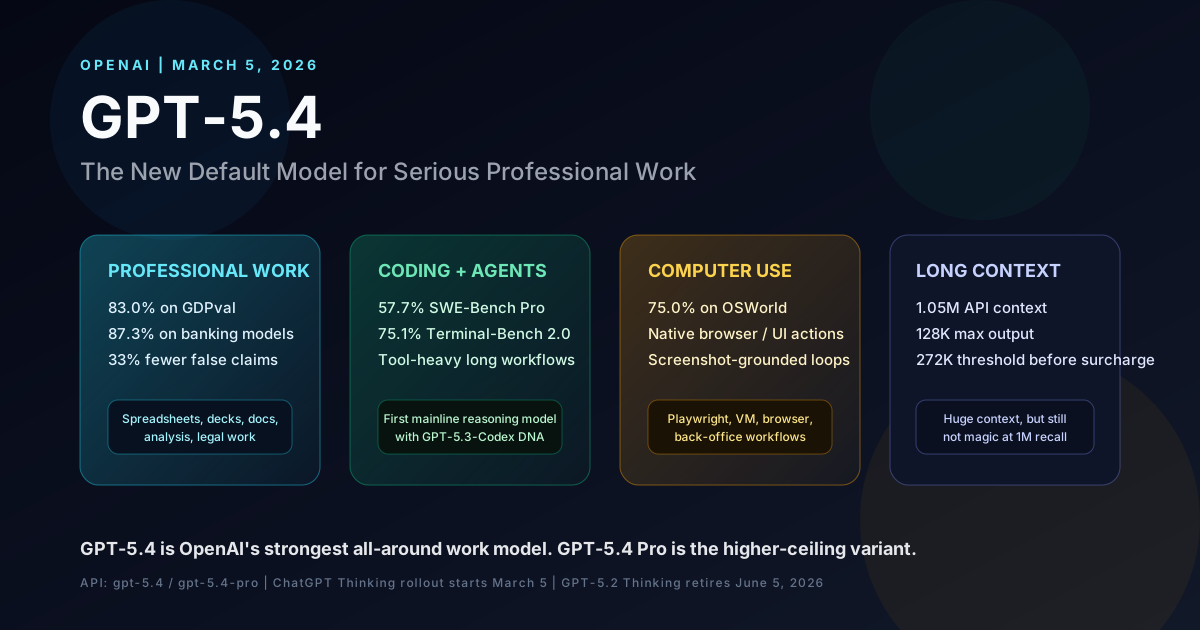
GPT-5.4 for Agents: Computer Use, MCP Tool Calls, and Real Pricing
GPT-5.4's native computer use and MCP tool calls are the real upgrade for agents. What holds up in a loop, what the 1M context costs, and how Pro compares.
Keep reading
Get new posts on AI, Claude Code & LLMs
New deep-dives on AI engineering, Claude Code, and developer tooling — follow along however you prefer.
About the Author

Software engineer writing about AI, Claude Code, LLMs, OpenAI, Anthropic, and developer tooling. 5+ years building production systems at Expedia Group, Tekion, and BYJU'S.