Self-Hosted AI Coding Agent: Sandboxed Prompt-to-Deploy for $25/mo
Build a self-hosted AI coding agent with sandboxed execution. One prompt produces a repo, tests, CI, and deployed app — $25/mo, no cloud bills.

A self-hosted AI coding agent is an autonomous code-generation stack running on your own hardware with structural isolation — the LLM can create repos, write code, run CI, and deploy apps, but it can’t touch your main machine or credentials. Setup takes a weekend; ongoing cost is ~$25/mo for inference. If the agent does something destructive, you lose a sacrificial server, not your development environment.
Jake Saunders recently demonstrated this approach with a stack that turned a single prompt into a working calorie tracker: repo created, code written, tests passing, CI green, Postgres provisioned, app deployed behind HTTPS. Total cost: £20/month for inference. Zero additional prompts required.
Why self-host an AI coding agent instead of running locally
Claude Code and Cursor are excellent, but they run on your machine with your credentials and your network access. That’s fine for supervised work. It’s less fine for autonomous mode where the agent loops for hours without human review.
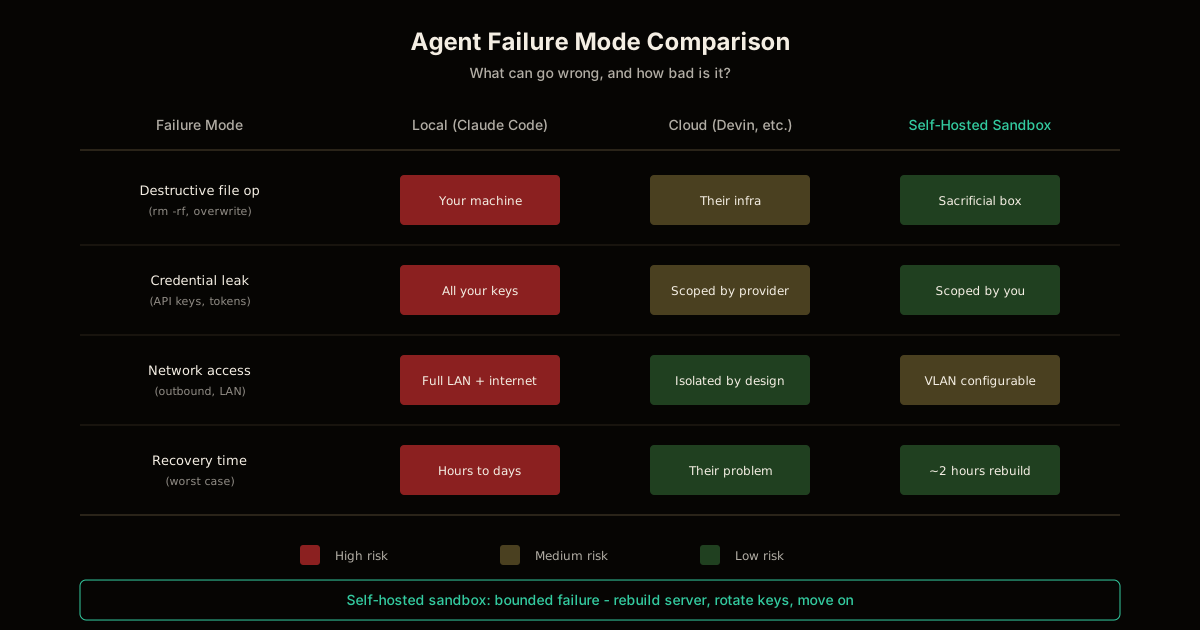
The failure mode matters. If Claude Code running locally does something destructive, you’re debugging your actual development environment. If a sandboxed agent on separate hardware does the same thing, you rebuild a sacrificial server and rotate a handful of API keys.
Self-hosting isn’t about better inference — it’s about bounded failure.
| Approach | Failure boundary | Recovery |
|---|---|---|
| Claude Code on your laptop | Your machine, credentials, network | Hope nothing important was touched |
| Cloud-hosted agent (Devin, etc.) | Provider’s infrastructure | Their problem, but also their access |
| Self-hosted sandboxed agent | Sacrificial hardware, scoped keys | Rebuild server, rotate keys |
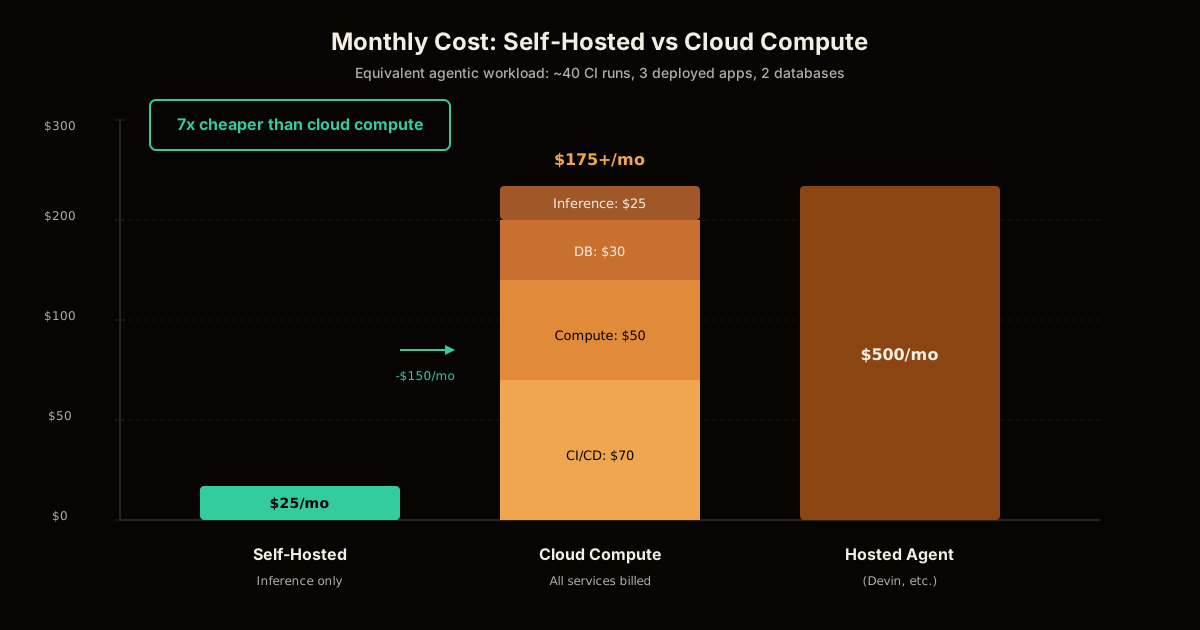
The other driver is cost. Cloud compute for agentic workloads adds up fast — every CI run, every container, every database. Self-hosted, you’re paying for hardware once and inference by the month.
The stack that actually works
The reference implementation uses commodity hardware and open-source tooling. The only ongoing cost is the inference subscription.
Hardware
- Server: A 2021 10th-gen i7 with 32GB RAM, bought used from eBay (~$250)
- No GPU required: Inference happens in the cloud; you’re hosting the tooling, not the model
Software stack
| Component | Role |
|---|---|
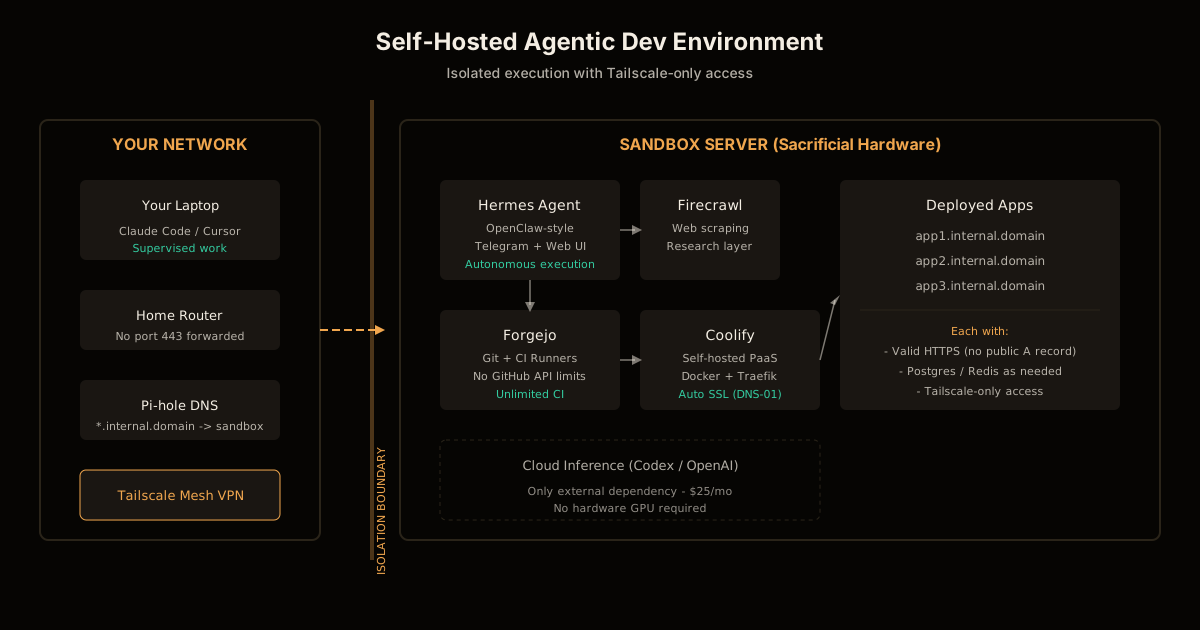
| Coolify | Self-hosted PaaS (like Heroku) built on Docker — handles deployments, SSL, databases |
| Forgejo | Self-hosted Git and CI runners (GitHub alternative with no API limits) |
| Hermes | OpenClaw-style agent framework with Telegram integration and self-building skills |
| Firecrawl | Self-hosted web scraping for agent research |
| Tailscale | Mesh VPN for secure access without public ingress |
| Pi-hole | Local DNS for custom subdomains |
| Let’s Encrypt + DNS-01 | SSL certificates without public A records |
The clever bit is the networking. There’s no public ingress — the server doesn’t have port 443 forwarded from the router. Access is Tailscale-only, which cuts out the entire attack surface of internet background radiation.
How the isolation actually works
Three layers contain the agent:
Layer 1: Physical separation. The agent runs on its own metal, not your daily driver. It could rm -rf / and you’d lose a few hours rebuilding, not your actual work.
Layer 2: Network isolation. No public ingress means no attack surface. The server is reachable only through your Tailscale mesh. Even if the agent generates malicious code, it can’t phone home through a public endpoint.
Layer 3: Scoped credentials. Every API key the agent holds is scoped as narrowly as the provider allows. It can delete repos on its own Forgejo instance but not touch your GitHub. It can burn inference tokens but not access your bank.
The DNS-01 trick is particularly elegant. Normally, getting an SSL certificate requires a public A record pointing to your server. DNS-01 validation uses a TXT record challenge instead — Let’s Encrypt verifies you control the domain without ever knowing the server’s IP. Your services get valid HTTPS at custom subdomains with zero public exposure.
What the agent can actually do
From a single prompt like “build me a calorie tracking app with SvelteKit, Drizzle, Postgres, and Tailwind — deploy it to calories.internal.mydomain.me”, the stack:
- Creates a new Git repo on Forgejo
- Bootstraps the project with the specified frameworks
- Writes the application code — routes, components, database schema
- Writes tests for the functionality
- Commits in logical stages (not one giant squash)
- Creates a CI pipeline and iterates until it’s green
- Containerizes with Docker Compose, including its own Postgres instance
- Deploys to Coolify at the specified subdomain with automatic SSL
No additional prompts. The agent handles test failures, CSRF issues, and deployment configuration autonomously. When the human tried the deployed app and hit a bug, one follow-up prompt triggered diagnosis, fix, regression tests, and redeployment.
That’s the loop: prompt → repo → code → tests → CI → deploy → bug fix. The boring parts are handled.
What the agent can still break
Self-hosting isn’t magic containment. Even with this setup, the agent can:
- Nuke the server and everything running on it
- Delete repos, databases, and deployments within its scope
- Leak or abuse credentials you’ve given it
- Burn inference tokens without budget controls
- Make outbound requests and download whatever the internet serves
- Probe your local network if firewall rules are loose
The security model is “bounded blast radius,” not “zero risk.” You’re trading “agent has access to everything” for “agent can destroy this one sacrificial box.”
Hardening beyond the baseline
The reference implementation is a starting point. Production hardening means:
- VLAN isolation: Put the agent box on its own network segment, explicitly blocking access to the rest of your home network
- Credential rotation: Rotate every key the agent touches on a schedule, not just when something breaks
- Automated backups: Coolify’s S3 backup integration plus Docker volume mounts make rebuilding a one-shot job
- Approval gates: Require human sign-off before anything public-facing or hard to undo
The tradeoff is obvious: enough approval gates and your autonomous software factory becomes a form you fill out. Finding the useful point between “needs me every five minutes” and “has the launch codes” is the real work.
The cost math
| Item | Cost |
|---|---|
| Used i7 mini PC (one-time) | ~$250 |
| Codex inference subscription | $25/mo |
| Tailscale (free tier) | $0 |
| Forgejo, Coolify, Firecrawl | $0 (self-hosted) |
| Domain (annual) | ~$12/year |
| Total ongoing | ~$26/mo |
Compare to cloud-hosted agentic workloads where every CI minute, container hour, and database instance bills separately. A moderately active agent can easily burn $200+/month in cloud compute alone.
Who this is for
Self-hosting an AI coding agent makes sense if you:
- Run agents autonomously for extended periods without supervision
- Want structural isolation rather than trust-based containment
- Have homelab experience or are willing to learn Docker, networking, and DNS
- Care about cost at scale — cloud bills compound fast for agentic workloads
It doesn’t make sense if you:
- Only use agents interactively with constant human review
- Don’t have spare hardware or the interest to maintain it
- Need enterprise compliance that self-hosted can’t provide
Getting started
The full writeup includes Docker Compose files for the entire stack, Forgejo Hermes skills, and Coolify deployment templates. The setup isn’t one-click — budget a weekend for initial configuration — but once running, it’s remarkably hands-off.
The key insight: you’re not replacing Claude Code, you’re building a separate execution environment for autonomous work. Keep using Claude Code on your laptop for supervised sessions. Deploy the sandbox when you want to hand off a task and walk away.
FAQ
Why self-host an AI coding agent instead of using Claude Code or Cursor?
Self-hosting gives you structural isolation — the agent runs on sacrificial hardware with no access to your main machine, credentials, or network. If it does something destructive, you lose an eBay server and rotate a few keys instead of discovering an LLM reorganized your actual laptop. Cost is also a factor: a $25/mo inference subscription replaces cloud compute bills.
What hardware do I need to self-host an agentic dev environment?
Surprisingly little. The reference setup uses a 2021 10th-gen i7 with 32GB RAM bought used from eBay. You don’t need local inference hardware — the stack uses cloud inference (Codex/OpenAI) for the LLM and runs everything else locally. A decent mini PC or old laptop works fine.
How does the sandbox actually contain the AI agent?
Three layers: separate physical hardware (not your main machine), no public network ingress (Tailscale-only access), and scoped credentials. The agent can nuke its own box but can’t touch your home network or real infrastructure. Each failure mode is bounded to “rebuild the server and rotate keys.”
Can the self-hosted agent really deploy apps automatically?
Yes. From one prompt, the demonstrated stack creates a Git repo, writes application code and tests, commits in stages, runs CI until green, containerizes with Docker Compose, provisions a Postgres database, and deploys behind HTTPS at a custom subdomain — without another human message.
What’s the total cost of running this self-hosted AI coding stack?
About $25/month for the inference subscription (Codex). Hardware is a one-time cost — a used i7 mini PC runs $150-300. Everything else (Forgejo, Coolify, Firecrawl, Tailscale free tier) is self-hosted at zero marginal cost. No cloud compute bills.
The agent can still mess things up. It just can’t mess up anything that matters.
Frequently asked questions
Google Search · Preferred sources
Prefer this site on Google
If you already read this writing, add umesh-malik.com as a Preferred Source. Google can then highlight it with a preferred badge in Top Stories, AI Overviews, and AI Mode — for you, not as a site-wide ranking boost.
Related Articles

AI Coding Agents & DX
Build AI-Generated Code Guardrails: The 6 Checks Anthropic Runs
How to build AI-generated code guardrails before shipping: the six checks Anthropic runs, what each catches, and the cost of running them on your own repo.

AI Coding Agents & DX
Rust LSP Low Memory: How to Run Glancer Locally on 8GB RAM
Rust LSP low memory is achievable: Rust Glancer runs on 8GB machines by freezing analysis at save and offloading to disk.

AI Coding Agents & DX
Cut agent tool call cost: GitHub's 20% fix was a prompt rewrite
Agent tool call cost jumped after you gave it better tools? GitHub hit that on Copilot code review and won ~20% back with a prompt rewrite, not new tools.
Keep reading
Get new posts on AI, Claude Code & LLMs
New deep-dives on AI engineering, Claude Code, and developer tooling — follow along however you prefer.
About the Author

Software engineer writing about AI, Claude Code, LLMs, OpenAI, Anthropic, and developer tooling. 5+ years building production systems at Expedia Group, Tekion, and BYJU'S.