Rust LSP Low Memory: How to Run Glancer Locally on 8GB RAM
Rust LSP low memory is achievable: Rust Glancer runs on 8GB machines by freezing analysis at save and offloading to disk.

TL;DR — Rust LSP low memory usage is now achievable: Rust Glancer targets under 100MB where rust-analyzer can consume 8GB+. The trick: freeze analysis results at save time, serialize them to disk, and load only what each query needs. You give up keystroke-level incrementality — new items appear only after you save — but you get immediate restart and a usable Rust LSP on machines with low memory that rust-analyzer has priced out.
What is Rust LSP low memory (and what makes it possible)?
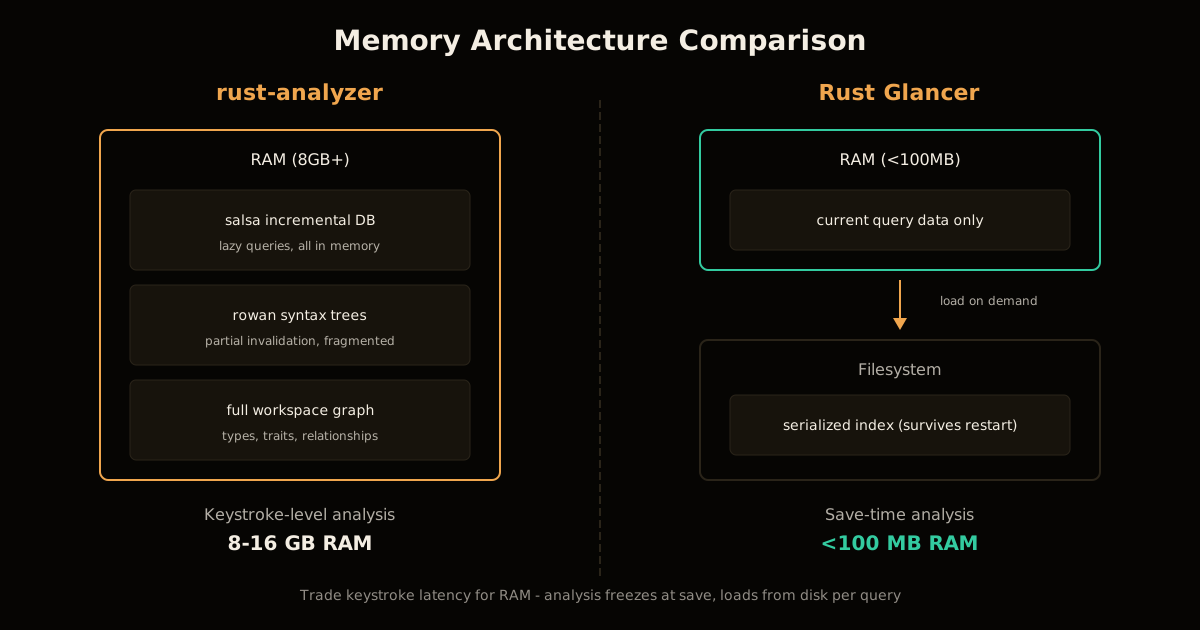
Rust LSP low memory means running a full-featured Rust language server under 100MB of RAM instead of the 8-16GB rust-analyzer often consumes. Rust Glancer is a Rust LSP with low memory requirements — an alternative to rust-analyzer that trades keystroke responsiveness for dramatically reduced RAM consumption. Where rust-analyzer keeps your entire workspace in memory for instant results, Rust Glancer serializes analysis to disk and loads it on demand. The result: a Rust LSP low memory footprint that stays under 100MB even on large projects, making it usable on machines rust-analyzer has priced out.
What makes rust-analyzer consume gigabytes of RAM?
rust-analyzer is fast because it keeps everything in memory. Three architectural choices drive its footprint:
salsa — an incremental query-based database that lazily computes and caches every piece of analysis. It is elegant and avoids explicit recording, but it is “inherently tied to memory, which makes it hard to move parts of data from memory elsewhere.”
rowan — a syntax tree representation that allows partial invalidation when a file changes. The tree-like structure enables keystroke-level reparsing but causes heavy memory fragmentation, meaning the OS allocation is higher than the actual bytes in use.
The sheer size of Rust workspaces — thousands of functions, structs, traits, and the relationships between them. This one is unavoidable, but the first two are architectural choices that trade RAM for speed.
On a multi-workspace setup — two IDE windows with the same projects on two displays — the author of Rust Glancer was seeing 16GB of RAM consumed by rust-analyzer alone. Startup was equally painful: fans spinning, parallel indexing jobs, and a minute or more before completions worked.
How does Rust Glancer stay under 100MB?
Rust Glancer asks a different question: what if we do not try to be incremental? What if all we have is a frozen analysis result that gets invalidated on save?
| Architecture | rust-analyzer | Rust Glancer |
|---|---|---|
| Analysis model | Lazy incremental via salsa | Frozen snapshot on save |
| Syntax tree | rowan (partial invalidation) | Serialize to disk |
| Memory target | Scales with workspace | Under 100MB target |
| Restart behavior | Re-index from scratch | Load saved index instantly |
| Keystroke latency | Full analysis per keystroke | Shallow body analysis between saves |
The core idea is that analysis results get serialized to the filesystem and loaded on demand. When you type, Rust Glancer does not re-analyze the entire workspace — it performs shallow analysis of the current function body and reuses the previous index. New imports, structs, or traits you add do not appear in suggestions until you save, at which point the full index is rebuilt.
This design trades latency for RAM. Loading and deserializing data from disk is slower than reading from memory, but the payoff is that you can run a Rust LSP on a machine with 8GB of total RAM — or, more commonly, keep more RAM available for the rest of your system while the LSP stays resident.
What do you give up for the memory savings?
Rust Glancer is explicitly incomplete. It is four months old. The author lists what is missing:
| Feature | Status in Rust Glancer |
|---|---|
| Type inference | Supported via a proper inference engine |
| Trait solving | Supported via Chalk |
| Goto definition | Supported |
| Hover | Supported |
| Inlay hints | Supported |
| Completions | Supported (with save-time refresh) |
| Code actions (auto-import, implement trait) | Planned, not yet implemented |
| Proc macros via execution | Not planned — no untrusted code execution |
| Build scripts | Not planned |
| Nightly features | Partial — sysroot support is there, but niche features are deferred |
The biggest behavioral difference is the save boundary. If you define a new struct in one file and immediately try to import it in another, it will not appear until you save. The author reports this becomes natural quickly, and for developers already in the habit of saving frequently — or using agentic workflows that save after each edit — the gap is invisible.
Proc macro support is a deliberate scope cut. rust-analyzer runs proc macros by executing them in a subprocess, which Rust Glancer refuses to do. The author has “some weird idea that will not require actual code execution,” but that is future work. If your project is proc-macro-heavy, you may not get useful results from Rust Glancer today.
How fast is Rust Glancer compared to rust-analyzer?
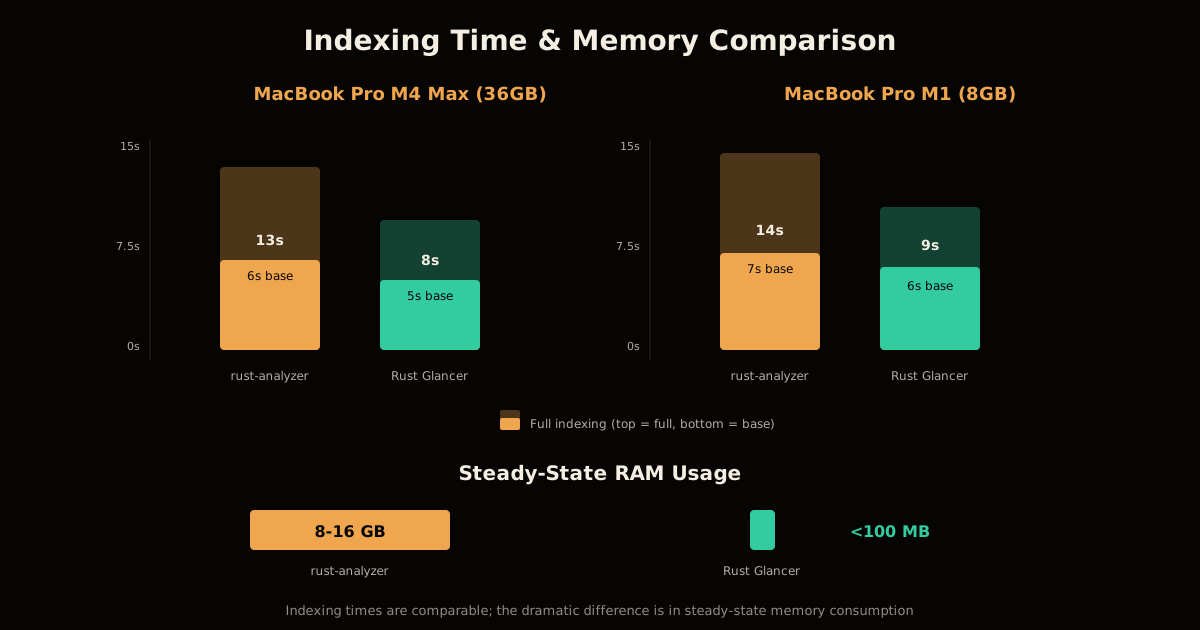
Benchmarks from the announcement post, running on two machines:
| Machine | LSP | Base indexing | Full indexing |
|---|---|---|---|
| MacBook Pro M4 Max, 36GB (2025) | rust-analyzer | 6 seconds | 13 seconds |
| MacBook Pro M4 Max, 36GB (2025) | Rust Glancer | 5 seconds | 8 seconds |
| MacBook Pro M1, 8GB (2020) | rust-analyzer | 7 seconds | 14 seconds |
| MacBook Pro M1, 8GB (2020) | Rust Glancer | 6 seconds | 9 seconds |
Indexing times are comparable, with Rust Glancer slightly faster on both machines. But these numbers do not capture the real difference, which is in steady-state RAM:
- rust-analyzer: scales with workspace, often gigabytes
- Rust Glancer: remains under 100MB throughout the video demo
The tradeoff is keystroke latency. rust-analyzer processes every keystroke against the live workspace graph. Rust Glancer defers full analysis until save, so if you are accustomed to seeing new definitions appear in completions the instant you type them, you will notice a delay.
When should you use Rust Glancer instead of rust-analyzer?
Pick Rust Glancer if:
- You have 8GB of RAM or less and rust-analyzer is unusable
- You run multiple IDE windows and rust-analyzer consumes your entire memory budget
- You want instant startup — the saved index means no re-indexing after closing the editor
- You are comfortable with the incomplete feature set and save-time refresh model
- You use agentic workflows that save after each edit anyway
Stick with rust-analyzer if:
- You need keystroke-level completions with no save boundary
- Your project depends heavily on proc macros executed at analysis time
- You need code actions like auto-import or implement-trait today
- You have sufficient RAM and value completeness over footprint
The author is explicit that rust-analyzer will remain the default choice for users who care about completeness and keystroke accuracy. Rust Glancer is positioned as an alternative for people with weaker machines or a higher tolerance for tradeoffs.
How was Rust Glancer built with LLMs?
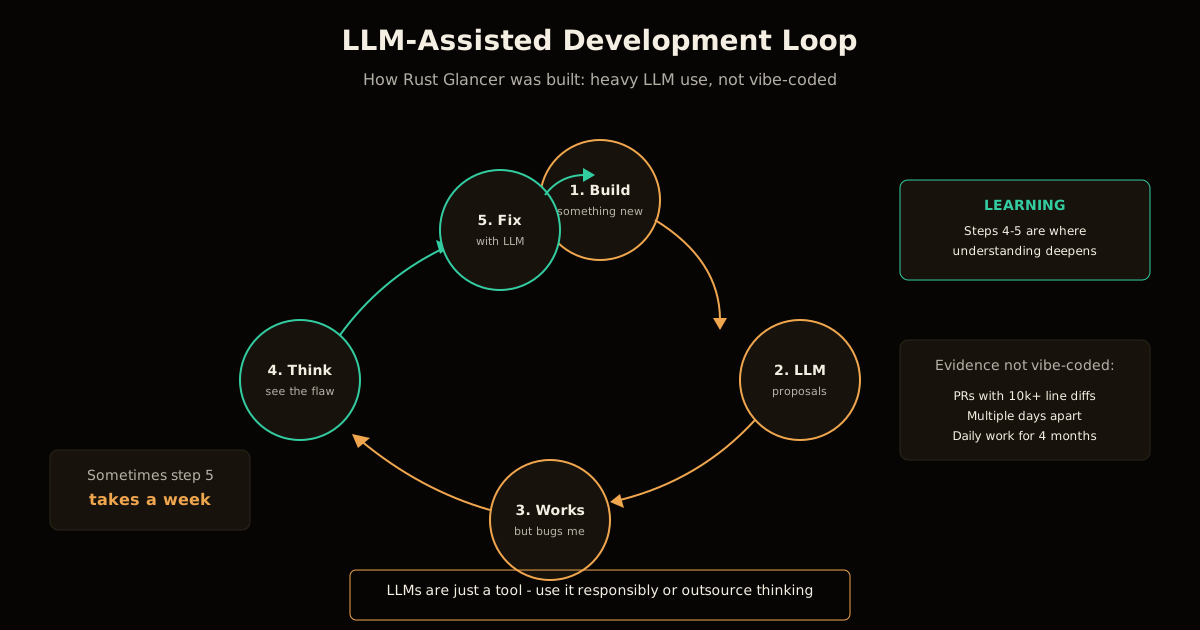
The project was built with heavy LLM assistance, but the author is careful to distinguish this from “vibe coding”:
It is not vibe coded, though. I am verifying each pull request to make sure that I am happy with the state of the codebase. If you need proofs, you can check the git history: it has PRs with 10k+ lines of diff, but these are multiple days apart despite the fact that I work on this project nearly every day since its inception.
The development loop the author describes:
- Build something new
- LLM proposals seem reasonable, so accept them
- It works but something bugs me
- Think about the design and see a flaw
- Work with the LLM to fix it (sometimes for a week)
This is a mature description of LLM-assisted development: the models are domain experts that can accelerate learning, but they are not great at building big projects, and the developer must own the design. The author spent four months on the project and used the time to learn — the biggest milestones (declarative macro expansion, type inference, trait solving) were moments of genuine understanding, not generated artifacts.
The codebase has extensive comments, which the author describes as “not as good as professionally written human docs” but “helpful and not annoying to read.” This matches the pattern of spec-driven development, where the human maintains the architectural intent while the model fills in implementation.
How to try Rust Glancer
Install the VS Code extension directly, or build and install the vsix from the repository. Documentation is available at the project site.
You can run Rust Glancer alongside rust-analyzer by disabling one extension while enabling the other. This lets you compare behavior on your own codebase before committing to a switch.
The project is in active development. Expected in upcoming releases:
- Further performance and memory optimizations
- Improved type inference and syntax support
- Code actions (auto-import, implement missing trait fields)
- Potential proc macro support without code execution
If Rust Glancer’s disk-offload trick has you thinking about memory elsewhere in your Rust stack, the struct-level version of the same discipline — reducing a Rust struct’s memory footprint with layout changes instead of an architecture rewrite — is worth a look next.
FAQ
Does Rust Glancer support all the features rust-analyzer has? No. It is four months old and incomplete. Core features (type inference, trait solving, goto definition, hover, inlay hints, completions) work, but code actions and proc macro execution are missing.
What happens when I type between saves? Shallow analysis of the current function body, reusing the previous index. New items appear only after you save.
Does Rust Glancer work with proc macros and build scripts? Declarative macros yes, proc macros via execution no. The author has ideas for proc macro support without code execution, but that is future work.
Can Rust Glancer run alongside rust-analyzer? Yes. Disable one VS Code extension while enabling the other.
How much LLM assistance was used? Heavy use, but with manual review of every PR. The author describes a loop of accepting proposals, identifying flaws, and iterating to fix them.
Is Rust Glancer faster than rust-analyzer? No. Frozen analysis is slower than lazy incremental. You trade latency for RAM.
Sources
- Rust Glancer — Hello, world! (August 21, 2026)
- Rust Glancer — Project Documentation
- Rust Glancer — GitHub Repository
Frequently asked questions
Google Search · Preferred sources
Prefer this site on Google
If you already read this writing, add umesh-malik.com as a Preferred Source. Google can then highlight it with a preferred badge in Top Stories, AI Overviews, and AI Mode — for you, not as a site-wide ranking boost.
Related Articles

AI Coding Agents & DX
Rust LLM Policy: Use AI to Review, Not to Create
The Rust LLM policy bans AI-created code and prose but allows AI review, analysis, and bug-finding. Here's the exact rule, why it works, and how to copy it.

AI Coding Agents & DX
Self-Hosted AI Coding Agent: Sandboxed Prompt-to-Deploy for $25/mo
Build a self-hosted AI coding agent with sandboxed execution. One prompt produces a repo, tests, CI, and deployed app — $25/mo, no cloud bills.

AI Coding Agents & DX
Cut agent tool call cost: GitHub's 20% fix was a prompt rewrite
Agent tool call cost jumped after you gave it better tools? GitHub hit that on Copilot code review and won ~20% back with a prompt rewrite, not new tools.
Keep reading
Get new posts on AI, Claude Code & LLMs
New deep-dives on AI engineering, Claude Code, and developer tooling — follow along however you prefer.
About the Author

Software engineer writing about AI, Claude Code, LLMs, OpenAI, Anthropic, and developer tooling. 5+ years building production systems at Expedia Group, Tekion, and BYJU'S.