Run Kimi K3 Locally: 2.8T Params From 4 SSDs at 1 Tok/s
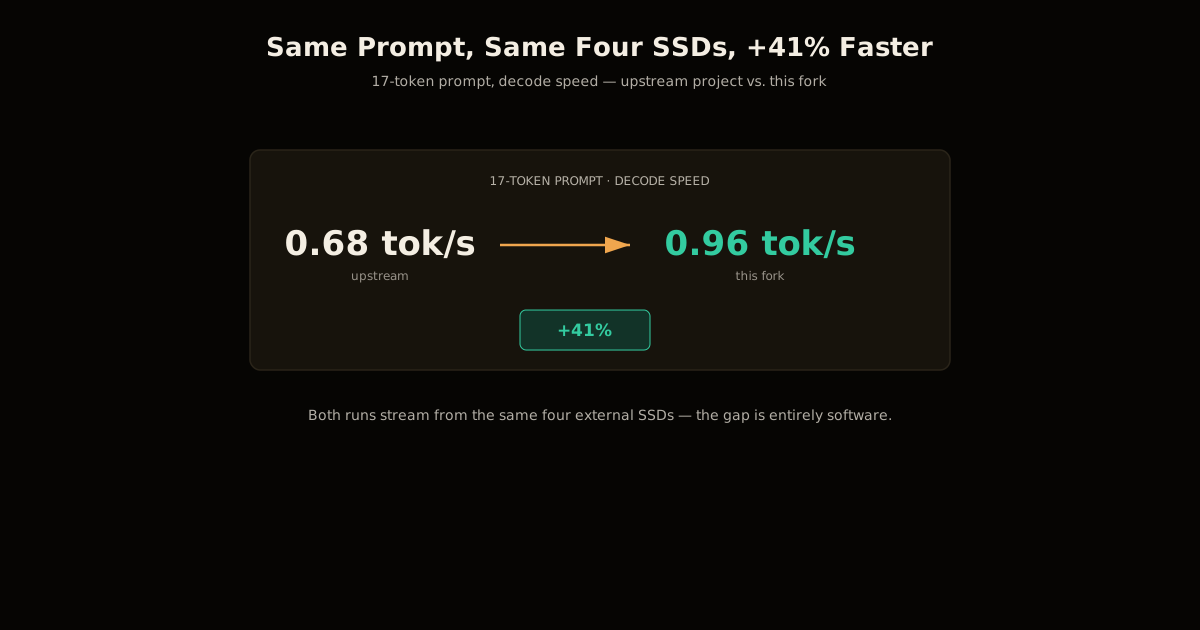
Run Kimi K3 locally on a MacBook by streaming 1.45TB of experts from four SSDs — the 1 tok/s number, and why doubling drives doesn't double speed.

TL;DR You can run Kimi K3 locally on a MacBook Pro by streaming its 1.45TB of expert weights from four external SSDs instead of loading them into RAM or VRAM. The reference build hits 1 token/second steady decode, but doubling your SSD count from one to two only gets you to 73% of four-drive speed — because the bottleneck is the slowest of 16 parallel per-layer reads, not total disk bandwidth. It keeps the model at full BF16 precision, trading speed for zero quantization loss.
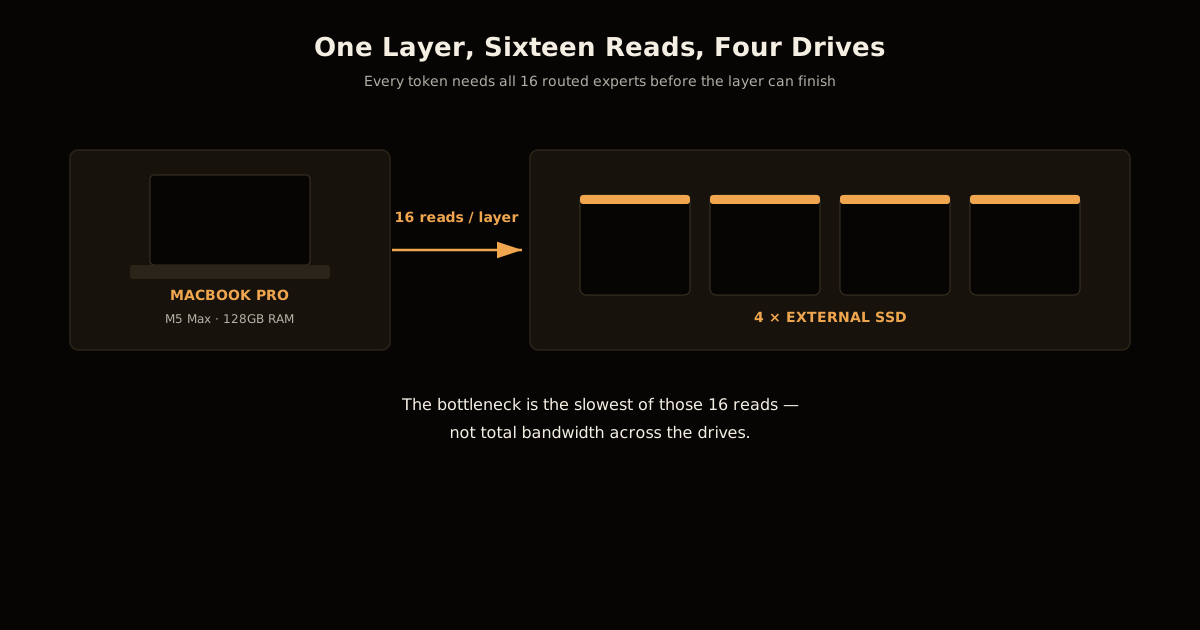
Deltafin is a Rust project that runs Kimi K3 — a 2.8-trillion-parameter mixture-of-experts model from Moonshot AI — on a single Mac by treating external SSDs as an extension of memory. Kimi K3 activates only 104 billion of its 2.8 trillion parameters per token, routing each token through 16 of its 896 experts plus 2 always-on shared experts. That routing is exactly what makes disk-streaming plausible: you never need all 2.8T parameters in memory at once, only the ~1.45TB of expert weights the current token’s routing decision touches, layer by layer.
If you’ve fought the same VRAM ceiling with smaller models, the shape of this problem will be familiar from running a 70B model on a 4GB GPU or working out how much VRAM a long context actually costs — this is that same trade pushed to a model two orders of magnitude larger.
How to Run Kimi K3 Locally on a MacBook
The reference hardware is an M5 Max MacBook Pro with 128GB of unified memory and four external SSDs supplying the expert storage. The setup is a normal Rust build, not a research harness:
- Clone the repository.
git clone https://github.com/argonautlabsai/deltafin.git(a fork of the originalgavamedia/deltafinproject) andcargo build --locked --release. - Choose a storage mode.
deltafin setup --streampulls a 215GB initial footprint and streams the rest as needed;deltafin setup --fulldownloads the entire 1.7TB local copy up front if you have the disk to spare. - Optionally add a draft model.
deltafin setup-qweninstalls a small Qwen model for speculative decoding — it proposes tokens, but Kimi K3 still validates every one before it ships, so this doesn’t relax the precision guarantee. - Run it.
deltafin run --chat --prompt "..."for a one-off completion, ordeltafin serve --host 127.0.0.1 --port 8000for an OpenAI-compatible/v1/chat/completionsendpoint you can point existing tooling at.
Weights are stored as DFSP files — Deltafin’s own contiguous on-disk format for expert tensors — packed alongside scale4 expert sidecars for lossless compression, plus a small row-int8 resident spine kept in RAM so gating and routing decisions never wait on disk. Only the expert bodies stream; the parts of the model that fire on every token stay resident.
Why Doesn’t Doubling Your SSDs Double Tokens per Second?
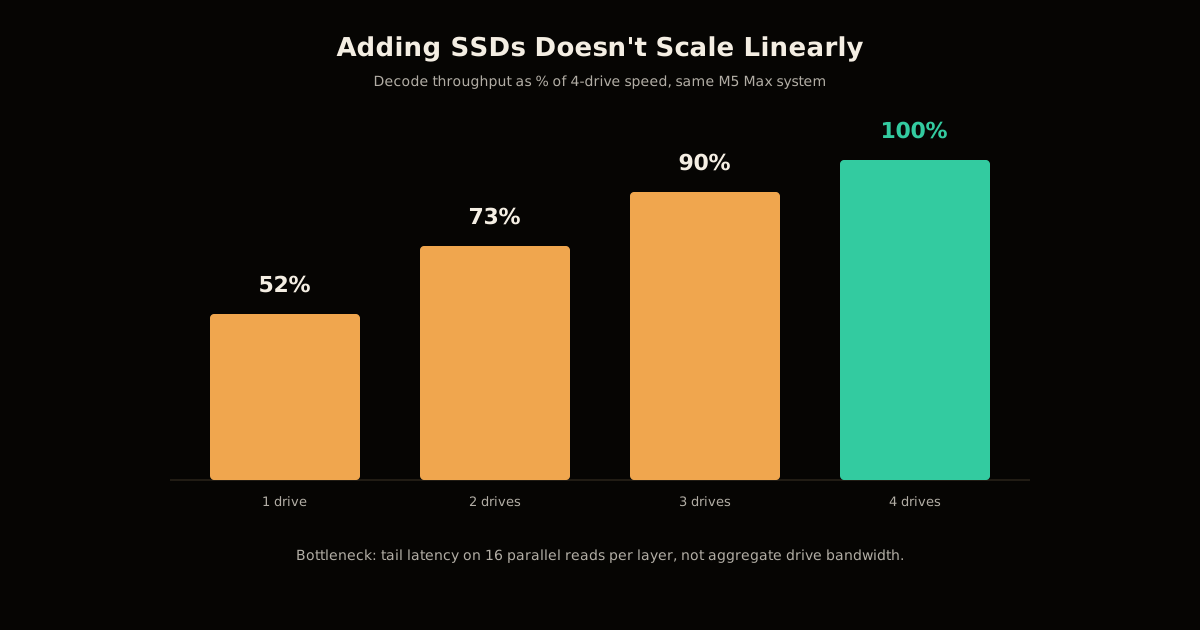
This is the counterintuitive result the whole project turns on. Measured on the same M5 Max system, decode throughput scales like this as drives are added:
| SSDs | Decode speed (% of 4-drive) |
|---|---|
| 1 | ~52% |
| 2 | ~73% |
| 3 | ~90% |
| 4 | 100% (1.00 tok/s baseline) |
Going from one drive to two buys you 21 points of throughput; going from two to four buys you 27. Neither move is proportional to the drive count, and the reason is architectural, not a tuning bug: every layer needs 16 expert reads to satisfy the router’s choices, and the layer can’t proceed until the slowest of those 16 reads finishes. Striping reads across more drives lowers the odds that any one read draws the short straw, but total aggregate bandwidth was never the constraint — tail latency on 16 reads that must all complete was. Adding a fifth or sixth drive keeps paying off, just with steadily shrinking returns, because you’re incrementally reducing the odds of a slow straggler, not adding headroom to a bandwidth ceiling nothing was hitting.
That same 16-reads-per-layer requirement explains why prefill is so much worse than decode. A 512-token prompt takes roughly 6.3 minutes to produce a first token, because Deltafin’s current prefill path re-reads each layer’s experts once per prompt token instead of caching them across the pass — about 8x the disk traffic a token count of that size should need. The project’s own documentation calls this “planned, not built” — a known gap, not a hidden one.
Streaming Full Precision vs. Quantizing to 3-Bit: What You Trade
Every route to running a model this size on consumer hardware trades away something. Here’s where this one sits next to the two obvious alternatives:
| Approach | Precision | Local storage | Decode speed | Best for |
|---|---|---|---|---|
| SSD-streamed BF16 (Deltafin) | Full, no loss | ~1.45TB (streaming) / 1.7TB (full) | ~1 tok/s | Verifying exact release behavior, offline batch runs |
| Aggressive quantization (~3-bit) | Lossy | A few hundred GB | Much faster, still slow at this scale | Interactive use when some accuracy loss is acceptable |
| Cloud API | Provider-controlled | None locally | Fast, but you don’t control the weights | Production traffic, no local hardware budget |
Deltafin’s own documentation is explicit that other local runners “re-encoded K3’s expert bank down to ~3 bits” to make the model tractable on less storage — a real option if you can tolerate the accuracy hit. Deltafin’s bet is the opposite: keep every weight exactly as Moonshot shipped it, in the BF16 range the model card describes, and let disk speed be the bottleneck instead of the answer’s correctness. Kimi K3 itself natively ships weights in MXFP4 with MXFP8 activations for its own served inference stack; Deltafin works from a BF16-converted copy so nothing is quantized a second time on top of whatever the original format already cost.
Common Mistakes When Streaming Model Weights From Disk
Three mistakes will cost you most of your throughput before you even notice a problem:
- Using one drive and expecting proportional gains from adding a second. You’ll get roughly 21 percentage points, not a doubling — plan your drive budget around the curve above, not around raw bandwidth math.
- Judging the setup by prefill time. A slow response to your first prompt is prefill’s 8x read amplification, not a broken decode path. Watch tokens-per-second after generation starts, not time-to-first-token, if you want to know whether decode itself is healthy.
- Assuming compression means quantization. The scale4 sidecars are lossless compression on disk, not a precision cut — don’t budget for accuracy loss you aren’t actually taking.
Is This Actually Practical, or Just a Neat Hack?
Depends entirely on your latency tolerance. At 1 token/second with a multi-minute wait to first token on longer prompts, this is not a chat assistant, and treating it like one will be frustrating. Where it earns its complexity is batch and validation work: running a fixed evaluation set against the actual release weights overnight, reproducing a paper’s numbers without introducing a quantization variable, or holding a checkpoint of the real model locally without provisioning a multi-GPU server.
Compare that against what actually determines throughput once you’re inference-bound on a Mac, or against running a smaller MoE model that fits without streaming at all — if your prompt set can wait, streaming buys you a model class no single GPU touches.
The routing pattern here — a large sparse MoE where each token only lights up a fraction of the network — is the same shape behind DeepSeek’s much smaller active-parameter counts beating dense models; Kimi K3 just takes it to a size where even the active slice needs help fitting in memory.
For the full picture on getting the most out of local hardware in general, see the LLM engineering topic hub.
FAQ
Do I need special hardware to run Kimi K3 locally?
You need an Apple Silicon Mac with enough RAM to hold the resident spine and routing tables (the reference setup uses a 128GB M5 Max MacBook Pro) plus at least one external SSD with room for a 215GB streaming footprint or 1.7TB for the full local copy. More SSDs help throughput but are not required to get it running at all.
Why is decode so much faster than prefill in this setup?
Decode reads each layer’s 16 experts once per generated token. Prefill has to process the entire prompt before generation starts, and Deltafin’s current implementation re-reads each layer’s experts once per prompt token during that phase, so a 512-token prompt triggers roughly 8 times the disk traffic of decode before the first output token even appears.
Does streaming from disk hurt output quality?
No — that is the whole trade this project makes. It keeps Kimi K3’s weights at full precision rather than quantizing down to roughly 3 bits the way some other local runners do, so the accuracy cost is zero. The cost lands entirely on speed and storage, not on the model’s answers.
Can I do this on Linux or Windows instead of a Mac?
The public build targets Apple Silicon’s unified memory and Metal acceleration specifically, with CUDA and CPU fallback paths noted in the codebase for other platforms. The core idea — memory-map expert weights on fast external storage and prefetch by router decision — is platform-agnostic, but the tuning and the published benchmarks are Mac-specific.
Is this actually usable for real work, or just a benchmark stunt?
At 1 token per second and a multi-minute wait to first token, it is not a chat replacement. It is genuinely useful for anything batchable and latency-insensitive — validating a huge model’s behavior on a fixed prompt set overnight, or running the exact release weights without a quantization variable, on hardware that would otherwise need a multi-GPU server.
Sources
- argonautlabsai/deltafin — README, architecture notes, and benchmark numbers (a fork of
gavamedia/deltafin) - Kimi K3 model card — total/active parameters, expert count, native quantization format
Frequently asked questions
Google Search · Preferred sources
Prefer this site on Google
If you already read this writing, add umesh-malik.com as a Preferred Source. Google can then highlight it with a preferred badge in Top Stories, AI Overviews, and AI Mode — for you, not as a site-wide ranking boost.
Related Articles

LLM Engineering
How to Audit an LLM Judge: Right Verdict, Wrong Reason
How to audit an LLM judge in six steps: catch right-verdict, wrong-reason errors and set a mean-minus-2σ drift floor, using Netflix's rubric loop.

LLM Engineering
How to Stop an LLM Saying As a Language Model: It's the Template
How to stop an LLM saying as a language model: it's the chat template, not the weights. Disclaimers drop 17 points without one — the fix, and its limits.

LLM Engineering
How to Fix Multi-Agent LLM Latency: Text Handoffs Cost 2.5x
Multi-agent LLM latency isn't random: an ICLR 2026 paper measured the cause — text handoffs cost 2.5x more time and 3-5% less accuracy than skipping text.
Keep reading
Get new posts on AI, Claude Code & LLMs
New deep-dives on AI engineering, Claude Code, and developer tooling — follow along however you prefer.
About the Author

Software engineer writing about AI, Claude Code, LLMs, OpenAI, Anthropic, and developer tooling. 5+ years building production systems at Expedia Group, Tekion, and BYJU'S.