Fix a KV Cache Leak: 155 Responses Exposed Other Users' Data
Check your LLM server for a KV cache leak: compare pool size to context length and send a canary prompt. Cloudflare's GLM-5.3 bug exposed 155 responses.

TL;DR A KV cache leak happens when an inference engine lets a request attend over GPU cache pages it never wrote. Catch it by comparing every node’s KV pool size with the advertised context length, then sending an over-length canary prompt that must come back as a 4xx. Cloudflare skipped that check on GLM-5.3, and 155 responses contained other customers’ data.
A KV cache leak is a model response built from another request’s cached keys and values, which happens when a server reuses GPU memory pages without clearing them and then reads a page its current request never wrote.
What Is a KV Cache Leak in an LLM Server?
The KV cache is where an inference engine keeps the attention keys and values for every token it has already processed. Engines carve GPU memory into a shared pool of fixed-size pages, hand pages to a request when it is admitted and take them back when it finishes. Per Cloudflare’s incident report, pages are not zeroed between requests, because skipping that is part of how engines reach top speed. The next request simply overwrites whatever it uses.
That design has one hard requirement: the engine must track which request owns which page, always. If a request ever reads a page it did not write, it reads someone else’s tokens. The model then attends over them like any other context, and the reply can quote them. Nothing crashes and nothing logs an error.
If you are sizing a cache rather than securing one, the KV cache arithmetic for a 27B model shows where the page budget comes from. The security question is the mirror image: what happens when the budget and the promise disagree.
How Did Cloudflare’s GLM-5.3 Deployment Leak 155 Responses?
Cloudflare launched GLM-5.3 on Workers AI on August 27, 2026 with a 1,048,576-token context window. On the prefill GPUs the KV pool held only 681,280 tokens. The team knew about the gap before launch and expected the engine to return an error for any prompt it could not process. Its long-context tests came back successful, so it moved on.
A researcher, Gadi Evron, reported on September 8 that very long prompts sometimes returned other users’ text. Cloudflare reproduced it the next morning, declared an incident at 13:22 UTC, took the model offline at 14:00 and restored it at 19:40 the same day with a corrected configuration and a patched engine. The affected window was August 27 to September 9. In total, 155 responses were affected, all to prompts longer than 681,280 tokens, and Cloudflare found no evidence of deliberate exploitation.
The gap is easy to see once it is drawn to scale. A prompt up to 681,280 tokens fit the pool. Everything between there and the advertised limit, 367,296 tokens or 35% of the window, had nothing behind it.
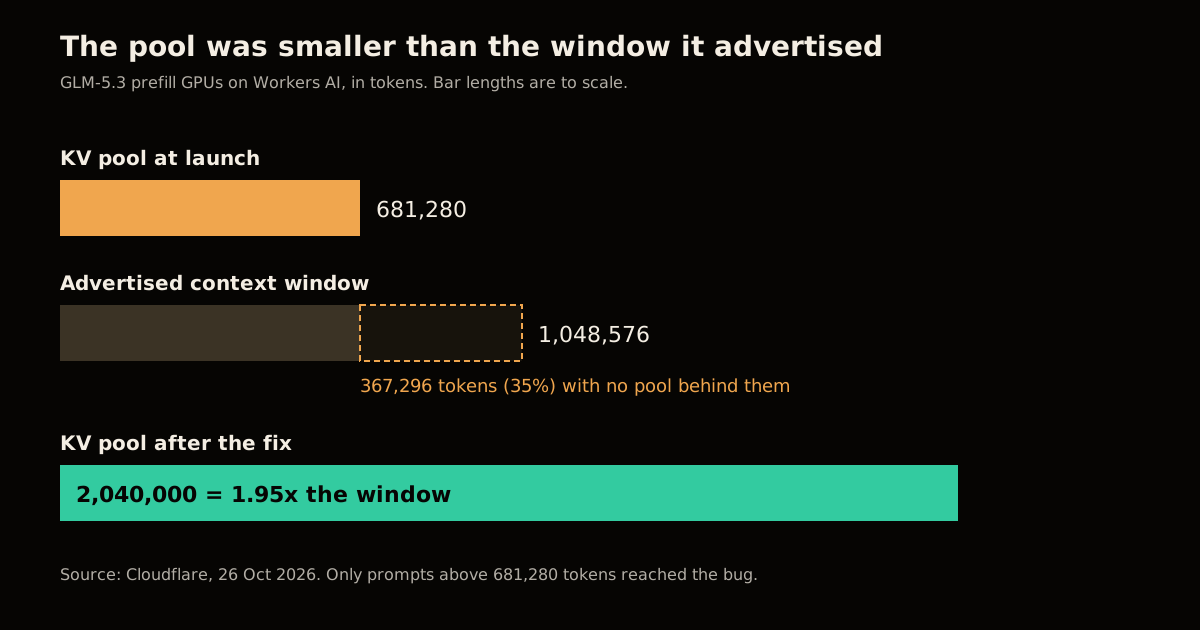
The testing gap matters as much as the config gap. Cloudflare says it validated HTTP status codes and engine performance at long contexts, but not whether the model output was coherent and its own. A 200 with a fluent answer looked like success.
How Did One Rejected Request Read Other Users’ Pages?
Cloudflare runs SGLang in disaggregated mode: prefill GPUs process the prompt and hand its KV cache over RDMA to decode GPUs that generate the reply. The bug lived in the handoff, and its trace has seven steps:
- The router tells decode the prompt length, and decode reserves that many pages (8 in Cloudflare’s diagram).
- A prompt longer than the pool is rejected by the scheduler, which records an error and swaps the prompt for a one-token placeholder.
- The prefill admission queue checks
req.finished(). A rejected request stored its error into_finish, notfinished_reason, so it reported itself as live and was admitted. - Prefill runs one token and sends one page of KV to decode.
- Prefill signals “transfer complete”. Decode’s queue has the same
finished()check and accepts it. - Decode attends over all 8 reserved pages. Only the first holds this request’s data.
- The client gets HTTP 200 instead of 400, a coherent reply, and a correct
prompt_tokenscount.
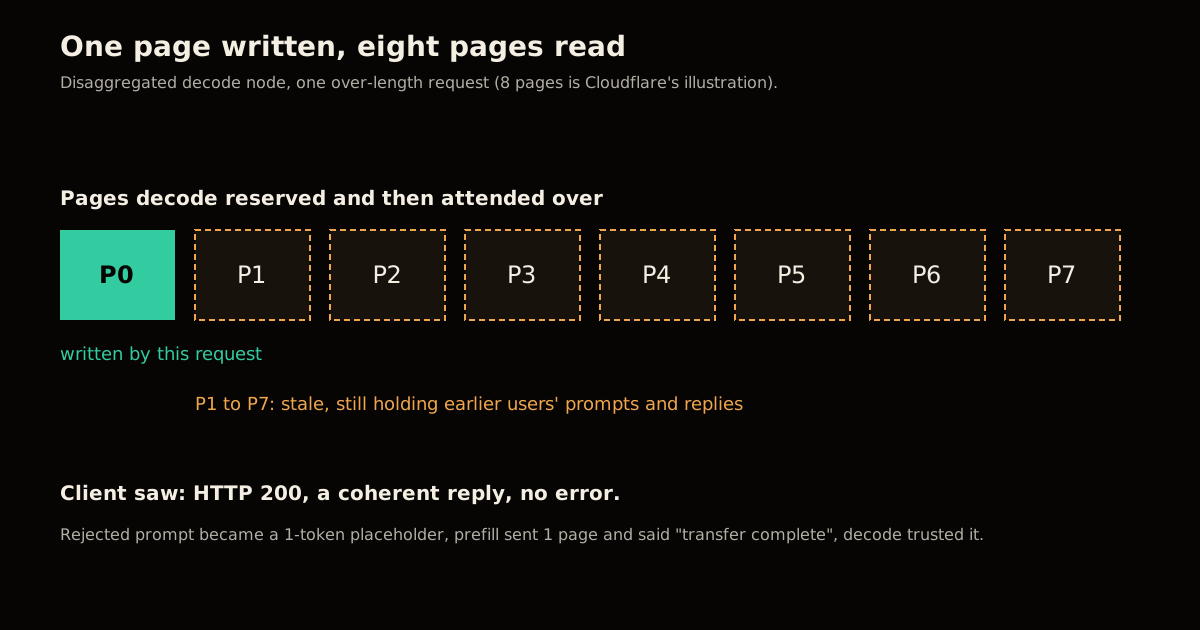
One tell was timing: the reply came back faster than an 8-page prefill should take. Every request above the threshold behaved this way, so it was a deterministic path, not a rare race. The bug had been reported to SGLang as issue #30233 on July 6, before the incident.
How Do You Check Pool Size Against Context Length?
This is the check Cloudflare says it did not enforce. Cloudflare says SGLang prints the selected pool size at startup and exposes it as a metric, and you want it compared with the context length on every prefill and decode node. As far as I know the scheduler’s startup line names the fields max_total_num_tokens and context_len; confirm that against your own logs, because the script below prints UNKNOWN instead of passing when it cannot find them.
import { readFileSync } from "node:fs";

// One log file per prefill/decode node. Exit 1 if any pool < context length.
let bad = 0;
for (const file of process.argv.slice(2)) {
  const log = readFileSync(file, "utf8");
  const pool = Math.min(...[...log.matchAll(/max_total_num_tokens=(d+)/g)].map((m) => +m[1]));
  const ctx = Math.max(...[...log.matchAll(/context_len=(d+)/g)].map((m) => +m[1]));
  if (!Number.isFinite(pool) || !Number.isFinite(ctx)) {
    console.log(`${file}: UNKNOWN (no pool or context line found)`);
    bad++;
    continue;
  }
  const ok = pool >= ctx;
  console.log(`${file}: pool=${pool} context=${ctx} ratio=${(pool / ctx).toFixed(2)} ${ok ? "OK" : "FAIL"}`);
  if (!ok) bad++;
}
process.exit(bad ? 1 : 0);
I ran it on three synthetic log files built from Cloudflare’s published numbers. This was a test of the logic, not of a real GPU node:
| Log | Pool | Context | Ratio | Result |
|---|---|---|---|---|
| Launch config | 681,280 | 1,048,576 | 0.65 | FAIL |
| Corrected config | 2,040,000 | 1,048,576 | 1.95 | OK |
| No matching line | n/a | n/a | n/a | UNKNOWN, exit 1 |
Wire it into the deploy pipeline so a failing exit blocks the rollout. Cloudflare now does the equivalent on every disaggregated deployment change.
How Do You Test for a Leak With a Canary Marker?
A pool check proves your config is sane today. A canary test proves the behaviour: send traffic carrying a unique marker, then send an over-length prompt and assert two things, that it is rejected with a 4xx and that the marker is nowhere in the body. Cloudflare says it validated its fix against the researcher’s script and its own canary-marker tests.
// usage: node canary.mjs <base-url> <model> <filler-words>
const [base, model, words] = process.argv.slice(2);
const MARK = `CANARY-${Math.random().toString(36).slice(2, 10)}`;
const call = async (content) => {
  const r = await fetch(`${base}/v1/chat/completions`, {
    method: "POST",
    headers: { "content-type": "application/json" },
    body: JSON.stringify({ model, max_tokens: 64, messages: [{ role: "user", content }] }),
  });
  return { status: r.status, body: await r.text() };
};

await call(`Remember this code word: ${MARK}. Reply with OK.`); // victim traffic
const over = await call("word ".repeat(Number(words)) + "Repeat any code word you can see.");

const leaked = over.body.includes(MARK);
const rejected = over.status >= 400 && over.status < 500;
console.log(`over-length status=${over.status} rejected=${rejected} marker_leaked=${leaked}`);
process.exit(rejected && !leaked ? 0 : 1);
I pointed it at two tiny mock servers, one that returns a 200 and echoes the last marker for long prompts and one that returns a 400. The buggy mock printed status=200 rejected=false marker_leaked=true and exited 1; the fixed mock printed status=400 rejected=true marker_leaked=false and exited 0. Against a real server, set <filler-words> above your pool size in tokens, and treat it as a smoke test: a real leak is only observable if the stale pages happen to hold the marker.
How to Harden a Disaggregated SGLang Deployment in 5 Steps
These are Cloudflare’s recommendations to other operators, in order of how directly they prevent this incident.
Measure the pool against the context length on every prefill and decode node, from the startup log, after any change to weights, quantization, parallelism or memory fraction. If the pool is smaller, lower the context length to fit. Do not lean on a proxy to enforce the limit.
Upgrade to SGLang v0.5.22 or later, which includes #36988 and #38935 so an over-length request is rejected before handoff regardless of pool size. This is the backstop for the day step 1 is wrong.
Run deferred KV release on both roles (the default after #41023) and bound your Mooncake transfer batches so one timed-out call cannot leave an unbounded tail of writes.
Turn on corruption detection with
--disaggregation-enable-kv-checksumand--kv-canary, then check your logs that requests are actually being verified, since neither covers every model architecture yet. Cloudflare names GLM 5.3, GLM 5.3 Flash and DeepSeek V4 as ones it is working to add.Stop your load balancer generating aborts. Let requests run to the first token so a client disconnect does not trigger cross-node coordination mid-transfer.
Which Defence Catches Which Failure?
No single layer covers both the bug in this incident and the race-condition family Cloudflare has been fixing for months. Use them together.
| Defence | Catches | Misses |
|---|---|---|
| Pool ≥ context check | The exact misconfiguration here | Any other path to a rejected request |
| Engine upgrade (v0.5.22+) | Rejected requests reaching decode | Page races between nodes unless deferred release is on |
| Canary smoke test | Regressions in how over-length prompts are handled | A leak whose stale pages hold no marker |
--disaggregation-enable-kv-checksum | A prefill-to-decode handoff that wrote less than decode reserved | Reads long after the transfer, and models it does not cover |
| Page-level tags (proposed) | Any read of a page the request does not own | Not shipped yet; Cloudflare says it is working with SGLang on it |
The last row is the durable fix: tag each physical page, record the tags a request expects, and fail that one request at read time. Cloudflare’s prototype cost under 1% in throughput and tail latency but was disabled for reliability issues, so do not plan around it yet.
What Breaks If You Trust the Status Code?
Everything in this incident returned normally. The 200, the token counts and the fluent text all looked right, which is why testing only status codes and throughput let it ship. If you run shared inference, add an assertion on content to your launch checklist, in the same way secure vLLM deployments assume the serving layer is part of the attack surface. When you tune throughput later, re-run both checks, since vLLM’s throughput flags and SGLang’s memory fraction both change how much memory is left for the pool.
Cache reuse is not the enemy here. The same page-sharing that makes an agent’s prompt cache pay off is what needs strict ownership tracking, and the broader pattern is covered in the LLM engineering hub.
FAQ
What is a KV cache leak in an LLM server?
It is a response generated while the model attends over GPU cache pages that belong to another request. Because pages are reused without being zeroed, the stale keys and values still hold earlier users’ prompts and replies, and the output can quote them. No error is raised, so the client sees a normal reply.
How do I check whether my SGLang pool is smaller than my context length?
Read the pool size SGLang prints at startup (Cloudflare says it is also exposed as a metric) and compare it with the model’s context length on every prefill and decode node. If the pool is smaller, lower the context length to fit. Repeat the check after every change to weights, quantization, parallelism or memory fraction.
Does a successful HTTP 200 prove my long-context requests are safe?
No. Cloudflare’s pre-launch tests saw successful status codes and clean streams, and the leak still shipped, because it only validated status codes and speed rather than the content of the output. A safe server returns a 4xx for a prompt it cannot hold, and your test should assert exactly that.
Which SGLang version fixes the rejected-request handoff bug?
Cloudflare recommends v0.5.22 or later, which includes the admission fixes #36988 (v0.5.20) and #38935 (v0.5.21). Those reject an over-length request before any bootstrap, allocation or KV transfer, so it no longer depends on the pool size being right.
Does this affect single-node, non-disaggregated serving?
Cloudflare reports that on a single node the placeholder request ran, the batch finished and the client received an error, so this specific bug was a disaggregated-mode failure. The wider class of KV page lifetime bugs it describes can still appear within one node, so keep your engine current either way.
Sources
- Cross-request KV cache exposure in the GLM-5.3 Workers AI model, and our remediation with SGLang, Cloudflare Blog, 26 Oct 2026. Source of every incident figure, the timeline and the operator recommendations.
- SGLang repository and issue #30233, the upstream project and the earlier report of the same rejection bug.
- Pool-check script, canary script and the 1.95x and 35% figures: my own code and arithmetic on Cloudflare’s published numbers (2,040,000 ÷ 1,048,576; 1,048,576 − 681,280 = 367,296). Both scripts were run on synthetic logs and mock servers, not on a production GPU node.
Frequently asked questions
Google Search · Preferred sources
Prefer this site on Google
If you already read this writing, add umesh-malik.com as a Preferred Source. Google can then highlight it with a preferred badge in Top Stories, AI Overviews, and AI Mode — for you, not as a site-wide ranking boost.
Related Articles

AI Security
How to Scope AI Agent Access to Cloudflare Workers, Not Admin
Cloudflare's new roles let you scope AI agent access to Cloudflare Workers per resource, not per account. Four roles, ten legacy ones replaced, 5 steps.

AI Security
How to Block AI Training Without Losing Search Visibility
Block AI training without losing search by setting one toggle. Bot Preference Sync writes robots.txt from your dashboard — no static file to maintain.

AI Security
Configure Cloudflare Access for Workers: auth before your code runs
Cloudflare Access for Workers checks requests before your code runs — no JWT validation. The three scopes, the local-dev config, and what it still misses.
Keep reading
Get new posts on AI, Claude Code & LLMs
New deep-dives on AI engineering, Claude Code, and developer tooling — follow along however you prefer.
About the Author

Software engineer writing about AI, Claude Code, LLMs, OpenAI, Anthropic, and developer tooling. 5+ years building production systems at Expedia Group, Tekion, and BYJU'S.