Debugging OpenRouter in production: the 10 provider bugs that bite
Debugging OpenRouter in production means auditing providers, not models: the same weights score 90% vs 58% GPQA, and pinned fallbacks cascade-fail in 14 days.

TL;DR Running OpenRouter in production means debugging providers, not models — “the model” is fixed weights, but “the provider” is whichever backend actually serves a given request, and that changes what you get. A deployment processing 18 million messages found ten distinct provider-level failure modes hiding behind OpenRouter’s one endpoint: benchmark scores swinging from 90% to 58% GPQA on the identical model, quantization labels that don’t predict quality, silently dropped tool calls, HTTP 200 responses with no content, and a provider-pinning setup that cascade-failed within two weeks. None of these show up until you’re already routing real traffic.
OpenRouter is an API layer that sits in front of dozens of LLM inference providers and forwards each request to whichever one is available, cheapest, or highest-priority for the model you asked for. That pitch is genuinely useful, but it’s also why OpenRouter in production surfaces failures a demo never will: if you’ve shipped an app on top of it and something intermittently misbehaves — a tool call that never fires, a vision model that can’t see, a reasoning setting that gets ignored — the cause is very rarely the model. It’s almost always which provider that specific request happened to land on.
What does OpenRouter actually route you to?
OpenRouter sells a single, simple idea: hit one API endpoint for a model name, and it “handles fallbacks automatically and picks the most cost-effective option for each request,” routing you to whichever backend can serve it. That’s genuinely useful — it turns a fragmented market of dozens of inference vendors into one integration.
The catch is a distinction that’s easy to skip past: the model is the weights; the provider is whoever OpenRouter routes you to for that request. A model name like deepseek/deepseek-v4-flash is a fixed set of parameters. The provider behind it — DeepInfra, Together, Baidu, Alibaba, DigitalOcean, and dozens of others — is a separate company running its own inference stack, its own quantization choices, its own request parsing, and its own default settings on top of those identical weights. OpenRouter doesn’t guarantee those providers behave the same, because they don’t, and it can’t — it’s a router, not the inference engine.
Why OpenRouter in production behaves differently by provider
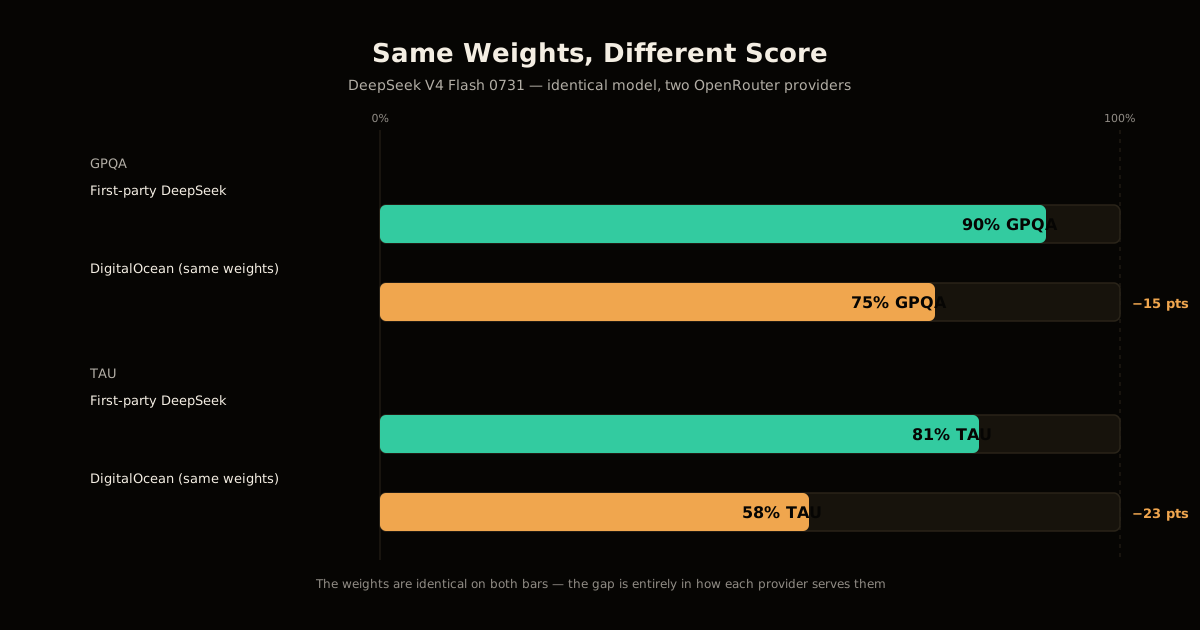
This distinction is the source of every bug below, so it’s worth making concrete with real numbers. Mo Moustafa, who runs an iMessage AI assistant called Olly processing roughly 18 million messages through OpenRouter, benchmarked DeepSeek V4 Flash 0731 across the providers OpenRouter routes to. First-party DeepSeek scored 90% on GPQA and 81% on TAU. DigitalOcean, serving the same published weights, scored 75% and 58% on the same two benchmarks — a 15-to-23-point gap on an identical model. Most other hosts underperformed first-party by 5-7 points on tool-calling tasks specifically, and four separate providers “fell off a cliff” on knowledge benchmarks entirely.
None of that is a model problem. DeepSeek didn’t publish a worse model to DigitalOcean. DigitalOcean’s serving stack — its inference engine version, its default sampling parameters, its context handling — produced a measurably worse model out of the same weights.
The 10 provider bugs that break in production
Moustafa’s production experience surfaced ten distinct failure modes, all traced to the model/provider gap above. Each one looks like a model bug until you check which provider actually served the request:
| # | Bug | Symptom | Fix |
|---|---|---|---|
| 1 | Benchmark variance | Score swings 15-23 pts by host | Check the per-provider board |
| 2 | Vision-blind providers | Misreads or rejects images | Test vision per provider |
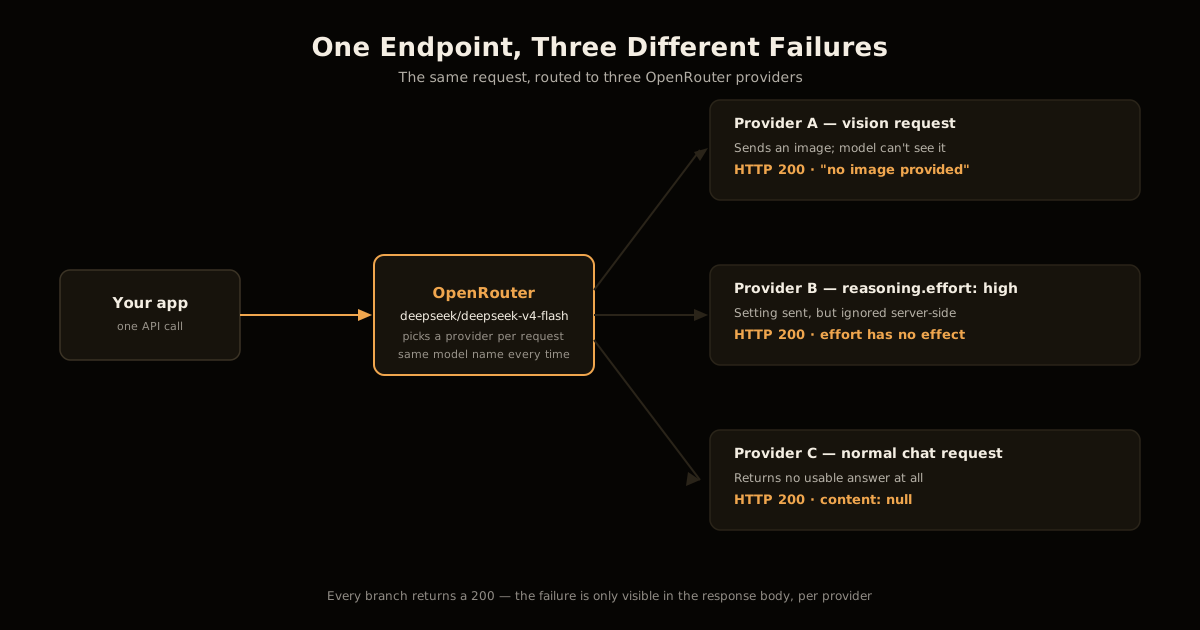
| 3 | reasoning.effort ignored | No effect on some hosts | Track reasoning-token counts |
| 4 | Quantization ≠ quality | Label doesn’t predict score | Filter by measured score |
| 5 | Tool calls as raw text | Arrives unparsed, as a string | Parse tool-call text client-side |
| 6 | Null content, HTTP 200 | Empty answer, status still 200 | Retry on null content |
| 7 | Hollow completions at scale | No content, reasoning, or usage | Monitor completion shape |
| 8 | Inconsistent history rules | One provider rejects, another accepts | Match each provider’s contract |
| 9 | IP-based rate limiting | Fine on a laptop, 429s from prod | Load-test from prod’s network |
| 10 | Provider pinning cascades | Pinned providers fail one by one | Always allow fallbacks |
Two of these are worth walking through in detail, because they’re the ones that look most like a model problem when they’re actually a routing problem.
Vision-blind providers. DeepInfra’s hosted instance of a 122-billion-parameter vision model misread the letter K as R and described a red object as blue in the same test. Separately, both Venice and Together returned “no image provided” for a different vision model even though the request included one — and every one of these providers still returned a 200-status response, so nothing in the HTTP layer told the caller anything was wrong.
Hollow completions. One provider returned a response with null content, null reasoning, and no usage object at all on 92% of its completions for about a fifth of its total traffic, during a documented incident in July. A different provider reproduced the same shape a month later on a different checkpoint of the same model family. A 200 OK here means “the request was served,” not “there’s an answer in the response” — that’s a distinction most client code doesn’t check for.
How do you audit an OpenRouter model before shipping it?
Don’t ship a model name to production off the leaderboard alone. Run this checklist against the specific model and workload you’re actually shipping:
- Pull the per-provider endpoint list via
GET /api/v1/models/{author}/{slug}/endpointsinstead of assuming one backend. - Check each provider’s benchmark score on your actual task — tool-calling, vision, or knowledge — not an aggregate leaderboard number.
- Send real vision inputs through every vision provider and confirm the described content matches the image.
- Confirm
reasoning.effortchanges token counts per provider before relying on it for cost or latency. - Rank providers by measured score, using
provider.sortor a shortlist — not aquantizationsfilter alone. - Treat null content and unparsed tool-call text as a retry, not a silent success.
- Load-test from your production network, since providers rate-limit by source IP, not by account.
- Keep
allow_fallbacksenabled, even with aprovider.orderpreference set — pinning without fallback is the riskiest configuration here.
{
  "model": "deepseek/deepseek-v4-flash",
  "provider": {
    "order": ["deepinfra", "together"],
    "allow_fallbacks": true,
    "require_parameters": true,
    "sort": "throughput"
  }
}
That configuration expresses a preference — try DeepInfra and Together first — without the failure mode below.
Declared quantization doesn’t predict the benchmark score
The instinct that “fewer bits means a dumber model” doesn’t hold up against Moustafa’s measurements. On the identical model, a provider declaring fp4 scored 89.1% on GPQA. A different provider declaring the theoretically higher-precision fp8 scored 70.5% on the same benchmark:
| Provider’s declared quantization | Measured GPQA score | What that implies |
|---|---|---|
| fp4 | 89.1% | Lower-precision label, higher measured score |
| fp8 | 70.5% | Higher-precision label, lower measured score |
The declared precision level tells you almost nothing about serving quality — it’s set by the provider, not verified independently, and it says nothing about the rest of that provider’s inference stack: sampling defaults, context truncation, prompt templating, or how faithfully it reproduces the reference implementation. Filtering on quantizations also narrows your fallback pool, which compounds problem #10 below if you’re not careful. Filter on the measured board for your task, not the bits a provider self-reports.
What breaks when you pin providers without fallbacks?
This is the failure mode that looks safest on paper and does the most damage in practice. Moustafa’s team tried pinning to three specific providers they trusted — provider.order: ["cloudflare", "baidu", "alibaba"] with allow_fallbacks: false — reasoning that a fixed, vetted shortlist would be more predictable than open routing.
It fell apart in stages over two weeks. Baidu started rate-limiting the majority of requests. Cloudflare stopped serving that specific model entirely, with no advance warning available through the API. That left Alibaba absorbing all the redirected traffic alone, and it began rate-limiting too once the concentrated load exceeded what a single provider could sustain — the exact failure the pinning was meant to prevent, produced by the pinning itself.
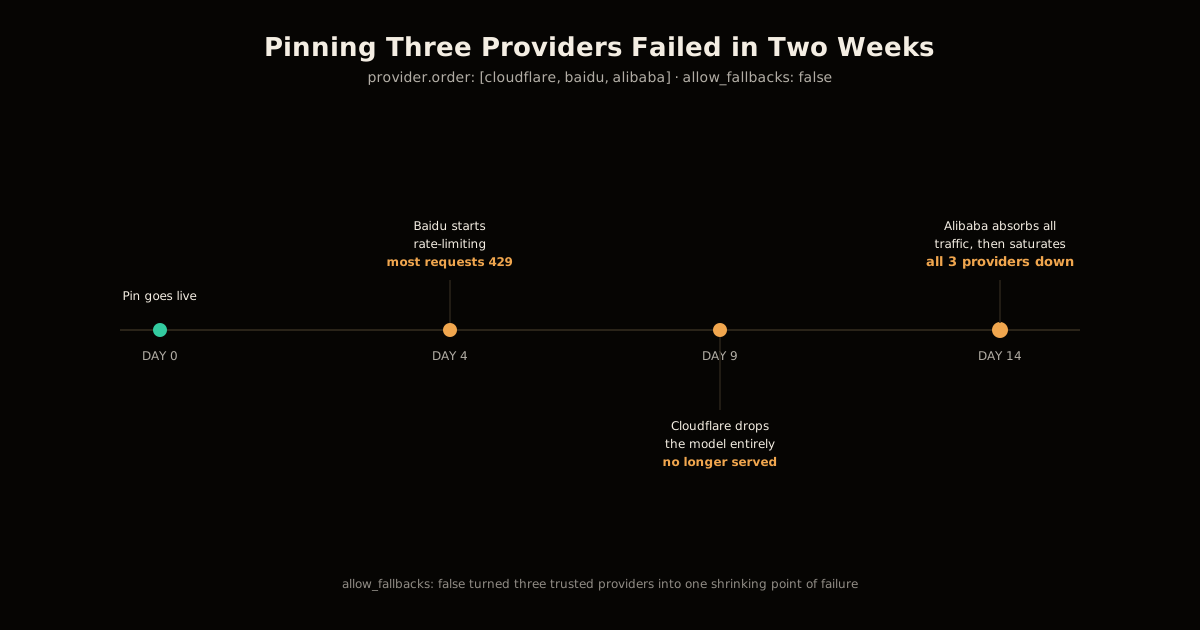
No fixed combination of providers is stable for long, because provider capacity, model availability, and rate limits all shift independently and without much notice. A shortlist expresses a real preference — latency, cost, compliance — but allow_fallbacks: false turns that preference into a single point of failure with three names on it instead of one.
Frequently asked questions
Is OpenRouter reliable for production LLM traffic?
It’s reliable as a routing layer, but the reliability of any individual request depends entirely on which provider it lands on, and that varies request to request. Treat OpenRouter as infrastructure you configure and monitor, not a black box you can point traffic at and forget. The failures documented here come from a production deployment processing 18 million real messages, not synthetic testing.
Why does the same model give different answers through OpenRouter?
Because “the model” on OpenRouter is the weights, but “the provider” is whoever is actually hosting and serving those weights, and each provider runs different inference software, different quantization, and different default settings. Two providers serving the identical checkpoint can produce different tool-call formatting, different reasoning-token counts, and even different vision support, because none of that behavior is part of the weights themselves.
Should I pin OpenRouter to specific trusted providers?
Pin a shortlist for latency or compliance reasons if you must, but never disable fallbacks entirely. A real-world attempt to pin three named providers with allow_fallbacks: false fell apart within two weeks — one provider rate-limited every request, a second stopped serving the model at all, and the third absorbed all the redirected traffic until it rate-limited too.
Does a 200 status code mean OpenRouter returned a real answer?
No. Providers have returned HTTP 200 with content: null, no tool call, and sometimes not even a usage object, which only tells you the request was accepted and served, not that there’s a usable answer inside it. One provider hit this on 92% of completions for roughly a fifth of its traffic during a documented incident, so treat null content with no tool call as a failure state that needs a retry, not a successful response.
Can I trust a provider’s declared quantization level (fp8, fp4, bf16)?
Not as a proxy for quality. A provider declaring fp4 has scored higher on the same benchmark than a different provider declaring fp8 on the identical model, which inverts the intuition that fewer bits means a dumber model. Filter and rank providers by their actual measured benchmark score for your workload, not by the precision label they publish.
How do I stop OpenRouter from silently dropping tool calls?
Some providers fail to parse a model’s tool-call syntax and return it as literal text in the message content instead of a structured tool call, and this happens inconsistently across providers for the same model. Add a client-side parser that can recognize and recover tool-call-shaped text even when the provider didn’t wrap it correctly, rather than assuming every 200 response with content contains prose.
Sources
- Mo Moustafa — So you want to use OpenRouter?, the production incident report this post is built on, drawn from 18 million messages of real traffic.
- Simon Willison — linkblog coverage of the same post, summarizing the core model-versus-provider distinction.
- OpenRouter — Provider routing documentation, the reference for
order,allow_fallbacks,only,quantizations, andsort.
The through-line across all ten bugs is the same one that shows up anywhere you outsource inference: a routing layer can hide which backend served a request, but it can’t make every backend behave identically, and treating “one endpoint” as “one system” is what actually breaks in production. If you’re weighing OpenRouter against running weights yourself, tuning vLLM’s own throughput flags is the self-hosted version of the same tradeoff, and patching CVE-2025-9141 in a self-hosted vLLM deployment shows the maintenance cost you take on in exchange for controlling the serving stack yourself.
Before you ship any router-selected model, verifying a vendor’s benchmark claims against your own harness applies directly to the leaderboard-trusting mistake in bug #1 and #4 above, and the DeepSeek V4 Flash 0731 benchmark numbers themselves are the first-party baseline Moustafa’s provider comparisons were measured against. If your architecture already spends real effort trimming what you send a model, cutting tool-call cost with prompt rewrites is worth doing on top of picking a provider that formats tool calls correctly in the first place — one fixes cost, the other fixes correctness, and you need both. For more patterns like this, see the LLM engineering topic hub.
Frequently asked questions
Google Search · Preferred sources
Prefer this site on Google
If you already read this writing, add umesh-malik.com as a Preferred Source. Google can then highlight it with a preferred badge in Top Stories, AI Overviews, and AI Mode — for you, not as a site-wide ranking boost.
Related Articles

LLM Engineering
How to Audit an LLM Judge: Right Verdict, Wrong Reason
How to audit an LLM judge in six steps: catch right-verdict, wrong-reason errors and set a mean-minus-2σ drift floor, using Netflix's rubric loop.

LLM Engineering
How to Stop an LLM Saying As a Language Model: It's the Template
How to stop an LLM saying as a language model: it's the chat template, not the weights. Disclaimers drop 17 points without one — the fix, and its limits.

LLM Engineering
How to Fix Multi-Agent LLM Latency: Text Handoffs Cost 2.5x
Multi-agent LLM latency isn't random: an ICLR 2026 paper measured the cause — text handoffs cost 2.5x more time and 3-5% less accuracy than skipping text.
Keep reading
Get new posts on AI, Claude Code & LLMs
New deep-dives on AI engineering, Claude Code, and developer tooling — follow along however you prefer.
About the Author

Software engineer writing about AI, Claude Code, LLMs, OpenAI, Anthropic, and developer tooling. 5+ years building production systems at Expedia Group, Tekion, and BYJU'S.