Vercel Deployment Retention Policy: What Oct 23 Deletes
Set your Vercel deployment retention policy before October 23 deletes old builds. The 30-day change, $0.10/GB-month math, and what rollback loses.

TL;DR A Vercel deployment retention policy decides how long old builds are kept, and Vercel will bill Pro teams $0.10 per GB-month to store them. Per its changelog, deployments older than 30 days start being deleted on October 23 unless you opt out, so set the policy per project in Settings, Security before then, because the Pro defaults (180 days for previews, 1 year for production) are far longer than 30 days. A deleted deployment returns a 410 and can be restored for 30 days, so choose the window by how far back you ever roll back.
A Vercel deployment retention policy is a per-project (or team-default) setting that sets how long Canceled, Errored, Pre-Production and Production deployments are kept before Vercel automatically deletes them.
If your team deploys on every push, that changelog is a real deadline, not an FYI. The page Vercel published is short, and it leaves out a start date for billing and any included allowance. This post pulls the facts out of it and the retention docs, then walks through the settings.
What does Vercel’s deployment storage change actually do?
It puts a price on every retained deployment and shortens how long Vercel keeps them. Per the changelog, Deployment Storage and Functions Storage billing applies to all Pro teams at $0.10 per GB-month, and the retention window becomes 30 days, with deployments older than that deleted starting October 23 unless you opt out. Settings that are already 30 days or shorter do not change.
The defaults before that change are what make the number matter. Vercel’s docs list these when no custom policy is set:
| Plan | Canceled | Errored | Pre-Production | Production |
|---|---|---|---|---|
| Hobby | 30 days | 30 days | 30 days | 30 days |
| Pro and Enterprise | 30 days | 90 days | 180 days | 1 year |
Preview deployments are the bulk of the volume on an active team, and on Pro they were kept for 180 days. That is six times the new 30-day window.
What does a 30-day retention window cost versus the default?
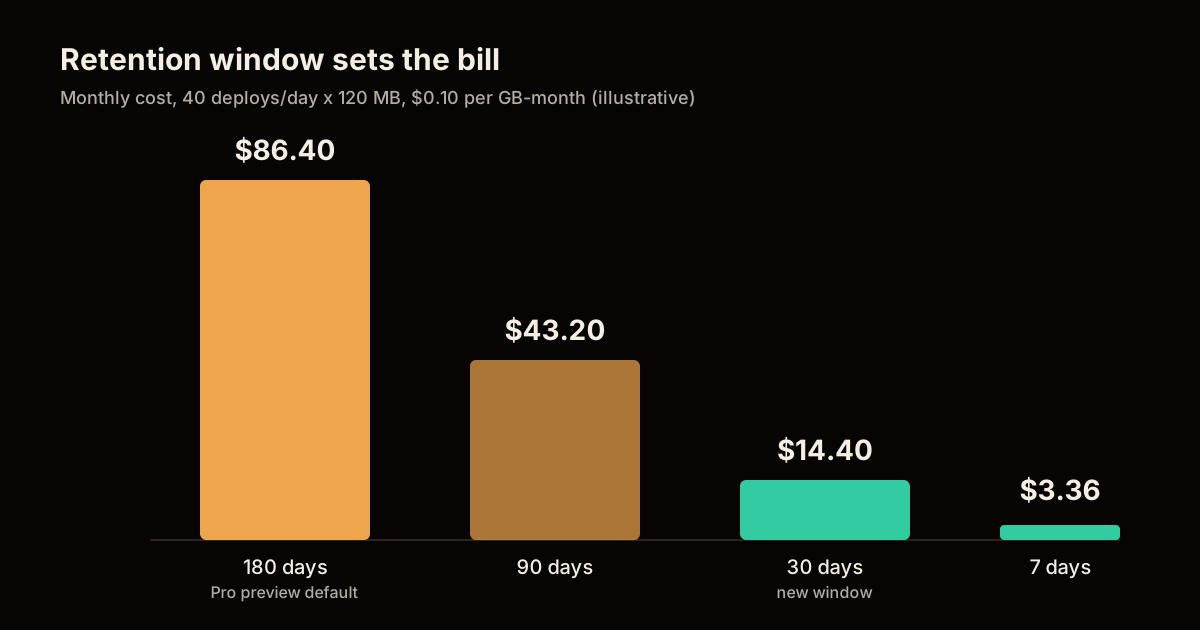
Storage scales linearly with retention, so cutting the window cuts the bill in proportion. The arithmetic below is mine, not Vercel’s. It assumes 40 deployments a day (a busy team with agents opening pull requests), 120 MB of stored output per deployment, and it ignores the protected exceptions covered later, so treat it as the shape of the curve and not a quote.
| Pre-Production retention | Deployments held | Stored output | Cost at $0.10/GB-month |
|---|---|---|---|
| 180 days (Pro default) | 7,200 | 864 GB | $86.40 |
| 90 days | 3,600 | 432 GB | $43.20 |
| 30 days | 1,200 | 144 GB | $14.40 |
| 7 days | 280 | 33.6 GB | $3.36 |
Replace 40 and 120 MB with your own numbers from the Usage page. The ratio holds even when the totals do not: 180 days costs six times 30 days.
How to set a Vercel deployment retention policy in 5 steps
Vercel’s storage optimization guide starts with retention because it saves money with no code change. Do this per project, from most to least expensive:
Rank projects by cost. Open Usage for the team, select Deployment Storage, set the last 30 days and switch to Projects. Repeat for Functions Storage. Record the totals so you can compare afterwards.
Decide how far back you really roll back. Pre-Production needs the length of your review cycle. Production needs your incident and audit window. Canceled and Errored only need enough time to debug a build.
Open the project policy. Go to Settings, Security, then Deployment Retention Policy, choose a duration for each state and save. This applies to that project only.
Set the team default carefully. In Team Settings, Security & Privacy, the same section sets the default for new projects. Leave Apply this policy to all existing projects cleared unless you mean to overwrite every project, which also replaces policies you set per project.
Verify. Confirm the policy with
vercel list [project-name](the docs show a--policyoption for viewing it), then compare Usage for the same team and date range after it refreshes.
Retention only changes stored history over time. To shrink what each new deployment stores, use the Resources tab on a Preview deployment to find large static files and big Function bundles, and move user-uploaded or frequently changing files to Vercel Blob.
What breaks if a deployment is deleted?
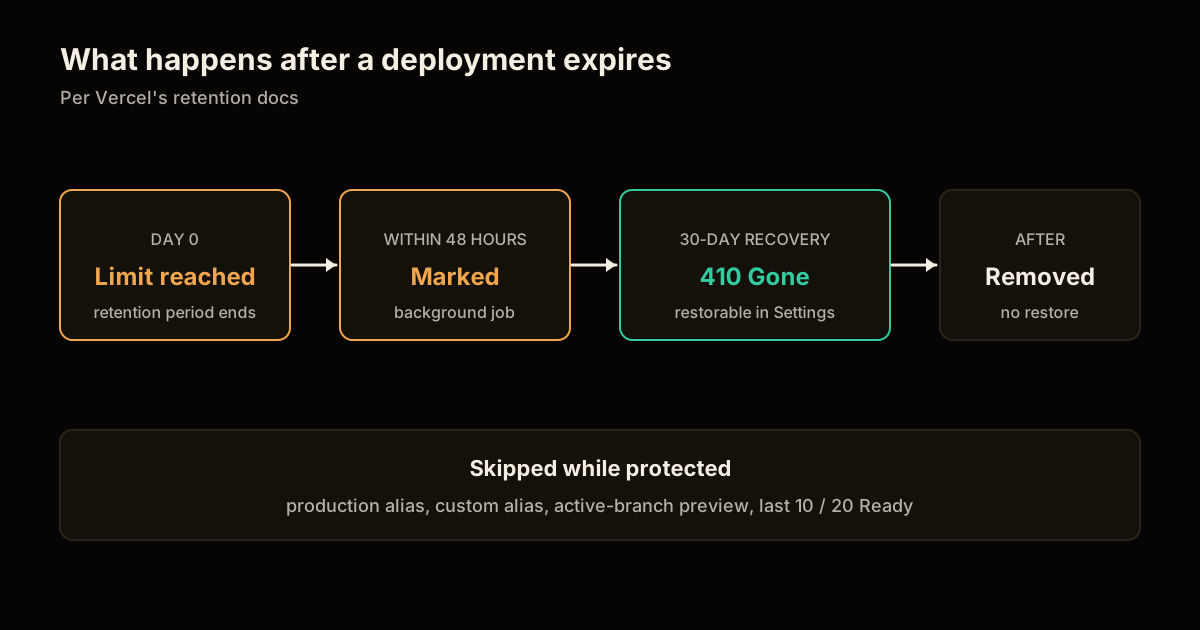
The old URL returns a 410 and you cannot instant-roll-back to it. Per the docs, an expired deployment enters a recovery period, which is 30 days for successfully built deployments. In that window visitors get a 410 and you can restore it from Settings, Security, Recently Deleted. After the window closes the resources are permanently removed and restore is no longer possible.
Two timing details are worth knowing. A background job usually marks an expired deployment for deletion within 48 hours of reaching its limit, so deletions are not instant on the minute it expires. And a deployment protected by an exception when first evaluated is skipped, then re-evaluated later, which the docs say can take up to 30 days.
Protected deployments never expire while an exception holds:
| Exception | Pro and Enterprise |
|---|---|
| Most recent deployments created | Last 10 |
| Production deployments in Ready state | Last 20 |
| Non-production deployments in Ready state | Last 20 |
| Production alias, or custom environment branch alias | Always kept |
| Non-production with a custom alias | Always kept |
| Latest preview of an active Git branch | Always kept |
This table explains why storage can stay high after you shorten retention. A stale pull request keeps its latest preview forever, and so does a leftover custom alias. Closing dead branches is a storage fix.
What should you do this week?
Do the opt-out decision deliberately, not by default. The changelog gives a deadline of October 23 for the deletion, so the order that protects you is: first list projects where you do roll back past 30 days (usually production), set those explicitly, then shorten Pre-Production everywhere else. Do not shorten production below your audit window just because the bill points at it.
Then check why volume is high at all. Vercel’s guide lists duplicate triggers, deploy hooks, CI jobs and coding-agent activity as reasons deployment counts jump. If you let agents open pull requests, agent-driven pull requests multiply previews, so pair a short Pre-Production window with a branch cleanup habit. The same cost discipline applies on other platforms, as in cutting S3 storage costs with lifecycle tiering.
If you are weighing whether to stay on Vercel at all, compare the framework trade-offs in SvelteKit vs Next.js, and for domains tied to your deployments, see the Vercel CLI DNS commands. Smaller output also helps users, since Core Web Vitals work usually shrinks bundles too. This site ships static files from Cloudflare instead, as the post on removing the Cloudflare beacon shows.
FAQ
When does Vercel start deleting old deployments? Vercel’s changelog says deployments older than 30 days will be deleted starting October 23 unless you opt out in your retention settings. Retention settings already at 30 days or shorter are not changed. Check your team’s email for the billing start date, since the changelog does not state one.
How much does Vercel deployment storage cost? Deployment Storage and Functions Storage are billed to Pro teams at $0.10 per GB-month. The changelog does not list an included allowance, so read your Usage page for what you are charged.
Can I restore a deployment after Vercel deletes it? Yes, for a limited time. The docs describe a 30-day recovery period for successfully built deployments, during which the old URL returns a 410. Restore it from Settings, Security, Recently Deleted before the resources are permanently removed.
Which deployments does a retention policy never delete? Anything with a production alias, a custom-environment branch alias, or a custom alias on a non-production deployment, plus the latest preview of every active Git branch. On Pro it also keeps the last 10 created and the last 20 Ready in each of production and non-production.
Does a shorter retention window make my builds smaller? No. Retention only lowers how much history is stored over time. Shrinking each deployment needs trimmed static output, large assets moved to Vercel Blob, and slimmer Function bundles.
Sources
Frequently asked questions
Google Search · Preferred sources
Prefer this site on Google
If you already read this writing, add umesh-malik.com as a Preferred Source. Google can then highlight it with a preferred badge in Top Stories, AI Overviews, and AI Mode — for you, not as a site-wide ranking boost.
Related Articles

Web Engineering
Fix Performance Regressions With a Benchmark Ratchet (3.1x, 0 Breaks)
Fix performance regressions with a benchmark ratchet that fails CI on regression and locks in wins. How Claude shipped 3,000 changes at 3.1x, zero breaks.

Web Engineering
How to Reduce S3 Storage Costs: 3 Levers That Still Work
How to reduce S3 storage costs when S3 Standard has stayed $0.023/GB-month since 2016: storage-class tiering, free-egress R2, and Glacier's deletion-fee traps.

Web Engineering
Is Your Postgres Migration Safe? Catch the Table Lock First
Is your Postgres migration safe? Not if it takes ACCESS EXCLUSIVE on a hot table. The lock table and 5-step check that catches it before you run it.
Keep reading
Get new posts on AI, Claude Code & LLMs
New deep-dives on AI engineering, Claude Code, and developer tooling — follow along however you prefer.
About the Author

Software engineer writing about AI, Claude Code, LLMs, OpenAI, Anthropic, and developer tooling. 5+ years building production systems at Expedia Group, Tekion, and BYJU'S.