How to Audit rel=next Pagination Headers: Firefox Fetches Page 2
How to audit rel=next pagination headers in 5 curl-and-log steps. Google ignores them, Firefox prefetches page 2, and one rule decides whether to keep them.

TL;DR — How to audit rel=next pagination headers: check every paginated HTML response for a Link: <...>; rel="next" header or a <link rel="next"> tag, then count Sec-Purpose: prefetch hits in your logs. Google has ignored rel=next since 2019, but Firefox still prefetches the next page on every view, so on HTML pages the hint mostly costs you renders and bandwidth. Keep crawlable <a href> next links and self-referencing canonicals, and keep the Link header only on JSON APIs.
rel=next is a link relation, defined in HTML and usable as an HTTP Link header, that says “this document is the next one in a series.” It started life as a pagination hint for search engines. In 2026 its main observable effect on a normal site is that one browser fetches page 2 before anyone asks for it.
What Does rel=next Actually Do in 2026?
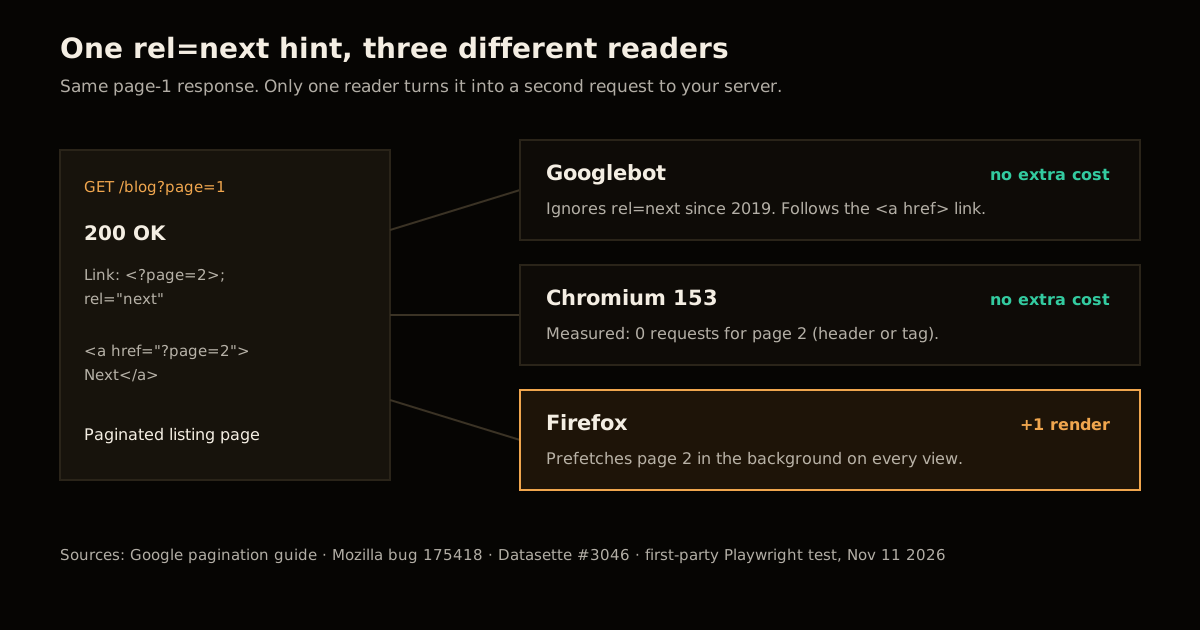
Three consumers read rel=next, and they disagree about what it means.
Google ignores it. In March 2019 Google said it had evaluated its indexing signals and retired rel=next and rel=prev, and that it had not used them for years before that. Its current pagination and incremental loading guide says Google “no longer uses these tags, although these links may still be used by other search engines.” What Google wants instead is plain: link each page to the next with <a href> and give each page its own canonical URL.
Firefox prefetches it. Firefox treats rel=next as a prefetch hint and fetches the target in the background once the current page is idle. Simon Willison noticed this on November 7, 2026, when Datasette’s table pages sent a Link header with rel="next" and Firefox quietly downloaded the next ~80 KB page of rows for every visitor. The fix landed as datasette issue #3046, which dropped the header from HTML pages. The Firefox side of it is Mozilla bug 175418, “Limit prefetching of rel=next documents”, filed about 24 years ago and still open at P5.
Chromium does nothing with it. I checked rather than assumed. A small Node server served three variants of page 1 to Playwright’s Chromium 153, waited three seconds on each, and logged every request:
| Page 1 advertises page 2 with | Requests for page 2 | Sec-Purpose sent |
|---|---|---|
HTTP header Link: </p?page=2>; rel="next" | 0 | — |
<link rel="next" href="..."> in <head> | 0 | — |
<link rel="prefetch" href="..."> in <head> | 1 | prefetch |
So the same markup is a no-op for Google, a no-op for Chromium, and a background page load for Firefox. That asymmetry is why it hides so well: if your team tests in Chrome, nobody ever sees the request.
If you already audit how scripts change what a crawler renders, the document.currentScript inline rendering audit is the same exercise one layer down: the browser doing something your view-source never shows.
How Much Does rel=next Prefetching Cost?
The cost is a rendered page per Firefox view of page 1, minus the views where the visitor really clicks Next. Those clicks are the only case where the prefetch pays off, because page 2 then loads from cache.
The formula is simple enough to run on your own numbers:
wasted renders = page-1 views × Firefox share × (1 − next-click rate)
wasted bytes   = wasted renders × page-2 HTML size
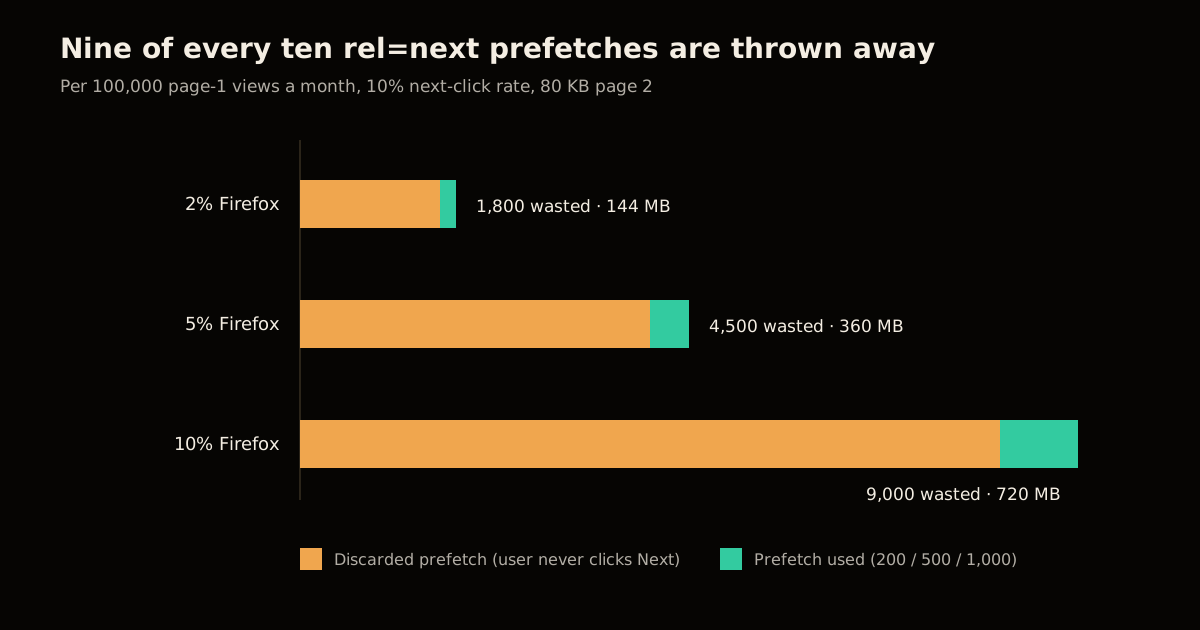
Here it is for 100,000 monthly views of paginated listing pages, Datasette’s ~80 KB page size, and a 10% next-click rate. The Firefox share is the variable you should replace with your own analytics, so the table shows a range rather than a guess:
| Firefox share of page-1 views | Wasted page-2 renders / month | Wasted HTML / month | Useful prefetches |
|---|---|---|---|
| 2% | 1,800 | 144 MB | 200 |
| 5% | 4,500 | 360 MB | 500 |
| 10% | 9,000 | 720 MB | 1,000 |
The ratio is the part that does not change: at a 10% click-through, nine of every ten prefetches are thrown away. Bandwidth is the cheap half. The expensive half is the server work, because a paginated listing page is usually a database query with an OFFSET, which gets slower the deeper the page. A visitor on page 40 makes you run the page 41 query too.
On metered infrastructure that becomes a bill. This site’s own Worker once ran out of its daily request allowance from background calls nobody looked at, which is why it now serves everything static and keeps the Worker to /mcp and /api. Background prefetches are the same shape of problem: requests that scale with traffic and deliver nothing to most users. The Cloudflare origin range requests write-up covers the CDN-side version of the same lesson, where an edge setting quietly multiplied origin traffic.
How to Audit rel=next Pagination Headers in 5 Steps
Run this against every template that paginates: blog archives, category and tag pages, search results, product listings, and any table view.
Check the response headers. Request page 1 of each paginated template and look for a
Linkheader withrel="next":curl -sI "https://example.com/blog?page=1" | grep -i '^link:'Frameworks and CMS plugins add this without asking, so check the live response, not the source code.
Check the HTML head. The tag form triggers the same Firefox behaviour as the header:
curl -s "https://example.com/blog?page=1" | grep -io '<link[^>]*rel="?(next|prev)[^>]*>'Measure prefetch traffic in your logs. Log the
Sec-Purposerequest header and count requests where it equalsprefetch. Current Firefox and Chromium sendSec-Purpose: prefetch; Firefox before version 115 sent the non-standardX-Moz: prefetch, so match both on older logs. Divide by total requests to the paginated paths to get your real waste ratio instead of the table’s estimate.Remove rel=next from HTML responses only. Drop the header and the
<link rel="next">tag from pages browsers navigate to. Leave theLinkheader on JSON API responses, where clients use it to page through results and browsers never prefetch from afetch()response. Datasette made exactly this split.Confirm the replacement signals are in place. Each page must link to the next with a visible
<a href="?page=2">that a crawler can follow, and carry a self-referencing canonical. Re-run steps 1 and 2 to confirm the hint is gone, then spot-check the<a href>link:curl -s "https://example.com/blog?page=1" | grep -o '<link rel="canonical"[^>]*>' curl -s "https://example.com/blog?page=1" | grep -o 'href="[^"]*page=2[^"]*"'
If you want a page that is meant to be prefetched, say so on purpose. <link rel="prefetch"> or the Speculation Rules API both mark the request with Sec-Purpose: prefetch, work in Chromium, and can be scoped to links a user is actually hovering. That is a decision you make per link, not a side effect of a pagination hint.
When Should You Keep rel=next?
Google’s own wording leaves a door open: other search engines “may still” use the tags. That is the only argument for keeping them on HTML, and it needs evidence before it outweighs a measured cost.
| Situation | rel=next on HTML | What to do |
|---|---|---|
| Paginated listing, Google is your main source of search traffic | Remove | <a href> next links + self-canonical per page |
| JSON or REST API pagination | Keep, as Link header | It is the client’s paging contract (RFC 8288) |
| Another engine sends meaningful traffic and you have seen it use rel=next | Keep, measure | Watch the Sec-Purpose: prefetch share every month |
| Article split across pages that readers really do read in order | Optional | A high next-click rate makes the prefetch useful, not wasted |
| Infinite scroll with no paginated URLs | Not applicable | Add paginated URLs first; crawlers do not scroll |
The middle row is the one to be honest about. “Some engine might use it” is not evidence. Check your search traffic by referrer, and if a non-Google engine is a rounding error, the hint is costing you more than it earns.
The same logic applies to every crawler-facing hint on a site. Before you keep one, ask who reads it and what it costs when they do. I went through that for bot rules in blocking AI training without losing search visibility and for spoofable user agents in verifying AI crawler IPs instead of user agents. For the wider picture of what still moves search and AI-search traffic, see the 2026 GEO playbook and the AI search topic hub.
What Breaks If You Remove It Wrong?
Removing a hint is low risk. Removing the wrong thing alongside it is not.
| Mistake | What breaks | How to catch it |
|---|---|---|
Deleting the visible Next <a href> along with the header | Google can no longer reach page 2+, and deep items drop out of the index | Step 5 grep for the page-2 href |
| Canonicalizing pages 2+ to page 1 | Google treats deep pages as duplicates and drops their items | Each page’s canonical must be its own URL |
Stripping Link from API responses | API clients stop paging after the first page | Run your API client’s pagination test |
noindex on pages 2+ to “save crawl budget” | Items only linked from deep pages lose their discovery path | Keep pages indexable; noindex only filter and sort variants |
Blocking prefetch requests with a 4xx instead of removing the hint | Firefox users can cache an error for a page they may visit | Remove the hint; don’t fight the request |
Google’s guidance draws the noindex line in the same place: use it for filter and sort variations of a list, not for the pages of the list itself.
FAQ
Does Google still use rel=next and rel=prev for pagination?
No. Google announced in March 2019 that it no longer uses rel=next and rel=prev as an indexing signal, and its pagination documentation now says other search engines may still read them. Google discovers paginated pages through ordinary crawlable links, so each page needs a real <a href> link to the next one.
Does Firefox prefetch pages linked with rel=next?
Yes. Firefox treats a rel=next relation, in an HTML link element or an HTTP Link header, as a prefetch hint and fetches the target in the background. Mozilla bug 175418, filed about 24 years ago, asks to limit this and is still open. Datasette removed its rel=next header from HTML pages in November 2026 because of the wasted requests.
Does Chrome prefetch rel=next links?
Not in our test. Chromium 153 made zero requests for a page 2 advertised with a rel=next Link header or a rel=next link element. The same browser fetched page 2 immediately for rel=prefetch and sent Sec-Purpose: prefetch with it.
How do I detect prefetch requests in my server logs?
Log the Sec-Purpose request header and count requests where it equals prefetch. Current Firefox and Chromium send Sec-Purpose: prefetch; Firefox releases before 115 sent the non-standard X-Moz: prefetch instead, so check both on older traffic.
Should I remove rel=next from JSON API responses too?
No. API clients read the Link header to find the next page, as RFC 8288 web linking intends, and browsers do not prefetch from the Link header of a fetch or XHR response. The prefetch cost only applies to HTML documents a browser navigates to, so scope the removal to HTML.
What canonical should paginated pages use?
Each page should carry its own canonical URL. Google’s pagination guidance says not to use the first page of the sequence as the canonical for later pages, because that hides the items on pages 2 and beyond from indexing.
Sources
- Google Search Central, Pagination, incremental page loading, and their impact on Google Search
- Datasette, issue #3046: Don’t serve link: rel=next HTTP headers to Firefox for HTML pages
- Mozilla Bugzilla, Bug 175418: Limit prefetching of rel=“next” documents
- Simon Willison, Don’t serve link: rel=next HTTP headers to Firefox
- MDN, rel=prefetch and Sec-Purpose
- First-party test: Playwright with Chromium 153.0.8010.12 against a local Node server, three page-1 variants, 3-second idle wait each, every request logged with its
Sec-PurposeandSec-Fetch-Destheaders (November 11, 2026)
Frequently asked questions
Google Search · Preferred sources
Prefer this site on Google
If you already read this writing, add umesh-malik.com as a Preferred Source. Google can then highlight it with a preferred badge in Top Stories, AI Overviews, and AI Mode — for you, not as a site-wide ranking boost.
Related Articles

Web Engineering
How to Stop Cloudflare Blocking Googlebot: The AI Training Trap
How to stop Cloudflare blocking Googlebot: its AI Training block also refuses Googlebot, Bingbot and Applebot. 6 steps to opt out of training, keep Search.

Web Engineering
Set Up Cloudflare Origin Range Requests: End 128 MiB Fetches
Set up Cloudflare Origin Range Requests with one Cache Rule. Why a 4 MiB seek cost 68 MiB of origin traffic on a 64 MiB range size, and a script to verify 206s.

Web Engineering
Use Postgres for everything in production: 5 swaps, 1 cliff
Use Postgres for everything and four of the five swaps hold. The queue is the one that death-spirals: 383,000 dead tuples and 300ms locks at 800 jobs/sec.
Keep reading
Get new posts on AI, Claude Code & LLMs
New deep-dives on AI engineering, Claude Code, and developer tooling — follow along however you prefer.
About the Author

Software engineer writing about AI, Claude Code, LLMs, OpenAI, Anthropic, and developer tooling. 5+ years building production systems at Expedia Group, Tekion, and BYJU'S.