How to Stop Cloudflare Blocking Googlebot: The AI Training Trap
How to stop Cloudflare blocking Googlebot: its AI Training block also refuses Googlebot, Bingbot and Applebot. 6 steps to opt out of training, keep Search.

TL;DR — How to stop Cloudflare blocking Googlebot: set the Training policy in Cloudflare’s AI Crawler and Agent access policies so multi-purpose crawlers are not blocked, then opt out of AI training in robots.txt with Google-Extended and Applebot-Extended instead. Cloudflare files Googlebot, Bingbot and Applebot as Search plus Training, and the most restrictive rule wins, so an edge Training block becomes a Googlebot block. Google drops indexed URLs that keep returning 403, so verify with a URL Inspection live test, not a spoofed user agent.
The AI Training toggle trap is what happens when a site owner blocks “AI training” at the Cloudflare edge and, without touching anything labeled Search, cuts off the crawler that sends most of their organic traffic. Nothing in the robots.txt changes, the site loads fine in a browser, and the first symptom is a Search Console report full of 403s.
Why Does Cloudflare’s Training Block Hit Googlebot?
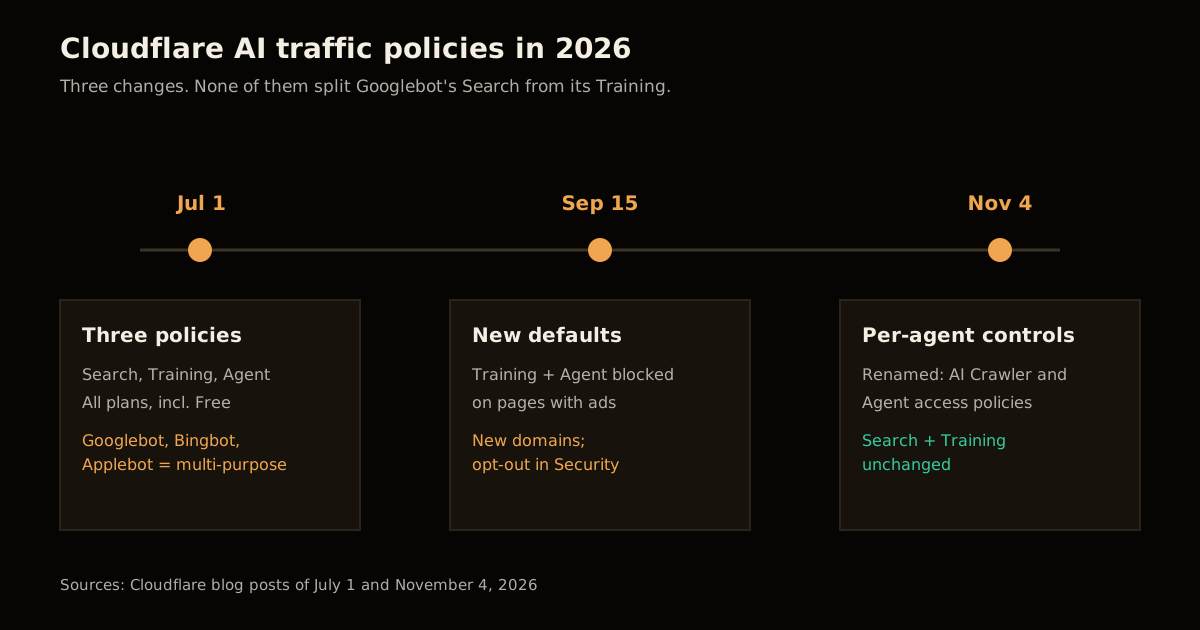
Cloudflare’s July 1, 2026 announcement split AI traffic into three use cases, each with its own policy, available on every plan including Free:
- Search — crawlers that index content to answer later queries. Allowed by default.
- Training — crawlers that collect content to train or fine-tune models.
- Agent — bots acting for a person in real time, such as chat fetchers and browser-use agents.
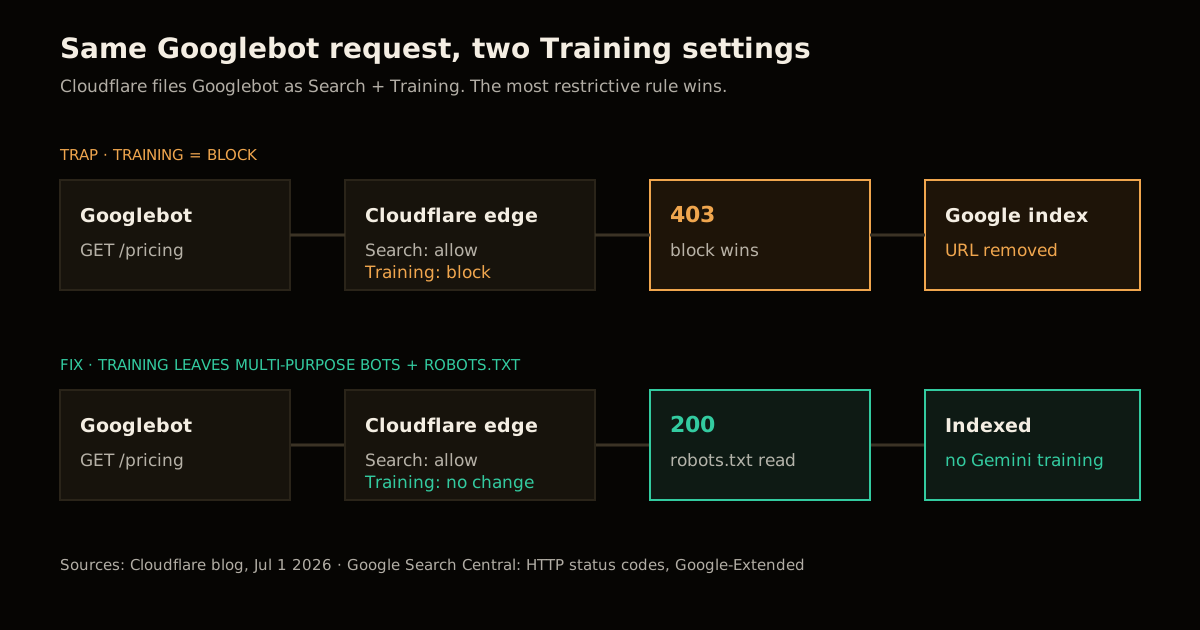
The catch is the crawlers that do more than one job. Cloudflare’s own wording is that “multi-purpose crawlers such as Googlebot, Applebot, and BingBot will be blocked” for customers who choose to block Training, because the defaults are enforced by the most restrictive applicable rule. Googlebot is not a search crawler with an AI side project in this model. It is a Search and Training crawler, and a block on either purpose is a block on the bot.
Google is not going to split it for you. Its crawler documentation says Google-Extended “doesn’t have a separate HTTP request user agent string” and is used only as a robots.txt control. Every Google fetch for Search arrives as Googlebot. There is no second user agent for an edge rule to catch, which is why the edge can only see one thing: a crawler that does Training, about to be blocked.
The November 4 update, See the agents, set the terms, renamed the setting to AI Crawler and Agent access policies and added per-agent overrides for personal agents: Allow (do not block), Block on pages with ads, or Block. It says the Search and Training policies “stay as they are”, so the trap is still there.
What Breaks If You Get This Wrong?
The cost is not a ranking dip. It is removal. Google’s HTTP status code documentation is blunt: “URLs that are already indexed and return a 4xx status code are removed from the index”, and every 4xx except 429 is treated the same way. A 403 from a bot policy is no different to Google than a 403 from a broken permissions config.
It also does not slow anything down to warn you. The same page says 4xx codes other than 429 “have no effect on crawl rate”, so Googlebot keeps asking, keeps getting refused, and keeps dropping pages. If you wanted to throttle Google, 429 or 503 is the signal. If you wanted to stop Gemini training, a 403 at the edge is the wrong tool entirely.
The blast radius covers three engines at once, because Cloudflare names Bingbot and Applebot in the same multi-purpose list. One toggle meant for model training takes out Google Search, Bing (and everything built on Bing’s index) and Spotlight, Siri and Safari suggestions.
There is one more reason to check rather than assume. The July post also set new defaults from September 15, 2026: Training and Agent blocked by default on pages that display ads, for new domains, with an opt-out in Security Settings. The post does not say how Cloudflare decides a page has ads. If your domain was added after that date and you answered yes to the ads question during onboarding, read your Training policy before you trust your traffic graph.
How to Stop Cloudflare Blocking Googlebot in 6 Steps
This keeps every search crawler in and still opts you out of AI training where the search engines actually let you.
Read the current Training policy. In the Cloudflare dashboard open the zone, go to Security → Settings, and find AI Crawler and Agent access policies on the bot traffic tab. Write down the Search, Training and Agents values before you change anything.
Set Search to allow. It is allowed by default. If someone changed it, change it back.
Stop the Training block from catching multi-purpose crawlers. Choose the Training option that leaves crawlers that also do Search unchanged (the July post describes an opt-out that keeps no changes for Training crawlers that also crawl for Search), or allow Training outright. A pure training crawler such as one in the
AI Crawlerverified category is the only kind you can safely block at the edge.Move the training opt-out into robots.txt. Add the two tokens the search engines document for exactly this:
User-agent: Google-Extended Disallow: / User-agent: Applebot-Extended Disallow: / User-agent: * Content-Signal: search=yes, ai-train=no Allow: /Content-Signalstates the preference for everyone else. Cloudflare’s own post notes these values express a preference and do not enforce a block, which is the point: you are declaring terms without refusing the crawler that indexes you.Verify from Cloudflare’s side. In Security Analytics or Security Events, filter on the verified bot category
Search Engine Crawler(the WAF field iscf.verified_bot_category) and confirm zero blocked or challenged requests over the last 24 hours. Then checkAI Crawlerto confirm the pure training bots are still being stopped, if that is what you want.Verify from Google’s side. In Search Console, run URL Inspection → Test live URL on a few important pages; the fetch comes from Google, so a Cloudflare block shows up as a failed fetch. Then open Settings → Crawl stats → By response and watch the 403 share fall back toward zero over the next few days.
Do not use curl -A "Googlebot" from your laptop as the test. Cloudflare decides a request is a verified bot from more than its user agent, so a spoofed Googlebot from your IP is just another unverified client and tells you nothing about how the real one is treated. The same logic is why verifying AI crawler IPs instead of trusting the user agent matters on your own origin.
Which Training Opt-Out Keeps You in Google Search?
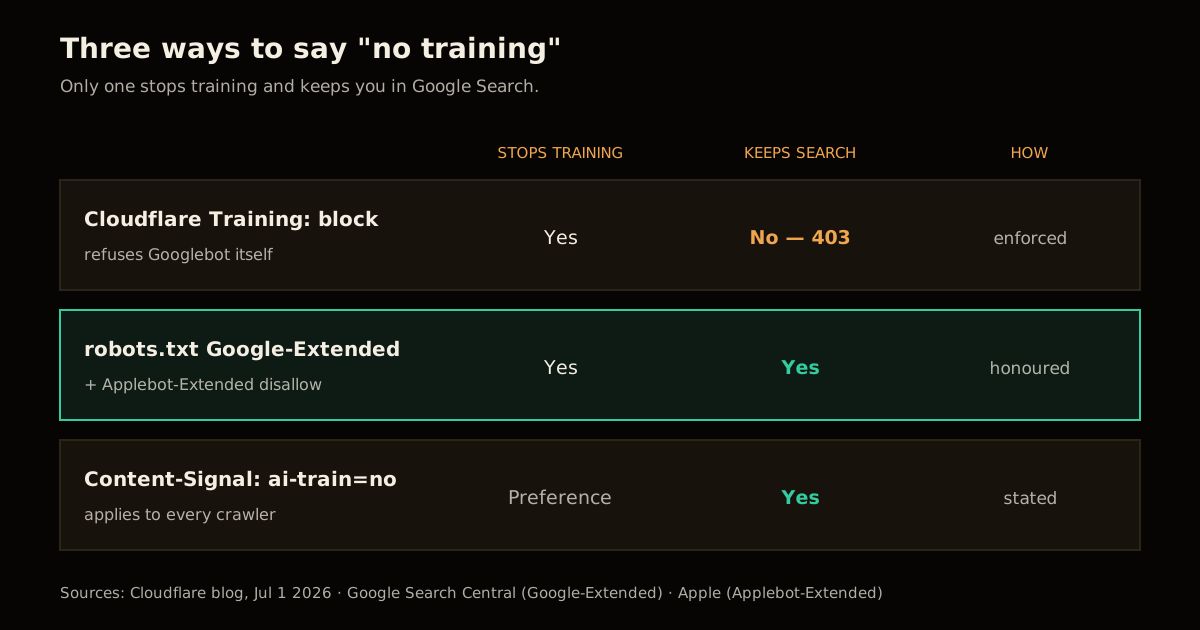
There are three ways to say “no training” on a Cloudflare zone, and only two of them leave Search alone.
| Method | Stops Google training | Stops Apple training | Keeps Google Search | Enforced or stated |
|---|---|---|---|---|
| Cloudflare Training policy set to block | Yes, by blocking Googlebot | Yes, by blocking Applebot | No — Googlebot gets a 4xx | Enforced at the edge |
robots.txt Google-Extended / Applebot-Extended disallow | Yes | Yes | Yes | Honoured by Google and Apple |
Content-Signal: ai-train=no | Preference only | Preference only | Yes | Stated, not enforced |
The robots.txt tokens are the only option that does what most people meant by the toggle. Google says Google-Extended “does not impact a site’s inclusion in Google Search nor is it used as a ranking signal”, and it covers both training future Gemini models and grounding. Apple’s Applebot-Extended documentation says the token “does not crawl webpages”, that pages disallowing it “can still be included in search results”, and that the rule is not used in ranking.
I covered the robots.txt side of this in more depth in how to block AI training without losing search visibility, where Cloudflare’s Bot Preference Sync writes these lines for you. The edge policy is the part that post could not see: a correct robots.txt does nothing for you if the request never reaches it.
When Should You Block at the Edge Instead?
Edge blocks are still the right tool, just not for multi-purpose crawlers.
| Situation | Edge policy | robots.txt |
|---|---|---|
| You want Search traffic and no AI training | Training: leave multi-purpose crawlers unchanged | Disallow Google-Extended, Applebot-Extended |
| A training-only crawler ignores robots.txt | Block it (category AI Crawler) | Keep the disallow as your stated terms |
| Ad-funded pages lose value to agents that skip ads | Agents: Block on pages with ads, then Allow the agents you trust | Not needed — agents act for a live user |
| You do not care about search at all (internal docs, staging) | Block everything | Disallow: / |
The per-agent controls are the genuinely new lever from November. A publisher can block agents on ad-supported pages while allowing the one assistant that sends real readers, which is the same trade I looked at in ads for AI agents and markdown crawlers. None of it needs to touch Search or Training.
The Practical Upshot
Treat “block AI training” as a robots.txt decision and “block a bot” as an edge decision, and never let the second one stand in for the first. Google and Apple both built a separate training token precisely so publishers would not have to choose between training and search; Cloudflare’s taxonomy is honest that the crawler itself does both, so the edge cannot make that distinction for you.
If you are tidying the rest of your crawl surface while you are in there, the same audit habit applies to rel=next pagination headers and to scoping how ChatGPT Search sees your site. More on how AI engines read and cite sites is collected on the AI search hub.
FAQ
Does blocking AI training in Cloudflare block Googlebot?
It can. Cloudflare’s July 2026 announcement classifies Googlebot, Applebot and Bingbot as multi-purpose crawlers that combine Search with Training, and says they will be blocked for customers who choose to block Training, because the most restrictive applicable rule wins. Blocked requests return an error status, and Google removes indexed URLs that keep returning a 4xx.
How do I opt out of Gemini training without leaving Google Search?
Disallow the Google-Extended token in robots.txt. Google documents that Google-Extended has no separate user agent string, is used only as a robots.txt control, and does not affect a site’s inclusion in Google Search or act as a ranking signal. Googlebot keeps crawling and indexing the page.
Can I block Google-Extended at the Cloudflare edge?
No. Google-Extended never sends a request of its own, so there is no Google-Extended user agent for a WAF rule or bot policy to match. Every Google fetch for Search arrives as Googlebot, which means the only place Google lets you separate training from search is the robots.txt token.
How do I check if Cloudflare is blocking Googlebot?
Run a live test in Search Console’s URL Inspection tool, which fetches the page from Google’s infrastructure, and check Crawl stats for a rise in 403 responses. On the Cloudflare side, filter Security Analytics or Security Events to the Search Engine Crawler verified bot category and look for blocked or challenged requests. Do not test with a spoofed Googlebot user agent from your own machine, because Cloudflare verifies bots by more than the user agent.
What do the new Cloudflare per-agent options do?
Since November 2026 the renamed AI Crawler and Agent access policies in Security Settings let you set an overall Agents policy and then override it per supported personal agent with Allow (do not block), Block on pages with ads, or Block. Cloudflare says the Search and Training policies are unchanged by that update.
Does Applebot-Extended work the same way as Google-Extended?
Yes, in effect. Apple says Applebot-Extended does not crawl webpages and only decides how data crawled by Applebot may be used for training its foundation models. Pages that disallow it can still appear in Spotlight, Siri and Safari results, and the rule is not used in ranking.
Sources
- Cloudflare, Your site, your rules: new AI traffic options for all customers (July 1, 2026)
- Cloudflare, See the agents, set the terms: new visibility and control for personal agents (November 4, 2026)
- Cloudflare Docs, Verified bot categories and
cf.verified_bot_category - Google Search Central, Google’s common crawlers (Google-Extended)
- Google Search Central, How HTTP status codes and network errors affect Google Search
- Apple, About Applebot (Applebot-Extended)
Frequently asked questions
Google Search · Preferred sources
Prefer this site on Google
If you already read this writing, add umesh-malik.com as a Preferred Source. Google can then highlight it with a preferred badge in Top Stories, AI Overviews, and AI Mode — for you, not as a site-wide ranking boost.
Related Articles

Web Engineering
How to Audit rel=next Pagination Headers: Firefox Fetches Page 2
How to audit rel=next pagination headers in 5 curl-and-log steps. Google ignores them, Firefox prefetches page 2, and one rule decides whether to keep them.

Web Engineering
How to Audit document.currentScript Inline Rendering for SEO
Is document.currentScript inline rendering safe for SEO? I measured what rendered, raw-HTML and Markdown readers see, plus CLS and the cost of 1,000 scripts.

Web Engineering
Post-Quantum TLS Migration: Stop Paying the 150ms Retry Tax
Post-quantum TLS migration checklist: X25519MLKEM768 cut Cloudflare's handshake retries from 52% to 3.7%. How to check, enable, and verify on your own origin.
Keep reading
Get new posts on AI, Claude Code & LLMs
New deep-dives on AI engineering, Claude Code, and developer tooling — follow along however you prefer.
About the Author

Software engineer writing about AI, Claude Code, LLMs, OpenAI, Anthropic, and developer tooling. 5+ years building production systems at Expedia Group, Tekion, and BYJU'S.