Vercel CLI DNS Commands: Manage Records Without the Dashboard
Use Vercel CLI DNS commands to manage records, renew domains, and pause projects from terminal. Automate with --json output.

Vercel’s dashboard is fine until you need to update DNS records for the third time in an hour, or you’re scripting a deployment pipeline, or an AI agent needs to provision a subdomain. The new Vercel CLI DNS commands bring that work to the terminal where it belongs — record updates, domain renewals, and project management, all scriptable.
The Vercel CLI now supports full DNS record management, domain renewal, project state control, and team membership — all with JSON output for scripts and agents. This isn’t a wrapper around the dashboard; it’s the same API the dashboard calls, exposed where you can actually automate it.
TL;DR
vercel dns updatemodifies records by ID — name, type, value, TTL, MX priority, SRV fields, and comments.vercel domains renewrenews on demand with price confirmation;vercel domains set-auto-renewtoggles automatic renewal.vercel project pause/resumehibernates projects;vercel project analyticsandvercel project speed-insightscontrol observability.- All commands support
--jsonfor structured output and--yesfor non-interactive confirmation. - Update with
npm i -g vercel@latest— the commands ship in the current release.
Why the CLI matters now
Three things changed that make CLI-first DNS management worth adopting.
AI agents need it. If you’re using Claude Code, Cursor, or any agent-driven workflow to manage infrastructure, those agents can’t click through a dashboard. They need commands that return structured data. Every new Vercel CLI command outputs JSON when you ask for it, which means an agent can parse the response, make decisions, and continue — no browser automation, no screen scraping, no brittle hacks.
Scripts can finally be self-contained. Before this, automating Vercel DNS meant calling the REST API directly, which meant managing authentication tokens, parsing responses, and handling errors yourself. The CLI handles all of that. A deployment script can now create a subdomain, wait for propagation, and run a health check without leaving bash.
Batch operations are faster. Updating 20 DNS records through the dashboard takes 20 page loads and 40 clicks. Updating them through a loop in the terminal takes one script and a few seconds.
The Vercel CLI DNS commands
Inspecting records
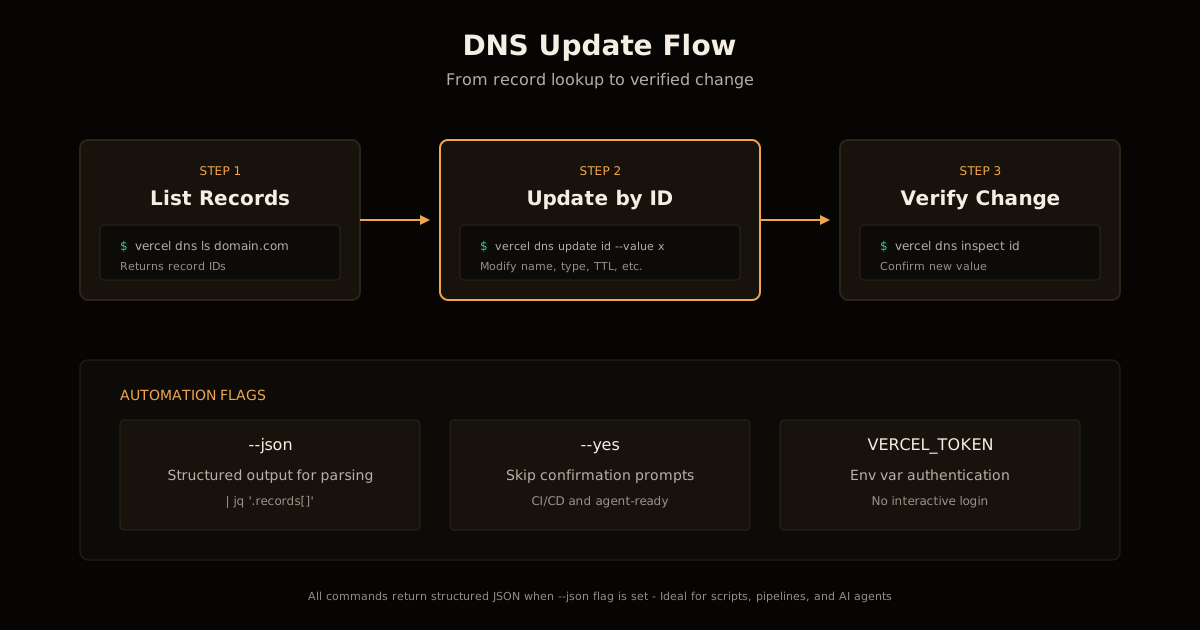
vercel dns ls example.comLists all DNS records for a domain with their IDs, types, names, values, and TTLs. The ID is what you’ll need for updates.
For a single record’s full configuration:
vercel dns inspect <record-id>Updating records
vercel dns update <record-id> --value "192.0.2.1" --ttl 300You can modify any combination of:
--name— the subdomain (or@for apex)--type— A, AAAA, CNAME, MX, TXT, SRV, CAA--value— the record value--ttl— time-to-live in seconds--priority— for MX records--comment— internal notes visible only in Vercel
For SRV records, you also get --weight, --port, and --target.
Creating and deleting
vercel dns add example.com @ A 192.0.2.1
vercel dns rm <record-id>
Creation takes the domain, name, type, and value as positional arguments. Deletion uses the record ID and asks for confirmation (skip with --yes).
Domain management
Renewal on demand
vercel domains renew example.comThe CLI fetches the current renewal price and shows it before asking for confirmation. You won’t accidentally renew at a rate you didn’t expect.
Auto-renewal control
vercel domains set-auto-renew example.com on
vercel domains set-auto-renew example.com off
Turning auto-renewal off is useful for domains you’re planning to let expire or transfer. The dashboard buries this toggle; the CLI makes it explicit.
Checking domain status
vercel domains inspect example.com --jsonReturns registration status, expiration date, nameserver configuration, and renewal settings in a format scripts can parse directly.
Project commands
Pause and resume
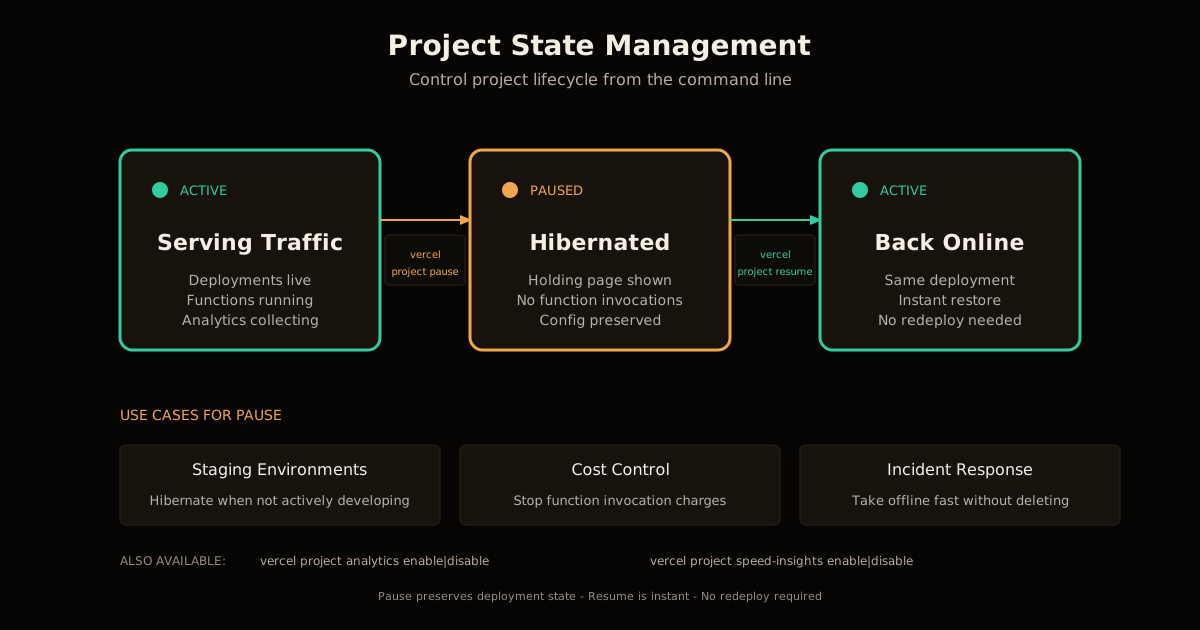
vercel project pause my-project
vercel project resume my-project
Pausing stops serving traffic — visitors get a holding page. This is useful for:
- Staging environments you only need during active development
- Cost control on projects with serverless functions that bill by invocation
- Incident response when you need to take a project offline fast without deleting it
Observability toggles
vercel project analytics enable my-project
vercel project analytics disable my-project
vercel project speed-insights enable my-project
vercel project speed-insights disable my-project
Web Analytics and Speed Insights could already be enabled from the CLI. Now they can be disabled too, which matters for scripts that set up and tear down environments.
Team membership
vercel project members add my-project user@example.com --role developer
vercel project members rm my-project user@example.com
Roles are owner, developer, or viewer. This is the part of Vercel administration that’s most often done manually and most often forgotten — scripting it means onboarding and offboarding can be automated alongside your identity provider.
Using these in scripts
Every command supports --json for structured output:
vercel dns ls example.com --json | jq '.records[] | select(.type == "A")'For non-interactive use (CI/CD pipelines, agent loops), add --yes to skip confirmation prompts:
vercel dns rm "$RECORD_ID" --yesA typical automation pattern:
#!/bin/bash
set -e

DOMAIN="staging.example.com"
IP=$(curl -s https://api.ipify.org)

RECORD_ID=$(vercel dns ls "$DOMAIN" --json | jq -r '.records[] | select(.name == "@" and .type == "A") | .id')

if [ -n "$RECORD_ID" ]; then
  vercel dns update "$RECORD_ID" --value "$IP" --yes
else
  vercel dns add "$DOMAIN" @ A "$IP"
fi

echo "DNS updated to $IP"
This pattern — inspect, decide, act — is exactly what AI agents do. The JSON output and explicit confirmation flags make the CLI agent-ready out of the box.
What to use when
| Task | Dashboard | CLI |
|---|---|---|
| Exploring records you don’t know the IDs for | Better | Works, but requires listing first |
| One-off record update | Fine | Faster if you know the ID |
| Batch updates (>3 records) | Tedious | Much faster |
| CI/CD integration | Impossible | Native |
| Agent-driven provisioning | Impossible | Native |
| Domain renewal | Fine | Same, with price shown inline |
| Project state control (pause/resume) | Fine | Faster, scriptable |
The dashboard isn’t going anywhere, and it’s still the right tool for exploration and one-off changes where you want to see everything at once. The CLI is for repetition, automation, and anything that needs to happen without a human clicking through pages.
Getting started
Update to the latest CLI:
npm i -g vercel@latestVerify the new commands are available:
vercel dns --help
vercel domains --help
vercel project --help
Authentication uses your existing Vercel login. If you’re already authenticated (vercel whoami shows your account), you’re ready to go.
For CI/CD environments, use a Vercel token with the VERCEL_TOKEN environment variable.
The bigger picture
This update is part of a broader trend: infrastructure management is moving from dashboards to commands because that’s where automation lives. Cloudflare did this years ago with Wrangler (see deploying to Cloudflare Workers). AWS has always been CLI-first. Vercel catching up here means you can finally manage a Vercel-hosted project with the same scripting patterns you use for everything else.
For AI coding agents specifically, this is a prerequisite for autonomous infrastructure work. An agent that can deploy code but can’t provision the DNS records pointing to it is only doing half the job. Now it can do both.
The Vercel CLI documentation has the full command reference. The DNS, domain, and project commands are available now in the current release.
Frequently asked questions
Google Search · Preferred sources
Prefer this site on Google
If you already read this writing, add umesh-malik.com as a Preferred Source. Google can then highlight it with a preferred badge in Top Stories, AI Overviews, and AI Mode — for you, not as a site-wide ranking boost.
Related Articles

Web Engineering
Is Your Postgres Migration Safe? Catch the Table Lock First
Is your Postgres migration safe? Not if it takes ACCESS EXCLUSIVE on a hot table. The lock table and 5-step check that catches it before you run it.

Web Engineering
Migrate to a New CMS With Zero Downtime: a 28K RPS DDoS Mid-Rollout
Here is how to migrate to a new CMS with zero downtime: a cookie-routed proxy Worker, staged 1%-100% rollout, and a 28,000 RPS DDoS absorbed mid-migration.

Web Engineering
SVG to MP4 in the browser: a two-step workflow, no server
SVG to MP4 in the browser needs no server: paste a URL and 30MB of ffmpeg.wasm renders every frame in your tab. The one catch that trips people up.
Keep reading
Get new posts on AI, Claude Code & LLMs
New deep-dives on AI engineering, Claude Code, and developer tooling — follow along however you prefer.
About the Author

Software engineer writing about AI, Claude Code, LLMs, OpenAI, Anthropic, and developer tooling. 5+ years building production systems at Expedia Group, Tekion, and BYJU'S.