Fix Date/Time Not in ISO 8601 Format: 9 of 15 Formats Fail
Date/time not in ISO 8601 format means Google can't read a date in your markup. 9 of 15 common formats fail, and 7 of those 9 still parse in JavaScript.

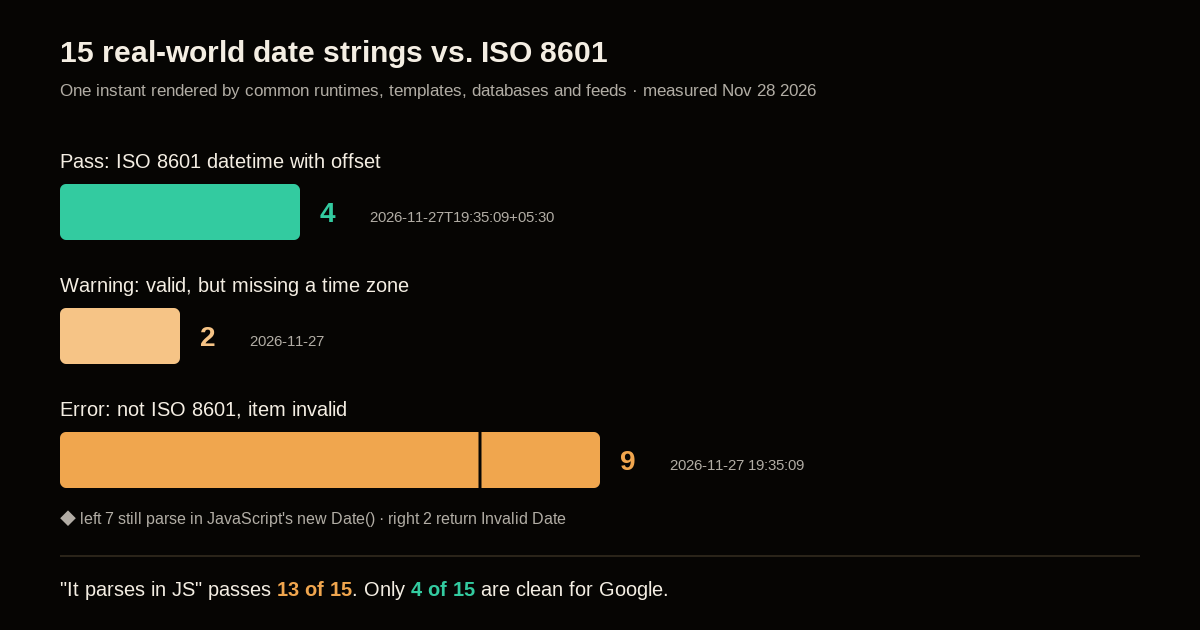
TL;DR — Date/time not in ISO 8601 format is a Search Console error: a date in your structured data, usually datePublished, uploadDate or startDate, is a string Google can’t read as ISO 8601, so the item is invalid for rich results. I classified 15 date strings that common stacks actually emit: 4 pass, 2 trigger the softer missing a time zone warning, and 9 fail, and 7 of those 9 still parse fine in JavaScript’s new Date(). The fix is always the same: serialize the date once, at the template, as a full datetime with an offset like 2026-11-28T09:00:00+05:30.
The reason this error survives code review is that every date in it looks fine. 2026-11-27 19:35:09 is a perfectly good date to a human, to MySQL, and to your browser. It’s just not ISO 8601, and that’s the only thing the parser on Google’s side cares about.
What Does Date/Time Not in ISO 8601 Format Mean?
Date/time not in ISO 8601 format is a Search Console structured data error: a date property on the page holds a value Google can’t parse as an ISO 8601 date or datetime. The message names the field, for example Date/time not in ISO 8601 format in field "datePublished", and Search Console adds that items with this issue are invalid and not eligible for Google Search’s rich results.
It has a softer sibling that’s easy to confuse with it:
- Error:
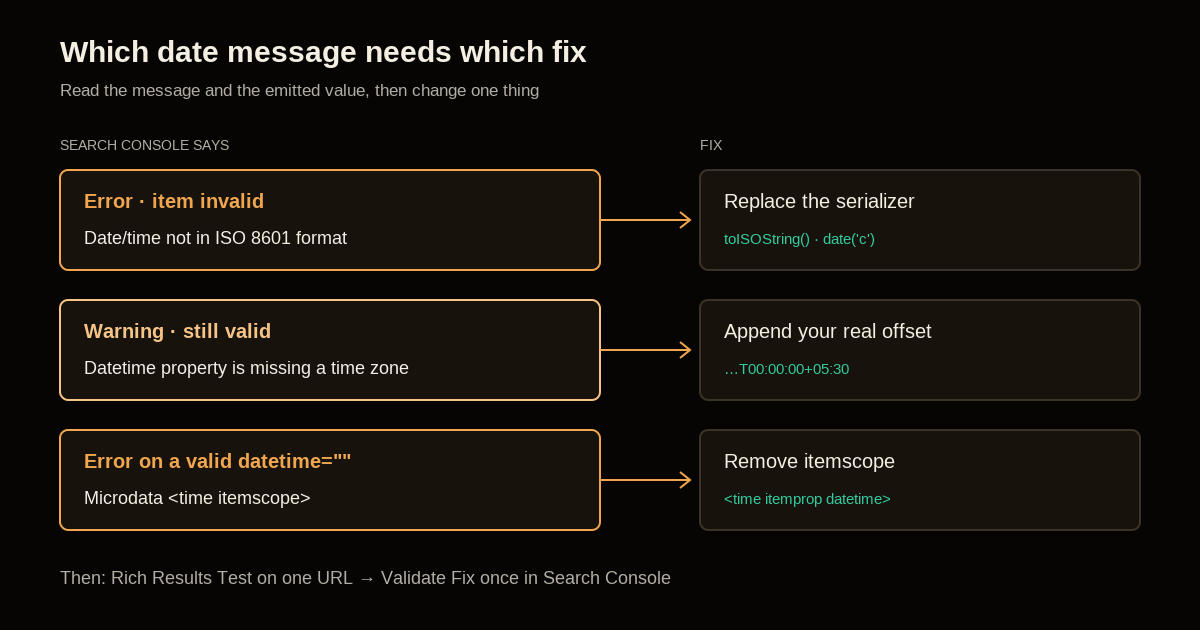
Date/time not in ISO 8601 format. The value isn’t ISO 8601 at all. The item is invalid. - Warning:
Datetime property "uploadDate" is missing a time zone(orstartDate,datePublished). The value is valid ISO 8601 but has no offset. The item stays valid, and Google fills in the gap itself.
Both come from the same place. Google’s Article and Video docs type these fields as DateTime “in ISO 8601 format” and say the same thing about timezones: “We recommend that you provide timezone information; otherwise, we will default to the timezone used by Googlebot.” Google moved uploadDate and expires from date to date-and-time on November 2, 2023, and Ryan Levering of Google described that as “part of a push for better timestamps in several markup types” (Search Engine Roundtable). That push is why sites that never saw the warning before suddenly have hundreds of them.
Which Date Formats Pass, Warn, or Fail?
I took one moment, 2026-11-27 14:05:09 UTC, rendered it the way 15 common sources do (template languages, runtimes, databases, feeds, CMS fields), and classified each string against ISO 8601’s extended format plus Google’s timezone rule. I also ran each through JavaScript’s new Date(), because “it parses” is the check most developers actually do.
| Source | Emitted value | ISO 8601 | Search Console outcome | new Date() |
|---|---|---|---|---|
JS toISOString() | 2026-11-27T14:05:09.000Z | Yes | Pass | Parses |
PHP date('c') / DATE_ATOM | 2026-11-27T19:35:09+05:30 | Yes | Pass | Parses |
Python aware isoformat() | 2026-11-27T19:35:09.000000+05:30 | Yes | Pass | Parses |
| Hand-written UTC | 2026-11-27T14:05:09Z | Yes | Pass | Parses |
Python naive isoformat() | 2026-11-27T19:35:09 | Yes, no offset | Missing time zone warning | Parses |
| Date-only frontmatter | 2026-11-27 | Yes, no time | Missing time zone warning | Parses |
| Offset without colon | 2026-11-27T19:35:09+0530 | Mixed basic/extended | Fail (non-conformant) | Parses |
MySQL DATETIME | 2026-11-27 19:35:09 | No (space, no T) | Fail | Parses |
JS Date#toString() | Fri Nov 27 2026 19:35:09 GMT+0530 (India Standard Time) | No | Fail | Parses |
JS String(yamlDate) | Fri Nov 27 2026 05:30:00 GMT+0530 (India Standard Time) | No | Fail | Parses |
RFC 2822 (RSS pubDate) | Fri, 27 Nov 2026 14:05:09 +0000 | No | Fail | Parses |
| Human label | November 27, 2026 | No | Fail | Parses |
Microdata <time> text | 27 Nov 2026 19:35 | No | Fail | Parses |
| Locale string | 27/11/2026 | No | Fail | Invalid Date |
| Unix timestamp | 1795788309 | No | Fail | Invalid Date |
Two findings matter more than the table itself:
- 9 of 15 fail, and 7 of those 9 parse in JavaScript. If your test is
!isNaN(new Date(value)), it passes almost everything this error is about. JavaScript’s parser accepts RFC 2822 and its owntoString()output on purpose. Google’s doesn’t. - The offset without a colon is the sneaky one. ISO 8601 allows
+0530in its basic format, but a single representation has to be all basic or all extended.19:35:09+0530mixes them. Some parsers shrug it off; I don’t trust it in markup, and adding the colon costs one byte.
Where Do Bad Dates Come From?
Nobody types Fri Nov 27 2026 05:30:00 GMT+0530 into a CMS. Bad dates are almost always a serialization accident: a real date object gets turned into a string by whatever default the template language reaches for. Here’s where each one usually comes from:
| Where it’s emitted | What goes wrong | Fix at the source |
|---|---|---|
| YAML frontmatter (Astro, SvelteKit, Eleventy, Gatsby) | Unquoted 2026-11-27 becomes a Date, then String() or template interpolation prints toString() | Quote the date in YAML, or serialize with toISOString() or an explicit offset |
| SQL column dropped straight into JSON-LD | DATETIME prints with a space and no offset | Format in the app layer with the site’s timezone |
| RSS or Atom pipeline reused for schema | RFC 2822 pubDate copied into datePublished | Keep two formatters; never reuse the feed string |
| Python backend | Naive datetime.isoformat() has no offset | Make the datetime timezone-aware before isoformat() |
Microdata <time itemscope> | Google reads the visible text, not datetime | Remove itemscope from the <time> element |
| CMS display field | The human label November 27, 2026 is reused as the machine value | Read the raw stored date, not the formatted one |
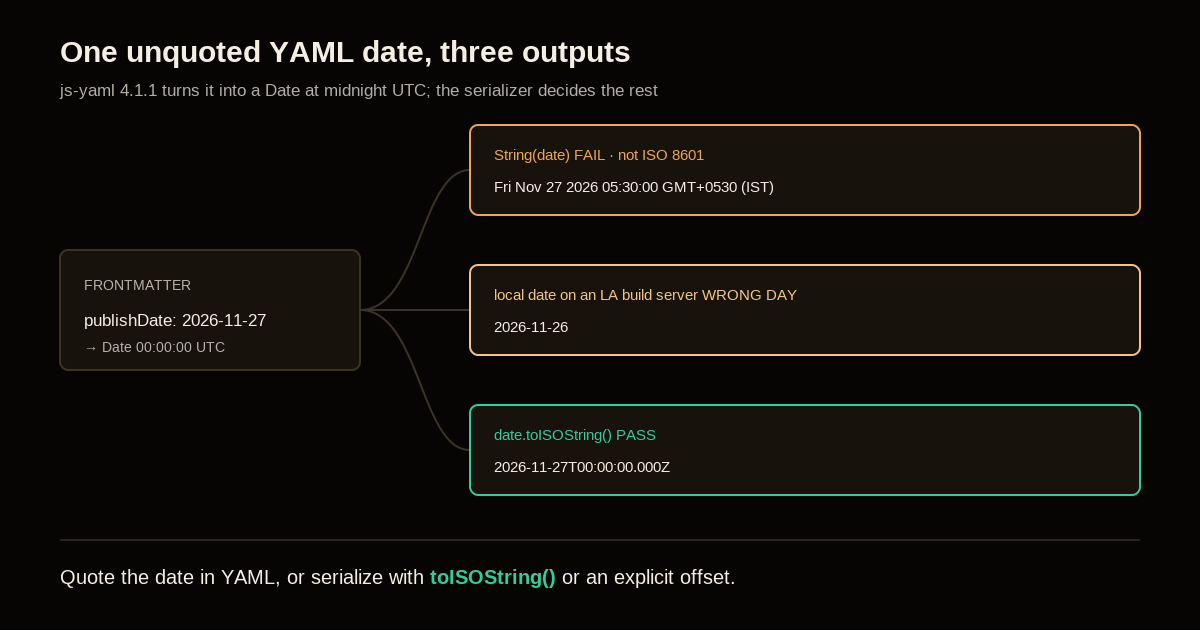
The YAML case deserves its own warning, because it can be wrong in two ways at once. js-yaml turns an unquoted publishDate: 2026-11-27 into a Date at midnight UTC. Print it with String() and you get the non-ISO toString() format. Format it as a local date on a build server in America/Los_Angeles and you get 2026-11-26, a day early, which then lands in your byline, your sitemap and your schema. Only toISOString() (or JSON.stringify) gives you the valid 2026-11-27T00:00:00.000Z.
The microdata trap comes from Terence Eden, who hit this exact error with a <time> element whose datetime attribute was already valid ISO 8601 (write-up). The element also had itemscope, which turns it into a nested item, so Google took the visible text 9 June 2025 11:27 instead. Removing itemscope fixed it.
How to Fix Date/Time Not in ISO 8601 Format in 6 Steps
Read the field name in the message. Open the affected report (Articles, Videos, Events, or the rich result type named), click the issue, and note the field:
datePublished,dateModified,uploadDate,expires,startDateorendDate. Different fields often come from different templates.Look at the emitted value, not the template. Run one affected URL through URL Inspection → View tested page or the Rich Results Test and copy the exact string Google saw. Templates lie; rendered HTML doesn’t. If the page renders JSON-LD with JavaScript, the tested page is the only honest view.
Match the string to its source. Use the two tables above. A space instead of
Tmeans SQL. A weekday name meanstoString()or RFC 2822. A bare date means frontmatter or a date-only field.Serialize once, with an offset. Replace the default stringification with an explicit formatter in the one helper that builds your schema:
// JavaScript / Node: UTC is always valid datePublished: new Date(post.date).toISOString()// WordPress / PHP: 'c' is ISO 8601 with the site's offset 'datePublished' => get_the_date( 'c' ),# Python: make it aware first, or the offset is silently dropped "datePublished": post.published.astimezone().isoformat(),{{/* Hugo: Go reference layout with a colon offset */}} "datePublished": "{{ .Date.Format "2006-01-02T15:04:05-07:00" }}"{% comment %} Jekyll {% endcomment %} "datePublished": "{{ page.date | date_to_xmlschema }}"If you only store a date, append a fixed time and your own offset rather than leaving it bare. This site’s
BlogPostingbuilder does exactly that: a frontmatter date like2026-11-28goes out as2026-11-28T00:00:00+05:30, 15 extra bytes that clear the warning for good.For microdata, put the ISO value in the attribute and drop
itemscope.<time itemprop="datePublished" datetime="2026-11-28T09:00:00+05:30">28 November 2026</time>is correct. A date is a plain value, not a nested item.Validate one URL, then the report. Rerun the Rich Results Test on one fixed URL, confirm the item is valid with no date warnings, then press Validate Fix once in Search Console and leave it running.
What Breaks If You Only Fix the Warning?
Adding an offset fixes the warning, but the offset has to be true. Appending Z to a local time shifts every timestamp by your UTC offset. For a datePublished that’s cosmetic. For an Event’s startDate it’s a wrong start time in Google results, and for expires on a video it can drop the video before it actually expires.
Three rules keep the fix honest:
- Use the site’s real timezone, not the build server’s. CI runners usually run in UTC. If your dates are stored as local wall time, format them with an explicit zone, never the process default.
- Keep
dateModifiedmeaningful. If you’re touching the date helper, don’t make it emit the build time. Google uses these dates as a byline signal, and adateModifiedthat changes every deploy is noise. The same goes for sitemaps; see fixing sitemap lastmod dates. - Match the visible date. Google’s publication date guidance asks for the structured data and the visible byline to agree. A schema date a day off from the byline is the YAML-midnight bug showing through.
When Is the Missing Time Zone Warning Not Worth Fixing?
The warning is non-critical. For an archive of blog posts where only the day matters, a bare 2026-11-27 is valid ISO 8601 and Google will still read it. Fix it when the template is cheap to change (it usually is: one helper), when the time matters (events, video expiry, live content), or when the warnings drown out real issues in the report. The error is different: it makes the item invalid, so fix that one every time.
If the date error sits next to other markup problems, work through them in the right order: a JSON syntax error comes first, because nothing else is read until unparsable structured data is gone. Then fix field-level issues like this one, a missing breadcrumb item, or duplicate FAQPage fields. For video pages, also check that the page qualifies at all with Video isn’t on a watch page. The rest of this technical SEO series is in the AI search hub.
FAQ
What does Date/time not in ISO 8601 format mean in Search Console?
It means a date property in your structured data, such as datePublished, uploadDate or startDate, holds a string Google can’t read as an ISO 8601 date. The report names the field in the message. Search Console treats it as an error, so the item is invalid and not eligible for rich results until the value is fixed.
What is the difference between the ISO 8601 error and the missing time zone warning?
The error means the value isn’t ISO 8601 at all, for example 2026-11-27 19:35:09 or November 27, 2026. The warning, Datetime property is missing a time zone, means the value is valid ISO 8601 but has no offset, like 2026-11-27 or 2026-11-27T19:35:09. The error blocks rich results for that item; the warning doesn’t, but Google then assumes Googlebot’s timezone instead of yours.
What is the correct ISO 8601 format for datePublished?
Use a full date and time with an offset, such as 2026-11-28T09:00:00+05:30 or 2026-11-28T03:30:00Z. Google’s Article documentation types datePublished and dateModified as DateTime in ISO 8601 and recommends including timezone information. A date-only value is still valid ISO 8601, but it triggers the missing time zone warning on DateTime fields.
Why does my date fail when it works in JavaScript?
JavaScript’s Date constructor accepts many formats that aren’t ISO 8601, including RFC 2822 strings and the output of Date#toString(). In my test, 7 of the 9 strings that fail ISO 8601 still parsed fine with new Date(). Never use a successful parse as proof the value is valid for markup; check the emitted string itself.
Why does the error appear on a microdata time element with a valid datetime attribute?
If the <time> element also carries itemscope, Google can read the element’s visible text instead of the datetime attribute, and visible text like 9 June 2025 11:27 isn’t ISO 8601. Remove itemscope from the <time> element so the itemprop takes the datetime value. A date property is a plain value, not a nested item.
How long does validation take after fixing date format errors?
Validate Fix in Search Console re-crawls the affected URLs over days to weeks, depending on how many there are and how often Google crawls them. Test one URL in the Rich Results Test first, ship the change to the template that emits the date, then start one validation and let it finish.
Sources
- Google Search Central, Article structured data:
datePublishedanddateModifiedas ISO 8601DateTime, and the timezone recommendation. - Google Search Central, Video structured data:
uploadDateandexpiresas ISO 8601DateTimewith the same timezone default. - Google Search Central, Influence your byline dates in Google Search: keep visible and structured dates consistent.
- Search Engine Roundtable, Google Video Structured Data Docs Now Recommend Time & Timezone Inclusion, November 2, 2023, including Ryan Levering’s comment.
- Terence Eden, Fixing “Date/time not in ISO 8601 format” in Google Search Console, December 2025: the microdata
<time itemscope>case. - First-party measurement: 15 date strings for one instant, classified against ISO 8601 extended format plus Google’s timezone rule and parsed with
new Date()in Node 22, plus the js-yaml 4.1.1 unquoted-date behaviour across three timezones, November 28, 2026. The Search Console outcome column follows Google’s documented rules; it is not a scrape of Google’s internal validator.
Frequently asked questions
Google Search · Preferred sources
Prefer this site on Google
If you already read this writing, add umesh-malik.com as a Preferred Source. Google can then highlight it with a preferred badge in Top Stories, AI Overviews, and AI Mode — for you, not as a site-wide ranking boost.
Related Articles

Web Engineering
Fix Missing Field hasMerchantReturnPolicy: 5 of 7 Fixes Fail
Missing field hasMerchantReturnPolicy is a warning, not an error. Link each Offer to one store-wide policy by @id: 189 bytes a page instead of 697.

Web Engineering
Fix Missing Field "item" in Breadcrumbs: 8 Causes, 1 Rule
Missing field "item" means a breadcrumb before the last one has no URL. I broke BreadcrumbList 14 ways; 8 hit this error, and one rule fixes them all.

Web Engineering
Fix Offers, Review, or aggregateRating Error: 5 Hidden Causes
The offers, review, or aggregateRating error means a Product node has none of the three. 9 test variants passed the schema.org validator; 5 still failed.
Keep reading
Get new posts on AI, Claude Code & LLMs
New deep-dives on AI engineering, Claude Code, and developer tooling — follow along however you prefer.
About the Author

Software engineer writing about AI, Claude Code, LLMs, OpenAI, Anthropic, and developer tooling. 5+ years building production systems at Expedia Group, Tekion, and BYJU'S.