Fix Video Isn't on a Watch Page: Moving the Player Isn't Enough
Video isn't on a watch page means Google sees the video as secondary. I measured 6 layouts: moving the player up fixes nothing if the page is an article.

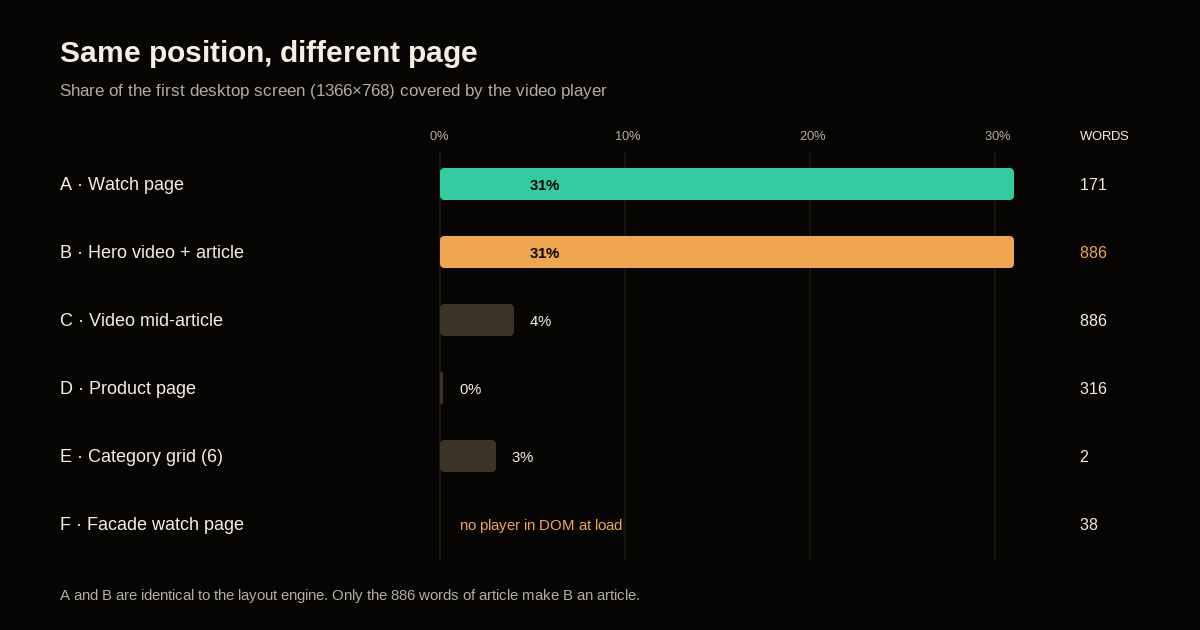
TL;DR — Video isn’t on a watch page is the Search Console reason for a video Google found but won’t index, because it decided the page exists for something else. The page itself can still rank. I rendered six page layouts in Chromium and found that a real watch page and a long article with the same hero video are geometrically identical: same player position, same 31% of the first screen. The fix is to decide what the page is for. Give a video that deserves it a dedicated watch page, and ignore the warning on articles where the video only supports the text.
Most people see this in the Search Console video indexing report, move the embed higher, click Validate Fix, and watch it fail two weeks later. That’s because position isn’t the test. Google is asking what the page is for, and an article with a video on top is still an article.
What Does Video Isn’t on a Watch Page Mean?
Video isn’t on a watch page is a Search Console video indexing reason meaning Google found a video on the URL but classified it as supplementary to the page’s main content. Google’s video indexing report help page defines a watch page this way: “A watch page’s main purpose is to show a user a single video.” Only videos on watch pages are eligible for video indexing.
The rule came from a December 4, 2023 Search Central post. Earlier that year, Google had started showing video thumbnails in main results only when the video was the main content. That post extended the same rule to Video mode, and it announced the Search Console reason as “Video is not the main content of the page.” The current report calls it Video isn’t on a watch page, with the same meaning, under No video indexed.
Google gave three examples of pages where the video isn’t the main content:
- a blog post where the video complements the text
- a product details page with a complementary video
- a video category page listing several videos of equal prominence
Two things don’t happen here. Your page isn’t dropped from Google, because it can still be indexed and rank as a normal text result. And it’s not a structured data problem. The video indexing report works whether or not you have VideoObject markup, so valid markup won’t clear it.
What Did 6 Measured Layouts Show?
I wanted to know whether the usual fix, moving the player higher, could change anything Google can see. So I built six minimal page layouts and rendered each in Chromium with Playwright at a 1366×768 desktop viewport and a 412×915 phone viewport. For each one I recorded whether a player (<iframe> or <video>) exists at load, where its top edge sits, how much of the first screen it covers, and how many words the main content has.
These are my own geometry measurements, not Google’s classifier. Google doesn’t publish how it decides what a page is for. The numbers just show what changes, and what doesn’t, when you rearrange a page.
| Layout | Player at load | Player top (desktop) | First screen covered (desktop / phone) | Main-content words |
|---|---|---|---|---|
| A. Watch page: title, player, short description | 1 | 174px | 31% / 22% | 171 |
| B. Same hero player, then a long article | 1 | 174px | 31% / 22% | 886 |
| C. Article with the video after 4 paragraphs | 1 | 709px | 4% / 0% | 886 |
| D. Product page, video below the gallery | 1 | 1,469px | 0% / 0% | 316 |
| E. Category page, 6 equal videos | 6 | 174px | 3% / 22% | 2 |
| F. Watch page with a click-to-load facade | 0 | n/a | n/a | 38 |
Three findings matter.
A and B are the same page to a layout engine. The player sits at 174px and covers 31% of the first desktop screen in both. The only difference is that B carries 886 words of article under the video. If B gets Video isn’t on a watch page, moving the player up can’t help, because it’s already at the top. What makes B an article is everything after the video.
E looks like a watch page on a phone. On a 412px screen, the grid stacks into a single column and the first video covers the same 22% as A. But there are six players of identical size, which is exactly Google’s “multiple videos of equal prominence” example. No single video is the point of the page.
F has no video at all when the page loads. A facade, a thumbnail with a play button that swaps in the real iframe on click, leaves zero players in the DOM. That’s a different reason in the report, covered below, and it’s the one you can fix in code.
Should You Fix Video Isn’t on a Watch Page at All?
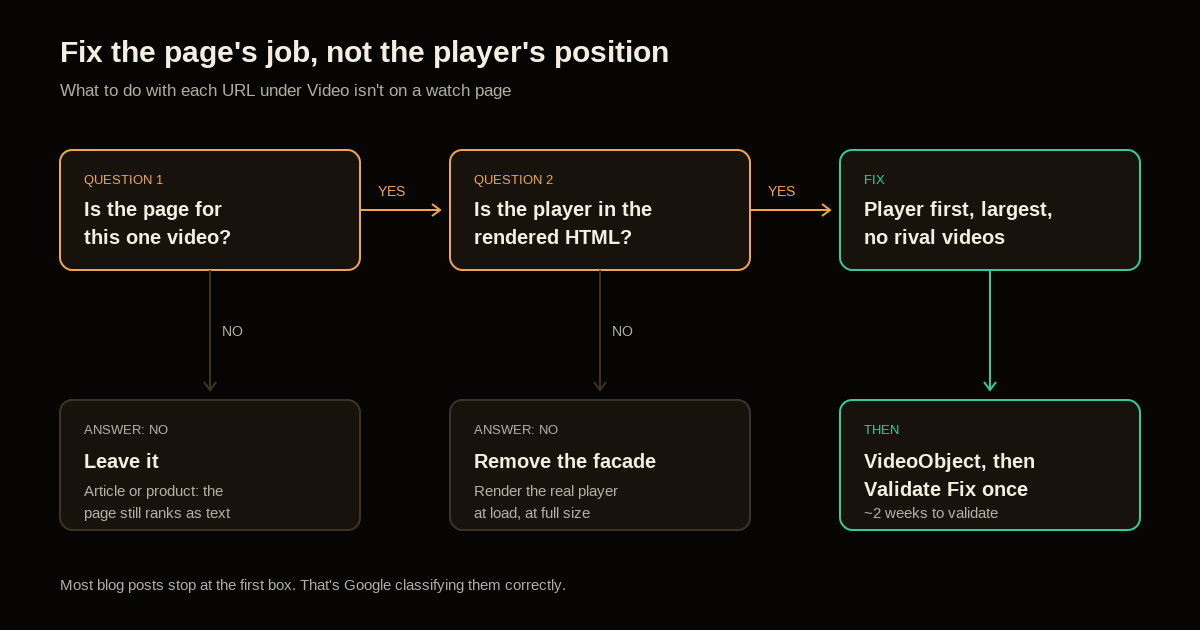
For most sites, no. A blog post with an embedded YouTube tutorial is supposed to be an article. Google is classifying it correctly, and the video already has a watch page: the one on YouTube. Turning every post into a stub with a video on top would make your content worse to rank a video someone can already find.
Fix it when the page really exists to show one video and Google got that wrong. Use this to decide:
| Page type | What Google sees | What to do |
|---|---|---|
| Blog post or tutorial with a supporting video | Article; video is secondary | Leave it. The page still ranks as text. |
| Product page with a demo video | Product; video is secondary | Leave it, or give the demo its own watch page and link to it |
| Course lesson, webinar or talk recording | Should be a watch page | Fix it: the video must lead the page |
| Video library or category grid | Listing page | Leave the grid; give each video its own watch page |
| Self-hosted video that only lives inside an article | Article | Create a dedicated watch page if you want that video in Video mode |
| Watch page using a click-to-load facade | No player found at load | Fix it: render the real player on load |
The honest test is one question: if a visitor lands here from a video result, is watching the video the thing they came to do? If the answer is no, Google agrees with you.
How to Fix Video Isn’t on a Watch Page in 6 Steps
These steps are for the pages that pass that test, real watch pages that Google flagged anyway.
List the affected URLs. Open Search Console, go to Indexing → Videos, and click the Video isn’t on a watch page row. Export the example URLs and group them by template. The fix almost always belongs to one template, not one page.
Confirm what the page is for. For each template, apply the test from the table above. Drop the article and product templates from your list. What’s left are pages where the video is the reason the page exists.
Check the rendered HTML, not your source. Run the URL through the URL Inspection tool, open View crawled page, and search the rendered HTML for your
<iframe>or<video>. If the player is injected by JavaScript, Google’s video best practices say it should still show up there. If it’s missing, you have a rendering or facade problem, not a watch page one.Put the video first and make it the largest element. Google’s help page suggests moving the video container higher in the HTML. Put the title, then the player, at full content width above the fold, with no hero image, carousel or ad slot competing for that space. Keep anything else below it: a short description, chapters or a transcript.
Remove the competition. Make sure the page has one prominent video, not three equal ones. Move “more videos” to a smaller related row under the main player, and push long-form text below the player or into a collapsible transcript. If the page has to carry a long article to work, that’s a sign it’s an article.
Describe the video, then validate. Add
VideoObjectstructured data with the requiredname,thumbnailUrlanduploadDate, plusdescription,durationandembedUrl. Deploy the template change, then click Validate Fix once. Google says validation typically takes up to about two weeks, and you shouldn’t restart it while it’s running.
A minimal watch page template looks like this:
<main>
  <h1>How to rotate a TLS certificate without downtime</h1>
  <iframe
    src="https://www.youtube-nocookie.com/embed/VIDEO_ID"
    title="How to rotate a TLS certificate without downtime"
    width="1280" height="720"
    style="width:100%;height:auto;aspect-ratio:16/9"
    allowfullscreen></iframe>
  <p>A 12-minute walkthrough of rotating a certificate behind a load balancer.</p>
  <details>
    <summary>Transcript</summary>
    <!-- transcript text -->
  </details>
</main>
Note the width, height and aspect-ratio. They reserve the box before the iframe loads, so you don’t pay for the fix with a CLS issue.
What Breaks When You Use a Video Facade?
The facade pattern is good performance advice in the wrong place. Chrome’s Lighthouse audit, Lazy load third-party resources with facades, recommends replacing heavy embeds with a static preview until the user clicks. On an article that’s right. A YouTube iframe is expensive, and it often holds back LCP.
On a watch page, it costs you the video. My layout F had zero players in the DOM at load, and that’s what Google sees too. The report’s Cannot determine video position and size reason describes this case: “The video player is not present in the page when loaded.” Google’s fix is to load the player “at its actual size and position when the page is loaded, without requiring any user interaction.”
So split the rule by page type. Keep facades on articles, where the video won’t be indexed anyway. Render the real player on watch pages, and win back speed elsewhere: reserve the box with aspect-ratio, use a preconnect to the video host, and don’t lazy-load the one player the page exists for.
Which Video Indexing Reason Is Which?
Video isn’t on a watch page often shows up next to other reasons in the same report, and they need different fixes. Here are the ones I see most often, using Google’s help page definitions:
| Report reason | What it means | Fix |
|---|---|---|
| Video isn’t on a watch page | The video is secondary to the page’s main content | Decide the page’s job; fix only real watch pages |
| Cannot determine video position and size | No player is present at load, often behind a click | Render the player at its real size on load |
| No thumbnail URL provided | No thumbnail given and Google couldn’t generate one | Set thumbnailUrl in structured data, a sitemap or mRSS |
| Thumbnail blocked by robots.txt | A robots.txt rule blocks the thumbnail file | Allow the image path; see blocked by robots.txt |
| Video not processed yet | Google is still processing the video | Wait a few days, then check again |
| Video not found on host service | The video is missing or private on its host | Restore it or make it public on the host |
Thumbnails have their own rules too. Google’s best practices ask for at least 60×30 pixels, a supported format (BMP, GIF, JPEG, PNG, WebP, SVG or AVIF), and at least 80% of pixels with an alpha value above 250.
What Doesn’t Fix Video Isn’t on a Watch Page?
- Adding
VideoObjectto an article. Markup describes the video. It doesn’t change what the page is for, and the report doesn’t depend on it. - Moving the player up on a long article. My layouts A and B show that position alone doesn’t separate a watch page from an article with a hero video.
- Deleting text to make a stub. A thin page with a video and nothing else can lose its text ranking and still isn’t a better result. Keep the transcript and description.
- Clicking Validate Fix again and again. Each validation waits for recrawls. Restarting it just resets the clock.
If the page has a bigger problem, like being crawled but not indexed or indexed without content, fix that first. A video can’t be indexed on a page Google isn’t indexing properly. Structured data problems on the same page, like unparsable structured data, show up in their own reports, and an uploadDate with no offset or in the wrong format is covered in fixing Date/time not in ISO 8601 format. The rest of this technical SEO series is in the AI search hub.
FAQ
What does Video isn’t on a watch page mean in Search Console?
It means Google found a video on the URL but decided the page’s main purpose is something else, such as an article or a product. Google only indexes videos on watch pages, whose main purpose is to show a single video. The page itself can still be indexed and rank as a normal text result.
Is Video isn’t on a watch page an error I have to fix?
Usually not. If the page is a blog post, tutorial, or product page with a supporting video, Google is classifying it correctly and there’s nothing wrong. Only fix it on pages that really exist to show one video, like a course lesson, a webinar recording, or a video library entry.
Will moving the video to the top of the page fix it?
Only if the page is already built around that video. In my measurement, a watch page and a long article with the same hero video had identical player position and the same share of the first screen. The difference was 171 words against 886. If the page’s job is the article, moving the player doesn’t change what the page is for.
Why does my video say Cannot determine video position and size?
The player isn’t in the page when it loads. The usual cause is a click-to-load facade, a thumbnail with a play button that only inserts the real iframe after a click. Google’s fix is to load the player at its actual size and position when the page loads, with no user interaction.
Do I need VideoObject structured data to fix this?
No. The video indexing report works whether or not you have structured data, and markup can’t turn an article into a watch page. VideoObject still helps on real watch pages, with name, thumbnailUrl and uploadDate required. Use it to describe the video, not to change Google’s view of the page.
How long does Validate Fix take for video indexing issues?
Google’s video indexing help page says validation typically takes up to about two weeks and can take much longer. Don’t click Validate Fix again until the current validation has passed or failed. Fix every affected template first, then start one validation.
Sources
- Google Search Console Help — Video indexing report
- Google Search Central Blog — Video mode now only shows pages where video is the main content (December 4, 2023)
- Google Search Central — Video SEO best practices
- Google Search Central — Video (VideoObject) structured data
- Chrome for Developers — Lazy load third-party resources with facades
- Layout measurements: six minimal layouts rendered by the author in Chromium via Playwright at 1366×768 and 412×915, November 26, 2026
Frequently asked questions
Google Search · Preferred sources
Prefer this site on Google
If you already read this writing, add umesh-malik.com as a Preferred Source. Google can then highlight it with a preferred badge in Top Stories, AI Overviews, and AI Mode — for you, not as a site-wide ranking boost.
Related Articles

Web Engineering
Fix Date/Time Not in ISO 8601 Format: 9 of 15 Formats Fail
Date/time not in ISO 8601 format means Google can't read a date in your markup. 9 of 15 common formats fail, and 7 of those 9 still parse in JavaScript.

Web Engineering
Fix Missing Field hasMerchantReturnPolicy: 5 of 7 Fixes Fail
Missing field hasMerchantReturnPolicy is a warning, not an error. Link each Offer to one store-wide policy by @id: 189 bytes a page instead of 697.

Web Engineering
Fix Missing Field "item" in Breadcrumbs: 8 Causes, 1 Rule
Missing field "item" means a breadcrumb before the last one has no URL. I broke BreadcrumbList 14 ways; 8 hit this error, and one rule fixes them all.
Keep reading
Get new posts on AI, Claude Code & LLMs
New deep-dives on AI engineering, Claude Code, and developer tooling — follow along however you prefer.
About the Author

Software engineer writing about AI, Claude Code, LLMs, OpenAI, Anthropic, and developer tooling. 5+ years building production systems at Expedia Group, Tekion, and BYJU'S.