Fix Missing Field "item" in Breadcrumbs: 8 Causes, 1 Rule
Missing field "item" means a breadcrumb before the last one has no URL. I broke BreadcrumbList 14 ways; 8 hit this error, and one rule fixes them all.

TL;DR — Missing field “item” is the Search Console breadcrumb error for a ListItem that isn’t the last crumb and has no item, so Google can’t tell which page it links to. I built 14 BreadcrumbList variants and 8 broke this rule in some form: a crumb shown as plain text, an empty template variable, or a URL put under the wrong property. The rule is that every crumb except the last needs an absolute URL in item, so link the bare crumb or drop it from the markup.
This is one of the easier structured data errors to fix, because Google’s rule is narrow and the cause is nearly always one template. The confusing part is that the page often looks fine. The breadcrumb renders, the trail reads correctly, and the markup is valid JSON. One crumb just doesn’t point anywhere.
What Does Missing Field “item” Mean?
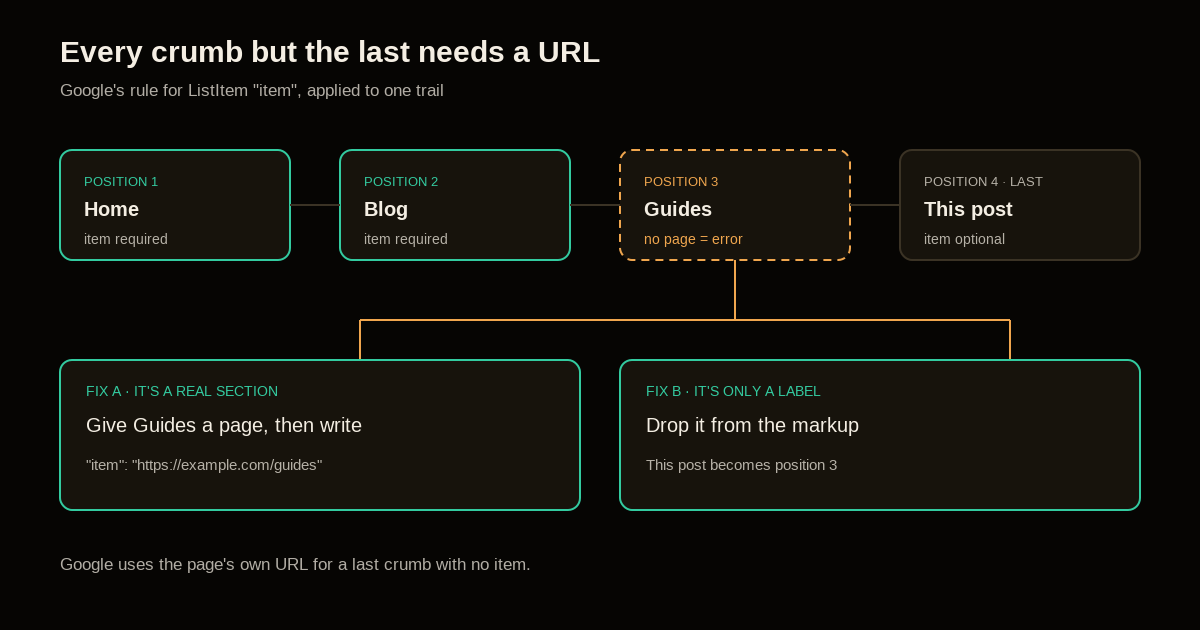
Missing field “item” means a breadcrumb in your trail has a name but no destination. Google’s breadcrumb structured data documentation lists three properties on each ListItem: item, name and position. item is “the URL to the webpage that represents the breadcrumb,” with one exception:
If the breadcrumb is the last item in the breadcrumb trail,
itemis not required. Ifitemisn’t included for the last item, Google uses the URL of the containing page.
So the error only fires on crumbs before the last one. Search Console usually shows it as Missing field "item" (in "itemListElement"), and because it’s a critical error, the whole trail stops being eligible for the breadcrumb display. That’s not the same as the Unparsable structured data error. Here Google read your JSON fine. It just found a hole in it.
A valid trail looks like this. Notice the last crumb has no item, and that’s allowed:
{
  "@context": "https://schema.org",
  "@type": "BreadcrumbList",
  "itemListElement": [
    { "@type": "ListItem", "position": 1, "name": "Home", "item": "https://example.com/" },
    { "@type": "ListItem", "position": 2, "name": "Blog", "item": "https://example.com/blog" },
    { "@type": "ListItem", "position": 3, "name": "Fix Missing Field item" }
  ]
}
Does It Still Matter After Google Hid Mobile Breadcrumbs?
Yes, but for desktop. On January 23, 2025 Google stopped showing breadcrumbs on mobile search results, because they “get cut off on smaller screens,” and now shows only the domain there. The same post says breadcrumbs “continue to appear on desktop search results,” and that there’s nothing to change if you already use the markup.
So a broken trail still costs you the desktop breadcrumb, and the error stays in the Search Console breadcrumb report until you fix it. It’s also a cheap signal of a deeper template bug. If one crumb has no URL, you’ll usually find a page that has no real home in your site structure.
What Causes Missing Field “item” in Breadcrumbs?
I wanted numbers, not a list of guesses. I wrote a 50-line checker that applies Google’s documented rules and ran it on 14 BreadcrumbList variants: 3 valid controls and 11 broken ones taken from patterns common in CMS themes and hand-written templates. All 3 controls passed, including one with no item on the last crumb and one using item as an object with @id. Of the 11 failures, 8 were item problems:
| Root cause | Cases | Example | Where it comes from |
|---|---|---|---|
| Crumb rendered as plain text | 2 | { "name": "Guides", "position": 2 } | A category or “Home” with no page to link, copied from the visible HTML |
| Empty value | 2 | "item": "" or "item": null | A template variable that resolves to nothing on some pages |
| Right URL, wrong property | 3 | "url": "…", "@id" on the ListItem, or item: { "name": "Blog" } with no @id | Hand-written schema that guesses at the vocabulary |
| Relative URL | 1 | "item": "/blog" | Paths copied from router links |
The relative URL is a strict call on my part. Google may resolve it against the page, but its docs ask for “the URL of the page,” and an absolute URL takes the guesswork out, so the checker flags it.
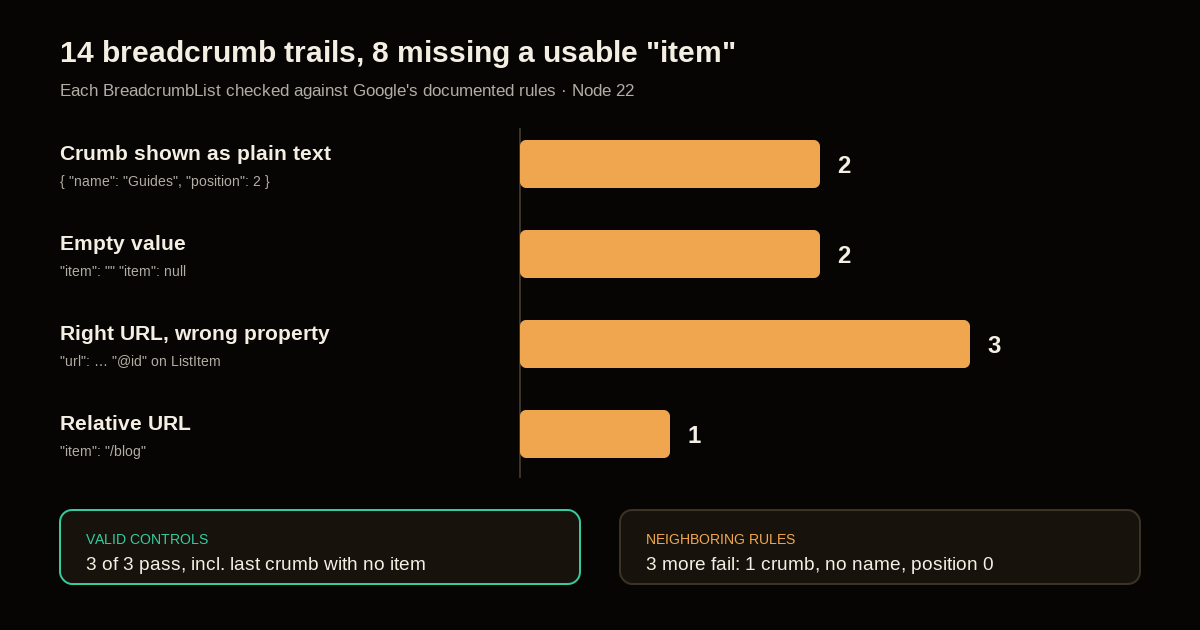
The first row is the one you’ll hit most. A theme shows Home › Guides › This post, where Guides is a label with no archive page behind it. The schema template walks the same crumb array, finds no link for Guides, and emits the crumb without item. The HTML looks right because a breadcrumb doesn’t need to be a link. The markup is wrong because Google needs it to be one.
The other 3 failures were neighboring rules, which you’ll see in the same report: a trail with only 1 crumb (Google says a BreadcrumbList “contains at least two ListItems”), a crumb with neither name nor item.name, and positions starting at 0 instead of 1.
How to Fix Missing Field “item” in 6 Steps
Open the report and find the template. In Search Console, open Breadcrumbs under Enhancements and click the
Missing field "item"issue. The affected URLs almost always share one template, such as every blog post or every product in a category with no landing page.Check one URL with the Rich Results Test. Run an affected page through the Rich Results Test. It shows the trail with the bad crumb highlighted. If the live test is clean, the page was already fixed and the report is waiting for a recrawl, so skip to step 6.
Find the exact crumb. The Rich Results Test shows one page at a time. This checker pulls every
BreadcrumbListfrom the server HTML, including ones inside@graph, and names the position and the reason:// breadcrumb-check.mjs — flag the BreadcrumbList items Google reports as Missing field "item" const RE = /<script[^>]*type=["']?application/ld+json["']?[^>]*>([sS]*?)</script>/gi; const isUrl = (v) => typeof v === 'string' && /^https?://S+$/.test(v.trim()); const itemUrl = (item) => typeof item === 'string' ? item : item && typeof item === 'object' ? item['@id'] ?? item.url : undefined; function lists(node, out = []) { if (Array.isArray(node)) node.forEach((n) => lists(n, out)); else if (node && typeof node === 'object') { if ([node['@type']].flat().includes('BreadcrumbList')) out.push(node); else Object.values(node).forEach((v) => lists(v, out)); } return out; } export function checkList(list) { const problems = []; const items = [list.itemListElement ?? []].flat(); if (items.length < 2) problems.push(`only ${items.length} ListItem (Google wants at least 2)`); const lastPos = Math.max(...items.map((li) => Number(li.position) || 0)); items.forEach((li, i) => { const label = `position ${li.position ?? '?'} (${li.name ?? li.item?.name ?? 'unnamed'})`; const isLast = Number(li.position) === lastPos; const url = itemUrl(li.item); if (!Number.isInteger(Number(li.position)) || Number(li.position) !== i + 1) problems.push(`${label}: position should be ${i + 1}`); if (li.item === undefined && !isLast) { const hint = li.url ? ' — found "url", Google reads "item"' : li['@id'] ? ' — "@id" is on the ListItem, not inside "item"' : ''; problems.push(`${label}: Missing field "item"${hint}`); } else if (li.item !== undefined && !isUrl(url) && !(isLast && !url)) problems.push(`${label}: "item" has no usable URL (${JSON.stringify(li.item)})`); if (!li.name && !(li.item && typeof li.item === 'object' && li.item.name)) problems.push(`${label}: Either "name" or "item.name" should be specified`); }); return problems; } export function check(html) { const out = []; for (const [, raw] of html.matchAll(RE)) { let data; try { data = JSON.parse(raw); } catch { continue; } // unparsable is a different report for (const list of lists(data)) out.push(checkList(list)); } return out; // one array of problems per BreadcrumbList; [] means valid } // usage: node breadcrumb-check.mjs https://example.com/page (or a local .html file) const target = process.argv[2]; if (target) { const html = /^https?:/.test(target) ? await (await fetch(target)).text() : (await import('node:fs')).readFileSync(target, 'utf8'); const results = check(html); results.forEach((p, i) => console.log(`trail ${i + 1}: ${p.length ? 'FAIL\n ' + p.join('\n ') : 'ok'}`)); if (!results.length) console.log('no BreadcrumbList in server HTML'); process.exitCode = results.some((p) => p.length) ? 1 : 0; }On the plain-text category case it prints:
trail 1: FAIL
  position 2 (Guides): Missing field "item"
It reads server HTML only. If a plugin or tag manager injects the breadcrumb after load, check the rendered DOM too.
Link the crumb or drop it. If the crumb names a real section, give it a real page and put that absolute URL in
item. If it’s only a label, remove it from the markup. Google says you don’t need a crumb for the top-level domain, and it recommends “breadcrumbs that represent a typical user path to a page, instead of mirroring the URL structure.” A shorter trail that’s valid beats a longer one that isn’t.Build the trail from data, and skip the last crumb’s URL on purpose. Generate the list from an array of
{ name, url }pairs and only writeitemwhen a URL exists:// crumbs = [{ name: 'Home', url: 'https://example.com/' }, { name: 'Guides' }, { name: 'This post' }] const linked = crumbs.filter((c, i) => c.url || i === crumbs.length - 1); // drop bare middle crumbs const breadcrumb = { '@context': 'https://schema.org', '@type': 'BreadcrumbList', itemListElement: linked.map((c, i) => ({ '@type': 'ListItem', position: i + 1, name: c.name, ...(c.url ? { item: new URL(c.url, 'https://example.com').href } : {}) })) };Positions are renumbered after the filter, and
new URL()turns any relative path into an absolute one. Serialize it withJSON.stringify, never by joining strings.Gate the build, then validate. Run the checker over your built HTML in CI and fail on exit code 1. Then click Validate Fix in Search Console. Google has to recrawl the affected URLs, so expect days, sometimes a couple of weeks.
Which Breadcrumb Error Is Which?
The item error rarely arrives alone. These are the messages that sit next to it in the Breadcrumbs report, and what each one means in the JSON:
| Search Console message | What it means | Fix |
|---|---|---|
Missing field "item" | A non-last crumb has no item | Add an absolute URL, or drop the crumb |
Invalid URL in field "item" / "id" | item is there but isn’t a usable URL | Write an absolute https:// URL, not "" or a path |
Either "name" or "item.name" should be specified | A crumb has no label | Add name, or name inside the item object |
Missing field "itemListElement" | The BreadcrumbList has no items at all | Usually an empty array from a page with no parents. Don’t emit the list |
Invalid object type for field "item" | item is a type Google can’t use as a breadcrumb target | Use a URL string, or an object with @id |
The first two rows are the same bug at different stages. An empty template variable might drop the property, or it might write "item": "", depending on your serializer. Either way the fix is in the data, not the markup.
How Did This Site’s Own Breadcrumbs Score?
I ran the same checker over this site’s build: 695 prerendered HTML pages, 691 breadcrumb trails, 2,259 crumbs, 0 failures. Most trails are 3 deep (471), then 4 (203), then 2 (17). The 4 pages with no trail are the homepage, the 404 page, the blog index and one project page. The homepage can’t have a valid trail anyway, because a single crumb is below Google’s two-item minimum.
It passes for a boring reason. The site never writes breadcrumb JSON by hand. One helper takes an array of { name, url } pairs and maps each one to a ListItem with item: url, so there’s no code path that can emit a crumb without a URL. It even writes item on the last crumb, which Google doesn’t require but doesn’t penalize either. If your breadcrumbs come from a template that loops over HTML links, that’s the change worth making: make the data hold a URL for every crumb, and the error has nowhere to come from.
If you’re working through structured data, the same report family covers the offers, review, or aggregateRating error on products and the Duplicate field FAQPage error. Breadcrumbs also say which section a page belongs to, so a crumb with no page behind it is worth checking against orphan pages in your sitemap and your canonical signals. The rest of this technical SEO series is on the AI search hub.
FAQ
What does Missing field “item” mean in Search Console?
It means a ListItem in your BreadcrumbList has no item property, so Google doesn’t know which page that breadcrumb points to. Google requires item on every breadcrumb except the last one in the trail. The error is critical, so the whole trail is ineligible for the breadcrumb display until it’s fixed.
Is the item property required on the last breadcrumb?
No. Google’s breadcrumb documentation says that if the breadcrumb is the last item in the trail, item is not required, and Google uses the URL of the containing page instead. Every earlier breadcrumb still needs a URL in item, either as a string or as an object with an @id.
Why does my category breadcrumb have no item?
Usually the visible breadcrumb shows the category as plain text because there’s no category archive page to link to, and the schema template mirrors the HTML. A crumb with no page behind it can’t have a URL. Either give it a real page and link it, or leave it out of the markup, since Google only needs a typical user path.
Can I use url instead of item in a ListItem?
No. Google reads the item property for the breadcrumb’s destination, so a ListItem with url and no item still reports Missing field “item”. The same goes for an @id placed on the ListItem itself rather than inside the item object. Rename the property or move the @id inside item.
Do breadcrumbs still show in Google search results?
On desktop, yes. Google stopped showing breadcrumbs on mobile search results on January 23, 2025 and shows only the domain there, but it kept breadcrumb markup support for desktop results. The Search Console breadcrumb report and the Rich Results Test both still check the markup.
How long does Validate Fix take for breadcrumb errors?
Validation waits for Google to recrawl the affected URLs, which usually takes days and can take a couple of weeks. A template fix covers every page at once, so you only need to validate the issue once. If it fails, open the URL it names, check the live test and start a new validation.
Sources
- Google Search Central, Breadcrumb (BreadcrumbList) structured data: required
item,nameandposition, the last-item exception, the two-item minimum, and the “typical user path” guideline. - Google Search Central Blog, Simplifying the visible URL element on mobile search results (January 23, 2025): breadcrumbs removed from mobile results, kept on desktop.
- Schema.org, BreadcrumbList: the
ItemListofListItementries the trail is built from. - First-party measurement: 14
BreadcrumbListvariants checked withbreadcrumb-check.mjs(Node 22), and a scan of this site’s prerendered HTML, November 26, 2026.
Frequently asked questions
Google Search · Preferred sources
Prefer this site on Google
If you already read this writing, add umesh-malik.com as a Preferred Source. Google can then highlight it with a preferred badge in Top Stories, AI Overviews, and AI Mode — for you, not as a site-wide ranking boost.
Related Articles

Web Engineering
Fix Date/Time Not in ISO 8601 Format: 9 of 15 Formats Fail
Date/time not in ISO 8601 format means Google can't read a date in your markup. 9 of 15 common formats fail, and 7 of those 9 still parse in JavaScript.

Web Engineering
Fix Offers, Review, or aggregateRating Error: 5 Hidden Causes
The offers, review, or aggregateRating error means a Product node has none of the three. 9 test variants passed the schema.org validator; 5 still failed.

Web Engineering
Fix Unparsable Structured Data: 16 Ways It Breaks, 1 Fix
Unparsable structured data means Google hit a JSON syntax error and dropped the block. I broke JSON-LD 16 ways; one serializer change fixed every one.
Keep reading
Get new posts on AI, Claude Code & LLMs
New deep-dives on AI engineering, Claude Code, and developer tooling — follow along however you prefer.
About the Author

Software engineer writing about AI, Claude Code, LLMs, OpenAI, Anthropic, and developer tooling. 5+ years building production systems at Expedia Group, Tekion, and BYJU'S.