Fix Unparsable Structured Data: 16 Ways It Breaks, 1 Fix
Unparsable structured data means Google hit a JSON syntax error and dropped the block. I broke JSON-LD 16 ways; one serializer change fixed every one.

TL;DR — Unparsable structured data is the Search Console error for a JSON-LD (or microdata) block Google couldn’t read because of a syntax error, so it dropped the whole block and couldn’t even tell what type it was. I broke JSON-LD 16 different ways and every one came from building JSON as a string: unescaped quotes, loop commas, empty template variables, or a </script> inside a value. Build the data as an object, serialize it with your language’s JSON encoder, escape < as \u003c, and all 16 parse.
This error looks like a structured data problem, but it isn’t. Your schema can be perfect and still fail, because Google never gets far enough to read the schema. It stops at the JSON. That’s good news: a syntax error has one exact location, and you can find it in seconds once you stop staring at the Rich Results Test and use a parser that tells you the character position.
What Does Unparsable Structured Data Mean?
Unparsable structured data is the Search Console report for markup Google could not parse at all. According to Google’s Unparsable structured data report documentation, the intended type “could not be determined” because of the parsing error, so every issue in the report is a critical error. There are no warnings and no valid items in it.
That matters for one reason. Most structured data errors, like a missing offers or a duplicate FAQPage, mean Google read your markup and didn’t like it. This one means Google read nothing. Whatever the block was meant to describe, whether an Article, Product, BreadcrumbList or Organization, is invisible until the syntax is fixed.
Google’s report names the failure. The labels map directly to JSON syntax rules:
Parsing error: Missing ',' or '}'Parsing error: Missing ',' or ']' in array declarationParsing error: Missing '}' or object member nameParsing error: Missing ':'Invalid JSON document,Invalid number,Bad escape sequence in string,Empty escape sequence in stringDuplicate unique property(for example two@contextvalues) andInvalid top level element
What Actually Breaks JSON-LD?
I wanted real numbers, not a list of guesses, so I wrote 15 broken JSON-LD payloads based on the patterns that show up in support threads, plus one </script> case, and ran each through Node 22’s JSON.parse. All 16 failed. They group into four root causes:
| Root cause | Cases | Example | Where it comes from |
|---|---|---|---|
| Unescaped text content | 5 | "headline": "How "evicting" works" | CMS text pasted into a template string: quotes, newlines, tabs, backslashes |
| Hand-built structure | 6 | [{...},{...},] or "price": } | Loops that add commas by hand, empty template variables, NaN, $19.99 |
| Rewritten syntax | 4 | {“@context”: …} | Smart quotes from an editor, single quotes, " entities, // comments |
Early </script> | 1 | "headline": "Escaping </script> in JSON-LD" | Any value containing a closing script tag |
The first case is the classic. Claudio Kuenzler traced a Missing ',' or '}' error to an article description with the word evicting in double quotes, pulled straight from the database into the JSON. The quote ended the string early. Shopify’s Dawn theme has an open [discussion about `Missing ’,’ or ’]’ in array declaration`](https://www.github.com/Shopify/dawn/discussions/3196) on product schema, which is the hand-built loop comma pattern.
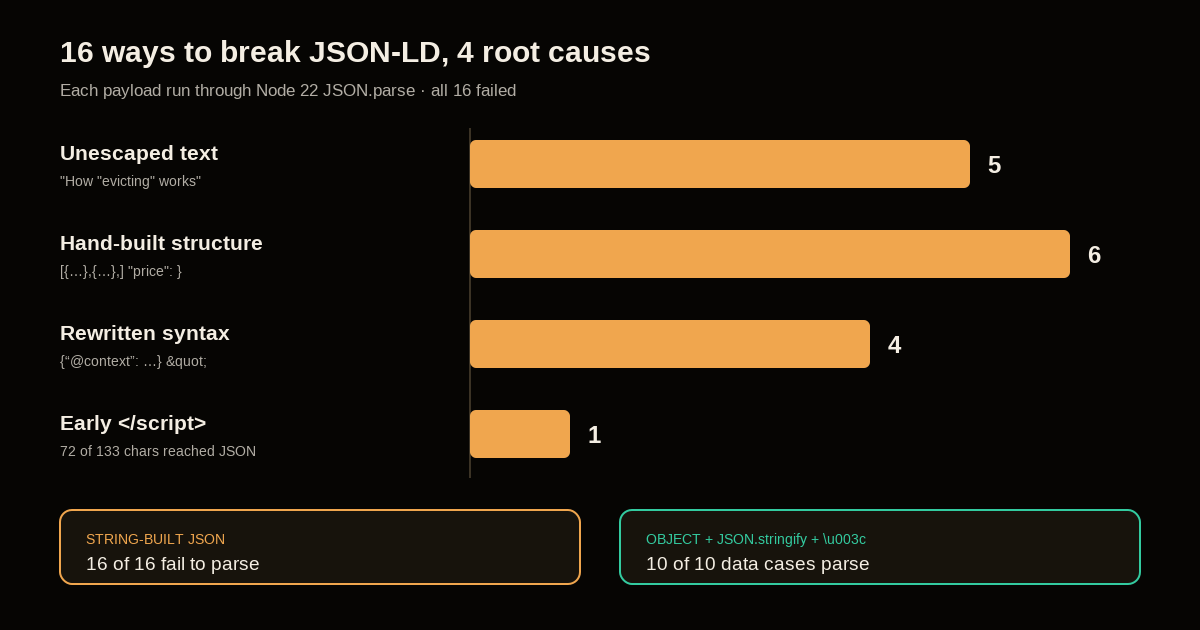
What do all four groups share? Every one of them comes from producing JSON by concatenating strings. No JSON serializer will emit a trailing comma, an unescaped quote or a smart quote. When I rebuilt the 10 cases that came from data, not from an editor, as JavaScript objects and serialized them with JSON.stringify(obj).replace(/</g, '\\u003c'), all 10 parsed, including the </script> one. The other six can’t happen at all when no human or editor writes the JSON text.
How Much Structured Data Does One Parse Error Take Down?
One parse error takes down everything in the same script tag, and nothing outside it. A JSON parser can’t skip a bad line and keep going. The whole document is valid or it isn’t.
I tested this with three entities, an Organization, an Article with an unescaped quote, and a BreadcrumbList:
| Layout | Entities that parse |
|---|---|
Three separate application/ld+json script tags | 2 of 3 (only the Article is lost) |
The same three entities in one @graph block | 0 of 3 |
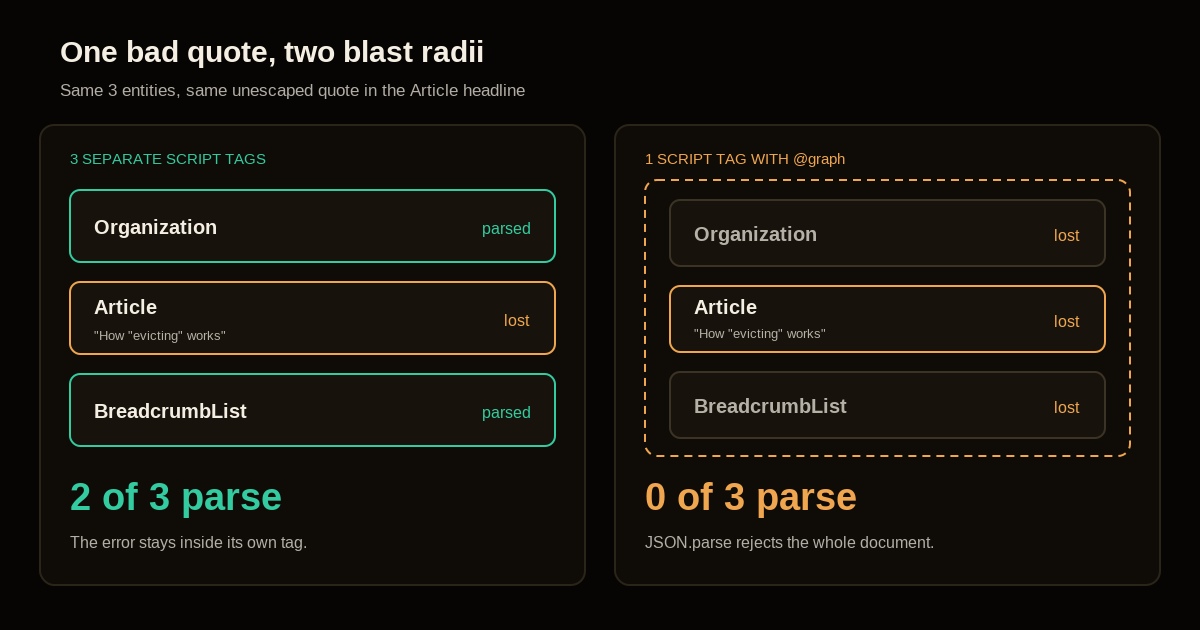
I’m not telling you to stop using @graph. It’s the right tool for linking entities by @id. But it raises the cost of a syntax error, so if you use one big graph, the build gate in step 6 below isn’t optional.
The </script> case is the strangest. The browser’s HTML parser, not the JSON parser, decides where the script ends, and it ends at the first </script> it sees, even inside a quoted JSON string. In my test, parse5 (the HTML parser behind jsdom) handed the JSON parser 72 of the 133 characters. Your template output was valid JSON. The page wasn’t.
How to Fix Unparsable Structured Data in 7 Steps
Open the report and group the URLs by template. In Search Console, open Unparsable structured data and the issue type, for example
Parsing error: Missing ',' or '}'. If hundreds of URLs share one template, Google’s own guidance is that the cause is often that template, so you’re fixing one file, not hundreds of pages.Confirm with the Rich Results Test. Run one affected URL through the Rich Results Test or the URL Inspection live test. If the live result is clean, the page has already been fixed and the report is waiting for a recrawl. Skip to step 7.
Find the exact character. The Rich Results Test shows that a block failed but is vague about where. This 37-line checker pulls every JSON-LD block from the server HTML, parses each one, and prints the position with a caret:
// jsonld-parse-check.mjs — find the exact character Google can't parse
const RE = /<script[^>]*type=["']?application/ld+json["']?[^>]*>([sS]*?)</script>/gi;

export function check(html) {
  const results = [];
  let i = 0;
  for (const [, raw] of html.matchAll(RE)) {
    i++;
    try {
      const data = JSON.parse(raw);
      const types = [data].flat().flatMap((d) => d['@graph'] ?? [d]).map((d) => d['@type']);
      results.push({ block: i, ok: true, types });
    } catch (err) {
      const pos = Number(/position (d+)/.exec(err.message)?.[1] ?? raw.length);
      const line = raw.slice(0, pos).split('\n').length;
      const context = raw.slice(Math.max(0, pos - 40), pos + 20).replace(/s/g, ' ');
      const caret = ' '.repeat(Math.min(40, pos)) + '^';
      results.push({ block: i, ok: false, line, error: err.message, context, caret });
    }
  }
  return results;
}

// usage: node jsonld-parse-check.mjs https://example.com/page  (or a local .html file)
const target = process.argv[2];
if (target) {
  const html = /^https?:/.test(target)
    ? await (await fetch(target, { headers: { 'user-agent': 'jsonld-parse-check' } })).text()
    : (await import('node:fs')).readFileSync(target, 'utf8');
  const results = check(html);
  for (const r of results) {
    if (r.ok) console.log(`block ${r.block}: ok  ${JSON.stringify(r.types)}`);
    else console.log(`block ${r.block}: FAIL line ${r.line}: ${r.error}\n  ${r.context}\n  ${r.caret}`);
  }
  if (!results.length) console.log('no JSON-LD blocks found in server HTML');
  process.exitCode = results.some((r) => !r.ok) ? 1 : 0;
}
On a test page with one good block and two broken ones, it prints:
block 1: ok  ["Organization"]
block 2: FAIL line 5: Expected ',' or '}' after property value in JSON at position 81 (line 5 column 21)
  "@type": "Article",   "headline": "How "evicting" works",
                                          ^
block 3: FAIL line 1: Unexpected token ']', ..."":"Home"},]}" is not valid JSON
The caret lands on the
eof evicting, right after the quote that ended the string. It reads server HTML only. If a tag manager or client script injects your JSON-LD, check the rendered DOM as well.Name the cause. Match the failing character to a row in the table in the next section. You need to know which group it is, because the fix is different for each.
Serialize, don’t concatenate. Replace the hand-written JSON in the template with a data structure passed through your platform’s encoder:
// JavaScript / any SSR framework const jsonLd = { '@context': 'https://schema.org', '@type': 'Article', headline: post.title }; const html = `<script type="application/ld+json">${JSON.stringify(jsonLd).replace(/</g, '\u003c')}</script>`;// WordPress / PHP: JSON_HEX_TAG turns < and > into < and > echo '<script type="application/ld+json">' . wp_json_encode( $schema, JSON_HEX_TAG | JSON_UNESCAPED_SLASHES ) . '</script>';{%- comment -%} Shopify Liquid: let the json filter quote and escape {%- endcomment -%} "description": {{ product.description | strip_html | json }},In Jinja use
{{ schema | tojson }}, which escapes<,>,&and'for HTML. The.replace(/</g, '\\u003c')in the JavaScript version is the same fix Next.js recommends in its JSON-LD guide.Gate the build. Run the checker over your built HTML in CI and fail on exit code 1. A broken template is broken on every page that uses it, so one bad commit can fill the report with thousands of URLs.
Validate the fix. Click Validate Fix on the issue in Search Console. Google says validation typically takes up to about two weeks, sometimes longer. If it fails, open See details, fix the URL it names and start a new validation.
Which Search Console Message Points to Which Cause?
Node’s error text and Google’s labels aren’t word for word the same, but they describe the same failures. This is the mapping I use, based on Google’s descriptions of each label and the JSON.parse output from my 16 cases:
| Search Console label | Most likely cause | Fix |
|---|---|---|
Missing ',' or '}' | Unescaped " in a text value | Serialize the value instead of interpolating it |
Missing ',' or ']' in array declaration | Loop forgot a comma between items | Build an array, then serialize it |
Missing '}' or object member name | Trailing comma before } | Same: no hand-written commas |
Bad escape sequence in string | Backslash in text, such as C:\docs | Let the encoder write \\ |
Empty escape sequence in string | Lone backslash, such as Google’s own example "Call me \ John" | Same |
Invalid number | NaN, $19.99 or an empty variable where a number goes | Cast it, or omit the field |
Invalid JSON document | Smart quotes, single quotes, " entities or comments | Stop the editor or CMS from rewriting the script |
Duplicate unique property | Two @context keys after merging two templates | Merge objects in code, not text |
What Breaks After the Parse Error Is Gone?
A clean parse isn’t the end. Google’s report warns that fixing a parse error can surface “additional warnings or errors that were hidden because the item could not be parsed at all.” That’s exactly what a serializer does to bad data. In my test, JSON.stringify turned NaN into null and silently dropped an undefined price. The JSON is valid now, but a Product with no price can move straight into a different report.
So after step 7, expect the affected URLs to show up in the report for the type they actually are. A Product block often goes from Unparsable to the offers, review, or aggregateRating error, and an FAQ block might show the Duplicate field FAQPage issue it had all along. That isn’t a regression. Google can finally see the markup.
If your JSON-LD is injected after load, check what Googlebot receives, as covered in auditing document.currentScript inline rendering and fixing Page indexed without content. The same “test what the crawler actually fetches” approach is what fixed Sitemap couldn’t fetch. Once a BreadcrumbList parses, the next error it usually shows is a crumb with no URL, covered in fixing Missing field “item” in breadcrumbs. On Article and Video markup, the usual next one is a date the parser can’t read, covered in fixing Date/time not in ISO 8601 format. The rest of this technical SEO series lives on the AI search hub.
FAQ
What does Unparsable structured data mean in Search Console?
It means Google found structured data on the page but couldn’t read it because of a syntax error, usually in a JSON-LD script. Because the block can’t be parsed, Google can’t even tell which type it was meant to be, so the report lists every issue as a critical error. Fixing the syntax is the only way to get the markup read again.
How do I find the exact error in my JSON-LD?
Run the affected URL through the Rich Results Test, or extract each application/ld+json block from the page source and pass it to JSON.parse. A JSON parser reports the character position where it gave up, which points within a few characters of the real problem. The checker script in this post prints that position with a caret under it.
What causes Parsing error: Missing ’,’ or ’}‘?
The most common cause is an unescaped double quote inside a text value, such as a product description or headline that contains quoted words. The quote ends the string early, so the parser expects a comma or closing brace and finds more text instead. Building the data as an object and serializing it escapes the quote for you.
Does one unparsable block break all structured data on the page?
It breaks everything inside that one script tag, because a JSON parser can’t recover part of an invalid document. Other separate script tags on the same page still parse. In my test, three entities in separate tags lost one to a bad quote, while the same three entities inside one @graph block lost all three.
Why does my JSON-LD break when a value contains a closing script tag?
The HTML parser ends the script element at the first closing script tag it finds, even inside a JSON string. The JSON parser then receives a truncated document. Replacing every < with \u003c after serializing, as Next.js recommends, keeps the HTML parser from seeing the tag while the JSON value stays the same.
How long does Validate Fix take for Unparsable structured data?
Google says validation typically takes up to about two weeks and sometimes longer, because it waits for the affected URLs to be recrawled. If validation fails, open See details, find the URL that still fails, fix it and start a new validation. Fixing a parse error can also reveal new warnings that were hidden while the block was unreadable.
Sources
- Google Search Console Help, Unparsable structured data report: error labels, “type could not be determined,” template-level causes, Validate Fix timing, and hidden errors appearing after a parse fix.
- Next.js, How to implement JSON-LD in your Next.js application:
JSON.stringify(jsonLd).replace(/</g, '\\u003c')to keep HTML tags out of the payload. - Claudio Kuenzler, How to fix unparsable structured data issues:
Missing ',' or '}'traced to double quotes in a database-sourced description. - Shopify Dawn, Unparsable structured data discussion #3196:
Missing ',' or ']' in array declarationin product schema, and the| jsonfilter advice. - First-party measurement: 16 broken JSON-LD payloads parsed with Node 22
JSON.parse, a</script>truncation test with parse5 7.3, a separate-tags vs@graphblast-radius test, andjsonld-parse-check.mjsrun on a three-block fixture, November 25, 2026.
Frequently asked questions
Google Search · Preferred sources
Prefer this site on Google
If you already read this writing, add umesh-malik.com as a Preferred Source. Google can then highlight it with a preferred badge in Top Stories, AI Overviews, and AI Mode — for you, not as a site-wide ranking boost.
Related Articles

Web Engineering
Fix Offers, Review, or aggregateRating Error: 5 Hidden Causes
The offers, review, or aggregateRating error means a Product node has none of the three. 9 test variants passed the schema.org validator; 5 still failed.

Web Engineering
Fix Date/Time Not in ISO 8601 Format: 9 of 15 Formats Fail
Date/time not in ISO 8601 format means Google can't read a date in your markup. 9 of 15 common formats fail, and 7 of those 9 still parse in JavaScript.

Web Engineering
Fix Missing Field "item" in Breadcrumbs: 8 Causes, 1 Rule
Missing field "item" means a breadcrumb before the last one has no URL. I broke BreadcrumbList 14 ways; 8 hit this error, and one rule fixes them all.
Keep reading
Get new posts on AI, Claude Code & LLMs
New deep-dives on AI engineering, Claude Code, and developer tooling — follow along however you prefer.
About the Author

Software engineer writing about AI, Claude Code, LLMs, OpenAI, Anthropic, and developer tooling. 5+ years building production systems at Expedia Group, Tekion, and BYJU'S.