Fix Missing Field hasMerchantReturnPolicy: 5 of 7 Fixes Fail
Missing field hasMerchantReturnPolicy is a warning, not an error. Link each Offer to one store-wide policy by @id: 189 bytes a page instead of 697.

TL;DR — Missing field hasMerchantReturnPolicy is a non-critical Search Console warning, usually paired with Missing field shippingDetails: the Offer in your Product markup has no return or shipping policy attached. I ran eight common markup variants through the schema.org validator and all eight scored 0 errors, but five of the seven attempted fixes still break Google’s rules. The fix that holds up is one store-wide policy on your Organization, referenced from every Offer by @id, which costs 189 bytes a product page instead of 697.
You’ve probably seen this one in bulk. The Merchant listings report shows the same two warnings on every product URL, your theme or plugin doesn’t output either field, and the forum answer is “paste this big JSON block into your template.” That works, but it’s the most expensive version, and most hand-written copies of it contain a mistake the validator won’t catch.
What Does Missing Field hasMerchantReturnPolicy Mean?
Missing field “hasMerchantReturnPolicy” means at least one Offer on the page has no return policy in its structured data. Search Console reports it in the Merchant listings report as a non-critical issue, usually written as Missing field "hasMerchantReturnPolicy" (in "offers"). The paired warning, Missing field "shippingDetails", means the same Offer has no shipping policy either.
Google’s merchant listing documentation lists both as recommended Offer properties, not required ones. So three things are true at once:
- Your product is still eligible for merchant listing results. Nothing is broken.
- Google has less to show. Return windows and shipping costs can appear in shopping results, and without a source for them they don’t.
- The warning is about the markup on that page. It says nothing about whether Google knows your policy from somewhere else.
That last point is why people get stuck. You can give Google a perfectly good return policy and still see this warning on every product.
Should You Fix It at All?
If you sell online and want shipping cost and return window in your Google results, yes. If the page isn’t a real product page with a buy option, the warning is a sign you shouldn’t be emitting merchant markup there at all, which is the same root cause as the offers, review or aggregateRating error on category pages.
There’s one more case where you can leave it alone. If you’ve already set shipping and returns in Search Console or Merchant Center, Google uses those settings ahead of any markup. The warning stays because the page markup still lacks the field, but the information Google shows comes from the settings.
Which Return and Shipping Source Does Google Use?
Google now accepts your policies from four places, and it ranks them. The return policy documentation and the shipping policy documentation give the same order, strongest first:
| Rank | Source | Scope | Clears the page warning? |
|---|---|---|---|
| 1 | Content API for Shopping settings | Account | No, markup unchanged |
| 2 | Merchant Center or Search Console Shipping and returns settings | Account | No, markup unchanged |
| 3 | Product-level markup on the Offer | One product | Yes |
| 4 | Organization-level markup (hasMerchantReturnPolicy, hasShippingService) | Whole site | Not on its own |
Two dates explain why this table looks the way it does. Organization-level return policy markup arrived in a June 2024 Search Central post. Organization-level shipping markup, plus Search Console’s Shipping and returns settings for every site Google identifies as an online merchant, followed in a November 2025 post. Before those, putting the full policy on every Offer was the only markup option, which is why so many tutorials still teach it.
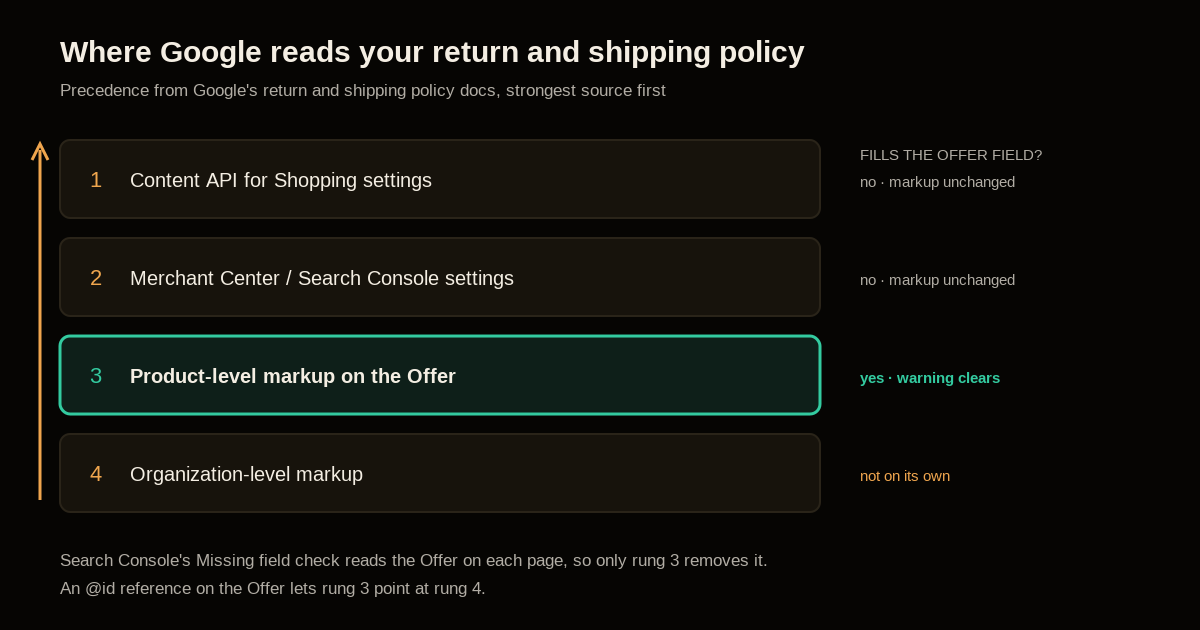
The fourth row is the trap. Add a return policy to your Organization, re-run the test, and the warning is still there, because the warning is about each Offer, and organization markup isn’t attached to any Offer.
Why Do Validator-Clean Fixes Still Fail?
I built one product, a $89 shoe with a 30-day free-return policy and $4.95 US shipping, and wrote eight versions of its JSON-LD: the default no-policy output and seven attempted fixes I see in forum threads and plugin output. Each one went through the schema.org validator endpoint, and through a 33-line checker I wrote against the required and recommended fields in Google’s merchant listing documentation. Sizes are minified JSON-LD bytes.
| Variant | Bytes | schema.org validator | Google’s rules |
|---|---|---|---|
| A. No policy (default theme output) | 271 | 0 errors | 2 warnings: both Missing field |
B. Full policy inline on the Offer | 968 | 0 errors | Clean |
C. Offer references Organization policies by @id | 460 | 0 errors | Clean |
D. Finite return window, no merchantReturnDays | 944 | 0 errors | Error: days required for a finite window |
| E. Shipping rate in EUR on a USD offer | 968 | 0 errors | Error: currency must match the offer |
F. transitTime with unitCode: "days" | 969 | 0 errors | Error: unit must be DAY or d |
G. Two shippingRate values in one detail | 1,029 | 0 errors | Error: one rate per detail |
H. Policy on the Product, not the Offer | 550 | 0 errors | 2 warnings: both Missing field |
All eight scored 0 errors and 0 warnings in the validator. That’s expected: schema.org checks vocabulary, and every one of these properties is legal vocabulary. Google’s rules sit on top of it. Only B and C pass both checks, so five of the seven fixes fail.
Variant H is the one that catches people. hasMerchantReturnPolicy is a valid property of Product in schema.org, so the validator is happy, but Google reads it from the Offer. Moving the block up a level silently does nothing.
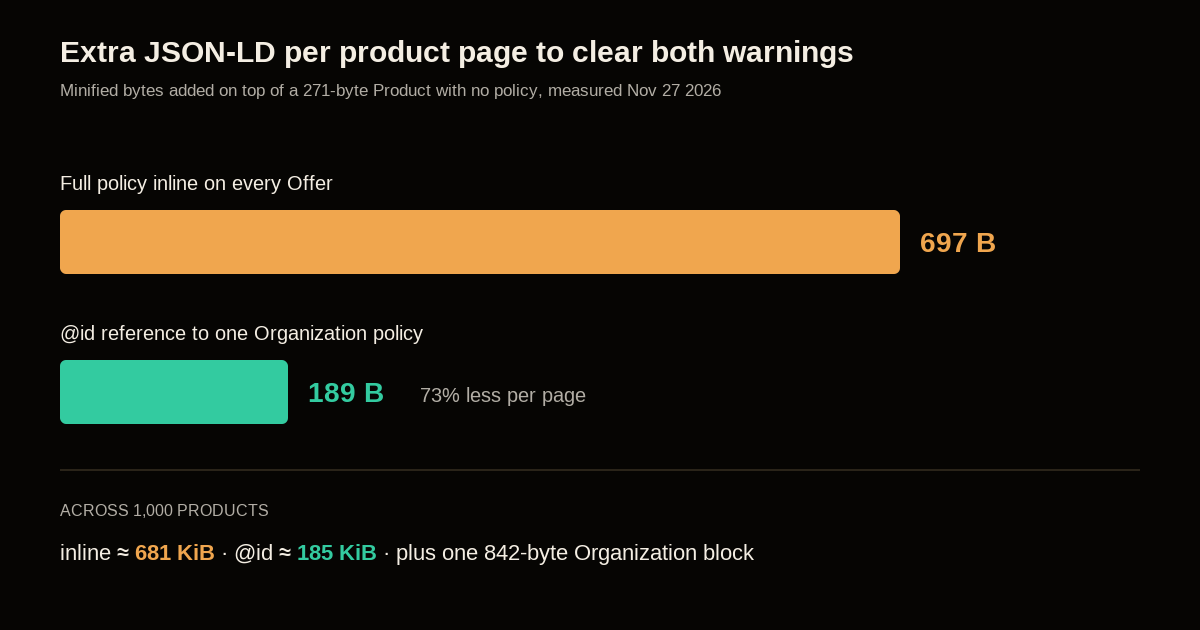
The byte numbers matter more than they look. The inline policy adds 697 bytes to every product page. The @id reference adds 189, which is 73% less. Across 1,000 products that’s roughly 681 KiB against 185 KiB of extra HTML for Google to fetch and parse, and one place to update the return window instead of a template change across the catalog.
How to Fix Missing Field hasMerchantReturnPolicy in 6 Steps
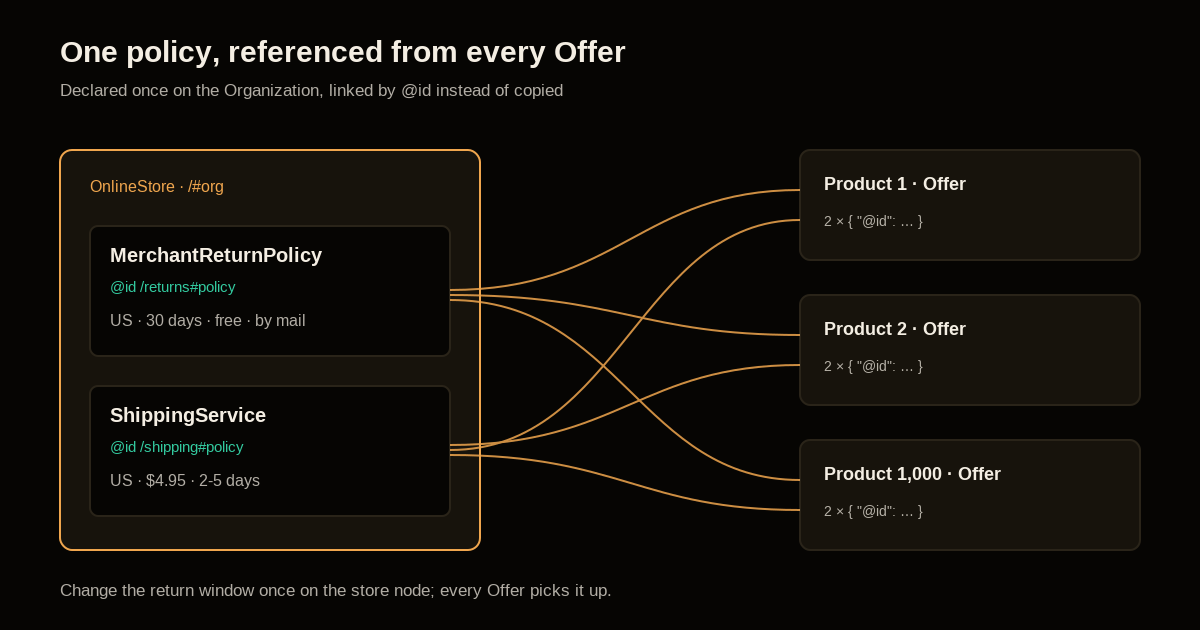
This is variant C. It gives Google one source of truth and gives every Offer the field the report looks for.
Check the policy settings first. In Search Console, look under Settings for Shipping and returns. If your real policies are already there, Google is using them. Decide whether you still want clean markup, then continue or stop.
Declare one return policy on your
Organization. Put it on the page your organization markup already lives on, typically the homepage or a dedicated returns page. Google recommends theOnlineStoresubtype for online shops. Give the policy a stable@id:{ "@context": "https://schema.org", "@type": "OnlineStore", "@id": "https://example.com/#org", "name": "Example Store", "url": "https://example.com/", "hasMerchantReturnPolicy": { "@type": "MerchantReturnPolicy", "@id": "https://example.com/returns#policy", "applicableCountry": "US", "returnPolicyCategory": "https://schema.org/MerchantReturnFiniteReturnWindow", "merchantReturnDays": 30, "returnMethod": "https://schema.org/ReturnByMail", "returnFees": "https://schema.org/FreeReturn" } }applicableCountryandreturnPolicyCategoryare required. A finite window also needsmerchantReturnDays, which is variant D’s bug.Declare one shipping service on the same
Organization. AddhasShippingServicewith its own@id:"hasShippingService": { "@type": "ShippingService", "@id": "https://example.com/shipping#policy", "shippingConditions": [{ "@type": "ShippingConditions", "shippingDestination": { "@type": "DefinedRegion", "addressCountry": "US" }, "shippingRate": { "@type": "MonetaryAmount", "value": "4.95", "currency": "USD" }, "transitTime": { "@type": "ServicePeriod", "duration": { "@type": "QuantitativeValue", "minValue": 2, "maxValue": 5, "unitCode": "DAY" } } }] }Reference both from every
Offerby@idonly. Google’s merchant listing docs describe exactly this pattern for pointing anOfferat a global policy on another page. This is the whole per-product change:"offers": { "@type": "Offer", "price": "89.00", "priceCurrency": "USD", "availability": "https://schema.org/InStock", "hasMerchantReturnPolicy": { "@id": "https://example.com/returns#policy" }, "shippingDetails": { "@type": "OfferShippingDetails", "hasShippingService": { "@id": "https://example.com/shipping#policy" } } }Products with a different policy, such as final-sale items, get a full inline
MerchantReturnPolicyinstead. Product-level markup overrides organization markup, so the exception wins only where you put it.Test one product URL in the Rich Results Test. The URL test runs Google’s own rules on the rendered page. If your markup is injected by JavaScript, this is also where you find out whether Googlebot sees it, the problem behind Page indexed without content. Confirm the Merchant listings item shows no missing-field warnings, and that the page doesn’t also carry a second, policy-free
Productfrom theme microdata.Ship it to the template, then validate once. Roll the change out to every product template, open the Merchant listings report, and click Validate Fix on each warning. Validation re-crawls the affected URLs over days to weeks. Don’t restart it while it’s running.
What Breaks If You Copy the Full Inline Block?
Nothing breaks on day one, which is the problem. Variant B passes everything. Then three months later the return window changes from 30 days to 14, and the change has to land in every product template, plugin setting and hard-coded snippet that copied the block. Miss one and your markup disagrees with your returns page, and Google’s structured data guidelines require markup to match the visible content.
The inline block also invites the D-to-G mistakes. Each was valid schema.org, each looked right in a code review, and each gives Google a policy it can’t use:
- A finite window with no days. The category says “limited window” and never says how long.
- A currency mismatch. Multi-currency stores often hard-code the shipping currency while the offer currency changes per market.
- A free-text unit.
"days"reads fine to a human. Google only acceptsDAYord. - Multiple rates in one detail. Use one
OfferShippingDetailsper rate and destination instead.
If you must go inline, for example because your platform can’t output the organization block, generate it from one config value and run a checker on the output in CI. The Unparsable structured data post covers catching syntax breaks before they ship, and the same discipline applies here.
When Is the Warning Not Worth Fixing?
Skip it when the page isn’t a store page. Service businesses, digital downloads with no physical shipping, and affiliate review pages often pick up merchant markup from a plugin default. The right fix there is to stop emitting Offer markup that implies Google can send shoppers to a checkout you don’t have.
Also skip the markup work if your policies live in Search Console settings and you don’t mind the warning. Ranks 1 and 2 in the precedence table beat anything on the page. Clean markup is still useful for other consumers of your structured data, but it won’t change what Google shows.
This post is part of a running series on Search Console reports. For the adjacent product issues, see Missing field item in breadcrumbs, Duplicate field FAQPage, and the full list on the AI search hub.
FAQ
What does Missing field hasMerchantReturnPolicy mean in Search Console?
It means a Product on your page has an Offer with no hasMerchantReturnPolicy property, so Google can’t read your return policy from that markup. It shows up as a non-critical warning in the Merchant listings report, usually next to Missing field shippingDetails. The product stays eligible for merchant listing results; the warning only says Google has less information to show.
Do I have to fix Missing field hasMerchantReturnPolicy?
No, it’s a warning, not an error, and Google’s documentation lists both fields as recommended rather than required. Fix it when you actually sell online and want returns and shipping costs shown in Google results. If you already set these policies in Search Console or Merchant Center, Google uses those settings, and the markup warning on its own is cosmetic.
Why does the warning stay after I add a return policy to my Organization?
The report checks each Offer’s markup, and organization-level markup isn’t attached to any Offer. Google does use the organization policy as the fallback source, but the Offer still has no field. Add a one-line hasMerchantReturnPolicy reference with only an @id pointing at the organization policy, which Google’s merchant listing docs describe as the way to reference a global policy from an Offer.
Is it enough to add hasMerchantReturnPolicy to the Product instead of the Offer?
No. Schema.org accepts the property on Product, so validators pass it, but Google’s merchant listing rules read it from the Offer. In my test, the version with the policy on the Product still produced both Missing field warnings under Google’s rules. Move it inside offers.
What are the required fields for shippingDetails?
Inside OfferShippingDetails, Google requires shippingDestination with an addressCountry, exactly one shippingRate with a value or maxValue and a currency that matches the offer, and one deliveryTime. Handling and transit times are recommended, and when you give them they need minValue, maxValue and a unitCode of DAY or d.
How long does validation take after fixing merchant listing warnings?
Validate Fix in Search Console re-crawls the affected URLs over days to weeks, depending on how many there are and how often Google crawls them. Check one product URL in the Rich Results Test first, ship the fix to the template, then start a single validation and leave it running.
Sources
- Google Search Central, Merchant listing structured data:
hasMerchantReturnPolicyandshippingDetailsare recommendedOfferproperties; requiredOfferShippingDetailsfields; referencing a global policy from anOfferwith only@id. - Google Search Central, Merchant return policy structured data: organization-level
hasMerchantReturnPolicy, required properties, allowed values, and precedence. - Google Search Central, Shipping policy structured data: organization-level
hasShippingServiceand the same precedence order. - Google Search Central Blog, Adding markup support for organization-level return policies, June 11, 2024.
- Google Search Central Blog, More ways to share your shipping and returns policies with Google, November 12, 2025.
- Schema.org, Schema Markup Validator: vocabulary validation used for the eight-variant test.
- First-party measurement: eight JSON-LD variants of one Product posted to the validator.schema.org validate endpoint, checked against Google’s documented merchant listing fields with a Node 22 script, and sized as minified JSON, November 27, 2026.
Frequently asked questions
Google Search · Preferred sources
Prefer this site on Google
If you already read this writing, add umesh-malik.com as a Preferred Source. Google can then highlight it with a preferred badge in Top Stories, AI Overviews, and AI Mode — for you, not as a site-wide ranking boost.
Related Articles

Web Engineering
Fix Date/Time Not in ISO 8601 Format: 9 of 15 Formats Fail
Date/time not in ISO 8601 format means Google can't read a date in your markup. 9 of 15 common formats fail, and 7 of those 9 still parse in JavaScript.

Web Engineering
Fix Duplicate Field FAQPage: Google Stopped Checking in June
Duplicate field FAQPage means one URL ships two FAQPage blocks. Google stopped flagging it in June 2026, so here's the checker that caught 7 of 7 in my tests.

Web Engineering
Fix Missing Field "item" in Breadcrumbs: 8 Causes, 1 Rule
Missing field "item" means a breadcrumb before the last one has no URL. I broke BreadcrumbList 14 ways; 8 hit this error, and one rule fixes them all.
Keep reading
Get new posts on AI, Claude Code & LLMs
New deep-dives on AI engineering, Claude Code, and developer tooling — follow along however you prefer.
About the Author

Software engineer writing about AI, Claude Code, LLMs, OpenAI, Anthropic, and developer tooling. 5+ years building production systems at Expedia Group, Tekion, and BYJU'S.