Fix Offers, Review, or aggregateRating Error: 5 Hidden Causes
The offers, review, or aggregateRating error means a Product node has none of the three. 9 test variants passed the schema.org validator; 5 still failed.

TL;DR — Either offers, review, or aggregateRating should be specified is the Search Console error for a Product item carrying none of those three properties, so the page can’t get a product rich result. I ran nine common Product setups through the schema.org validator: all nine scored 0 errors and 0 warnings, and five of them still break Google’s rule. The usual culprits aren’t missing markup but broken markup: an Offer that isn’t linked, an empty offers array on out-of-stock items, and a second Product hiding in theme microdata.
This one is frustrating because everything looks right. Your SEO plugin outputs an Offer. The price is on the page. You paste the URL into a validator and it comes back clean. Search Console still lists the URL under Product snippets → Invalid items.
The gap is between two different checks. The schema.org validator checks vocabulary. Google checks its own product rules on top. So I built nine variants of the same Product, ran each through both rule sets, and wrote a 45-line checker that catches what the validator lets through.
What Does Either Offers, Review, or aggregateRating Should Be Specified Mean?
It means at least one Product item on the page has no offers, no review and no aggregateRating. Google’s product snippet documentation requires name plus one of those three. Miss all three and the item is invalid, which removes the page’s eligibility for price, availability and star results.
Each of the three has its own minimum before it counts:
| Property | Satisfies the rule? | Minimum Google wants inside it |
|---|---|---|
offers (Offer) | Yes | price (and priceCurrency, required for merchant listings) |
offers (AggregateOffer) | Yes | lowPrice and priceCurrency |
review | Yes | author with a valid name, reviewRating |
aggregateRating | Yes | ratingValue, plus ratingCount or reviewCount |
brand, sku, gtin, image | No | Useful, but none of them count |
Two reports read this markup. Product snippets covers any product page, including review and comparison sites, and accepts any of the three. Merchant listings, per the merchant listing guide, is for pages where shoppers can buy, and it requires an Offer with a price above zero and a currency. A page that passes on aggregateRating alone still fails merchant listings.
Why Does the Schema.org Validator Say 0 Errors?
Because nothing in schema.org is required. The schema.org validator checks that your types and properties exist in the vocabulary; it does not apply Google’s product rules. A Product with only a name is perfectly valid schema.org.
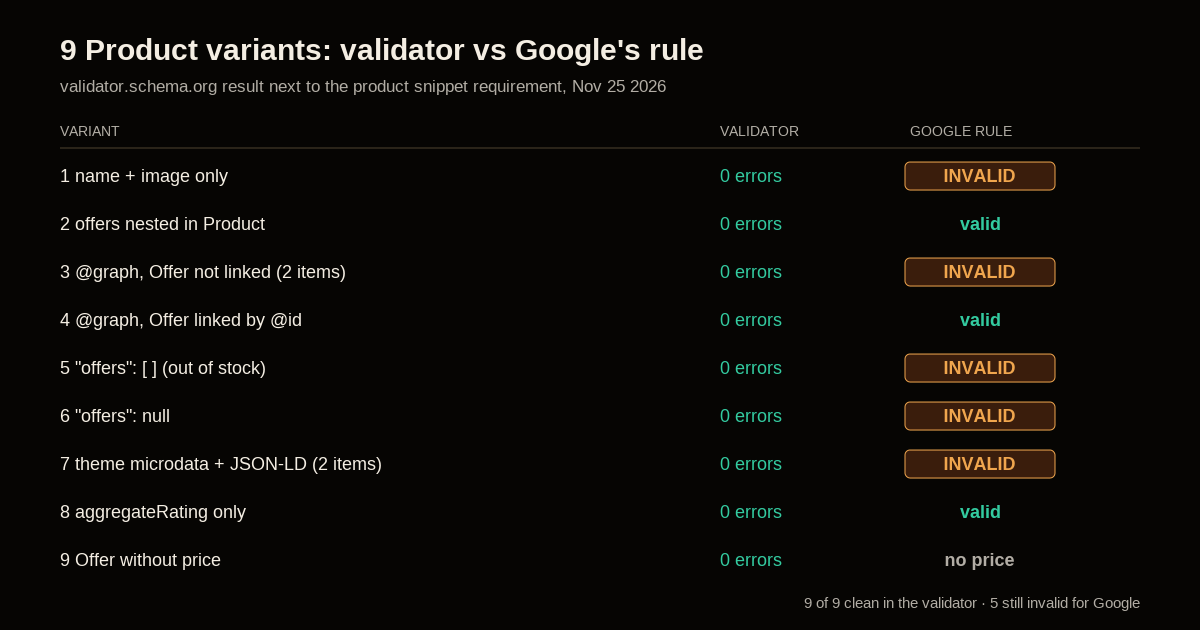
I sent nine versions of one product, an “Ember Mug” at $24, to the validator’s own endpoint and recorded what it parsed: how many top-level items, and which properties hung off the Product. Then I applied Google’s documented rule to that parsed result.
| # | Variant | Validator | Items parsed | Google’s rule |
|---|---|---|---|---|
| 1 | name and image only | 0 errors | 1 | Invalid |
| 2 | offers nested in the Product | 0 errors | 1 | Valid |
| 3 | @graph: Product and Offer, not linked | 0 errors | 2 | Invalid |
| 4 | @graph: Offer linked by @id | 0 errors | 1 | Valid |
| 5 | "offers": [] (out of stock) | 0 errors | 1 | Invalid |
| 6 | "offers": null | 0 errors | 1 | Invalid |
| 7 | Theme microdata Product + good JSON-LD | 0 errors | 2 | Invalid (microdata copy) |
| 8 | aggregateRating only | 0 errors | 1 | Valid (snippets only) |
| 9 | Offer with no price | 0 errors | 1 | Different error: missing price |
Nine for nine scored 0 errors and 0 warnings. Five still trigger this exact error, and a sixth swaps it for a missing-price error. The validator also reported 2 separate top-level items for variants 3 and 7, which is the real story behind both of them: the Product that Google checks isn’t the one you think you wrote.
What Are the 5 Hidden Causes?
A Product with nothing to sell. Name, image, description, maybe a brand. Typical on pages for services, software, recipes or “coming soon” items that a plugin labels as Product by default.
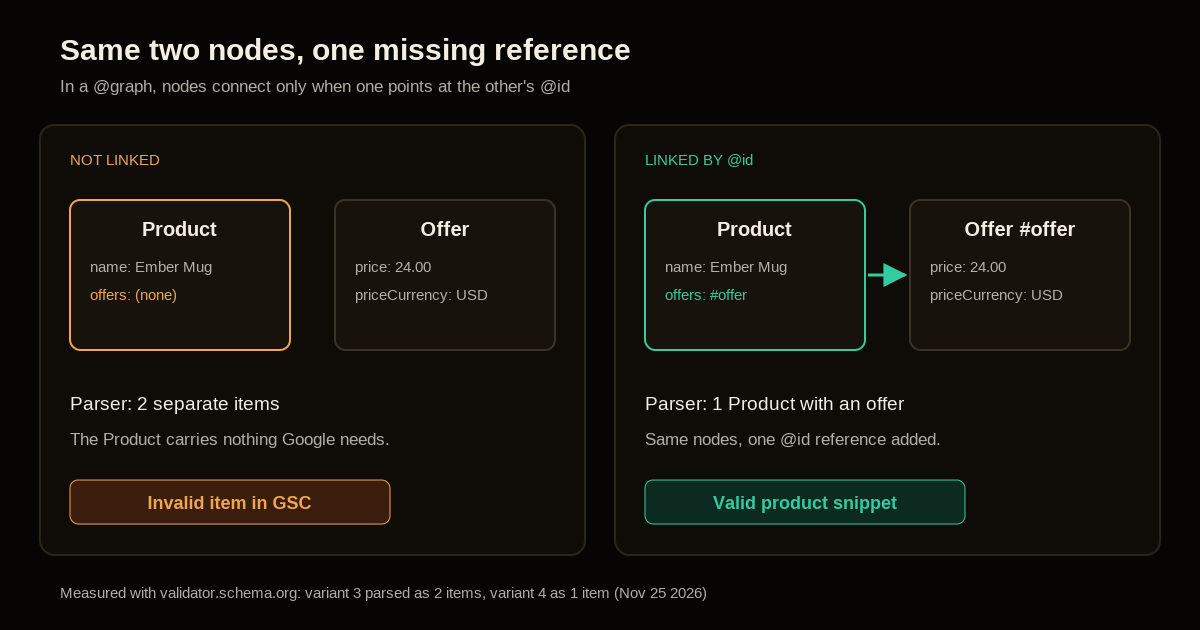
An Offer that sits next to the Product instead of inside it. In a
@graph, nodes are only connected if one points to the other. If the Product has no"offers": { "@id": "…#offer" }reference, the parser sees two unrelated items. The Offer is fine; the Product is empty.An empty
offersarray when stock hits zero. Some templates buildoffersfrom in-stock variants only. Sell out, and the array becomes[], which parses as no property at all.nullor a blank value from a template. Same effect as the empty array: a template variable with no data renders as"offers": null.A second Product from the theme. The SEO plugin writes good JSON-LD, but the theme still has
itemscope itemtype="https://schema.org/Product"microdata on the product card, carrying only a name. Two Products, and the microdata one is empty. Category grids are the worst case: one empty Product per card.
How to Fix the Offers, Review, or aggregateRating Error in 6 Steps
Open the report and pick an example URL. In Search Console go to Shopping → Product snippets (and Merchant listings), open the invalid-items issue and note which templates the affected URLs share: product page, category, blog, out-of-stock items.
Look at what Google parsed, not what you wrote. Run the URL through Google’s Rich Results Test. Count the Product items. If it shows two, you have a duplicate source (cause 2 or 5).
Run a checker across the template. This one reads every JSON-LD block, follows
@graphand@idlinks, and flags the patterns from my test, including theme microdata:// product-snippet-check.mjs — flag Product nodes Google will call invalid const NEED = ['offers', 'review', 'aggregateRating']; const has = (v) => v != null && !(Array.isArray(v) && v.length === 0); export function check(html) { const blocks = [...html.matchAll(/<script[^>]*application/ld+json[^>]*>([sS]*?)</script>/gi)]; const nodes = blocks.flatMap((m) => { const data = JSON.parse(m[1]); return (Array.isArray(data) ? data : [data]).flatMap((d) => d['@graph'] ?? [d]); }); const byId = new Map(nodes.filter((n) => n['@id']).map((n) => [n['@id'], n])); const linked = new Set( nodes.flatMap((n) => Object.values(n).flatMap((v) => [v].flat())) .filter((v) => v && typeof v === 'object' && v['@id'] && Object.keys(v).length === 1) .map((v) => v['@id']) ); const problems = []; for (const n of nodes) { const types = [n['@type']].flat(); if (types.includes('Product') && !NEED.some((k) => has(n[k]))) { problems.push(`Product "${n.name}" has none of offers/review/aggregateRating`); } if (types.includes('Offer') && n['@id'] && !linked.has(n['@id'])) { problems.push(`Offer ${n['@id']} is not referenced by any Product`); } for (const o of [n.offers].flat().filter(Boolean)) { const offer = o['@id'] ? byId.get(o['@id']) ?? o : o; if (typeof offer === 'object' && offer.price == null && offer.priceSpecification == null && offer.lowPrice == null) { problems.push(`Offer on "${n.name}" has no price`); } } } if (/itemtype=["']https?://schema.org/Product["']/i.test(html)) { problems.push('Microdata Product found: check it carries offers too'); } return problems; } // usage: node product-snippet-check.mjs https://example.com/p/mug if (process.argv[2]) { const html = await (await fetch(process.argv[2])).text(); const problems = check(html); console.log(problems.length ? problems.join('\n') : 'ok'); process.exitCode = problems.length ? 1 : 0; }On my nine variants it flagged all five invalid ones plus the missing price, and passed the three valid ones. It reads server HTML only, so if your markup is injected by JavaScript, test the rendered page too.
Link or nest the Offer. Either put the Offer object inside
offers, or keep the@graphand reference it by@id:{ "@context": "https://schema.org", "@graph": [ { "@type": "Product", "@id": "https://example.com/p/mug#product", "name": "Ember Mug", "offers": { "@id": "https://example.com/p/mug#offer" } }, { "@type": "Offer", "@id": "https://example.com/p/mug#offer", "price": "24.00", "priceCurrency": "USD", "availability": "https://schema.org/OutOfStock" } ] }Remove the second source. Delete
itemscope/itemtypeProduct microdata from theme templates, and stop emitting Product on category and listing pages. One page, one emitter, one Product.Validate the fix. Re-run the Rich Results Test on a few URLs per template, then click Validate fix in Search Console. Validation progresses as Google recrawls the affected URLs, so large catalogs take longer than small ones.
Which Fix Fits Which Page Type?
Don’t fill every Product with whatever clears the error. Match the property to what the page really shows:
| Page type | Right fix | Wrong fix |
|---|---|---|
| Product you sell, in stock | offers with price, priceCurrency, availability | aggregateRating only (fails merchant listings) |
| Product you sell, out of stock | Keep offers, set availability to OutOfStock | Dropping offers or outputting [] |
| Editorial review of a product | review with a named author and reviewRating | An Offer with a price you don’t charge |
| Category or listing page | Remove Product markup from the cards | One Product per card |
| Software, course or service page | Use the matching type, or no Product at all | Product with a made-up rating |
| Page with no price or reviews | Remove the Product markup | "price": "0" to make it pass |
What Breaks If You Fake the Fix?
Ratings and prices in markup must match the page. Google’s review snippet guidelines say the rated content must be readily available on the marked-up page, and “don’t aggregate reviews or ratings from other websites.” For businesses that control reviews of themselves, star results are off the table entirely.
Markup that misrepresents the page falls under Google’s structured data policies, and the penalty is a manual action that can remove rich results across the site, not just on one URL. An invalid-items warning costs you a rich result on some pages. A fake aggregateRating can cost you all of them.
The same discipline applies to every structured data error. One emitter per entity was also the fix for Duplicate field FAQPage. If Search Console lists the product page under Unparsable structured data instead, Google never got as far as the Product rules; fix the JSON syntax first. If your markup is added by a script after load, check what Googlebot actually receives, as covered in auditing document.currentScript inline rendering and fixing Page indexed without content. Out-of-stock pages that turn into “no longer available” shells can drift into soft 404 errors, and product variants on many URLs bring their own trouble when Google chooses a different canonical. Once the product snippet is valid, the Merchant listings report usually flags return and shipping next; fixing Missing field hasMerchantReturnPolicy covers both with one store-wide policy. The rest of this technical SEO series lives on the AI search hub.
FAQ
What does Either offers, review, or aggregateRating should be specified mean?
It means Google found a Product item on the page that has none of the three properties product snippets require: offers, review or aggregateRating. Search Console lists it as an invalid item in the Product snippets report, and the page loses eligibility for price, availability and star rich results. Adding one real, visible value for any of the three clears it.
Why does the schema.org validator show 0 errors for my product?
The schema.org validator checks your markup against the schema.org vocabulary, where every Product property is optional. Google’s product snippet rule is stricter and lives on top of that vocabulary. In my tests, all nine Product variants scored 0 errors and 0 warnings in the validator, and five of them still broke Google’s rule. Use the Rich Results Test or Search Console for Google’s verdict.
Should I remove offers when a product is out of stock?
No. Keep the Offer with its price and set availability to https://schema.org/OutOfStock. Many themes and plugins drop the offers block or output an empty array when stock hits zero, and an empty array leaves the Product with nothing, which triggers this exact error. Out-of-stock is valid availability, not a reason to remove the offer.
Can I just add a fake aggregateRating to clear the error?
No. Google requires ratings in markup to be visible on the page and sourced from real users, and it forbids aggregating ratings from other websites. Markup that doesn’t match the visible page breaks Google’s structured data policies and can lead to a manual action that removes rich results for the whole site. If the page has no real price or reviews, remove the Product markup instead.
Is aggregateRating alone enough to fix the error?
It clears the product snippets error, because Google needs only one of the three properties. It does not make the page eligible for merchant listings, which require an Offer with a price above zero and a currency. If shoppers can buy on the page, add offers as well, so both reports are clean.
Why does the error appear on my category pages?
Usually a theme or SEO plugin outputs a Product item for every product card in the grid, with only a name and image. Each card becomes a Product with no offers, review or aggregateRating. Google recommends product rich results only for pages focused on a single product, so the fix is to stop emitting Product markup on listing pages, not to fill it in.
Sources
- Google Search Central, Product snippet structured data:
nameplus one ofreview,aggregateRatingoroffers;Offerneedsprice;AggregateOfferneedslowPriceandpriceCurrency; single-product pages only. - Google Search Central, Merchant listing structured data:
offersmust be anOffer, with a price above zero andpriceCurrency. - Google Search Central, Review snippet structured data:
ratingValueplusratingCountorreviewCount; visible ratings; no ratings aggregated from other sites; no self-serving reviews. - Google Search Central, General structured data guidelines: markup must represent the page’s visible content; violations can lead to a manual action.
- Schema.org, Schema Markup Validator: vocabulary validation used for the nine-variant test.
- First-party measurement: nine JSON-LD and microdata variants of one Product posted to the validator.schema.org validate endpoint and checked with
product-snippet-check.mjs(Node 22), November 25, 2026.
Frequently asked questions
Google Search · Preferred sources
Prefer this site on Google
If you already read this writing, add umesh-malik.com as a Preferred Source. Google can then highlight it with a preferred badge in Top Stories, AI Overviews, and AI Mode — for you, not as a site-wide ranking boost.
Related Articles

Web Engineering
Fix Unparsable Structured Data: 16 Ways It Breaks, 1 Fix
Unparsable structured data means Google hit a JSON syntax error and dropped the block. I broke JSON-LD 16 ways; one serializer change fixed every one.

Web Engineering
Fix Date/Time Not in ISO 8601 Format: 9 of 15 Formats Fail
Date/time not in ISO 8601 format means Google can't read a date in your markup. 9 of 15 common formats fail, and 7 of those 9 still parse in JavaScript.

Web Engineering
Fix Missing Field "item" in Breadcrumbs: 8 Causes, 1 Rule
Missing field "item" means a breadcrumb before the last one has no URL. I broke BreadcrumbList 14 ways; 8 hit this error, and one rule fixes them all.
Keep reading
Get new posts on AI, Claude Code & LLMs
New deep-dives on AI engineering, Claude Code, and developer tooling — follow along however you prefer.
About the Author

Software engineer writing about AI, Claude Code, LLMs, OpenAI, Anthropic, and developer tooling. 5+ years building production systems at Expedia Group, Tekion, and BYJU'S.