Fix Duplicate Field FAQPage: Google Stopped Checking in June
Duplicate field FAQPage means one URL ships two FAQPage blocks. Google stopped flagging it in June 2026, so here's the checker that caught 7 of 7 in my tests.

TL;DR — Duplicate field FAQPage is the error for one URL that ships two or more FAQPage blocks, almost always because two systems (a plugin and a block, a theme and a tag manager) each write their own. Google dropped FAQ rich results on May 7, 2026 and stopped checking FAQ markup in the Rich Results Test in June, so the error no longer surfaces anywhere — but the duplicate is still on your page. Count FAQPage entities per page with a 40-line script, keep the one block that matches the visible FAQ, and gate your build so it can’t come back.
For years, Duplicate field “FAQPage” was one of the most-asked structured data errors on WordPress, Shopify and Webflow forums. Then Google turned off the feature that made people look. FAQ rich results disappeared from Search on May 7, 2026, and the Rich Results Test and the Search Console report that used to flag the duplicate went with them in June.
So the error didn’t get fixed. It got hidden. If your page had two FAQPage blocks in April, it almost certainly still has two today, and nothing in Google’s tooling will tell you.
What Does Duplicate Field FAQPage Mean?
Duplicate field FAQPage means a single URL contains more than one FAQPage entity in its structured data. A page has one FAQ, so it should be described once. Rank Math’s knowledge base puts it plainly: a post or page should have a maximum of one FAQ Schema.
The duplicate doesn’t have to be two identical <script> tags. Any of these count as “two FAQPage” to a parser that reads the whole page:
- two
application/ld+jsonscripts, each with"@type": "FAQPage" - one JSON-LD block plus
itemtype="https://schema.org/FAQPage"microdata in an accordion - a FAQPage inside an
@grapharray and a separate FAQPage script - a FAQPage nested as the
mainEntityof aWebPageand a top-level FAQPage
Two things are not duplicates: one FAQPage inside @graph, and one node typed as both ["WebPage", "FAQPage"]. Those are a single entity written in a different shape.
Why Did the Error Disappear From Search Console?
Because Google retired the feature it belonged to. The timeline is short and it’s all on Google’s own Search Central changelog:
| Date | What changed | Effect on the duplicate error |
|---|---|---|
| Aug 8, 2023 | FAQ rich results limited to “well-known, authoritative government and health websites” (Google) | Most sites stop seeing the rich result; the error still reports |
| May 7, 2026 | “This feature will no longer appear in Google Search” | No FAQ rich results for anyone |
| June 2026 | Google drops “the FAQ search appearance, rich result report, and support in the Rich results test” (as quoted by Search Engine Journal) | The error stops appearing in Google’s tools |
| June 15, 2026 | “Removed documentation for the FAQ rich result feature” | No official reference left to check against |
| August 2026 | FAQ rich result support removed from the Search Console API | Scripted reports go quiet too |
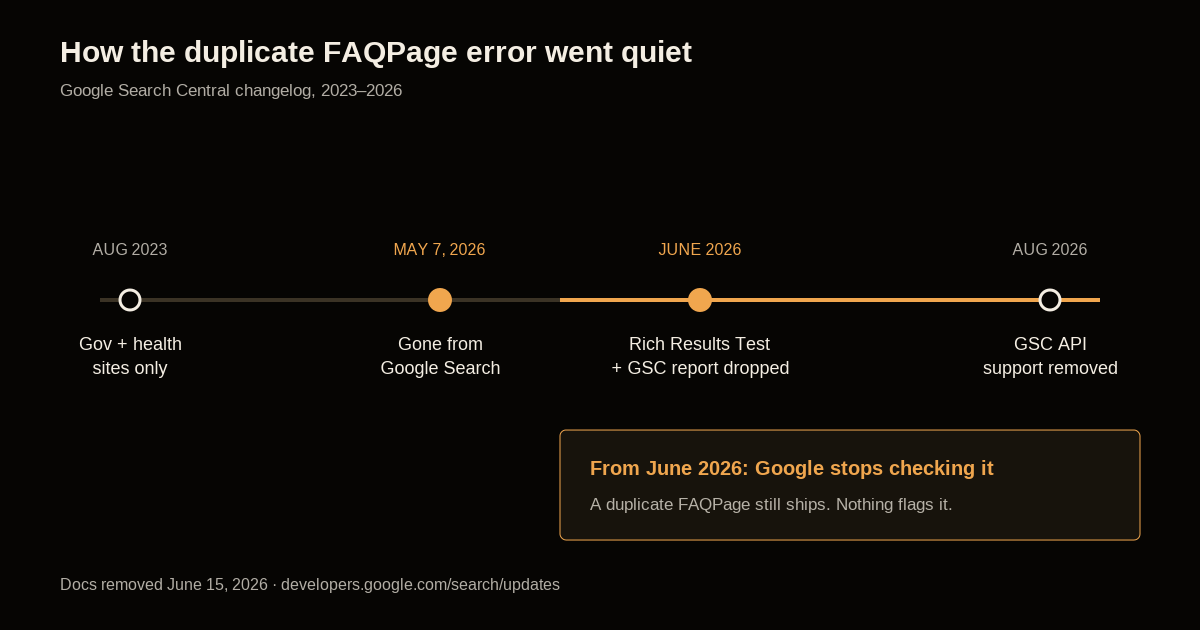
Read the June row carefully. Google didn’t decide duplicates are fine. It stopped validating FAQ markup at all. A duplicate FAQPage is now the same kind of bug as a broken alt attribute on an image no one looks at: invisible until someone else’s parser reads it.
Should You Still Fix It Now That FAQ Rich Results Are Gone?
Yes, but treat it as a ten-minute cleanup, not an SEO emergency. I can’t show you a ranking effect, and Search Engine Journal’s report notes the markup can stay on the page without causing problems. So don’t panic, and don’t believe anyone selling a “FAQ schema recovery” service.
It’s still worth fixing for three reasons:
- A duplicate means two owners. Two systems writing the same content will drift. Someone edits the FAQ in the page builder, the plugin’s copy keeps last year’s answer, and now your markup contradicts your page.
- Other parsers still read schema. The Schema Markup Validator still parses FAQPage, and so does any crawler that extracts structured data, including AI crawlers that summarize pages. Two FAQPage blocks give them two answers to the same question.
- It’s cheap. In every case I tested, the fix was deleting one emitter.
Here’s what to do in each situation:
| What the page has | What to do | Why |
|---|---|---|
| One FAQPage, matches the visible FAQ | Leave it | Harmless, and still valid Schema.org |
| Two FAQPage blocks, same content | Delete one emitter | Same data, two owners that will drift |
| Two FAQPage blocks, different content | Keep the one matching the visible FAQ | The other is describing content users can’t see |
| FAQPage but no visible FAQ on the page | Delete it | Markup should describe what’s on the page |
| No FAQPage, thinking of adding it for Google | Don’t | No FAQ rich result has shown since May 7, 2026 |
The last row matters more than it looks. Plenty of SEO checklists written before May 2026 still say “add FAQ schema to every post.” For Google rich results, that advice is now dead.
How to Fix Duplicate Field FAQPage in 5 Steps
Google’s tools won’t find these for you anymore, so the procedure starts with finding them yourself.
List the URLs that had the error. If you exported the old FAQ enhancement report from Search Console before June 2026, start there. If not, check every page that has an FAQ section, or just scan the whole site in step 2. It’s fast.
Count FAQPage entities per page. Run the checker below on a saved page or a whole build directory. It prints how many FAQPage entities each page has and where each one sits.
Map each hit to the system that writes it.
ld#1is the first JSON-LD script,ld#2.@graph[1]is the second item in an@graph,microdatais anitemtypeattribute. Search view-source for each and you’ll find the plugin, block, theme or tag behind it.Delete every emitter except one. Keep the one tied to the visible FAQ, so that editing the FAQ updates the markup. In a plugin, that’s usually a “disable FAQ schema” toggle. In a tag manager, delete the tag, don’t just pause it.
Gate it in CI. Run the checker against your build output on every deploy. It exits with code 1 when any page has more than one FAQPage, so a new plugin can’t quietly reintroduce the problem.
Here’s the checker. It’s plain Node with no dependencies:
// faq-dupe-check.mjs — count FAQPage entities per HTML file (JSON-LD + microdata + RDFa).
// Usage: node faq-dupe-check.mjs <file-or-dir>...
import { readFileSync, readdirSync, statSync } from 'node:fs';
import { join } from 'node:path';

const isFaq = (t) => [].concat(t ?? []).some((x) => /(^|/|:)FAQPage$/.test(String(x)));

function walk(node, hits, path) {
  if (Array.isArray(node)) return node.forEach((n, i) => walk(n, hits, `${path}[${i}]`));
  if (!node || typeof node !== 'object') return;
  if (isFaq(node['@type'])) hits.push(path || '(root)');
  for (const [k, v] of Object.entries(node)) if (k !== '@type') walk(v, hits, `${path}.${k}`);
}

export function check(html) {
  const hits = [];
  let n = 0, broken = 0;
  for (const m of html.matchAll(/<script[^>]*type=["']?application/ld+json["']?[^>]*>([sS]*?)</script>/gi)) {
    n++;
    try { walk(JSON.parse(m[1]), hits, `ld#${n}`); }
    catch { broken++; if (/FAQPage/.test(m[1])) hits.push(`ld#${n}(unparseable)`); }
  }
  for (const m of html.matchAll(/<[a-z][^>]*s(itemtype|typeof)=["'][^"']*FAQPage[^"']*["']/gi))
    hits.push(m[1] === 'itemtype' ? 'microdata' : 'rdfa');
  return { count: hits.length, hits, broken };
}

function files(p) {
  if (statSync(p).isDirectory()) return readdirSync(p).flatMap((f) => files(join(p, f)));
  return p.endsWith('.html') ? [p] : [];
}

let total = 0, withFaq = 0, dupes = 0;
for (const f of process.argv.slice(2).flatMap(files)) {
  const r = check(readFileSync(f, 'utf8'));
  total++;
  if (r.count) withFaq++;
  if (r.count > 1) dupes++;
  if (r.count > 1 || r.broken || process.env.VERBOSE)
    console.log(`${r.count > 1 ? 'DUPLICATE' : r.count ? 'OK' : 'NONE'}\t${r.count}\t${f}\t${r.hits.join(' ')}`);
}
console.log(`\n${total} pages · ${withFaq} with FAQPage · ${dupes} duplicate`);
process.exitCode = dupes ? 1 : 0;
For one live page, save it and point the checker at the file:
curl -s https://example.com/some-page > page.html
VERBOSE=1 node faq-dupe-check.mjs page.html
For a static site, point it at the build folder. For a WordPress or Shopify site, loop over the URLs in your sitemap with curl and check each saved file.
What Did the Checker Find on 10 Test Pages?
I built ten HTML pages covering every duplicate pattern I’ve seen reported, plus the valid shapes that look like duplicates but aren’t. Then I ran the checker on them with Node 22.23 on November 23, 2026.
| # | Setup | FAQPage count | Verdict |
|---|---|---|---|
| 1 | One JSON-LD FAQPage | 1 | OK |
| 2 | Plugin script + block script | 2 | Duplicate |
| 3 | JSON-LD + accordion microdata | 2 | Duplicate |
| 4 | FAQPage in @graph + separate script | 2 | Duplicate |
| 5 | Two FAQPage in one JSON array | 2 | Duplicate |
| 6 | FAQPage as WebPage.mainEntity + separate script | 2 | Duplicate |
| 7 | One node typed ["WebPage","FAQPage"] | 1 | OK |
| 8 | No FAQPage | 0 | None |
| 9 | Archive page repeating three posts’ FAQs | 3 | Duplicate |
| 10 | Valid block + tag-manager leftover with a trailing comma | 2 | Duplicate |
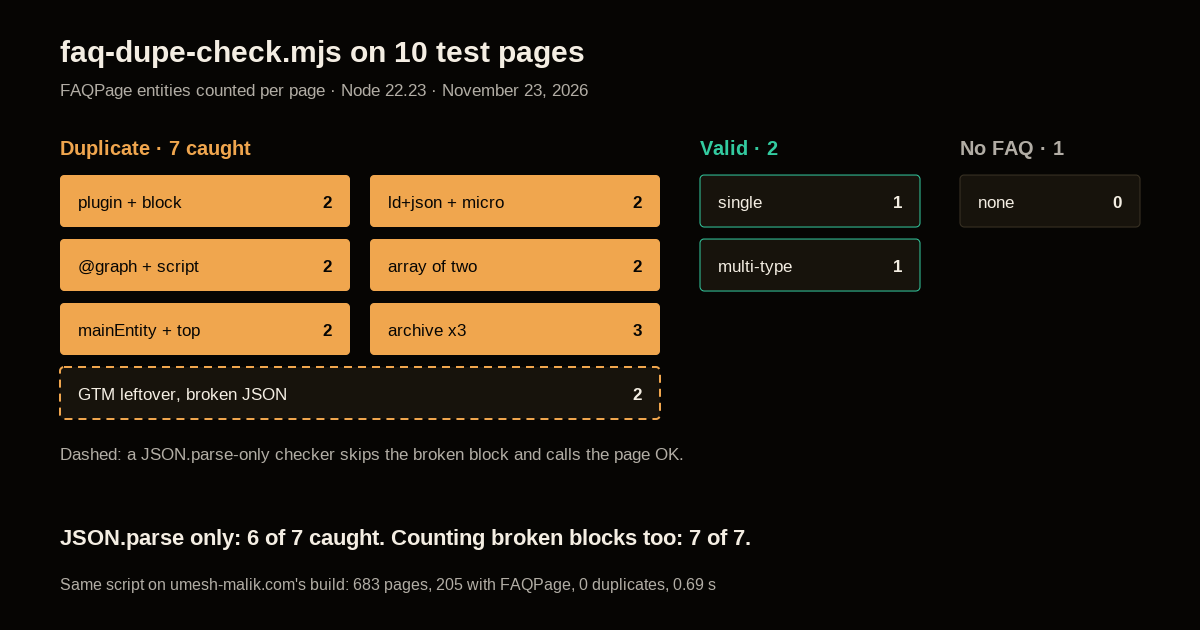
Case 10 is the one that taught me something. My first version only counted blocks that JSON.parse accepted. The leftover tag-manager block had a trailing comma, so it failed to parse, got skipped, and the page came back OK. The block was still sitting in the HTML. That version caught 6 of 7 duplicates. The version above treats any unparseable block that mentions FAQPage as a hit, and caught 7 of 7.
Then I ran it on this site’s own build, with this post included. The first run flagged exactly one page: this post. The explanation above quotes an itemtype="https://schema.org/FAQPage" attribute inside inline code, and my microdata pattern matched the text, not a real tag. Requiring the attribute to sit inside an actual HTML tag fixed it, and that’s the version printed above.
The corrected run: 683 HTML pages, 205 with FAQPage, 0 duplicates, in 0.69 seconds. That’s zero by design, not luck. A post here emits FAQPage from either its faq: front matter or a visible FAQ accordion with schema turned on, never both, and the page template skips the front-matter block when the post contains an accordion. One source per page is the whole fix.
Where Does the Second FAQPage Come From?
Nearly every duplicate traces back to two systems that each think they own the FAQ. These are the usual pairs:
| First emitter | Second emitter | Where to look |
|---|---|---|
| SEO plugin’s FAQ block | Page builder’s FAQ widget | Both plugins’ schema settings |
| JSON-LD from a plugin | Microdata in the theme’s accordion | Theme template: search for itemtype |
| Tag manager custom HTML tag | Anything | Tag manager container, including paused or old versions |
| Post template | Archive or category template | Archive pages that print full post content |
@graph builder | A hand-pasted script | The page’s custom HTML or code-injection field |
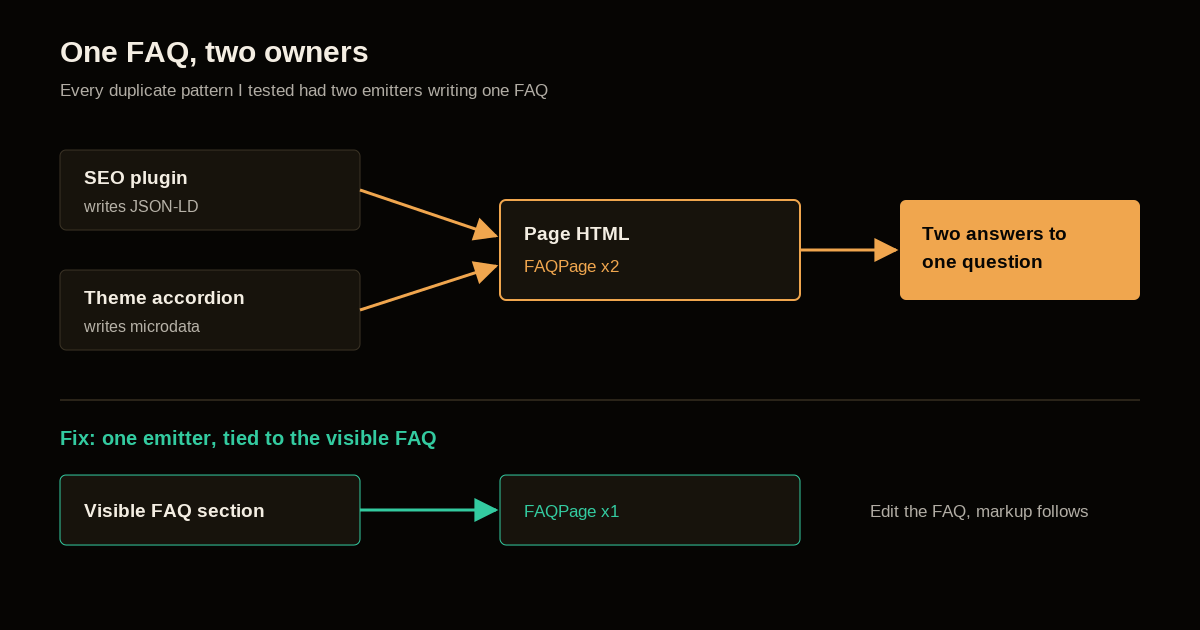
The tag manager row needs one extra step. A block injected by JavaScript isn’t in the raw HTML that curl downloads, so the checker won’t see it. Open DevTools on the live page, run copy(document.documentElement.outerHTML) in the console, paste into a file, and check that file instead. If a FAQPage shows up there but not in view-source, the tag manager is your second emitter.
Common Mistakes When Fixing It
- Deleting the wrong copy. Keep the block that’s generated from the visible FAQ. If you keep the hand-pasted one, the next FAQ edit puts your markup out of date.
- Checking only one template. A post can be clean while its archive or category page shows three posts’ FAQs, each with its own FAQPage. Check the listing pages too.
- Trusting
JSON.parsealone. As case 10 showed, a broken block is still in your HTML. A strict checker skips it and calls the page clean. - Pausing the tag instead of deleting it. Paused tags come back the next time someone publishes the container from an old version.
- Adding FAQPage everywhere “for AI”. If a page has no visible FAQ, adding the markup creates the exact mismatch the duplicate fix is trying to remove.
If you’re cleaning up structured data, check your other indexing signals while you’re in there. Pages that look fine in a browser but ship thin HTML to Googlebot are covered in fixing Page indexed without content, and markup that disagrees with the page has the same root cause as the problems in fixing Excluded by noindex tag. For script-injected content specifically, see auditing document.currentScript inline rendering. Product markup fails the same way when a theme and a plugin both emit it, covered in fixing the offers, review, or aggregateRating error. Breadcrumb trails that hand-build their JSON hit a similar template bug, covered in fixing Missing field “item” in breadcrumbs.
Where FAQs Still Earn Something
The FAQ section is still worth writing. A clear question-and-answer block is the easiest thing for an AI answer engine to quote, which is why every post on this site still has one. That’s a content decision, not a markup decision, and it’s covered in the 2026 GEO playbook and the ChatGPT search optimization guide. More on how AI search engines pick sources is on the AI search topic hub.
Just don’t confuse the two. Google stopped rewarding the markup. It never stopped rewarding a page that answers the question.
If a FAQ block fails before Google can even count it, because of a stray quote or comma, that’s a different report: see how to fix Unparsable structured data.
FAQ
What does Duplicate field FAQPage mean?
It means a single URL contains more than one FAQPage entity in its structured data. Usually two separate systems both emit FAQ markup, such as an SEO plugin and a page builder block, or a JSON-LD block and microdata in a theme’s accordion. A page should describe its FAQ once.
Why doesn’t the Rich Results Test show the error anymore?
Google stopped showing FAQ rich results on May 7, 2026, and said it would drop the FAQ rich result report and FAQ support in the Rich Results Test in June 2026. With no FAQ feature left to validate, Google’s tools no longer check for duplicate FAQPage blocks. The markup is still on your page, so you have to check it yourself.
Should I delete all FAQPage schema now that FAQ rich results are gone?
Not necessarily. Reporting on Google’s removal notice says the markup can stay, and a single FAQPage block that matches a visible FAQ is harmless. Delete the duplicates, delete any FAQPage that describes questions not visible on the page, and stop adding new FAQPage markup in the hope of a Google rich result.
How do I find which plugin or script outputs the duplicate FAQPage?
Count FAQPage entities in the page’s HTML and note where each one sits, for example the first JSON-LD script versus an itemtype attribute. Then search view-source for each location and match it to the plugin, theme, block, or tag that writes it. If a block only appears in the DevTools Elements panel and not in view-source, JavaScript added it, which usually means a tag manager.
Does duplicate FAQ schema hurt rankings?
I’ve found no evidence that it does, and Search Engine Journal’s report on the removal notes the markup can stay on pages without causing problems. The real cost is data quality: two systems describing the same content can drift apart, and any parser that reads your structured data gets two different answers. That’s a maintenance bug worth fixing even without a ranking penalty.
Can a page have FAQPage inside @graph and still be valid?
Yes. One FAQPage inside an @graph array is fine, and so is a single node typed as both WebPage and FAQPage. The problem only starts when a second FAQPage exists elsewhere on the page, such as another script tag or microdata in the template.
Sources
Google Search Central, Search documentation updates: the May 8, 2026 deprecation entry (“This feature will no longer appear in Google Search starting May 7, 2026”) and the June 15, 2026 entry removing the FAQ rich result documentation
Google Search Central Blog, Changes to HowTo and FAQ rich results (August 8, 2023): FAQ rich results limited to “well-known, authoritative government and health websites”
Search Engine Journal, Google Drops FAQ Rich Results From Search: Google’s notice dropping the FAQ report and Rich Results Test support in June 2026 and Search Console API support in August 2026
Rank Math knowledge base, Duplicate field FAQPage error: one FAQ schema per page
Schema.org, Schema Markup Validator: still parses FAQPage markup
First-party measurement, November 23, 2026:
faq-dupe-check.mjs(above) on Node 22.23 against ten fixture pages (7 of 7 duplicates caught; aJSON.parse-only version caught 6 of 7) and against this site’s production build (683 HTML pages, 205 with FAQPage, 0 duplicates, 0.69 s, after fixing one false positive from anitemtypeexample quoted in this post’s inline code)
Frequently asked questions
Google Search · Preferred sources
Prefer this site on Google
If you already read this writing, add umesh-malik.com as a Preferred Source. Google can then highlight it with a preferred badge in Top Stories, AI Overviews, and AI Mode — for you, not as a site-wide ranking boost.
Related Articles

Web Engineering
Fix Date/Time Not in ISO 8601 Format: 9 of 15 Formats Fail
Date/time not in ISO 8601 format means Google can't read a date in your markup. 9 of 15 common formats fail, and 7 of those 9 still parse in JavaScript.

Web Engineering
Fix Missing Field hasMerchantReturnPolicy: 5 of 7 Fixes Fail
Missing field hasMerchantReturnPolicy is a warning, not an error. Link each Offer to one store-wide policy by @id: 189 bytes a page instead of 697.

Web Engineering
Fix Offers, Review, or aggregateRating Error: 5 Hidden Causes
The offers, review, or aggregateRating error means a Product node has none of the three. 9 test variants passed the schema.org validator; 5 still failed.
Keep reading
Get new posts on AI, Claude Code & LLMs
New deep-dives on AI engineering, Claude Code, and developer tooling — follow along however you prefer.
About the Author

Software engineer writing about AI, Claude Code, LLMs, OpenAI, Anthropic, and developer tooling. 5+ years building production systems at Expedia Group, Tekion, and BYJU'S.