Fix Duplicate Without User-Selected Canonical: 812 Copies Had None
Fix Duplicate without user-selected canonical with a canonical Google can read. My site had 812 Markdown twins with none; one Cloudflare header rule fixed them.

TL;DR — To fix Duplicate without user-selected canonical, find every URL variant that answers 200 without a canonical Google can read, then give it one: a rel="canonical" tag on HTML, a Link: <…>; rel="canonical" HTTP header on everything else, or a 301 if nobody needs the copy. On this site every HTML page was clean, but 812 Markdown twins carried their canonical only inside YAML front matter, which Google treats as plain text. One _headers rule with a path placeholder fixed all of them.
Duplicate without user-selected canonical is the Search Console status for a URL Google judged to be a copy of another page when the copy never said which URL it prefers. Google picks the canonical for you, and it may not pick the one you’d choose.
What Does Duplicate Without User-Selected Canonical Mean?
Google’s Page indexing report help defines it in two sentences: “This page is a duplicate of another page, although it doesn’t indicate a preferred canonical page.” And: “Google has chosen the other page as the canonical for this page, and so will not serve this page in Search.”
So the URL in the row isn’t indexed, but its content usually is, under a different URL. The status doesn’t say you lost the page. It says you didn’t vote, and Google decided without you.
Which Duplicate Status Do You Have?
Search Console has three duplicate statuses, and they differ on two questions: did the page declare a canonical, and did Google agree with it?
| Search Console status | Did the page declare a canonical? | Did Google agree? | Typical cause | Action |
|---|---|---|---|---|
| Duplicate without user-selected canonical | No | Google chose one itself | Parameter URLs, slash twins, alternate formats, non-HTML copies | Add a canonical tag or Link header, or 301 the copy |
| Duplicate, Google chose different canonical than user | Yes, itself | No | Other signals point elsewhere | Make redirects, sitemap and links agree with the tag |
| Alternate page with proper canonical tag | Yes, another URL | Yes | A correct tag on a variant | Nothing |
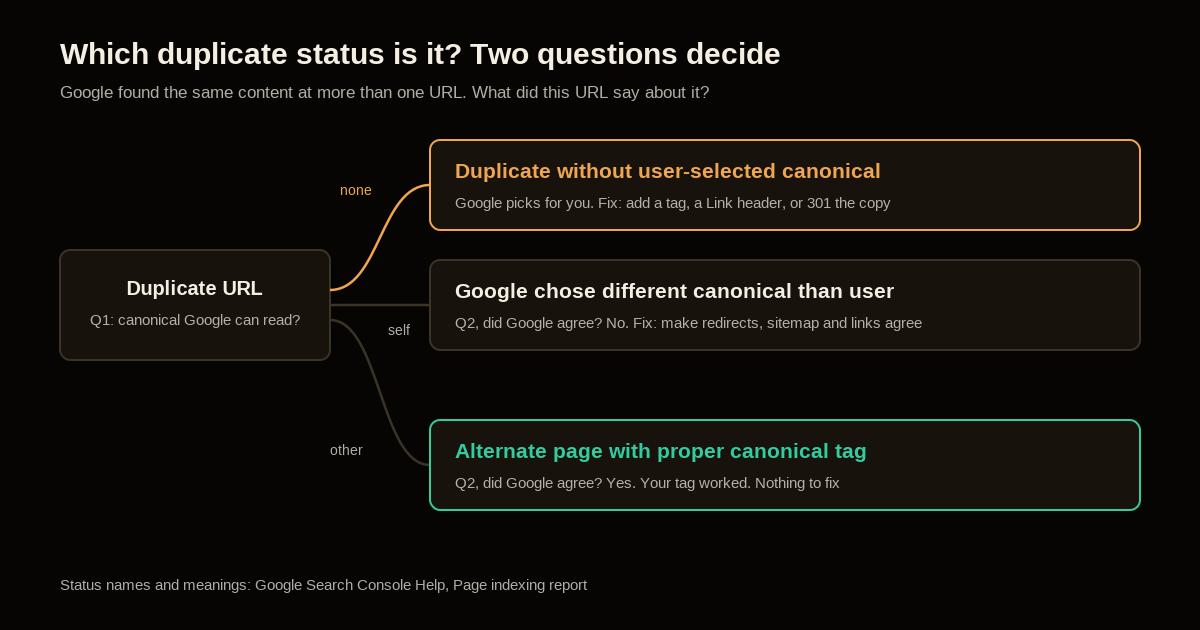
The middle row has its own guide: fixing Google chose different canonical. The third row is Google telling you your tags work, though four checks on Alternate page with proper canonical tag catch the cases where it hides a bug. This post is about the first row, where the fix is to start voting.
Why Does Google Treat a Page as a Duplicate Without a Canonical?
Because the same content answers at more than one URL, and at least one of those URLs says nothing about which is the real one. Google’s canonicalization guide puts it plainly: “if you don’t specify a canonical URL, Google will identify which version of the URL is objectively the best version to show to users in Search.”
The usual sources of unlabeled copies:
- Parameter URLs.
?utm_source=,?sort=,?ref=and session IDs that render the same page. - Host and protocol twins.
http://,www.and legacy domains that answer 200 instead of redirecting. - Path twins. Trailing slash,
/index.html, uppercase paths. - Alternate formats. Print views, AMP,
.txtexports, and now the.mdrenderings many sites publish for AI agents. - Non-HTML files. PDFs and text files can’t carry a
<link>element, so they have no canonical unless the server sends one as a header.
That last group is the one people miss, because nothing in the page source shows it.
What Did Probing 2,726 URL Variants Find?
On November 17, 2026 I took all 638 URLs in umesh-malik.com’s sitemaps and requested four variants of each: the URL itself, the URL with ?utm_source=newsletter, its trailing-slash twin, and its .md rendering. Blog posts got a fifth, the unsponsored /clean/blog/<slug>.md copy. That’s 2,726 requests. For each 200 response, the probe recorded whether it declared a canonical Google can read: a <link rel="canonical"> in HTML or a rel="canonical" in the Link response header.
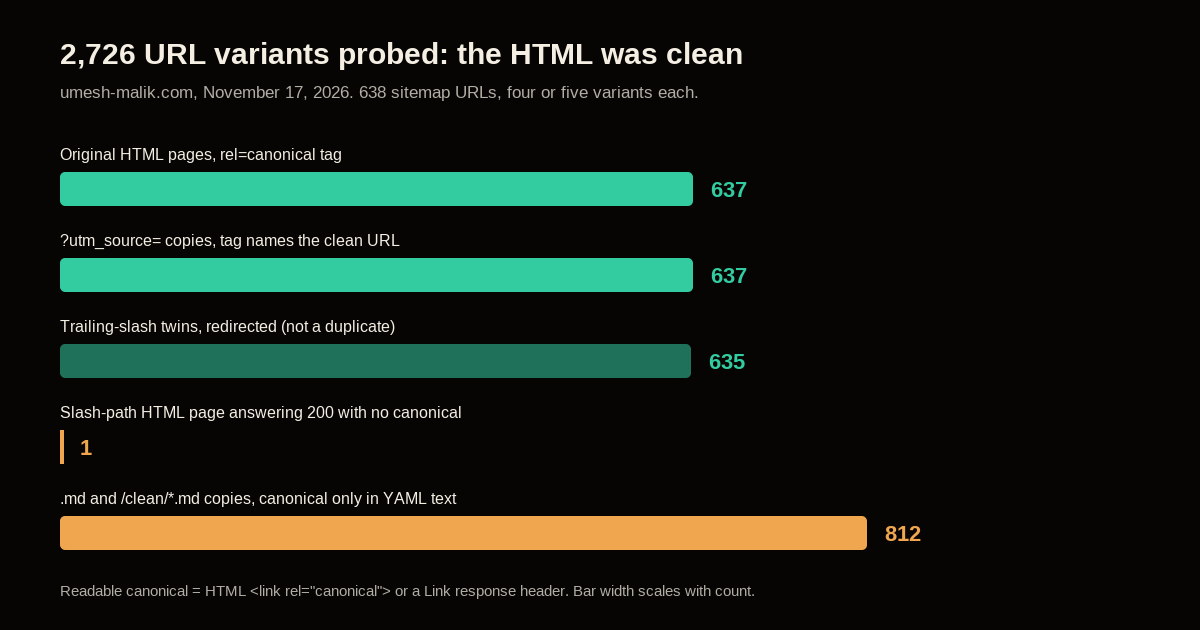
The HTML side was clean. All 637 HTML pages declared a self-referencing canonical, and all 637 ?utm_source= copies declared the clean URL, with no query string. Trailing-slash twins redirected. That’s the setup the earlier posts in this series pushed toward.
Two findings, one small and one big:
- One HTML page had no canonical at all.
/projects/edu-rag-saas/is a separately built sub-app. Its HTML has no<link rel="canonical">, and the sitemap lists the slashless URL that 301s to it. One page, but it’s exactly this status waiting to happen. - 812 Markdown copies had no canonical Google can read. Every page has a
.mdtwin for AI agents (638 of them), and every post has a second, unsponsored one under/clean/(174). All 812 answer 200 withtext/markdown, and each one does name its canonical, on a line that readscanonical: "https://umesh-malik.com/…". But that line is inside YAML front matter. Google doesn’t parse YAML. To Google it’s text, the same as any other sentence on the page.
Would Google index a Markdown file? Its indexable file types list covers “Text (.txt, .text, other file extensions)“. Markdown isn’t named, and I can’t prove from the URL Inspection audit whether Google has flagged these copies yet, because that audit only inspects sitemap URLs. But nothing in those 812 responses would stop it, and each one is a near-copy of a page I want ranked. That’s enough reason to fix it before a report forces me to.
How to Fix Duplicate Without User-Selected Canonical in 6 Steps
Export the rows. In Search Console, open Indexing → Pages → Duplicate without user-selected canonical and export the examples. Run a few through URL Inspection, which shows the Google-selected canonical. That tells you which URL Google already prefers.
Probe every variant, not just the flagged ones. The report shows samples. Request each sitemap URL with a tracking parameter, a slash twin, and any alternate format you publish, and record status,
Content-Type, and where the canonical lives. The script below does that.Decide: keep the copy or redirect it. If nobody needs the duplicate, 301 it to the canonical. Google calls a redirect “a strong signal that the target of the redirect should become canonical.” If the copy has users, like a PDF, a print view, or a Markdown version agents read, keep it and label it.
Label HTML copies with a tag. Every HTML response gets
<link rel="canonical" href="https://example.com/page">in the<head>, with an absolute URL and no query string. Parameter copies should point at the clean URL, not at themselves.Label non-HTML copies with a header. Google supports
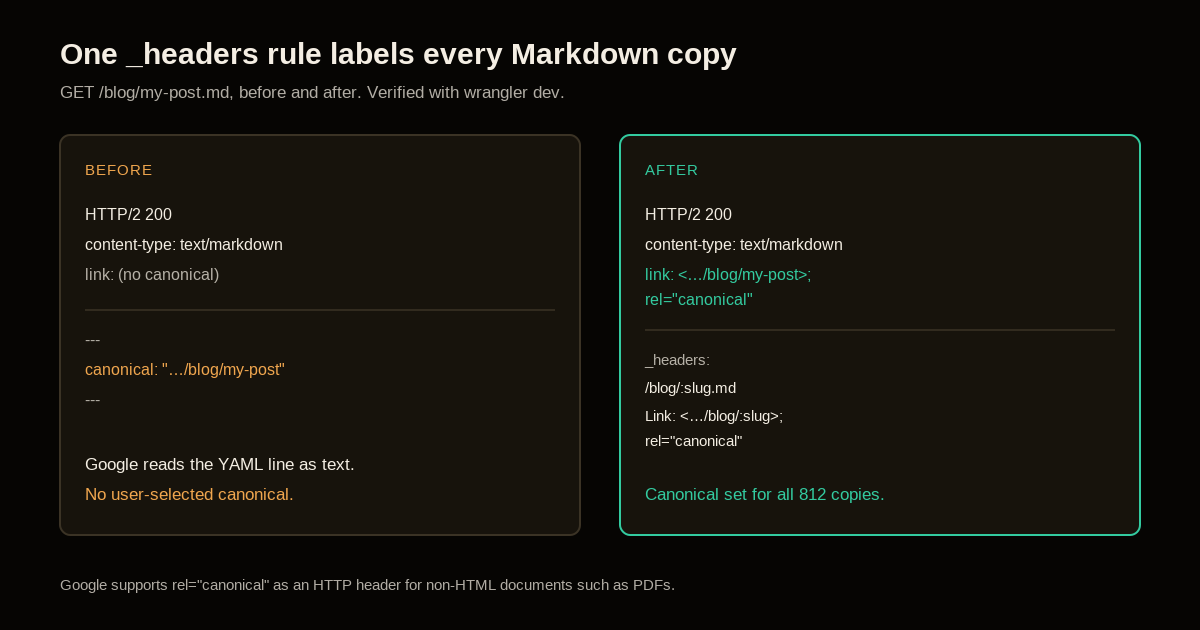
rel="canonical"as an HTTP header “for a document supported by Search, including non-HTML documents such as PDF files.” On Cloudflare, one_headersrule covers every file in a pattern:/blog/:slug.md Link: <https://umesh-malik.com/blog/:slug>; rel="canonical" /clean/blog/:slug.md Link: <https://umesh-malik.com/blog/:slug>; rel="canonical" /:page.md Link: <https://umesh-malik.com/:page>; rel="canonical"Cloudflare’s headers docs say a matched placeholder “can be used in the header values with
:placeholder_name.” I checked this withwrangler dev:/blog/:slug.mdmatched/blog/my-post.mdand sentLink: <https://example.com/blog/my-post>; rel="canonical". Placeholders don’t cross a/, so/:page.mddidn’t also match the blog file. When a site-wide/*rule already sets aLinkheader, Cloudflare merges the two into one comma-separated list, which is valid. On nginx, the equivalent isadd_header Linkinside alocationblock that captures the slug.Re-probe, then validate. Run the probe again until every 200 shows
tagorheader. Then click Validate fix. Google says validation “typically takes up to about two weeks.”
Here’s the probe. It’s Node 20+ with no dependencies:
// canonical-probe.mjs — request URL variants and report which 200 responses
// declare a canonical Google can read (HTML <link> tag or Link header).
// usage: node canonical-probe.mjs https://example.com/sitemap.xml
const [sitemap] = process.argv.slice(2);
const xml = await (await fetch(sitemap)).text();
const pages = [...xml.matchAll(/<loc>([^<]+)</loc>/g)].map((m) => m[1]);

const variants = (u) => {
  const path = new URL(u).pathname.replace(//$/, '');
  return {
    original: u,
    utm: `${u}${u.includes('?') ? '&' : '?'}utm_source=probe`,
    slash: new URL(path + '/', u).href,
    md: new URL((path || '/index') + '.md', u).href,
  };
};

async function check(url) {
  const res = await fetch(url, { redirect: 'manual' });
  if (res.status !== 200) return `${res.status}`;
  if (/rel="?canonical"?/.test(res.headers.get('link') ?? '')) return 'header';
  const type = res.headers.get('content-type') ?? '';
  if (type.includes('html') && /<link[^>]+rel="canonical"/.test(await res.text())) return 'tag';
  return 'NONE';
}

const tally = {};
for (const page of pages) {
  for (const [kind, url] of Object.entries(variants(page))) {
    const verdict = await check(url).catch(() => 'fetch failed');
    tally[`${kind} ${verdict}`] = (tally[`${kind} ${verdict}`] ?? 0) + 1;
    if (verdict === 'NONE') console.log(`no canonical  ${url}`);
  }
}
console.log(tally);
Every NONE line is a duplicate Google has to judge without your input. A 200 copy that’s missing from the tally entirely is fine. That means it redirected or 404’d.
What Breaks if You Use noindex or robots.txt Instead?
You lose the consolidation you were after. Google’s canonicalization guide says it directly: “Don’t use the robots.txt file for canonicalization purposes,” and noindex isn’t recommended “to prevent selection of a canonical page within a single site” because it “will completely block the page from Search.”
The two shortcuts fail in different ways:
- robots.txt stops Google from reading the copy, so it can’t see that the copy is a duplicate. The URL can still get indexed with no content. That’s the Indexed, though blocked by robots.txt status, and it’s worse than the one you started with.
- noindex removes the URL instead of merging it. Links and signals pointing at the copy don’t flow to the canonical, and the URL moves to Excluded by noindex tag.
A canonical or a 301 keeps the copy reachable and tells Google where its signals belong. For agent-facing Markdown, that matters twice: agents still get the file, and search engines don’t count it as a competing page. The agent ads teardown explains why this site serves those Markdown copies in the first place.
When Is It Fine to Leave This Status Alone?
When Google already picked the URL you want, and the duplicates aren’t growing. A handful of ?ref= URLs from an old campaign, deduplicated onto the right page, are a record of Google doing its job. Adding a tag is still cheap, but there’s no ranking emergency.
Fix it promptly in three cases:
- Google picked the wrong URL. URL Inspection shows a
?sort=orhttp://URL as the Google-selected canonical. Add the tag, then align the sitemap and internal links, the same way as in the Page with redirect guide. - The count keeps climbing. A growing number means a URL pattern is generating copies, like a filter, a session ID, or a new export format. Label the pattern, not the URLs.
- The duplicate is in your sitemap. A sitemap should list canonical URLs only. Finding orphan pages uses the same sitemap comparison to spot it.
The AI search hub collects the rest of this Search Console series.
FAQ
What does Duplicate without user-selected canonical mean?
It means Google found the page to be a duplicate of another URL, and the page did not declare a canonical of its own. Google picked the other URL as canonical and will not show this one in Search. The content is usually still indexed, under the URL Google chose.
Is Duplicate without user-selected canonical an error?
Not always. If the URL Google chose is the one you want to rank, the status is just a record of correct deduplication. It needs a fix when Google picked the wrong URL, when the duplicate is a page you link to, or when the duplicates come from a URL pattern that keeps generating new copies.
How do I set a canonical on a PDF, Markdown or text file?
Send a rel=canonical Link HTTP header with the response, for example Link: <https://example.com/page>; rel="canonical". Google documents this header for non-HTML documents such as PDFs. A canonical written inside YAML front matter or a comment is just text to Google and does not count.
Should I noindex or robots.txt block the duplicate instead?
No. Google says not to use robots.txt for canonicalization and does not recommend noindex for choosing a canonical within one site. A blocked URL can still be indexed without its content, and noindex removes the page from Search entirely instead of consolidating its signals into the canonical.
How long does Validate fix take for this status?
Google says validation typically takes up to about two weeks, and in some cases much longer. Google has to recrawl each duplicate and see the new canonical signal. Start validation only after every flagged URL returns a canonical, a 301, or a 404.
Sources
- Google Search Console Help, Page indexing report
- Google Search Central, How to specify a canonical URL with rel=“canonical” and other methods
- Google Search Central, File types indexable by Google
- Cloudflare Workers docs, Static assets: headers
- First-party measurement: a canonical probe run on November 17, 2026 against all 638 umesh-malik.com sitemap URLs, with 2,726 requests across original,
?utm_source=, trailing-slash,.mdand/clean/blog/*.mdvariants (637 of 637 HTML pages and 637 of 637 parameter copies declared a canonical tag; 1 slash-path HTML page and 812 Markdown copies declared none Google can read), plus a localwrangler devtest confirming that a_headerspath placeholder interpolates into aLink: rel="canonical"header and merges with a site-wideLinkrule
Frequently asked questions
Google Search · Preferred sources
Prefer this site on Google
If you already read this writing, add umesh-malik.com as a Preferred Source. Google can then highlight it with a preferred badge in Top Stories, AI Overviews, and AI Mode — for you, not as a site-wide ranking boost.
Related Articles

Web Engineering
Fix Alternate Page With Proper Canonical Tag? Run 4 Checks First
Before you fix alternate page with proper canonical tag, check it: Google indexed the URL your tag named. Four checks find the rows that hide a canonical bug.

Web Engineering
Fix Redirect Error in Search Console: Trace Every Hop Like Googlebot
Fix Redirect error in Search Console by tracing each hop like Googlebot. A loop, an 11th hop, a growing URL or an empty Location: the tracer names which one.

Web Engineering
How to Fix Google Chose Different Canonical: 3 Hosts Served 200
Fix Google chose different canonical than user: make every duplicate 301 to the URL you declared. On my site 3 hosts served 200 copies of all 39 pages I probed.
Keep reading
Get new posts on AI, Claude Code & LLMs
New deep-dives on AI engineering, Claude Code, and developer tooling — follow along however you prefer.
About the Author

Software engineer writing about AI, Claude Code, LLMs, OpenAI, Anthropic, and developer tooling. 5+ years building production systems at Expedia Group, Tekion, and BYJU'S.