Fix Alternate Page With Proper Canonical Tag? Run 4 Checks First
Before you fix alternate page with proper canonical tag, check it: Google indexed the URL your tag named. Four checks find the rows that hide a canonical bug.

TL;DR — Before you fix alternate page with proper canonical tag, know what it means: a URL pointed its rel="canonical" at another page and Google agreed, so the other page gets indexed. It’s usually fine, but run four checks before ignoring it: the alternate is a real copy, and the target answers 200, is indexable, and is in your sitemap. On this site, 661 of 662 alternate URLs passed, and the one that failed was a redirect, not an alternate.
Alternate page with proper canonical tag is the Search Console status for a URL whose canonical tag names a different page, where Google accepted that choice. It’s a record of deduplication working, not an indexing error. The risk is that the same row also shows up when the tag points somewhere you didn’t mean.
What Does Alternate Page With Proper Canonical Tag Mean?
Google’s Page indexing report help defines it this way: “This page is marked as an alternate of another page.” It continues: “This page correctly points to the canonical page, which is indexed, so there is nothing you need to do.”
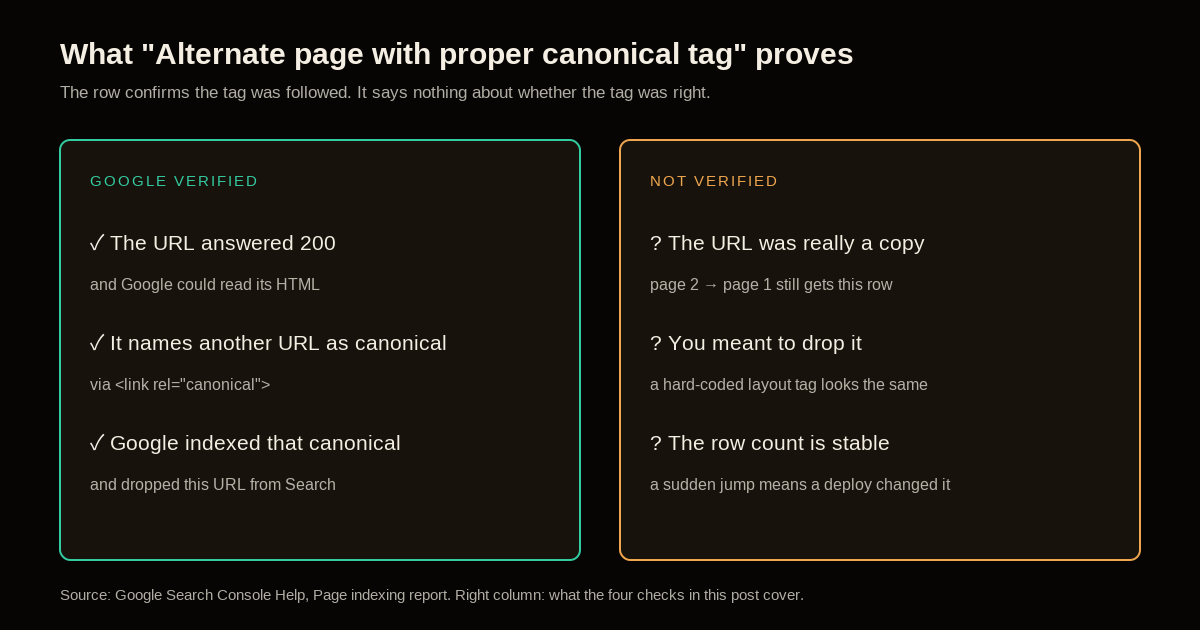
Three facts are packed into that row:
- The URL answered 200 and Google could read it.
- It declared some other URL as canonical.
- Google accepted the tag and indexed the canonical URL instead.
The status only confirms that the tag was consistent. It doesn’t check whether the tag was right. Google’s examples are AMP and mobile versions of a desktop page. In practice, most rows come from tracking parameters, sorted or filtered views, internal search URLs, and print views. The same help page notes that alternate language pages aren’t detected here, so hreflang variants show up elsewhere.
Which Canonical Status Are You Looking At?
Search Console has three neighbouring statuses for duplicate URLs. The difference is who chose the canonical and whether Google agreed.
| Search Console status | Canonical declared by the page | Google agreed? | Usual meaning | Action |
|---|---|---|---|---|
| Alternate page with proper canonical tag | Another URL | Yes | Parameter, filter or format copy, tagged correctly | Run the four checks, then ignore |
| Duplicate, Google chose different canonical than user | Itself or another URL | No | Redirects, sitemap or links contradict the tag | Align the signals |
| Duplicate without user-selected canonical | None Google can read | Google picked one | Copies with no tag or Link header | Add a canonical or 301 |
The second row is covered in fixing Google chose different canonical, and the third in fixing Duplicate without user-selected canonical. This post is about the first row, the one Google says needs no action.
When Is Alternate Page With Proper Canonical Tag a Problem?
When the URL in the row isn’t really a copy, or when the target it points at is unhealthy. Google accepts a canonical tag as “a strong signal,” according to its canonicalization guide. That cuts both ways: a wrong tag gets followed just as readily as a right one.
The four patterns worth hunting for:
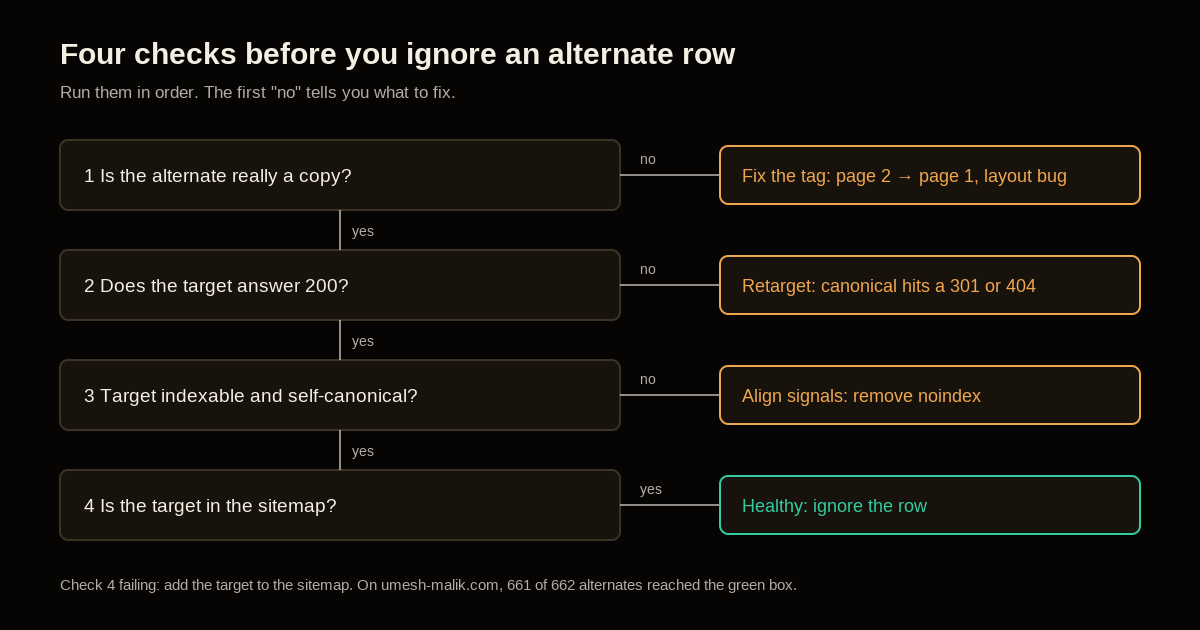
Paginated pages pointing at page 1.
/blog/page/2with a canonical of/blogtells Google the posts listed only on page 2 have no indexable listing page. Google’s pagination guidance is direct: “Don’t use the first page of a paginated sequence as the canonical page.” Give each page its own canonical instead.A template bug. One hard-coded canonical in a layout, such as every product page pointing at the category or every post pointing at the homepage, turns real pages into “alternates” overnight. The tell is a sudden jump in the row count.
A canonical that points at a redirect, a noindex page, or a 404. The tag sends signals to a URL that can’t hold them. That usually turns into one of the other statuses later, but an alternate row can show it first.
A target missing from your sitemap. Google says “all pages listed in a sitemap are suggested as canonicals.” When the tag names one URL and the sitemap lists another, the two signals disagree.
If none of those apply, the row is just a record of Google doing what you asked.
What Did Checking 662 Alternate URLs Find?
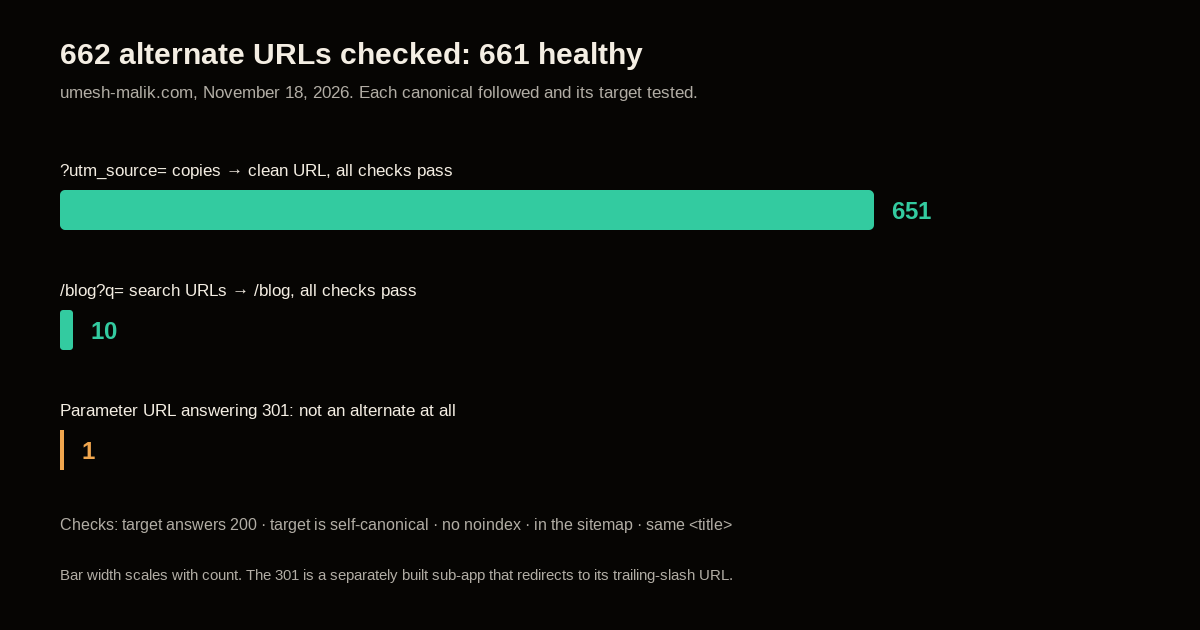
On November 18, 2026 I took all 652 URLs in umesh-malik.com’s two sitemaps and requested each one with ?utm_source=newsletter appended. That’s the most common way alternates get created: someone links to a page with a tracking parameter. I added 10 internal search URLs like /blog?q=react. The site publishes that URL pattern in its WebSite SearchAction schema, and search URLs get shared like any other link.
For each of the 662 URLs, the checker followed the canonical tag and tested the target.
The results:
661 of 662 passed all checks. Each canonical pointed at a clean URL that answered 200, was self-canonical, had no noindex, appeared in the sitemap, and had the same
<title>as the alternate.1 wasn’t an alternate at all.
/projects/edu-rag-saas?utm_source=newsletteranswers 301, because that sub-app is built separately and redirects to a trailing-slash URL. Google would file it under Page with redirect, not here. The real fix is the sitemap entry, which lists the URL that redirects.One near-miss, which was harmless. The sitemap lists the homepage as
https://umesh-malik.com, and the canonical tag sayshttps://umesh-malik.com/. Those are the same URL once normalized, because an empty path is/. A naive string comparison flags it, which is why the checker below normalizes withnew URL()first.
A clean live site doesn’t prove the checker catches anything, so I also ran it against a local server with four bugs planted on purpose: a paginated page canonicalized to page 1, a canonical pointing at a 301, one pointing at a noindex page, and one pointing at a URL missing from the sitemap. It flagged all four and passed the one healthy control.
How to Fix Alternate Page With Proper Canonical Tag in 5 Steps
Export the rows. In Search Console, open Indexing → Pages → Alternate page with proper canonical tag and export. The list is a sample. Google says it is “limited to 1,000 items” and “isn’t guaranteed to show all URLs” in that status.
Group by pattern before reading URLs one by one. Sort the export by path shape:
?utm_,?sort=,/page/,/amp/,?q=. Parameter and format copies are expected. Path-only alternates like/page/2or two different product slugs deserve a closer look.Run the checker on the export. Save the URLs one per line and run the script below. It follows each canonical and tests the target for status, self-canonical, noindex, sitemap membership, and a title match.
Fix the pattern, not the row. A pagination or template bug is one line in a layout. Fix the canonical in the template, then request indexing for one affected page in URL Inspection to confirm Google reads the new tag.
Watch the count, not the list. Note the row total each month. Slow growth from new tracking links is normal. A jump of hundreds in a week means a deploy changed a canonical.
Here’s the checker. It’s Node 20+ with no dependencies:
// alternate-check.mjs — for each "alternate" URL, follow its rel=canonical and
// check that the target is a healthy, indexable copy of the same page.
// usage: node alternate-check.mjs https://example.com/sitemap.xml alternates.txt
import { readFileSync } from 'node:fs';
const [sitemapUrl, listFile] = process.argv.slice(2);
const locs = async (u) =>
  [...(await (await fetch(u)).text()).matchAll(/<loc>([^<]+)</loc>/g)].map((m) => m[1]);
let inSitemap = new Set();
for (const s of await locs(sitemapUrl)) {
  inSitemap = s.endsWith('.xml') ? new Set([...inSitemap, ...(await locs(s))]) : inSitemap.add(s);
}
const norm = (u) => new URL(u).href; // https://a.com and https://a.com/ compare equal

async function page(url) {
  const res = await fetch(url, { redirect: 'manual' });
  const html = res.status === 200 ? await res.text() : '';
  return {
    status: res.status,
    canonical: html.match(/<link[^>]+rel="canonical"[^>]+href="([^"]+)"/)?.[1],
    title: html.match(/<title>([^<]*)</title>/)?.[1]?.trim(),
    noindex:
      /<meta[^>]+name="robots"[^>]+noindex/i.test(html) ||
      /noindex/i.test(res.headers.get('x-robots-tag') ?? ''),
  };
}

const tally = {};
for (const alt of readFileSync(listFile, 'utf8').split('\n').filter(Boolean)) {
  const a = await page(alt);
  const problems = [];
  if (a.status !== 200) problems.push(`alternate answers ${a.status}: not an alternate`);
  else if (!a.canonical) problems.push('alternate has no canonical');
  else {
    const t = await page(a.canonical);
    if (t.status !== 200) problems.push(`target answers ${t.status}`);
    if (t.canonical && norm(t.canonical) !== norm(a.canonical)) problems.push('target canonicalizes elsewhere');
    if (t.noindex) problems.push('target is noindex');
    if (![...inSitemap].some((s) => norm(s) === norm(a.canonical))) problems.push('target not in sitemap');
    if (a.title && t.title && a.title !== t.title) problems.push('different <title>: is this really a copy?');
  }
  const key = problems.length ? problems.join('; ') : 'ok';
  tally[key] = (tally[key] ?? 0) + 1;
  if (problems.length) console.log(`${alt}\n  -> ${a.canonical ?? '(none)'}\n  ${key}`);
}
console.log(tally);
The title check is a cheap proxy for “is this really a copy?” Page 2 of a list usually has a different title than page 1, and two different products always do. It raises a false alarm when a sorted view changes the title, so read the flagged rows rather than acting on the count. The regexes assume rel comes before href in the tag, which is how most frameworks render it. Adjust them if your markup differs.
What Breaks if You Try to Clear the Report?
Usually something worse than the row you removed. People see hundreds of “not indexed” rows and reach for a fix that makes the number go down:
Blocking the parameter in robots.txt. Google can’t read a blocked URL’s canonical tag, so it loses the signal that the URL is a copy. External links pointing at the blocked URL stop consolidating into the clean page, and the URL can still be indexed without content, as in Indexed, though blocked by robots.txt.
Adding noindex to the alternates. That moves them to Excluded by noindex tag and drops them instead of merging them. Google’s canonicalization guide warns against using noindex to pick a canonical within one site.
Redirecting every parameter URL. A 301 is a valid canonical method, but redirecting
?utm_URLs at the edge can strip the parameters your analytics needs. The tag already does the job.
Leave real alternates crawlable with the tag in place. The row count isn’t a quality score. A site with many inbound tracking links will always have a long list here.
Should You Click Validate Fix for This Status?
No. Alternate page with proper canonical tag isn’t an error, so there’s nothing to validate. If the checks turned up a real bug, fix the template and use URL Inspection on one representative URL to confirm Google sees the new canonical. Google says validation “typically takes up to about two weeks,” and that applies to the error statuses you’d validate, not this one.
The rest of this Search Console series lives on the AI search hub. For the sitemap side of the target check, finding orphan pages uses the same sitemap-versus-reality comparison.
FAQ
What does Alternate page with proper canonical tag mean?
It means the URL declares another page as its canonical with a rel=canonical tag, and Google agreed. Google indexes the canonical URL and leaves this one out of Search. Google’s own help page says there is nothing you need to do.
Is Alternate page with proper canonical tag a problem?
Usually not. It becomes one when the alternate is a page you wanted ranked, such as page 2 of a paginated list pointing at page 1, or when a template bug points many different pages at one URL. Check that each alternate really is a copy of its canonical before ignoring the row.
Should I click Validate fix for this status?
No. Alternate page with proper canonical tag is not an error, so there is nothing to validate. If you changed a canonical because the row was a real bug, request indexing for the page you corrected and let Google recrawl it.
Why are tracking-parameter URLs listed as alternates?
Google found a link to a URL like ?utm_source=newsletter, crawled it, and read its canonical tag pointing at the clean URL. That is the tag working as intended. The rows grow as more parameter links appear on the web and do not hurt the clean page.
Can I remove these URLs from the report?
Not directly, and you do not need to. Blocking them in robots.txt stops Google from seeing the canonical tag, and a noindex removes them instead of consolidating them. Leave them crawlable with the canonical in place.
Sources
- Google Search Console Help, Page indexing report
- Google Search Central, How to specify a canonical URL with rel=“canonical” and other methods
- Google Search Central, Pagination, incremental page loading, and their impact on Google Search
- First-party measurement: the
alternate-check.mjsscript above, run on November 18, 2026 against 662 alternate URLs on umesh-malik.com (652 sitemap URLs with?utm_source=newsletterappended, plus 10/blog?q=search URLs). 661 passed every check and 1 answered 301. The same script was run against a local server with four planted canonical bugs and flagged all four.
Frequently asked questions
Google Search · Preferred sources
Prefer this site on Google
If you already read this writing, add umesh-malik.com as a Preferred Source. Google can then highlight it with a preferred badge in Top Stories, AI Overviews, and AI Mode — for you, not as a site-wide ranking boost.
Related Articles

Web Engineering
Fix Duplicate Without User-Selected Canonical: 812 Copies Had None
Fix Duplicate without user-selected canonical with a canonical Google can read. My site had 812 Markdown twins with none; one Cloudflare header rule fixed them.

Web Engineering
How to Fix Google Chose Different Canonical: 3 Hosts Served 200
Fix Google chose different canonical than user: make every duplicate 301 to the URL you declared. On my site 3 hosts served 200 copies of all 39 pages I probed.

Web Engineering
Fix Offers, Review, or aggregateRating Error: 5 Hidden Causes
The offers, review, or aggregateRating error means a Product node has none of the three. 9 test variants passed the schema.org validator; 5 still failed.
Keep reading
Get new posts on AI, Claude Code & LLMs
New deep-dives on AI engineering, Claude Code, and developer tooling — follow along however you prefer.
About the Author

Software engineer writing about AI, Claude Code, LLMs, OpenAI, Anthropic, and developer tooling. 5+ years building production systems at Expedia Group, Tekion, and BYJU'S.