Fix Redirect Error in Search Console: Trace Every Hop Like Googlebot
Fix Redirect error in Search Console by tracing each hop like Googlebot. A loop, an 11th hop, a growing URL or an empty Location: the tracer names which one.

TL;DR — To fix Redirect error in Search Console, trace each flagged URL hop by hop the way Googlebot does, because the error is one of exactly four things: a loop, a chain longer than 10 hops, a URL that keeps growing, or an empty or broken Location header. Point every old URL straight at its final 200 with one 301, update the links and sitemap entries that still use the old URL, then click Validate fix.
Redirect error is the Search Console status for a URL where Googlebot followed a redirect and never reached a page. It’s different from a working redirect, and the fix is almost never “add another redirect.”
What Does Redirect Error Mean in Search Console?
It means the redirect broke before Googlebot got any content. Google’s Page indexing report help says Google “experienced one of the following redirect errors”:
- “A redirect chain that was too long”
- “A redirect loop”
- “A redirect URL that eventually exceeded the max URL length”
- “A bad or empty URL in the redirect chain”
That list is the whole diagnosis. Your job is to find out which one you have, and a browser won’t tell you. Browsers cache 301s, follow more hops than Google does, and show “too many redirects” for loops and long chains alike.
People confuse it with the status next to it in the report, so here’s how the redirect-related labels compare:
| Search Console label | What happened | Is the page indexed? | Do you need to fix it? |
|---|---|---|---|
| Redirect error | The chain never reached a final page | No URL in the chain is indexed from this crawl | Yes, on the server |
| Page with redirect | The redirect worked; Google indexed the target | The target may be | Only if the redirect is wrong or the URL is in your sitemap |
| Soft 404 | A redirect landed on an irrelevant page, like the homepage | No | Yes, return a real 404 or a relevant target |
| Not found (404) | The URL itself returns 404 | No | Only if the page should exist |
If your URL is in the second row, the Page with redirect guide is the one you want. The rest of this post is about the first row.
How Many Redirects Will Googlebot Follow?
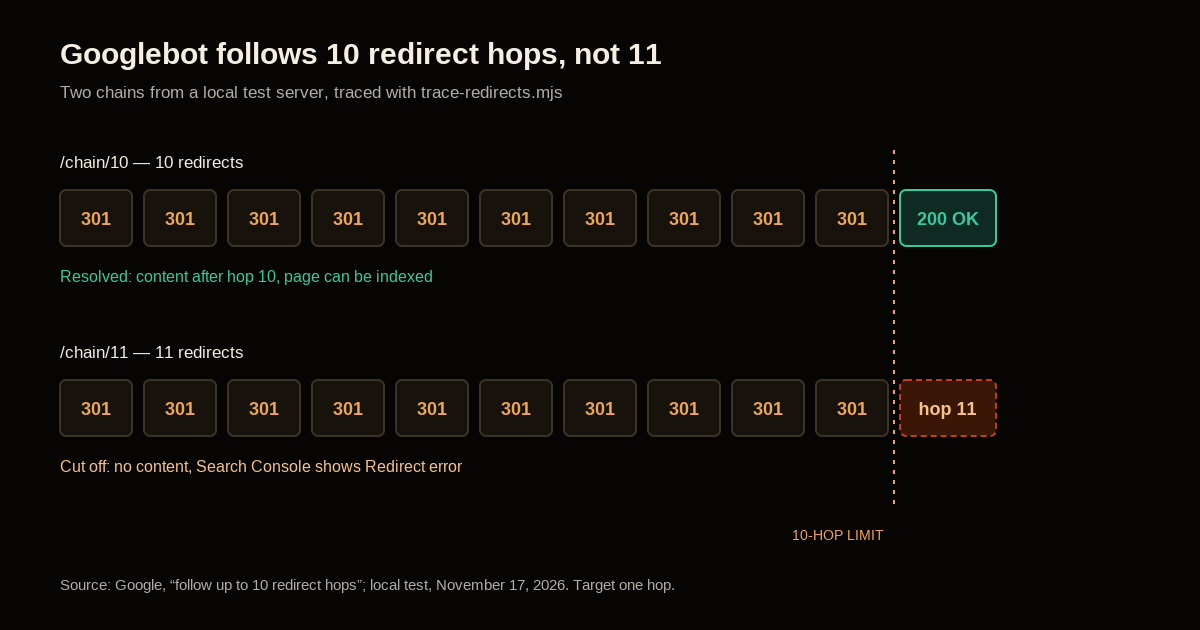
Ten. Google’s HTTP status code documentation says: “By default, Google’s crawlers follow up to 10 redirect hops.” An 11th hop means no content, so the URL lands in Redirect error. The same page adds that “specific products’ crawlers may have different limits,” which is why 10 is a ceiling, not a target. Aim for one.
Two more lines from that page matter here. First, “Any content Google receives from the redirecting URL is ignored,” so a redirect with a nice HTML body counts for nothing. Second, 301 and 308 are a “strong” signal that the target should be canonical, while 302, 303 and 307 are a “weak” signal. A weak signal isn’t an error, but a chain of weak hops gives Google little reason to drop the old URL.
I checked the 10-hop boundary against a local test server and my tracer. A chain of exactly 10 redirects resolved. A chain of 11 failed:
Real chains get long without anyone writing 11 rules. A typical one: http:// → https://, then www → apex, then old path → new path, then add a trailing slash, then a CMS slug change from two redesigns ago. That’s five hops from rules that were each correct when someone wrote them.
Which of the Four Redirect Errors Do You Have?
Each cause has a fingerprint you can spot in the hop list. I built a local server that reproduces all four, then ran the tracer below against it:
| Cause | How it looked in my test | Typical real-world source | Fix |
|---|---|---|---|
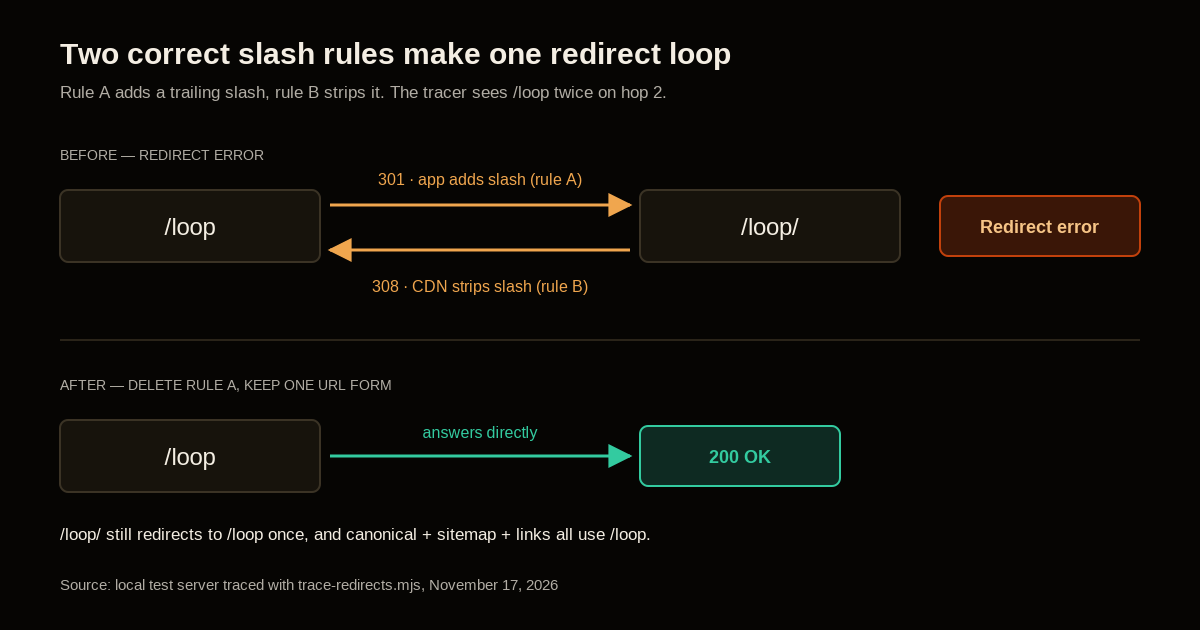
| Redirect loop | /loop → 301 /loop/ → 308 /loop, caught on hop 2 | Two trailing-slash rules that disagree, or an app and a CDN both “normalizing” | Pick one URL form and remove the other rule |
| Chain too long | /chain/11 needed 11 hops and was cut off | Stacked migrations: protocol, host, path, slash, slug | Point every old URL straight at the final URL |
| URL keeps growing | /grow grew from 26 to 1,258 characters in 11 hops | A login or geo redirect that appends ?next= with the current URL, re-encoded each hop | Never put the redirecting URL inside its own redirect |
| Bad or empty URL | Location: blank, or a host with port 99999 | A template that renders an empty variable, a typo in a hand-written rule | Return an absolute, valid URL, or no redirect at all |
The growing URL is the sneaky one. Each hop percent-encodes the previous URL again, so % becomes %25, then %2525. In my test the hop cap caught it first. With a longer starting URL, say a product page with UTM tags, it hits a length limit before it hits 10 hops. Either way it’s a Redirect error, and the fix is the same: stop the app from redirecting a URL to itself.
The loop is the one I’d bet on if you just changed hosting. One layer adds a trailing slash, a second strips it, and each is fine on its own:
How to Fix Redirect Error in Search Console in 6 Steps
Export the rows. In Search Console, open Indexing → Pages → Redirect error and export the example URLs. Note the Last crawled date on each one, since an old date may mean you already fixed it.
Trace each URL as Googlebot, hop by hop. Use the script below, or
curl -sIL -A Googlebot --max-redirs 10 <url>. Don’t use URL Inspection for this step. Google’s status code page says “Google Inspection Tools doesn’t follow redirects,” so a live test only shows the first 3xx.Name the cause. A URL that shows up twice in the hop list is a loop. More than 10 hops is a chain that’s too long. A URL that gets longer each hop is a growing URL. A blank or unparseable
Locationis a bad URL.Point the start straight at the end. For chains, rewrite each old rule so it targets the final 200 URL directly, with a 301 or 308. For loops, delete one of the two disagreeing rules. For growing URLs, exclude crawlable pages from the login or geo redirect. Google’s redirects guide prefers server-side redirects, and treats an instant
meta refreshas permanent if you can’t do that.Fix what sends Google to the old URL. Update internal links, canonical tags, hreflang and sitemap entries so they name the final URL. A redirect you never trigger can’t break. Finding orphan pages uses the same sitemap-versus-links comparison.
Re-trace, then validate. Run the tracer again until every row says
ok (direct)orok (1 hop). Then click Validate fix in the report. Google says validation “typically takes up to about two weeks.”
Here’s the tracer. It’s dependency-free Node 20+, it stops at 10 hops like Googlebot, and it names the cause:
// trace-redirects.mjs — follow each URL's redirects the way Googlebot does and
// name the Search Console "Redirect error" cause. Node 20+, no dependencies.
// usage: node trace-redirects.mjs urls.txt
import fs from 'node:fs';

const UA = 'Mozilla/5.0 (compatible; Googlebot/2.1; +http://www.google.com/bot.html)';
const MAX_HOPS = 10;     // Google: "follow up to 10 redirect hops"
const MAX_LEN = 2048;    // conservative: flag URLs that keep growing

export async function trace(start) {
  const seen = new Set();
  const hops = [];
  let url = start;
  for (let i = 0; i <= MAX_HOPS; i++) {
    if (seen.has(url)) return { verdict: 'loop', hops };
    seen.add(url);
    const res = await fetch(url, { redirect: 'manual', headers: { 'user-agent': UA },
      signal: AbortSignal.timeout(10_000) });
    if (res.status < 300 || res.status > 399) {
      return { verdict: hops.length ? `ok (${hops.length} hop)` : 'ok (direct)', status: res.status, hops };
    }
    const loc = res.headers.get('location')?.trim();
    if (!loc) return { verdict: 'empty Location', hops };
    let next;
    try { next = new URL(loc, url).href; } catch { return { verdict: 'bad Location', hops }; }
    if (next.length > MAX_LEN) return { verdict: 'URL too long', hops };
    hops.push(`${res.status} → ${next}`);
    url = next;
  }
  return { verdict: 'chain too long', hops };
}

const [file] = process.argv.slice(2);
if (file) {
  const urls = fs.readFileSync(file, 'utf8').split('\n').map((s) => s.trim()).filter(Boolean);
  const tally = {};
  for (const url of urls) {
    const r = await trace(url).catch(() => ({ verdict: 'fetch failed', hops: [] }));
    const key = r.status && r.status !== 200 ? `${r.verdict} → ${r.status}` : r.verdict;
    tally[key] = (tally[key] ?? 0) + 1;
    if (!r.verdict.startsWith('ok') || r.hops.length > 1 || r.status !== 200) {
      console.log(`${key.padEnd(18)} ${url}\n  ${r.hops.join('\n  ')}`);
    }
  }
  console.log(JSON.stringify({ urls: urls.length, verdicts: tally }));
}
The MAX_LEN value of 2,048 is my threshold, not Google’s. Google doesn’t publish its maximum URL length, so the script flags anything that grows past a size no real page needs. It also reports chains that end in a 404 or 5xx, because those aren’t Redirect errors but they’re the next status you’d see.
What Did Tracing 1,342 URLs on This Site Find?
Zero Redirect errors, and two things worth fixing anyway. On November 17, 2026 I ran the tracer against three sets of URLs on umesh-malik.com:
- all 638 URLs in
sitemap.xmlandblog-sitemap.xml - the 637 trailing-slash twins of those URLs (
/about↔/about/), which is how loops usually start - the 67 concrete redirect rules in the site’s Cloudflare
_redirectsfile
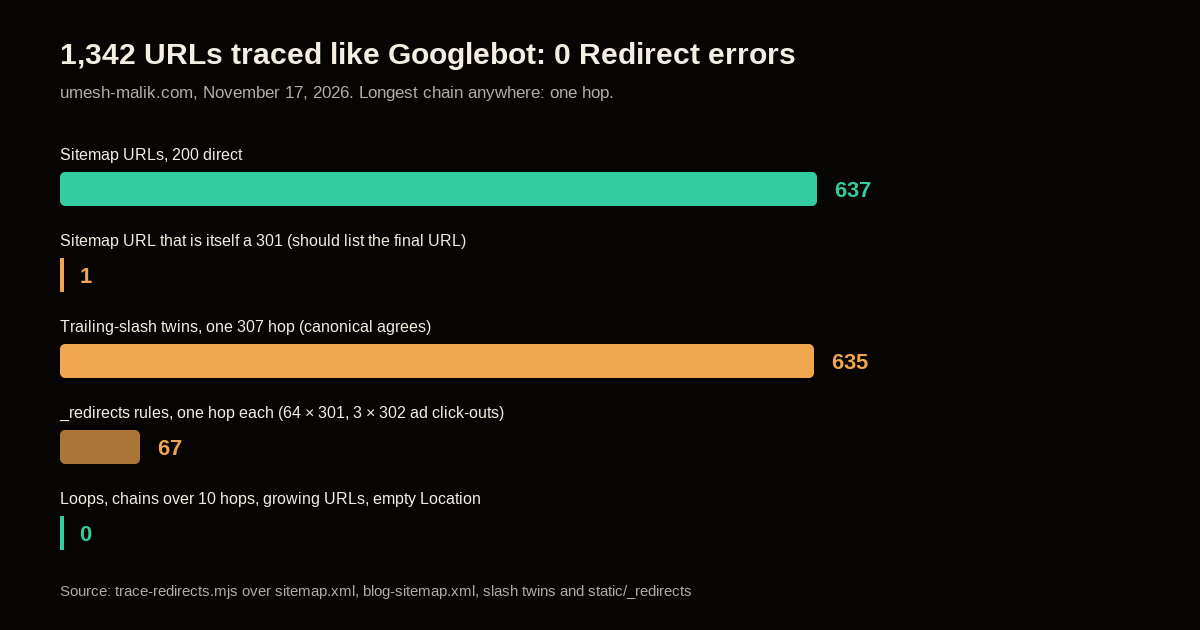
The longest chain anywhere was one hop. No loops, no empty headers, nothing near 10. The two findings:
- One sitemap URL is itself a redirect.
/projects/edu-rag-saasanswers 301 to/projects/edu-rag-saas/. It isn’t an error, but a sitemap should list final URLs only. Left alone, it shows up as Page with redirect. - 635 slash twins answer 307, not 301. Cloudflare’s static asset layer strips the trailing slash with a temporary redirect. Google reads 307 as a weak signal. Here that’s harmless, because every page’s canonical tag already names the slashless URL, so the two signals agree. If your canonicals pointed the other way, the same 307 would be the first half of a loop.
That’s the pattern behind most Redirect errors I’ve seen: each layer, whether app, CDN or host, does something sensible, and the problem only shows up when you trace the whole path.
When Is a Redirect Chain Fine to Leave Alone?
When it’s short, ends at a 200, and nothing important points at its start. A two-hop chain from a URL nobody links to won’t trip the 10-hop limit, and Google follows it fine. Collapse it when you’re editing the rules anyway, but don’t start a migration for it.
What isn’t fine:
- Any chain behind a page you link to internally. Every crawl of that link costs extra fetches. Link to the final URL.
- A 302 or 307 you meant as permanent. Use 301 or 308 so Google moves the canonical to the target. The canonical post covers what happens when signals disagree.
- A redirect to the homepage for every dead URL. Google may count that as a soft 404. Return a 404 or 410 instead, and use the Not found (404) triage to decide which of those 404s need a fix.
- A redirect that returns 5xx on some hops. That’s a Server error (5xx) wearing a 3xx costume.
The AI search hub collects the rest of this technical SEO series.
FAQ
What does Redirect error mean in Google Search Console?
It means Googlebot started following a redirect from the URL and never reached a final page. Google lists four causes: a redirect chain that was too long, a redirect loop, a redirect URL that eventually exceeded the maximum URL length, and a bad or empty URL in the chain. The URL is not indexed while the error stands.
How many redirects does Googlebot follow?
Google’s crawlers follow up to 10 redirect hops by default. If the chain needs an 11th hop, Googlebot stops and Search Console reports a Redirect error. Some Google product crawlers can use different limits, so the safe target is one hop.
Is Redirect error the same as Page with redirect?
No. Page with redirect means the redirect worked and Google indexed the target instead, which is usually fine. Redirect error means the redirect never finished, so Google indexed nothing. Only Redirect error needs a fix on the server.
Why does URL Inspection not show the redirect problem?
Google’s inspection tools do not follow redirects. A live test on the first URL only shows its own 3xx response, not where the chain breaks. Trace the chain yourself with curl or a script, then inspect the final URL.
How long does Validate fix take for Redirect error?
Google says validation typically takes up to about two weeks, and sometimes longer. Google recrawls the affected URLs during that window and marks the issue fixed once they resolve. Start validation only after every flagged URL reaches a 200 in one hop.
Sources
- Google Search Console Help, Page indexing report
- Google Crawling Infrastructure, How HTTP status codes affect Google’s crawlers
- Google Search Central, Redirects and Google Search
- First-party measurement:
trace-redirects.mjsrun on November 17, 2026 against a local Node test server reproducing all four causes (10-hop chain resolved, 11-hop chain cut off, slash loop caught on hop 2, self-nesting?next=URL grew from 26 to 1,258 characters in 11 hops, empty and invalidLocationheaders), and against 1,342 live umesh-malik.com URLs (638 sitemap URLs, 637 trailing-slash twins, 67_redirectsrules; maximum chain one hop, zero Redirect errors)
Frequently asked questions
Google Search · Preferred sources
Prefer this site on Google
If you already read this writing, add umesh-malik.com as a Preferred Source. Google can then highlight it with a preferred badge in Top Stories, AI Overviews, and AI Mode — for you, not as a site-wide ranking boost.
Related Articles

Web Engineering
How to Fix Page With Redirect: Our Canonical URL Was a 301
Fix Page with redirect by making your sitemap, canonical and internal links name the final URL. Mine named a 301 in all three places. The 0.5s audit inside.

Web Engineering
Fix Duplicate Without User-Selected Canonical: 812 Copies Had None
Fix Duplicate without user-selected canonical with a canonical Google can read. My site had 812 Markdown twins with none; one Cloudflare header rule fixed them.

Web Engineering
How to Fix Google Chose Different Canonical: 3 Hosts Served 200
Fix Google chose different canonical than user: make every duplicate 301 to the URL you declared. On my site 3 hosts served 200 copies of all 39 pages I probed.
Keep reading
Get new posts on AI, Claude Code & LLMs
New deep-dives on AI engineering, Claude Code, and developer tooling — follow along however you prefer.
About the Author

Software engineer writing about AI, Claude Code, LLMs, OpenAI, Anthropic, and developer tooling. 5+ years building production systems at Expedia Group, Tekion, and BYJU'S.