How to Fix Page With Redirect: Our Canonical URL Was a 301
Fix Page with redirect by making your sitemap, canonical and internal links name the final URL. Mine named a 301 in all three places. The 0.5s audit inside.

TL;DR — To fix Page with redirect, find every place your own site still names the redirecting URL (sitemap <loc>, rel="canonical", and internal <a href>) and point all three at the final 200 URL. On this site, a 0.5-second audit of 1,965 URL references found exactly one: /projects/edu-rag-saas, which the sitemap listed, the page declared canonical, and 8 pages linked to, while the edge answered it with a 301 to a different page.
Page with redirect is the Search Console status for a URL that answers with a redirect, so Google indexes the target instead. Most rows in it are fine: they are old URLs you moved on purpose. The ones to fix are URLs you are still advertising, because then your site is telling Google two different things about which URL is canonical.
What Does Page With Redirect Mean in Search Console?
Google’s Page indexing report help describes it as “a non-canonical URL that redirects to another page,” and adds that “this URL will not be indexed.” The target gets judged on its own merits. Nothing is penalized. Google simply followed the redirect.
The trouble starts when the redirect disagrees with your other signals. Google’s canonicalization guide ranks them: a redirect is “a strong signal that the target of the redirect should become canonical,” while sitemap inclusion is “a weak signal.” It also says to link to “the canonical URL rather than a duplicate URL” and not to specify different canonicals with different techniques.
So a URL in Page with redirect falls into one of two cases:
| Case | Sitemap lists it? | Canonical tag names it? | Internal links point at it? | Action |
|---|---|---|---|---|
| Deliberate move (old slug, retired category) | No | No | No | None. This is the redirect working. |
Trailing-slash or .html variant | Sometimes | Sometimes | Often | Fix the reference, not the redirect. |
| Advertised URL that redirects | Yes | Yes | Yes | Fix: the redirect and your signals disagree. |
| Redirect chain (2+ hops) | Any | Any | Any | Collapse to one hop, then fix references. |
Why Does a URL You Never Moved Land in Page With Redirect?
Because something other than your redirect map is issuing redirects. On most static hosts that something is trailing-slash normalization.
Cloudflare’s HTML handling docs document the default auto-trailing-slash mode: a single file like about.html is served at /about, and both /about/ and /about.html get a 307 to /about. A folder index like dir/index.html is the opposite: /dir gets a 307 to /dir/. Netlify, Vercel and nginx try_files setups each have their own version of this rule.
I checked production with curl on November 14, 2026, and it behaves exactly as documented: /about/ and /about.html both return 307 to /about.
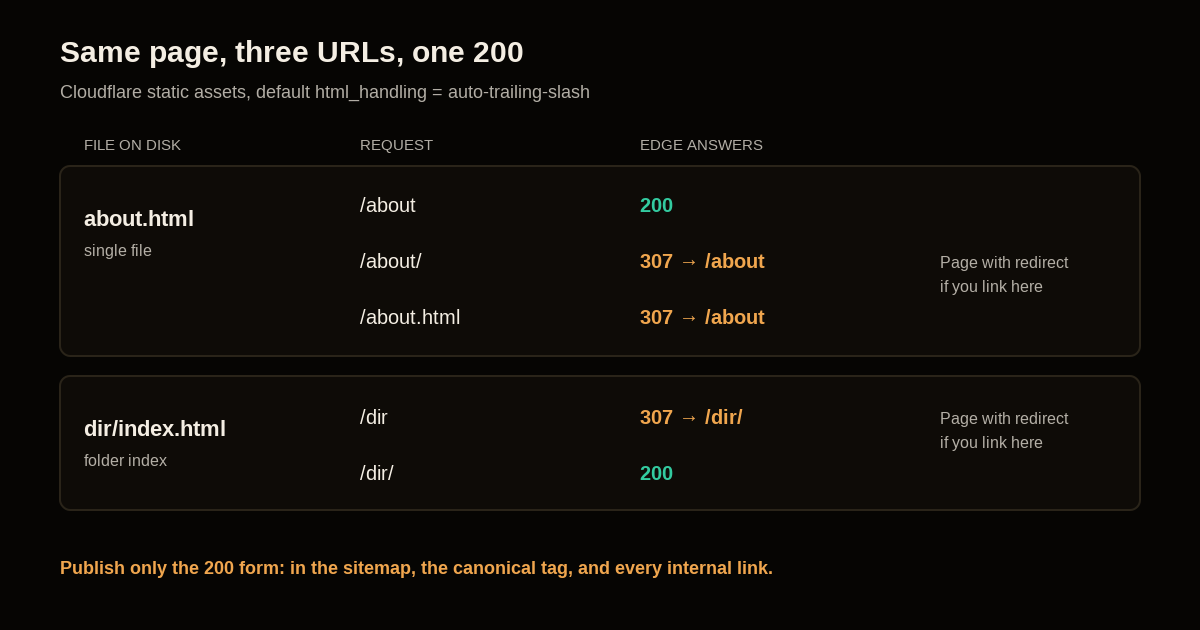
That rule is harmless as long as everything you publish uses the 200 form. It becomes a Page with redirect row the moment a template hardcodes the other form. And a _redirects rule can do the same thing silently, which is what happened here.
What Did the Audit Find on 1,965 URL References?
I built this site (pnpm build, a SvelteKit static export) and ran the script below over the output: 652 HTML files, two sitemaps with 663 URLs, every rel="canonical", and every internal <a href>. That came to 1,965 unique URL references. Exactly one URL did not answer 200 directly, and it failed in all three places at once:
| Reference type | URL | What the edge does | Sources |
|---|---|---|---|
Sitemap <loc> | /projects/edu-rag-saas | 301 → /projects/edu-rag-saas/ | sitemap.xml |
rel="canonical" | /projects/edu-rag-saas | 301 → /projects/edu-rag-saas/ | the page itself |
Internal <a href> | /projects/edu-rag-saas | 301 → /projects/edu-rag-saas/ | 8 pages, including the homepage |
The cause is a two-page collision. The site has a prerendered project brief at /projects/edu-rag-saas (from edu-rag-saas.html) and a separate static pitch deck in the folder /projects/edu-rag-saas/. A line in static/_redirects sends the no-slash path to the deck with a 301. Redirect rules run before asset lookup, so the brief is unreachable: no visitor and no crawler can get its bytes. Its canonical names a URL that 301s, and the deck it lands on declares no canonical at all.
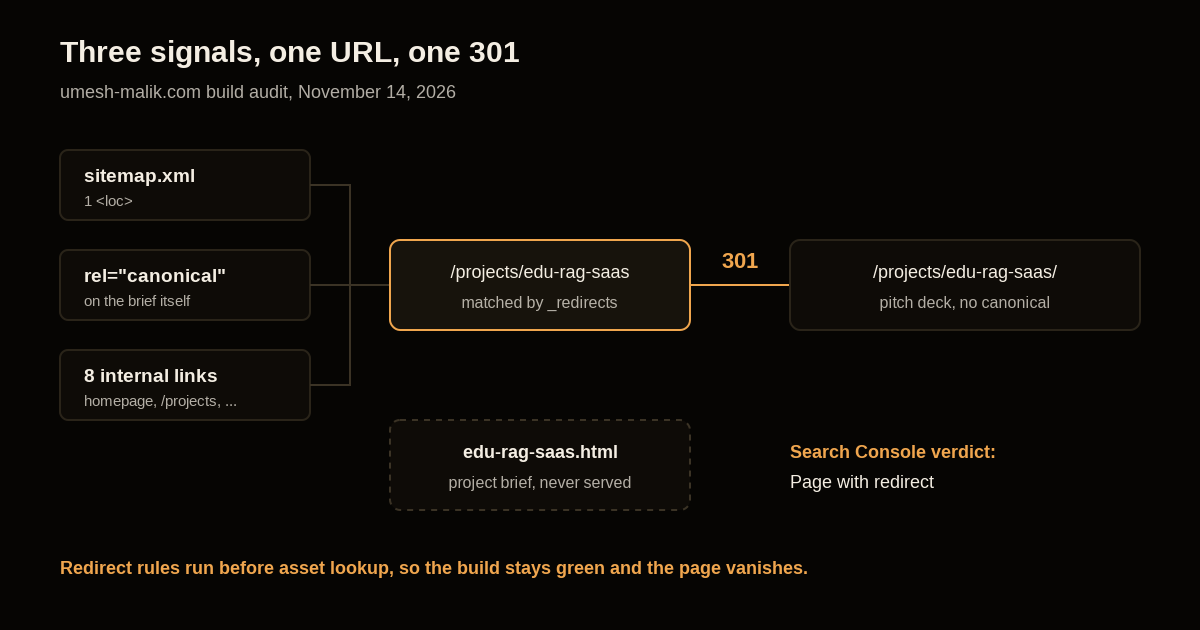
Search Console agreed. The site’s URL Inspection report, committed October 2, 2026, lists /projects/edu-rag-saas as Page with redirect, last crawled September 22. It was the only row with that status out of 575 inspected URLs, the same one the build audit found.
Zero redirect chains, zero .html links and zero trailing-slash mismatches turned up. The audit is not bad news for the site. It’s a demonstration that one hand-written redirect line is enough to make a page disappear from search while the build stays green.
How to Fix Page With Redirect in 5 Steps
Export the Page with redirect rows. In Search Console, open Indexing → Pages, click Page with redirect and export the list. That is the set Google saw. Your audit decides which rows matter.
Audit your own references against the redirect rules. Run the script below over your build output, or crawl production. Any sitemap URL, canonical or internal link that does not answer 200 directly is a reference to fix.
Decide which URL is canonical. For a trailing-slash variant this is mechanical: use whatever form your host serves with a 200. For a collision like mine, it’s an editorial call. Keep one page, and move or remove the other.
Point all three signals at the final URL in one deploy. Change the sitemap source, the canonical tag and the link data together. Fixing only the sitemap leaves the canonical and links still voting for the redirecting URL.
Validate. Re-run the audit (it should print zero), run URL Inspection on the final URL, then click Validate fix on the issue. The old URL can stay in Page with redirect forever. That’s fine once nothing on your site points at it.
Here is the audit. It reads your _redirects file and models Cloudflare’s auto-trailing-slash rules, so it catches both kinds of redirect without a network request:
// redirect-audit.mjs — usage: node redirect-audit.mjs <build-dir> <origin>
// Flags every sitemap <loc>, rel=canonical and internal <a href> that does
// not answer 200 directly, using _redirects + Cloudflare auto-trailing-slash.
import fs from 'node:fs';
import path from 'node:path';

const [dir, origin] = process.argv.slice(2);
const isFile = (p) => fs.existsSync(path.join(dir, p)) && fs.statSync(path.join(dir, p)).isFile();

const rules = fs.readFileSync(path.join(dir, '_redirects'), 'utf8').split('\n')
  .map((l) => l.trim()).filter((l) => l && !l.startsWith('#'))
  .map((l) => { const [from, to, code = '302'] = l.split(/s+/); return { from, to, code: +code }; })
  .filter((r) => r.code >= 300 && r.code < 400);
const toRe = (from) => new RegExp('^' + from.replace(/./g, '\.').replace(/:w+/g, '[^/]+').replace(/*/g, '.*') + '$');

// One hop: returns [status, location] the edge would send for this path.
function hop(p) {
  const rule = rules.find((r) => (/[:*]/.test(r.from) ? toRe(r.from).test(p) : r.from === p));
  if (rule) return [rule.code, rule.to];
  if (p.endsWith('.html')) return [307, p.slice(0, -5).replace(//index$/, '/')];
  if (p.endsWith('/') && p !== '/' && !isFile(p + 'index.html') && isFile(p.slice(0, -1) + '.html')) return [307, p.slice(0, -1)];
  if (!p.endsWith('/') && !isFile(p) && !isFile(p + '.html') && isFile(p + '/index.html')) return [307, p + '/'];
  return [200, null];
}

const htmlFiles = fs.readdirSync(dir, { recursive: true }).filter((f) => f.endsWith('.html'));
const found = new Map(); // kind+url -> { kind, url, from: Set }
const add = (kind, url, from) => {
  if (url.startsWith(origin)) url = url.slice(origin.length) || '/';
  if (!url.startsWith('/') || url.startsWith('//')) return;
  url = url.split(/[?#]/)[0];
  const key = kind + ' ' + url;
  if (!found.has(key)) found.set(key, { kind, url, from: new Set() });
  found.get(key).from.add(from);
};

for (const f of htmlFiles) {
  const html = fs.readFileSync(path.join(dir, f), 'utf8');
  const canon = html.match(/<link rel="canonical" href="([^"]+)"/);
  if (canon) add('canonical', canon[1], f);
  for (const m of html.matchAll(/<a[^>]*?shref="([^"]+)"/g)) add('link', m[1], f);
}
for (const sm of fs.readdirSync(dir).filter((f) => /sitemap.*.xml$/.test(f))) {
  for (const m of fs.readFileSync(path.join(dir, sm), 'utf8').matchAll(/<loc>([^<]+)</loc>/g)) add('sitemap', m[1], sm);
}

let bad = 0;
for (const { kind, url, from } of found.values()) {
  const chain = [];
  for (let cur = url, i = 0; i < 10; i++) {
    const [status, next] = hop(cur);
    if (status === 200) break;
    chain.push(`${status} → ${next}`);
    cur = next.startsWith(origin) ? next.slice(origin.length) : next;
  }
  if (!chain.length) continue;
  bad++;
  console.log(`${kind.padEnd(9)} ${url}  ${chain.join('  ')}  (${from.size} source${from.size > 1 ? 's' : ''})`);
}
console.log(`\n${found.size} unique URL references, ${bad} not answering 200 directly`);
Run against this site’s build, it prints:
link      /projects/edu-rag-saas  301 → /projects/edu-rag-saas/  (8 sources)
canonical /projects/edu-rag-saas  301 → /projects/edu-rag-saas/  (1 source)
sitemap   /projects/edu-rag-saas  301 → /projects/edu-rag-saas/  (1 source)

1965 unique URL references, 3 not answering 200 directly
It runs in 0.5 seconds, so it belongs in CI next to the build, not in a quarterly crawl. If you are not on Cloudflare, swap the three trailing-slash lines in hop() for your host’s rules, or replace hop() with a fetch(url, { redirect: 'manual' }) against production.
Which Page With Redirect Rows Need a Fix?
| Row looks like | Likely cause | Fix |
|---|---|---|
| Old slug or retired section | You moved it on purpose | Nothing. Make sure no internal link still uses it. |
/page/ when the site serves /page | Template or CMS adds a slash | Fix the link generator, not the redirect. |
/page.html | Hardcoded file path in content | Rewrite links to the extensionless URL. |
http:// or www. variant | Absolute URLs built from the wrong base | Build every absolute URL from one site config value. |
| A URL in your sitemap | Sitemap source and redirect map drifted | Remove it or replace it with the target, and fix the canonical too. |
| Two pages sharing one path | A redirect rule shadows a real page | Rename one, then update all three signals. |
The last two rows are the ones that cost you a page. The others cost you crawl requests and a cluttered report.
What Breaks If You Fix It Wrong?
Deleting the redirect instead of the reference. If anything external links to the old URL, it now 404s. Keep the redirect and stop advertising its source.
Fixing the sitemap only. The canonical tag still names the redirecting URL, so the page keeps contradicting the redirect. Google’s guide calls that mixing signals.
Swapping 301 for 302 to “keep the page indexed.” Google’s redirect docs call a temporary redirect only a weak canonical signal, so Google may keep the old URL in the index while it serves the target’s content. That changes which URL gets canonicalized. It doesn’t make a shadowed page reachable.
Pointing the canonical at the redirect target from a page nobody can reach. In a collision like mine, the shadowed page’s tags never get served. Editing them does nothing until the path conflict is gone.
Chasing Page with redirect to zero. It shouldn’t be zero on any site that has ever moved a URL. The target is zero advertised redirecting URLs, which is what the audit measures.
How This Fits the Rest of a Technical SEO Audit
Redirect hygiene sits between status codes and link structure. If the redirect never finishes at all, because of a loop or a chain past 10 hops, the row moves to Redirect error, and a hop-by-hop tracer finds the cause. Dead URLs should return a real 404, covered in the soft 404 fix. Every page you keep needs a click path, covered in the orphan-page audit, and honest freshness hints, covered in the sitemap lastmod fix.
Pages that answer 200 should answer recrawls cheaply, which is serving 304 Not Modified. Pages that pass all of that and still don’t get indexed are Crawled - currently not indexed. Pages you un-hid but Google still reports as hidden are Excluded by noindex tag. And when Google indexes a www or trailing-slash copy instead of the URL you declared, that’s Duplicate, Google chose different canonical than user. If the redirect goes to a login page, the underlying problem is a leaked private URL, the same one behind Blocked due to unauthorized request (401). The AI search hub collects the rest of the series.
FAQ
What does Page with redirect mean in Google Search Console?
It means Google crawled the URL, got a redirect, and treated the URL as a non-canonical address for the redirect target. Google’s Page indexing report says such a URL will not be indexed. The target is evaluated on its own and may or may not be indexed.
Is Page with redirect an error I need to fix?
Usually not. Old URLs you deliberately redirected belong in that bucket, and Google treats it as expected behavior. It needs a fix only when the redirecting URL is one you still advertise, through your sitemap, a canonical tag or your own internal links.
Should a sitemap contain URLs that redirect?
No. Google’s canonicalization guide says to pick a canonical URL for each page and submit that in your sitemap. A sitemap URL that redirects tells Google one URL is canonical while the redirect says another one is, which is the mixed signal Google’s documentation warns against.
Do trailing slash redirects cause Page with redirect?
They can. Hosts such as Cloudflare Workers static assets redirect /page/ to /page for single files and /folder to /folder/ for index files, with a 307. If your sitemap, canonical or links use the other form, every one of those URLs lands in Page with redirect.
How long does it take Page with redirect to clear after a fix?
It clears when Google recrawls the old URL, which can take days to weeks. Use URL Inspection on the final URL to confirm it is indexable, then click Validate fix on the issue. The old URL will keep appearing as Page with redirect, which is correct once nothing on your site points at it.
Sources
- Google Search Console Help, Page indexing report
- Google Search Central, How to specify a canonical URL with rel=“canonical” and other methods
- Google Search Central, Redirects and Google Search
- Cloudflare Docs, HTML handling for Workers static assets
- First-party measurement:
redirect-audit.mjsrun against the umesh-malik.compnpm buildoutput on November 14, 2026 (652 HTML files, 663 sitemap URLs, 1,965 unique URL references); productioncurlchecks the same day; and the site’s Search Console URL Inspection report committed on October 2, 2026 (575 URLs, 1 Page with redirect)
Frequently asked questions
Google Search · Preferred sources
Prefer this site on Google
If you already read this writing, add umesh-malik.com as a Preferred Source. Google can then highlight it with a preferred badge in Top Stories, AI Overviews, and AI Mode — for you, not as a site-wide ranking boost.
Related Articles

Web Engineering
Fix Redirect Error in Search Console: Trace Every Hop Like Googlebot
Fix Redirect error in Search Console by tracing each hop like Googlebot. A loop, an 11th hop, a growing URL or an empty Location: the tracer names which one.

Web Engineering
Fix Duplicate Without User-Selected Canonical: 812 Copies Had None
Fix Duplicate without user-selected canonical with a canonical Google can read. My site had 812 Markdown twins with none; one Cloudflare header rule fixed them.

Web Engineering
How to Fix Google Chose Different Canonical: 3 Hosts Served 200
Fix Google chose different canonical than user: make every duplicate 301 to the URL you declared. On my site 3 hosts served 200 copies of all 39 pages I probed.
Keep reading
Get new posts on AI, Claude Code & LLMs
New deep-dives on AI engineering, Claude Code, and developer tooling — follow along however you prefer.
About the Author

Software engineer writing about AI, Claude Code, LLMs, OpenAI, Anthropic, and developer tooling. 5+ years building production systems at Expedia Group, Tekion, and BYJU'S.