How to Fix Excluded by noindex Tag: 33 Pages Google Never Rechecked
Fix Excluded by noindex tag: remove the tag, then make Google recrawl. 33 of my pages kept the label 99+ days later; 16 had a sitemap saying nothing changed.

TL;DR — To fix Excluded by noindex tag, remove the noindex from both the robots meta tag and the X-Robots-Tag header, bump the sitemap lastmod to the day you removed it, then request a recrawl. The status only changes when Googlebot comes back. On this site, 33 tag pages still showed the label 99 to 112 days after their last crawl, and 16 of the 33 had a sitemap lastmod telling Google nothing had changed since that crawl.
Excluded by noindex tag is the Search Console status for a URL that Google crawled and found a noindex rule on. It is a snapshot of the last crawl, not a live check. That one detail explains almost every “I removed it weeks ago, why is it still excluded?” thread.
What Does Excluded by noindex Tag Mean?
Google’s noindex documentation defines two ways to send the rule: a <meta name="robots" content="noindex"> tag in the HTML, or an X-Robots-Tag: noindex HTTP response header. Either one, seen on a crawl, puts the URL in this bucket. Google also notes the rule only works if the crawler can fetch the page: “If the page is blocked by a robots.txt file or the crawler can’t access the page, the crawler will never see the noindex rule.”
Whether the row needs a fix depends on intent and on what the page serves now:
| Live page today | In your sitemap? | You want it indexed? | What the row means | Action |
|---|---|---|---|---|
Serves noindex | No | No | Working as intended | None |
Serves noindex | Yes | No | Mixed signal | Drop it from the sitemap |
Serves noindex | Yes | Yes | Real bug | Remove the meta tag and the header |
Serves index | Yes | Yes | Stale label | Bump lastmod, request a recrawl |
| Blocked by robots.txt | Any | Yes | Google can’t see the change | Unblock it first |
The fourth row is the one this post is about, because nothing in Search Console tells you you’re in it.
Why Is a Page Still Excluded After You Removed noindex?
Because Search Console reports what Googlebot saw on its last visit, and Googlebot hasn’t visited since. Three things keep it away.
Noindexed pages get crawled less. Google doesn’t publish a schedule, but a page it can’t index is a poor use of crawl budget, and this site’s data (below) shows exactly that pattern. Google’s recrawl guide says crawling “can take anywhere from a few days to a few weeks” even when you ask. Nobody asks for pages they forgot about.
Your sitemap may say nothing changed. Google’s sitemap guide says the lastmod “should reflect the date and time of the last significant update to the page.” Flipping a page from noindex to index is about as significant as an update gets. But most generators derive lastmod from content, such as the newest post on a tag page. A template change to the robots tag doesn’t touch that date.
A header can override the meta tag you fixed. If a CDN rule, _headers file or framework hook still sends X-Robots-Tag: noindex, the HTML looks clean and the page stays excluded. View-source won’t show it. Only the response headers will.
What Did the Audit Find on 33 Excluded URLs?
This site’s Search Console URL Inspection report, committed on October 2, 2026, inspected 575 URLs. 33 were Excluded by noindex tag, and every one was a /blog/tag/* page. The tag template used to noindex thin, single-post tags. That guard was removed. The template now marks every tag page indexable, and the sitemap lists all of them.
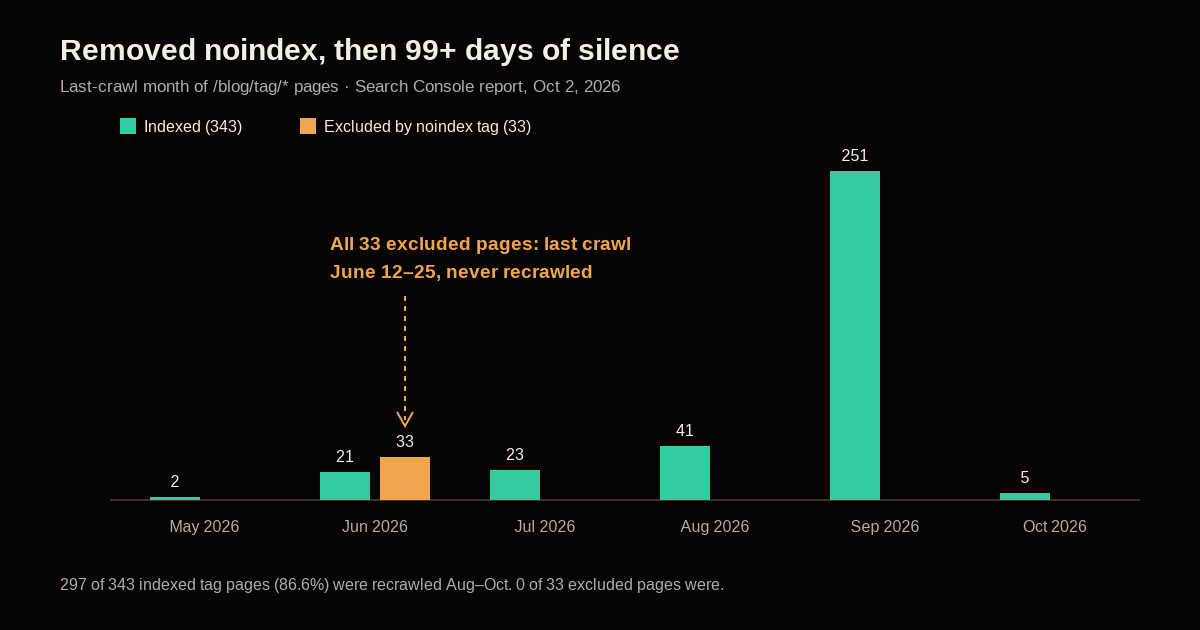
The removal worked for most tag pages. The same report has 343 tag pages indexed, and 297 of those (86.6%) were recrawled between August and October. The 33 excluded ones were last crawled between June 12 and June 25, 2026, and not once after that. By the report date that is 99 to 112 days of silence.
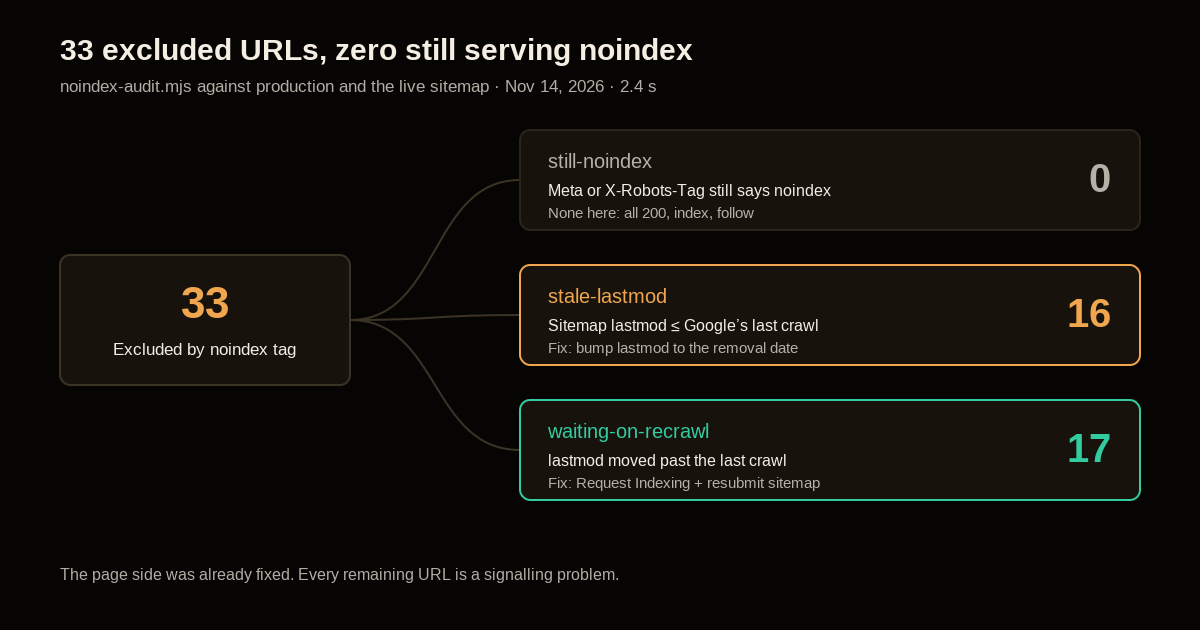
On November 14, 2026, I ran the script below against all 33 URLs on production. It took 2.4 seconds:
| Verdict | Count | What it means |
|---|---|---|
still-noindex | 0 | Every URL returns 200, index, follow meta, no X-Robots-Tag |
stale-lastmod | 16 | Sitemap lastmod is on or before Google’s last crawl |
waiting-on-recrawl | 17 | lastmod moved past the last crawl, Google hasn’t come back |
So the page side is fixed. The problem is entirely on the signalling side. For 16 URLs the sitemap advertises a date like 2026-06-13 for a page Google crawled on 2026-06-13. From Google’s point of view, that page has not changed since the crawl that found the noindex. Its lastmod comes from the newest post carrying the tag, and none of those posts changed.
The audit turned up one more defect. The sitemap lists 14 tag URLs twice, each copy with a different lastmod. /blog/tag/ci-cd appears with both 2026-10-11 and 2026-08-06. Two tag spellings that differ only in case or punctuation slugify to the same URL, and the sitemap loop iterates over spellings instead of URLs. Dedupe on the slug and keep the newest date.
How to Fix Excluded by noindex Tag in 6 Steps
Export the rows. In Search Console, open Indexing → Pages, click Excluded by ‘noindex’ tag, and export the table. The Last crawled column is the number you’ll compare against.
Decide which rows should be indexed. Login pages, thank-you pages and internal search results belong in this bucket. Remove those from your sitemap and stop. Only carry forward the URLs you actually want in search.
Remove
noindexfrom both places. Delete it from the robots (andgooglebot) meta tag in the template, and check every layer that can add a header:_headers, CDN transform rules, server middleware, framework config. Runcurl -sI <url> | grep -i x-robotson the live URL to verify.Make sure Google can fetch the page. It must return 200 and not be disallowed in
robots.txt, or Google never sees that the rule is gone.Bump
lastmodto the date thenoindexcame off. Treat a robots change like a content edit. The simplest rule:lastmod = max(content date, robots-change date). Dedupe the sitemap while you’re there.Request a recrawl, then validate. Use URL Inspection → Request Indexing on the few URLs that matter most, since Google’s recrawl guide says there’s a quota for individual URLs. Resubmit the sitemap for the rest, then click Validate fix. Google says validation “typically takes up to about two weeks.”
Here is the audit. It reads a Search Console export and the live sitemap, then classifies each URL:
// noindex-audit.mjs — usage: node noindex-audit.mjs <gsc-export.csv> <sitemap-url>
// For each "Excluded by 'noindex' tag" row: is noindex still served (meta or
// header), and does the sitemap's lastmod tell Google anything changed?
import fs from 'node:fs';

const [csv, sitemapUrl] = process.argv.slice(2);
const rows = fs.readFileSync(csv, 'utf8').trim().split('\n').slice(1)
  .map((l) => l.split(',')).map(([url, crawled]) => ({ url, crawled }));

const sitemap = await (await fetch(sitemapUrl)).text();
const lastmod = new Map();
for (const [, loc, mod] of sitemap.matchAll(/<loc>([^<]+)</loc>s*<lastmod>([^<]+)</lastmod>/g)) {
  if (!lastmod.has(loc) || mod > lastmod.get(loc)) lastmod.set(loc, mod);
}

const verdicts = { 'still-noindex': 0, 'stale-lastmod': 0, 'waiting-on-recrawl': 0 };
for (const { url, crawled } of rows) {
  const res = await fetch(url, { redirect: 'manual' });
  const html = res.status === 200 ? await res.text() : '';
  const meta = /<meta[^>]+name="(?:robots|googlebot)"[^>]+content="[^"]*noindex/i.test(html);
  const header = /noindex/i.test(res.headers.get('x-robots-tag') ?? '');
  const mod = lastmod.get(url);
  const verdict = res.status !== 200 || meta || header ? 'still-noindex'
    : !mod || mod <= crawled ? 'stale-lastmod' : 'waiting-on-recrawl';
  verdicts[verdict]++;
  console.log(`${verdict.padEnd(19)} ${res.status} lastmod=${mod ?? '—'} crawled=${crawled} ${url}`);
}
console.log(verdicts);
The CSV needs two columns, URL and Last crawled (ISO dates), which is what the Search Console export gives you once you trim the extra columns. A non-200 counts as still-noindex on purpose: a redirect or a 404 needs a different fix, covered in How to Fix Page With Redirect and How to Fix Soft 404 Errors.
When Should You Leave a noindex Page Alone?
When it’s doing its job. Tag archives with one post, filtered listings, paginated duplicates and account pages are all reasonable noindex candidates. In those cases Excluded by noindex tag is the correct, permanent answer. The only real fix is to take those URLs out of the sitemap so you aren’t asking Google to index a page you’re also telling it not to index.
The reverse mistake is the costly one. Removing noindex from 33 pages and then not telling Google is how a page set can sit out of the index for a whole quarter. If those pages are thin, Google may index them and then drop them again into Crawled – currently not indexed. Fix the content before you flip the switch.
What Breaks if You Only Fix the Meta Tag?
Three things, all of them invisible in your HTML:
- A stale
X-Robots-Tagheader keeps the page excluded no matter what the markup says. Check headers, not source. - A
lastmodthat predates the change means a good-faith sitemap tells Google the page is the same one it already rejected. The sitemap lastmod audit on this site found 114 of 176 post dates wrong for exactly this kind of reason: the date came from the wrong field. - No internal links to the page means the sitemap is the only way Google finds it again. A page reachable only through the sitemap is the orphan page problem in another form.
Fix all three in the same deploy and the label clears at Google’s next crawl. Fix only the tag and you’re waiting on Googlebot to come back on its own schedule. For these 33 pages, it hadn’t in over three months. Once Google does come back, serving 304 Not Modified keeps later recrawls cheap. If Google then indexes a different URL than the one your tag names, see how to fix Google chose different canonical. If a page is also disallowed in robots.txt, Google can’t read the noindex at all; how to fix Indexed, though blocked by robots.txt covers that case. If you also filed a Search Console removal for the page, the noindex is what keeps it out once that removal expires; see how to fix Blocked by page removal tool. The AI search hub collects the rest of this technical SEO series.
FAQ
What does Excluded by noindex tag mean in Google Search Console?
It means the last time Googlebot crawled the URL, the page carried a noindex rule in a robots meta tag or an X-Robots-Tag HTTP header, so Google left it out of the index. The status describes that last crawl, not the page as it is today. If the noindex was intentional, nothing needs fixing.
Why does Search Console still say Excluded by noindex tag after I removed it?
Because Google has not crawled the page since you removed it. The label only changes on a recrawl. Pages Google last saw as noindex tend to get crawled less often, and a sitemap lastmod that did not change gives Google no reason to come back sooner.
Should a noindex page be in my sitemap?
No. A sitemap is a list of URLs you want indexed, so a noindex URL in it sends two opposite signals. Either remove the noindex or drop the URL from the sitemap. Pick one in the same deploy.
Does changing the sitemap lastmod make Google recrawl a page?
It can help but it is a hint, not a command. Google’s sitemap documentation says it uses lastmod only when the value is consistently and verifiably accurate. Removing noindex is a significant change, so the lastmod should move to the deploy date of that change.
How long does Excluded by noindex tag take to clear?
It clears per URL when Googlebot recrawls the page and sees no noindex. Google says crawling can take a few days to a few weeks, and Validate fix typically takes up to about two weeks. On this site, 33 pages had gone more than 99 days without a recrawl.
Sources
- Google Search Central, Block Search indexing with noindex
- Google Search Central, Ask Google to recrawl your URLs
- Google Search Central, Build and submit a sitemap
- Google Search Console Help, Page indexing report
- First-party measurement: the umesh-malik.com Search Console URL Inspection report committed on October 2, 2026 (575 URLs; 33 Excluded by noindex tag; 343 tag pages indexed), and
noindex-audit.mjspluscurlchecks against production and the livesitemap.xmlon November 14, 2026 (33 URLs in 2.4 s; 14 duplicated tag URLs in the sitemap)
Frequently asked questions
Google Search · Preferred sources
Prefer this site on Google
If you already read this writing, add umesh-malik.com as a Preferred Source. Google can then highlight it with a preferred badge in Top Stories, AI Overviews, and AI Mode — for you, not as a site-wide ranking boost.
Related Articles

Web Engineering
Fix Discovered Currently Not Indexed: Why 0 of 575 URLs Got Stuck
Fix Discovered currently not indexed by raising crawl demand, not just server speed. My audit: 0 of 575 URLs stuck, but 66.6% of my sitemap was thin tag pages.

Web Engineering
Fix Offers, Review, or aggregateRating Error: 5 Hidden Causes
The offers, review, or aggregateRating error means a Product node has none of the three. 9 test variants passed the schema.org validator; 5 still failed.

Web Engineering
Fix Unparsable Structured Data: 16 Ways It Breaks, 1 Fix
Unparsable structured data means Google hit a JSON syntax error and dropped the block. I broke JSON-LD 16 ways; one serializer change fixed every one.
Keep reading
Get new posts on AI, Claude Code & LLMs
New deep-dives on AI engineering, Claude Code, and developer tooling — follow along however you prefer.
About the Author

Software engineer writing about AI, Claude Code, LLMs, OpenAI, Anthropic, and developer tooling. 5+ years building production systems at Expedia Group, Tekion, and BYJU'S.