How to Fix Soft 404 Errors: 1 Setting Sent 7 Dead URLs a 200
How to fix soft 404 errors: make dead URLs return a real 404. One hosting setting turned 7 of 7 dead URLs into 200 OK copies of the homepage. The test inside.

TL;DR — How to fix soft 404 errors: make every URL that has nothing on it return a real 404 or 410 status, and redirect only to a page that does the same job. On this site, one hosting setting decided it: with Cloudflare’s single-page-application fallback, all 7 dead URLs I probed answered 200 OK with a byte-identical copy of the homepage, while 404-page answered all 7 with a real 404 and a noindex recovery page.
A soft 404 is a URL that tells a person “not found” but tells Googlebot 200 OK. The fix is almost never on the page itself. It is in whatever decides the status code: the host’s fallback rule, a redirect map, or client-side routing.
The live site’s own Search Console URL Inspection report, committed on October 2, 2026, has 0 soft 404s across 554 inspected URLs. That is not luck. It is one line in wrangler.toml, and the experiment below shows what happens when that line changes.
What Is a Soft 404 Error?
Google’s Page indexing report help defines it as a page that “returns a user-friendly ‘not found’ message but not a 404 HTTP response code.” Google’s HTTP status code reference adds the other half: a 2xx page whose content looks like an error, an empty page, or an error message also lands in the Soft 404 bucket.
So there are two kinds, and they need different fixes:
| Kind | What the server says | What the page shows | Typical cause |
|---|---|---|---|
| Dead URL served as 200 | 200 OK | “Not found”, or a fallback page | Host or framework catch-all fallback |
| Live URL that looks empty | 200 OK | Zero results, out of stock, empty listing | Template renders with no data |
| Real 404 | 404 Not Found | Recovery page | Correct, nothing to fix |
| Gone | 410 Gone | Recovery page | Correct for deliberate removals |
Google is blunt about the correct state: it “doesn’t index URLs that return a 4xx status code” and “doesn’t use the content” of those URLs. A real 404 is not a penalty. It is the cheapest possible answer for a URL with nothing on it.
Why Do Static Sites and SPAs Produce Soft 404s?
Because a single-page app has to answer unknown paths with something, and the easy answer is the app shell with 200 OK. The router then decides in the browser what to show. Googlebot sees the status code before any JavaScript runs.
Cloudflare’s single-page application routing docs describe exactly that behavior: when a request matches no file, not_found_handling = "single-page-application" will “serve the contents of the /index.html file with a 200 OK status.” The static site generation mode, not_found_handling = "404-page", instead serves “the nearest 404.html file with a 404 Not Found status.”
Netlify, Vercel, Firebase Hosting and nginx try_files setups all have an equivalent rewrite-everything-to-index option. It is the default advice in most SPA deployment guides, and it is the single most common way a whole site starts producing soft 404s at once.
What Did 7 Dead URLs Return Under 3 Hosting Modes?
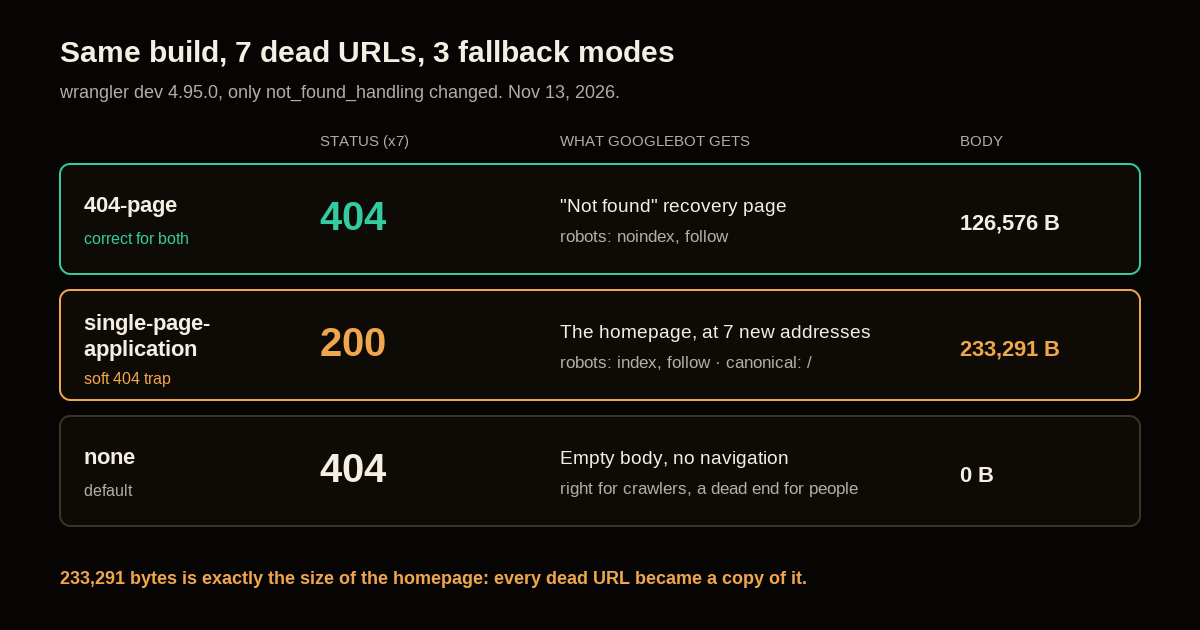
I built this site (pnpm build, a SvelteKit static export with a prerendered 404.html) and served the same build/ directory three times with wrangler dev, changing only not_found_handling. Then I requested 7 URLs that do not exist — a missing post, a missing tag, a missing topic, a root-level typo, a wrong-case slug, a deleted project path and a /wp-login.php scanner probe — and recorded the status, title, robots meta and response size.
| Mode | Status for 7 dead URLs | <title> served | robots meta | Body size |
|---|---|---|---|---|
404-page | 7 × 404 | Not found — Umesh Malik | noindex, follow | 126,576 bytes |
single-page-application | 7 × 200 | The homepage title | index, follow | 233,291 bytes |
none (default) | 7 × 404 | (empty body) | (none) | 0 bytes |
The single-page-application row is the trap. Every dead URL returned exactly 233,291 bytes, the same size as the homepage, with the homepage’s title, its index, follow robots tag and its canonical pointing at /. To Googlebot that is seven copies of the homepage at seven addresses. Google decides whether to file them as soft 404s or as duplicates of /; either way they are crawled, and none of them can be indexed as anything useful.
The default none mode gets the status right but gives a human a blank page. 404-page is the only mode that is correct for both: a real 404 for crawlers, and a page with navigation for people.
The live site matches the 404-page row. A curl against production for a missing post, a missing tag and a missing topic each returned 404 with the 126,577-byte recovery page, and the unknown API path /api/nope returned 404 as application/problem+json.
How to Fix Soft 404 Errors in 6 Steps
Export the list. In Search Console, open Page indexing, click Soft 404, and export the URLs. Note the pattern: one directory, one template, or the whole site.
Probe a URL that cannot exist. Request a random path such as
/zz-soft-404-test-81. If it returns200, your host or framework fallback is the cause and every other step is secondary.Check what each listed URL really returns. Status code, title and robots meta tell you which bucket it is in:
while read -r url; do
  code=$(curl -s -o /tmp/p.html -w '%{http_code}' "$url")
  title=$(grep -o '<title>[^<]*' /tmp/p.html | head -1 | cut -c8-70)
  robots=$(grep -o 'name="robots" content="[^"]*' /tmp/p.html | head -1 | cut -d'"' -f4)
  printf '%s\t%s\t%s\t%s\n' "$code" "$url" "$title" "$robots"
done < soft-404-urls.txt
Fix the fallback first. On Cloudflare Workers static assets, set
not_found_handling = "404-page"and ship a root404.html. On other hosts, remove the catch-all rewrite or scope it to the app’s real route prefixes.Fix the remaining URLs one by one using the table in the next section: 404, 410, a relevant 301, or real content.
Validate. Run URL Inspection’s live test on two or three fixed URLs, confirm the status in the response, then click Validate fix on the Soft 404 issue.
Which Fix Does Each Soft 404 Need?
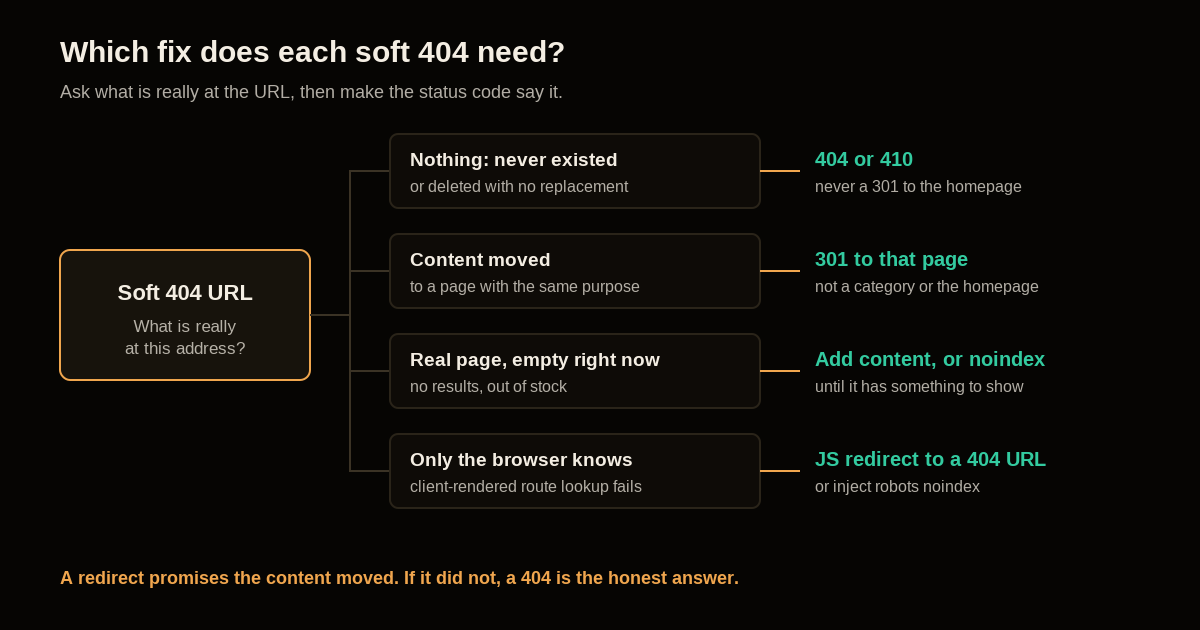
Once the fallback returns real 404s, what is left is a decision per URL. The rule is simple: the status code has to tell the truth about what is on the page.
| What is at the URL | Correct response | Wrong response |
|---|---|---|
| Nothing, never existed | 404 | 200 app shell |
| Deleted on purpose, no replacement | 410 (or 404) | 301 to homepage |
| Moved to a page with the same purpose | 301 to that page | 301 to a category or homepage |
| Real page, empty right now (no results, out of stock) | Real content, or 404 / noindex until it has some | 200 with an empty template |
| Client-rendered route the server cannot validate | JS redirect to a 404 URL, or injected noindex | 200 with a “not found” component |
The redirect row catches more sites than the fallback does. Google’s site move guide warns that redirecting many old URLs to one irrelevant destination, such as the home page, “might be treated as a soft 404 error.” A redirect is a promise that the content moved. If it did not, a 404 is the honest answer.
For client-side routes, Google’s JavaScript SEO basics gives two options when the server cannot know a route is dead: redirect with JavaScript to a URL that returns a real 404, or add <meta name="robots" content="noindex"> from JavaScript when the data lookup fails. Both work; the server-side 404 is still better, because it costs Googlebot no rendering.
What Breaks If You Fix It Wrong?
Three mistakes turn up after a soft 404 cleanup:
- Blanket 301s to the homepage. They swap one soft 404 for another and add a redirect hop. Keep redirects for URLs whose content really moved.
- A 404 page that is also
index, follow. Fine while the status is 404, but the moment a fallback rule serves that template with200, every dead URL becomes an indexable copy of it. Putnoindexon the error template anyway; it costs nothing. 401or403instead of404. Google’s status code guide says not to use401and403to limit crawling. Use them only for real access control.
A deleted page will keep showing up in the Not found (404) report for a while. Google’s help says Googlebot “will probably continue to try this URL for some period of time” and crawls it “less and less often.” That is expected, not a regression. To sort which of those rows need work at all, see how to fix Not found (404) in Search Console.
How This Fits the Rest of a Technical SEO Audit
Status codes sit near the start of the crawl pipeline, so check them before the later stages. Googlebot has to be allowed through first, which is the bot-blocking audit. Live pages should answer recrawls cheaply, which is serving 304 Not Modified. Real pages need internal links, covered in the orphan-page audit, and honest freshness hints, covered in the sitemap lastmod fix. Pages that return 200 correctly and still do not get indexed are a different problem: Crawled - currently not indexed. URLs that answer with a 301 while your sitemap or canonical still names them are the Page with redirect fix. The opposite mistake, a real error status Googlebot keeps hitting, is covered in how to fix Server error (5xx) in Search Console. A 200 that Google indexes but can’t read, because of a bot challenge or an empty JavaScript shell, is Page indexed without content. If an out-of-stock product page stays live, keep its Offer in the markup, or its Product schema breaks with the offers, review, or aggregateRating error. The AI search hub collects the rest of the series.
FAQ
What is a soft 404 error in Google Search Console?
A soft 404 is a URL that shows a not-found or empty page but returns an HTTP 200 OK status. Google’s Page indexing report defines it as a user-friendly not found message without a 404 response code. Google does not index the URL, and the report lists it under Soft 404.
Are soft 404 errors bad for SEO?
They waste crawling and hide real problems. A soft 404 tells Googlebot the page is valid, so it keeps fetching it, and it can mask a misconfigured host that answers every unknown path with the same 200 page. A real 404 is cheaper for everyone: Google says it does not use content from 4xx URLs and crawls them less over time.
Should I redirect 404 pages to the homepage?
No. Google’s site move guide says redirecting many old URLs to one irrelevant destination, such as the homepage, might be treated as a soft 404. Redirect a dead URL only to a page that serves the same purpose, and let everything else return 404 or 410.
How do I fix soft 404s in a single-page app?
Make the server return a real 404 for unknown paths, which on Cloudflare Workers static assets means not_found_handling set to 404-page instead of single-page-application. When an unknown route can only be detected in the browser, Google recommends either a JavaScript redirect to a URL that returns 404, or injecting a robots noindex meta tag.
Should I use 404 or 410 for deleted pages?
Either works for Google, which treats every 4xx status as a page it will not index. Use 410 Gone when you deliberately removed the page and will not bring it back, and 404 for everything else. The important part is that the status is 4xx and not 200.
Sources
- Google Search Console Help, Page indexing report
- Google Search Central, How HTTP status codes, and network and DNS errors affect Google Search
- Google Search Central, Understand the JavaScript SEO basics
- Google Search Central, Site moves with URL changes
- Cloudflare Docs, Single Page Application (SPA) routing and Static Site Generation (SSG) and custom 404 pages
- First-party measurement: this site’s
build/directory served withwrangler dev4.95.0 under eachnot_found_handlingmode on November 13, 2026, probing 7 dead URLs for status, title, robots meta and body size; plus productioncurlchecks the same day and the umesh-malik.com Search Console URL Inspection report committed on October 2, 2026 (575 URLs, 554 with a verdict, 0 Soft 404)
Frequently asked questions
Google Search · Preferred sources
Prefer this site on Google
If you already read this writing, add umesh-malik.com as a Preferred Source. Google can then highlight it with a preferred badge in Top Stories, AI Overviews, and AI Mode — for you, not as a site-wide ranking boost.
Related Articles

Web Engineering
Fix Page Indexed Without Content: Check Googlebot's First 2MB
Page indexed without content means Google indexed the URL but read no text. Find the layer that ate it: a bot challenge, MIME type, JS render or the 2MB cutoff.

Web Engineering
Fix Duplicate Without User-Selected Canonical: 812 Copies Had None
Fix Duplicate without user-selected canonical with a canonical Google can read. My site had 812 Markdown twins with none; one Cloudflare header rule fixed them.

Web Engineering
Fix Redirect Error in Search Console: Trace Every Hop Like Googlebot
Fix Redirect error in Search Console by tracing each hop like Googlebot. A loop, an 11th hop, a growing URL or an empty Location: the tracer names which one.
Keep reading
Get new posts on AI, Claude Code & LLMs
New deep-dives on AI engineering, Claude Code, and developer tooling — follow along however you prefer.
About the Author

Software engineer writing about AI, Claude Code, LLMs, OpenAI, Anthropic, and developer tooling. 5+ years building production systems at Expedia Group, Tekion, and BYJU'S.